
Automatically closing issue from pull request in GitHub
Answer a question
How do I close an issue using a pull request on GitHub? I know about closing multiple issues with a commit message, but it's a different case.
I would like to close the issues not from a commit, but from the description of the pull request. More like
Pull request:
Name: bla bla
Description ... , _fixes_ #123
And when merging the pull request, the #123 to automatically close. Is this possible?
Answers
As you mention in the comments, the merge from the pull request will result in a commit.
It is on that commit message you can add a "close #xx" in order to trigger the closing of an issue.
However, as mentioned in "Closing multiple issues in Github with a commit message", in GitHub blog post "Closing Issues via Commit Messages" (January 2013), and in the current GitHub docs.
Now when you enter "
Fixes #33" in a commit message, issue 33 will only be closed once the commit is merged into your default branch (usuallymaster).This is super useful because it means the issue's open / closed status will map to your default branch.
If the bug isn't fixed in your default branch, the issue will remain open.
Once the commit with the fix is merged into your default branch the issue will be automatically closed.When you do make a commit in a non-default branch with the "
Fixes #33" syntax, the issue will be referenced with a tooltip:
You can use any of these keywords to close an issue via commit message:
close, closes, closed, fix, fixes, fixed, resolve, resolves, resolved

As mentioned below by cosmolev (upvoted), the blog post from May 14th 2013 "Closing Issues via Pull Requests" adds pull requests as a way to close an issue:
some issues take more work than a single commit to close.
That's why you can now close an issue from a Pull Request.
All you have to do is include the special keyword syntax (eg. "fixes #5") in the body of your Pull Request.
the referenced issue will automatically be closed when the PR is merged into the default branch.
It even works across repositories.
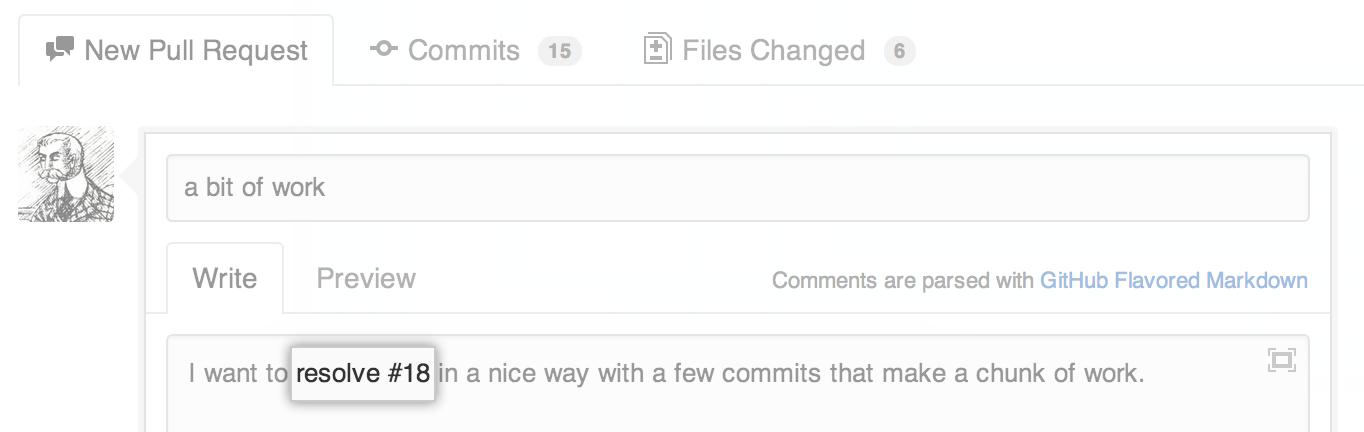
As John Eikenberry points out in the comments, the help page "Closing issues using keywords" does mention:
To close multiple issues, preface each issue reference with one of the above keywords.
You must use the keyword before each issue you reference for the keyword to work.
For example, This closes #34, closes #23, and closes example_user/example_repo#42 would close issues #34 and #23 in the same repository, and issue #42 in the "example_user/example_repo" repository.

ModelScope旨在打造下一代开源的模型即服务共享平台,为泛AI开发者提供灵活、易用、低成本的一站式模型服务产品,让模型应用更简单!
更多推荐
 0
0 0
0- 0


 已为社区贡献27134条内容

所有评论(0)