
Git Error : 'upstream' does not appear to be a git repository
Answer a question
I'm very new to Git, so facing some issues with it correct usage. Here is my scenario.
I have a fork of my master repository and cloned it into my local. In that, I have 2 branches for different fixes.
When I commit, I saw a statement in the git-we saying that I'm 3 commits ahead and around 20 commits behind.
I understand that my fork is not in sync with master. Also I need to merge the two branches too (or should i do it?)
I used the windows client to syncing. But seems I'm not following the Git way. So, I tried to follow the steps described in https://help.github.com/articles/syncing-a-fork/ which is giving me an error as follows (I'm using windows).
 $>git fetch upstream
 fatal: 'upstream' does not appear to be a git repository
 fatal: Could not read from remote repository.

 Please make sure you have the correct access rights
 and the repository exists.
I'm a bit confused. Please help me with steps I should follow in this scenario.
@HuStmpHrrr
Sorry for adding the details in comments I'll modify the question for readability
By executing the command:
  $>git remote  returning two values
  acme-development (which the name of my actual/main repository, from where I forked) and
  origin
Adding some more info.
After making a fetch, I tried a origin/master merge on to my master Please see the screenshot 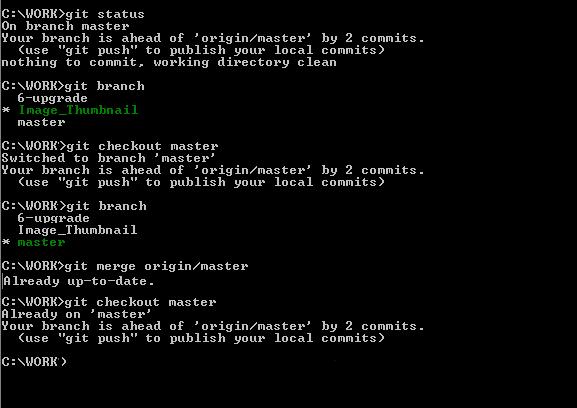
But, if I login to my Github online account, it is saying a different story.

My git client says that the local repo is up to date. But the online git says that we are 42 commits behind and 7 commits ahead.
Answers
The article you link to (though it may have changed since you asked) starts with a reference to https://help.github.com/articles/configuring-a-remote-for-a-fork/. If you complete this you will have a new remote repository named upstream pointing to the original repository which you forked, and git fetch upstream will work.

ModelScope旨在打造下一代开源的模型即服务共享平台,为泛AI开发者提供灵活、易用、低成本的一站式模型服务产品,让模型应用更简单!
更多推荐
 0
0 0
0- 0


 已为社区贡献27134条内容

所有评论(0)