
GitHub can't rebase my feature branch: "This branch cannot be rebased due to conflicts"
Answer a question
Even when my feature branch was branched out from the latest version of master, when I attempt to rebase my PR (from feature X to master), I end up seeing:
This branch cannot be rebased due to conflicts Rebasing the commits of this branch on top of the base branch cannot be performed automatically due to conflicts encountered while reapplying the individual commits from the head branch.
I understand that this can be resolved by:
git checkout master
git rebase feature/x
(resolve conflicts)
However, direct pushing to master is locked and I need to go through a PR. What are the steps to successfully be able to rebase a feature/x branch to master through a pull request?
Answers
First let's look at what is causing this problem, from the question:
This branch cannot be rebased due to conflicts Rebasing the commits of this branch on top of the base branch cannot be performed automatically due to conflicts encountered while reapplying the individual commits from the head branch.
This occurs when it's not possible to rebase each individual commit onto master cleanly.
If, for example, a PR had merge conflicts and they were solved by merging master and fixing the conflicts in a new commit that will have no effect on this warning as it will not allow GitHub to rebase the PR cleanly.
Note that all solutions involve rewriting history for the PR branch and merging via GitHub's UI.
Fix using git rebase
If you wish to keep all individual commits:
$ cd /my/repo
$ git checkout my-feature-branch
$ git fetch
$ git rebase origin/master             # 1
$ git push -f origin/my-feature-branch # 2
This will:
- Rebase (Reapply) each commit in the PR on top of master
- Update the PR branch on GitHub
If a PR has a none-trivial number of commits this can be a painful process to go through - there will definitely be at least one merge-conflict to resolve (otherwise, GitHub wouldn't have the warning on the PR (: ) - if you start this process and decide it's the wrong move git rebase --abort to get back to a clean working copy.
Fix using git rebase -i
If you wish to keep all/most individual commits with tweaks:
$ cd /my/repo
$ git checkout my-feature-branch
$ git fetch
$ git rebase origin/master -i          # 1
$ git push -f origin/my-feature-branch # 2
This will:
- Rebase each commit in the PR on top of master interactively
- Update the PR branch on GitHub
This can be handy if for example you recognise that by squashing a few commits together, or reordering commits, or etc. a clean history can be obtained.
Again, if you start this process and decide it's the wrong move (or want to try again) git rebase --abort to get back to a clean working copy.
Fix using git reset
If you don't care for keeping the individual PR commits, there is a simpler/easier option:
$ cd /my/repo
$ git checkout my-feature-branch
$ git fetch
$ git merge origin/master              # 1
$ git reset --soft origin/master       # 2
$ git commit -va                       # 3
$ git push -f origin/my-feature-branch # 4
This will:
- Make sure that the branch is up to date with origin/master
- Reset the local branch to match origin/master (but leaving the working copy unmodified)
- Create a new single commit for the PR (this is a new commit, remember to write a detailed commit message!)
- Update the PR branch on GitHub
This process will not require you to resolve intermediary conflicts.
Avoiding in the future
Github allows multiple merge strategies for PRs:
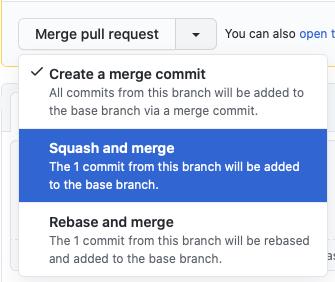
The problem in the question is specific only to rebase and merge, so to avoid: Just don't use/force rebase and merge strategy.

ModelScope旨在打造下一代开源的模型即服务共享平台,为泛AI开发者提供灵活、易用、低成本的一站式模型服务产品,让模型应用更简单!
更多推荐
 0
0 0
0- 0


 已为社区贡献27134条内容

所有评论(0)