
#FOSS Fintech in Python:如何在 OpenBB 终端中使用历史命令!
如果它是历史的,那就是歇斯底里!使用这个从过去开始的命令让你的 lolz 继续前进。
历史:该命令用于两个或多个公司之间的价格历史比较分析。
2022 Apr 09, 14:14 (🦋) / $ /stocks/ca/historical -h

2022 Apr 09, 14:14 (🦋) /stocks/ $ ca
2022 Apr 09, 14:14 (🦋) /stocks/ca/ $ historical -h
usage: historical [-t {o,h,l,c,a}] [-n] [-s START] [-h] [--export EXPORT]

Historical price comparison between similar companies.

optional arguments:
  -t {o,h,l,c,a}, --type {o,h,l,c,a}
                        Candle data to use: o-open, h-high, l-low, c-close, a-adjusted close. (default: a)
  -n, --normalize       Flag to normalize all prices on same 0-1 scale (default: False)
  -s START, --start START
                        The starting date (format YYYY-MM-DD) of the stock (default: 2021-04-08)
  -h, --help            show this help message (default: False)
  --export EXPORT       Export raw data into csv, json, xlsx and figure into png, jpg, pdf, svg (default: )
进入全屏模式 退出全屏模式
该筛选器非常适合发现,并包含一个到比较分析菜单的路径,在该菜单中可以找到此命令。第一步,从股票筛选器开始,用一些代码填充终端。
/stocks/scr/set unusual_volume/
进入全屏模式 退出全屏模式
[ ](https://res.cloudinary.com/practicaldev/image/fetch/ s--XOXMoUw6--/c_limit%2Cf_auto%2Cfl_progressive%2Cq_auto%2Cw_880/https://dev-to-uploads.s3.amazonaws.com/uploads/articles/5bomt4q1s8iq5klc64q1.png)
使用诸如异常_volume 之类的预设,将过滤器应用于逻辑类别时可获得最佳结果。我们将在这里使用“技术”来排名前五个交易量异常的代码,按当前/最后一个交易日的交易量排序。
technical -l 5 -s Volume
进入全屏模式 退出全屏模式
打印一个表格:
2022 Apr 09, 13:41 (🦋) /stocks/scr/ $ technical -l 5 -s Volume
                                                       Finviz Screener
┏━━━━━━━━┳━━━━━━━┳━━━━━━┳━━━━━━━┳━━━━━━━┳━━━━━━━━┳━━━━━━━━━━┳━━━━━━━━━┳━━━━━━━┳━━━━━━━┳━━━━━━━━┳━━━━━━━━━━━┳━━━━━━━┳━━━━━━━━━┓
┃ Ticker ┃ Beta  ┃ ATR  ┃ SMA20 ┃ SMA50 ┃ SMA200 ┃ 52W High ┃ 52W Low ┃ RSI   ┃ Price ┃ Change ┃ from Open ┃ Gap   ┃ Volume  ┃
┡━━━━━━━━╇━━━━━━━╇━━━━━━╇━━━━━━━╇━━━━━━━╇━━━━━━━━╇━━━━━━━━━━╇━━━━━━━━━╇━━━━━━━╇━━━━━━━╇━━━━━━━━╇━━━━━━━━━━━╇━━━━━━━╇━━━━━━━━━┩
│ MDVL   │ 0.94  │ 0.21 │ 0.97  │ 0.75  │ -0.41  │ -0.87    │ 1.49    │ 77.77 │ 1.96  │ 0.39   │ 0.05      │ 0.32  │ 193.7 M │
├────────┼───────┼──────┼───────┼───────┼────────┼──────────┼─────────┼───────┼───────┼────────┼───────────┼───────┼─────────┤
│ PHIO   │ 1.84  │ 0.18 │ 1.67  │ 1.72  │ 0.63   │ -0.18    │ 2.36    │ 90.36 │ 2.35  │ 1.59   │ 1.67      │ -0.03 │ 110.9 M │
├────────┼───────┼──────┼───────┼───────┼────────┼──────────┼─────────┼───────┼───────┼────────┼───────────┼───────┼─────────┤
│ SBFM   │ -2.34 │ 1.32 │ 0.75  │ 0.32  │ -0.62  │ -0.90    │ 2.99    │ 57.73 │ 6.03  │ -0.38  │ -0.20     │ -0.22 │ 90.1 M  │
├────────┼───────┼──────┼───────┼───────┼────────┼──────────┼─────────┼───────┼───────┼────────┼───────────┼───────┼─────────┤
│ ATER   │       │ 0.48 │ 0.75  │ 0.60  │ -0.26  │ -0.85    │ 1.22    │ 73.35 │ 4.67  │ 0.21   │ 0.02      │ 0.18  │ 85.8 M  │
├────────┼───────┼──────┼───────┼───────┼────────┼──────────┼─────────┼───────┼───────┼────────┼───────────┼───────┼─────────┤
│ TWTR   │ 0.80  │ 2.69 │ 0.16  │ 0.25  │ -0.11  │ -0.37    │ 0.48    │ 63.68 │ 46.23 │ -0.04  │ -0.02     │ -0.01 │ 83.1 M  │
└────────┴───────┴──────┴───────┴───────┴────────┴──────────┴─────────┴───────┴───────┴────────┴───────────┴───────┴─────────┘
进入全屏模式 退出全屏模式
我们现在可以看到缓存已经加载了五个代码。
[](https://res.cloudinary.com/practicaldev/image/fetch/s---rRSY5I3--/c_limit%2Cf_auto%2Cfl_progressive%2Cq_auto%2Cw_880/https:// dev-to-uploads.s3.amazonaws.com/uploads/articles/0zvtvl1c18goq6l2zo8f.png)
现在我们可以将这些代码带到比较分析菜单
ca
进入全屏模式 退出全屏模式
[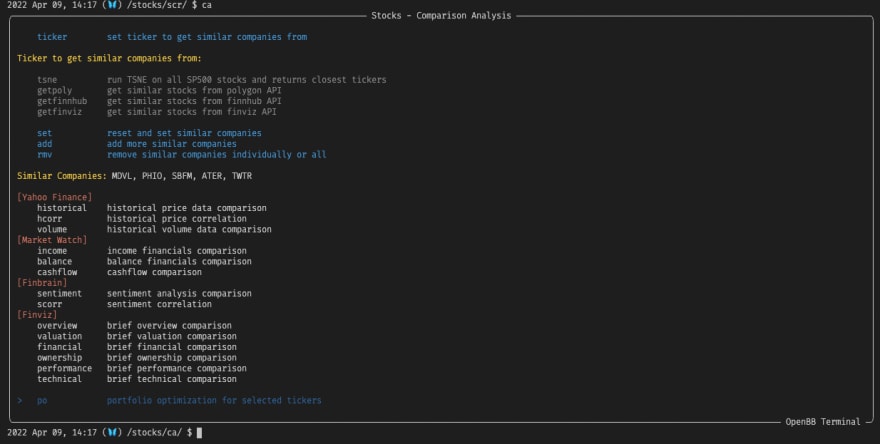 ](https://res.cloudinary.com/practicaldev/image/fetch /s--s7kX5Eh0--/c_limit%2Cf_auto%2Cfl_progressive%2Cq_auto%2Cw_880/https://dev-to-uploads.s3.amazonaws.com/uploads/articles/kfyba41dxz61h2p6uq67.png)
现在使用每日命令,历史,下面的图表显示了一个标准化的股价,目标是每日高点,从情人节开始。
historical -t h -n -s 2022-02-14
进入全屏模式 退出全屏模式
[ ](https://res.cloudinary .com/practicaldev/image/fetch/s--ROUjcA7U--/c_limit%2Cf_auto%2Cfl_progressive%2Cq_auto%2Cw_880/https://dev-to-uploads.s3.amazonaws.com/uploads/articles/s88q3osi9ur3inj74n3r.png)
这应该可以帮助您开始使用 OpenBB 终端中的历史命令。随时在社区 Discord Server 停留并提出问题,或者只是打个招呼!
https://discord.com/invite/Up2QGbMKHY
https://openbb.co
https://twitter.com/openbb_finance

ModelScope旨在打造下一代开源的模型即服务共享平台,为泛AI开发者提供灵活、易用、低成本的一站式模型服务产品,让模型应用更简单!
更多推荐
 0
0 0
0- 0


 已为社区贡献27134条内容

所有评论(0)