如何使用 NestJS 命名法为猫鼬写下嵌套模式 [关闭]
问题:如何使用 NestJS 命名法为猫鼬写下嵌套模式 [关闭]
我正在学习 NestJS 和 Mongoose。我想知道如何使用 NextJS 命名法在 Mongoose 中写下/编码嵌套模式。
传入的数据结构如下所示 -
{
    something: {
        info: {
            title: string,
            score: number,
            description: string,
            time: string,
            DateOfCreation: string
        },
        Store: {
            item: {
                question: string,
                options: {
                    item: {
                        answer: string,
                        description: string,
                        id: string,
                        key: string,
                        option: string
                    }
                }
            }
        }
    }
}
挑战:使用 NestJS 内部 API 写下来。
我正在使用 NestJS 和猫鼬。我想为上面给出的数据结构编写一个模式。 我找不到嵌套模式的示例。欢迎任何见解。
我是所有 NestJS、Mongoose 和 MongoDB 的初学者。所以请不要以为我知道些什么。因此,也欢迎任何关于 Mongoose 的见解。
非常感谢。
编辑 - 这是我在关注这个 SO 帖子后想出的东西 -Mongoose Subdocuments in Nest.js。但我只是在黑暗中扔石头。
import { Prop, Schema, SchemaFactory } from "@nestjs/mongoose";

@Schema()
export class Cat {
    @Prop()
    name: string
}


export const CatSchema = SchemaFactory.createForClass(Cat);


@Schema()
class testInfo {
    @Prop()
    title: string;
    @Prop()
    score: number;
    @Prop()
    description: string;
    @Prop()
    time: string;
    @Prop()
    DateOfCreation: string;
}

const testInfoSchema = SchemaFactory.createForClass(testInfo);

@Schema()
class OptionContent {
    @Prop()
    answer: string;
    @Prop()
    description: string;
    @Prop()
    id: string;
    @Prop()
    key: string;
    @Prop()
    option: string
}
const OptionContentSchema = SchemaFactory.createForClass(OptionContent);

@Schema({ strict: false })
class Option {
    @Prop({ type: OptionContentSchema })
    item: OptionContent;
}

const OptionSchema = SchemaFactory.createForClass(Option);

@Schema({ strict: false })
class Page {
    @Prop()
    question: string;
    @Prop({ type: OptionSchema })
    options: Option;
}

const PageSchema = SchemaFactory.createForClass(Page);

@Schema({ strict: false })
class McqStore {
    @Prop({ type: PageSchema })
    item: Page;
}

const McqStoreSchema = SchemaFactory.createForClass(McqStore);

@Schema()
export class Test {
    @Prop({ type: testInfoSchema })
    info: testInfo

    @Prop({ type: McqStoreSchema })
    McqStore: McqStore
}

const TestSchema = SchemaFactory.createForClass(Test);

@Schema()
export class TestContainer {
    @Prop({ type: TestSchema })
    name: Test
}

export const TestContainerSchema = SchemaFactory.createForClass(TestContainer);

export type userDocument = TestContainer & Document;
解答
好问题,它激发了我的好奇心!
我不是 Mongoose 的新手,而是 NestJS 的新手,正在学习使用。我能够使其正常运行。
import { Prop, Schema, SchemaFactory } from '@nestjs/mongoose';
import { Document } from 'mongoose';

export type CatDocument = Cat & Document;


@Schema()
export class Owners {
  @Prop()
  names: [string];
}

@Schema()
export class Cat {
  @Prop()
  name: string;

  @Prop()
  age: number;

  @Prop()
  breed: string;

  @Prop()
  owners: Owners;//schema for owner
}

export const CatSchema = SchemaFactory.createForClass(Cat);
结果!如果我理解正确,它似乎可以解决您的问题。拜托,您需要适应,我不确定您添加的所有这些级别,您必须进行实验!
在您的示例中,您“编译”了子模式,如果我没记错的话,即使在 Mongoose 中使用 express,您也不会这样做!我必须仔细检查!对于 NestJS,似乎没有必要!
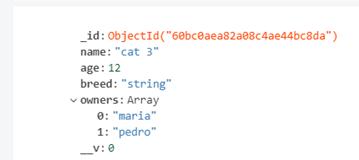
如果你想要类似的东西:Nest.js 中的猫鼬子文档,那就是另一回事了。我对这种方法的关注是使用populate,我知道如何在 Express 上使用,但不知道在 NestJS 上。
我发现他们的文档非常丰富,而且他们也有一个存储库。见这里:https://docs.nestjs.com/techniques/mongodb
更新
user3399180 8 很好地通过电子邮件向我发送了他的最终答复!
import { Prop, Schema, SchemaFactory } from "@nestjs/mongoose";
import { Document } from "mongoose";

@Schema()
class testInfo {
    @Prop()
    title: string;
    @Prop()
    score: number;
    @Prop()
    description: string;
    @Prop()
    time: string;
    @Prop()
    dateOfCreation: string;
}

@Schema()
class OptionContent {
    @Prop()
    answer: string;
    @Prop()
    description: string;
    @Prop()
    id: string;
    @Prop()
    key: string;
    @Prop()
    option: string
}

@Schema()
class Option {
    @Prop()
    option: OptionContent;
}

@Schema()
class Page {
    @Prop()
    question: string;
    @Prop()
    options: Option;
}

@Schema()
class McqStore {
    @Prop()
    page: Page;
}

@Schema()
export class Test {
    @Prop()
    info: testInfo

    @Prop()
    McqStore: McqStore
}

@Schema()
export class TestContainer {
    @Prop({ type: Map })
    name: Test
}

export const TestContainerSchema = SchemaFactory.createForClass(TestContainer);

export type userDocument = Test & Document;
有关的:
1.NestJS - 如何使用装饰器创建嵌套模式
MongoDB社区为您提供最前沿的新闻资讯和知识内容
更多推荐
 0
0 0
0- 0


 已为社区贡献32862条内容

所有评论(0)