Display next delivery day based on date time rules in Woocommerce products loop
Answer a question
I have the following code below that creates a line of text under all products on the home, category and related products pages, that says "GREATER CAPE TOWN AREA"…
add_action( 'woocommerce_after_shop_loop_item_title', 'woocommerce_products_loop', 20 );
function woocommerce_products_loop(){
    global $product;

    echo '<p class="deliveryline">' . __("GREATER CAPE TOWN AREA", "woocommerce") . '</p>';
}
I'd like to have a line of text above this that says "NEXT DELIVERY: " and then uses the following logic:
- If it's a weekday BEFORE 12pm, it should say "TOMORROW"
- If it's a weekday AFTER 12pm, it should say the name of the business day after tomorrow.
- if it's a friday BEFORE 12pm it should say "MONDAY"
- if it's a friday AFTER 12pm it should say "TUESDAY"
Basically, we offer next day delivery on weekdays, for orders placed before 12pm.
I have code for something similar that may work..
$now = new Zend_Date();
if (($now->get(Zend_Date::WEEKDAY_DIGIT) % 6 == 0)
 || ($now->isLater('17:00:00', Zend_Date::TIMES))
) {
    $now->set(
        strtotime('+1 weekday', $now->toString(Zend_Date::TIMESTAMP)),
        Zend_Date::TIMESTAMP
    );
}
echo $now->toString(Zend_Date::W3C);
I just need help please figuring out the correct maths for what I need (this code is based on same day if before 5pm), and then where do I place it within the original code?
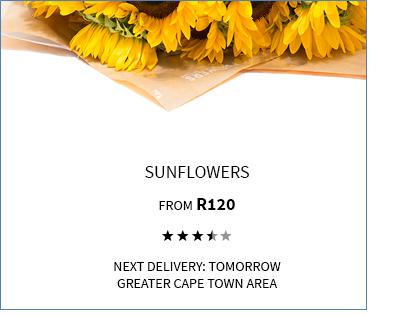
Could someone please help with this complete code snippet? Ideally I want it to look like the attached image.
Desired result:
Answers
The following code will display dynamically the delivery day based on your time and dates specifications (You will have to set your shop time zone in the code):
add_action( 'woocommerce_after_shop_loop_item_title', 'woocommerce_products_loop', 20 );
function woocommerce_products_loop(){
    global $product;

    // Set Your shop time zone (http://php.net/manual/en/timezones.php)
    date_default_timezone_set('Europe/Paris');

    $is_week_days  = in_array( date('w'), array( 1, 2, 3, 4 ) ) ? true : false; // From Monday to Thursday
    $is_friday     = date('w') == 5 ? true : false; // Friday
    $is_week_end   = in_array( date('w'), array( 0, 6 ) ) ? true : false; // Weekend days

    $end_time      = mktime('12', '00', '00', date('m'), date('d'), date('Y')); // 12h00
    $now_time      = time();

    $after_tomorow = date('l', strtotime('+2 days'));

    // Displayed day conditions
    if( $is_week_days && $now_time < $end_time ) {
        $displayed_day = __("TOMORROW", "woocommerce");
    } elseif( $is_week_days && $now_time >= $end_time ) {
        $displayed_day = strtoupper( date( 'l', strtotime('+2 days') ) );
    } elseif( $is_friday && $now_time < $end_time ) {
        $displayed_day = __("MONDAY", "woocommerce");
    } elseif( ( $is_friday && $now_time >= $end_time ) || $is_week_end ) {
        $$displayed_day = __("THUESDAY", "woocommerce");
    }

    // Dynamic text Output based on date and time
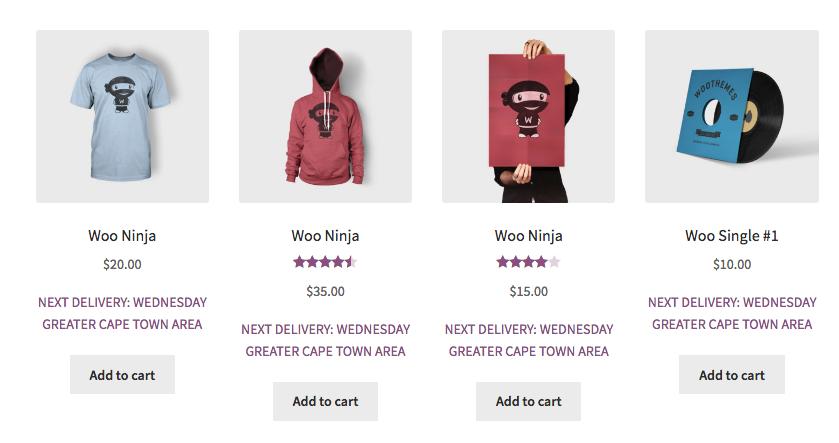
    echo '<p class="deliveryline">' . __("NEXT DELIVERY: ", "woocommerce") . $displayed_day .
        '<br>' . __("GREATER CAPE TOWN AREA", "woocommerce") . '</p>';
}
Code goes in function.php file of your active child theme (active theme). Tested and works.

MongoDB社区为您提供最前沿的新闻资讯和知识内容
更多推荐
 0
0 0
0- 0


 已为社区贡献32862条内容

所有评论(0)