

I am trying to initialize a fresh instance of MariaDB (putting my .sql file inside /docker-entrypoint-initdb.d) using the official helm chart at https://github.com/helm/charts/tree/master/stable/mariadb#initialize-a-fresh-instance.
But I find the instructions quite unclear:
In order to execute the scripts, they must be located inside the chart folder
files/docker-entrypoint-initdb.dso they can be consumed as a ConfigMap.
Since the only thing I do to set up the Mariadb cluster is using their helm install --name my-release stable/mariadb -f values-production.yaml I am quite confuse.
Where is this folder ?
Edit
I downloaded https://github.com/helm/charts/tree/master/stable/mariadb and placing (the whole folder) and placed my SQL file inside files/docker-entrypoint-initdb.d.
I then used helm package ./mariadb followed by helm install ./mariadb -f ./mariadb/values-production.yaml. But the master pod has "CrashLoopBackOff" as status.
Here are the master logs
==> ** Starting MariaDB setup **
==> Validating settings in MYSQL_*/MARIADB_* env vars..
==> Initializing mariadb database...
==> Persisted data detected. Restoring...
==> Loading user's custom files from /docker-entrypoint-initdb.d ...
==> Stopping mariadb...
I also tried this way, but the db keep crashing
kubectl create configmap db-scheme --from-file=db.sql
helm install --name db-test stable/mariadb -f .values-production.yml --set rootUser.password=ROOT_PASSWORD --set replication.password=REPLICATION_PASSWORD --set initdbScriptsConfigMap=db-scheme
Here are the logs :
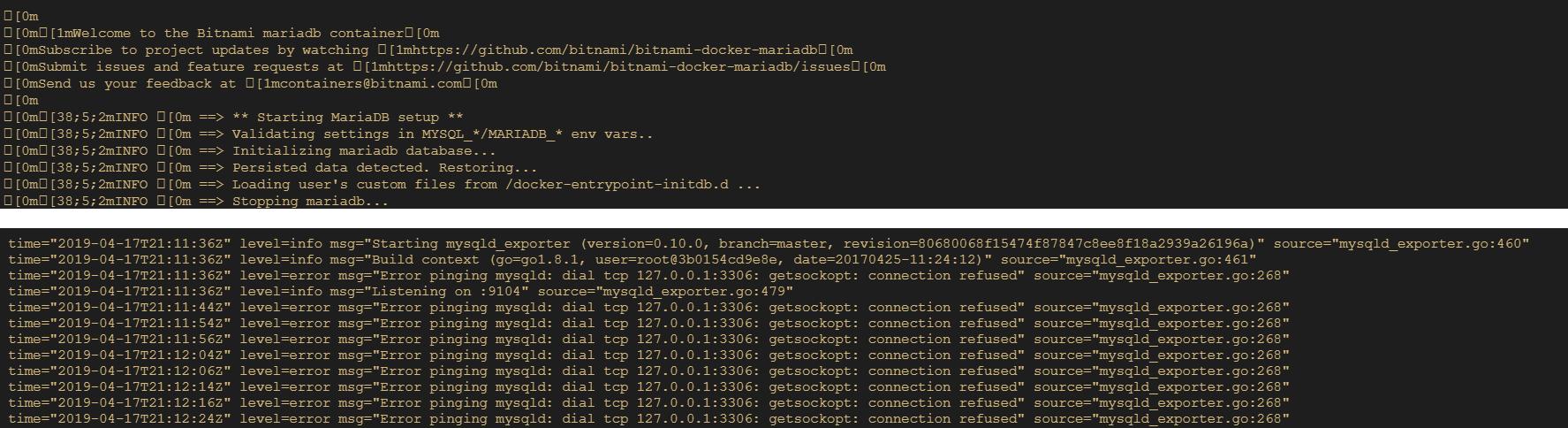
Edit2
I created a folder named files/docker-entrypoint-initdb.d
My current directory:
.
├── values-production.yml
│
├── files
│   └── docker-entrypoint-initdb.d
│       └── db.sql
And run this command from the current directory:
helm install --name test stable/mariadb -f .\values-production.yml --set rootUser.password=ROOT_PASSWORD --set replication.password=REPLICATION_PASSWORD
MariaDB boots up but without my SQL tables.


 已为社区贡献20439条内容

所有评论(0)