基于python,mysql的学生打卡系统(班级在用)
一款基于python等技术的打卡系统,简单轻便,通俗易懂,稳定性强,作者的班级都在用,非常适合初学者读或使用。
本文约有1.8W字,快来数一数 读一读吧
本文目录
前言
本项目由某不知名学校的高中生开发。
本项目为一个基于python,flask,pymysql的学生打卡系统,开发环境PyCharm 2021.3.2,运行环境Windows server 2022。
- 开发背景
受疫情影响,我们学校进入了网课阶段,往常的打卡手段为微信群的接龙,但是由于消息过多,容易将上课等重要信息覆盖,所以出现了这个项目。 - 系统优缺点
优点:直观看到学生打卡情况
缺点:同学不喜欢界面丑陋(很少的css,时间紧没写界面) - 自认为nb之处
记忆名字:通过记录每次打卡的IP进行查询。
将画图步骤转化到打卡过程(详情请转到:四、1)
直接看图:
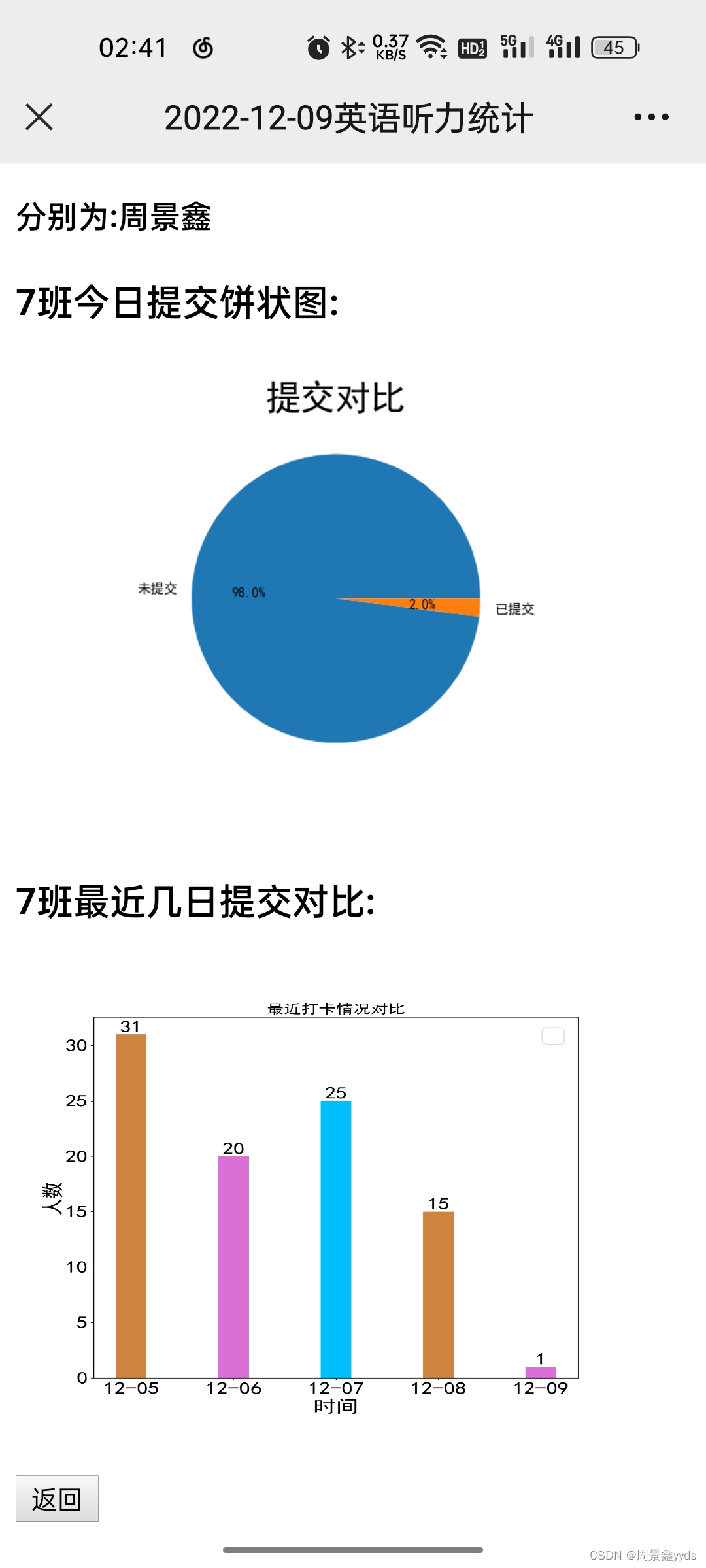
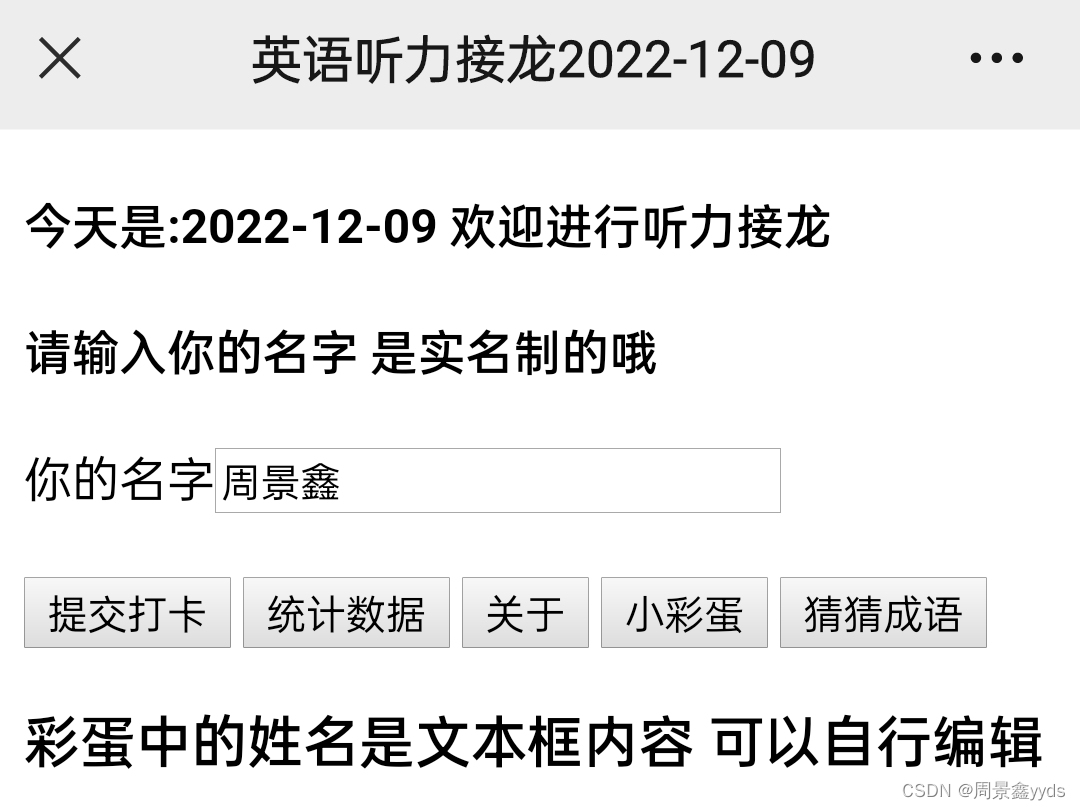
一、建立基础数据库(数据库名:english punch)
all_name表:用于存储所有学生信息
SET NAMES utf8mb4;
SET FOREIGN_KEY_CHECKS = 0;

-- ----------------------------
-- Table structure for all_name
-- ----------------------------
DROP TABLE IF EXISTS `all_name`;
CREATE TABLE `all_name`  (
  `name` varchar(255) CHARACTER SET utf8mb4 COLLATE utf8mb4_0900_ai_ci NOT NULL,
  `class` int(0) NULL DEFAULT NULL,
  PRIMARY KEY (`name`) USING BTREE
) ENGINE = InnoDB CHARACTER SET = utf8mb4 COLLATE = utf8mb4_0900_ai_ci ROW_FORMAT = Dynamic;

SET FOREIGN_KEY_CHECKS = 1;
- name:学生姓名
- class:学生班级
如图: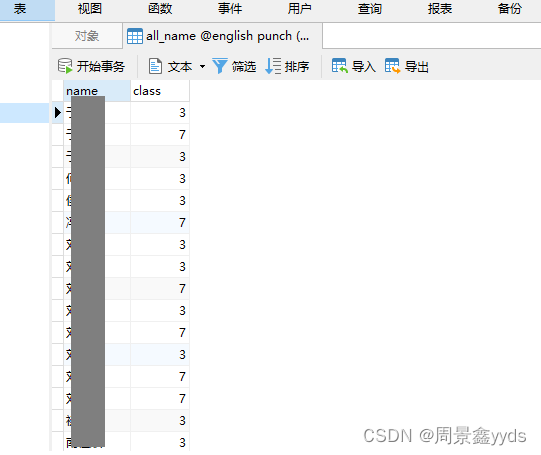
update_table表:用于记录打卡信息
SET NAMES utf8mb4;
SET FOREIGN_KEY_CHECKS = 0;

-- ----------------------------
-- Table structure for update_table
-- ----------------------------
DROP TABLE IF EXISTS `update_table`;
CREATE TABLE `update_table`  (
  `name` varchar(255) CHARACTER SET utf8mb4 COLLATE utf8mb4_0900_ai_ci NOT NULL,
  `class` int(0) NULL DEFAULT NULL,
  `date` datetime(0) NOT NULL,
  `ip` varchar(255) CHARACTER SET utf8mb4 COLLATE utf8mb4_0900_ai_ci NULL DEFAULT NULL,
  `vid` varchar(100) CHARACTER SET utf8mb4 COLLATE utf8mb4_0900_ai_ci NULL DEFAULT NULL
) ENGINE = InnoDB CHARACTER SET = utf8mb4 COLLATE = utf8mb4_0900_ai_ci ROW_FORMAT = Dynamic;

SET FOREIGN_KEY_CHECKS = 1;
- name:打卡姓名
- class:学生班级
- date:打卡时间
- IP:当前打卡的IP,目的:记忆用户名
- vid:浏览器唯一标识,
目的:为防止重复打卡(停用了)
如图: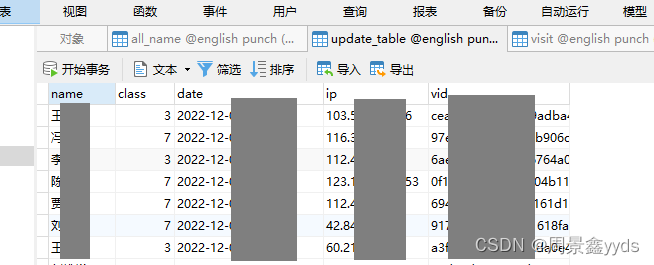
visit表:存储访问信息
SET NAMES utf8mb4;
SET FOREIGN_KEY_CHECKS = 0;

-- ----------------------------
-- Table structure for visit
-- ----------------------------
DROP TABLE IF EXISTS `visit`;
CREATE TABLE `visit`  (
  `time` datetime(0) NULL DEFAULT NULL,
  `ip` varchar(255) CHARACTER SET utf8mb4 COLLATE utf8mb4_0900_ai_ci NULL DEFAULT NULL,
  `thing` varchar(255) CHARACTER SET utf8mb4 COLLATE utf8mb4_0900_ai_ci NULL DEFAULT NULL
) ENGINE = InnoDB CHARACTER SET = utf8mb4 COLLATE = utf8mb4_0900_ai_ci ROW_FORMAT = Dynamic;

SET FOREIGN_KEY_CHECKS = 1;
- time:访问时间
- IP:访问的IP
- thing:本次事件
如图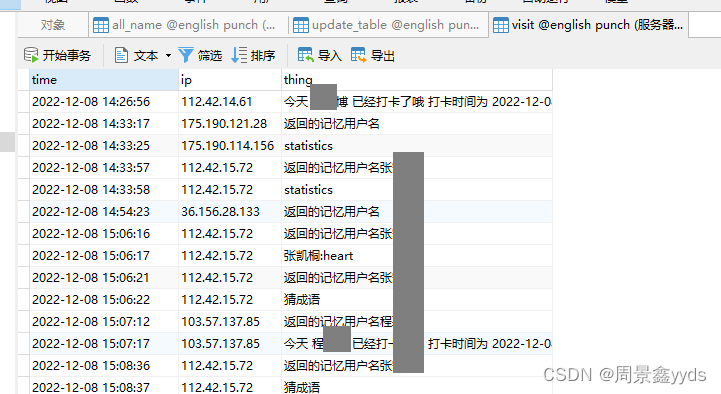
二、 用处不大的表
或者说是无用表
pharse表:存储成语信息
(本来是英语打卡来着)
SET NAMES utf8mb4;
SET FOREIGN_KEY_CHECKS = 0;

-- ----------------------------
-- Table structure for phrase
-- ----------------------------
DROP TABLE IF EXISTS `phrase`;
CREATE TABLE `phrase`  (
  `question` varchar(255) CHARACTER SET utf8mb4 COLLATE utf8mb4_0900_ai_ci NULL DEFAULT NULL,
  `answer` varchar(255) CHARACTER SET utf8mb4 COLLATE utf8mb4_0900_ai_ci NULL DEFAULT NULL,
  `source` varchar(255) CHARACTER SET utf8mb4 COLLATE utf8mb4_0900_ai_ci NULL DEFAULT NULL,
  `study` varchar(255) CHARACTER SET utf8mb4 COLLATE utf8mb4_0900_ai_ci NULL DEFAULT NULL,
  `abbr` varchar(255) CHARACTER SET utf8mb4 COLLATE utf8mb4_0900_ai_ci NULL DEFAULT NULL,
  `quanpin` varchar(255) CHARACTER SET utf8mb4 COLLATE utf8mb4_0900_ai_ci NULL DEFAULT NULL
) ENGINE = InnoDB CHARACTER SET = utf8mb4 COLLATE = utf8mb4_0900_ai_ci ROW_FORMAT = Dynamic;

SET FOREIGN_KEY_CHECKS = 1;
- question:存储问题(成语意思)
- answer:存储答案
- source:存储出处
- study:存储例句
- abbr:存储首拼
- quanpin:存储全拼
如图: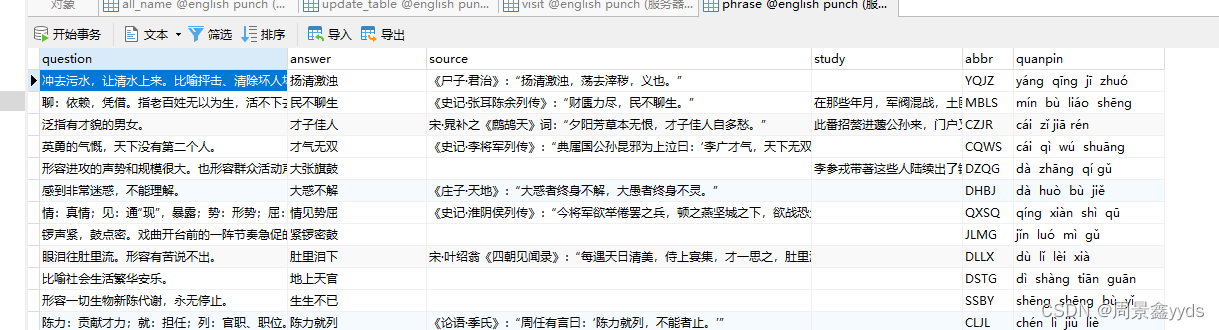
三、写前端
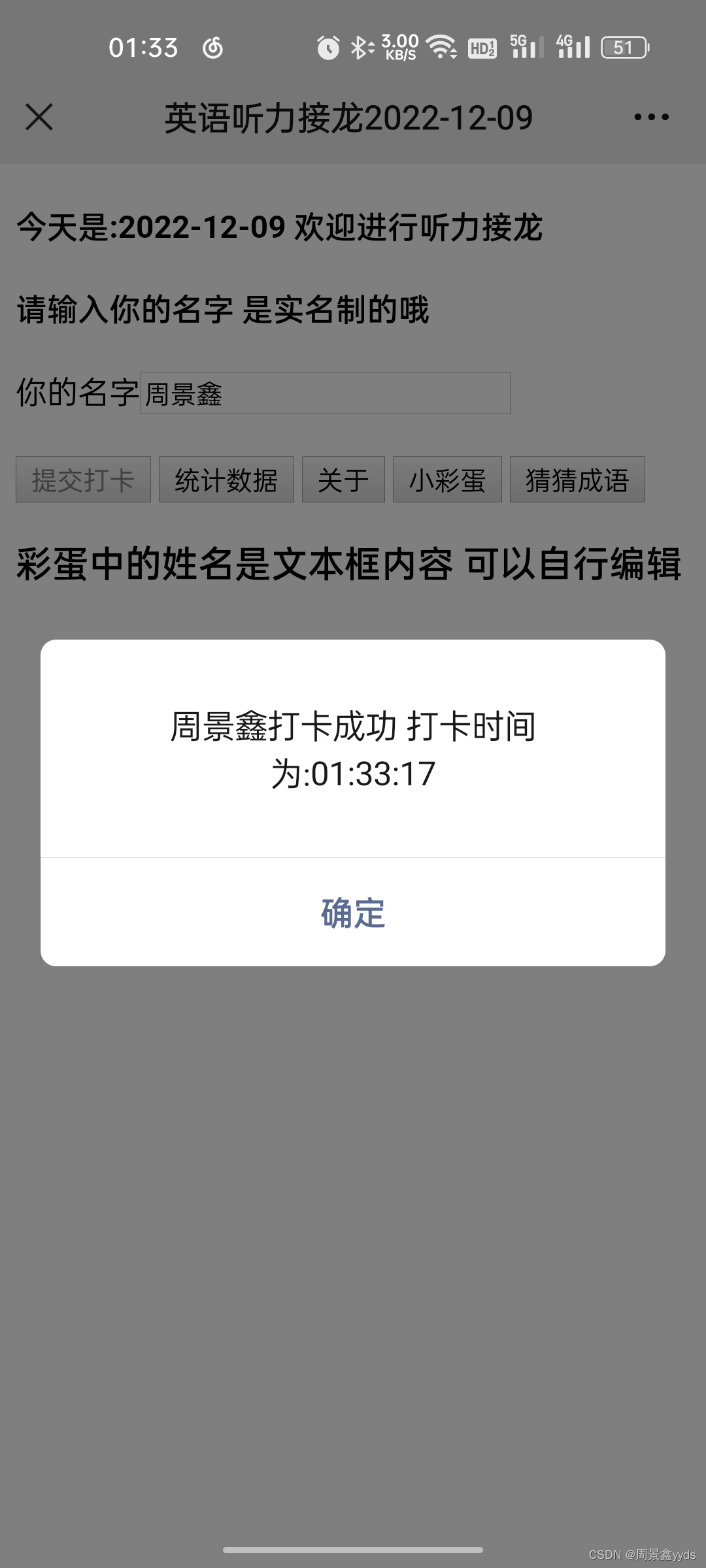
1. 主页面
主页面采用简洁风 (没空写css)
文件:main.html
<!DOCTYPE html>
<html lang="en">
<head>
    <meta charset="UTF-8">
    <title>英语听力接龙{{ date }}</title>
    <meta name="viewport"
        content="width=device-width, initial-scale=1.0, minimum-scale=0.5, maximum-scale=2.0, user-scalable=yes" />
    <!--引入jQuery包用于使用ajax-->
    <script type="text/javascript" src="http://apps.bdimg.com/libs/jquery/2.1.4/jquery.min.js"></script>
    <h4>今天是:{{ date }} 欢迎进行听力接龙</h4>
    <h4>请输入你的名字 是实名制的哦</h4>
    你的名字<input type="text" id="name" name="name" placeholder="姓名" value="{{ name }}">
    <h1></h1>
    <button onclick="add_fun();" id="send_mess">提交打卡</button>
    <button onclick="search_fun();">统计数据</button>
    <button onclick="help_fun()">关于</button>
    <button onclick="heart()">小彩蛋</button>
    <button onclick="p()">猜猜成语</button>
    <h3>彩蛋中的姓名是文本框内容 可以自行编辑</h3>
    <script>
        function heart(){
            $.ajax({
                url : "heart",
                type : "POST",
                data: { "name": $("#name").val()},
                success: function (result) {
                    document.write(result)
                }
            });
        }
        function help_fun() {
            $.ajax({
                url : "about",
                type : "POST",
                success: function (result) {
                    document.write(result)
                }
            });
        }

        function search_fun() {
            $.ajax({
                url:"s",
                type:"POST",
                success:function (res){
                    document.write(res);
                }
            })
        }
        visitorId = "";

        function get_vid(){
            const fpPromise = import('https://openfpcdn.io/fingerprintjs/v3').then(FingerprintJS => FingerprintJS.load())

            // Get the visitor identifier when you need it.
            fpPromise.then(fp => fp.get()).then(result => {
                // This is the visitor identifier:
                  visitorId = result.visitorId;
              });

        }
        window.οnlοad=get_vid();
        function add_fun() {
            if($("#name").val().length===0){
                alert("名字不能留空");
                return;
            }
            $("#send_mess").attr('disabled',true);
            $.ajax({
                url: "add",
                type: "POST",
                data: { "name": $("#name").val(), "vid":visitorId
                     },
                success: function (result) {
                    if (result.message == "OK") {
                        alert("提交成功");
                        document.getElementById("name").value = "";
                    }else if(result.message == "E"){
                        alert("其他错误 请联系周景鑫");
                    }else{
                        alert(result.message);
                    }
                    $("#send_mess").attr('disabled',false);
                }
            });

        }

        function p(){
            $.ajax({
                url: "p",
                type: "POST",
                success: function (res) {
                    document.write(res);
                }
            });
        }
    </script>
</head>
<body>

</body>
</html>
如图: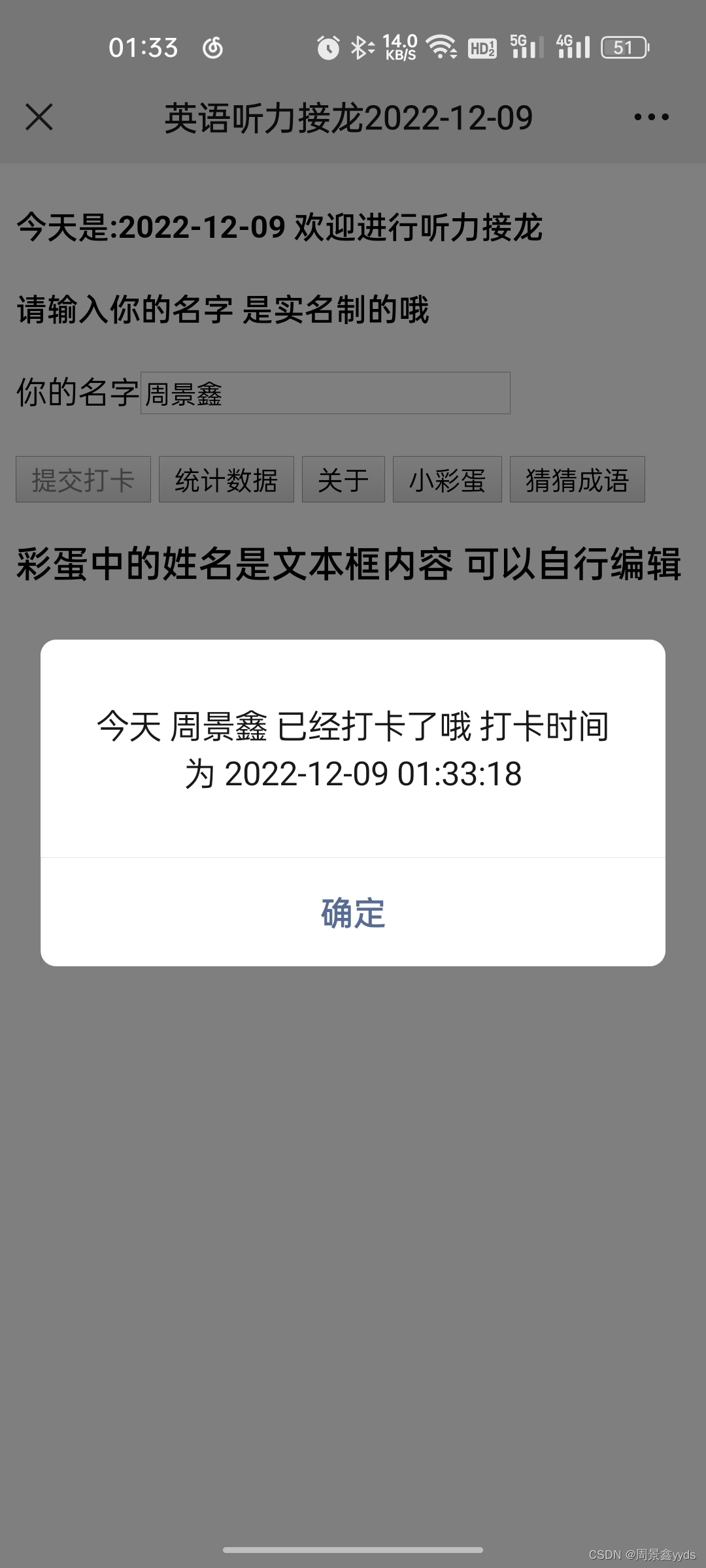
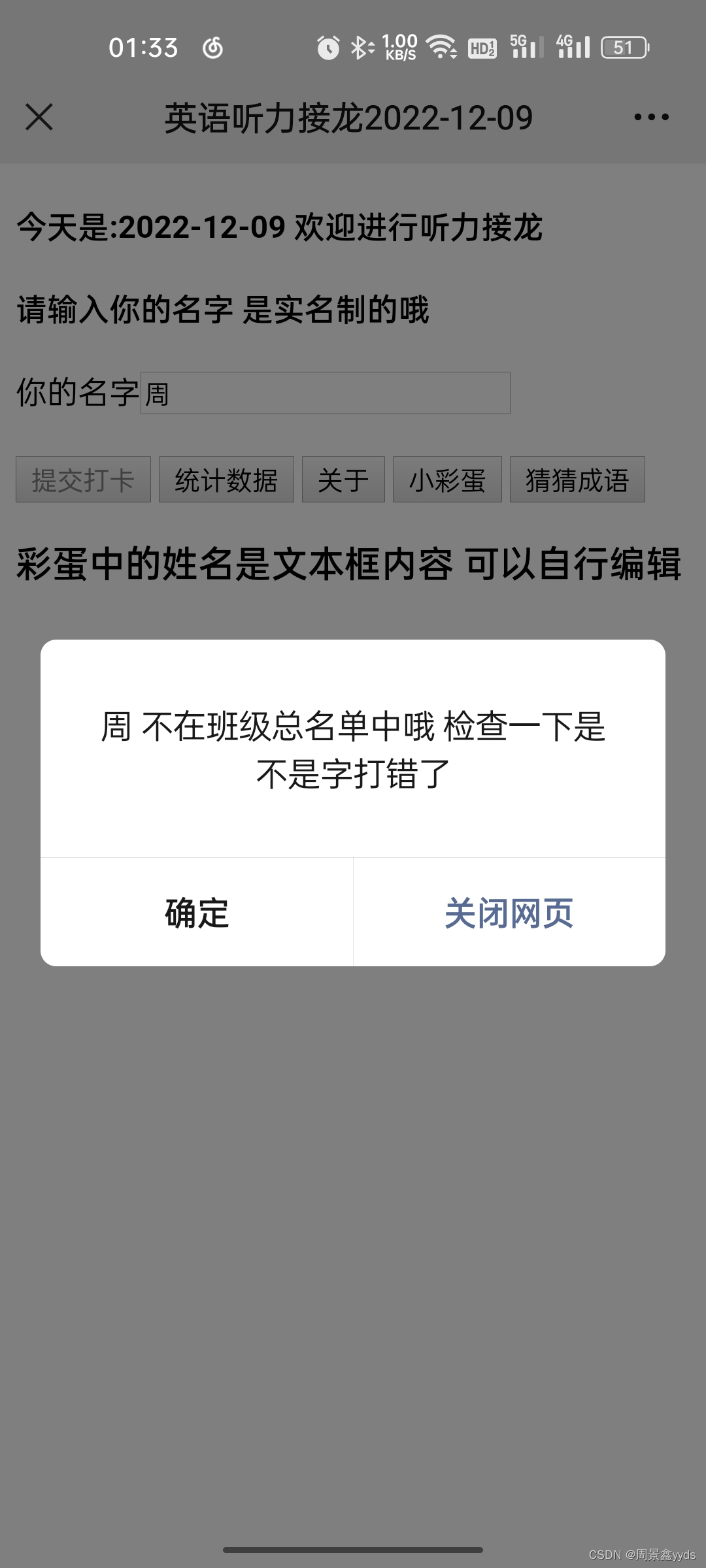
2. 统计页面
文件:statistics.html
<!DOCTYPE html>
<html lang="en">
<head>
    <meta charset="UTF-8">
    <meta name="viewport" content="width=device-width, initial-scale=1.0, minimum-scale=0.5, maximum-scale=2.0, user-scalable=yes" />
    <title>{{ date }}英语听力统计</title>
    <h1>{{ date }}英语听力统计</h1>
    {% if havedate==True %}
        {% for c in classes %}
            <h4>截至到{{ time }}为止</h4>
            <h4>{{ c.get('class') }}班未提交:共{{ c.get('no_s_p') }}人</h4>
            <h4>分别为:{{ c.get('no_s_p_list') }}</h4>
            <h4></h4><h4></h4>

            <h4>{{ c.get('class') }}班已提交:共{{ c.get('s_p') }}人</h4>
            <h4>分别为:{{ c.get('s_p_list') }}</h4>

            <h3>{{ c.get('class') }}班今日提交饼状图:</h3>
            <h3><img src="{{ c.get('pie') }}" alt="饼状图加载失败" width="320" height="240"></h3>
            <h3>{{ c.get('class') }}班最近几日提交对比:</h3>
            <h3><img src="{{ c.get('bar') }}" alt="柱状图加载失败" width="320" height="240"></h3>
        {% endfor %}
    {% else %}
        <h1>今天还没有人打卡哦 等等再来吧</h1>
    {% endif %}
    <input type="button" value="返回" onclick="location.reload();">
</head>
<body>

</body>
</html>
如图
3. 关于页面
文件:help.html
<!DOCTYPE html>
<html lang="en">
<head>
    <meta charset="UTF-8">
    <title>关于</title>
    <h4>别看了 网站是3.7周景鑫写的 长按加我vx</h4>
    <img src="static\vx.jpg" alt="二维码加载失败" width="180" height="264"/>
    <h4></h4>
    {% for info in infolist %}
        <h6>更新日志:{{ info['time'] }}</h6>
        <h6>{{ info['info'] }}</h6>
    {% endfor %}
    <h4>------------------------------</h4>
    <h4> </h4>
    <h6>由于技术与时间等原因 不足之处敬请谅解</h6>
    <h6>出现问题请联系周景鑫 vx:zjxyyds0307</h6>
    <h2>别看了快去学习吧</h2>
    <input type="button" value="返回" onclick="location.reload();">
</head>
<body>

</body>
</html>
如图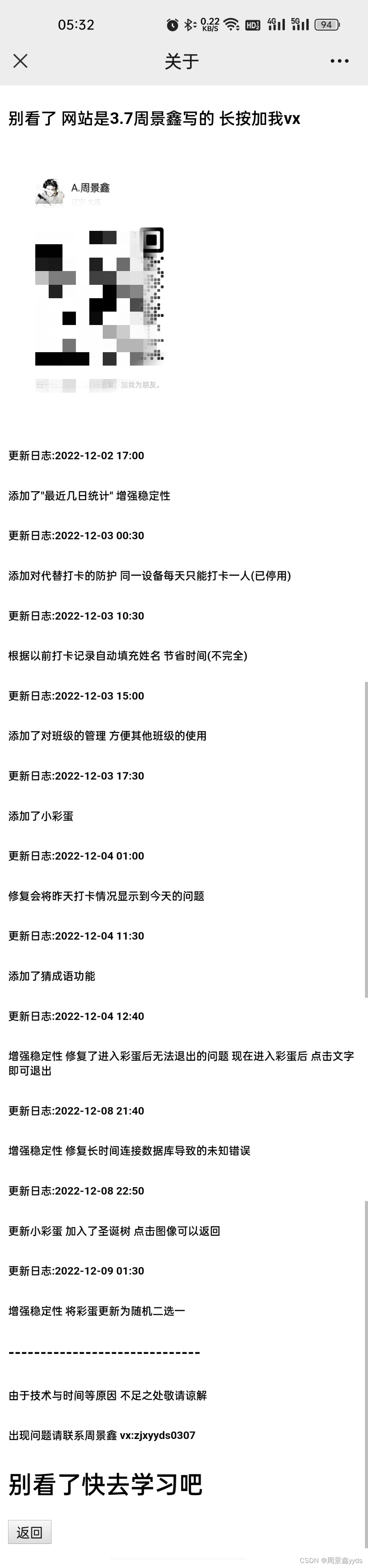
4. 彩蛋(直接copy的)
看图

这两个,都是抄的,就不放代码了…
5. 猜成语
转型之路了属于是
代码:
<!DOCTYPE html>
<html lang="en">
<head>
    <meta charset="UTF-8">
    <title>无奖成语竞猜</title>
    <script type="text/javascript" src="http://apps.bdimg.com/libs/jquery/2.1.4/jquery.min.js"></script>
    <h3 style="text-align:center">根据意思猜成语</h3>
    <h4 id="t">成语意思和解释</h4>
    <h4 id="question">-</h4>
    <h4 id="fig1"> </h4>
    <h4 id="quanpin"> </h4>
    <h4 id="ts">请输入成语:</h4>
    <input type="text" id="input" placeholder="输入成语">
    <h4> </h4>
    <h4 id="ans"> </h4>
    <h4 id="chuchu"> </h4>
    <h4 id="liju"> </h4>
    <button onclick="send()" id="send">提交一下</button>
    <button onclick="fig_fun()" id="fig_b">提示</button>
    <h4> </h4>
    <input type="button" value="返回" onclick="location.reload();">
    <h6>成语数据由天行api提供</h6>
    <script>
        window.onload = load_all();
        const ans = "答案: {{ answer }}";
        const sp = "首拼: {{ sp }}";
        // 首拼
        const source = "出处: {{ source }}";
        // 出处
        const study = "例句: "+"{{ study }}";
        // 例句
        var fig_flag = 0;

        function load_all(){
            $("#question").text("{{ question }}");
        }

        function ok(){
            $("#ans").text(ans);
            $("#question").text("词义是: {{ question }}");
            $("#chuchu").text(source);
            $("#liju").text(study);
            $("#send").hide();
            $("#fig_b").hide();
            $("#input").hide();
            $("#ts").hide();
            $("#t").hide();
            $("#fig1").hide();
        }

        function fig_fun(){
            if(fig_flag == 2){
                // console.log(ans);
                ok();
            }else if(fig_flag == 1){
                $("#quanpin").text('全拼: {{ quanpin }}');
                fig_flag = fig_flag + 1;
                $("#fig_b").text("告诉我答案");
            }else{
                fig_flag = fig_flag + 1;
                $("#fig1").text(sp);
                $("#fig_b").text("再提示一下");
            }
        }

        function send(){
            if($("#input").val() == "{{ answer }}"){
                alert("恭喜 答对了");
                ok();
            }else{
                alert("还不对哦 再试试");
            }
        }
    </script>
</head>
<body>

</body>
</html>
如图: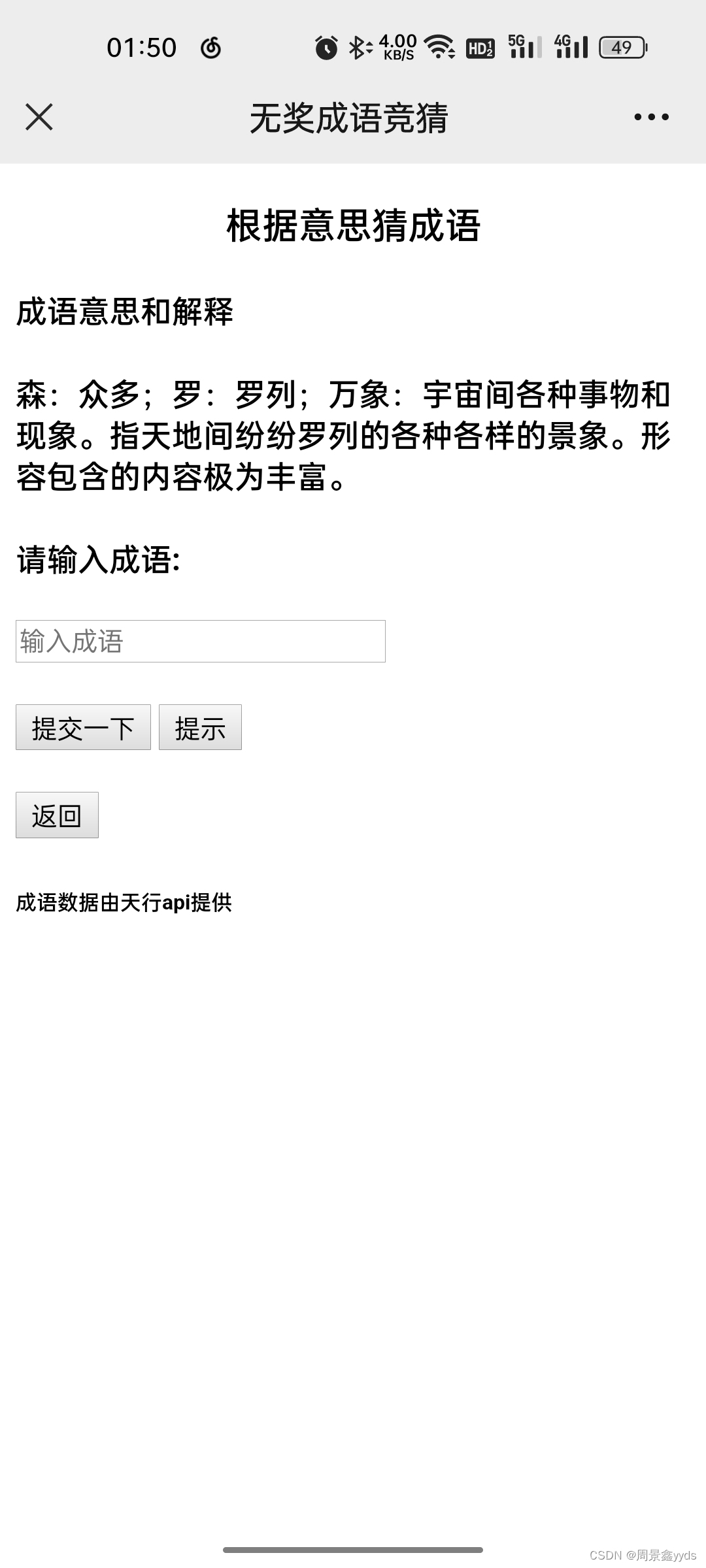
四、写后端
1. app.py
代码:
import http.client, urllib, json
import random
from flask import *
from sql_fun import *

app = Flask(__name__)
sql_f = mess_sql()


class info:
    def __init__(self):
        self.c = sql_f.new_statistics()
        sql_f.close_sql()


i = info()


@app.route('/')
def hello_world():  # put application's code here
    return render_template("main.html",
                           date=get_today(),
                           name=sql_f.ip_to_name(request.remote_addr))


@app.route('/add', methods=["POST"])
def add_fun():
    name = str(request.form.get("name"))
    vid = str(request.form.get("vid"))
    print('vid:', vid)
    ans = sql_f.add(name, request.remote_addr, vid)

    sql_f.close_sql()
    if '打卡成功' in ans:
        i.c = sql_f.new_statistics()
        # 在这里画图
        sql_f.close_sql()
    return {'message': ans}


@app.route('/about', methods=['POST'])
def helpfun():
    sql_f.add_visit(request.remote_addr, 'help')
    infol = []
    with open('helplist.txt', 'r', encoding='utf-8') as f:
        infolist = f.readlines()
        index = 0
        m = {}
        for i in infolist:
            index += 1
            if index % 2 == 0:
                m['info'] = i
                infol.append(m)
                m = {}
            else:
                m['time'] = i

    # return render_template('help.html')
    return render_template('help.html', infolist=infol)


@app.route('/heart', methods=['POST'])
def heart_fun():
    name = str(request.form.get("name"))
    a = random.randint(0,9)
    if name == '' or name == ' ':
        name = '专属于你'
    if a > 6:
        sql_f.add_visit(request.remote_addr, name + ':heart')
        print(name + ':heart')
        return render_template('heart.html', name=name)
    else:
        sql_f.add_visit(request.remote_addr, name + ':圣诞树')
        print(name + ':圣诞树')
        return render_template('圣诞树.html', name=name)


@app.route('/s', methods=['POST'])
def s():
    print(request.remote_addr + ':statistics')
    sql_f.add_visit(request.remote_addr, 'statistics')
    return render_template('statistics.html',
                           date=get_today(),
                           havedate=sql_f.today_date_have(),
                           classes=i.c,
                           time=datetime.datetime.now().strftime('%H:%M:%S'))


def get_p_dic():
    conn = http.client.HTTPSConnection('apis.tianapi.com')  # 接口域名
    params = urllib.parse.urlencode({'key': '天行数据api的key'})
    headers = {'Content-type': 'application/x-www-form-urlencoded'}
    conn.request('POST', '/caichengyu/index', params, headers)
    tianapi = conn.getresponse()
    result = tianapi.read()
    data = result.decode('utf-8')
    dict_data = json.loads(data)
    return dict_data


def is_None(s):
    if s == '':
        return '暂无'
    return s


@app.route('/p', methods=['POST', 'GET'])
def p():
    d = get_p_dic()
    print(d)
    print(request.remote_addr + ':猜成语')
    sql_f.add_visit(request.remote_addr, '猜成语')
    sql_f.add_phrase(d)
    return render_template("phrase.html",
                           question=d.get("result").get("question"),
                           answer=d.get("result").get("answer"),
                           source=is_None(d.get("result").get("source")),
                           study=is_None(d.get("result").get("study")),
                           sp=d.get("result").get("abbr"),
                           quanpin=d.get("result").get("pinyin")
                           )


if __name__ == '__main__':
    app.run()
其实也写了一些没有意义的代码 (某种程度上)
这个是程序入口,使用的flask框架
为什么 将画图部分移动到添加信息过程
- 提高用户体验:打卡过程中按钮会禁用一段时间(见前端代码),将占用时间的工作放到此过程中非常合适
- 提高用户体验:统计数据时非常快,用户会觉得我
代码写的好,其实是把费时间工作放到其他地方做了。
2. sql_fun内部
文件: __ init__.py
import pymysql
import datetime
import matplotlib.pyplot as plt


def get_today():
    return str(datetime.datetime.now().strftime('%Y-%m-%d'))


plt.rcParams['font.sans-serif'] = ['SimHei']
plt.rcParams['axes.unicode_minus'] = False
plt.yticks(fontsize=26)
plt.xticks(fontsize=26)

class mess_sql:
    def __init__(self):
        # self.word_max = 500
        try:
            self.connect = pymysql.connect(host='localhost',
                                           user='root',
                                           password='',
                                           db='english punch',
                                           charset='gbk')  # 服务器名,账户,密码,数据库名称
        except:
            self.connect = pymysql.connect(host='localhost',
                                           user='root',
                                           password='',
                                           db='english punch',
                                           charset='gbk')  # 服务器名,账户,密码,数据库名称
        self.cur = self.connect.cursor()

    def open_sql(self):
        try:
            self.connect = pymysql.connect(host='localhost',
                                           user='root',
                                           password='',
                                           db='english punch',
                                           charset='gbk')  # 服务器名,账户,密码,数据库名称
        except:
            self.connect = pymysql.connect(host='localhost',
                                           user='root',
                                           password='',
                                           db='english punch',
                                           charset='gbk')  # 服务器名,账户,密码,数据库名称
        self.cur = self.connect.cursor()

    def close_sql(self):
        try:
            if self.connect:
                self.connect.close()
            if self.cur:
                self.cur.close()
        except Exception as e:
            print(e)

    def add(self, name, ip, vid):
        self.open_sql()
        try:
            self.connect.ping(reconnect=True)
            find_name_in_table = "select class from all_name where name='{0}'".format(name)
            # print("find_name_in_table:", find_name_in_table)
            self.cur.execute(find_name_in_table)
            classres = self.cur.fetchall()
            if len(classres) == 0:
                s = '{0} 不在班级总名单中哦 检查一下是不是字打错了'.format(name)
                print(s)
                self.add_visit(ip, s)
                return s

            today = "select date from update_table where date > '{0}' and name ='{1}'".format(
                get_today(), name)
            self.cur.execute(today)
            res = self.cur.fetchall()

            if len(res) != 0:
                s = '今天 {0} 已经打卡了哦 打卡时间为 {1}'.format(name, res[0][0])
                print(s)
                self.add_visit(ip, s)
                return s

            ip_err = "select name from update_table where date > '{0}' and vid='{1}'".format(
                get_today(), vid
            )
            self.cur.execute(ip_err)
            res = self.cur.fetchall()
            # TODO 防止重复ip
            res = []
            if len(res) != 0:
                s = "今天本设备已经为 {0} 打卡啦 不能重复打卡".format(res[0][0])
                print(s)
                self.add_visit(ip, s)
                return s

            add_text = "insert into update_table values ('{0}','{1}','{2}','{3}','{4}');"\
                .format(name, classres[0][0],
                        datetime.datetime.now(),
                        ip, vid)

            self.cur.execute(add_text)
            self.connect.commit()
            s = '{0}打卡成功 打卡时间为:{1}'.format(name, datetime.datetime.now().strftime('%H:%M:%S'))
            print(s)
            return s
        except Exception as e:
            print(e)
            self.add_visit(ip, str(e))
            return 'E'

    def new_statistics(self):
        try:
            self.open_sql()
            self.connect.ping(reconnect=True)
            search_class = 'SELECT class FROM all_name GROUP BY class;'
            self.cur.execute(search_class)
            classes = self.cur.fetchall()
            res_list = []
            for c in classes:
                c = c[0]
                all_name = "select name from all_name where class={0}".format(c)
                self.cur.execute(all_name)
                res = self.cur.fetchall()
                res = [i[0] for i in res]  # list(res)

                tijiao = "select name from update_table where date > '{0}' and class={1}".format(get_today(), c)
                self.cur.execute(tijiao)
                tijiao_list = self.cur.fetchall()
                # tijiao_list = list(tijiao_list)
                tijiao_list = [i[0] for i in tijiao_list]
                # print(tijiao_list)
                yitijiao = len(tijiao_list)
                weitijiao = len(res) - yitijiao
                weitijiao_list = ",".join([i for i in res if i not in tijiao_list])
                yitijiao_list = ",".join([i for i in tijiao_list])
                plt.figure()
                plt.cla()
                plt.title('提交对比', fontsize=26)
                plt.pie([weitijiao, yitijiao], labels=['未提交', '已提交'], autopct='%3.1f%%')
                pie_path = 'static/pie{0}.png'.format(c)
                plt.savefig(pie_path)
                # plt.show()
                bar_path = self.lately(c)
                plt.close('all')
                m = {'class': c,
                     'no_s_p': weitijiao,
                     'no_s_p_list': weitijiao_list,
                     's_p': yitijiao,
                     's_p_list': yitijiao_list,
                     'pie': pie_path,
                     'bar': bar_path
                     }
                res_list.append(m)
            return res_list
        except Exception as e:
            print(e)
            self.add_visit('0.0.0.1', str(e))
            return []

    def lately(self, c):
        try:
            plt.figure(dpi=300, figsize=(10, 10))
            time_list = []
            peo_list = []
            delta = datetime.timedelta(days=-1)
            endtime = datetime.datetime.now() - delta
            for i in range(5):

                starttime = endtime + delta
                # print(str(starttime.strftime('%Y-%m-%d')))
                sql = "select name from update_table where date>'{0}' and date<'{1}' and class={2}".format(starttime.strftime('%Y-%m-%d'),
                                                                                             endtime.strftime('%Y-%m-%d'), c)
                # print('sql line', sql)
                self.connect.ping(reconnect=True)
                self.cur.execute(sql)
                res = self.cur.fetchall()
                # if len(res) == 0:
                #     endtime = starttime
                #     continue
                time_list.append(str(starttime.strftime('%m-%d')))
                peo_list.append(len(res))

                endtime = starttime

            plt.cla()
            plt.legend(fontsize=32)
            plt.title('最近打卡情况对比',fontsize=20)
            x = [i + 1 for i in range(len(time_list))]
            color = ['peru', 'orchid', 'deepskyblue']
            plt.yticks(fontsize=26)
            plt.xticks(fontsize=26)

            plt.xlabel('时间', fontsize=26)
            plt.ylabel('人数', fontsize=26)
            list.reverse(time_list)
            list.reverse(peo_list)
            # time_list = time_list * 2
            # peo_list = peo_list * 2

            plt.xticks(x, time_list)  # 绘制x刻度标签
            b = plt.bar(x, peo_list, color=color, width=0.3)
            plt.bar_label(b, label_type='edge', fontsize=26)
            save_path = 'static/bar{0}.png'.format(c)
            try:
                plt.savefig(save_path)
            except:
                plt.savefig('bar.png')
            return save_path
        except Exception as e:
            print(e)
            self.add_visit('0.0.0.2', str(e))
            return ''

    def ip_to_name(self, ip):
        try:
            self.open_sql()
            sql = "select name from update_table where ip='{0}'".format(ip)
            self.connect.ping(reconnect=True)
            self.cur.execute(sql)
            res = self.cur.fetchall()
            res = [i[0] for i in res]  # list(res)
            res = list(set(res))
            # print(res)
            print('返回的记忆用户名' + ','.join(res))
            self.add_visit(ip, '返回的记忆用户名' + ','.join(res))
            self.close_sql()
            return ','.join(res)
        except Exception as e:
            print(e)
            self.add_visit('0.0.0.3', str(e))
            return ''

    def today_date_have(self):
        try:
            self.open_sql()
            sql = "select name from update_table where date > '{0}'".format(get_today())
            self.connect.ping(reconnect=True)
            self.cur.execute(sql)
            res = self.cur.fetchall()
            self.close_sql()
            return len(res) != 0
        except Exception as e:
            print(e)
            self.add_visit('0.0.0.3', str(e))
            return True

    def add_visit(self, ip, thing):
        try:
            self.open_sql()
            sql = "insert into visit values ('{0}','{1}','{2}');".format(datetime.datetime.now(),ip,thing)
            self.connect.ping(reconnect=True)
            self.cur.execute(sql)
            self.connect.commit()
            self.close_sql()
        except Exception as e:
            print(e)
            # self.add_visit('0.0.0.4', str(e))

    def add_phrase(self, d):
        try:
            self.open_sql()
            question = d.get("result").get("question")
            answer = d.get("result").get("answer")
            source = d.get("result").get("source")
            study = d.get("result").get("study")
            sp = d.get("result").get("abbr")
            quanpin = d.get("result").get("pinyin")
            sql = "insert into phrase values ('{0}','{1}','{2}','{3}','{4}','{5}');".format(
                question, answer, source, study, sp, quanpin
            )
            self.connect.ping(reconnect=True)
            self.cur.execute(sql)
            self.connect.commit()
            self.close_sql()
        except Exception as e:
            print(e)
            self.add_visit('0.0.0.5', str(e))
- open_sql:打开数据库
- close_sql:关闭数据库
- add:添加打卡信息
- new_statistics:统计本日打卡
- lately:统计最近几日打卡人数
- ip_to_name:记忆用户名
- today_date_have:查询今天是否有人已打卡
- add_visit:添加访问记录
- add_phrase:添加一条成语记录
3. helplist.txt
2022-12-02 17:00
添加了"最近几日统计" 增强稳定性
2022-12-03 00:30
添加对代替打卡的防护 同一设备每天只能打卡一人(已停用)
2022-12-03 10:30
根据以前打卡记录自动填充姓名 节省时间(不完全)
2022-12-03 15:00
添加了对班级的管理 方便其他班级的使用
2022-12-03 17:30
添加了小彩蛋
2022-12-04 01:00
修复会将昨天打卡情况显示到今天的问题
2022-12-04 11:30
添加了猜成语功能
2022-12-04 12:40
增强稳定性 修复了进入彩蛋后无法退出的问题 现在进入彩蛋后 点击文字即可退出
2022-12-08 21:40
增强稳定性 修复长时间连接数据库导致的未知错误
2022-12-08 22:50
更新小彩蛋 加入了圣诞树 点击图像可以返回
使用helplist的目的是降低维护成本,不需要每次更新都需要修改h5页面
五、辅助文件
1. run.bat
一键跑项目
@echo off
python -m flask run --host=0.0.0.0 --port=88
2. 项目目录
C:.
│  app.py
│  bar.png
│  helplist.txt
│  run.bat
│
├─sql_fun
│  │  bar.png
│  │  pie.png
│  │  __init__.py
│  │
│  └─__pycache__
│          __init__.cpython-38.pyc
│
├─static
│      bar3.png
│      bar7.png
│      img.png
│      pie3.png
│      pie7.png
│      vx.jpg
│
├─templates
│      heart.html
│      help.html
│      main.html
│      phrase.html
│      statistics.html
│      圣诞树.html
│
└─__pycache__
        app.cpython-38.pyc
六、留个地方放项目网址
等项目测试打包好会上传到GitHub或其他网站,链接会放这里。
写在最后:生活不易,高中生也叹气。
如果你觉得有用的话麻烦点个赞,或者扫一扫二维码赞赏一下。


本社区面向用户介绍CSDN开发云部门内部产品使用和产品迭代功能,产品功能迭代和产品建议更透明和便捷
更多推荐

 4
4 0
0- 0


 已为社区贡献1条内容

所有评论(0)