Docker Compose and Django app using AWS Lighstail containers fail to deploy
Answer a question
I'm trying to get a Django application running on the latest version of Lightsail which supports deploying docker containers as of Nov 2020 (AWS Lightsail Container Announcement).
I've created a very small Django application to test this out. However, my container deployment continues to get stuck and fail.
Here are the only logs I'm able to see: 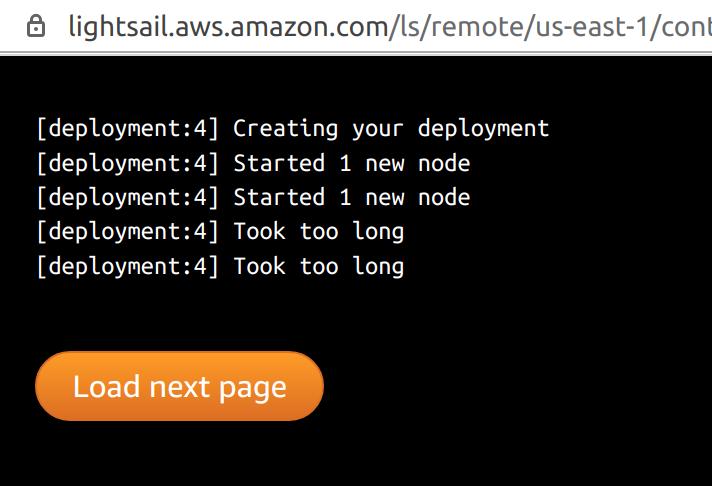
This is my Dockerfile:
FROM python:3
ENV PYTHONUNBUFFERED=1
WORKDIR /code
COPY requirements.txt /code/
RUN pip install -r requirements.txt
COPY . /code/
And this is my docker-compose.yml:
version: "3.9"

services:
  db:
    image: postgres
    environment:
      - POSTGRES_DB=postgres
      - POSTGRES_USER=postgres
      - POSTGRES_PASSWORD=postgres
  web:
    build: .
    image: argylehacker/app-stats:latest
    command: python manage.py runserver 0.0.0.0:8000
    volumes:
      - .:/code
    ports:
      - "8000:8000"
    depends_on:
      - db
I'm wondering a few things:
- Right now I'm only uploading the
webcontainer to Lightsail. Should I also be uploading thedbcontainer? - Should I create a postgres database in Lightsail and connect to it first?
- Do I need to tell Django to run the db migrations before the application starts?
- Is there a way to enable more logs from the containers? Or does the lack of logs mean that the containers aren't even able to start.
Thanks for the help!
Answers
Docker
This problem stemmed from a bad understanding of Docker. I was previously trying to include image: argylehacker/app-stats:latest in my docker-compose.yml to upload the web container to DockerHub. This is the wrong way of going about things. From what I understand now, docker-compose is most helpful for orchestrating your local environment rather than creating docker images that can be run in containers.
The most important thing is to upload a container to Lightsail that can start your server. When you're using Docker this can be specified using the CMD and the end of your Dockerfile. In my case I needed to add this line to my Dockerfile:
CMD ["python", "manage.py", "runserver", "0.0.0.0:8000"]
So now it looks like this:
FROM python:3
ENV PYTHONUNBUFFERED=1
WORKDIR /code
COPY requirements.txt /code/
RUN pip install -r requirements.txt
COPY . /code/
CMD ["python", "manage.py", "runserver", "2.0.0.0:8000"]
Finally, I removed the image: argylehacker/app-stats:latest line from my docker-compose.yml file.
At this point you should be able to:
- Build your container
docker build -t argylehacker/app-stats:latest . - Upload it to DockerHub
docker push argylehacker/app-stats:latest - Deploy it in AWS Lightsail pointing to
argylehacker/app-stats:latest
Troubleshooting
I got stuck on this because I couldn't see any meaningful logs in the Lightsail log terminal. This was because my container wasn't actually running anything.
In order to get debug this locally I took the following steps
- Build the image
docker build -t argylehacker/app-stats:latest . - Run the container
docker run -it --rm -p 8000:8000 argylehacker/app-stats:latest.
At this point docker should be running the container and you can view the logs. This is exactly what Lightsail is going to do when it runs your container.
Answers to my Original Questions
- The Dockerfil is very different than a docker-compose file used to compose services. The purpose of docker-compose is to coordinate containers, vs a Dockerfile will define how an image is built. All you need to do for Lightsail is build the image
docker build <container>:<tag> - Yes, you'll need to create a Postgres database in AWS Lightsail so that Django can connect to a database and run. You'll modify the
settings.pyfile to include the database credentails once it is available in Lightsail. - Still tracking down the best way to run the db migrations
- The lack of logs was because the Dockerfile wasn't starting Django

云原生社区为您提供最前沿的新闻资讯和知识内容
更多推荐
 0
0 0
0- 0


 已为社区贡献35528条内容

所有评论(0)