PyCharm can't parse docker-compose.yml to add Python interpreter, seems to be using old version
Answer a question
I'm setting up a new instance of PyCharm, and would like to set up a Python interpreter using docker-compose, but PyCharm doesn't seem to like my docker-compose version.
First of all, in Build, Execution, Deployment > Docker > Tools, it can't figure out the version of docker-compose I'm using, because docker-compose no longer supports the '-v' option.
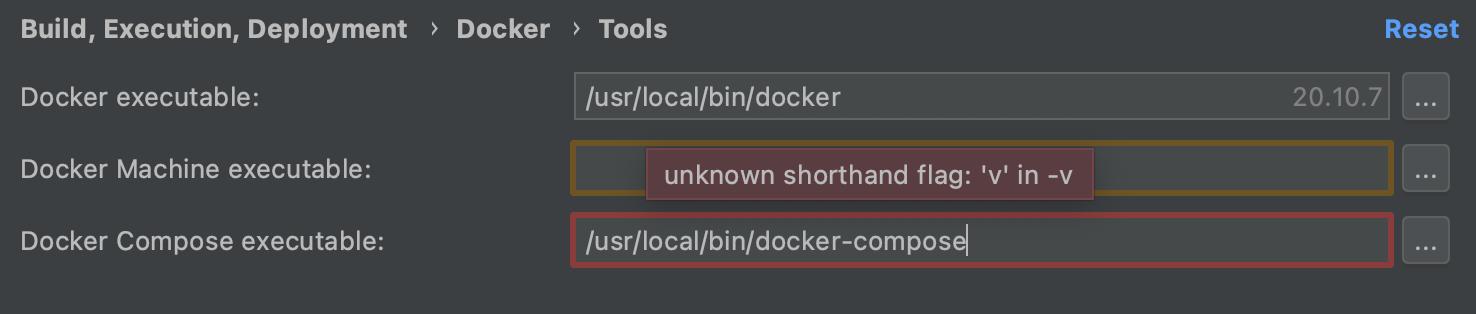
Then, when I go to add a new Python interpreter of type Docker Compose, I get parse errors from my docker-compose file. It seems like it thinks the file is using 2.x syntax and is confused by the new syntax options.

Error while parsing "/Users/_______/projects/________/docker-compose.yml": Cannot deserialize value of type 'java.lang.String' from Object value (token 'JsonToken.START_OBJECT') at [Source: UNKNOWN; line -1; column: -1] (through reference chain: java.util.LinkedHashMap["x-service-defaults"]->com.intellij.docker.compose.configuration.beans.v1.DockerComposeServiceV1["build"])
A stripped down version of the docker-compose file which still has this error is below:
version: '3.4'

x-service-defaults:
  &service-defaults
  build:
    context: .
    dockerfile: Dockerfile
services:
  core:
    <<: *service-defaults
    command: /bin/bash -c "python /ci/healthcheck.py && python manage.py runserver 0.0.0.0:8000"
    volumes:
      - ./ci/:/ci
      - static:/usr/src/app/static

  postgres:
    image: postgres:12.6
    volumes:
      - .pgdata/:/var/lib/postgresql/data
      - ./docker-postgresql-multiple-databases:/docker-entrypoint-initdb.d
    environment:
      - POSTGRES_USER=postgres
      - POSTGRES_PASSWORD=postgres

volumes:
  static:
The error seems to suggest that it doesn't understand the fact that the build property in x-service-defaults is an object rather than a string, which is 3.x syntax.
Even worse, if I try modifying the docker-compose.yml to change the aforementioned build property to just the string '.', then I don't get an error, but the list of services is wrong.
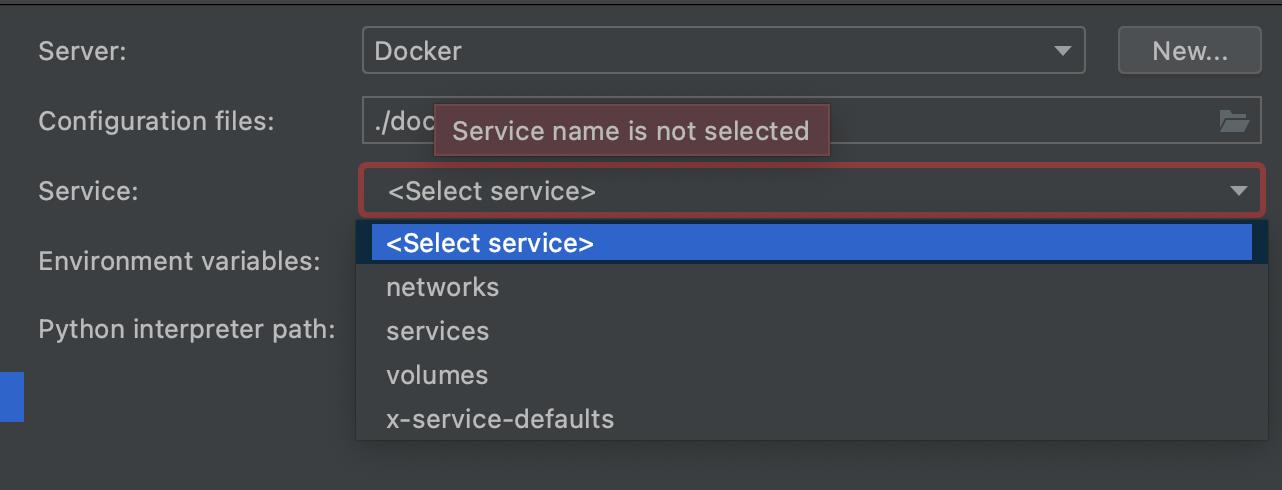
I expect to be given the options of core or postgres, since those are the options listed under services but instead it lists all the top level options: networks, services, volumes, and x-service-defaults.
It's worth noting that if I run docker-compose from the terminal, then it parses the file fine and runs my containers exactly like I expect.
Versions
I installed PyCharm from the JetBrains website, and it assures me that it has no updates. It's on version 2021.1.3, build #PY-211.7628.24.
I installed Docker Desktop for Mac using the Homebrew Docker Cask (and not using any of the formulae). It also says no new updates. It's version 3.5.2 (66501), which means Docker Engine 20.10.7 and Compose version v2.0.0-beta.6 (which is also what docker-compose --version reports).
Answers
It turns out that the answer is that PyCharm does not currently support docker-compose version 2, because it is still in beta. I simply should still be using docker-compose version 1.29.2.
As for why I was using docker-compose version 2, apparently the Docker cask on Homebrew defaults to enabling the "Use Docker Compose V2" Experimental Feature. I was able to disable this in my Docker Desktop settings.

云原生社区为您提供最前沿的新闻资讯和知识内容
更多推荐
 0
0 0
0- 0


 已为社区贡献35528条内容

所有评论(0)