Correct way to use Kotlin with Command Line and VS Code
Answer a question
I have a file hello.kt which I'm editing in VSCode. When I tried a simple Hello World:
fun main() {
    println("Hello, World!");
}
and compiled the file with kotlinc hello.kt followed by java HelloKt, the program worked fine.
However, when I change my file to:
fun main() {
    val c = sum(2, 3);
    println("The sum of 2 and 3 is $c");
}
fun sum(x: Int, y: Int): Int {
    return x + y;
}
and run the same commands, I get an error.
        at HelloKt.main(hello.kt:4)
        at HelloKt.main(hello.kt)
Caused by: java.lang.ClassNotFoundException: kotlin.jvm.internal.Intrinsics
        at java.base/jdk.internal.loader.BuiltinClassLoader.loadClass(BuiltinClassLoader.java:636)
        at java.base/jdk.internal.loader.ClassLoaders$AppClassLoader.loadClass(ClassLoaders.java:182)
        at java.base/java.lang.ClassLoader.loadClass(ClassLoader.java:519)
        ... 2 more
The official Kotlin documentation suggests installing a full fledged IDE as the first step of learning Kotlin, but what do I need to do if I want to write Kotlin programs (or even full-fledged Kotlin projects) in VSCode?
I am running Kotlin on macOS Catalina, after running brew install kotlin . I have Java installed correctly (i.e. on the path, with $JAVA_HOME defined and everything).
Answers
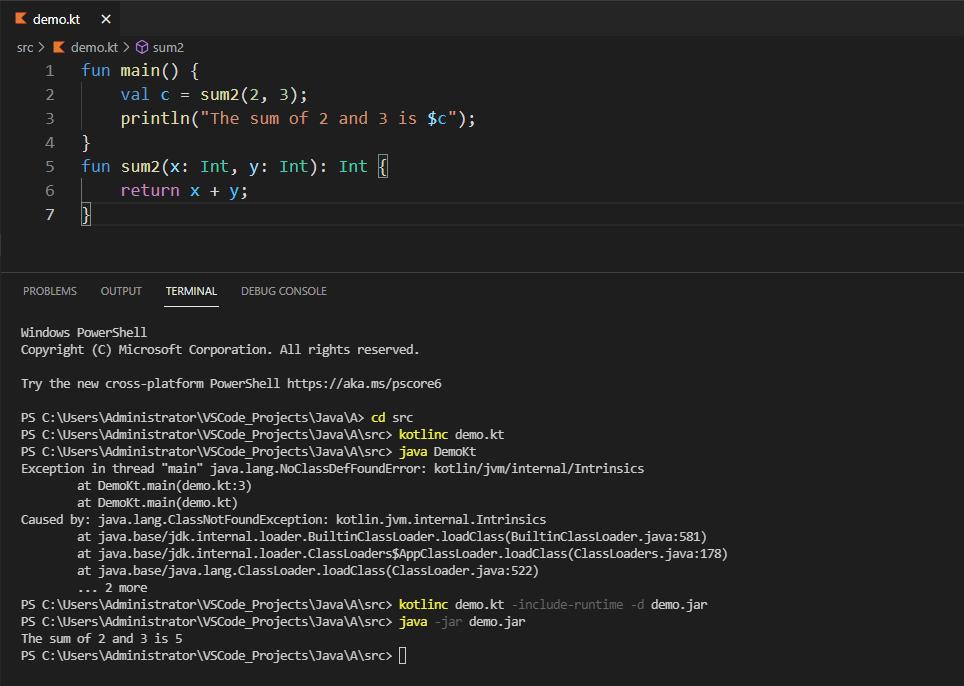
The default command for Kotlin is
kotlinc hello.kt -include-runtime -d hello.jar
java -jar hello.jar
Run with above commands, you will get the right result:

开发云社区提供前沿行业资讯和优质的学习知识,同时提供优质稳定、价格优惠的云主机、数据库、网络、云储存等云服务产品
更多推荐
 0
0 0
0- 0


 已为社区贡献4438条内容

所有评论(0)