Python package installs globally but fails within virtual environment
Answer a question
I am new to Python and struggling to understand the different ways to install packages. I am on MacOS Catalina.
I tried installing the Python package CytoPy (https://github.com/burtonrj/CytoPy) in the terminal:
pip install cytopy
This installs fine. I create a file test.py:
from cytopy.data.setup import global_init
print("test")
Which runs fine, i.e. the cytopy package is imported correctly.
I then follow this Getting Started with Python in Visual Studio tutorial here: https://code.visualstudio.com/docs/python/python-tutorial
It says its important to avoid installing packages into a global interpreter environment and instead use a project-specific virtual environment. I create a virtual environment as per the tutorial in the Terminal within Visual Studio Code:
python3 -m venv .venv
source .venv/bin/activate
Now, I attempt to install the package in the virtual environment:
pip install cytopy
And I end up with a huge number of errors:
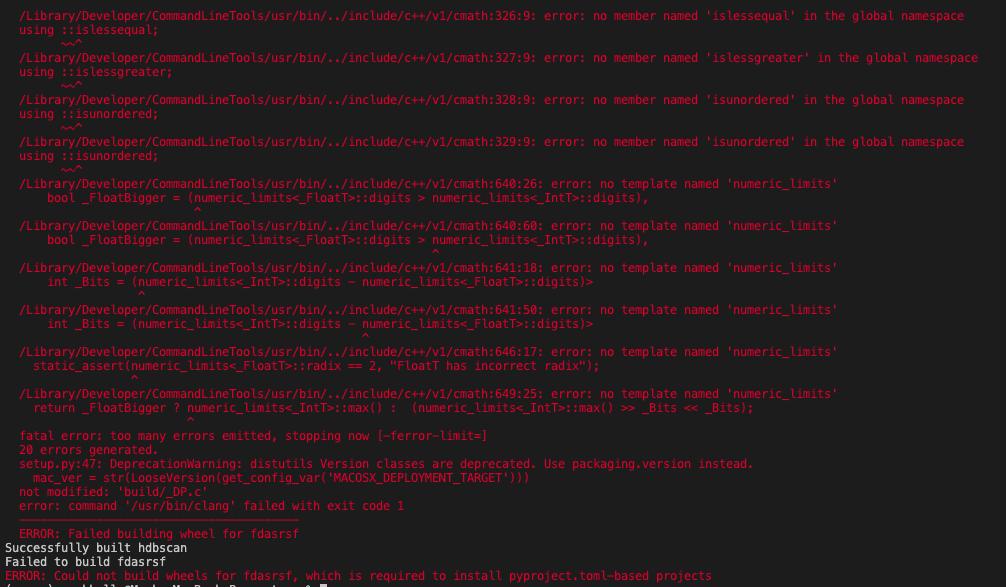
The main error is:
 ERROR: Failed building wheel for fdasrsf
 Successfully built hdbscan
 Failed to build fdasrsf
 ERROR: Could not build wheels for fdasrsf, which is required to install
 pyproject.toml-based projects
Why does it install globally, but not within the virtual environment via the terminal in Visual Studio Code?
EDIT I used pip3 as suggested. I still get the same error. Here are more logs of the errors:
                                          _Nonnull
/Library/Developer/CommandLineTools/SDKs/MacOSX.sdk/usr/include/signal.h:83:53: warning: pointer is missing a nullability type specifier (_Nonnull, _Nullable, or _Null_unspecified) [-Wnullability-completeness]
int     pthread_sigmask(int, const sigset_t *, sigset_t *) __DARWIN_ALIAS(pthread_sigmask);
                                                        ^
/Library/Developer/CommandLineTools/SDKs/MacOSX.sdk/usr/include/signal.h:83:53: note: insert '_Nullable' if the pointer may be null
int     pthread_sigmask(int, const sigset_t *, sigset_t *) __DARWIN_ALIAS(pthread_sigmask);
                                                        ^
                                                         _Nullable
/Library/Developer/CommandLineTools/SDKs/MacOSX.sdk/usr/include/signal.h:83:53: note: insert '_Nonnull' if the pointer should never be null
int     pthread_sigmask(int, const sigset_t *, sigset_t *) __DARWIN_ALIAS(pthread_sigmask);
                                                        ^
                                                         _Nonnull
/Library/Developer/CommandLineTools/SDKs/MacOSX.sdk/usr/include/signal.h:84:43: warning: pointer is missing a nullability type specifier (_Nonnull, _Nullable, or _Null_unspecified) [-Wnullability-completeness]
int     sigaction(int, const struct sigaction * __restrict,
                                              ^
/Library/Developer/CommandLineTools/SDKs/MacOSX.sdk/usr/include/signal.h:84:43: note: insert '_Nullable' if the pointer may be null
int     sigaction(int, const struct sigaction * __restrict,
                                              ^
                                                _Nullable
/Library/Developer/CommandLineTools/SDKs/MacOSX.sdk/usr/include/signal.h:84:43: note: insert '_Nonnull' if the pointer should never be null
int     sigaction(int, const struct sigaction * __restrict,
                                              ^
                                                _Nonnull
/Library/Developer/CommandLineTools/SDKs/MacOSX.sdk/usr/include/signal.h:85:23: warning: pointer is missing a nullability type specifier (_Nonnull, _Nullable, or _Null_unspecified) [-Wnullability-completeness]
            struct sigaction * __restrict);
                             ^
/Library/Developer/CommandLineTools/SDKs/MacOSX.sdk/usr/include/signal.h:85:23: note: insert '_Nullable' if the pointer may be null
            struct sigaction * __restrict);
                             ^
                               _Nullable
/Library/Developer/CommandLineTools/SDKs/MacOSX.sdk/usr/include/signal.h:85:23: note: insert '_Nonnull' if the pointer should never be null
            struct sigaction * __restrict);
                             ^
                               _Nonnull
/Library/Developer/CommandLineTools/SDKs/MacOSX.sdk/usr/include/signal.h:86:24: warning: pointer is missing a nullability type specifier (_Nonnull, _Nullable, or _Null_unspecified) [-Wnullability-completeness]
int     sigaddset(sigset_t *, int);
                           ^
/Library/Developer/CommandLineTools/SDKs/MacOSX.sdk/usr/include/signal.h:86:24: note: insert '_Nullable' if the pointer may be null
int     sigaddset(sigset_t *, int);
                           ^
                            _Nullable
/Library/Developer/CommandLineTools/SDKs/MacOSX.sdk/usr/include/signal.h:86:24: note: insert '_Nonnull' if the pointer should never be null
int     sigaddset(sigset_t *, int);
                           ^
                            _Nonnull
/Library/Developer/CommandLineTools/SDKs/MacOSX.sdk/usr/include/signal.h:87:31: warning: pointer is missing a nullability type specifier (_Nonnull, _Nullable, or _Null_unspecified) [-Wnullability-completeness]
int     sigaltstack(const stack_t * __restrict, stack_t * __restrict)  __DARWIN_ALIAS(sigaltstack) __WATCHOS_PROHIBITED __TVOS_PROHIBITED;
                                  ^
/Library/Developer/CommandLineTools/SDKs/MacOSX.sdk/usr/include/signal.h:87:31: note: insert '_Nullable' if the pointer may be null
int     sigaltstack(const stack_t * __restrict, stack_t * __restrict)  __DARWIN_ALIAS(sigaltstack) __WATCHOS_PROHIBITED __TVOS_PROHIBITED;
                                  ^
                                    _Nullable
/Library/Developer/CommandLineTools/SDKs/MacOSX.sdk/usr/include/signal.h:87:31: note: insert '_Nonnull' if the pointer should never be null
int     sigaltstack(const stack_t * __restrict, stack_t * __restrict)  __DARWIN_ALIAS(sigaltstack) __WATCHOS_PROHIBITED __TVOS_PROHIBITED;
                                  ^
                                    _Nonnull
/Library/Developer/CommandLineTools/SDKs/MacOSX.sdk/usr/include/signal.h:87:53: warning: pointer is missing a nullability type specifier (_Nonnull, _Nullable, or _Null_unspecified) [-Wnullability-completeness]
int     sigaltstack(const stack_t * __restrict, stack_t * __restrict)  __DARWIN_ALIAS(sigaltstack) __WATCHOS_PROHIBITED __TVOS_PROHIBITED;
                                                        ^
/Library/Developer/CommandLineTools/SDKs/MacOSX.sdk/usr/include/signal.h:87:53: note: insert '_Nullable' if the pointer may be null
int     sigaltstack(const stack_t * __restrict, stack_t * __restrict)  __DARWIN_ALIAS(sigaltstack) __WATCHOS_PROHIBITED __TVOS_PROHIBITED;
                                                        ^
                                                          _Nullable
/Library/Developer/CommandLineTools/SDKs/MacOSX.sdk/usr/include/signal.h:87:53: note: insert '_Nonnull' if the pointer should never be null
int     sigaltstack(const stack_t * __restrict, stack_t * __restrict)  __DARWIN_ALIAS(sigaltstack) __WATCHOS_PROHIBITED __TVOS_PROHIBITED;
                                                        ^
                                                          _Nonnull
/Library/Developer/CommandLineTools/SDKs/MacOSX.sdk/usr/include/signal.h:88:24: warning: pointer is missing a nullability type specifier (_Nonnull, _Nullable, or _Null_unspecified) [-Wnullability-completeness]
int     sigdelset(sigset_t *, int);
                           ^
/Library/Developer/CommandLineTools/SDKs/MacOSX.sdk/usr/include/signal.h:88:24: note: insert '_Nullable' if the pointer may be null
int     sigdelset(sigset_t *, int);
                           ^
                            _Nullable
/Library/Developer/CommandLineTools/SDKs/MacOSX.sdk/usr/include/signal.h:88:24: note: insert '_Nonnull' if the pointer should never be null
int     sigdelset(sigset_t *, int);
                           ^
                            _Nonnull
/Library/Developer/CommandLineTools/SDKs/MacOSX.sdk/usr/include/signal.h:89:26: warning: pointer is missing a nullability type specifier (_Nonnull, _Nullable, or _Null_unspecified) [-Wnullability-completeness]
int     sigemptyset(sigset_t *);
                             ^
/Library/Developer/CommandLineTools/SDKs/MacOSX.sdk/usr/include/signal.h:89:26: note: insert '_Nullable' if the pointer may be null
int     sigemptyset(sigset_t *);
                             ^
                              _Nullable
/Library/Developer/CommandLineTools/SDKs/MacOSX.sdk/usr/include/signal.h:89:26: note: insert '_Nonnull' if the pointer should never be null
int     sigemptyset(sigset_t *);
                             ^
                              _Nonnull
/Library/Developer/CommandLineTools/SDKs/MacOSX.sdk/usr/include/signal.h:90:25: warning: pointer is missing a nullability type specifier (_Nonnull, _Nullable, or _Null_unspecified) [-Wnullability-completeness]
int     sigfillset(sigset_t *);
                            ^
/Library/Developer/CommandLineTools/SDKs/MacOSX.sdk/usr/include/signal.h:90:25: note: insert '_Nullable' if the pointer may be null
int     sigfillset(sigset_t *);
                            ^
                             _Nullable
/Library/Developer/CommandLineTools/SDKs/MacOSX.sdk/usr/include/signal.h:90:25: note: insert '_Nonnull' if the pointer should never be null
int     sigfillset(sigset_t *);
                            ^
                             _Nonnull
/Library/Developer/CommandLineTools/SDKs/MacOSX.sdk/usr/include/signal.h:94:32: warning: pointer is missing a nullability type specifier (_Nonnull, _Nullable, or _Null_unspecified) [-Wnullability-completeness]
int     sigismember(const sigset_t *, int);
                                   ^
/Library/Developer/CommandLineTools/SDKs/MacOSX.sdk/usr/include/signal.h:94:32: note: insert '_Nullable' if the pointer may be null
int     sigismember(const sigset_t *, int);
                                   ^
                                    _Nullable
/Library/Developer/CommandLineTools/SDKs/MacOSX.sdk/usr/include/signal.h:94:32: note: insert '_Nonnull' if the pointer should never be null
int     sigismember(const sigset_t *, int);
                                   ^
                                    _Nonnull
/Library/Developer/CommandLineTools/SDKs/MacOSX.sdk/usr/include/signal.h:96:25: warning: pointer is missing a nullability type specifier (_Nonnull, _Nullable, or _Null_unspecified) [-Wnullability-completeness]
int     sigpending(sigset_t *);
                            ^
/Library/Developer/CommandLineTools/SDKs/MacOSX.sdk/usr/include/signal.h:96:25: note: insert '_Nullable' if the pointer may be null
int     sigpending(sigset_t *);
                            ^
                             _Nullable
/Library/Developer/CommandLineTools/SDKs/MacOSX.sdk/usr/include/signal.h:96:25: note: insert '_Nonnull' if the pointer should never be null
int     sigpending(sigset_t *);
                            ^
                             _Nonnull
/Library/Developer/CommandLineTools/SDKs/MacOSX.sdk/usr/include/signal.h:97:37: warning: pointer is missing a nullability type specifier (_Nonnull, _Nullable, or _Null_unspecified) [-Wnullability-completeness]
int     sigprocmask(int, const sigset_t * __restrict, sigset_t * __restrict);
                                        ^
/Library/Developer/CommandLineTools/SDKs/MacOSX.sdk/usr/include/signal.h:97:37: note: insert '_Nullable' if the pointer may be null
int     sigprocmask(int, const sigset_t * __restrict, sigset_t * __restrict);
                                        ^
                                          _Nullable
/Library/Developer/CommandLineTools/SDKs/MacOSX.sdk/usr/include/signal.h:97:37: note: insert '_Nonnull' if the pointer should never be null
int     sigprocmask(int, const sigset_t * __restrict, sigset_t * __restrict);
                                        ^
                                          _Nonnull
/Library/Developer/CommandLineTools/SDKs/MacOSX.sdk/usr/include/signal.h:97:60: warning: pointer is missing a nullability type specifier (_Nonnull, _Nullable, or _Null_unspecified) [-Wnullability-completeness]
int     sigprocmask(int, const sigset_t * __restrict, sigset_t * __restrict);
                                                               ^
/Library/Developer/CommandLineTools/SDKs/MacOSX.sdk/usr/include/signal.h:97:60: note: insert '_Nullable' if the pointer may be null
int     sigprocmask(int, const sigset_t * __restrict, sigset_t * __restrict);
                                                               ^
                                                                 _Nullable
/Library/Developer/CommandLineTools/SDKs/MacOSX.sdk/usr/include/signal.h:97:60: note: insert '_Nonnull' if the pointer should never be null
int     sigprocmask(int, const sigset_t * __restrict, sigset_t * __restrict);
                                                               ^
                                                                 _Nonnull
/Library/Developer/CommandLineTools/SDKs/MacOSX.sdk/usr/include/signal.h:100:31: warning: pointer is missing a nullability type specifier (_Nonnull, _Nullable, or _Null_unspecified) [-Wnullability-completeness]
int     sigsuspend(const sigset_t *) __DARWIN_ALIAS_C(sigsuspend);
                                  ^
/Library/Developer/CommandLineTools/SDKs/MacOSX.sdk/usr/include/signal.h:100:31: note: insert '_Nullable' if the pointer may be null
int     sigsuspend(const sigset_t *) __DARWIN_ALIAS_C(sigsuspend);
                                  ^
                                   _Nullable
/Library/Developer/CommandLineTools/SDKs/MacOSX.sdk/usr/include/signal.h:100:31: note: insert '_Nonnull' if the pointer should never be null
int     sigsuspend(const sigset_t *) __DARWIN_ALIAS_C(sigsuspend);
                                  ^
                                   _Nonnull
/Library/Developer/CommandLineTools/SDKs/MacOSX.sdk/usr/include/signal.h:101:28: warning: pointer is missing a nullability type specifier (_Nonnull, _Nullable, or _Null_unspecified) [-Wnullability-completeness]
int     sigwait(const sigset_t * __restrict, int * __restrict) __DARWIN_ALIAS_C(sigwait);
                               ^
/Library/Developer/CommandLineTools/SDKs/MacOSX.sdk/usr/include/signal.h:101:28: note: insert '_Nullable' if the pointer may be null
int     sigwait(const sigset_t * __restrict, int * __restrict) __DARWIN_ALIAS_C(sigwait);
                               ^
                                 _Nullable
/Library/Developer/CommandLineTools/SDKs/MacOSX.sdk/usr/include/signal.h:101:28: note: insert '_Nonnull' if the pointer should never be null
int     sigwait(const sigset_t * __restrict, int * __restrict) __DARWIN_ALIAS_C(sigwait);
                               ^
                                 _Nonnull
/Library/Developer/CommandLineTools/SDKs/MacOSX.sdk/usr/include/signal.h:101:46: warning: pointer is missing a nullability type specifier (_Nonnull, _Nullable, or _Null_unspecified) [-Wnullability-completeness]
int     sigwait(const sigset_t * __restrict, int * __restrict) __DARWIN_ALIAS_C(sigwait);
                                                 ^
/Library/Developer/CommandLineTools/SDKs/MacOSX.sdk/usr/include/signal.h:101:46: note: insert '_Nullable' if the pointer may be null
int     sigwait(const sigset_t * __restrict, int * __restrict) __DARWIN_ALIAS_C(sigwait);
                                                 ^
                                                   _Nullable
/Library/Developer/CommandLineTools/SDKs/MacOSX.sdk/usr/include/signal.h:101:46: note: insert '_Nonnull' if the pointer should never be null
int     sigwait(const sigset_t * __restrict, int * __restrict) __DARWIN_ALIAS_C(sigwait);
                                                 ^
                                                   _Nonnull
/Library/Developer/CommandLineTools/SDKs/MacOSX.sdk/usr/include/signal.h:103:39: warning: pointer is missing a nullability type specifier (_Nonnull, _Nullable, or _Null_unspecified) [-Wnullability-completeness]
void    psignal(unsigned int, const char *);
                                         ^
/Library/Developer/CommandLineTools/SDKs/MacOSX.sdk/usr/include/signal.h:103:39: note: insert '_Nullable' if the pointer may be null
void    psignal(unsigned int, const char *);
                                         ^
                                          _Nullable
/Library/Developer/CommandLineTools/SDKs/MacOSX.sdk/usr/include/signal.h:103:39: note: insert '_Nonnull' if the pointer should never be null
void    psignal(unsigned int, const char *);
                                         ^
                                          _Nonnull
/Library/Developer/CommandLineTools/SDKs/MacOSX.sdk/usr/include/signal.h:106:31: warning: pointer is missing a nullability type specifier (_Nonnull, _Nullable, or _Null_unspecified) [-Wnullability-completeness]
int     sigvec(int, struct sigvec *, struct sigvec *);
                                  ^
/Library/Developer/CommandLineTools/SDKs/MacOSX.sdk/usr/include/signal.h:106:31: note: insert '_Nullable' if the pointer may be null
int     sigvec(int, struct sigvec *, struct sigvec *);
                                  ^
                                   _Nullable
/Library/Developer/CommandLineTools/SDKs/MacOSX.sdk/usr/include/signal.h:106:31: note: insert '_Nonnull' if the pointer should never be null
int     sigvec(int, struct sigvec *, struct sigvec *);
                                  ^
                                   _Nonnull
/Library/Developer/CommandLineTools/SDKs/MacOSX.sdk/usr/include/signal.h:106:48: warning: pointer is missing a nullability type specifier (_Nonnull, _Nullable, or _Null_unspecified) [-Wnullability-completeness]
int     sigvec(int, struct sigvec *, struct sigvec *);
                                                   ^
/Library/Developer/CommandLineTools/SDKs/MacOSX.sdk/usr/include/signal.h:106:48: note: insert '_Nullable' if the pointer may be null
int     sigvec(int, struct sigvec *, struct sigvec *);
                                                   ^
                                                    _Nullable
/Library/Developer/CommandLineTools/SDKs/MacOSX.sdk/usr/include/signal.h:106:48: note: insert '_Nonnull' if the pointer should never be null
int     sigvec(int, struct sigvec *, struct sigvec *);
                                                   ^
                                                    _Nonnull
220 warnings generated.
clang -bundle -undefined dynamic_lookup -L/usr/local/opt/readline/lib -L/usr/local/opt/readline/lib -L/Users/markkelly/.pyenv/versions/3.8.0/lib -L/usr/local/opt/readline/lib -L/usr/local/opt/readline/lib -L/Users/markkelly/.pyenv/versions/3.8.0/lib build/temp.macosx-10.15-x86_64-3.8/src/DP.o build/temp.macosx-10.15-x86_64-3.8/src/optimum_reparam_N.o -o build/lib.macosx-10.15-x86_64-3.8/optimum_reparam_N.cpython-38-darwin.so
clang -Wno-unused-result -Wsign-compare -Wunreachable-code -DNDEBUG -g -fwrapv -O3 -Wall -I/Library/Developer/CommandLineTools/SDKs/MacOSX.sdk/usr/include -I/Library/Developer/CommandLineTools/SDKs/MacOSX.sdk/usr/include -I/private/var/folders/pg/g0n4w9955m7ff1rsj6b6tpz40000gn/T/pip-build-env-vgswf17a/overlay/lib/python3.8/site-packages/numpy/core/include -I/Users/markkelly/RedMatter/repos/new_version/cytopy/.venv/include -I/Users/markkelly/.pyenv/versions/3.8.0/include/python3.8 -c src/bayesian.cpp -o build/temp.macosx-10.15-x86_64-3.8/src/bayesian.o
In file included from src/bayesian.cpp:1:
In file included from src/armadillo:26:
/Library/Developer/CommandLineTools/usr/bin/../include/c++/v1/cmath:317:9: error: no member named 'signbit' in the global namespace
using ::signbit;
      ~~^
/Library/Developer/CommandLineTools/usr/bin/../include/c++/v1/cmath:318:9: error: no member named 'fpclassify' in the global namespace
using ::fpclassify;
      ~~^
/Library/Developer/CommandLineTools/usr/bin/../include/c++/v1/cmath:319:9: error: no member named 'isfinite' in the global namespace; did you mean 'finite'?
using ::isfinite;
      ~~^
/Library/Developer/CommandLineTools/SDKs/MacOSX.sdk/usr/include/math.h:752:12: note: 'finite' declared here
extern int finite(double)
           ^
In file included from src/bayesian.cpp:1:
In file included from src/armadillo:26:
/Library/Developer/CommandLineTools/usr/bin/../include/c++/v1/cmath:320:9: error: no member named 'isinf' in the global namespace
using ::isinf;
      ~~^
/Library/Developer/CommandLineTools/usr/bin/../include/c++/v1/cmath:321:9: error: no member named 'isnan' in the global namespace
using ::isnan;
      ~~^
/Library/Developer/CommandLineTools/usr/bin/../include/c++/v1/cmath:322:9: error: no member named 'isnormal' in the global namespace
using ::isnormal;
      ~~^
/Library/Developer/CommandLineTools/usr/bin/../include/c++/v1/cmath:323:9: error: no member named 'isgreater' in the global namespace
using ::isgreater;
      ~~^
/Library/Developer/CommandLineTools/usr/bin/../include/c++/v1/cmath:324:9: error: no member named 'isgreaterequal' in the global namespace
using ::isgreaterequal;
      ~~^
/Library/Developer/CommandLineTools/usr/bin/../include/c++/v1/cmath:325:9: error: no member named 'isless' in the global namespace
using ::isless;
      ~~^
/Library/Developer/CommandLineTools/usr/bin/../include/c++/v1/cmath:326:9: error: no member named 'islessequal' in the global namespace
using ::islessequal;
      ~~^
/Library/Developer/CommandLineTools/usr/bin/../include/c++/v1/cmath:327:9: error: no member named 'islessgreater' in the global namespace
using ::islessgreater;
      ~~^
/Library/Developer/CommandLineTools/usr/bin/../include/c++/v1/cmath:328:9: error: no member named 'isunordered' in the global namespace
using ::isunordered;
      ~~^
/Library/Developer/CommandLineTools/usr/bin/../include/c++/v1/cmath:329:9: error: no member named 'isunordered' in the global namespace
using ::isunordered;
      ~~^
/Library/Developer/CommandLineTools/usr/bin/../include/c++/v1/cmath:640:26: error: no template named 'numeric_limits'
    bool _FloatBigger = (numeric_limits<_FloatT>::digits > numeric_limits<_IntT>::digits),
                         ^
/Library/Developer/CommandLineTools/usr/bin/../include/c++/v1/cmath:640:60: error: no template named 'numeric_limits'
    bool _FloatBigger = (numeric_limits<_FloatT>::digits > numeric_limits<_IntT>::digits),
                                                           ^
/Library/Developer/CommandLineTools/usr/bin/../include/c++/v1/cmath:641:18: error: no template named 'numeric_limits'
    int _Bits = (numeric_limits<_IntT>::digits - numeric_limits<_FloatT>::digits)>
                 ^
/Library/Developer/CommandLineTools/usr/bin/../include/c++/v1/cmath:641:50: error: no template named 'numeric_limits'
    int _Bits = (numeric_limits<_IntT>::digits - numeric_limits<_FloatT>::digits)>
                                                 ^
/Library/Developer/CommandLineTools/usr/bin/../include/c++/v1/cmath:646:17: error: no template named 'numeric_limits'
  static_assert(numeric_limits<_FloatT>::radix == 2, "FloatT has incorrect radix");
                ^
/Library/Developer/CommandLineTools/usr/bin/../include/c++/v1/cmath:649:25: error: no template named 'numeric_limits'
  return _FloatBigger ? numeric_limits<_IntT>::max() :  (numeric_limits<_IntT>::max() >> _Bits << _Bits);
                        ^
fatal error: too many errors emitted, stopping now [-ferror-limit=]
20 errors generated.
setup.py:47: DeprecationWarning: distutils Version classes are deprecated. Use packaging.version instead.
  mac_ver = str(LooseVersion(get_config_var('MACOSX_DEPLOYMENT_TARGET')))
not modified: 'build/_DP.c'
It seems to be something to do with CommandLineTools
EDIT
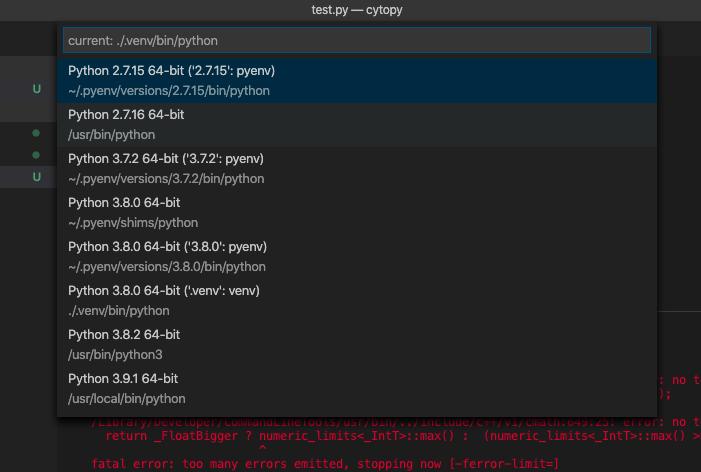
To follow on from a comment below by Alan, when I go to Visual Studio Code > Command Palette > Python: Select Interpreter, I see this:
EDIT Following @Phoenix answer, I downloaded and installed conda. I then created a virtual environment:
conda create --name myEnv python=3.8
I then activate:
conda activate myEnv
It activates as I see (myEnv). I then do:
which python
Which outputs:
/usr/local/bin/python
I then do (within myEnv):
python --version
Which outputs:
Python 3.9.9
When I should expect 3.8.0. Anyway, I proceed and run (within myEnv):
pip install numpy==1.19
Which responds with yet another error:
ERROR: Could not find a version that satisfies the requirement numpy==1.19 (from versions: 1.3.0, 1.4.1, 1.5.0, 1.5.1, 1.6.0, 1.6.1, 1.6.2, 1.7.0, 1.7.1, 1.7.2, 1.8.0, 1.8.1, 1.8.2, 1.9.0, 1.9.1, 1.9.2, 1.9.3, 1.10.0.post2, 1.10.1, 1.10.2, 1.10.4, 1.11.0, 1.11.1, 1.11.2, 1.11.3, 1.12.0, 1.12.1, 1.13.0rc1, 1.13.0rc2, 1.13.0, 1.13.1, 1.13.3, 1.14.0rc1, 1.14.0, 1.14.1, 1.14.2, 1.14.3, 1.14.4, 1.14.5, 1.14.6, 1.15.0rc1, 1.15.0rc2, 1.15.0, 1.15.1, 1.15.2, 1.15.3, 1.15.4, 1.16.0rc1, 1.16.0rc2, 1.16.0, 1.16.1, 1.16.2, 1.16.3, 1.16.4, 1.16.5, 1.16.6)
Of course, numpy 1.19 does exist.
It is always this extraordinarily hard to set up a virtual environment with python?
Answers
So the first thing I want to note is that the documentation of the package you want to use, CytoPy, has a dedicated page to installing and configuring CytoPy. This page can be accessed here.
This page lists the various steps that must be followed in order, including installing MongoDB, installing NumPy, and other steps. The installation process is very specific and detailed, so I want to highlight a few things which are important. Firstly, you must make sure to use the proper version of Python, namely 3.8. Further, you want to have the correct version of NumPy, namely 1.19.
Further, CytoPy strongly recommends creating your environments using Conda instead of venv, which in general is very good advice when using tools which contain code from non-Python languages (which includes many data and scientific computing tools which contain modules from compiled languages such as C or C++). For more differences on Conda vs venv see this article.
In addition, while this is not strictly necessary, if you plan on doing a lot of scientific computing and data-based computing in the future or you plan on installing many different packages into the environment you are using for this project, I would strongly recommend looking into Mamba, which is a faster, improved version of Conda, although this may not be necessary for this project depending on your specific intentions.
On a more general note, while there is of course nothing wrong with following general Python tutorials such as the one you mentioned from VSCode, you are often better off looking into the more specific installation processes/recommendations from the specific packages you want to use and the recommended "best practices" for the area of computing you are in. In fact, this is actually mentioned in the VSCode tutorial here:
Data Science: If your primary purpose for using Python is Data Science, then you might consider a download from Anaconda. Anaconda provides not just a Python interpreter, but many useful libraries and tools for data science.
Edit: Edited answer in response to your update involving your issues with conda.
In regards to the following:
which pythonWhich outputs:/usr/local/bin/python
This here is the root of your issue, if python still points to that python interpreter even when you have activated your conda environment, it is likely a problem with your python aliasing/PATH.
Unfortunately your trouble is likely the result of a known bug in conda: https://github.com/conda/conda/issues/9392
From reading through the Github webpage linked above there are two potential workarounds I recommend (credit to the developers on this webpage for these workarounds):
Workaround 1:
-
Open a new terminal session. If you are currently in a conda base environment, as in you see
(base)to the left of your shell session, then skip to step 2. If you did not see(base)typeconda activateto activate the conda base environment. -
Type
conda activate myEnvand press enter to activate themyEnvenvironment. -
Type
which pythonand press enter, noting that you are using the wrong python interpreter. -
Type
conda deactivateto deactivate the conda environmentmyEnv -
Type
conda deactivateto deactivate the base conda environment. -
Type
conda activate myEnvto activate the conda environmentmyEnv. -
Type
which pythonandpython -Vto verify you are using the correct python interpreter and version.
If this does not work, exit the shell session, open a new one and try the following:
Workaround 2
This workaround is a bit shorter but I am less confident in it.
-
Open a new terminal shell and activate conda base environment if it is not already activated.
-
Create a new environment with
conda create --name myEnv2 python=3.8 numpy==1.19(you may have to answer yes to a prompt to install numpy) -
Check
which pythonandpython -Vto see if this works. If this does not work, try using workaround 1 withmyEnv2instead ofmyEnv.
In the future, before using your conda environments make sure to check what the current python is and if it is not correct use whichever workaround worked for you.
If none of these work, you can examine the other workarounds discussed here but I believe at least 1 of the above should work: https://github.com/conda/conda/issues/9392
I totally understand your frustration with creating your environment. Creating and managing python virtual environments can be difficult (ironically this was what conda was supposed to solve), but it seems that your case is particularly complicated due to an unfixed bug in conda.

开发云社区提供前沿行业资讯和优质的学习知识,同时提供优质稳定、价格优惠的云主机、数据库、网络、云储存等云服务产品
更多推荐
 0
0 0
0- 0


 已为社区贡献4438条内容

所有评论(0)