VS Code editing .ipynb file: How to collapse notebook cells?
Answer a question
I'm editing an .ipynb file in VS Code using the Jupyter Notebook extension. I can't seem to figure out how to collapse (or expand) cells.
Can someone explain to me how to do this (using hotkeys or not using hotkeys), or give ideas for what I might be doing wrong?
I tried each of the hotkeys shown below, under three sets of conditions: 1. with the blue vertical bar on the left-hand side of my cell input selected, 2. with the blue vertical bar on the left-hand side of my cell output selected, 3. with my cursor in my cell input.

Answers
Currently, the use of this function is not supported in Jupyter of VS Code, you could refer to this link: Jupyter notebook cell code folding and output view expanding request.
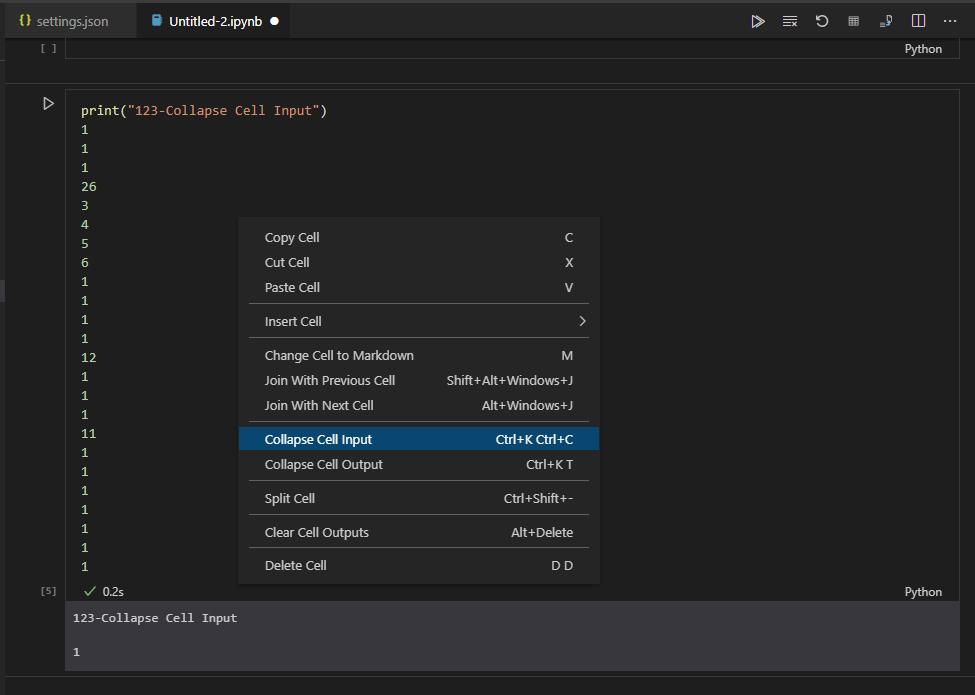
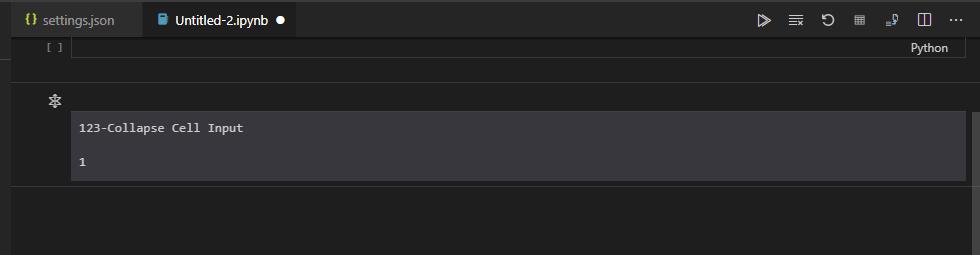
Also, please try to use "Visual Studio Code Insiders", right-click in the cell of Jupyter, and select "Collapse Cell Input" or "Collapse Cell Output":
before:
after:

开发云社区提供前沿行业资讯和优质的学习知识,同时提供优质稳定、价格优惠的云主机、数据库、网络、云储存等云服务产品
更多推荐
 0
0 0
0- 0


 已为社区贡献4439条内容

所有评论(0)