

This article is reproduced from the official account StreamCloudNative, author Xue Song, who works in the new world software as a senior software engineer.
Editor: chicken chop, StreamNative.
About Apache Pulsar
Apache Pulsar is a top-level project of the Apache Software Foundation. It is a native distributed message flow platform for the next generation cloud. It integrates message, storage and lightweight functional computing. It adopts a separate architecture design of computing and storage, supports multi tenant, persistent storage, multi machine room cross regional data replication, and has strong consistency, high throughput Stream data storage features such as low latency and high scalability.
At present, many large Internet and traditional industry companies at home and abroad have adopted Apache Pulsar. The cases are distributed in artificial intelligence, finance, telecom operators, live and short video, Internet of things, retail and e-commerce, online education and other industries, such as American cable TV network giants Comcast, Yahoo Tencent, China Telecom, China Mobile, BIGO, VIPKID, etc.
Background introduction
As a cloud native distributed messaging system, Apache Pulsar includes Zookeeper, bookie, broker, functions worker, proxy and other components, and all components are deployed on multiple hosts in a distributed manner. Therefore, the log files of each component are scattered on multiple hosts. When there is a problem with the components, due to the scattered logs, If you want to check whether each service has error information, you need to check it one by one. It is troublesome. Usually, we can obtain the desired information by directly issuing grep, awk and other commands to the log file. However, with the increase of the volume of applications and services, the number of supporting nodes also increases, so the traditional methods expose many problems, such as low efficiency, how to archive if the log volume is too large, what to do if the text search is too slow, how to multi-dimensional query and so on. Therefore, we hope that through the aggregation and monitoring of logs, we can quickly find the error information of Pulsar services and conduct rapid troubleshooting, so as to make the operation and maintenance more purposeful, targeted and direct.
In order to solve the problem of log retrieval, our team considers using a centralized log collection system to uniformly collect, manage and access logs on all nodes of Pulsar.
A complete centralized log system needs to include the following main features:
- Collection - can collect log data from multiple sources;
- Transmission - able to stably transmit log data to the central system;
- Storage - how to store log data;
- Analysis - UI analysis can be supported;
- Warning - provides error reporting and monitoring mechanisms
ELK provides a complete set of solutions, all of which are open source software. They are used together, perfectly connected, and efficiently meet the applications in many occasions. It is a mainstream log system at present. Our company has a self-developed big data management platform. ELK is deployed and managed through the big data management platform, and ELK has been used in the production system to provide support services for multiple business systems. ELK is the abbreviation of three open source software, namely Elasticsearch, Logstash and Kibana. They are all open source software. The latest version has been renamed Elastic Stack, and the Beats project has been added, including Filebeat. It is a lightweight log collection and processing tool (Agent). Filebeat occupies less resources, It is suitable for collecting logs on each server and transmitting them to Logstash.
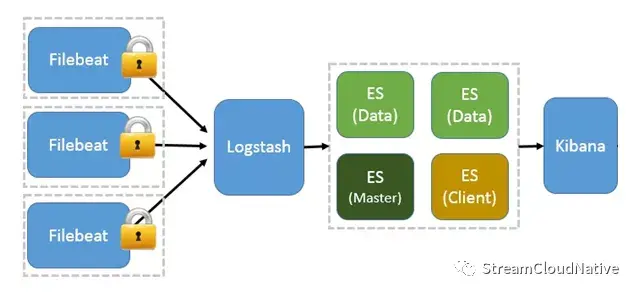
As can be seen from the above figure, if Pulsar uses this log collection mode, there are two problems:
- The host with Pulsar service deployed must deploy a set of Filebeat services;
- The Pulsar service log must be placed on the disk once in the form of a file, which occupies the IO of the host disk.
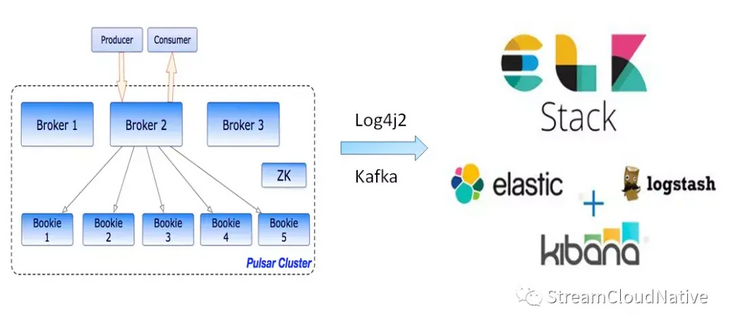
For this reason, we consider that Apache Pulsar implements fast log retrieval based on Log4j2+Kafka+ELK. Log4j2 supports the function of sending logs to Kafka by default. By using Kafka's own Log4j2Appender and configuring it in the log4j2 configuration file, we can send the logs generated by log4j2 to Kafka in real time.
As shown in the figure below:
Implementation process
Taking pulsar version 2.6.2 as an example, the following describes the detailed implementation process of Apache Pulsar's solution for fast log retrieval based on Log4j2+Kafka+ELK.
1, Preparatory work
First, you need to determine the fields used to retrieve logs in Kibana. These fields can be aggregated and queried in multiple dimensions. Then, Elasticsearch divides words according to the retrieved fields and creates an index.
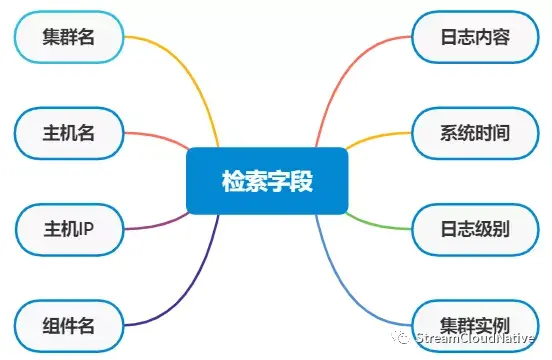
As shown in the figure above, we will create 8 retrieval fields for Pulsar logs, namely: cluster name, host name, host IP, component name, log content, system time, log level and cluster instance.
2, Implementation process
Note: in order to ensure that the structure of Pulsar's native configuration file and script file is not damaged, we implement this scheme by adding new configuration file and script file.
1. Add profile
Add the following two configuration files in the {PULSAR_HOME}/conf Directory:
1)logenv.sh this file transfers the JVM options required when starting the Pulsar component to the Java process of the Pulsar service in a configured manner. The content example is as follows:
KAFKA_CLUSTER=192.168.0.1:9092,192.168.0.2:9092,192.168.0.2:9092
PULSAR_CLUSTER=pulsar_cluster
PULSAR_TOPIC=pulsar_topic
HOST_IP=192.168.0.1
PULSAR_MODULE_INSTANCE_ID=1
The meanings of the above fields are:
- KAFKA_CLUSTER: Kafka broker list address;
- PULSAR_CLUSTER: cluster name of Pulsar;
- PULSAR_TOPIC: topic in Kafka for accessing Pulsar service log;
- HOST_IP: IP of Pulsar host;
- PULSAR_MODULE_INSTANCE_ID: the instance ID of Pulsar service. Multiple Pulsar clusters may be deployed on a host. Clusters are distinguished by instance ID.
2)log4j2-kafka.yaml
The configuration file is from log4j2 Yaml is copied from log4j2 Add the following modifications based on yaml: (Note: in the figure below, log4j2.yaml is on the left and log4j2-kafka.yaml is on the right.)
- Add the Kafka cluster broker list and define the message record format log4j2 written to Kafka. The eight search fields in a message are separated by spaces, and Elasticsearch uses spaces as separators to segment the eight search fields.
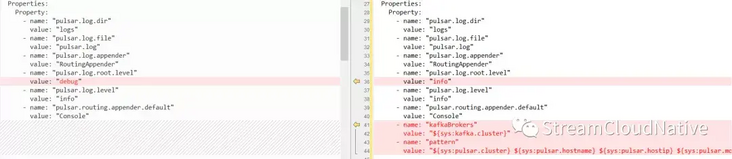
• add kafka Appenders;

• add Failover;

• modify the Root and Logger of Loggers to asynchronous mode;
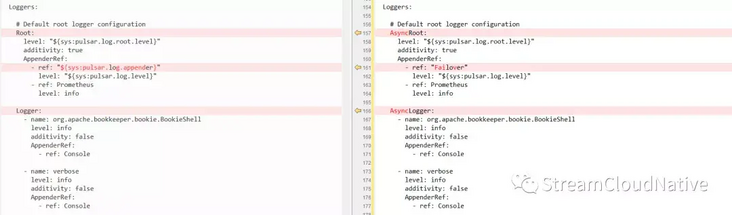
•log4j2-kafka. The complete contents of yaml configuration file are as follows:
#
# Licensed to the Apache Software Foundation (ASF) under one
# or more contributor license agreements.  See the NOTICE file
# distributed with this work for additional information
# regarding copyright ownership.  The ASF licenses this file
# to you under the Apache License, Version 2.0 (the
# "License"); you may not use this file except in compliance
# with the License.  You may obtain a copy of the License at
#
#   http://www.apache.org/licenses/LICENSE-2.0
#
# Unless required by applicable law or agreed to in writing,
# software distributed under the License is distributed on an
# "AS IS" BASIS, WITHOUT WARRANTIES OR CONDITIONS OF ANY
# KIND, either express or implied.  See the License for the
# specific language governing permissions and limitations
# under the License.
#


Configuration:
  status: INFO
  monitorInterval: 30
  name: pulsar
  packages: io.prometheus.client.log4j2


  Properties:
    Property:
      - name: "pulsar.log.dir"
        value: "logs"
      - name: "pulsar.log.file"
        value: "pulsar.log"
      - name: "pulsar.log.appender"
        value: "RoutingAppender"
      - name: "pulsar.log.root.level"
        value: "info"
      - name: "pulsar.log.level"
        value: "info"
      - name: "pulsar.routing.appender.default"
        value: "Console"
      - name: "kafkaBrokers"
        value: "${sys:kafka.cluster}"
      - name: "pattern"
        value: "${sys:pulsar.cluster} ${sys:pulsar.hostname} ${sys:pulsar.hostip} ${sys:pulsar.module.type} ${sys:pulsar.module.instanceid} %date{yyyy-MM-dd HH:mm:ss.SSS} [%thread] [%c{10}] %level , %msg%n"


  # Example: logger-filter script
  Scripts:
    ScriptFile:
      name: filter.js
      language: JavaScript
      path: ./conf/log4j2-scripts/filter.js
      charset: UTF-8


  Appenders:


    #Kafka
    Kafka:
      name: "pulsar_kafka"
      topic: "${sys:pulsar.topic}"
      ignoreExceptions: "false"
      PatternLayout:
        pattern: "${pattern}"
      Property:
        - name: "bootstrap.servers"
          value: "${kafkaBrokers}"
        - name: "max.block.ms"
          value: "2000"


    # Console
    Console:
      name: Console
      target: SYSTEM_OUT
      PatternLayout:
        Pattern: "%d{HH:mm:ss.SSS} [%t] %-5level %logger{36} - %msg%n"


    Failover:
      name: "Failover"
      primary: "pulsar_kafka"
      retryIntervalSeconds: "600"
      Failovers:
        AppenderRef:
          ref: "RollingFile"


    # Rolling file appender configuration
    RollingFile:
      name: RollingFile
      fileName: "${sys:pulsar.log.dir}/${sys:pulsar.log.file}"
      filePattern: "${sys:pulsar.log.dir}/${sys:pulsar.log.file}-%d{MM-dd-yyyy}-%i.log.gz"
      immediateFlush: false
      PatternLayout:
        Pattern: "%d{HH:mm:ss.SSS} [%t] %-5level %logger{36} - %msg%n"
      Policies:
        TimeBasedTriggeringPolicy:
          interval: 1
          modulate: true
        SizeBasedTriggeringPolicy:
          size: 1 GB
      # Delete file older than 30days
      DefaultRolloverStrategy:
          Delete:
            basePath: ${sys:pulsar.log.dir}
            maxDepth: 2
            IfFileName:
              glob: "*/${sys:pulsar.log.file}*log.gz"
            IfLastModified:
              age: 30d


    Prometheus:
      name: Prometheus


    # Routing
    Routing:
      name: RoutingAppender
      Routes:
        pattern: "$${ctx:function}"
        Route:
          -
            Routing:
              name: InstanceRoutingAppender
              Routes:
                pattern: "$${ctx:instance}"
                Route:
                  -
                    RollingFile:
                      name: "Rolling-${ctx:function}"
                      fileName : "${sys:pulsar.log.dir}/functions/${ctx:function}/${ctx:functionname}-${ctx:instance}.log"
                      filePattern : "${sys:pulsar.log.dir}/functions/${sys:pulsar.log.file}-${ctx:instance}-%d{MM-dd-yyyy}-%i.log.gz"
                      PatternLayout:
                        Pattern: "%d{ABSOLUTE} %level{length=5} [%thread] [instance: %X{instance}] %logger{1} - %msg%n"
                      Policies:
                        TimeBasedTriggeringPolicy:
                          interval: 1
                          modulate: true
                        SizeBasedTriggeringPolicy:
                          size: "20MB"
                        # Trigger every day at midnight that also scan
                        # roll-over strategy that deletes older file
                        CronTriggeringPolicy:
                          schedule: "0 0 0 * * ?"
                      # Delete file older than 30days
                      DefaultRolloverStrategy:
                          Delete:
                            basePath: ${sys:pulsar.log.dir}
                            maxDepth: 2
                            IfFileName:
                              glob: "*/${sys:pulsar.log.file}*log.gz"
                            IfLastModified:
                              age: 30d
                  - ref: "${sys:pulsar.routing.appender.default}"
                    key: "${ctx:function}"
          - ref: "${sys:pulsar.routing.appender.default}"
            key: "${ctx:function}"


  Loggers:


    # Default root logger configuration
    AsyncRoot:
      level: "${sys:pulsar.log.root.level}"
      additivity: true
      AppenderRef:
        - ref: "Failover"
          level: "${sys:pulsar.log.level}"
        - ref: Prometheus
          level: info


    AsyncLogger:
      - name: org.apache.bookkeeper.bookie.BookieShell
        level: info
        additivity: false
        AppenderRef:
          - ref: Console


      - name: verbose
        level: info
        additivity: false
        AppenderRef:
          - ref: Console


    # Logger to inject filter script
#     - name: org.apache.bookkeeper.mledger.impl.ManagedLedgerImpl
#       level: debug
#       additivity: false
#       AppenderRef:
#         ref: "${sys:pulsar.log.appender}"
#         ScriptFilter:
#           onMatch: ACCEPT
#           onMisMatch: DENY
#           ScriptRef:
#             ref: filter.js
matters needing attention:
- Log access must be asynchronous and must not affect service performance;
- Systems with high response requirements must rely on decoupling when accessing third-party systems. The Failover Appender here is to decouple the dependence on Kafka. When Kafka crashes, the log triggers Failover and writes locally;
- The default value of log4j2 Failover appender retryIntervalSeconds is 1 minute, which is switched through exceptions, so the interval can be increased appropriately, such as the above 10 minutes;
- Kafka appender ignoreExceptions must be set to false, otherwise Failover cannot be triggered;
- There is a big pit here, which is max.block MS property, the default value in KafkaClient package is 60000ms. When Kafka goes down, it takes 1 minute to try to write Kafka to return an Exception, and then Failover will be triggered. When the number of requests is large, the log4j2 queue will soon be full, and then the log will be blocked, which seriously affects the response of the main service. Therefore, the queue length should be set to be short enough and long enough.
2. Add script file
Add the following two script files in the {PULSAR_HOME}/bin directory: 1) pulsar Kafka the script file is copied from the pulsar script file. Add the following modifications on the basis of the pulsar script file: (Note: in the figure below, pulsar is on the left and pulsar Kafka is on the right.)
• specify log4j2 Kafka yaml;

• add read logenv Contents of the project;

• add the OPTS option to pass the JVM option to the Java process when starting the Pulsar component in the Pulsar Kafka and Pulsar daemon Kafka script files;

• the complete contents of pulsar Kafka script file are as follows:
#!/usr/bin/env bash
#
# Licensed to the Apache Software Foundation (ASF) under one
# or more contributor license agreements.  See the NOTICE file
# distributed with this work for additional information
# regarding copyright ownership.  The ASF licenses this file
# to you under the Apache License, Version 2.0 (the
# "License"); you may not use this file except in compliance
# with the License.  You may obtain a copy of the License at
#
#   http://www.apache.org/licenses/LICENSE-2.0
#
# Unless required by applicable law or agreed to in writing,
# software distributed under the License is distributed on an
# "AS IS" BASIS, WITHOUT WARRANTIES OR CONDITIONS OF ANY
# KIND, either express or implied.  See the License for the
# specific language governing permissions and limitations
# under the License.
#


BINDIR=$(dirname "$0")
export PULSAR_HOME=`cd -P $BINDIR/..;pwd`


DEFAULT_BROKER_CONF=$PULSAR_HOME/conf/broker.conf
DEFAULT_BOOKKEEPER_CONF=$PULSAR_HOME/conf/bookkeeper.conf
DEFAULT_ZK_CONF=$PULSAR_HOME/conf/zookeeper.conf
DEFAULT_CONFIGURATION_STORE_CONF=$PULSAR_HOME/conf/global_zookeeper.conf
DEFAULT_DISCOVERY_CONF=$PULSAR_HOME/conf/discovery.conf
DEFAULT_PROXY_CONF=$PULSAR_HOME/conf/proxy.conf
DEFAULT_STANDALONE_CONF=$PULSAR_HOME/conf/standalone.conf
DEFAULT_WEBSOCKET_CONF=$PULSAR_HOME/conf/websocket.conf
DEFAULT_LOG_CONF=$PULSAR_HOME/conf/log4j2-kafka.yaml
DEFAULT_PULSAR_PRESTO_CONF=${PULSAR_HOME}/conf/presto


# functions related variables
FUNCTIONS_HOME=$PULSAR_HOME/pulsar-functions
DEFAULT_WORKER_CONF=$PULSAR_HOME/conf/functions_worker.yml
DEFAULT_JAVA_INSTANCE_JAR=$PULSAR_HOME/instances/java-instance.jar
JAVA_INSTANCE_JAR=${PULSAR_JAVA_INSTANCE_JAR:-"${DEFAULT_JAVA_INSTANCE_JAR}"}
DEFAULT_PY_INSTANCE_FILE=$PULSAR_HOME/instances/python-instance/python_instance_main.py
PY_INSTANCE_FILE=${PULSAR_PY_INSTANCE_FILE:-"${DEFAULT_PY_INSTANCE_FILE}"}
DEFAULT_FUNCTIONS_EXTRA_DEPS_DIR=$PULSAR_HOME/instances/deps
FUNCTIONS_EXTRA_DEPS_DIR=${PULSAR_FUNCTIONS_EXTRA_DEPS_DIR:-"${DEFAULT_FUNCTIONS_EXTRA_DEPS_DIR}"}
SQL_HOME=$PULSAR_HOME/pulsar-sql
PRESTO_HOME=${PULSAR_HOME}/lib/presto


# Check bookkeeper env and load bkenv.sh
if [ -f "$PULSAR_HOME/conf/bkenv.sh" ]
then
    . "$PULSAR_HOME/conf/bkenv.sh"
fi


# Check pulsar env and load pulser_env.sh
if [ -f "$PULSAR_HOME/conf/pulsar_env.sh" ]
then
    . "$PULSAR_HOME/conf/pulsar_env.sh"
fi


if [ -f "$PULSAR_HOME/conf/logenv.sh" ]
then
    . "$PULSAR_HOME/conf/logenv.sh"
fi


# Check for the java to use
if [[ -z $JAVA_HOME ]]; then
    JAVA=$(which java)
    if [ $? != 0 ]; then
        echo "Error: JAVA_HOME not set, and no java executable found in $PATH." 1>&2
        exit 1
    fi
else
    JAVA=$JAVA_HOME/bin/java
fi


# exclude tests jar
RELEASE_JAR=`ls $PULSAR_HOME/pulsar-*.jar 2> /dev/null | grep -v tests | tail -1`
if [ $? == 0 ]; then
    PULSAR_JAR=$RELEASE_JAR
fi


# exclude tests jar
BUILT_JAR=`ls $PULSAR_HOME/pulsar-broker/target/pulsar-*.jar 2> /dev/null | grep -v tests | tail -1`
if [ $? != 0 ] && [ ! -e "$PULSAR_JAR" ]; then
    echo "\nCouldn't find pulsar jar.";
    echo "Make sure you've run 'mvn package'\n";
    exit 1;
elif [ -e "$BUILT_JAR" ]; then
    PULSAR_JAR=$BUILT_JAR
fi


#
# find the instance locations for pulsar-functions
#


# find the java instance location
if [ ! -f "${JAVA_INSTANCE_JAR}" ]; then
    # didn't find a released jar, then search the built jar
    BUILT_JAVA_INSTANCE_JAR="${FUNCTIONS_HOME}/runtime-all/target/java-instance.jar"
    if [ -z "${BUILT_JAVA_INSTANCE_JAR}" ]; then
        echo "\nCouldn't find pulsar-functions java instance jar.";
        echo "Make sure you've run 'mvn package'\n";
        exit 1;
    fi
    JAVA_INSTANCE_JAR=${BUILT_JAVA_INSTANCE_JAR}
fi


# find the python instance location
if [ ! -f "${PY_INSTANCE_FILE}" ]; then
    # didn't find a released python instance, then search the built python instance
    BUILT_PY_INSTANCE_FILE="${FUNCTIONS_HOME}/instance/target/python-instance/python_instance_main.py"
    if [ -z "${BUILT_PY_INSTANCE_FILE}" ]; then
        echo "\nCouldn't find pulsar-functions python instance.";
        echo "Make sure you've run 'mvn package'\n";
        exit 1;
    fi
    PY_INSTANCE_FILE=${BUILT_PY_INSTANCE_FILE}
fi


# find pulsar sql presto distribution location
check_presto_libraries() {
    if [ ! -d "${PRESTO_HOME}" ]; then


        BUILT_PRESTO_HOME="${SQL_HOME}/presto-distribution/target/pulsar-presto-distribution"
        if [ ! -d "${BUILT_PRESTO_HOME}" ]; then
            echo "\nCouldn't find presto distribution.";
            echo "Make sure you've run 'mvn package'\n";
            exit 1;
        fi
        PRESTO_HOME=${BUILT_PRESTO_HOME}
    fi
}


pulsar_help() {
    cat <<EOF
Usage: pulsar <command>
where command is one of:


    broker              Run a broker server
    bookie              Run a bookie server
    zookeeper           Run a zookeeper server
    configuration-store Run a configuration-store server
    discovery           Run a discovery server
    proxy               Run a pulsar proxy
    websocket           Run a web socket proxy server
    functions-worker    Run a functions worker server
    sql-worker          Run a sql worker server
    sql                 Run sql CLI
    standalone          Run a broker server with local bookies and local zookeeper


    initialize-cluster-metadata     One-time metadata initialization
    delete-cluster-metadata         Delete a cluster's metadata
    initialize-transaction-coordinator-metadata     One-time transaction coordinator metadata initialization
    initialize-namespace     namespace initialization
    compact-topic       Run compaction against a topic
    zookeeper-shell     Open a ZK shell client
    broker-tool         CLI to operate a specific broker
    tokens              Utility to create authentication tokens


    help                This help message


or command is the full name of a class with a defined main() method.


Environment variables:
   PULSAR_LOG_CONF               Log4j configuration file (default $DEFAULT_LOG_CONF)
   PULSAR_BROKER_CONF            Configuration file for broker (default: $DEFAULT_BROKER_CONF)
   PULSAR_BOOKKEEPER_CONF        Configuration file for bookie (default: $DEFAULT_BOOKKEEPER_CONF)
   PULSAR_ZK_CONF                Configuration file for zookeeper (default: $DEFAULT_ZK_CONF)
   PULSAR_CONFIGURATION_STORE_CONF         Configuration file for global configuration store (default: $DEFAULT_CONFIGURATION_STORE_CONF)
   PULSAR_DISCOVERY_CONF         Configuration file for discovery service (default: $DEFAULT_DISCOVERY_CONF)
   PULSAR_WEBSOCKET_CONF         Configuration file for websocket proxy (default: $DEFAULT_WEBSOCKET_CONF)
   PULSAR_PROXY_CONF             Configuration file for Pulsar proxy (default: $DEFAULT_PROXY_CONF)
   PULSAR_WORKER_CONF            Configuration file for functions worker (default: $DEFAULT_WORKER_CONF)
   PULSAR_STANDALONE_CONF        Configuration file for standalone (default: $DEFAULT_STANDALONE_CONF)
   PULSAR_PRESTO_CONF            Configuration directory for Pulsar Presto (default: $DEFAULT_PULSAR_PRESTO_CONF)
   PULSAR_EXTRA_OPTS             Extra options to be passed to the jvm
   PULSAR_EXTRA_CLASSPATH        Add extra paths to the pulsar classpath
   PULSAR_PID_DIR                Folder where the pulsar server PID file should be stored
   PULSAR_STOP_TIMEOUT           Wait time before forcefully kill the pulsar server instance, if the stop is not successful


These variable can also be set in conf/pulsar_env.sh
EOF
}


add_maven_deps_to_classpath() {
    MVN="mvn"
    if [ "$MAVEN_HOME" != "" ]; then
    MVN=${MAVEN_HOME}/bin/mvn
    fi


    # Need to generate classpath from maven pom. This is costly so generate it
    # and cache it. Save the file into our target dir so a mvn clean will get
    # clean it up and force us create a new one.
    f="${PULSAR_HOME}/distribution/server/target/classpath.txt"
    if [ ! -f "${f}" ]
    then
    ${MVN} -f "${PULSAR_HOME}/pom.xml" dependency:build-classpath -DincludeScope=compile -Dmdep.outputFile="${f}" &> /dev/null
    fi
    PULSAR_CLASSPATH=${CLASSPATH}:`cat "${f}"`
}


if [ -d "$PULSAR_HOME/lib" ]; then
PULSAR_CLASSPATH=$PULSAR_CLASSPATH:$PULSAR_HOME/lib/*
    ASPECTJ_AGENT_PATH=`ls -1 $PULSAR_HOME/lib/org.aspectj-aspectjweaver-*.jar`
else
    add_maven_deps_to_classpath


    ASPECTJ_VERSION=`grep '<aspectj.version>' $PULSAR_HOME/pom.xml | awk -F'>' '{print $2}' | awk -F'<' '{print $1}'`
    ASPECTJ_AGENT_PATH="$HOME/.m2/repository/org/aspectj/aspectjweaver/$ASPECTJ_VERSION/aspectjweaver-$ASPECTJ_VERSION.jar"
fi


ASPECTJ_AGENT="-javaagent:$ASPECTJ_AGENT_PATH"


# if no args specified, show usage
if [ $# = 0 ]; then
    pulsar_help;
    exit 1;
fi


# get arguments
COMMAND=$1
shift


if [ -z "$PULSAR_WORKER_CONF" ]; then
    PULSAR_WORKER_CONF=$DEFAULT_WORKER_CONF
fi


if [ -z "$PULSAR_BROKER_CONF" ]; then
    PULSAR_BROKER_CONF=$DEFAULT_BROKER_CONF
fi


if [ -z "$PULSAR_BOOKKEEPER_CONF" ]; then
    PULSAR_BOOKKEEPER_CONF=$DEFAULT_BOOKKEEPER_CONF
fi


if [ -z "$PULSAR_ZK_CONF" ]; then
    PULSAR_ZK_CONF=$DEFAULT_ZK_CONF
fi


if [ -z "$PULSAR_GLOBAL_ZK_CONF" ]; then
    PULSAR_GLOBAL_ZK_CONF=$DEFAULT_GLOBAL_ZK_CONF
fi


if [ -z "$PULSAR_CONFIGURATION_STORE_CONF" ]; then
    PULSAR_CONFIGURATION_STORE_CONF=$DEFAULT_CONFIGURATION_STORE_CONF
fi


if [ -z "$PULSAR_DISCOVERY_CONF" ]; then
    PULSAR_DISCOVERY_CONF=$DEFAULT_DISCOVERY_CONF
fi


if [ -z "$PULSAR_PROXY_CONF" ]; then
    PULSAR_PROXY_CONF=$DEFAULT_PROXY_CONF
fi


if [ -z "$PULSAR_WEBSOCKET_CONF" ]; then
    PULSAR_WEBSOCKET_CONF=$DEFAULT_WEBSOCKET_CONF
fi


if [ -z "$PULSAR_STANDALONE_CONF" ]; then
    PULSAR_STANDALONE_CONF=$DEFAULT_STANDALONE_CONF
fi


if [ -z "$PULSAR_LOG_CONF" ]; then
    PULSAR_LOG_CONF=$DEFAULT_LOG_CONF
fi


if [ -z "$PULSAR_PRESTO_CONF" ]; then
    PULSAR_PRESTO_CONF=$DEFAULT_PULSAR_PRESTO_CONF
fi


PULSAR_CLASSPATH="$PULSAR_JAR:$PULSAR_CLASSPATH:$PULSAR_EXTRA_CLASSPATH"
PULSAR_CLASSPATH="`dirname $PULSAR_LOG_CONF`:$PULSAR_CLASSPATH"
OPTS="$OPTS -Dlog4j.configurationFile=`basename $PULSAR_LOG_CONF`"


# Ensure we can read bigger content from ZK. (It might be
# rarely needed when trying to list many z-nodes under a
# directory)
OPTS="$OPTS -Djute.maxbuffer=10485760 -Djava.net.preferIPv4Stack=true"


OPTS="-cp $PULSAR_CLASSPATH $OPTS"


OPTS="$OPTS $PULSAR_EXTRA_OPTS $PULSAR_MEM $PULSAR_GC"


# log directory & file
PULSAR_LOG_DIR=${PULSAR_LOG_DIR:-"$PULSAR_HOME/logs"}
PULSAR_LOG_APPENDER=${PULSAR_LOG_APPENDER:-"RoutingAppender"}
PULSAR_LOG_ROOT_LEVEL=${PULSAR_LOG_ROOT_LEVEL:-"info"}
PULSAR_LOG_LEVEL=${PULSAR_LOG_LEVEL:-"info"}
PULSAR_ROUTING_APPENDER_DEFAULT=${PULSAR_ROUTING_APPENDER_DEFAULT:-"Console"}


#Configure log configuration system properties
OPTS="$OPTS -Dpulsar.log.appender=$PULSAR_LOG_APPENDER"
OPTS="$OPTS -Dpulsar.log.dir=$PULSAR_LOG_DIR"
OPTS="$OPTS -Dpulsar.log.level=$PULSAR_LOG_LEVEL"
OPTS="$OPTS -Dpulsar.routing.appender.default=$PULSAR_ROUTING_APPENDER_DEFAULT"


# Functions related logging
OPTS="$OPTS -Dpulsar.functions.process.container.log.dir=$PULSAR_LOG_DIR"
# instance
OPTS="$OPTS -Dpulsar.functions.java.instance.jar=${JAVA_INSTANCE_JAR}"
OPTS="$OPTS -Dpulsar.functions.python.instance.file=${PY_INSTANCE_FILE}"
OPTS="$OPTS -Dpulsar.functions.extra.dependencies.dir=${FUNCTIONS_EXTRA_DEPS_DIR}"
OPTS="$OPTS -Dpulsar.functions.instance.classpath=${PULSAR_CLASSPATH}"
OPTS="$OPTS -Dpulsar.module.instanceid=${PULSAR_MODULE_INSTANCE_ID} -Dpulsar.module.type=$COMMAND -Dkafka.cluster=${KAFKA_CLUSTER} -Dpulsar.hostname=${HOSTNAME} -Dpulsar.hostip=${HOST_IP} -Dpulsar.cluster=${PULSAR_CLUSTER} -Dpulsar.topic=${PULSAR_TOPIC}"


ZK_OPTS=" -Dzookeeper.4lw.commands.whitelist=* -Dzookeeper.snapshot.trust.empty=true"


#Change to PULSAR_HOME to support relative paths
cd "$PULSAR_HOME"
if [ $COMMAND == "broker" ]; then
    PULSAR_LOG_FILE=${PULSAR_LOG_FILE:-"pulsar-broker.log"}
    exec $JAVA $OPTS $ASPECTJ_AGENT -Dpulsar.log.file=$PULSAR_LOG_FILE org.apache.pulsar.PulsarBrokerStarter --broker-conf $PULSAR_BROKER_CONF $@
elif [ $COMMAND == "bookie" ]; then
    PULSAR_LOG_FILE=${PULSAR_LOG_FILE:-"bookkeeper.log"}
    # Pass BOOKIE_EXTRA_OPTS option defined in pulsar_env.sh
    OPTS="$OPTS $BOOKIE_EXTRA_OPTS"
    exec $JAVA $OPTS -Dpulsar.log.file=$PULSAR_LOG_FILE org.apache.bookkeeper.proto.BookieServer --conf $PULSAR_BOOKKEEPER_CONF $@
elif [ $COMMAND == "zookeeper" ]; then
    PULSAR_LOG_FILE=${PULSAR_LOG_FILE:-"zookeeper.log"}
    exec $JAVA ${ZK_OPTS} $OPTS $ASPECTJ_AGENT -Dpulsar.log.file=$PULSAR_LOG_FILE org.apache.pulsar.zookeeper.ZooKeeperStarter $PULSAR_ZK_CONF $@
elif [ $COMMAND == "global-zookeeper" ]; then
    PULSAR_LOG_FILE=${PULSAR_LOG_FILE:-"global-zookeeper.log"}
    # Allow global ZK to turn into read-only mode when it cannot reach the quorum
    OPTS="${OPTS} ${ZK_OPTS} -Dreadonlymode.enabled=true"
    exec $JAVA $OPTS $ASPECTJ_AGENT -Dpulsar.log.file=$PULSAR_LOG_FILE org.apache.pulsar.zookeeper.ConfigurationStoreStarter $PULSAR_GLOBAL_ZK_CONF $@
elif [ $COMMAND == "configuration-store" ]; then
    PULSAR_LOG_FILE=${PULSAR_LOG_FILE:-"configuration-store.log"}
    # Allow global ZK to turn into read-only mode when it cannot reach the quorum
    OPTS="${OPTS} ${ZK_OPTS} -Dreadonlymode.enabled=true"
    exec $JAVA $OPTS $ASPECTJ_AGENT -Dpulsar.log.file=$PULSAR_LOG_FILE org.apache.pulsar.zookeeper.ConfigurationStoreStarter $PULSAR_CONFIGURATION_STORE_CONF $@
elif [ $COMMAND == "discovery" ]; then
    PULSAR_LOG_FILE=${PULSAR_LOG_FILE:-"discovery.log"}
    exec $JAVA $OPTS -Dpulsar.log.file=$PULSAR_LOG_FILE org.apache.pulsar.discovery.service.server.DiscoveryServiceStarter $PULSAR_DISCOVERY_CONF $@
elif [ $COMMAND == "proxy" ]; then
    PULSAR_LOG_FILE=${PULSAR_LOG_FILE:-"pulsar-proxy.log"}
    exec $JAVA $OPTS -Dpulsar.log.file=$PULSAR_LOG_FILE org.apache.pulsar.proxy.server.ProxyServiceStarter --config $PULSAR_PROXY_CONF $@
elif [ $COMMAND == "websocket" ]; then
    PULSAR_LOG_FILE=${PULSAR_LOG_FILE:-"pulsar-websocket.log"}
    exec $JAVA $OPTS -Dpulsar.log.file=$PULSAR_LOG_FILE org.apache.pulsar.websocket.service.WebSocketServiceStarter $PULSAR_WEBSOCKET_CONF $@
elif [ $COMMAND == "functions-worker" ]; then
    PULSAR_LOG_FILE=${PULSAR_LOG_FILE:-"pulsar-functions-worker.log"}
    exec $JAVA $OPTS -Dpulsar.log.file=$PULSAR_LOG_FILE org.apache.pulsar.functions.worker.FunctionWorkerStarter -c $PULSAR_WORKER_CONF $@
elif [ $COMMAND == "standalone" ]; then
    PULSAR_LOG_FILE=${PULSAR_LOG_FILE:-"pulsar-standalone.log"}
    exec $JAVA $OPTS $ASPECTJ_AGENT ${ZK_OPTS} -Dpulsar.log.file=$PULSAR_LOG_FILE org.apache.pulsar.PulsarStandaloneStarter --config $PULSAR_STANDALONE_CONF $@
elif [ $COMMAND == "initialize-cluster-metadata" ]; then
    exec $JAVA $OPTS org.apache.pulsar.PulsarClusterMetadataSetup $@
elif [ $COMMAND == "delete-cluster-metadata" ]; then
    exec $JAVA $OPTS org.apache.pulsar.PulsarClusterMetadataTeardown $@
elif [ $COMMAND == "initialize-transaction-coordinator-metadata" ]; then
    exec $JAVA $OPTS org.apache.pulsar.PulsarTransactionCoordinatorMetadataSetup $@
elif [ $COMMAND == "initialize-namespace" ]; then
    exec $JAVA $OPTS org.apache.pulsar.PulsarInitialNamespaceSetup $@
elif [ $COMMAND == "zookeeper-shell" ]; then
    exec $JAVA $OPTS org.apache.zookeeper.ZooKeeperMain $@
elif [ $COMMAND == "broker-tool" ]; then
    exec $JAVA $OPTS org.apache.pulsar.broker.tools.BrokerTool $@
elif [ $COMMAND == "compact-topic" ]; then
    exec $JAVA $OPTS org.apache.pulsar.compaction.CompactorTool --broker-conf $PULSAR_BROKER_CONF $@
elif [ $COMMAND == "sql" ]; then
    check_presto_libraries
    exec $JAVA -cp "${PRESTO_HOME}/lib/*" io.prestosql.cli.Presto --server localhost:8081 "${@}"
elif [ $COMMAND == "sql-worker" ]; then
    check_presto_libraries
    exec ${PRESTO_HOME}/bin/launcher --etc-dir ${PULSAR_PRESTO_CONF} "${@}"
elif [ $COMMAND == "tokens" ]; then
      exec $JAVA $OPTS org.apache.pulsar.utils.auth.tokens.TokensCliUtils $@
elif [ $COMMAND == "help" -o $COMMAND == "--help" -o $COMMAND == "-h" ]; then
    pulsar_help;
else
    echo ""
    echo "-- Invalid command '$COMMAND' -- Use '$0 help' to get a list of valid commands"
    echo ""
    exit 1
fi
2)pulsar-daemon-kafka
The script file is copied from the pulsar daemon script file. Based on the pulsar daemon script file, the following modifications are added: (Note: in the following figure, the left side is pulsar daemon and the right side is pulsar daemon Kafka.)
• add read logenv Contents of the project;

• read the contents of pulsar Kafka;

• the complete contents of pulsar daemon Kafka script file are as follows:
#!/usr/bin/env bash
#
# Licensed to the Apache Software Foundation (ASF) under one
# or more contributor license agreements.  See the NOTICE file
# distributed with this work for additional information
# regarding copyright ownership.  The ASF licenses this file
# to you under the Apache License, Version 2.0 (the
# "License"); you may not use this file except in compliance
# with the License.  You may obtain a copy of the License at
#
#   http://www.apache.org/licenses/LICENSE-2.0
#
# Unless required by applicable law or agreed to in writing,
# software distributed under the License is distributed on an
# "AS IS" BASIS, WITHOUT WARRANTIES OR CONDITIONS OF ANY
# KIND, either express or implied.  See the License for the
# specific language governing permissions and limitations
# under the License.
#


usage() {
    cat <<EOF
Usage: pulsar-daemon (start|stop) <command> <args...>
where command is one of:
    broker              Run a broker server
    bookie              Run a bookie server
    zookeeper           Run a zookeeper server
    configuration-store Run a configuration-store server
    discovery           Run a discovery server
    websocket           Run a websocket proxy server
    functions-worker    Run a functions worker server
    standalone          Run a standalone Pulsar service
    proxy               Run a Proxy Pulsar service


where argument is one of:
    -force (accepted only with stop command): Decides whether to stop the server forcefully if not stopped by normal shutdown
EOF
}


BINDIR=$(dirname "$0")
PULSAR_HOME=$(cd -P $BINDIR/..;pwd)


# Check bookkeeper env and load bkenv.sh
if [ -f "$PULSAR_HOME/conf/bkenv.sh" ]
then
    . "$PULSAR_HOME/conf/bkenv.sh"
fi


if [ -f "$PULSAR_HOME/conf/pulsar_env.sh" ]
then
    . "$PULSAR_HOME/conf/pulsar_env.sh"
fi


if [ -f "$PULSAR_HOME/conf/logenv.sh" ]
then
    . "$PULSAR_HOME/conf/logenv.sh"
fi

PULSAR_LOG_APPENDER=${PULSAR_LOG_APPENDER:-"RollingFile"}
PULSAR_STOP_TIMEOUT=${PULSAR_STOP_TIMEOUT:-30}
PULSAR_PID_DIR=${PULSAR_PID_DIR:-$PULSAR_HOME/bin}


if [ $# = 0 ]; then
    usage
    exit 1
elif [ $# = 1 ]; then
    if [ $1 == "--help" -o $1 == "-h" ]; then
        usage
        exit 1
    else
        echo "Error: no enough arguments provided."
        usage
        exit 1
    fi
fi


startStop=$1
shift
command=$1
shift


case $command in
    (broker)
        echo "doing $startStop $command ..."
        ;;
    (bookie)
        echo "doing $startStop $command ..."
        ;;
    (zookeeper)
        echo "doing $startStop $command ..."
        ;;
    (global-zookeeper)
        echo "doing $startStop $command ..."
        ;;
    (configuration-store)
        echo "doing $startStop $command ..."
        ;;
    (discovery)
        echo "doing $startStop $command ..."
        ;;
    (websocket)
        echo "doing $startStop $command ..."
        ;;
    (functions-worker)
        echo "doing $startStop $command ..."
        ;;
    (standalone)
        echo "doing $startStop $command ..."
        ;;
    (proxy)
        echo "doing $startStop $command ..."
        ;;
    (*)
        echo "Error: unknown service name $command"
        usage
        exit 1
        ;;
esac


export PULSAR_LOG_DIR=$PULSAR_LOG_DIR
export PULSAR_LOG_APPENDER=$PULSAR_LOG_APPENDER
export PULSAR_LOG_FILE=pulsar-$command-$HOSTNAME.log


pid=$PULSAR_PID_DIR/pulsar-$command.pid
out=$PULSAR_LOG_DIR/pulsar-$command-$HOSTNAME.out
logfile=$PULSAR_LOG_DIR/$PULSAR_LOG_FILE


rotate_out_log ()
{
    log=$1;
    num=5;
    if [ -n "$2" ]; then
       num=$2
    fi
    if [ -f "$log" ]; then # rotate logs
        while [ $num -gt 1 ]; do
            prev=`expr $num - 1`
            [ -f "$log.$prev" ] && mv "$log.$prev" "$log.$num"
            num=$prev
        done
        mv "$log" "$log.$num";
    fi
}


mkdir -p "$PULSAR_LOG_DIR"


case $startStop in
  (start)
    if [ -f $pid ]; then
      if kill -0 `cat $pid` > /dev/null 2>&1; then
        echo $command running as process `cat $pid`.  Stop it first.
        exit 1
      fi
    fi


    rotate_out_log $out
    echo starting $command, logging to $logfile
    echo Note: Set immediateFlush to true in conf/log4j2-kafka.yaml will guarantee the logging event is flushing to disk immediately. The default behavior is switched off due to performance considerations.
    pulsar=$PULSAR_HOME/bin/pulsar-kafka
    nohup $pulsar $command "$@" > "$out" 2>&1 < /dev/null &
    echo $! > $pid
    sleep 1; head $out
    sleep 2;
    if ! ps -p $! > /dev/null ; then
      exit 1
    fi
    ;;


  (stop)
    if [ -f $pid ]; then
      TARGET_PID=$(cat $pid)
      if kill -0 $TARGET_PID > /dev/null 2>&1; then
        echo "stopping $command"
        kill $TARGET_PID


        count=0
        location=$PULSAR_LOG_DIR
        while ps -p $TARGET_PID > /dev/null;
         do
          echo "Shutdown is in progress... Please wait..."
          sleep 1
          count=`expr $count + 1`


          if [ "$count" = "$PULSAR_STOP_TIMEOUT" ]; then
                break
          fi
         done


        if [ "$count" != "$PULSAR_STOP_TIMEOUT" ]; then
            echo "Shutdown completed."
        fi


        if kill -0 $TARGET_PID > /dev/null 2>&1; then
              fileName=$location/$command.out
              $JAVA_HOME/bin/jstack $TARGET_PID > $fileName
              echo "Thread dumps are taken for analysis at $fileName"
              if [ "$1" == "-force" ]
              then
                 echo "forcefully stopping $command"
                 kill -9 $TARGET_PID >/dev/null 2>&1
                 echo Successfully stopped the process
              else
                 echo "WARNNING :  $command is not stopped completely."
                 exit 1
              fi
        fi
      else
        echo "no $command to stop"
      fi
      rm $pid
    else
      echo no "$command to stop"
    fi
    ;;


  (*)
    usage
    exit 1
    ;;
esac
3. Add jar s that Kafka Producer depends on
Add the following three jar s to the {PULSAR_HOME}/lib directory on all nodes of the pulsar cluster:
connect-api-2.0.1.jar
disruptor-3.4.2.jar
kafka-clients-2.0.1.jar
4. Start Pulsar service
- In order to ensure that the Pulsar service log can be correctly written to Kafka, start it in the foreground through bin / Pulsar Kafka, and then start it in the background through bin / Pulsar daemon Kafka command when there is no exception.
- Take starting broker as an example, execute the following command:
bin/pulsar-daemon-kafka start broker
- View the broker process through the ps command as follows:
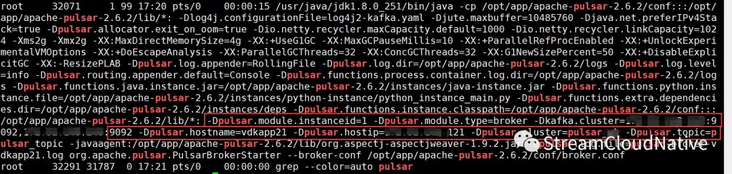
As you can see in the figure above, we use logenv The OPTS configured by SH has been passed to the broker process, log4j2 Kafka The sys tag in yaml can instantiate a Kafka Producer through these attribute values, and the broker process log will be sent to Kafka broker through Kafka Producer.
5. Test whether Pulsar log is successfully written to Kafka broker
Start a Kafka Consumer and subscribe to the Topic of the message sent by log4j2. The message contents read are as follows. Multiple search fields are separated by spaces:
pulsar-cluster dapp21 192.168.0.1 broker 1 2020-12-26 17:40:14.363 [prometheus-stats-43-1] [org.eclipse.jetty.server.RequestLog] INFO - 192.168.0.1 - - [26/Dec/2020:17:40:14 +0800] "GET /metrics/ HTTP/1.1" 200 23445 "http://192.168.0.1:8080/metrics" "Prometheus/2.22.1" 4
6. Log retrieval
Open kibana page and search according to the word segmentation field. The search conditions are as follows: Cluster: "pulse cluster" and hostname: "XXX" and module: "broker" and level: "info"
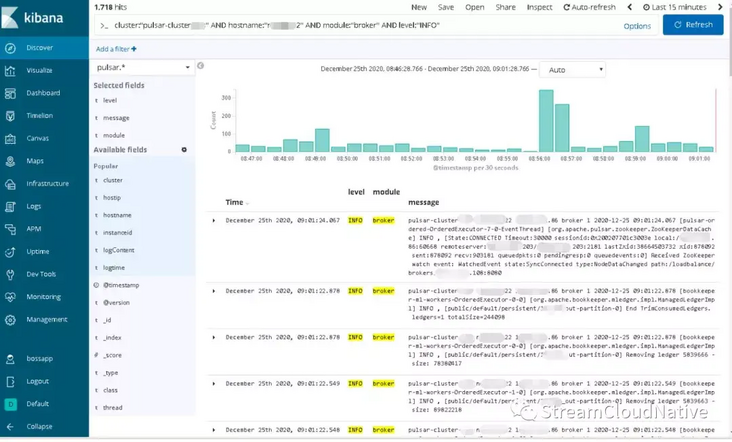
In the above figure, you can see the log retrieval results in a certain time period, and you can add Available fields to the retrieval results as needed. In this way, developers or operation and maintenance personnel can quickly and effectively analyze the causes of Pulsar service exceptions from multiple dimensions through kibana. So far, Apache Pulsar is a complete solution for fast log retrieval based on Log4j2+Kafka+ELK.
summary
At present, distributed and microservice are popular technical directions. In the production system, with the continuous development of business and the rapid expansion of application and service volume, it is a natural choice to transfer from single / vertical architecture to distributed / microservice architecture, which is mainly reflected in reducing complexity, fault tolerance, independent deployment, horizontal scalability and so on. However, it also faces new challenges, such as the efficiency of problem investigation, the convenience of operation and maintenance monitoring, etc. Taking Apache Pulsar as an example, this paper shares how Java processes use Log4j2+Kafka+ELK to realize the rapid retrieval of distributed and micro service logs, so as to achieve the effect of service governance.
Related reading
Pay attention to streamcloud native and discuss the development trend of technologies in various fields with the author 👇

- Collect logs to Pulsar using Elastic Beats
- How to send log data to Apache Pulsar using Apache Flume
- KoP is officially open source: it supports the native Kafka protocol on Apache Pulsar
Welcome to contribute
Are you inspired by this article?
Do you have any unique experience to share with community partners and grow together with the community?
The Apache Pulsar community welcomes your contributions. Apache Pulsar and StreamNative hope to provide you with a platform for Pulsar experience and knowledge sharing, and help more community partners have an in-depth understanding of Pulsar. Scan the code and add Bot friends to contact and submit 👇


click link , read the original!


 已为社区贡献15557条内容

所有评论(0)