Linux 详谈进程间通信(一)
目录
1. 进程间通信介绍
进程间通信⽬的
数据传输:⼀个进程需要将它的数据发送给另⼀个进程
资源共享:多个进程之间共享同样的资源。
通知事件:⼀个进程需要向另⼀个或⼀组进程发送消息,通知它(它们)发⽣了某种事件(如进程终⽌时要通知⽗进程)。
进程控制:有些进程希望完全控制另⼀个进程的执⾏(如Debug进程),此时控制进程希望能够拦截另⼀个进程的所有陷⼊和异常,并能够及时知道它的状态改变。
进程间通信发展
管道
System V进程间通信
POSIX进程间通信
进程间通信分类
管道:匿名管道pipe 命名管道
System V IPC:System V 消息队列 System V 共享内存 System V 信号量
POSIX IPC:消息队列 共享内存 信号量 互斥量 条件变量 读写锁
2. 管道
什么是管道
管道是Unix中最古⽼的进程间通信的形式。
我们把从⼀个进程连接到另⼀个进程的⼀个数据流称为⼀个“管道”
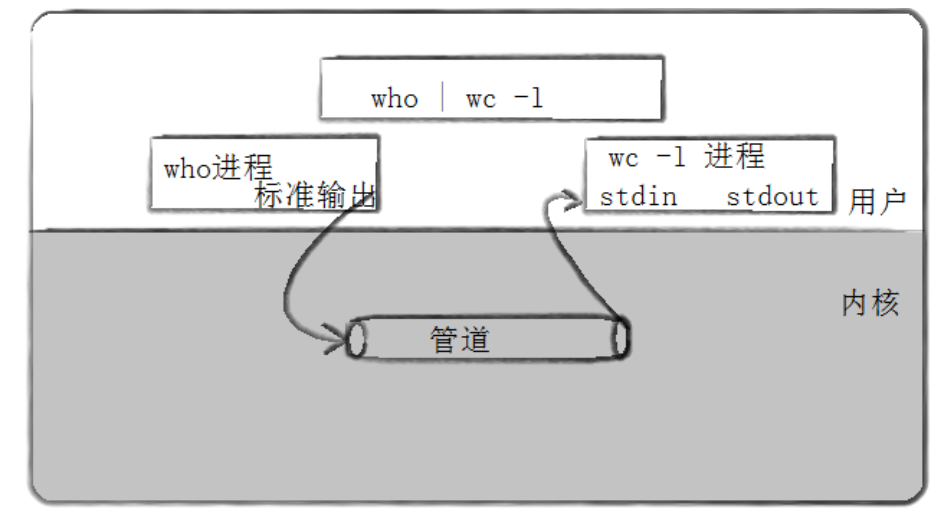
3. 匿名管道
#include <unistd.h>
功能:创建⼀⽆名管道
原型
int pipe(int fd[2]);
参数
fd:⽂件描述符数组,其中fd[0]表⽰读端, fd[1]表⽰写端
返回值:成功返回0,失败返回错误代码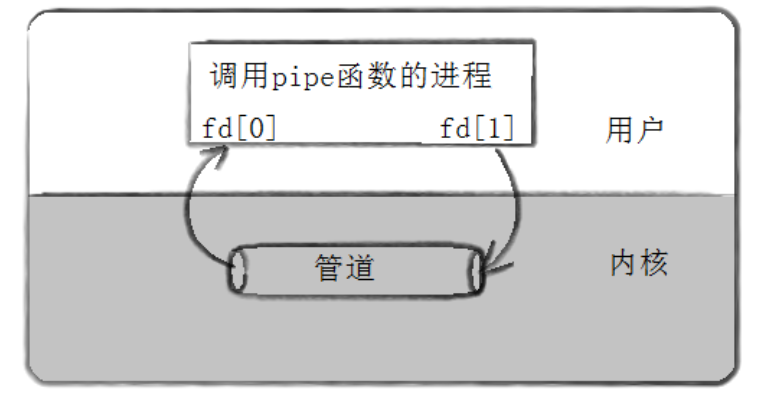
实例代码
//例⼦:从键盘读取数据,写⼊管道,读取管道,写到屏幕
#include <stdio.h>
#include <stdlib.h>
#include <string.h>
#include <unistd.h>
int main(void)
{
	int fds[2];
	char buf[100];
	int len;
	if (pipe(fds) == -1)
		perror("make pipe"), exit(1);
	// read from stdin
	while (fgets(buf, 100, stdin)) {
		len = strlen(buf);
		// write into pipe
		if (write(fds[1], buf, len) != len) {
			perror("write to pipe");
			break;
		}
		memset(buf, 0x00, sizeof(buf));

			// read from pipe
			if ((len = read(fds[0], buf, 100)) == -1) {
				perror("read from pipe");
				break;
		}

			// write to stdout
			if (write(1, buf, len) != len) {
				perror("write to stdout");
				break;
		}
	}
}
⽤ fork 来共享管道原理
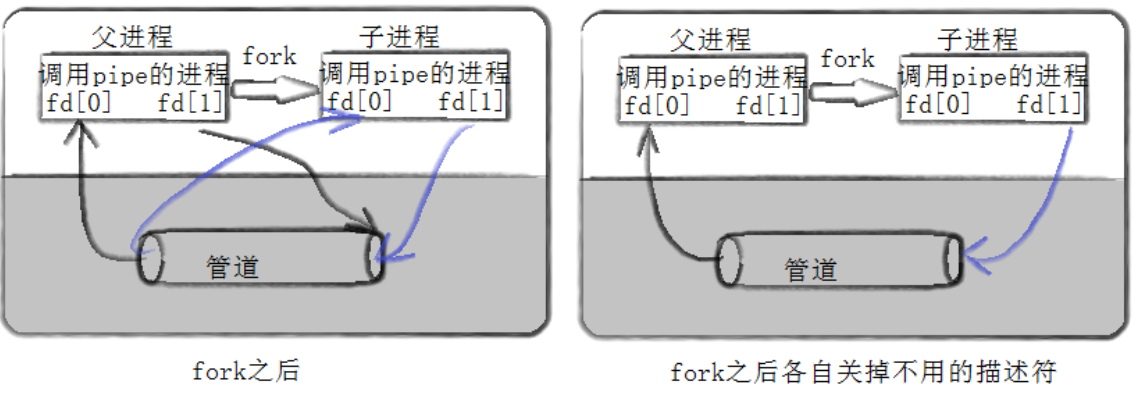
站在⽂件描述符⻆度-深度理解管道
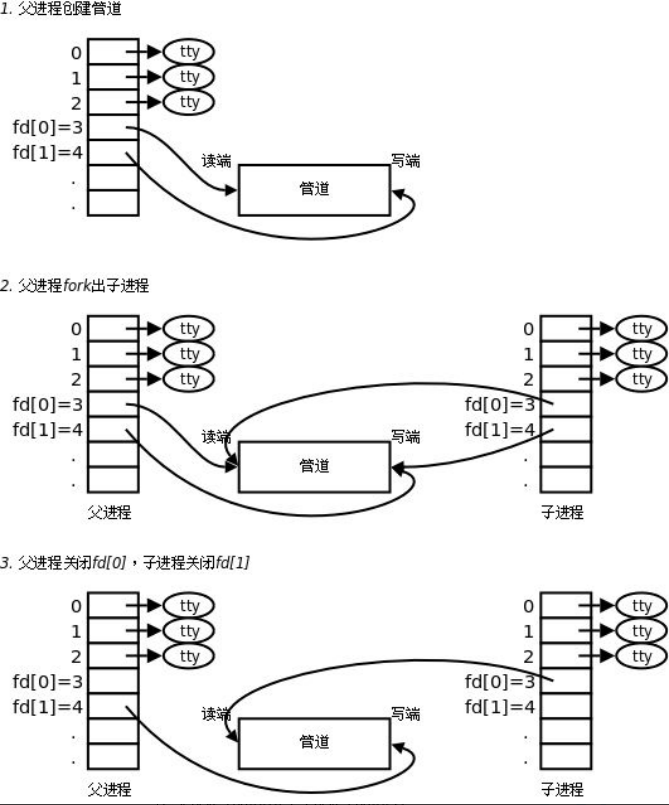
站在内核⻆度-管道本质
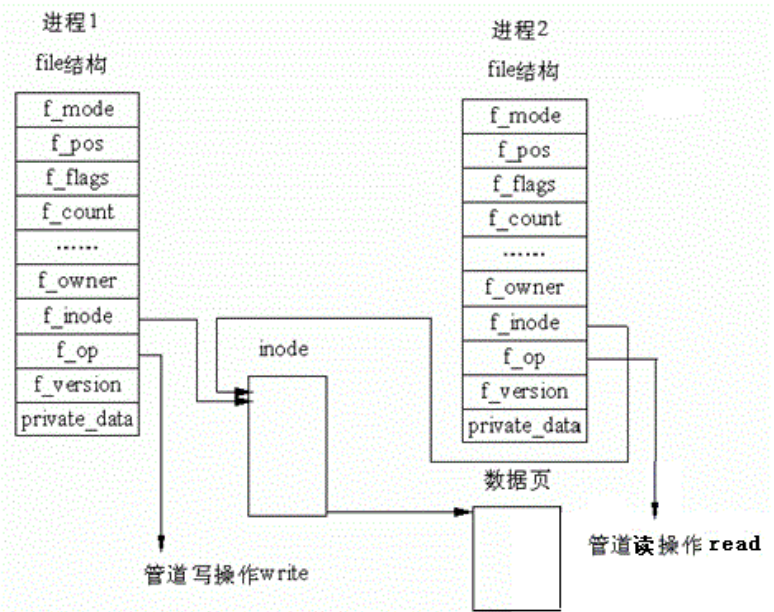
所以,看待管道,就如同看待⽂件⼀样!管道的使⽤和⽂件⼀致,迎合了“Linux⼀切皆⽂件思想”。
管道样例
测试管道读写
#include <unistd.h>
#include <stdlib.h>
#include <stdio.h>
#include <errno.h>
#include <string.h>
#define ERR_EXIT(m) \
do \
{ \
perror(m); \
exit(EXIT_FAILURE); \
} while(0)
int main(int argc, char* argv[])
{
	int pipefd[2];
	if (pipe(pipefd) == -1)
		ERR_EXIT("pipe error");
	pid_t pid;
	pid = fork();
	if (pid == -1)
		ERR_EXIT("fork error");
	if (pid == 0) {
		close(pipefd[0]);
		write(pipefd[1], "hello", 5);
		close(pipefd[1]);
		exit(EXIT_SUCCESS);
	}
	close(pipefd[1]);
	char buf[10] = { 0 };
	read(pipefd[0], buf, 10);
	printf("buf=%s\n", buf);
	return 0;
}
创建进程池处理任务
-- Channel.hpp --
#ifndef __CHANNEL_HPP__
#define __CHANNEL_HPP__
#include <iostream>
#include <string>
#include <unistd.h>
// 先描述
class Channel
{
public:
	Channel(int wfd, pid_t who) : _wfd(wfd), _who(who)
	{
		// Channel-3-1234
		_name = "Channel-" + std::to_string(wfd) + "-" + std::to_string(who);
	}
	std::string Name()
	{
		return _name;
	}
	void Send(int cmd)
	{
		::write(_wfd, &cmd, sizeof(cmd));
	}
	void Close()
	{
		::close(_wfd);
	}
	pid_t Id()
	{
		return _who;
	}
	int wFd()
	{
		return _wfd;
	}
	~Channel()
	{
	}
private:
	int _wfd;
	std::string _name;
	pid_t _who;
};
#endif
-- ProcessPool.hpp --
#ifndef __PROCESS_POOL_HPP__
#define __PROCESS_POOL_HPP__
#include <iostream>
#include <string>
#include <vector>
#include <cstdlib>
#include <unistd.h>
#include <sys/types.h>
#include <sys/wait.h>
#include <functional>
#include "Task.hpp"
#include "Channel.hpp"
// typedef std::function<void()> work_t;
using work_t = std::function<void()>;
enum
{
	OK = 0,
	UsageError,
	PipeError,
	ForkError
};
class ProcessPool
{
public:
	ProcessPool(int n, work_t w)
		: processnum(n), work(w)
	{
	}
	// channels : 输出型参数
	// work_t work: 回调
	int InitProcessPool()
	{
		// 2. 创建指定个数个进程
		for (int i = 0; i < processnum; i++)
		{
			// 1. 先有管道
			int pipefd[2] = { 0 };
			int n = pipe(pipefd);
			if (n < 0)
				return PipeError;
			// 2. 创建进程
			pid_t id = fork();
			if (id < 0)
				return ForkError;
			// 3. 建⽴通信信道
			if (id == 0)
			{
				// 关闭历史wfd
				std::cout << getpid() << ", child close history fd: ";
				for (auto& c : channels)
				{
					std::cout << c.wFd() << " ";
					c.Close();
				}
				std::cout << " over" << std::endl;
				::close(pipefd[1]); // read
				// child
				std::cout << "debug: " << pipefd[0] << std::endl;
				dup2(pipefd[0], 0);
				work();
				::exit(0);
			}
			// ⽗进程执⾏
			::close(pipefd[0]); // write
			channels.emplace_back(pipefd[1], id);
			// Channel ch(pipefd[1], id);
			// channels.push_back(ch);
		}
		return OK;
	}
	void DispatchTask()
	{
		int who = 0;
		// 2. 派发任务
		int num = 20;
		while (num--)
		{
			// a. 选择⼀个任务, 整数
			int task = tm.SelectTask();
			// b. 选择⼀个⼦进程channel
			Channel& curr = channels[who++];
			who %= channels.size();
			std::cout << "######################" << std::endl;
			std::cout << "send " << task << " to " << curr.Name() << ", 任务还剩: " << num << std::endl;
			std::cout << "######################" << std::endl;
			// c. 派发任务
			curr.Send(task);
			sleep(1);
		}
	}
	void CleanProcessPool()
	{
		// version 3
		for (auto& c : channels)
		{
			c.Close();
			pid_t rid = ::waitpid(c.Id(), nullptr, 0);
			if (rid > 0)
			{
				std::cout << "child " << rid << " wait ... success" <<
					std::endl;
			}
		}
		// version 2
		// for (auto &c : channels)
		// for(int i = channels.size()-1; i >= 0; i--)
		// {
		// channels[i].Close();
		// pid_t rid = ::waitpid(channels[i].Id(), nullptr, 0); // 阻塞了!
		// if (rid > 0)
		// {
		// std::cout << "child " << rid << " wait ... success" << std::endl;
		// }
		// }
		// version 1
		// for (auto &c : channels)
		// {
		// c.Close();
		// }
		//?
		// for (auto &c : channels)
		// {
		// pid_t rid = ::waitpid(c.Id(), nullptr, 0);
		// if (rid > 0)
		// {
		// std::cout << "child " << rid << " wait ... success" << std::endl;
		// }
		// }
	}
	void DebugPrint()
	{
		for (auto& c : channels)
		{
			std::cout << c.Name() << std::endl;
		}
	}
private:
	std::vector<Channel> channels;
	int processnum;
	work_t work;
	};
#endif
-- Task.hpp --
#pragma once
#include <iostream>
#include <unordered_map>
#include <functional>
#include <ctime>
#include <sys/types.h>
#include <unistd.h>
using task_t = std::function<void()>;
class TaskManger
{
public:
	TaskManger()
	{
		srand(time(nullptr));
		tasks.push_back([]()
			{ std::cout << "sub process[" << getpid() << " ] 执⾏访问数据库的任务\n"<< std::endl; });
		tasks.push_back([]()
			{ std::cout << "sub process[" << getpid() << " ] 执⾏url解析\n"<< std::endl; });
		tasks.push_back([]()
			{ std::cout << "sub process[" << getpid() << " ] 执⾏加密任务\n"<< std::endl; });
		tasks.push_back([]()
			{ std::cout << "sub process[" << getpid() << " ] 执⾏数据持久化任务\n"<< std::endl; });
	}
	int SelectTask()
	{
		return rand() % tasks.size();
	}
	void Excute(unsigned long number)
	{
		if (number > tasks.size() || number < 0)
			return;
		tasks[number]();
	}
	~TaskManger()
	{
	}
private:
	std::vector<task_t> tasks;
};
TaskManger tm;
void Worker()
{
	while (true)
	{
		int cmd = 0;
		int n = ::read(0, &cmd, sizeof(cmd));
		if (n == sizeof(cmd))
		{
			tm.Excute(cmd);
		}
		else if (n == 0)
		{
			std::cout << "pid: " << getpid() << " quit..." << std::endl;
			break;
		}
		else
		{
		}
	}
}
-- Main.cc --
#include "ProcessPool.hpp"
#include "Task.hpp"
void Usage(std::string proc)
{
	std::cout << "Usage: " << proc << " process-num" << std::endl;
}
// 我们⾃⼰就是master
int main(int argc, char* argv[])
{
	if (argc != 2)
	{
		Usage(argv[0]);
		return UsageError;
	}
	int num = std::stoi(argv[1]);
	ProcessPool* pp = new ProcessPool(num, Worker);
	// 1. 初始化进程池
	pp->InitProcessPool();
	// 2. 派发任务
	pp->DispatchTask();
	// 3. 退出进程池
	pp->CleanProcessPool();
	// std::vector<Channel> channels;
	// // 1. 初始化进程池
	// InitProcessPool(num, channels, Worker);
	// // 2. 派发任务
	// DispatchTask(channels);
	// // 3. 退出进程池
	// CleanProcessPool(channels);
	delete pp;
	return 0;
}
-- Makefile --
BIN = processpool
CC = g++
FLAGS = -c - Wall - std = c++11
LDFLAGS = -o
# SRC = $(shell ls * .cc)
SRC = $(wildcard * .cc)
OBJ = $(SRC:.cc = .o)

$(BIN) :$(OBJ)
    $(CC) $(LDFLAGS) $@ $ ^
%.o: % .cc
    $(CC) $(FLAGS) $ <
	.PHONY : clean
	clean :
rm - f $(BIN) $(OBJ)
.PHONY : test
test :
	@echo $(SRC)
	@echo $(OBJ)
管道读写规则
当没有数据可读时
O_NONBLOCK disable:read调⽤阻塞,即进程暂停执⾏,⼀直等到有数据来到为⽌。
O_NONBLOCK enable:read调⽤返回-1,errno值为EAGAIN。
当管道满的时候
O_NONBLOCK disable: write调⽤阻塞,直到有进程读⾛数据
O_NONBLOCK enable:调⽤返回-1,errno值为EAGAIN
如果所有管道写端对应的⽂件描述符被关闭,则read返回0
如果所有管道读端对应的⽂件描述符被关闭,则write操作会产⽣信号SIGPIPE,进⽽可能导致write进程退出
当要写⼊的数据量不⼤于PIPE_BUF时,linux将保证写⼊的原⼦性。
当要写⼊的数据量⼤于PIPE_BUF时,linux将不再保证写⼊的原⼦性。
管道特点
只能⽤于具有共同祖先的进程(具有亲缘关系的进程)之间进⾏通信;通常,⼀个管道由⼀个进程创建,然后该进程调⽤fork,此后⽗、⼦进程之间就可应⽤该管道。
管道提供流式服务
⼀般⽽⾔,进程退出,管道释放,所以管道的⽣命周期随进程
⼀般⽽⾔,内核会对管道操作进⾏同步与互斥
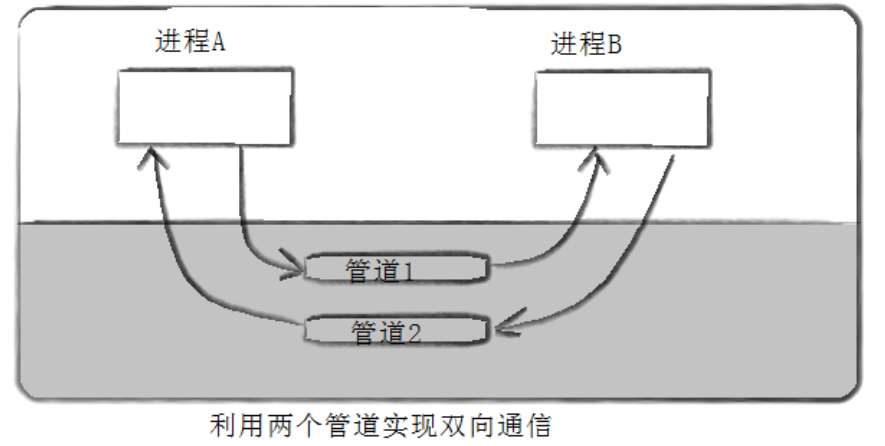
管道是半双⼯的,数据只能向⼀个⽅向流动;需要双⽅通信时,需要建⽴起两个管道

惟楚有才,于斯为盛。欢迎来到长沙!!! 茶颜悦色、臭豆腐、CSDN和你一个都不能少~
更多推荐


 25
25 0
0- 0


 已为社区贡献1条内容

所有评论(0)