
C# WinForms 实现简易串口通信上位机:双窗口互发 + 关键词自动回复
·
C# WinForms 实现简易串口通信上位机:双窗口互发 + 关键词自动回复
一、前言
刚接触上位机开发时,串口通信几乎是绕不开的入门内容。最近用 WinForms 写了一个小小的串口通信练习程序:开两个窗口实例,分别选择不同的串口号(如 COM2 和 COM3),一个窗口发送关键词,另一个窗口收到后自动从字典里查出对应的内容显示出来。
这个项目主要练以下几个点:
SerialPort的基本使用(打开、关闭、收发)- WinForms 控件的数据绑定与跨线程更新 UI
- 字符串与字节数组之间的编码转换
- 字典的简易匹配应用
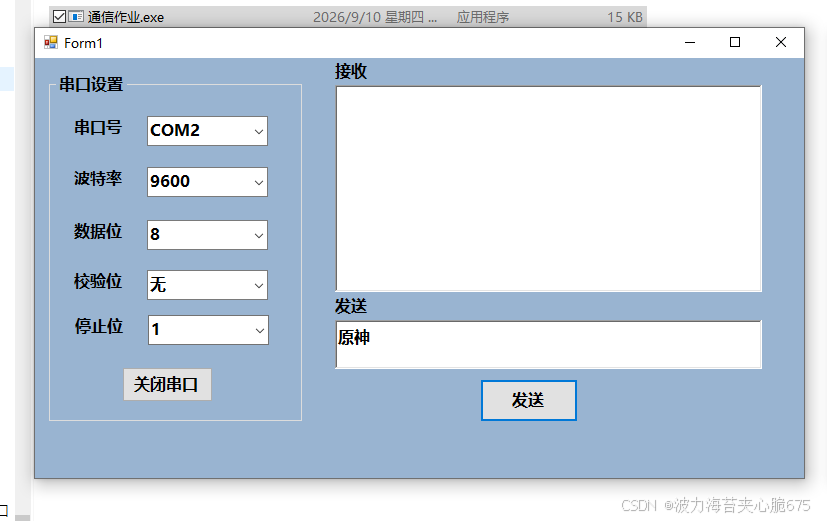
二、整体思路
程序界面主要分为三大块:
- 串口设置区:配置串口号、波特率、数据位、校验位、停止位,并打开/关闭串口。
- 接收区:用
RichTextBox显示收到的数据。 - 发送区:输入文字后,编码成字节通过串口发送。
通信流程很简单:
发送端:RichTextBox2.Text → UTF-8 编码成 byte[] → SerialPort.Write()
接收端:SerialPort.DataReceived → 读取 byte[] → UTF-8 解码成 string
         → 判断是否在字典中 → 是则显示关键词 + 对应内容
关键词回复通过一个静态字典 Dic.dic 实现。
三、关键代码
3.1 关键词字典
public class Dic
{
    public static readonly Dictionary<string, string> dic = new Dictionary<string, string>()
    {
        { "原神", "你说的对,但是《原神》是由米哈游自主研发的一款全新开放世界冒险游戏。游戏发生在一个被称作「提瓦特」的幻想世界,在这里,被神选中的人将被授予「神之眼」,导引元素之力。你将扮演一位名为「旅行者」的神秘角色,在自由的旅行中邂逅性格各异、能力独特的同伴们,和他们一起击败强敌,找回失散的亲人——同时,逐步发掘「原神」的真相。" },
        { "蔡徐坤", "全民制作人大家好,我是练习时长两年半的个人练习生蔡徐坤。喜欢唱、跳、rap、篮球。" }
    };
}
字典是 public static readonly,方便在 Form1 中直接访问。
3.2 串口参数初始化
在窗体加载时,把常用的串口参数绑定到 ComboBox:
SerialPort _serialPort = new SerialPort();

private void Form1_Load(object sender, EventArgs e)
{
    ScanPorts();      // 扫描串口
    BindBaudRate();   // 波特率
    BindDataBits();   // 数据位
    BindParity();     // 校验位
    BindStopBits();   // 停止位

    _serialPort.DataReceived += _serialPort_DataReceived;
}

private void ScanPorts()
{
    string[] portNames = SerialPort.GetPortNames();
    cbportNames.DataSource = portNames;
    cbportNames.SelectedIndex = portNames.Length - 1;
}

private void BindBaudRate()
{
    List<int> baudRate = new List<int>() { 4800, 9600, 14400, 19200 };
    cbBaudRate.DataSource = baudRate;
    cbBaudRate.SelectedItem = 9600;
}

private void BindDataBits()
{
    List<int> dataBits = new List<int>() { 5, 6, 7, 8 };
    cbDataBits.DataSource = dataBits;
    cbDataBits.SelectedIndex = 3;
}

private void BindParity()
{
    List<string> parity = new List<string>() { "无", "奇校验", "偶校验" };
    cbParity.DataSource = parity;
}

private void BindStopBits()
{
    List<float> stopBits = new List<float>() { 1f, 1.5f, 2f };
    cbStopBits.DataSource = stopBits;
}
注意:校验位和停止位在界面存的是中文或 float,实际设置串口属性时需要再转换成
Parity和StopBits枚举。
3.3 打开/关闭串口
private void button1_Click(object sender, EventArgs e)
{
    if (button1.Text == "打开串口")
    {
        if (cbportNames.SelectedIndex == -1)
        {
            MessageBox.Show("无可用串口,请检查");
            return;
        }

        try
        {
            _serialPort.PortName = cbportNames.Text;
            _serialPort.BaudRate = int.Parse(cbBaudRate.Text);
            _serialPort.DataBits = int.Parse(cbDataBits.Text);

            if (cbParity.Text == "无") _serialPort.Parity = Parity.None;
            if (cbParity.Text == "奇校验") _serialPort.Parity = Parity.Odd;
            if (cbParity.Text == "偶校验") _serialPort.Parity = Parity.Even;

            float stopBit = Convert.ToSingle(cbStopBits.SelectedItem);
            if (stopBit == 1f) _serialPort.StopBits = StopBits.One;
            if (stopBit == 1.5f) _serialPort.StopBits = StopBits.OnePointFive;
            if (stopBit == 2f) _serialPort.StopBits = StopBits.Two;

            if (!_serialPort.IsOpen)
            {
                _serialPort.Open();
                button1.Text = "关闭串口";
            }
        }
        catch (Exception ex)
        {
            MessageBox.Show($"串口打开失败:{ex.Message}");
        }
    }
    else
    {
        if (_serialPort.IsOpen)
        {
            _serialPort.Close();
            button1.Text = "打开串口";
        }
    }
}
3.4 发送数据
private void button2_Click(object sender, EventArgs e)
{
    if (_serialPort.IsOpen)
    {
        if (!string.IsNullOrEmpty(richTextBox2.Text))
        {
            byte[] wdata = Encoding.UTF8.GetBytes(richTextBox2.Text);
            _serialPort.Write(wdata, 0, wdata.Length);
        }
    }
}
串口只能传字节,所以需要先把字符串按 UTF-8 编码成 byte[]。这样中文也能正常发送。
3.5 接收数据并匹配关键词
private void _serialPort_DataReceived(object sender, SerialDataReceivedEventArgs e)
{
    byte[] rdata = new byte[_serialPort.BytesToRead];
    _serialPort.Read(rdata, 0, rdata.Length);
    string message = Encoding.UTF8.GetString(rdata);

    Invoke(new Action(() =>
    {
        richTextBox1.Text = message;

        if (Dic.dic.ContainsKey(richTextBox1.Text))
        {
            richTextBox1.Text = $"{DateTime.Now.ToString("HH:mm:ss")} 收到关键词:{richTextBox1.Text}\n内容:{Dic.dic[richTextBox1.Text]}";
        }
    }));
}
DataReceived是在后台线程触发的,更新 UI 时必须用Invoke。- 解码后先显示原始消息;如果命中字典,就替换成带时间戳的完整内容。
四、运行效果
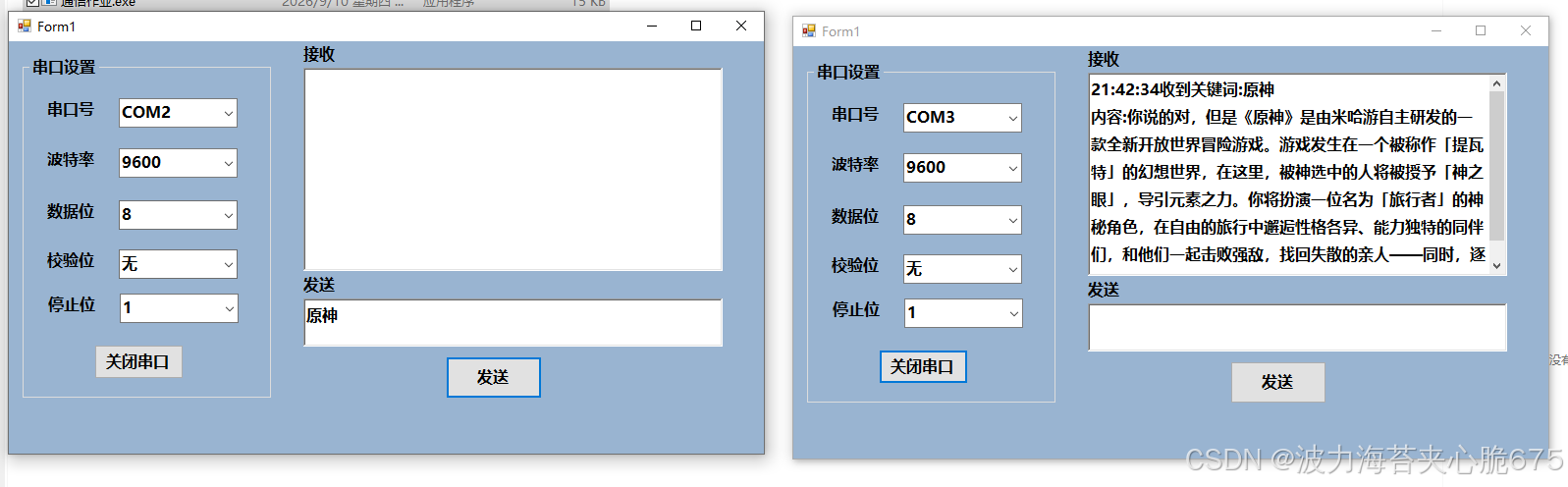
两个程序实例分别打开 COM2 和 COM3(波特率等参数保持一致):
- 左侧窗口在发送框输入
原神,点击发送。 - 右侧窗口接收后识别到关键词,自动显示字典中对应的文案。
效果如下:
五、当前代码存在的不足
作为练习项目,代码已经能跑通,但如果要做成真正可用的工具,还有几个点可以优化:
- 接收区是覆盖显示:
richTextBox1.Text = message会清空之前的内容。如果想保留历史记录,可以改用AppendText或追加字符串。 - 存在中文截断风险:串口是字节流,
DataReceived触发时可能只收到半个 UTF-8 字符,导致中文乱码。正式项目建议加缓存或简单协议处理。 - 未释放串口资源:窗口关闭前最好调用
_serialPort.Close()和Dispose(),否则可能造成串口被占用。 - 关键词匹配严格:必须完全一致,前后不能有空格或换行,否则匹配失败。
六、小结
这个项目虽然小,但把 WinForms 串口通信的核心流程都走了一遍:
- 串口参数配置与打开
- 字符串 ↔ 字节数组的 UTF-8 编解码
- 跨线程更新 UI
- 字典做关键词匹配
对于刚开始学习上位的同学来说,是个不错的练手案例。如果你也在做类似的课程设计,希望本文能给你一些参考。
更多推荐

 3
3 0
0- 0


 已为社区贡献2条内容

所有评论(0)