
C++云存储项目
来源:程序员老廖
1. 项目概述
1.1 功能特性
-
用户系统:支持用户注册、登录、登出
-
文件管理:文件上传、下载、删除、列表展示
-
媒体预览:视频在线播放、图片预览
-
文件分享:支持多种分享模式(公开/提取码/指定用户)
-
大文件优化:分块上传、断点续传
-
流式传输:视频首帧快速播放优化
1.2 项目特色
相比普通 Web 服务器项目,本项目的亮点:
-
大文件上传处理:基于状态机的分块解析,支持 GB 级文件
-
断点续传下载:完整支持 HTTP Range 请求
-
视频流式优化:智能缓冲控制,首帧秒开
-
企业级架构:基于 muduo 的 Reactor 高性能网络框架
2. 系统架构
2.1 总体架构图
┌──────────────────────────────────────────────────────────────────────────────────────┐
│                                          HTTP Client                                 │
│                                       (Browser/移动端)                               │
└──────────────────────────────────────────────────────────────────────────────────────┘
                                               │
                                               ▼
┌──────────────────────────────────────────────────────────────────────────────────────┐
│                                      HTTP Server Layer                               │
│ ┌────────────────┐    ┌───────────────┐   ┌────────────────┐  ┌───────────────┐      │
│ │   静态文件     │    │    文件上传    │   │    文件下载    │  │   用户认证    │      │
│ │   服务器       │    │    处理器      │   │    处理器      │  │     系统      │      │
│ └────────────────┘    └───────────────┘   └────────────────┘  └───────────────┘      │
│                                            │                                         │
│                           ┌────────────────▼───────────────┐                         │
│                           │          HttpUploadHandler     │                         │
│                           │            (业务逻辑核心)       │                        │
│                           └────────────────┬───────────────┘                         │
└────────────────────────────────────────────┼─────────────────────────────────────────┘
                                             │
┌────────────────────────────────────────────┼─────────────────────────────────────────┐
│                                MyMuduo Network Framework                             │
│ ┌──────────────────────────────────────────▼─────────────────────────────────────┐   │
│ │                                     HttpServer                                 │   │
│ │                            (HTTP Protocol Parser & Router)                     │   │
│ └──────────────────────────────────────────┬─────────────────────────────────────┘   │
│                                            │                                         │
│ ┌──────────────────────────────────────────▼─────────────────────────────────────┐   │
│ │                                      TcpServer                                 │   │
│ │                     (Connection Management & Event Distribution)               │   │
│ └──────────────────────────────────────────┬─────────────────────────────────────┘   │
│                                            │                                         │
│ ┌──────────────────────────────────────────▼─────────────────────────────────────┐   │
│ │                                       EventLoop                                │   │
│ │                            (epoll-based Reactor Pattern)                       │   │
│ └────────────────────────────────────────────────────────────────────────────────┘   │
└──────────────────────────────────────────────────────────────────────────────────────┘
                                             │
                                             ▼
┌──────────────────────────────────────────────────────────────────────────────────────┐
│                                        Data Layer                                    │
│ ┌──────────────────────────────┐ ┌──────────────────────────────────────┐            │
│ │         MySQL 5.7+           │ │            File System               │            │
│ │         - users              │ │            - uploads/                │            │
│ │         - sessions           │ │            - filename_mapping.json   │            │
│ │         - files              │ └──────────────────────────────────────┘            │
│ │         - file_shares        │                                                     │
│ └──────────────────────────────┘                                                     │
└──────────────────────────────────────────────────────────────────────────────────────┘
2.2 模块依赖关系
                     ┌──────────────────────┐
                     │   application/       │
                     │   http_upload.cc     │
                     └───────────┬──────────┘
                                 │ 使用
                                 ▼
                     ┌──────────────────────┐
                     │     net/http/        │
                     │     HttpServer       │
                     └───────────┬──────────┘
                                 │ 依赖
                                 ▼
   ┌─────────────────────────────┼──────────────────────────┐
   ▼                             ▼                          ▼
┌────────────────┐    ┌────────────────┐    ┌────────────────────┐
│    net/        │    │   base/        │    │     third_party    │
│    TcpServer   │    │   ThreadPool   │    │     json.hpp       │
│    Buffer      │    │   Buffer       │    │                    │
│    EventLoop   │    │   Logging      │    │                    │
└────────────────┘    └────────────────┘    └────────────────────┘
2.3 网络模型架构(Reactor 模式)
当前项目采用 单 Reactor + 线程池 模型:
┌────────────────────────────────────────────────────────────────────────────────────┐
│                                   Main Thread (Reactor)                            │
│ ┌─────────────────────────────────────────────────────────────────────────────┐    │
│ │                                    EventLoop                                │    │
│ │ ┌───────────────┐      ┌────────────────┐      ┌─────────────────────┐      │    │
│ │ │      epoll    │──▶  │     Channel     │──▶  │   TcpConnection     │      │    │
│ │ │      wait     │      │    callback    │      │                     │      │    │
│ │ └───────────────┘      └────────────────┘      └───────────┬─────────┘      │    │
│ └────────────────────────────────────────────────────────────┼────────────────┘    │
└──────────────────────────────────────────────────────────────┼─────────────────────┘
                                                               │
                                                  IO Events (Read/Write/Accept)
                                                               │
                                                               ▼
┌─────────────────────────────────────────────────────────────────────────────────┐
│                                   Thread Pool (4 threads)                       │
│ ┌───────────────┐ ┌────────────────┐ ┌──────────────┐ ┌──────────────────┐      │
│ │  Worker 1     │ │  Worker 2      │ │  Worker 3    │ │    Worker 4      │      │
│ │               │ │                │ │              │ │                  │      │
│ │  File Upload  │ │  File Upload   │ │  User Auth   │ │   DB Query       │      │
│ │  Processing   │ │  Processing    │ │  Processing  │ │   Processing     │      │
│ └───────────────┘ └────────────────┘ └──────────────┘ └──────────────────┘      │
│                                                                                 │
│                                   Business Logic Processing                     │
└─────────────────────────────────────────────────────────────────────────────────┘项目代码领取:C++ Linux学完后做什么项目?推荐做C++ Linux云存储项目(附带完整项目源码和文档)
3. 核心技术栈
3.1 C++11 特性应用
本项目充分运用了 C++11 的现代特性:
智能指针管理资源
// TcpConnection 使用 shared_ptr 管理生命周期
using TcpConnectionPtr = std::shared_ptr<TcpConnection>;

// 连接上下文存储
std::shared_ptr<HttpContext> context = std::make_shared<HttpContext>();
conn->setContext(context);

// 弱引用避免循环引用
std::weak_ptr<TcpConnection> weakConn = conn;
右值引用与移动语义
// Buffer 类的移动构造函数优化数据传输
class Buffer {
     Buffer(Buffer&& other) noexcept;
     Buffer& operator=(Buffer&& other) noexcept;
};

// 在 HttpRequest 中使用移动减少拷贝
void appendToBody(const char* data, size_t len) {
     body_.append(data, len); // 内部使用移动语义
}
Lambda 表达式注册回调
// 设置 HTTP 请求处理回调
server.setHttpCallback(
     [handler](const TcpConnectionPtr& conn, HttpRequest& req, HttpResponse* resp) {
        return handler->onRequest(conn, req, resp);
     });

// 设置写完成回调(用于分块下载)
conn->setWriteCompleteCallback([this, downContext](const TcpConnectionPtr& connection) {
     std::string chunk;
     if (downContext->readNextChunk(chunk)) {
         connection->send(chunk);
         return true; // 继续写
     } else {
         connection->shutdown(); // 完成,关闭连接
         return true;
     }
});
原子操作与线程安全
// 活跃请求计数器(线程安全)
std::atomic<int> activeRequests_{0};

// 在多个线程中安全递增
activeRequests_.fetch_add(1, std::memory_order_relaxed);
3.2 线程与线程池
Thread 类封装
基于 pthread 封装,提供简洁的线程接口:
class Thread : noncopyable {
public:
      explicit Thread(ThreadFunc func, const std::string& name);
      void start();
      int join();
private:
    std::shared_ptr<pthread_t> pthreadId_;
    ThreadFunc func_;
};
ThreadPool 线程池
class ThreadPool : noncopyable {
public:
      explicit ThreadPool(const std::string& nameArg);
      void start(int numThreads);
      void run(Task task); // 提交任务到队列
private:
    std::vector<std::unique_ptr<Thread>> threads_;
    BlockingQueue<Task> queue_; // 阻塞队列
};
3.3 高性能组件
Buffer 高性能缓冲区
class Buffer {
    // 采用 vector<char> 作为底层存储
    // 预留 prependable 空间用于高效头部插入
    // 支持 scatter/gather IO

    std::vector<char> buffer_;
    size_t readerIndex_;
    size_t writerIndex_;

public:
   void append(const char* data, size_t len);
   void retrieve(size_t len);
   std::string retrieveAllAsString();
};
AsyncLogging 异步日志
class AsyncLogging : noncopyable {
    // 双缓冲技术:前端缓冲 + 后端缓冲
    // 避免日志 IO 阻塞业务线程

    void append(const char* logline, int len);

private:
    BufferPtr currentBuffer_; // 当前写入缓冲
    BufferPtr nextBuffer_; // 预备缓冲
    BufferVector buffers_; // 待写入文件的缓冲队列
};
4. 核心流程详解
4.1 文件上传流程
4.1.1 架构流程图
┌──────────────┐   POST /upload       ┌─────────────────┐
│   Client     │ ──────────────────▶  │   HttpServer    │
│   (Browser   │   Content-Type:      │                 │
│   /App)      │   multipart/         │                 │
└──────────────┘   form-data          └─────────┬───────┘
                                                │
                                                ▼
                                      ┌──────────────────┐
                                      │   HttpUpload     │
                                      │   Handler        │
                                      └─────────┬────────┘
                                                │
                        ┌───────────────────────┼───────────────────┐
                        │                       │                   │
                        ▼                       ▼                   ▼
                   ┌────────────┐        ┌──────────┐        ┌────────────┐
                   │  Parse     │        │  Create  │        │  Write to  │
                   │ Boundary   │ ────▶ │  Upload  │ ─────▶ │  Disk      │
                   │ Headers    │        │  Context │        │  (chunked) │
                   └────────────┘        └──────────┘        └────────────┘
                                                │
                                                ▼
                                        ┌──────────────┐
                                        │ MySQL Insert │
                                        │ Save metadata│
                                        └──────────────┘
4.1.2 详细时序图
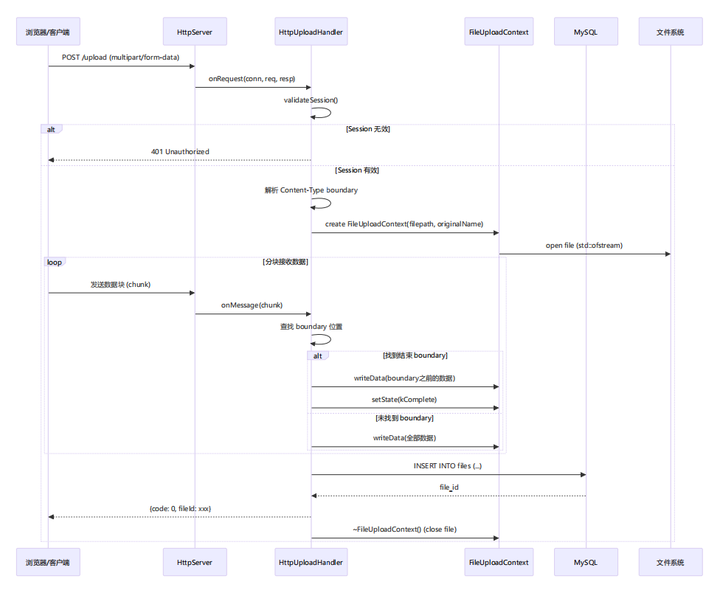
4.1.3 状态机实现
文件上传采用状态机处理多部分表单数据:
class FileUploadContext {
public:
    enum class State {
       kExpectHeaders, // 等待解析 multipart headers
       kExpectContent, // 等待文件内容
       kExpectBoundary, // 等待下一个 boundary
       kComplete // 上传完成
    };

    void writeData(const char* data, size_t len);
    State getState() const { return state_; }
    void setState(State state) { state_ = state; }

private:
   State state_;
   std::string boundary_;
   std::ofstream file_;
   uintmax_t totalBytes_;
};
状态转换逻辑:
┌──────────────────────────────────┐
│    kExpectHeaders                │◀─────────────────┐
└─────────────────┬────────────────┘                  │
                  │ 解析到 \r\n\r\n                   │
                  ▼                                   │
┌──────────────────────────────────┐ 找到 boundary    │
│   kExpectContent                 │──────────────────┘
└─────────────────┬────────────────┘
                  │ 找到结束 boundary (--)
                  ▼
┌──────────────────────────────────┐
│     kComplete                    │
└──────────────────────────────────┘
4.1.4 关键代码解析
分块数据处理(http_upload.cc 第 540-620 行):
// 处理后续的数据块
std::string body = req.body();
if (!body.empty()) {
   switch (uploadContext->getState()) {
     case FileUploadContext::State::kExpectBoundary: {
        // 检查是否是结束边界
        std::string endBoundary = uploadContext->getBoundary() + "--";
        size_t endPos = body.find(endBoundary);
        if (endPos != std::string::npos) {
          if (endPos > 0) {
            uploadContext->writeData(body.data(), endPos);
          }
          uploadContext->setState(FileUploadContext::State::kComplete);
          break;
        }
        // 检查是否是普通边界
        size_t boundaryPos = body.find(uploadContext->getBoundary());
        if (boundaryPos != std::string::npos) {
          if (boundaryPos > 0) {
              uploadContext->writeData(body.data(), boundaryPos);
          }
          uploadContext->setState(FileUploadContext::State::kExpectContent);
        } else {
         // 没有找到边界,写入所有内容
         uploadContext->writeData(body.data(), body.size());
        }
     break;
    }
    // ... 其他状态处理
  }
}
性能优化点:
-
直接写入磁盘:避免内存累积,支持 GB 级大文件
-
边读边写:无需等待完整请求体
-
零拷贝优化:使用 std::vector<char> 直接写入
4.2 文件下载与断点续传
4.2.1 流程图
┌──────────────┐  GET /download/{filename}     ┌─────────────────┐
│    Client    │ ───────────────────────────▶ │   HttpServer     │
│   (Browser   │  Headers:                     │                 │
│    /App)     │  X-Session-ID: xxx            │                 │
└──────────────┘  Range: bytes=0-1023          └────────┬────────┘
                                                        │
                                                        ▼
                                                 ┌───────────────┐
                                                 │     权限检查  │
                                                 │     validate  │
                                                 │     Session   │
                                                 └───────┬───────┘
                                                         │
                                   ┌─────────────────────┼───────────────────┐
                                   │                     │                   │
                                 有权限 ▼              无权限 ▼        文件不存在 ▼
                            ┌────────────────┐   ┌──────────────┐  ┌────────────────┐
                            │    创建下载    │   │     403      │  │    404         │
                            │    上下文      │   │    Forbidden │  │    Not Found   │
                            └───────┬────────┘   └──────────────┘  └────────────────┘
                                    │
                                    ▼
                           ┌─────────────────┐
                           │   解析 Range    │
                           │    头部         │
                           └────────┬────────┘
                                    │
                                    ▼
                           ┌─────────────────┐
                           │   设置响应头    │
                           │    206/200      │
                           └────────┬────────┘
                                    │
                                    ▼
                           ┌─────────────┐         ┌─────────────────┐
                           │ 读取 1MB    │ ──────▶ │   发送数据      │
                           │ 数据块      │         │                 │
                           └─────────────┘         └────────┬────────┘
                                                            │ 写完成
                                                            │ 回调
                                                            ▼
                                                    ┌─────────────────┐
                                                    │   继续读/发送   │
                                                    │   直到文件结束  │
                                                    └─────────────────┘
4.2.2 时序图
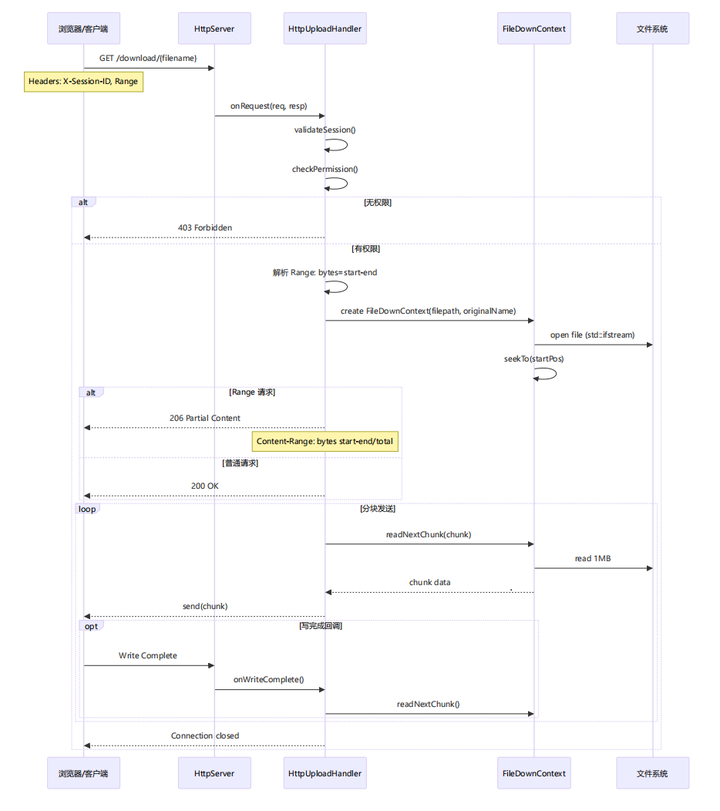
4.2.3 断点续传实现
class FileDownContext {
public:
     // 定位到指定位置
     void seekTo(uintmax_t position) {
        file_.seekg(position);
        currentPosition_ = position;
        isComplete_ = false;
     }

     // 读取下一个数据块(1MB)
     bool readNextChunk(std::string& chunk) {
        const uintmax_t chunkSize = 1024 * 1024; // 1MB
        uintmax_t remainingBytes = fileSize_ - currentPosition_;
        uintmax_t bytesToRead = std::min(chunkSize, remainingBytes);

        if (bytesToRead == 0) {
           isComplete_ = true;
           return false;
        }

        std::vector<char> buffer(bytesToRead);
        file_.read(buffer.data(), bytesToRead);
        chunk.assign(buffer.data(), bytesToRead);
        currentPosition_ += bytesToRead;
        return true;
     }

private:
   std::ifstream file_;
   uintmax_t fileSize_;
   uintmax_t currentPosition_;
   bool isComplete_;
};
4.2.4 Range 请求处理
// 解析 Range 头部
std::string rangeHeader = req.getHeader("Range");
uintmax_t startPos = 0;
uintmax_t endPos = fileSize - 1;
bool isRangeRequest = false;

if (!rangeHeader.empty()) {
   std::regex rangeRegex("bytes=(\\d+)-(\\d*)");
   std::smatch matches;
   if (std::regex_search(rangeHeader, matches, rangeRegex)) {
      startPos = std::stoull(matches[1]);
      if (!matches[2].str().empty()) {
         endPos = std::stoull(matches[2]);
      }
      isRangeRequest = true;
   }
}

// 设置响应状态码
if (isRangeRequest) {
   resp->setStatusCode(HttpResponse::k206PartialContent);
   resp->addHeader("Content-Range",
      "bytes " + std::to_string(startPos) + "-" +
      std::to_string(endPos) + "/" + std::to_string(fileSize));
} else {
    resp->setStatusCode(HttpResponse::k200Ok);
}

// 支持断点续传的头部
resp->addHeader("Accept-Ranges", "bytes");
resp->addHeader("Content-Length", std::to_string(endPos - startPos + 1));
4.3 用户认证与 Session 管理
4.3.1 架构图
┌──────────────────────────────────────────────────────────────────────────────┐
│                                Session Management                            │
├──────────────────────────────────────────────────────────────────────────────┤
│                                                                              │
│ ┌────────────┐            ┌───────────────────┐           ┌──────────────┐   │
│ │   Login    │──────────▶│   Session         │─────────▶ │   MySQL      │   │
│ │            │            │   Created         │           │   sessions   │   │
│ └────────────┘            └─────────┬─────────┘           │   table      │   │
│                                     │                     └──────────────┘   │
│                                     │                                        │
│ ┌────────────────┐                  │ Session ID (32 chars)                  │
│ │   Client       │◀─────────────────┘  stored in:                            │
│ │                │                   - localStorage (Browser)                │
│ └───────┬────────┘                   - X-Session-ID header                   │
│         │                                                                    │
│         │ Subsequent Requests                                                │
│         │ X-Session-ID: xxx                                                  │
│         ▼                                                                    │
│ ┌────────────┐            ┌────────────┐            ┌────────────┐           │
│ │    API     │─────────▶ │   Validate │─────────▶  │   Update   │           │
│ │    Request │            │   Session  │            │    Expire  │           │
│ └────────────┘            └──────┬─────┘            │    Time    │           │
│                                  │                  └────────────┘           │
│                            Valid / Invalid                                   │
│                                  │                                           │
│               ┌──────────────────┼──────────────────┐                        │
│               ▼                  ▼                  ▼                        │
│           Continue 401     Unauthorized 403     Forbidden                    │
│           Processing                                                         │
│                                                                              │
└──────────────────────────────────────────────────────────────────────────────┘
4.3.2 登录时序图
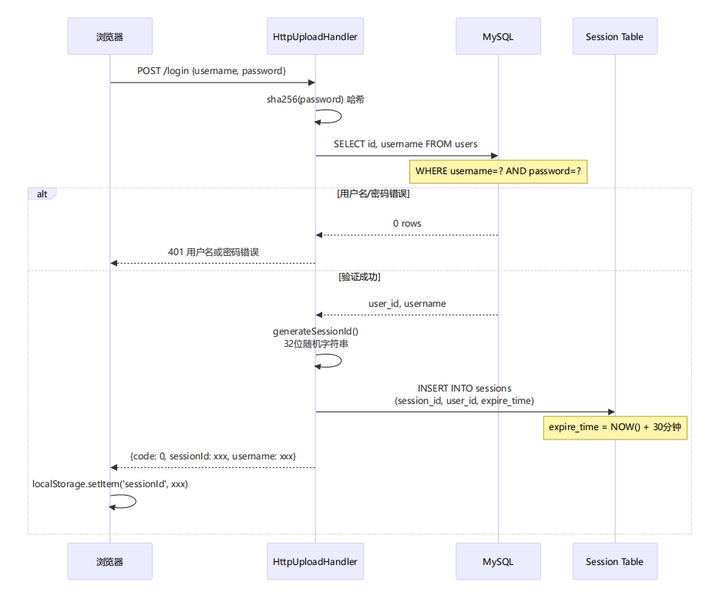
4.3.3 Session 验证时序图
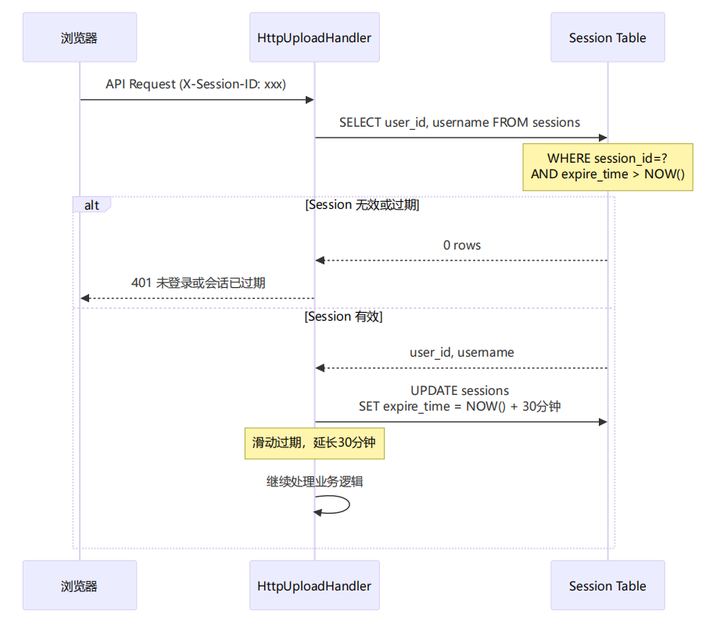
4.3.4 核心代码实现
Session ID 生成(http_upload.cc 第 1421-1435 行):
std::string generateSessionId() {
   std::random_device rd;
   std::mt19937 gen(rd());
   std::uniform_int_distribution<> dis(0, 35);

   const char* chars = "abcdefghijklmnopqrstuvwxyz0123456789";
   std::string sessionId;
   sessionId.reserve(32);

   for (int i = 0; i < 32; ++i) {
     sessionId += chars[dis(gen)];
   }
   return sessionId;
}
Session 验证(http_upload.cc 第 1449-1479 行):
bool validateSession(const std::string& sessionId, int& userId, std::string& username) {
   if (sessionId.empty()) {
      return false;
   }

   // 查询未过期的会话
   std::string query = "SELECT user_id, username FROM sessions WHERE session_id = '" +
                       escapeString(sessionId) + "' AND expire_time > NOW()";

   MYSQL_RES* result = executeQueryWithResult(query);
   if (!result || mysql_num_rows(result) == 0) {
      return false;
   }

   MYSQL_ROW row = mysql_fetch_row(result);
   userId = std::stoi(row[0]);
   username = row[1];
   mysql_free_result(result);

   // 更新过期时间(滑动过期)
   std::string updateQuery = "UPDATE sessions SET expire_time = DATE_ADD(NOW(), INTERVAL 30 MINUTE) WHERE session_id = '" +
                           escapeString(sessionId) + "'";
   executeQuery(updateQuery);
   return true;
}
4.4 文件分享机制
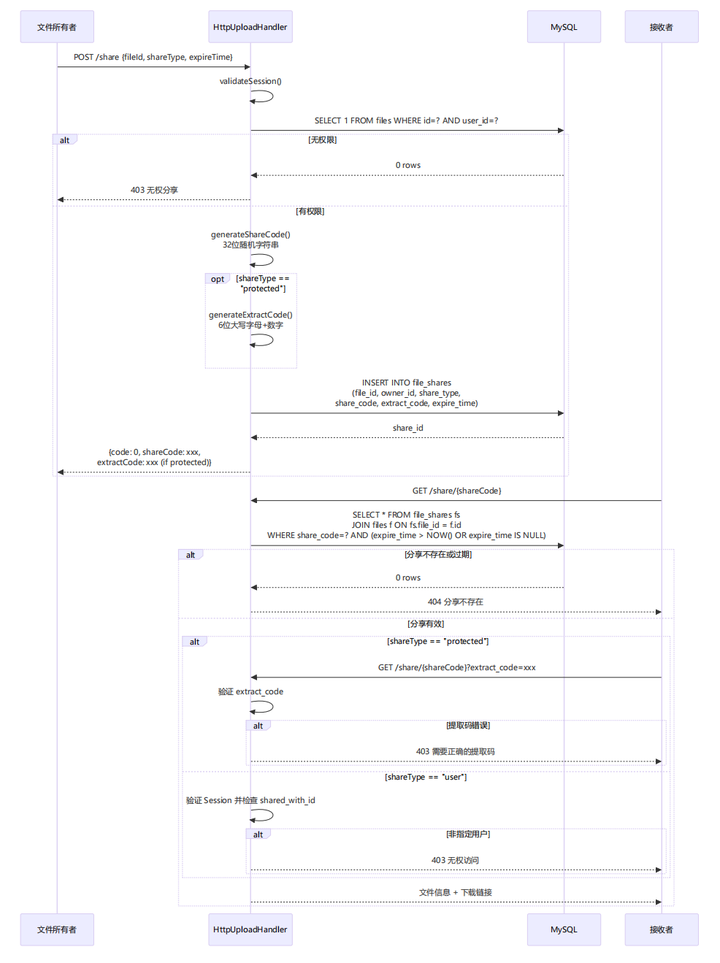
4.4.1 分享类型说明
| 分享类型 | 说明 | 访问方式 |
|---|---|---|
| private | 私有,不分享 | 仅文件所有者 |
| public | 完全公开 | 任何人通过链接访问 |
| protected | 需要提取码 | 链接 + 6位提取码 |
| use | 指定用户 | 仅指定用户可访问 |
4.4.2 分享流程图
┌───────────────────────────────────────────────────────────────────────────────┐
│                                    File Share Flow                            │
├───────────────────────────────────────────────────────────────────────────────┤
│                                                                               │
│ 1. 创建分享                                                                   │
│ ┌───────────────┐        ┌────────────────┐         ┌────────────────┐        │
│ │   用户选择    │───────▶│   生成         │───────▶ │  写入          │        │
│ │   分享类型    │        │   shareCode    │          │  file_shares  │        │
│ │   设置过期    │        │   extract      │          │  表           │        │
│ │   时间        │        │   Code(保护)   │          │               │        │
│ └───────────────┘        └────────────────┘         └────────────────┘        │
│                                     │                                         │
│                                     ▼                                         │
│                           ┌─────────────────┐                                 │
│                           │  返回分享链接    │                                │
│                           │  /share/{code}  │                                 │
│                           └─────────────────┘                                 │
│                                                                               │
│ 2. 访问分享                                                                   │
│ ┌──────────────┐       ┌──────────────┐       ┌──────────────┐                │
│ │  访问链接    │──────▶│   查询       │──────▶│  权限检查    │                │
│ │  /share/xx   │       │   shareCode  │       │              │                │
│ └──────────────┘       └──────────────┘       └───────┬──────┘                │
│                                                       │                       │
│                                           ┌───────────┼────────────┐          │
│                                           ▼           ▼            ▼          │
│                                        公开文件    需要提取码    指定用户      │
│                                           │           │            │          │
│                                           ▼           ▼            ▼          │
│                                       直接访问    验证extract    验证用户      │
│                                                                  Code 身份    │
│                                                                               │
└───────────────────────────────────────────────────────────────────────────────┘
4.4.3 分享时序图
4.5 视频流式传输优化
4.5.1 问题背景
传统视频下载会导致:
-
用户需要等待整个文件下载完成才能播放
-
大视频文件消耗大量带宽
-
用户可能只看几秒钟就关闭
4.5.2 优化方案
┌────────────────────────────────────────────────────────────────────┐
│                       Video Streaming Optimization                 │
├────────────────────────────────────────────────────────────────────┤
│                                                                    │
│ 传统方式 优化后                                                     │
│ ┌───────────────┐                   ┌──────────────────┐           │
│ │  下载整个     │  10秒+ 才能播放    │    首帧缓冲      │ 1秒内     │
│ │  文件         │                   │     2-5秒        │ 播放      │
│ │  (100MB)      │                   │                  │           │
│ └───────────────┘                   └────────┬─────────┘           │
│                                              │                     │
│                                              ▼                     │
│                                      ┌──────────────┐              │
│                                      │   暂停下载   │              │
│                                      │   保持连接   │              │
│                                      │   可用状态   │              │
│                                      └───────┬──────┘              │
│                                              │                     │
│                        用户点击播放 ────────▶│                     │
│                                              ▼                     │
│                                      ┌──────────────┐              │
│                                      │  恢复下载    │              │
│                                      │  流式传输    │              │
│                                      └──────────────┘              │
│                                                                    │
│ 关键技术:                                                         │
│ 1. HTTP 206 Partial Content (Range 请求)                           │
│ 2. 视频 moov atom 前置 (ffmpeg -movflags faststart)                │
│ 3. 智能缓冲控制 (metadata 加载后暂停)                               │
│                                                                    │
└────────────────────────────────────────────────────────────────────┘
4.5.3 前端缓冲控制逻辑(index.html)
// 关键代码:index.html 第 1206-1270 行
videoElement.addEventListener('loadedmetadata', function() {
    // 保存原始视频URL和时长信息
    videoElement.dataset.originalSrc = videoElement.src;
    videoElement.dataset.duration = videoElement.duration;

    // 目标缓冲时间:5秒 或 视频总时长的 10%
    const targetBufferTime = 5;
    const minBufferPercent = 0.1;
    const minBufferSeconds = Math.min(targetBufferTime, videoElement.duration * minBufferPercent);

    // 设置缓冲检查定时器
    const bufferCheckInterval = setInterval(() => {
    if (videoElement.hasAttribute('data-played')) {
       clearInterval(bufferCheckInterval);
       return;
     }

    // 检查缓冲进度
    if (videoElement.buffered.length > 0) {
       const bufferedEnd = videoElement.buffered.end(0);

       // 缓冲足够数据后中断连接
       if (bufferedEnd >= minBufferSeconds) {
         clearInterval(bufferCheckInterval);
         videoElement.pause();
         videoElement.removeAttribute('src');
         videoElement.load(); // 终止网络请求
       }
     }
  }, 500);

  // 最大等待10秒,防止无限等待
  setTimeout(() => {
     if (!videoElement.hasAttribute('data-played')) {
        clearInterval(bufferCheckInterval);
        // 至少有1秒数据就中断
        if (videoElement.buffered.length > 0 &&
            videoElement.buffered.end(0) >= 1) {
            videoElement.pause();
            videoElement.removeAttribute('src');
            videoElement.load();
        }
      }
  }, 10000);
});

// 用户点击播放时恢复下载
videoElement.addEventListener('play', function() {
    videoElement.setAttribute('data-played', 'true');
        if (!videoElement.hasAttribute('data-playing')) {
           videoElement.setAttribute('data-playing', 'true');
           if (!videoElement.src && videoElement.dataset.originalSrc) {
              videoElement.src = videoElement.dataset.originalSrc;
           }
        }
});
4.5.4 优化效果对比
| 指标 | 优化前 | 优化后 |
|---|---|---|
| 首帧时间 | 10秒+ | 1-3秒 |
| 初始流量消耗 | 100% 文件大小 | 2-5% 文件大小 |
| 服务器连接占用 | 持续直到完整下载 | 按需恢复 |
| 用户体验 | 差(长时间等待) | 好(秒开播放) |
5.项目运行
5.1 环境要求
操作系统:Linux (Ubuntu 18.04+ / CentOS 7+)
编译器:g++ 7.0+ (支持 C++17)
CMake:3.10+
MySQL:5.7+ 或 8.0
依赖库:
-
libmysqlclient-dev (MySQL C API)
-
nlohmann/json (单头文件 JSON 库,已包含)
5.2 数据库初始化
# 进入项目目录
# 导入数据库(替换为你的 MySQL 用户名和密码)
mysql -u root -p123456 < file_manager.sql

# 验证导入成功
mysql -u root -p123456 -e "USE file_manager; SHOW TABLES;"
5.3 编译运行
# 创建构建目录
mkdir build && cd build

# 生成构建文件
cmake ..

# 编译
make -j4

# 运行服务器
./bin/http_upload

# 访问 http://localhost:8000
5.4 配置文件说明
数据库连接配置在 http_upload.cc 中:
// HttpUploadHandler 构造函数(第 277-291 行)
HttpUploadHandler(int numThreads,
                 const std::string& dbHost = "localhost",
                 const std::string& dbUser = "root",
                 const std::string& dbPassword = "123456",
                 const std::string& dbName = "file_manager",
                 unsigned int dbPort = 3306)
修改默认配置:
// main 函数中创建 handler 时指定
auto handler = std::make_shared<HttpUploadHandler>(4, // 线程数
                                                  "localhost", // 主机
                                                  "root", // 用户名
                                                  "your_password", // 密码
                                                  "file_manager", // 数据库名
3306); // 端口更多推荐

 5
5 0
0- 0


 已为社区贡献6条内容

所有评论(0)