
第三章 Python文本分析基础
Python文本分析基础
掌握了Python相关的基础知识后,接下来就进入到文本分析的相关知识
文本分析的许多操作都是对字符串进行操作,涉及到文件的读入读出,字符串的匹配,处理等操作
1.1 文件的操作
Python可以对文件进行读写操作,在读写文件之前,需要先让程序能够找到要读写文件的地址,也即文件的路径
路径分为两种,一种是绝对路径,一种相对路径
- 相对路径:相对路径指的是相对于当前程序文件所在的路径,以当前程序文件的位置为起点,如何找到对应的文件,比如
./data.txt表示和当前程序文件相同目录下的data.txt文件,而../data.txt表示在当前程序文件上一级目录中的data.txt文件 - 绝对路径:绝对路径一旦给出,能够在机器上唯一的确定其位置,绝对路径是从文件系统的根目录为起点,到相应文件的路径,在windows系统上,绝对路径通常以盘符开始,比如
D:\PythonNote\Python,在linux系统当中,绝对路径以/开头,比如/home/PythonNote/Python
在明确了文件的路径之后,需要确定对文件的操作,对应不同的操作,Python打开文件时有不同的模式,下面列出了一些常用的模式
| 模式 | 含义 |
|---|---|
| r | 只读模式,只能读取不能写入 |
| w | 写入模式,会清空文件,从头开始写入,不能读取,如果文件不存在则创建 |
| a | 追加写入,不清空文件,不能读取,如果文件不存在则创建 |
| rb | 二进制读取 |
| wb | 二进制写入 |
各个模式当中,w和a都可以用来打开一个用来写入的文件,区别在于w模式每次会将之前写入的内容清空,而a模式会从上次写入的位置后追加写入
在Python中,使用open函数来打开一个文件,传入对应的模式标识,即可对文件进行操作
以下的代码演示了对文件的写入和读取操作
s = "hello,world"
f = open("data/data.txt","w") # 以写入模式打开文件
f.write(s) # 写入字符串
f.close() # 关闭文件
f = open("data/data.txt","r") # 以只读模式打开文件
t = f.read()
f.close()
print(t)
hello,world
在使用open函数打开文件后,同样也需要记得使用调用文件对象的close方法关闭文件,每打开一个文件都会占用操作系统的资源。在关闭文件时,除了上面展示的调用close方法关闭文件,还有一种with的写法
with open("data/data.txt","r") as f: # 使用with的写法,会在with代码块执行完毕后,自动调用close方法
    content =f.read()
    print(content)
hello,world
下面的代码演示了追加写入和普通写入模式的区别
s = "hello world\n"
with open("data/data1.txt","w") as f: # 普通写入
    f.write(s)

with open("data/data1.txt","r") as f: # 读取
    t = f.read()
    print("first reading")
    print(t)

with open("data/data1.txt","a") as f: # 追加写入,a模式会追加写入,不会清空之前的内容
    f.write(s)

with open("data/data1.txt","r") as f: # 再次读取
    t1 = f.read()
    print("second reading")
    print(t1)

with open("data/data1.txt","w") as f: # 普通写入,w模式会清空文件内容
    f.write(s)

with open("data/data1.txt","r") as f: # 第三次读取
    t2 = f.read()
    print("third reading")
    print(t2)
first reading
hello world

second reading
hello world
hello world

third reading
hello world
当读取的文件中包含中文时,会遇到文件编码的问题,导致读取出的中文内容出现错误,为了解决这个问题,可以在使用open函数打开文件时显式的指定以何种编码来读取文件,只有写文件和读文件的编码相同时,才能够正确读取出文件的内容。
比较常用的编码格式有utf-8和gbk以及gb2312,当读取文件遇到中文乱码或者内容错乱时,可以分别尝试几种编码。
with open("data/data.txt","w",encoding="utf-8") as f: # 以utf-8编码打开文件,并且写入中文内容
    f.write("你好Python")

with open("data/data.txt","r",encoding="gbk") as f: # 以gbk编码打开文件读取内容,会发现中文内容出现错误
    print(f.read())

with open("data/data.txt","r",encoding="utf-8") as f: # 以utf-8编码打开文件读取,发现中文内容正确
    print(f.read())
浣犲ソPython
你好Python
1.2 正则表达式
正则表达式一种字符串匹配的方式,可以通过正则表达式来表达复杂的逻辑,从字符串中提取特定的内容,下面介绍一些较为简单常用的正则语法和符号
| 字符 | 描述 |
|---|---|
| . | 匹配除换行符外的所有字符,如果要匹配.,需要使用\. |
| * | 表示匹配前面的表达式0次或多次 |
| + | 表示匹配前面的表达式1次到多次 |
| ? | 表示匹配前面的表达式0次或一次 |
| a-zA-Z | 匹配全部英文字母 |
| |转义字符 | |
| \d | 匹配单个数字 |
| 0-9 | 匹配全部数字 |
| \s | 匹配空格和换行符 |
| § | 标记一个子表达式p的开始和结束位置 |
| [abc] | 表示或的关系,只需要匹配abc其中任意一个表达式即可 |
在进行正则匹配时,主要使用的是Python内置的re包
假设我们需要匹配b前面有a或者b为开头的这种模式,就可以使用正则表达式a*b,可以看到下面的执行结果中,只有aaab和b匹配了我们的模式,在re包中我们可以使用match函数来测试字符串是否匹配特定模式
import re
pattern = "a*b"
target = "aaab"
target1 = "b"
target2 = "cb"
if re.match(pattern,target)is not None:
    print("target match a*b")
if re.match(pattern,target1)is not None:
    print("target1 match a*b")
if re.match(pattern,target2)is not None:
    print("target2 match a*b")
target match a*b
target1 match a*b
同时我们使用正则表达式来从文本中提取复杂的信息,而只需构造一个非常简单的表达式即可
假如有这么一段话:
小明买了新的iPhone X手机,一共花了5000元
我们想要提取出其中的iPhoneX和其价格5000,只需两个很简单的正则表达式即可,在re模块中,可以使用search函数来寻找第一个匹配模式的字符串
target = "小明买了新的iPhoneX手机,一共花了5000元"
phone_pattern = "[a-zA-Z]+"
price_pattern = "\d+"
print(re.search(phone_pattern,target).group())
print(re.search(price_pattern,target).group())
iPhoneX
5000
除了使用search寻找第一个匹配的字符串外,re还提供了findall和finditer函数,两个函数都可以搜索字符串中符合特定模式的所有子串,但在使用上略有不同,假如有如下的一段话
昨北上资金净流出33亿,其中沪市净流出9亿,深市净流出24亿
我们想要提取出话中的所有数字,使用findall和finditer的函数的示例分别如下
target = "昨北上资金净流出33亿,其中沪市净流出9亿,深市净流出24亿"
pattern = "\d+"
使用findall返回的是所有匹配后的结果,并且以列表的形式直接返回
all_number = re.findall(pattern,target)
print(all_number)
['33', '9', '24']
而finditer返回的是一个迭代器,迭代器中的每个元素同match和search函数返回的结果
all_number_iter = re.finditer(pattern,target)
print(type(all_number_iter))
for i in all_number_iter:
    print(i.group())
<class 'callable_iterator'>
33
9
24
同时re模块还提供了基于正则的替换能力,可以方便将字符串中符合特定模式的子串批量进行替换,可以使用sub函数来进行替换,假如我们想将昨北上资金净流出33亿,其中沪市净流出9亿,深市净流出24亿中的数字全部替换成xx,示例如下
sub_res = re.sub(pattern,"xx",target)
print(sub_res)
昨北上资金净流出xx亿,其中沪市净流出xx亿,深市净流出xx亿
1.3 分词
在文本处理的过程当中分词是非常基础且必须的步骤,通过分词可以将文本中的词语分离出来,方便我们作进一步的处理和分析,下面以一段英文为例,演示一下分词的基本操作。
1.3.1 英文分词
text从https://docs.python.org/3.8/tutorial/index.html 中拷贝
from textblob import Word
text = '''
Python is an easy to learn, powerful programming language.
It has efficient high-level data structures and a simple but effective approach to object-oriented programming.
Python’s elegant syntax and dynamic typing, together with its interpreted nature,
make it an ideal language for scripting and rapid application development in many areas on most platforms.
'''
processed_text = text.replace(".","").replace(",","").replace("\n","") # 去除多余的符号
processed_text = processed_text.lower()
words=[Word(word).lemmatize() for word in processed_text.split()]

count_dict = dict() #  使用字典来统计词语出现的次数
for word in words:
    if word not in count_dict:
        count_dict[word] = 0
    count_dict[word] += 1

sort_dict_items = sorted(count_dict.items(),key=lambda x:x[1],reverse=True) # 对字典的item按照value进行排序
sort_dict = dict(sort_dict_items)

for index,(k,v) in enumerate(sort_dict.items()):
    if index > 20: # 只输出前20个
        break
    print(k,v)
it 3
and 3
an 2
to 2
programming 2
language 2
python 1
is 1
easy 1
learn 1
powerful 1
ha 1
efficient 1
high-level 1
data 1
structure 1
a 1
simple 1
but 1
effective 1
approach 1
1.3.2 中文分词
对于英文的分词是较为简单的,因为词语之间都有空格分隔,而对于中文的分词就没有这么简单,在中文当中,相同的一段话可能会根据不同的语境切分为不同的词语集合,因此对于中文的分词就需要更加复杂的处理来完成
在处理中文时,我们通常使用jieba这个第三方库来完成中文分词,另外jieba库也提供了其他的功能比如关键词抽取等
以下是jieba库的项目地址:https://github.com/fxsjy/jieba
同样可以使用以下命令来安装jieba
conda install jieba
# or
pip install jieba
import jieba
import re
# copy from https://docs.python.org/zh-cn/3.8/tutorial/index.html
text = '''
Python 是一种易于学习又功能强大的编程语言。它提供了高效的高级数据结构,还能简单有效地面向对象编程。Python 优雅的语法和动态类型,以及解释型语言的本质,使它成为多数平台上写脚本和快速开发应用的理想语言。
'''
process_text = re.sub("[\s\n\t,。]","",text) # 使用正则去除标点符号,空格和换行符

words = jieba.lcut(process_text) # 使用jieba切分词语
print(words[:10])
Building prefix dict from the default dictionary ...
Loading model from cache C:\Users\ggq\AppData\Local\Temp\jieba.cache
Loading model cost 0.455 seconds.
Prefix dict has been built successfully.


['Python', '是', '一种', '易于', '学习', '又', '功能强大', '的', '编程语言', '它']
在分词结束之后,需要再对得到的词语进行过滤,中文中有一些词语是没有任何含义的,比如的等词语,因此在完成中文的分词后,往往还需要对停用词进行过滤
而中文的常用停用词库可以参考这个网址:https://github.com/goto456/stopwords 这里总结了目前常用的停用词库
我们这里使用哈工大的停用词库,这里已经提前将其下载到了本地,放置在input文件夹内,命名为hit_stopwords.txt
stopword_file = open("input/hit_stopwords.txt","r",encoding="utf-8") # 读取停用词文件
content = stopword_file.read()
stopword_file.close()

stop_words = content.split("\n") # 按照换行切分,每行是一个停用词

print(stop_words[:5]) # 输出前5个

filter_words = []
for word in words: # 对之前分词得到的结果过滤停用词
    if word in stop_words: # 如果停用词词库中就跳过
        continue
    filter_words.append(word) # 将不是停用词的词语记录
print(filter_words)
['———', '》),', ')÷(1-', '”,', ')、']
['Python', '一种', '易于', '学习', '功能强大', '编程语言', '提供', '高效', '高级', '数据结构', '还', '简单', '有效', '面向对象编程', 'Python', '优雅', '语法', '动态', '类型', '解释', '型', '语言', '本质', '使', '成为', '多数', '平台', '上', '写', '脚本', '快速', '开发', '应用', '理想', '语言']
1.4 词云图-文本数据可视化
词云图是一种对文本数据进行可视化的方式,能够对文本中出现频率较高的关键词予以视觉上的突出,使浏览者能够更加容易的领略文本的主旨,例如下图就是一种词云图:

利用Python我们也可以轻易的制作漂亮的词云图,主要使用的是一个第三方的库–wordcloud,可以通过conda或者pip来安装这个库
conda install wordcloud
# or
pip install wordcloud
也可以直接在jupyter中运行命令,在命令的前面加上!即可,如下面的cell
!pip install wordcloud
Looking in indexes: https://pypi.tuna.tsinghua.edu.cn/simple
Requirement already satisfied: wordcloud in c:\environment\python38\lib\site-packages (1.8.1)
Requirement already satisfied: numpy>=1.6.1 in c:\environment\python38\lib\site-packages (from wordcloud) (1.24.3)
Requirement already satisfied: pillow in c:\environment\python38\lib\site-packages (from wordcloud) (9.0.1)
Requirement already satisfied: matplotlib in c:\environment\python38\lib\site-packages (from wordcloud) (3.7.1)
Requirement already satisfied: contourpy>=1.0.1 in c:\environment\python38\lib\site-packages (from matplotlib->wordcloud) (1.0.7)
Requirement already satisfied: cycler>=0.10 in c:\environment\python38\lib\site-packages (from matplotlib->wordcloud) (0.10.0)
Requirement already satisfied: fonttools>=4.22.0 in c:\environment\python38\lib\site-packages (from matplotlib->wordcloud) (4.33.3)
Requirement already satisfied: kiwisolver>=1.0.1 in c:\environment\python38\lib\site-packages (from matplotlib->wordcloud) (1.3.2)
Requirement already satisfied: packaging>=20.0 in c:\environment\python38\lib\site-packages (from matplotlib->wordcloud) (23.0)
Requirement already satisfied: pyparsing>=2.3.1 in c:\environment\python38\lib\site-packages (from matplotlib->wordcloud) (2.4.7)
Requirement already satisfied: python-dateutil>=2.7 in c:\environment\python38\lib\site-packages (from matplotlib->wordcloud) (2.8.2)
Requirement already satisfied: importlib-resources>=3.2.0 in c:\environment\python38\lib\site-packages (from matplotlib->wordcloud) (5.12.0)
Requirement already satisfied: six in c:\environment\python38\lib\site-packages (from cycler>=0.10->matplotlib->wordcloud) (1.16.0)
Requirement already satisfied: zipp>=3.1.0 in c:\environment\python38\lib\site-packages (from importlib-resources>=3.2.0->matplotlib->wordcloud) (3.5.0)


WARNING: Ignoring invalid distribution -atplotlib (c:\environment\python38\lib\site-packages)
WARNING: Ignoring invalid distribution -atplotlib (c:\environment\python38\lib\site-packages)
我们只需要使用很简单的代码就可以将一段文本通过词云图可视化出来
import wordcloud
from matplotlib import colors
from PIL import Image
import numpy as np
text = '''
Python is an easy to learn, powerful programming language.
It has efficient high-level data structures and a simple but effective approach to object-oriented programming.
Python’s elegant syntax and dynamic typing, together with its interpreted nature,
make it an ideal language for scripting and rapid application development in many areas on most platforms.
'''

mask = np.array(Image.open("./input/figs/mask.png")) # 自定义绘制字体的mask
w = wordcloud.WordCloud(background_color="#d3d3d3",mask=mask) # 指定自定义的背景颜色和mask
w.generate(text)
w.to_image()
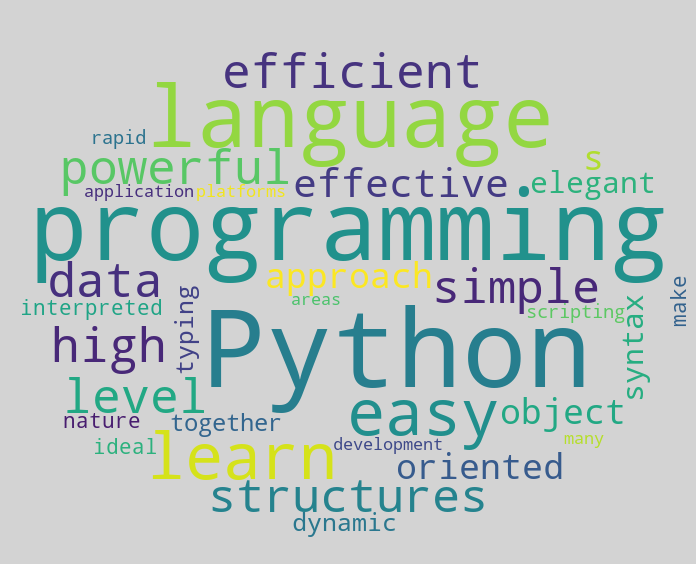
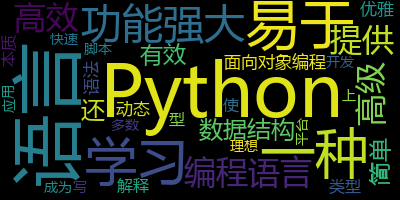
同样我们也可以绘制中文的词云图,但是在处理中文之前需要先对中文进行分词,且在生成词云图时需要设置中文的字体
from collections import Counter
word_counter = Counter(filter_words) # 统计各个词语及其出现的次数
w = wordcloud.WordCloud(stopwords=stop_words,font_path="./input/fonts/font.ttf") # 通过font_path设置中文字体的路径,且通过stopwords设置停用词
w.generate_from_frequencies(word_counter)
w.to_image()
更多推荐

 7
7 0
0- 0


 已为社区贡献2条内容

所有评论(0)