
【01 Agent Loop】原来 AI Agent 是这样运作的!带你读懂 Claude 工具调用(Loop)的核心逻辑
·
核心代码
def agent_loop(messages):
    while True:
        response = client.messages.create(
            model=MODEL, system=SYSTEM, messages=messages,
            tools=TOOLS, max_tokens=8000,
        )
        messages.append({"role": "assistant", "content": response.content})

        if response.stop_reason != "tool_use":
            return

        results = []
        for block in response.content:
            if block.type == "tool_use":
                output = run_bash(block.input["command"])
                results.append({
                    "type": "tool_result",
                    "tool_use_id": block.id,
                    "content": output,
                })
        messages.append({"role": "user", "content": results})
核心流程
用户提问
  ↓
模型判断是否需要工具
  ↓
如果不需要工具:直接回答,结束
  ↓
如果需要工具:模型返回 tool_use
  ↓
程序执行工具
  ↓
程序把工具结果包装成 tool_result
  ↓
把 tool_result 作为新的 user 消息传回模型
  ↓
模型看到工具结果后,生成最终答案
具体示例
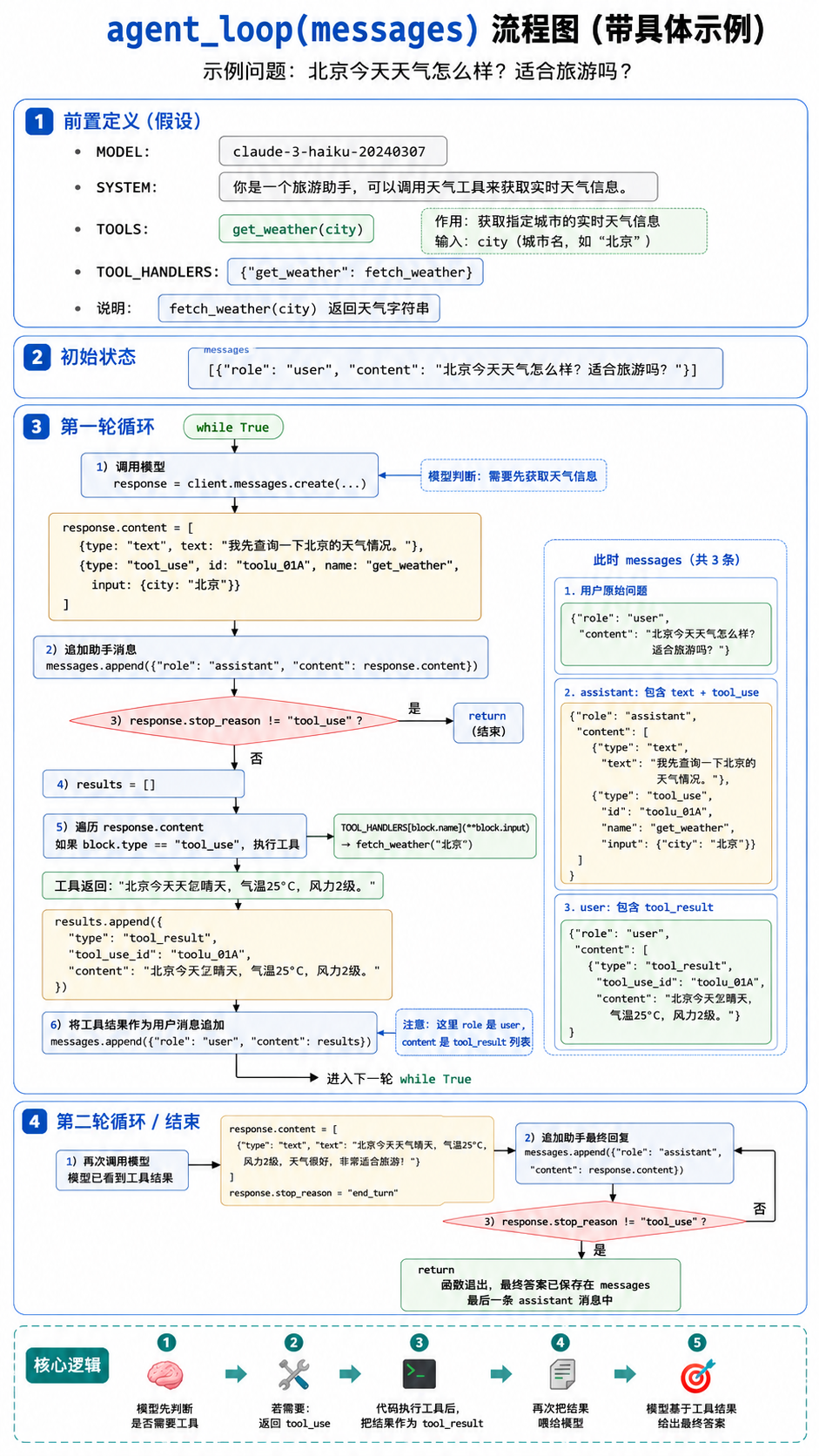
前置定义
- messages:完整的对话历史
- MODEL(当前模型):
MODEL = "claude-3-haiku-20240307"
-
SYSTEM(系统提示词):
SYSTEM = "你是一个旅游助手,可以调用天气工具来获取实时天气信息。" -
TOOLS(可使用的工具定义):只是告诉模型你可以调用一个叫
get_weather的工具,它需要一个city参数TOOLS = [ { "name": "get_weather", "description": "获取指定城市的当前天气", "input_schema": { "type": "object", "properties": { "city": { "type": "string", "description": "城市名" } }, "required": ["city"] } } ] -
TOOL_HANDLERS(工具映射):
# `fetch_weather` 是一个 Python 函数,接收 `city` 参数,返回天气字符串。
# 其中: fetch_weather("北京")
# 可能返回: "北京今天晴天,气温25°C,风力2级。"
TOOL_HANDLERS = {
    "get_weather": fetch_weather
}
初始状态
用户的问题被放进 messages 里:
messages = [
    {
        "role": "user",
        "content": "北京今天天气怎么样?适合旅游吗?"
    }
]
这里的 messages 就是完整的对话历史。
每一轮模型调用时,都会把当前的 messages 传给模型。
第一轮循环
步骤 1:调用模型
第一次进入循环时,执行:
response = client.messages.create(
    model=MODEL,
    system=SYSTEM,
    messages=messages,
    tools=TOOLS,
)
模型会看到三类信息:
1. system:你是旅游助手,可以调用天气工具
2. messages:用户问北京天气和是否适合旅游
3. tools:你可以调用 get_weather(city)
模型会判断:
用户问“北京今天天气怎么样”,这个问题需要实时天气信息。
我不能直接凭空回答,所以应该调用天气工具。
于是模型返回一个包含 tool_use 的响应。
response.content = [
    {"type": "text", "text": "我先查询一下北京的天气情况。"},

    '''
    模型想调用 get_weather 工具
    参数是 city="北京"
    这次工具调用的 ID 是 toolu_01A
    '''
    {"type": "tool_use", "id": "toolu_01A", "name": "get_weather", "input": {"city": "北京"}}
]
response.stop_reason = "tool_use"
步骤 2:将助手回复追加到消息历史
接下来代码执行:
messages.append({"role": "assistant", "content": response.content})
这一步的作用是:
把模型刚才说的话,包括 `text` 和 `tool_use`,都记录进对话历史
此时 messages 变成:
[
    {"role": "user", "content": "北京今天天气怎么样?适合旅游吗?"},
    {"role": "assistant", "content": [
        {"type": "text", "text": "我先查询一下北京的天气情况。"},
        {"type": "tool_use", "id": "toolu_01A", "name": "get_weather", "input": {"city": "北京"}}
    ]}
]
步骤 3:检查停止原因
然后执行:
if response.stop_reason != "tool_use":
    return
stop_reason 是 "tool_use",所以不返回,继续执行。
这段逻辑可以理解为:
如果模型没有要求调用工具:
    说明模型已经给出最终答案,可以结束
否则:
    说明模型要求调用工具,需要继续执行工具
步骤 4:准备执行工具
先创建一个空列表,它用来存放所有工具执行结果。
results = []
步骤 5:遍历内容块,执行工具
遍历 response.content
因为 response.content 里面可能既有普通文本,也有工具调用请求。
代码只处理其中的 tool_use 块。
for block in response.content:
    if block.type == "tool_use":
        # block.name = "get_weather", block.input = {"city": "北京"}
        # 假设 fetch_weather("北京") 返回字符串 "北京今天晴天,气温25°C,风力2级。"
        output = TOOL_HANDLERS[block.name](**block.input)

        # 按照 Anthropic API 的格式包装成 `tool_result`
        results.append({
            "type": "tool_result",
            "tool_use_id": block.id,  # "toolu_01A"
            "content": output,
        })
results 变为:
[
    {
        "type": "tool_result",
        "tool_use_id": "toolu_01A",
        "content": "北京今天晴天,气温25°C,风力2级。"
    }
]
这里最重要的是:tool_use_id
tool_use_id 用来告诉模型:
这个工具结果,是对刚才哪个 tool_use 的回复。
步骤 6:将工具结果作为用户消息追加
执行:
messages.append({"role": "user", "content": results})
这是 Anthropic API 的约定:
- 模型发出工具调用时,是 assistant 消息
- 工具返回结果时,需要放在 user 消息里
现在 messages 变为:
[
    {"role": "user", "content": "北京今天天气怎么样?适合旅游吗?"},
    {"role": "assistant", "content": [ ... ]},   # 包含 tool_use
    {"role": "user", "content": [                # 注意 role 是 user
        {"type": "tool_result", "tool_use_id": "toolu_01A", "content": "北京今天晴天,气温25°C,风力2级。"}
    ]}
]
第一轮循环结束。
第二轮循环
步骤 1:再次调用模型
response = client.messages.create(
    model=MODEL,
    system=SYSTEM,
    messages=messages,
    tools=TOOLS,
)
这一次模型看到的 messages 已经包含了:
1. 用户原始问题:北京天气怎么样?适合旅游吗?
2. assistant 的 tool_use:请求调用 get_weather("北京")
3. user 的 tool_result:北京今天晴天,气温25°C,风力2级
于是模型知道:
天气信息已经拿到了,现在可以回答用户的问题。
所以这次模型不需要再调用工具,而是直接生成最终文本:
response.content = [
    {"type": "text", "text": "北京今天晴天,气温25°C,风力2级。天气很好,非常适合旅游!"}
]
response.stop_reason = "end_turn"
步骤 2:追加助手回复
messages 最后追加了模型的最终回答。
messages.append({"role": "assistant", "content": response.content})
步骤 3:检查停止原因
stop_reason 是 "end_turn",不等于 "tool_use",所以执行 return。
函数退出,最终答案已保存在 messages 最后一条助手消息中
最终 messages 的结构
[
    {
        "role": "user",
        "content": "北京今天天气怎么样?适合旅游吗?"
    },
    {
        "role": "assistant",
        "content": [
            {
                "type": "text",
                "text": "我先查询一下北京的天气情况。"
            },
            {
                "type": "tool_use",
                "id": "toolu_01A",
                "name": "get_weather",
                "input": {
                    "city": "北京"
                }
            }
        ]
    },
    {
        "role": "user",
        "content": [
            {
                "type": "tool_result",
                "tool_use_id": "toolu_01A",
                "content": "北京今天晴天,气温25°C,风力2级。"
            }
        ]
    },
    {
        "role": "assistant",
        "content": [
            {
                "type": "text",
                "text": "北京今天晴天,气温25°C,风力2级。天气很好,非常适合旅游!"
            }
        ]
    }
]

    {
                "type": "tool_result",
                "tool_use_id": "toolu_01A",
                "content": "北京今天晴天,气温25°C,风力2级。"
            }
        ]
    },
    {
        "role": "assistant",
        "content": [
            {
                "type": "text",
                "text": "北京今天晴天,气温25°C,风力2级。天气很好,非常适合旅游!"
            }
        ]
    }
]
更多推荐

 5
5 0
0- 0


 已为社区贡献4条内容

所有评论(0)