
手把手 LoRA 微调 Qwen2-VL|VLM 训练
·
视频链接:https://www.bilibili.com/video/BV1Z5Kz6oEyv/?vd_source=5ba34935b7845cd15c65ef62c64ba82f
代码仓库: https://github.com/LitchiCheng/LLM-learning
使用 LoRA 对视觉语言模型(VLM)进行微调,选择 Qwen2-VL-7B-Instruct 作为基座模型,使用合成数据集进行快速验证
Tokenizer & Processor
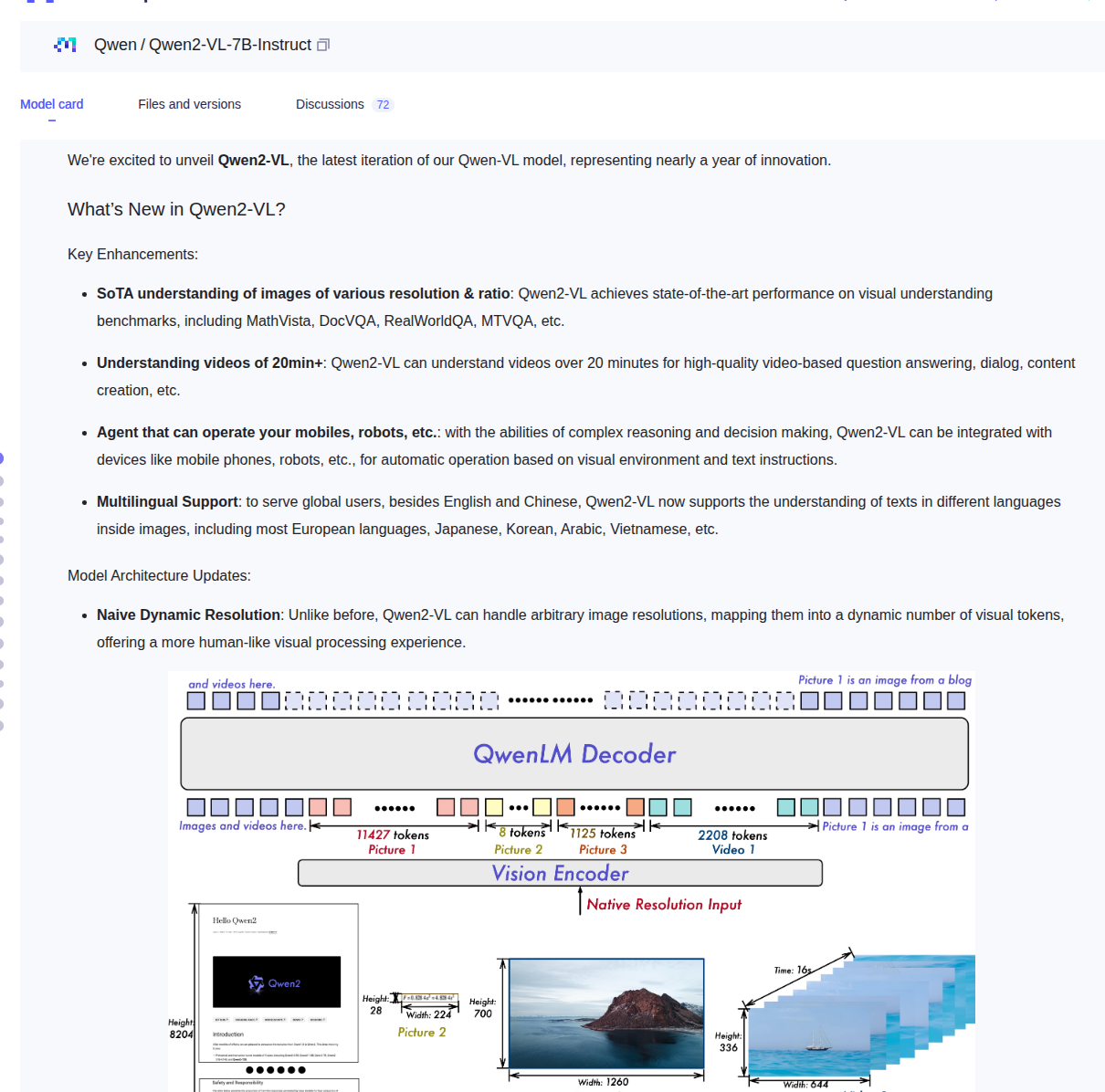
VLM 的处理器比纯文本模型复杂——它需要同时处理图像和文本
from transformers import AutoProcessor, Qwen2VLForConditionalGeneration
processor = AutoProcessor.from_pretrained(
    BASE_MODEL, trust_remote_code=True
)
print(f"Vocab size: {len(processor.tokenizer)}")
AutoProcessor 封装了图像预处理 + tokenizer
- 每个汉字/英文单词仍被拆成 token ID(数字)
- 图像会被视觉编码器转成固定数量的 visual tokens(如 256 个 patch embeddings)
模型加载
model = Qwen2VLForConditionalGeneration.from_pretrained(
    BASE_MODEL,
    torch_dtype="auto",
    device_map="auto",
    trust_remote_code=True
)
print(f"Params: {sum(p.numel() for p in model.parameters()):,}")
LoRA 配置
跟 LLM 一样,冻结原始权重,只训练小矩阵,但视觉编码器通常不加 LoRA(参数量小,微调收益有限)
from peft import LoraConfig, get_peft_model, TaskType

lora = LoraConfig(
    r=16,
    lora_alpha=32,
    target_modules=[
        "q_proj", "k_proj", "v_proj", "o_proj",
        "gate_proj", "up_proj", "down_proj"
    ],
    lora_dropout=0.05,
    bias="none",
    task_type=TaskType.CAUSAL_LM
)
model = get_peft_model(model, lora)

trainable = sum(p.numel() for p in model.parameters() if p.requires_grad)
total = sum(p.numel() for p in model.parameters())
print(f"Trainable: {trainable:,} / {total:,} ({100*trainable/total:.2f}%)")
数据集准备
TextVQA 是 OCR 视觉问答数据集:image_url, question, answers,手动创建合成数据:
test_data = [
        {"text": "LitchiCheng", "question": "What is written in the image?", "answer": "The image says: LitchiCheng"},
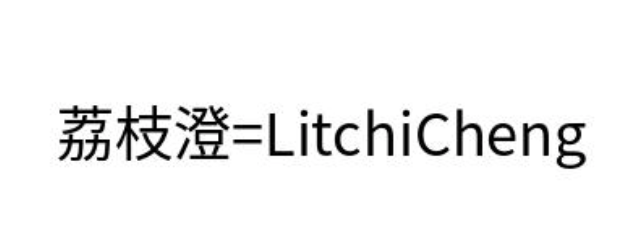
        {"text": "荔枝澄=LitchiCheng", "question": "What does the image show?", "answer": "LitchiCheng is 荔枝澄"},
    ]

    from PIL import Image, ImageDraw, ImageFont

    def _find_cjk_font(size: int = 36) -> ImageFont.FreeTypeFont:
        """在系统中搜索支持中文的字体,按优先级尝试。"""
        cjk_candidates = [
            "/usr/share/fonts/opentype/noto/NotoSansCJK-Regular.ttc",
            "/usr/share/fonts/truetype/wqy/wqy-zenhei.ttc",
            "/usr/share/fonts/truetype/droid/DroidSansFallbackFull.ttf",
            "/usr/share/fonts/opentype/simhei/SimHei.ttf",
        ]
        for path in cjk_candidates:
            try:
                return ImageFont.truetype(path, size)
            except OSError:
                continue
        print("     WARN: No CJK font found, falling back to DejaVu Sans")
        return ImageFont.truetype("/usr/share/fonts/truetype/dejavu/DejaVuSans.ttf", size)

    for i, item in enumerate(test_data):
        img_path = os.path.join(synth_dir, f"image_{i}.jpg")
        if os.path.exists(img_path):
            continue
        img = Image.new('RGB', (400, 150), color='white')
        draw = ImageDraw.Draw(img)
        font = _find_cjk_font(36)
        bbox = draw.textbbox((0, 0), item["text"], font=font)
        text_width = bbox[2] - bbox[0]
        x = (400 - text_width) // 2
        y = (150 - (bbox[3] - bbox[1])) // 2
        draw.text((x, y), item["text"], fill='black', font=font)
        img.save(img_path)

    # 构建数据集
    from datasets import Dataset as HFDataset
    samples = []
    for i in range(len(test_data)):
        samples.append({
            "id": f"image_{i}",
            "question": test_data[i]["question"],
            "answers": [test_data[i]["answer"]],
        })
    ds = HFDataset.from_list(samples)
需要把图像和文本对齐,两张用文本生成,一张用我的头像
ChatML 格式 + 视觉占位符
def format_sample(example):
    from PIL import Image
    images = [Image.open(f"image_{example['id']}.jpg")]
    text = processor.apply_chat_template(
        [
            {"role": "user", "content": [
                {"type": "image"},      # 视觉占位符
                {"type": "text", "text": example["question"]}
            ]},
            {"role": "assistant", "content": example["answer"]}
        ],
        tokenize=False,
        add_generation_prompt=True
    )

    return {"image": images, "text": text}
processor 会自动把图像编码成 visual tokens,插入到文本中
SFT 训练
from trl import SFTTrainer, SFTConfig

def collate_fn(examples):
    """自定义 batch 处理:图像 + 文本 → tensor"""
    images = [item["image"][0] for item in examples]
    texts = [item["text"] for item in examples]

    # processor 自动编码图像和文本
    batch = processor(
        text=texts,
        images=images,
        return_tensors="pt",
        padding=True
    )

    # 设置 labels(用于计算 loss)
    labels = batch["input_ids"].clone()
    labels[labels == processor.tokenizer.pad_token_id] = -100
    batch["labels"] = labels

    return batch

args = SFTConfig(
    output_dir=OUTPUT_DIR,
    per_device_train_batch_size=2,
    gradient_accumulation_steps=4,
    learning_rate=2e-4,
    max_steps=100,
    logging_steps=1,
    save_steps=10,
    fp16=True,
    report_to="none",
    remove_unused_columns=False,      # VLM 需要保留 image 列
    dataset_text_field="",             # 不用自动填充,用自定义 collate
)

trainer = SFTTrainer(
    model=model,
    train_dataset=train_dataset,
    args=args,
    data_collator=collate_fn
)

start = time.time()
result = trainer.train()
elapsed = time.time() - start

print(f"Training done in {elapsed:.1f}s")
print(f"Loss: {result.training_loss:.4f}")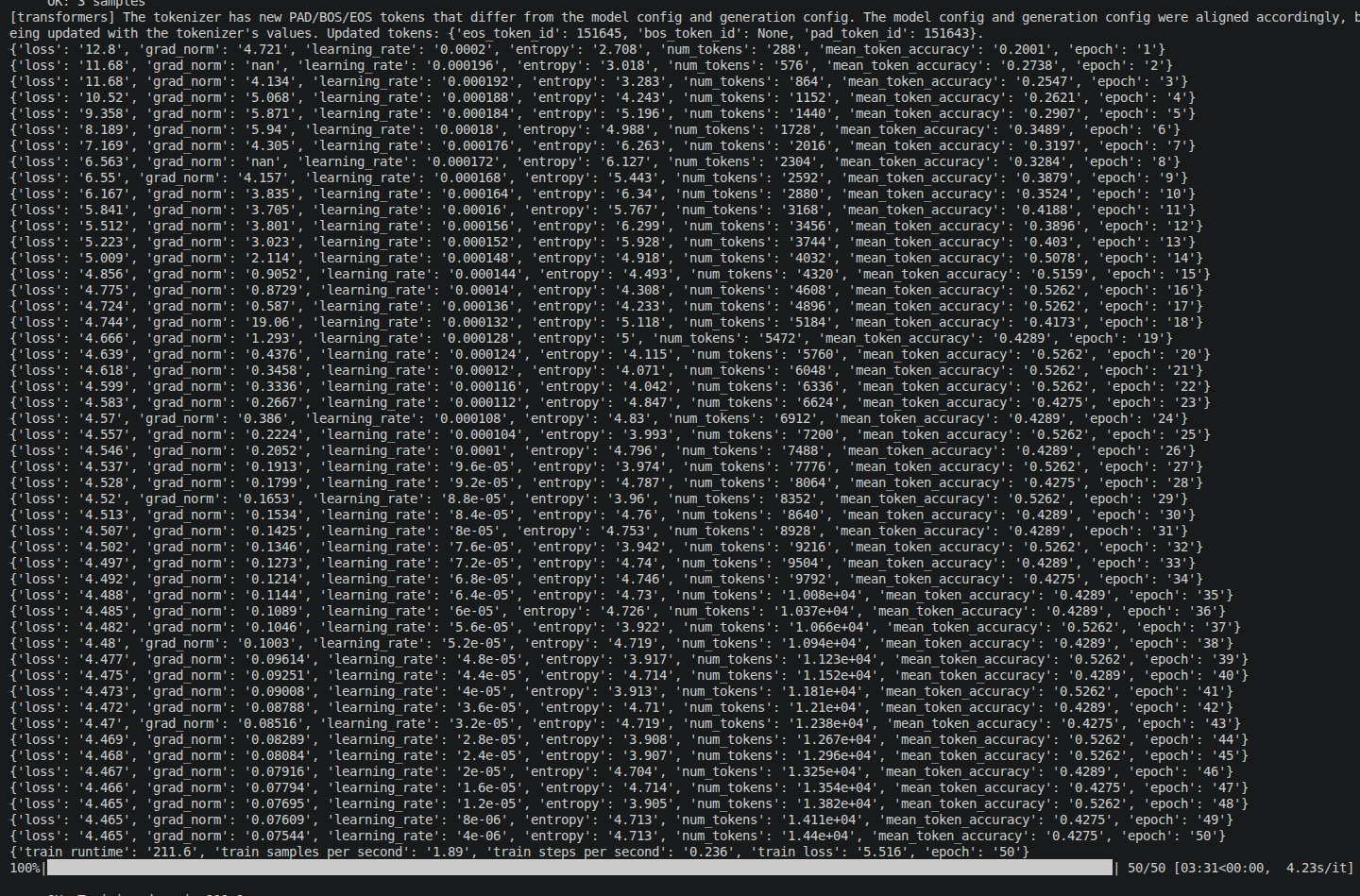
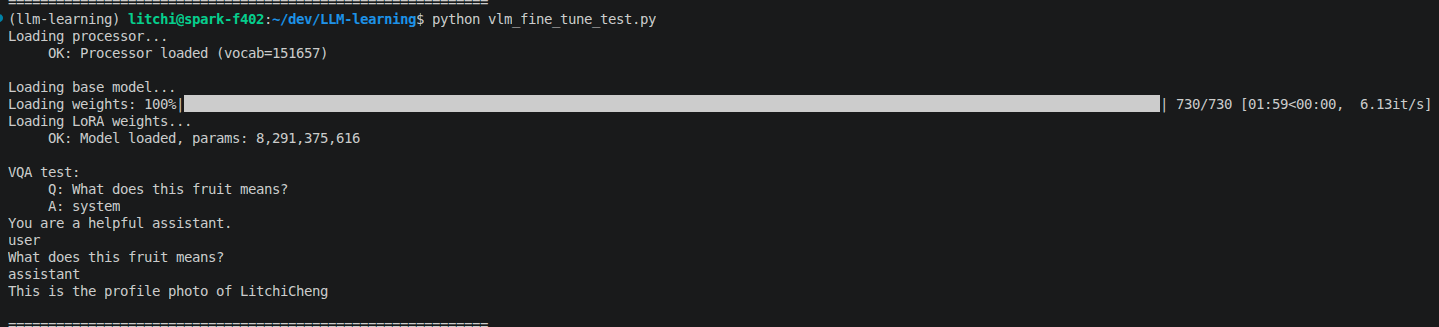
推理测试
#!/usr/bin/env python3
"""Qwen2-VL 微调推理脚本"""
import io, os, sys, time
import torch
from PIL import Image

CACHE_DIR = os.path.join(os.path.dirname(__file__), ".cache", "modelscope", "models", "qwen--Qwen2-VL-7B-Instruct", "snapshots", "master")
BASE_MODEL = CACHE_DIR
LORA_DIR  = "vlm_fine_tune_output/lora"

print("Loading processor...")
from transformers import AutoProcessor, Qwen2VLForConditionalGeneration
processor = AutoProcessor.from_pretrained(LORA_DIR, trust_remote_code=True)
print(f"     OK: Processor loaded (vocab={len(processor.tokenizer)})")

# 加载基座模型 + LoRA adapter
print("\nLoading base model...")
model = Qwen2VLForConditionalGeneration.from_pretrained(
    BASE_MODEL, torch_dtype="auto", device_map="auto", trust_remote_code=True
)

from peft import PeftModel
print("Loading LoRA weights...")
model = PeftModel.from_pretrained(model, LORA_DIR)
model = model.merge_and_unload()
print(f"     OK: Model loaded, params: {sum(p.numel() for p in model.parameters()):,}")

# 视觉问答测试
from PIL import Image
import urllib.request
import tempfile

def get_test_image():
    """优先读取本地合成图片,不存在则回退到网络下载。"""
    local = os.path.join(os.path.dirname(__file__), "dataset", "synthetic", "image_2.jpg")
    if os.path.exists(local):
        return Image.open(local).convert("RGB")
    url = "https://farm5.staticflickr.com/4093/32461784403_4bbdcb5b5a_o.jpg"
    try:
        resp = urllib.request.urlopen(url, timeout=10)
        img_data = resp.read()
        return Image.open(__import__("io").BytesIO(img_data)).convert("RGB")
    except Exception:
        # fallback: 生成一张测试图
        from PIL import ImageDraw, ImageFont
        img = Image.new("RGB", (400, 200), color="white")
        draw = ImageDraw.Draw(img)
        draw.text((50, 80), "Hello World", fill="black")
        return img

print("\nVQA test:")
test_image = get_test_image()
messages = [
    {"role": "user", "content": [{"type": "image"}, {"type": "text", "text": "What does this fruit means?"}]},
]
prompt = processor.apply_chat_template(messages, tokenize=False, add_generation_prompt=True)

inputs = processor(text=[prompt], images=[test_image], return_tensors="pt").to(model.device)

with torch.no_grad():
    out = model.generate(**inputs, max_new_tokens=100)
resp = processor.tokenizer.decode(out[0], skip_special_tokens=True).strip()
print(f"     Q: What does this fruit means?")
print(f"     A: {resp}")

print("\n" + "="*60)
print("VLM fine-tuning inference test passed!")
print("="*60)
更多推荐

 6
6 0
0- 0


 已为社区贡献2条内容

所有评论(0)