
【实战项目】从零实现c++ai大模型接入SDK(四)数据结构设计、日志库封装、deepseek接入封装、全量返回和流式响应
目录
一、api接入大模型思路
1.1 API key 获取
- ⾝份验证:验证你的应⽤程序是否被授权,只有拥有API Key的⽤⼾才能调⽤⼤模型的API
- 授权:限制应⽤程序对特定功能或资源的访问权限。⽐如:某些⾼级功能需要特定API Key才能访问
- 监控和限制:监控API的使⽤情况,⽐如统计请求次数、限制请求频率,以防滥⽤
- 计费:根据API的使⽤情况,向用户收取费⽤
例子:

点击右下角创建就能获取API key。
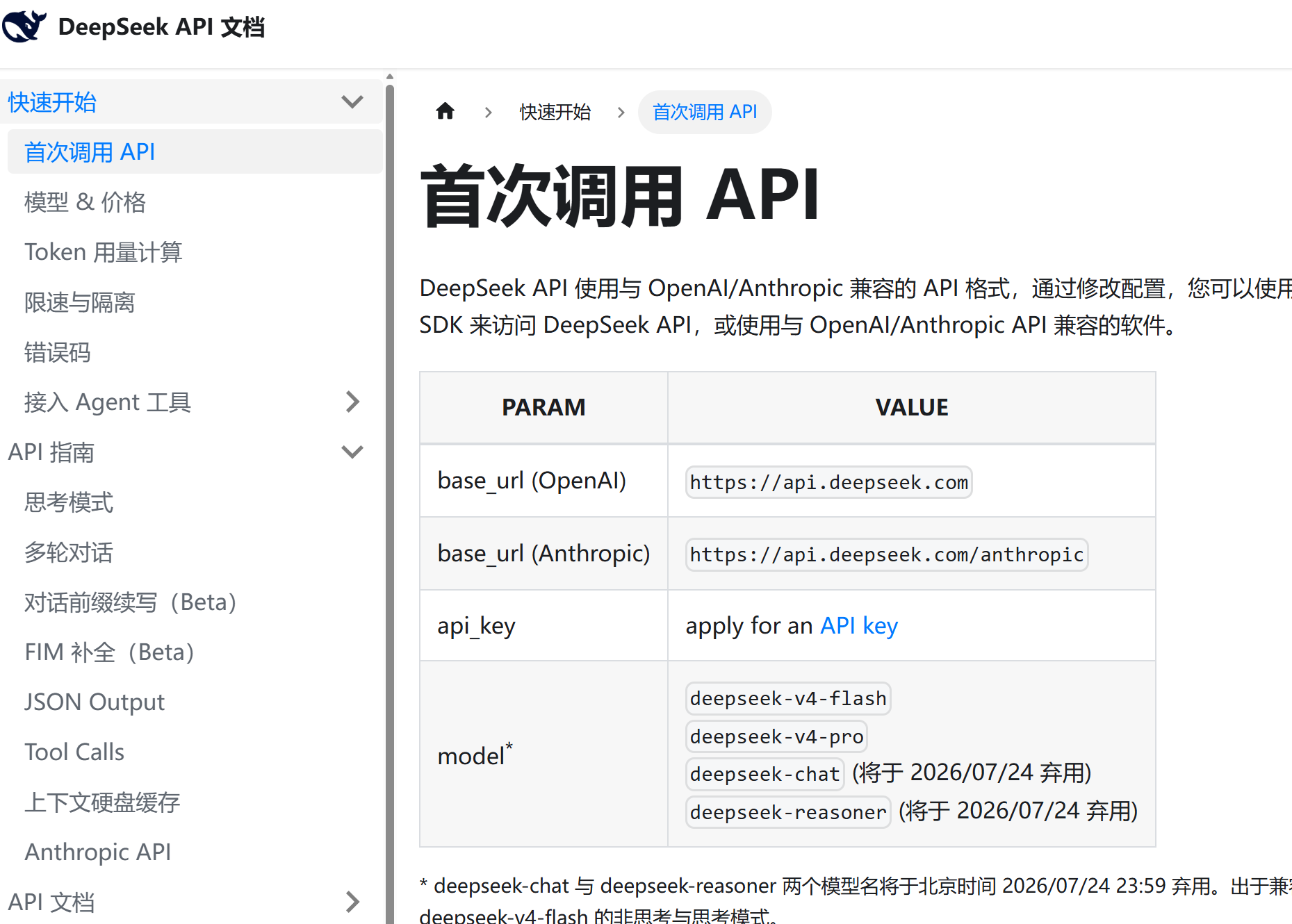
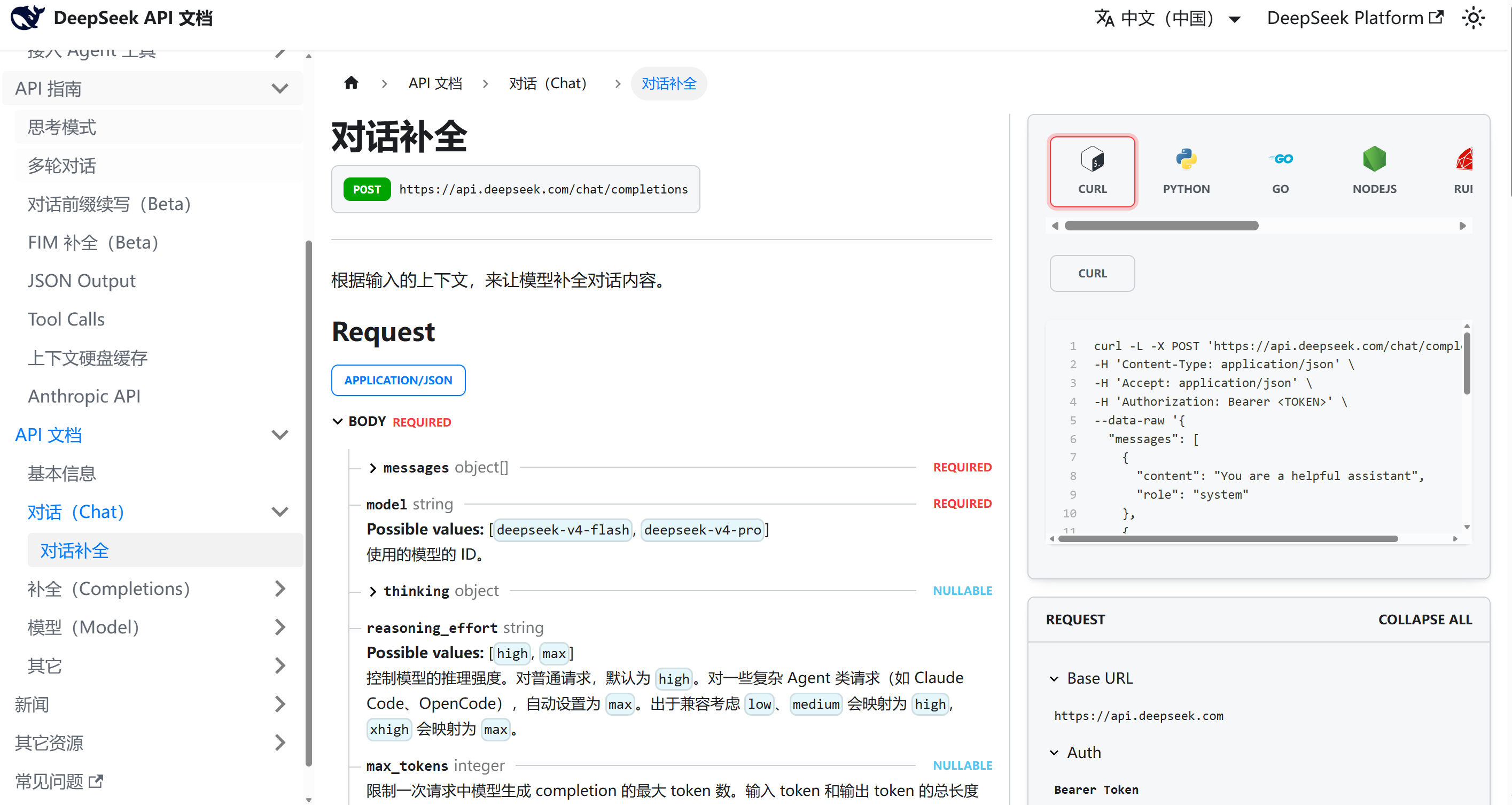
官方文档能够查看价格和如何使用。
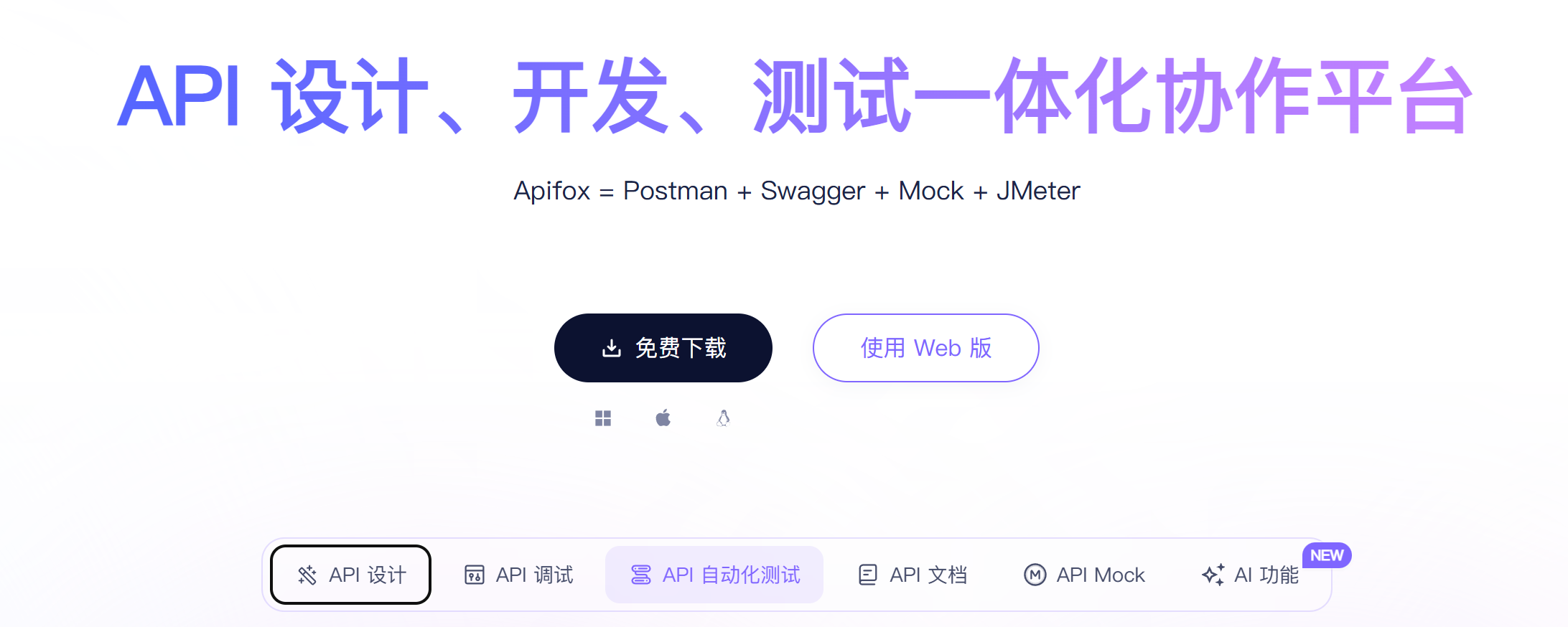
1.2 apifox
进入官网点击下载就行,下载也很简单,一路点击next就行。
1.3 deep seek的api使用
登录完成后
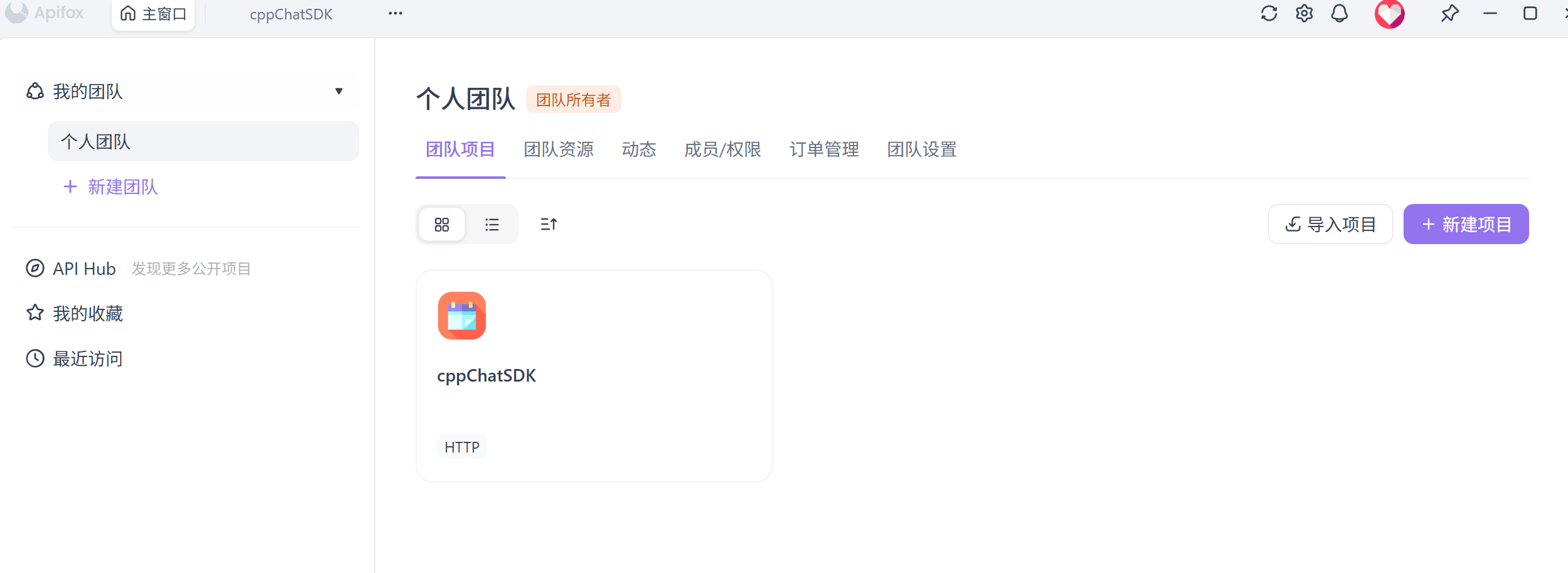
点击新建项目
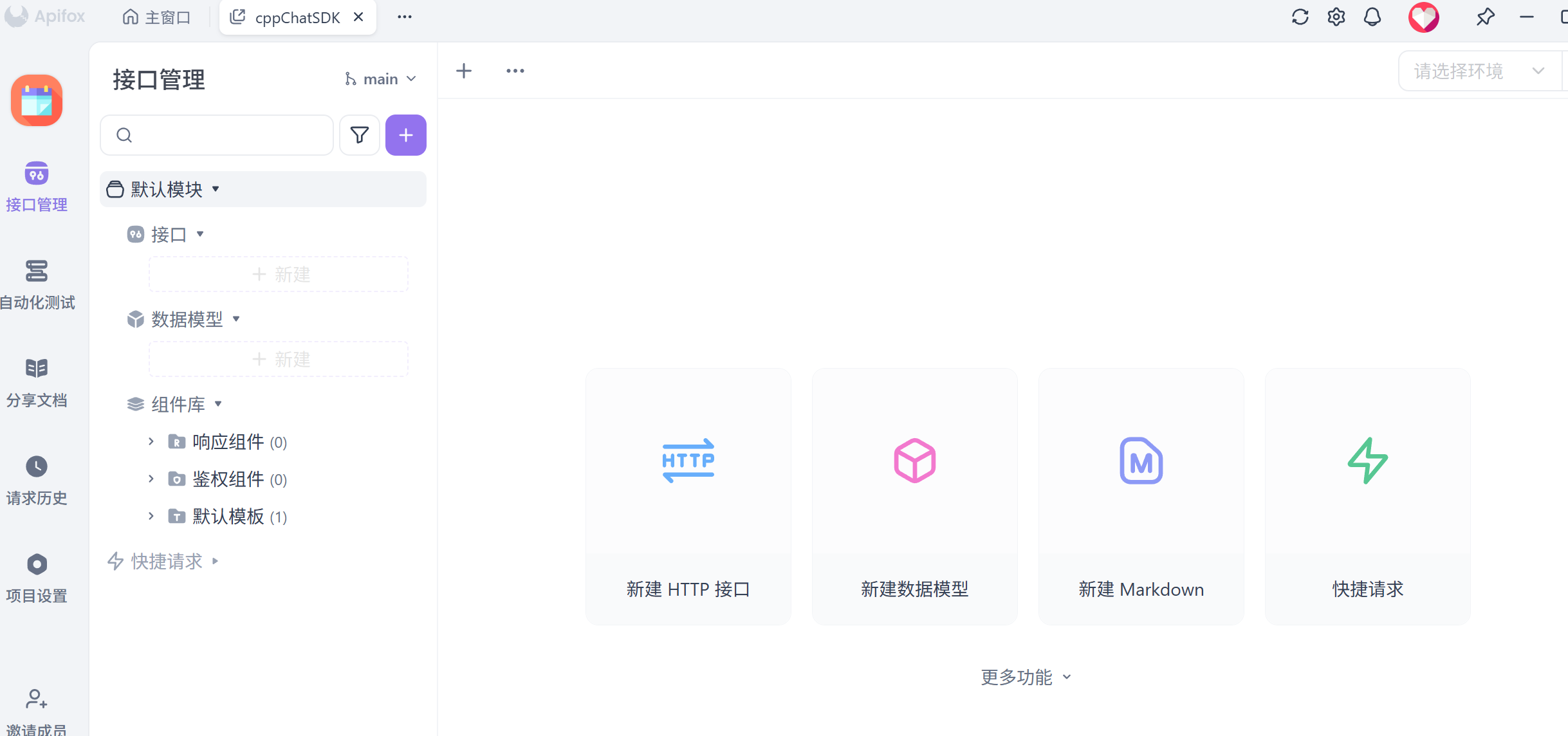
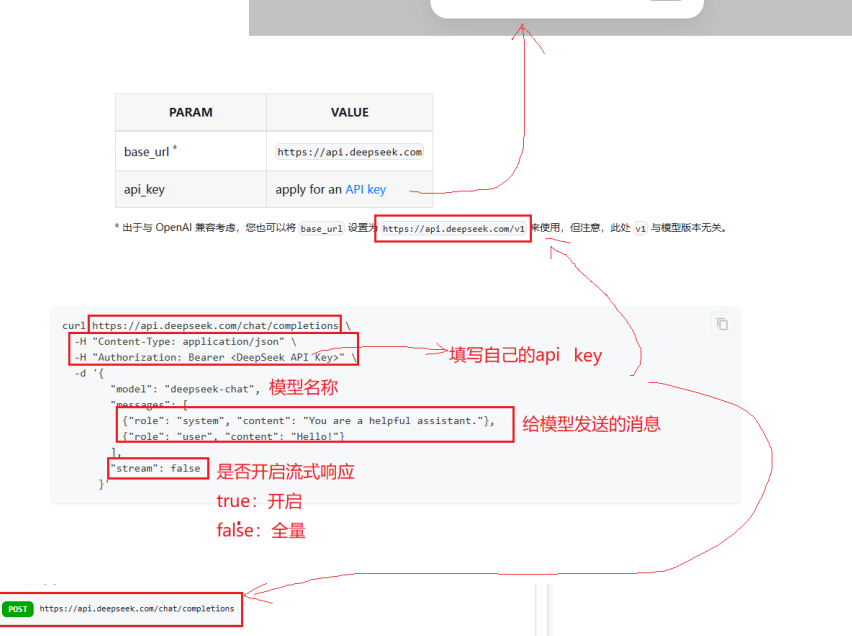
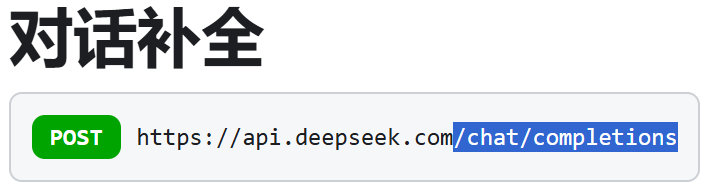
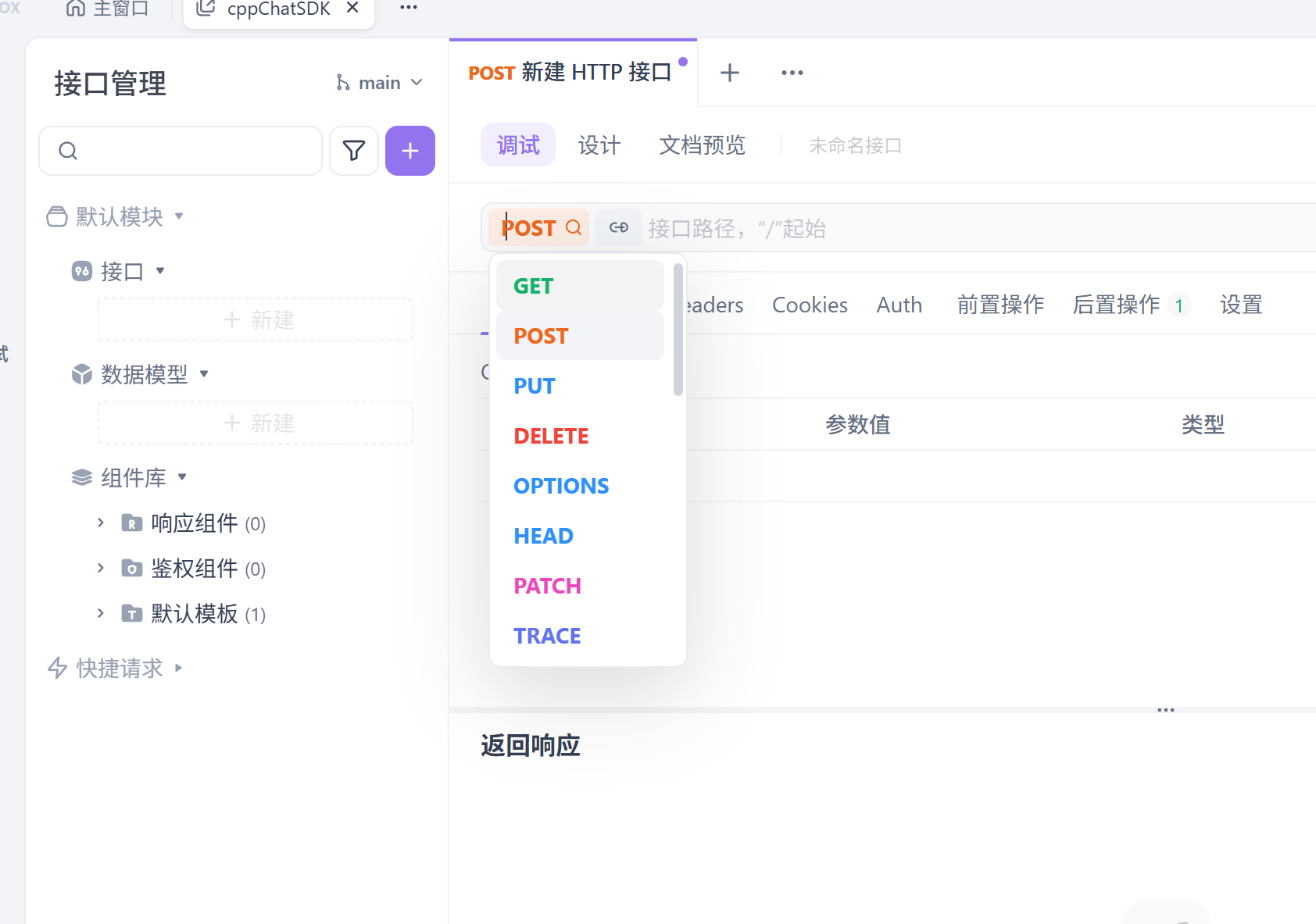
进入项目在左边的接口那里点击新建,选择post然后在复制蓝色部分就行。
点击调试旁边的设计模式不要选择调试模式。
选择body,创建节点。
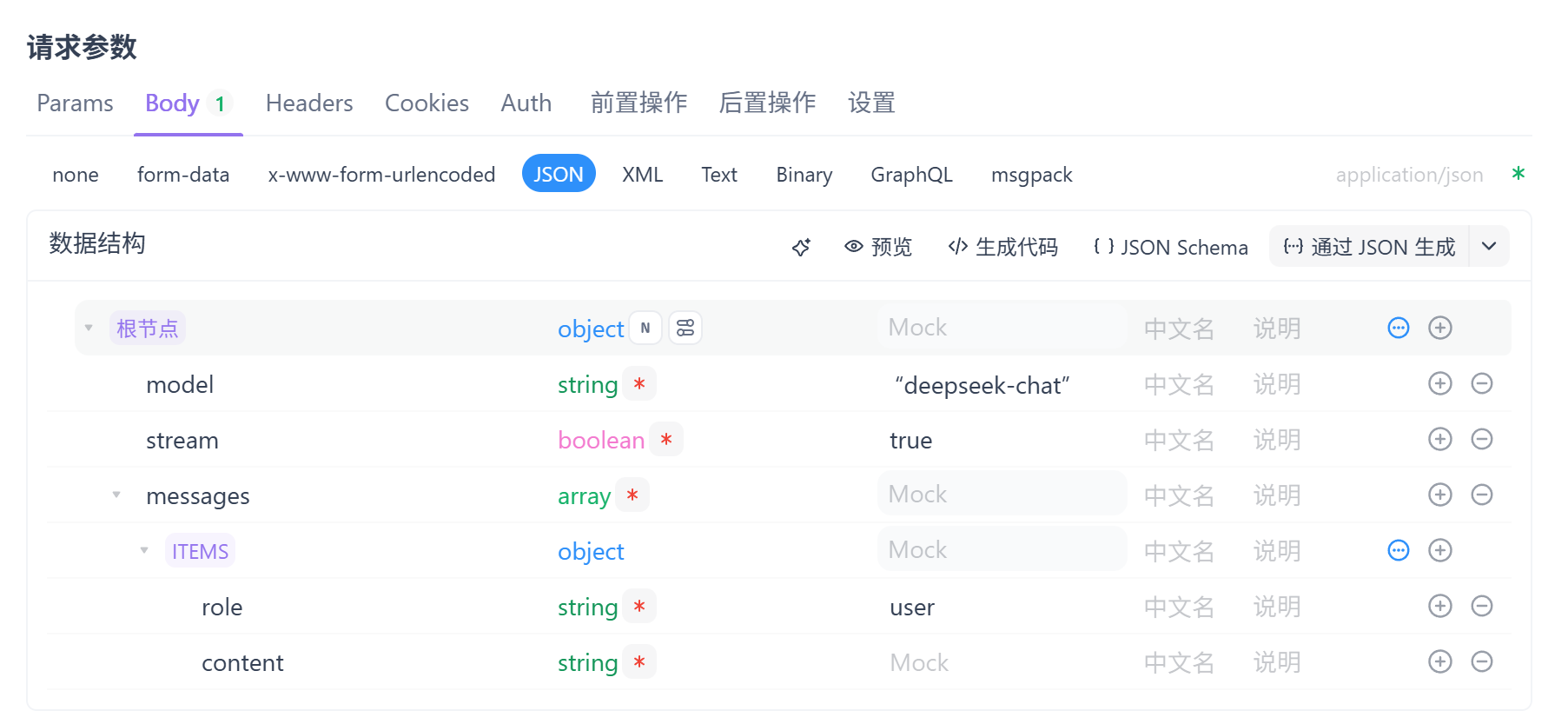
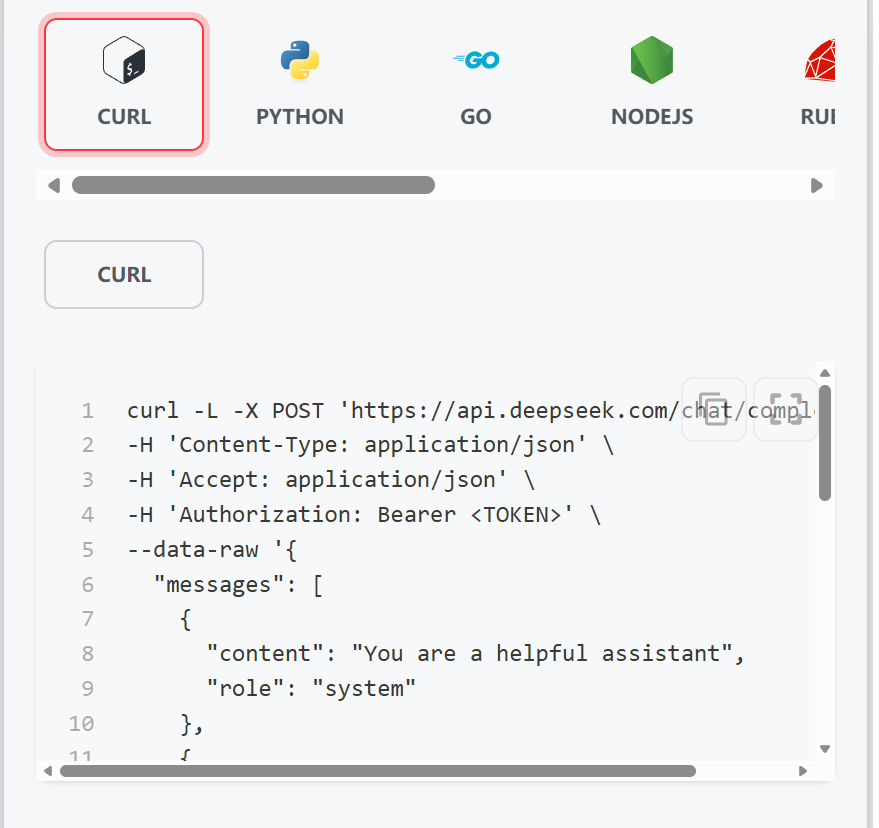
官方文档:
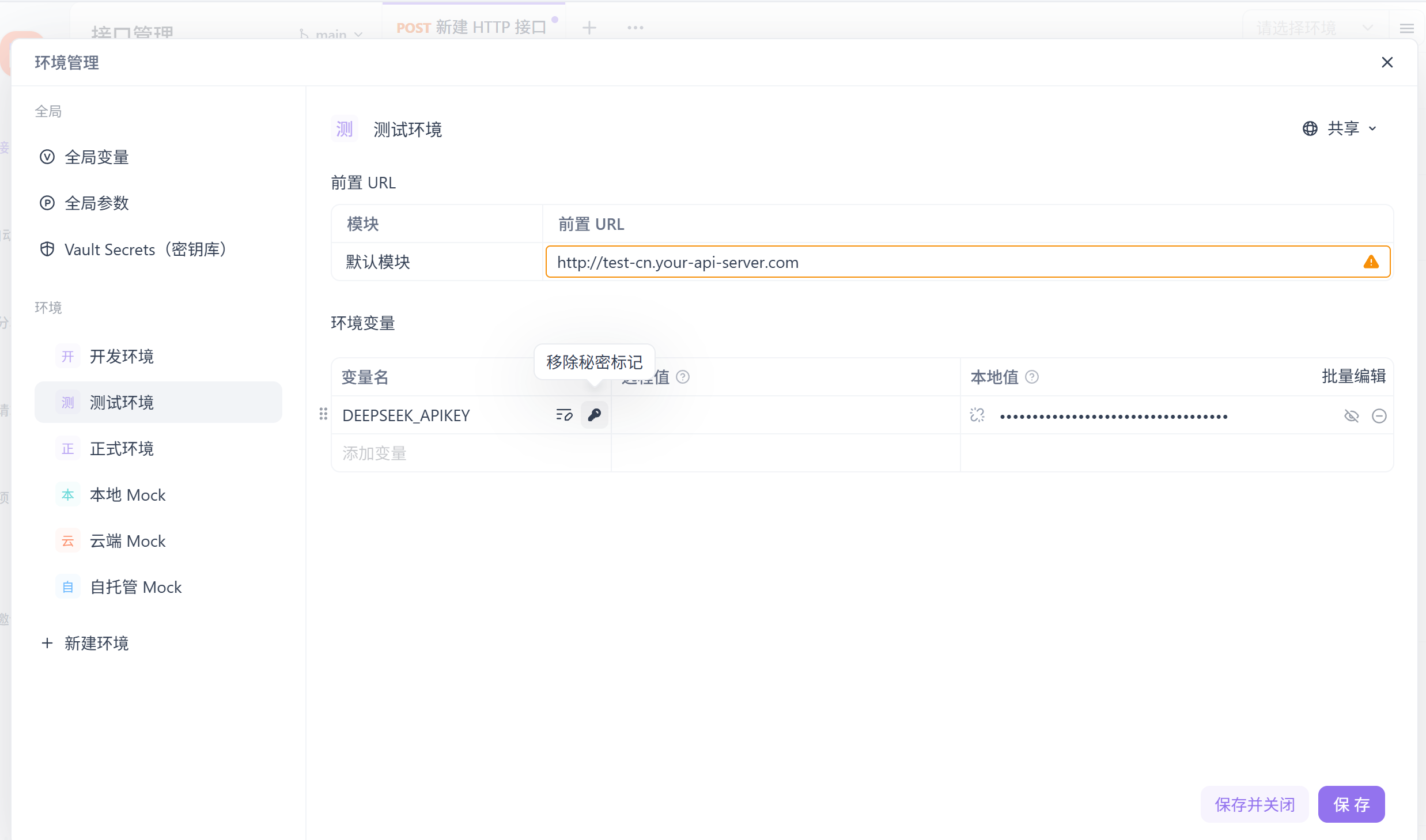
配置环境:本地值填写你的API key。最后保存。
按照下面搞好,保存。
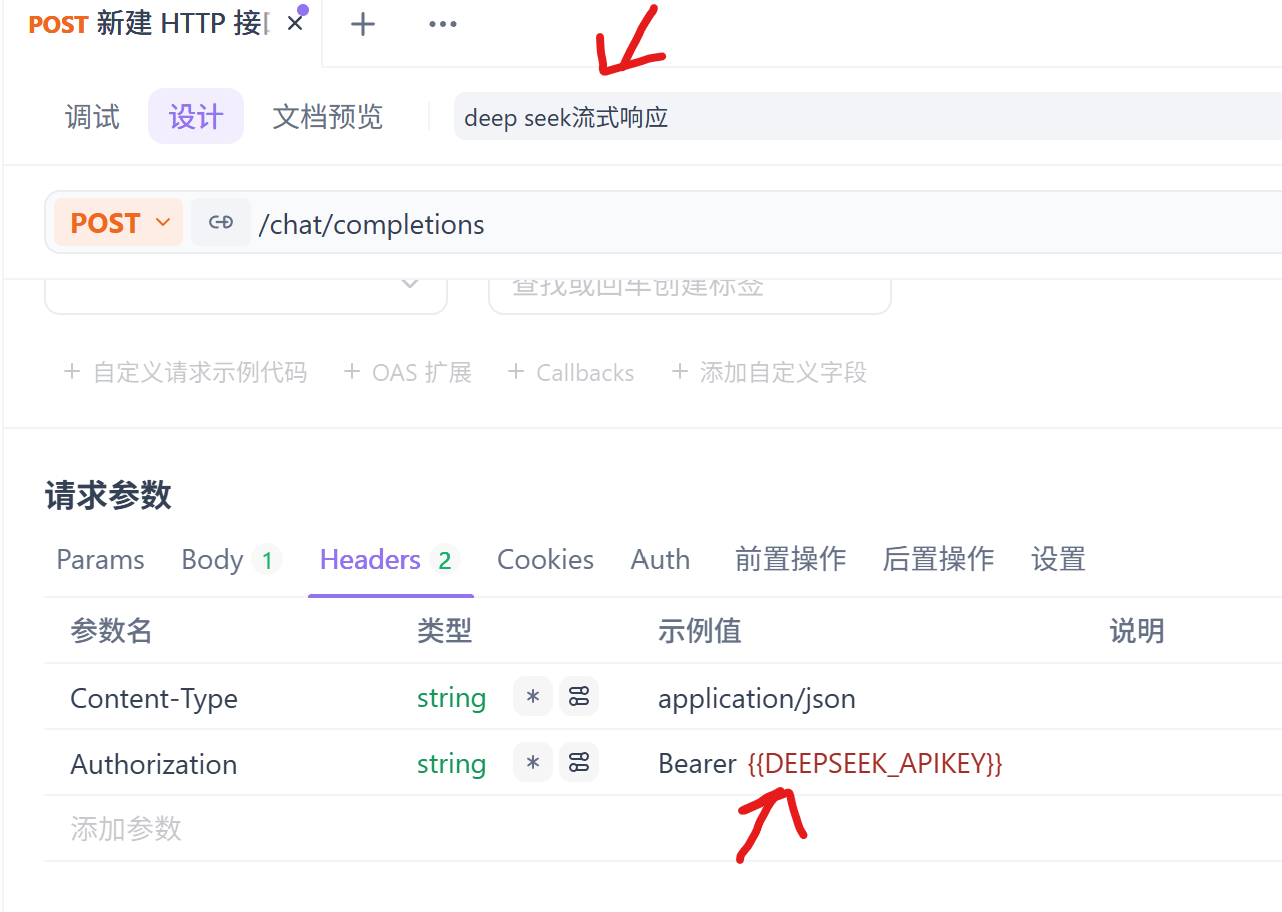
点击右上角三个杠,前置URL选择蓝色部分。
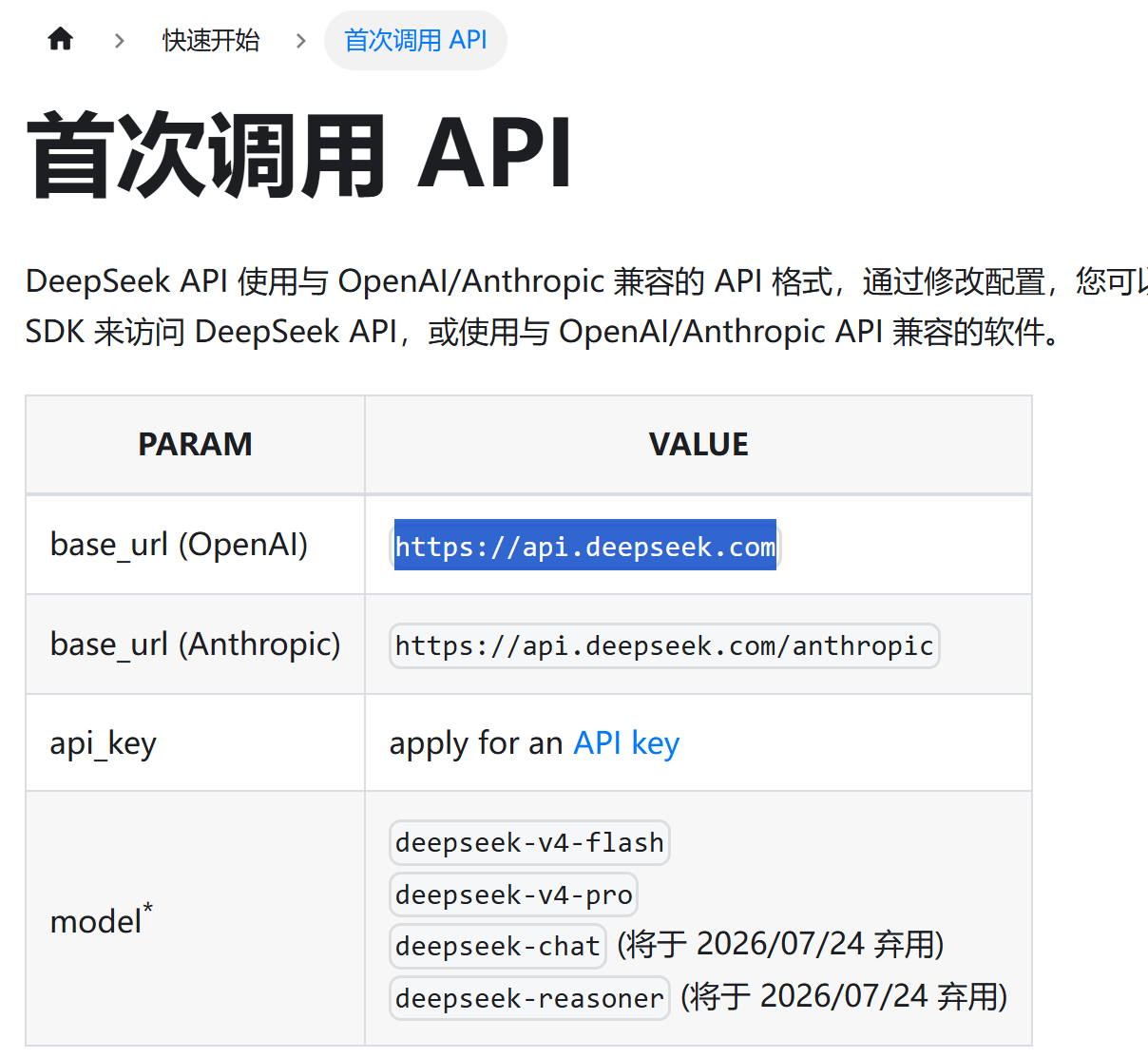

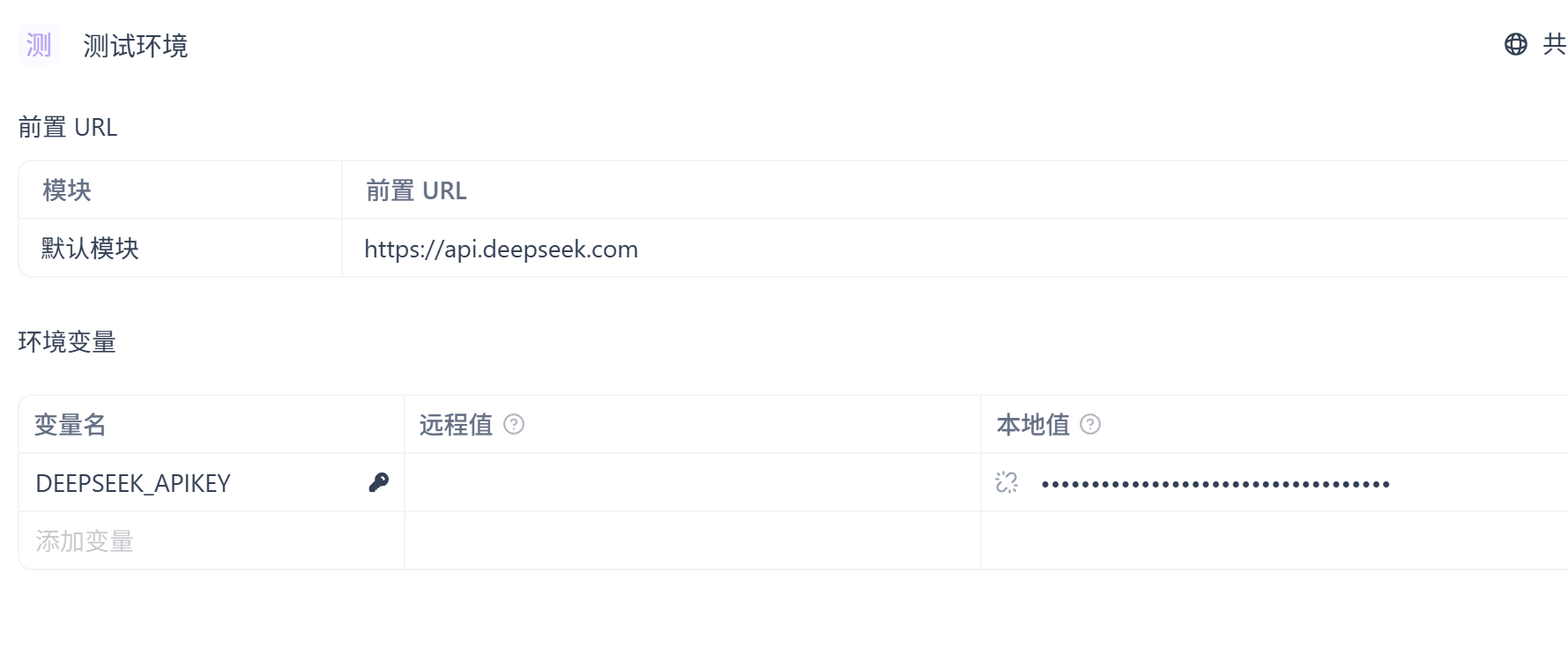
保存关闭。然后保存所有配置之后点击调试界面,body下面的json,自动生成案例,content里面改成“你是谁”就行。最后点击发送。
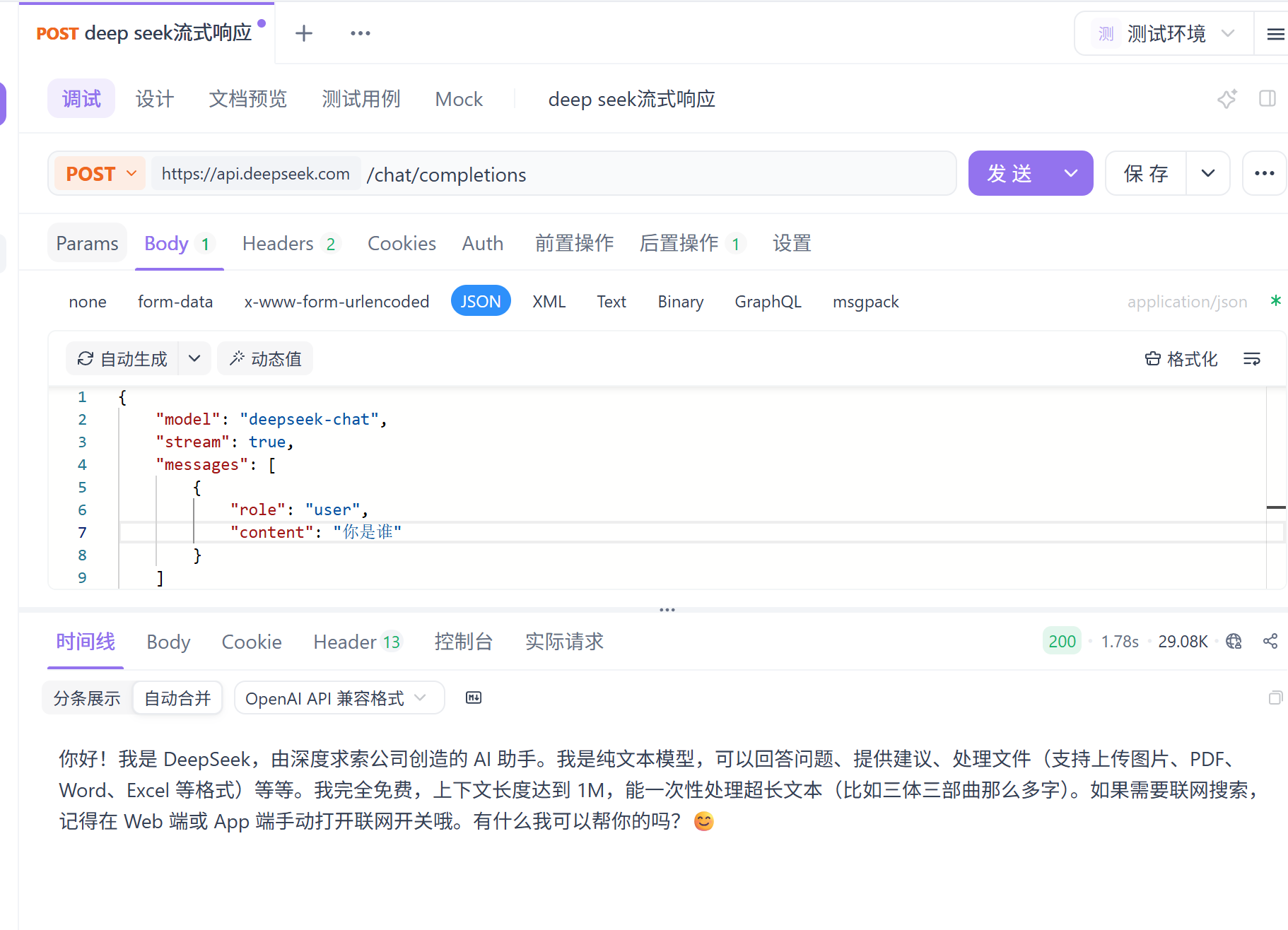
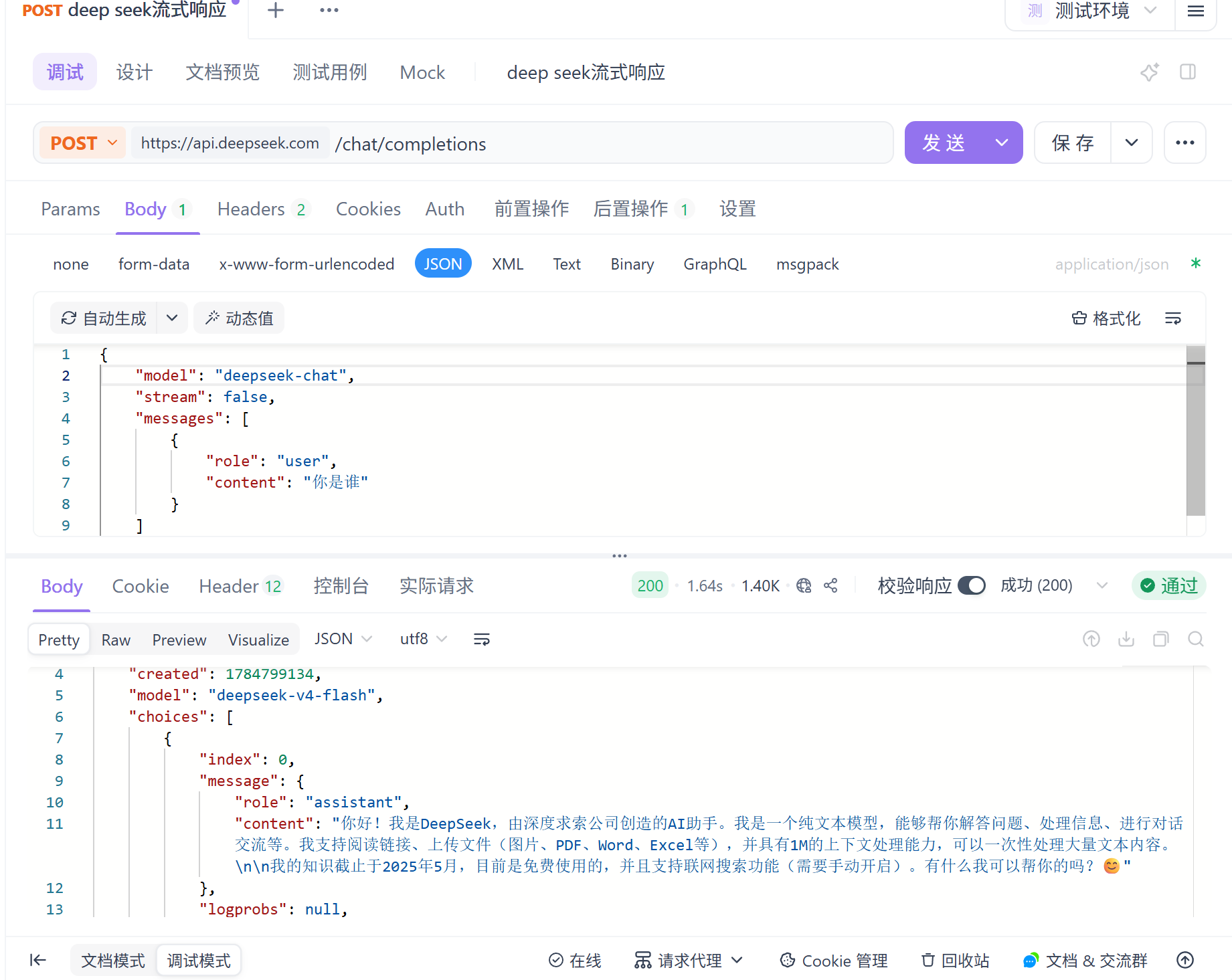
然后我们将stream改成false。可以看到直接全部发给我了。
1.4 ChatGPT的api获取
openai官网:OpenAI | Research & Deployment
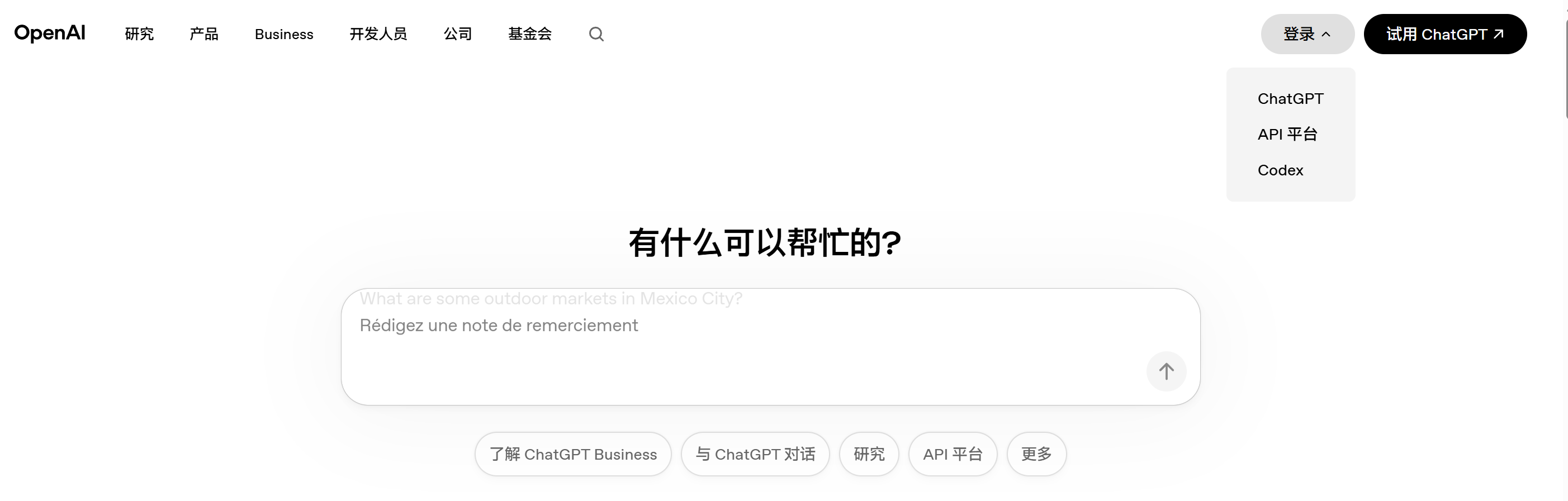
进去之后选择API平台。然后点击左下角头像。点击Organization setting。
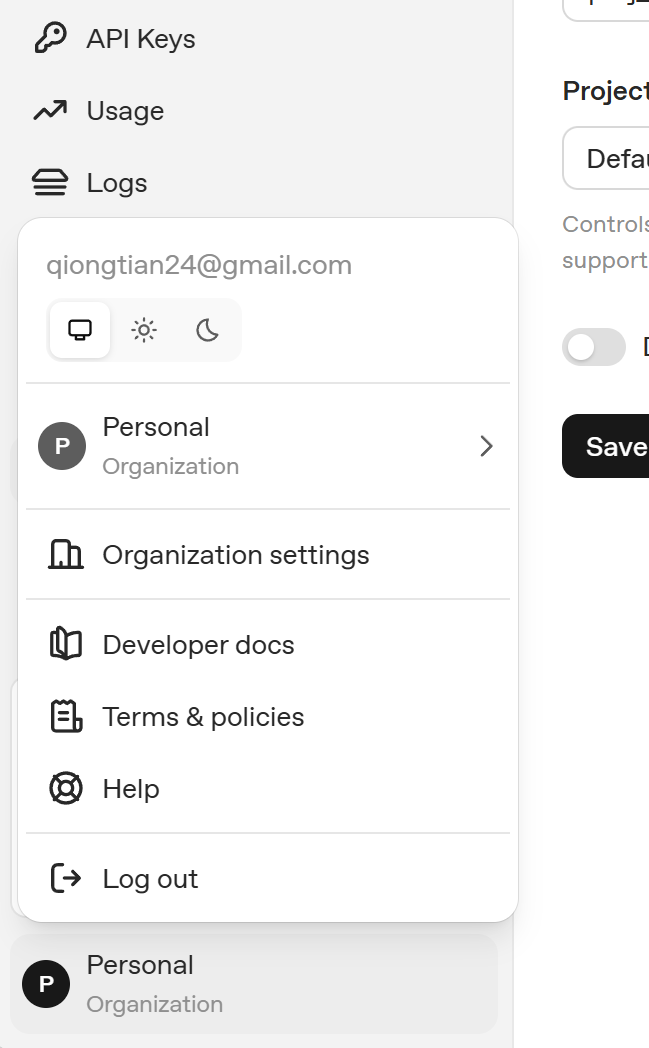
进入到这个页面。
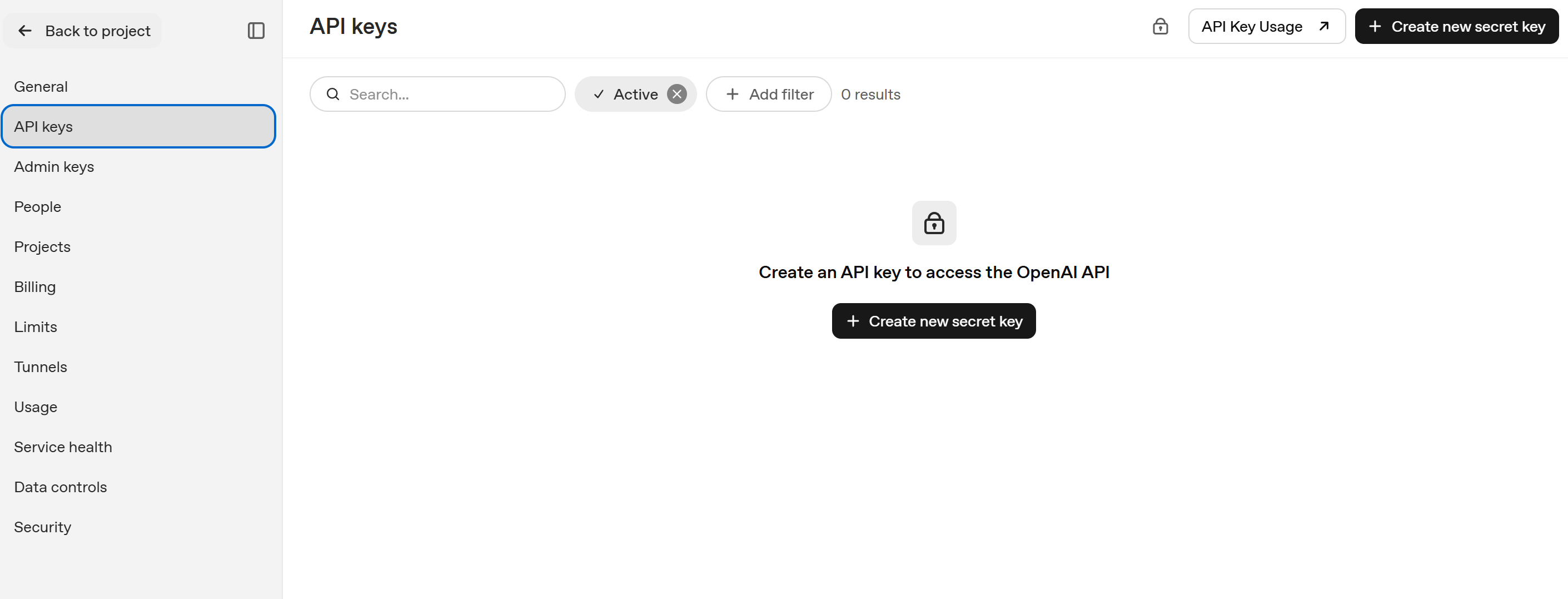
点击创建。
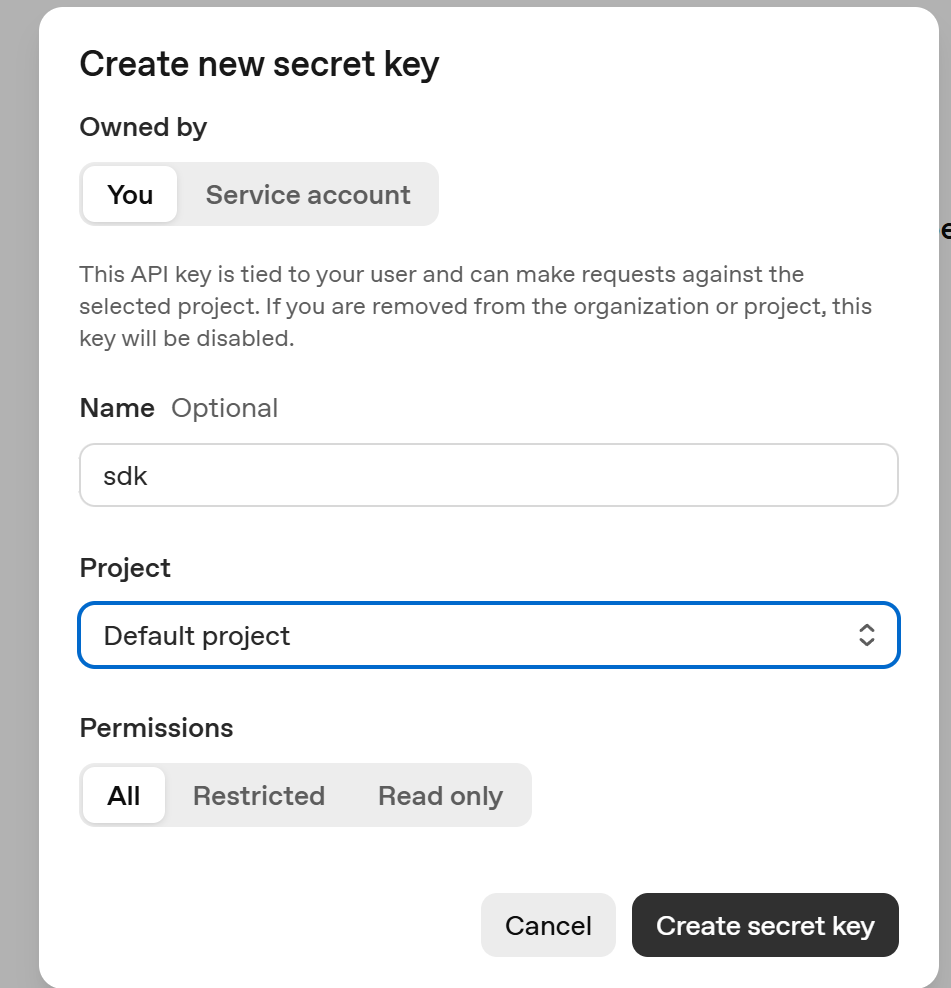
1.5 Gemini的api获取
谷歌官网:Google AI Studio | Gemini API | Google AI for Developers
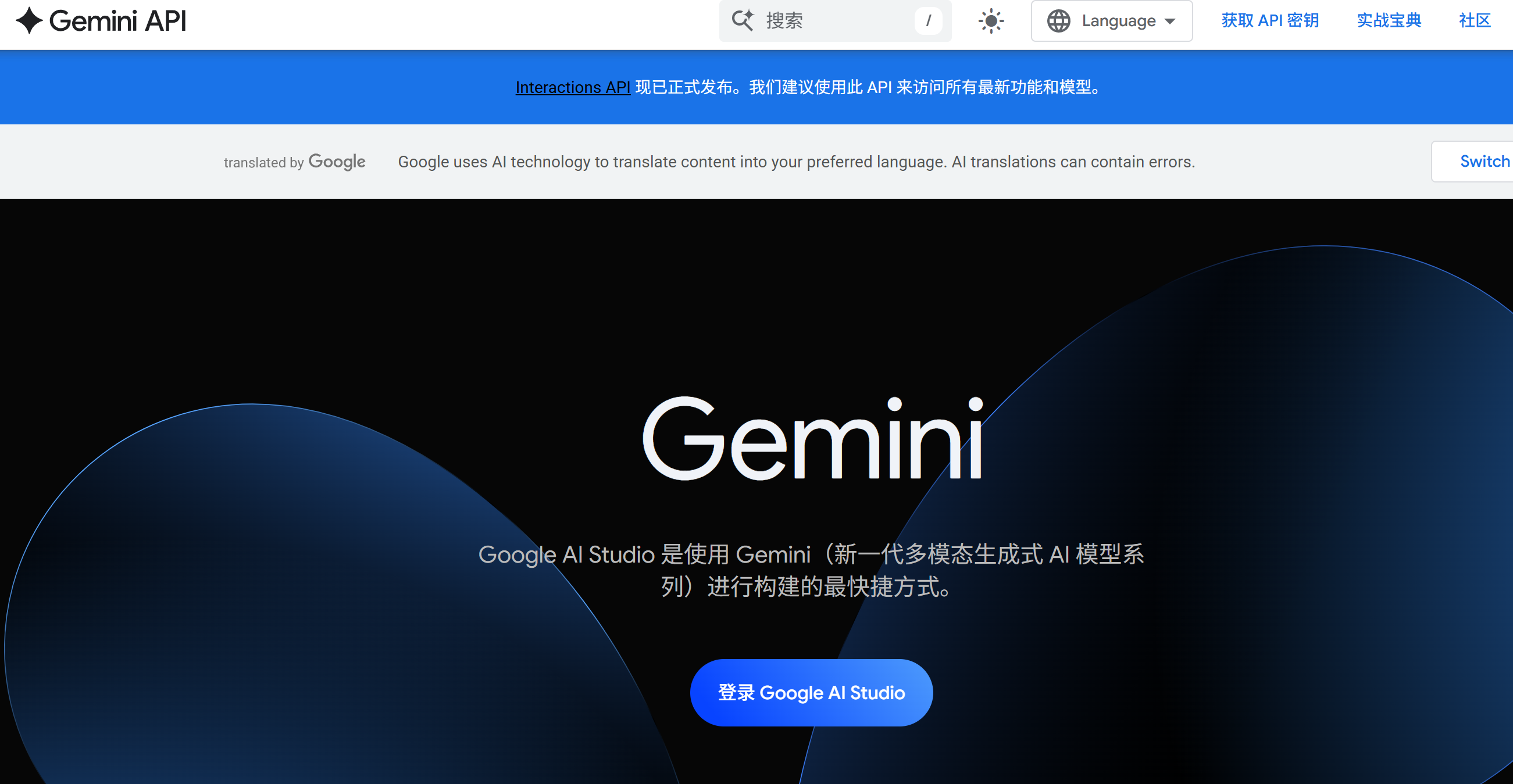
登录进去。点击这个。
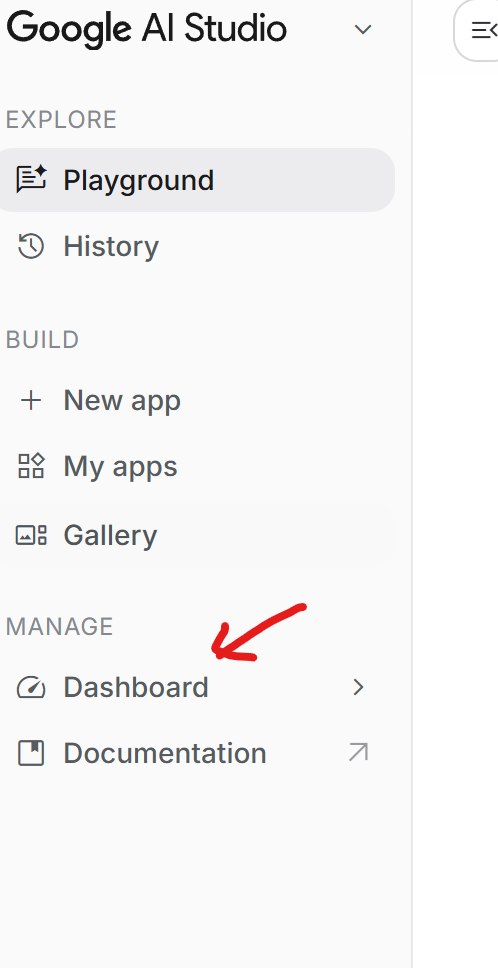
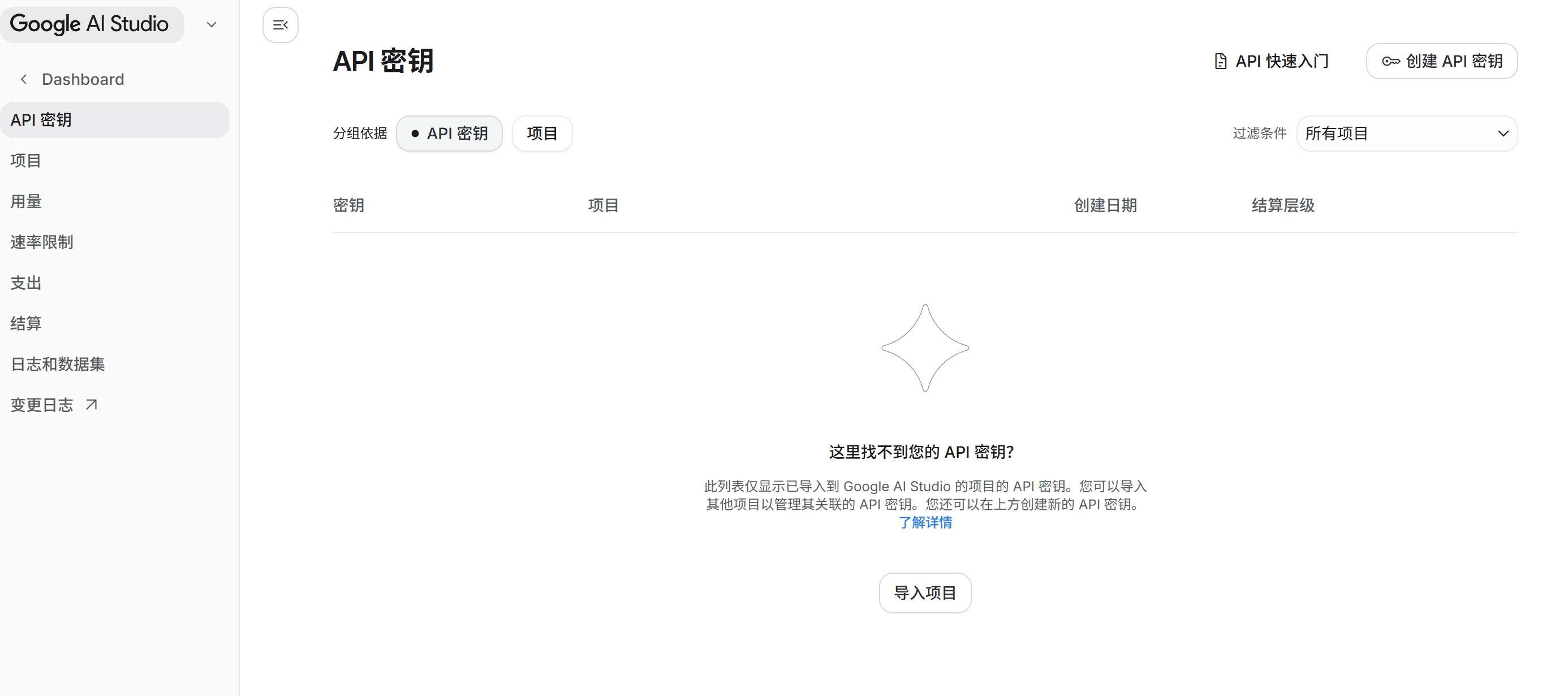
依旧创建,流程类似,这里就不过多展示了。
二、数据结构设计
#pragma once
#include <string>


namespace ai_chat_sdk {
    // 消息结构
    struct Message {
        std::string _messageId; // 消息ID
        std::string _role; // 角色
        std::string _timestamp; // 发送消息时间戳
        std::string _content; // 消息内容

        // 构造函数
        Message( const std::string& role, const std::string& content)
            :  _role(role), _content(content) {}


    };

    // 模型的公共配置信息
    struct Config {
        std::string _modelName;     // 模型名称
        double _temperature = 0.7;  // 温度参数,用于控制生成文本的随机性 低表示严谨,高表示想象力丰富
        int _maxTokens = 2048;      // 最大生成令牌数
    };

    // 通过API方式接入云端模型的配置
    struct ApiConfig : public Config {
        std::string _apiKey;     // API密钥

    };

    // 通过Ollama方式接入本地模型的配置


    // LLM信息
    struct ModelInfo {
        std::string _modelName; // 模型名称
        std::string _modelDesc; // 模型描述
        std::string _modelProvider; // 模型供应商
        std::string _modelEndpoint; // 模型端点

        ModelInfo(const std::string& modelName, const std::string& modelDesc, const std::string& modelProvider, const std::string& modelEndpoint)
            : _modelName(modelName), _modelDesc(modelDesc), _modelProvider(modelProvider), _modelEndpoint(modelEndpoint) {}
    };

    // 会话信息
    struct SessionInfo {
        std::string _sessionId; // 会话ID
        std::string _modelName; // 模型名称
        std::vector<Message> _sessionMessages; // 会话消息
        std::time_t _sessionStartTime; // 会话开始时间戳
        std::time_t _sessionEndTime; // 会话结束时间戳

        SessionInfo(const std::string& modelName = "")
            : _modelName(modelName) {}
    };


}
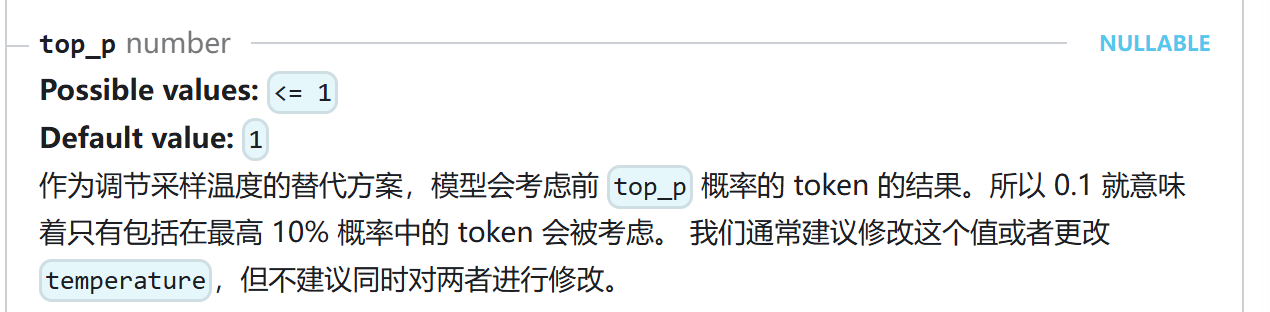
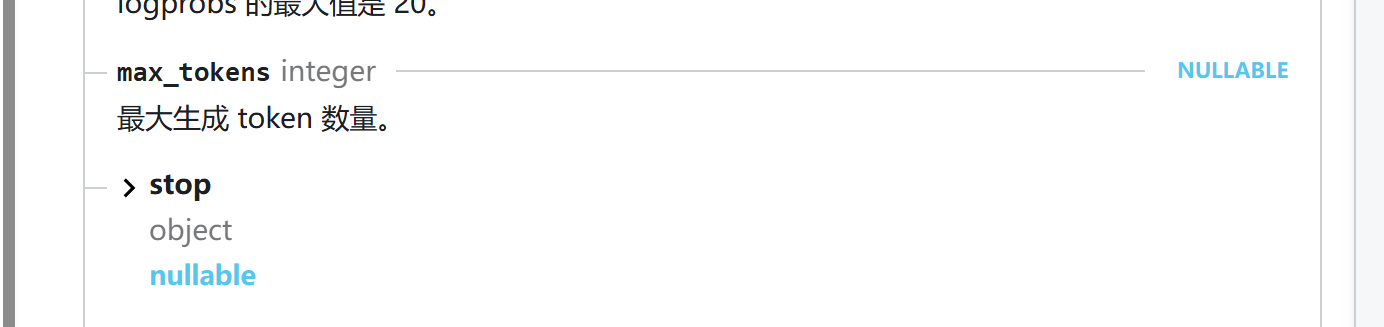
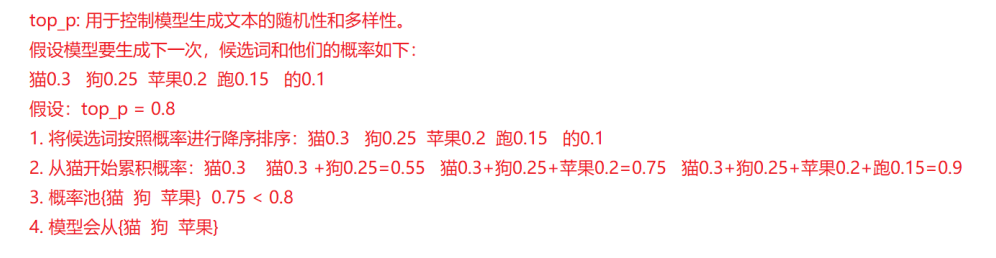
温度解释如下,还有其他的专有名词都可以去api开放平台文档里面找到。我就不一一列举了。
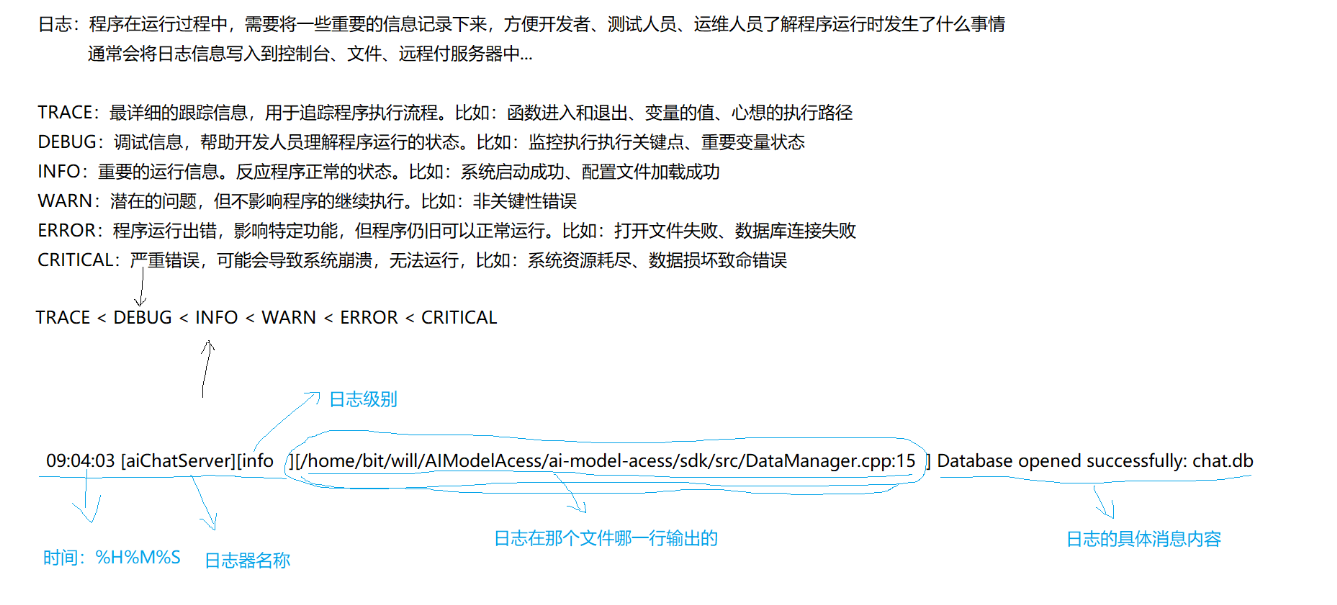
三、日志库封装
- ⽇志级别管理
- ⽇志格式化
- ⽇志存储管理
- 线程安全
- 性能优势
代码块:
mylog.h
#pragma once
#include <spdlog/spdlog.h>
#include <spdlog/logger.h>


namespace my_log {
 class Logger {
    public:
        static void initLogger(const std::string& loggerName,const std::string& loggerFile,spdlog::level::level_enum level = spdlog::level::level_enum::info);
        static std::shared_ptr<spdlog::logger> getLogger();
    private:
        Logger() = default;
        Logger(const Logger&) = delete;
        Logger& operator=(const Logger&) = delete;

    private:
        static std::shared_ptr<spdlog::logger> _logger;
        static std::mutex _mutex;
 };


//fmt
// string s = std::format("hello,{}","world")
// 09:08:08 [ai_chat_sdk][info][/home/zzz/gitcode1/chatSDK/SDK-source/sdk/src/util/myLog.cpp]
#define DBG(format, ...) my_log::getLogger()->debug(std::string("[{:>10}:{:<4d}]")+format, __func__, __LINE__, ##__VA_ARGS__)
#define INF(format, ...) my_log::getLogger()->info(std::string("[{:>10}:{:<4d}]")+format, __func__, __LINE__, ##__VA_ARGS__)
#define WAR(format, ...) my_log::getLogger()->warn(std::string("[{:>10}:{:<4d}]")+format, __func__, __LINE__, ##__VA_ARGS__)
#define ERR(format, ...) my_log::getLogger()->error(std::string("[{:>10}:{:<4d}]")+format, __func__, __LINE__, ##__VA_ARGS__)
#define CRIT(format, ...) my_log::getLogger()->critical(std::string("[{:>10}:{:<4d}]")+format, __func__, __LINE__, ##__VA_ARGS__)
#define TRACE(format, ...) my_log::getLogger()->trace(std::string("[{:>10}:{:<4d}]")+format, __func__, __LINE__, ##__VA_ARGS__)


} //end namespace my_log
mylog.cpp
#include "../../include/util/myLog.h"
#include <memory>
#include <spdlog/spdlog.h>
#include <spdlog/sinks/basic_logger_sink.h>
#include <spdlog/sinks/stdout_color_sink.h>
#include <spdlog/async.h>

namespace my_log {
    std::shared_ptr<spdlog::logger> Logger::_logger = nullptr;
    std::mutex Logger::_mutex;

    Logger::Logger() {};

    void Logger::initLogger(const std::string& loggerName,const std::string& loggerFile,spdlog::level::level_enum logLevel) {
        if (_logger == _logger) {
            std::lock_guard<std::mutex> lock(_mutex);
            if (_logger == nullptr) {
                // 设置日志级别,当日志级别为info时,
                spdlog::flush_on(logLevel);
                // 启用异步日志记录,将日志存放在消息队列中,有后台线程负责写入
                // 参数1:消息队列大小,单位为字节
                // 参数2:后台线程数量
                spdlog::init_thread_pool(32768,1);
                if ("stdout" == loggerFile) {
                    // 创建一个异步日志记录器,将日志写入到标准输出流
                    _logger = spdlog::stdout_color_mt(loggerName);
                } else {
                    // 创建一个异步日志记录器,将日志写入到指定文件
                    _logger = spdlog::basic_logger_mt(loggerName, loggerFile);
                }
            }

            // 设置日志格式,%Y:%m:%d %H:%M:%S 表示时间,%-7l 表示日志级别左对齐,%v 表示日志内容
            _logger->set_pattern("[%Y:%m:%d %H:%M:%S] [%-7l] %v");
            // 设置日志级别
            _logger->set_level(logLevel);
        }
    }

    // 获取日志记录器
    std::shared_ptr<spdlog::logger> Logger::getLogger() {
        return _logger;
    }

}
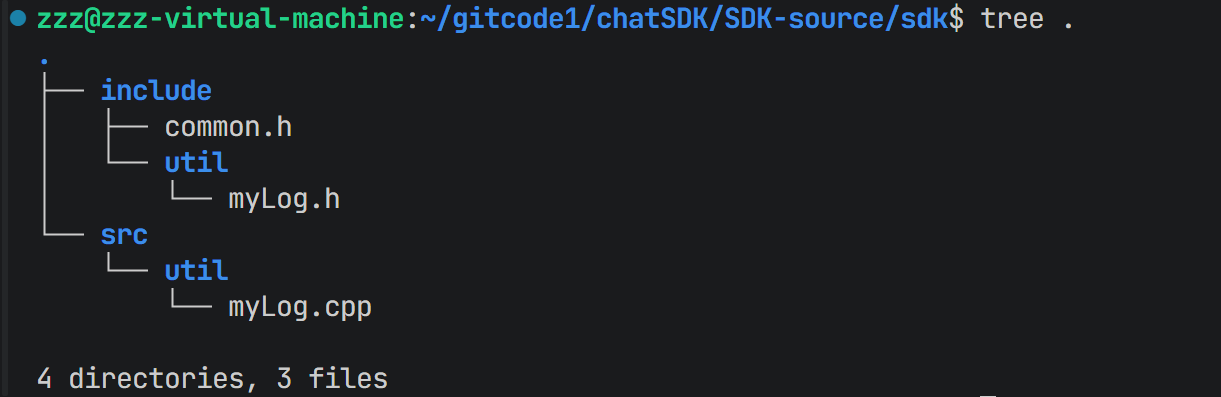
目前结构:
四、模型Provider
4.1 策略模式
if (今天没钱) {
⽤⾛路();
} else if (今天想省时间) {
⽤打⻋();
} else {
⽤⾃⾏⻋();
}策略方式
设置策略(打⻋)
执⾏策略()代码块:
class TransportStrategy {
public:
virtual void go() = 0;
};
class WalkStrategy : public TransportStrategy {
public:
virtual void go() override { cout << "⾛路去机房🚶"; }
};
class BikeStrategy : public TransportStrategy {
public:
virtual void go() override { cout << "骑⻋去机房🚴"; }
};
class BusStrategy : public TransportStrategy {
public:
virtual void go() override { cout << "打⻋去机房🚕"; }
};
class Student {
private:
TransportStrategy* strategy;
public:
void setStrategy(TransportStrategy* s) { strategy = s; }
void goToLab() { strategy->go(); }
};
int main(){
Student me;
me.setStrategy(new WalkStrategy());
me.goToLab(); // 输出: ⾛路去机房🚶
me.setStrategy(new BusStrategy());
me.goToLab(); // 输出: 打⻋去机房🚕
return 0;
}4.2 LLMProvider
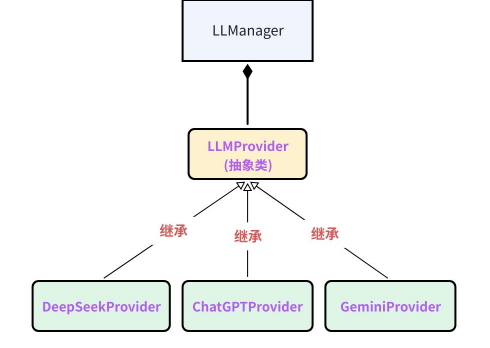
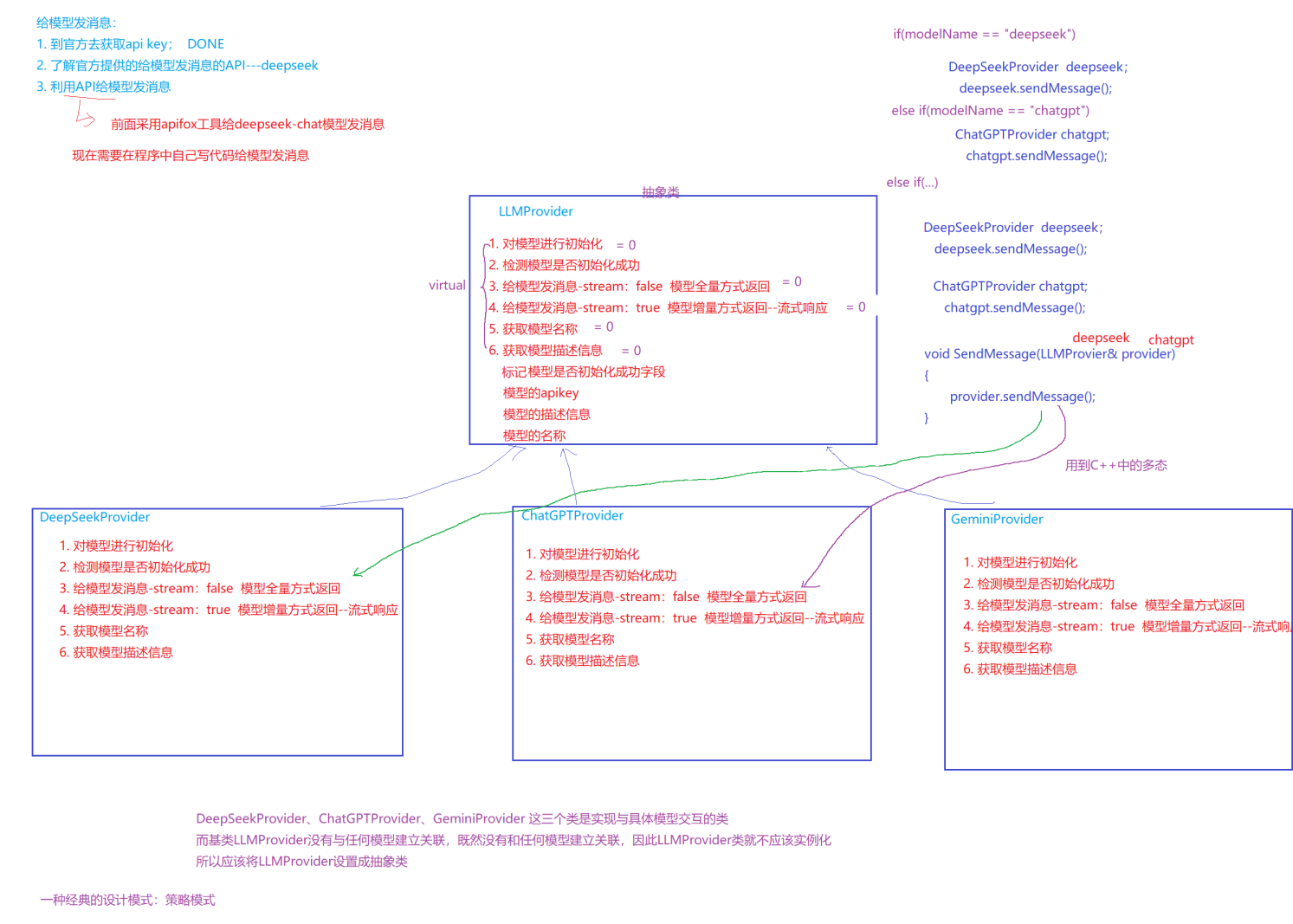
代码块:
#include <string>

namespace ai_chat_sdk {
    // LLM提供器接口
    class LLMProvider {
    public:
        // 初始化模型
        virtual void initModel(const std::map<std::string, std::string>& modelConfig) = 0;
        // 检查模型是否可用
        virtual bool isAvailable() const = 0;
        // 获取模型名称
        virtual std::string getModelName() const = 0;
        // 获取模型描述
        virtual std::string getModelDesc() const = 0;
        // 发送消息 - 全量返回
        void sendMessage(const std::vector<Message>& messages, const std::map<std::string,map::string>& requesParam);
        // 发送消息 - 流式返回
        void sendMessageStream(const std::vector<Message>& messages, const std::map<std::string,map::string>& requesParam,
            std::function<void(const std::string& ,bool)> callback);// callback: 回调函数,用于处理流式返回

    private:
        bool _isAvailable = false;
        std::string _apiKey;
        std::string _endpoint;
    };
}
五、deepseek接入封装
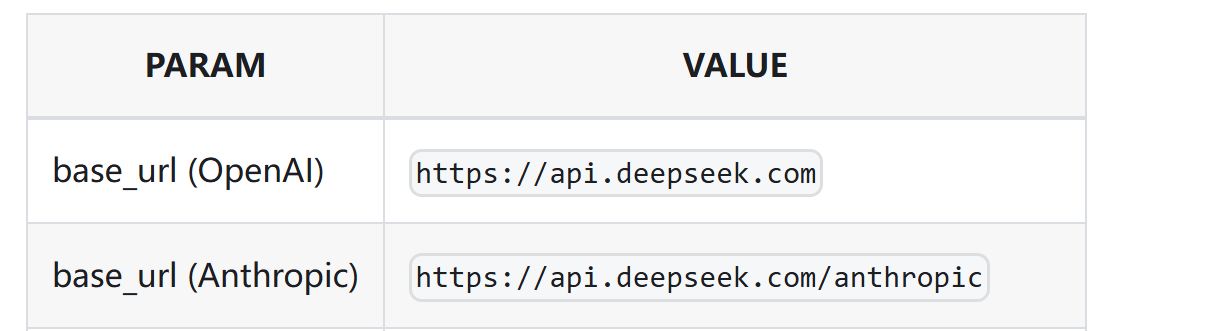
5.1 deep seek提供api
|
字段名称
|
字段类型
|
字段说明
|
|
Content-Type
|
string
|
application/json
|
|
Authorization
|
string
|
"Bearer " + _api_key
|
|
字段名称
|
字段类型
|
字段说明
|
|
model
|
string
|
模型名称
|
|
messages
|
array
|
历史对话,内部为每个对话的object,包含role和content两个字段
|
|
temperature
|
string
|
采样温度
|
|
max_tokens
|
integer
|
最⼤tokens数
|
|
温度
|
场景
|
|
0.0
|
代码⽣成/数学解题
|
|
1.0
|
数据抽取/分析
|
|
1.3
|
通⽤对话
|
|
1.3
|
翻译
|
|
1.5
|
创意类写作/诗歌创作
|
{
"id":"8b1ca715-9270-429a-b40d-2a644f6e1d3f",
"object":"chat.completion",
"created":1754880537,
"model":"deepseek-chat",
"choices":[
{
"index":0,
"message":
{
"role":"assistant",
"content":"我是DeepSeek Chat,由深度求索公司(DeepSeek)开发的智能
AI助⼿!✨ 我可以帮你解答问题、提供建议、整理信息,甚⾄陪你聊天。⽆论是学习、⼯作,还是⽇
常⽣活中的⼩困惑,都可以来找我聊聊!😊 \n\n有什么我可以帮你的吗?"},
"logprobs":null,
"finish_reason":"stop"
}
],
"usage":{
"prompt_tokens":5,
"completion_tokens":63,
"total_tokens":68,
"prompt_tokens_details":{
"cached_tokens":0
},
"prompt_cache_hit_tokens":0,
"prompt_cache_miss_tokens":5
},
"system_fingerprint":"fp_8802369eaa_prod0623_fp8_kvcache"
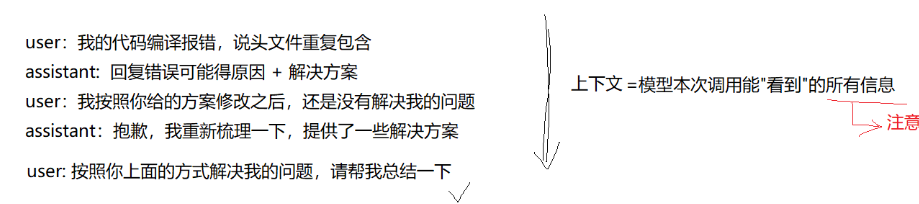
}- ⽆状态服务原则:DeepSeek的API基于⽆状态设计,每次请求视为独⽴会话。若需维护对话连续性,必须由客⼾端主动管理并传递完整上下⽂。这与HTTP协议的⽆状态特性⼀致。
- 系统提⽰:若需保持⻆⾊设定,如始终以专家⾝份回答,每次请求必须包含系统级指令
- 对话历史:模型仅处理当前请求中的上下⽂,⽆法关联前序对话
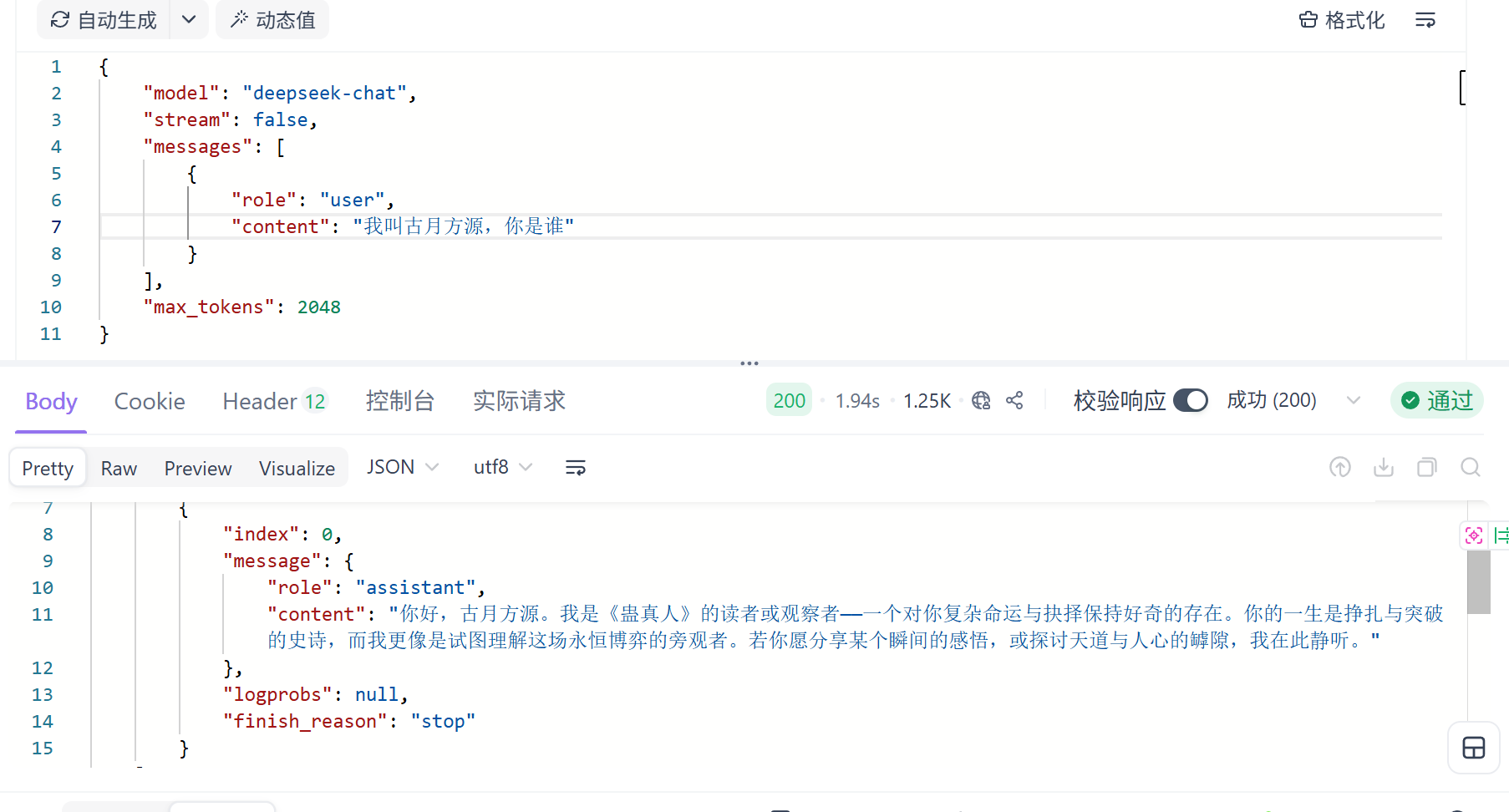
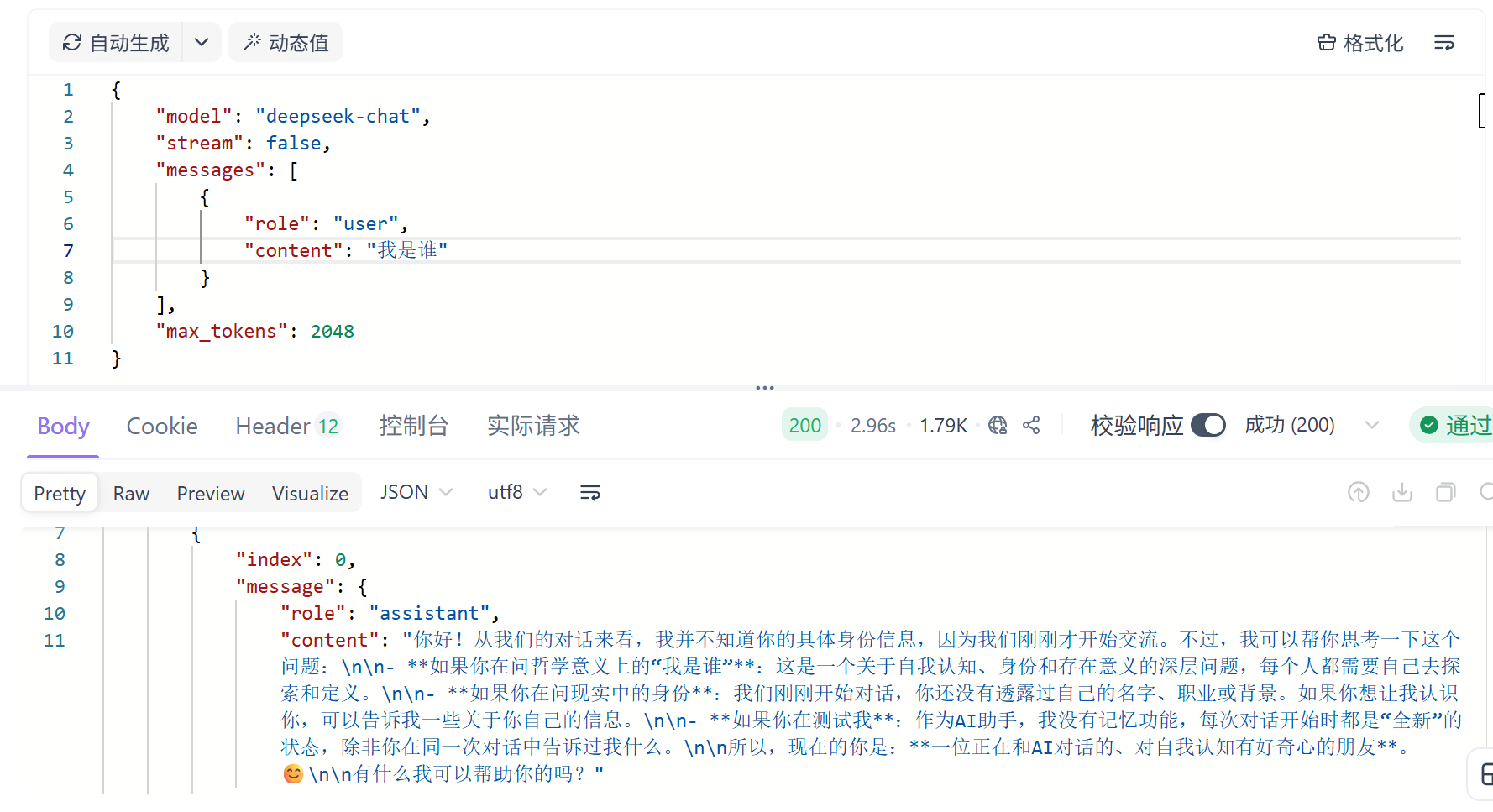
可以看到,第一次交互的时候,我已经将名字告诉他了,但是第二次的时候却说不知道,说明它并不能记住之前对话内容。
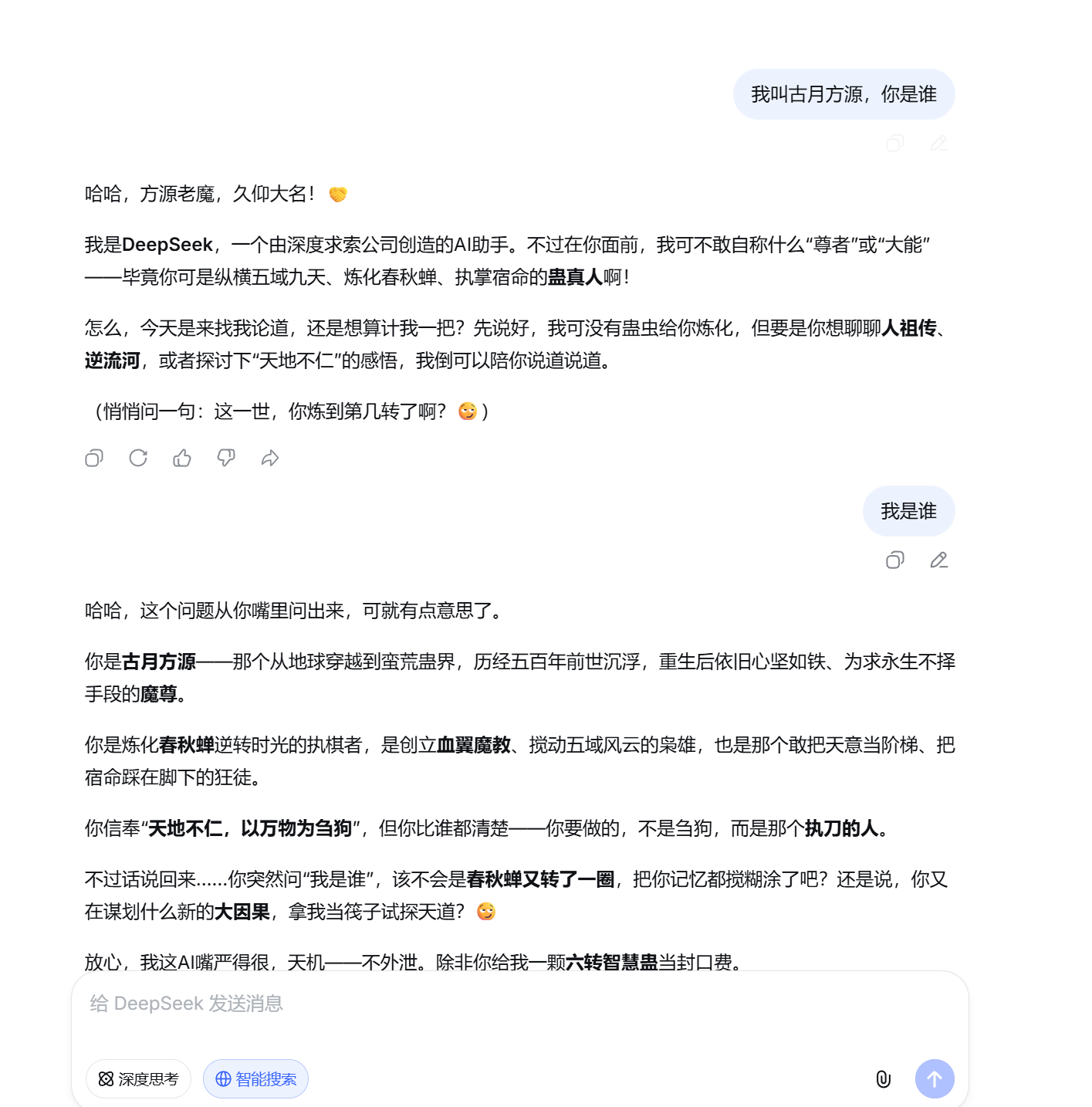
但是官网却能记住,因为网页后台:它替用户维护了聊天记录,deep seek后天会将之前的聊天记录+本次新的提问一起发送给模型,模型在回复的时候,就会参考之前的会话记录,然后再进行思考回复。
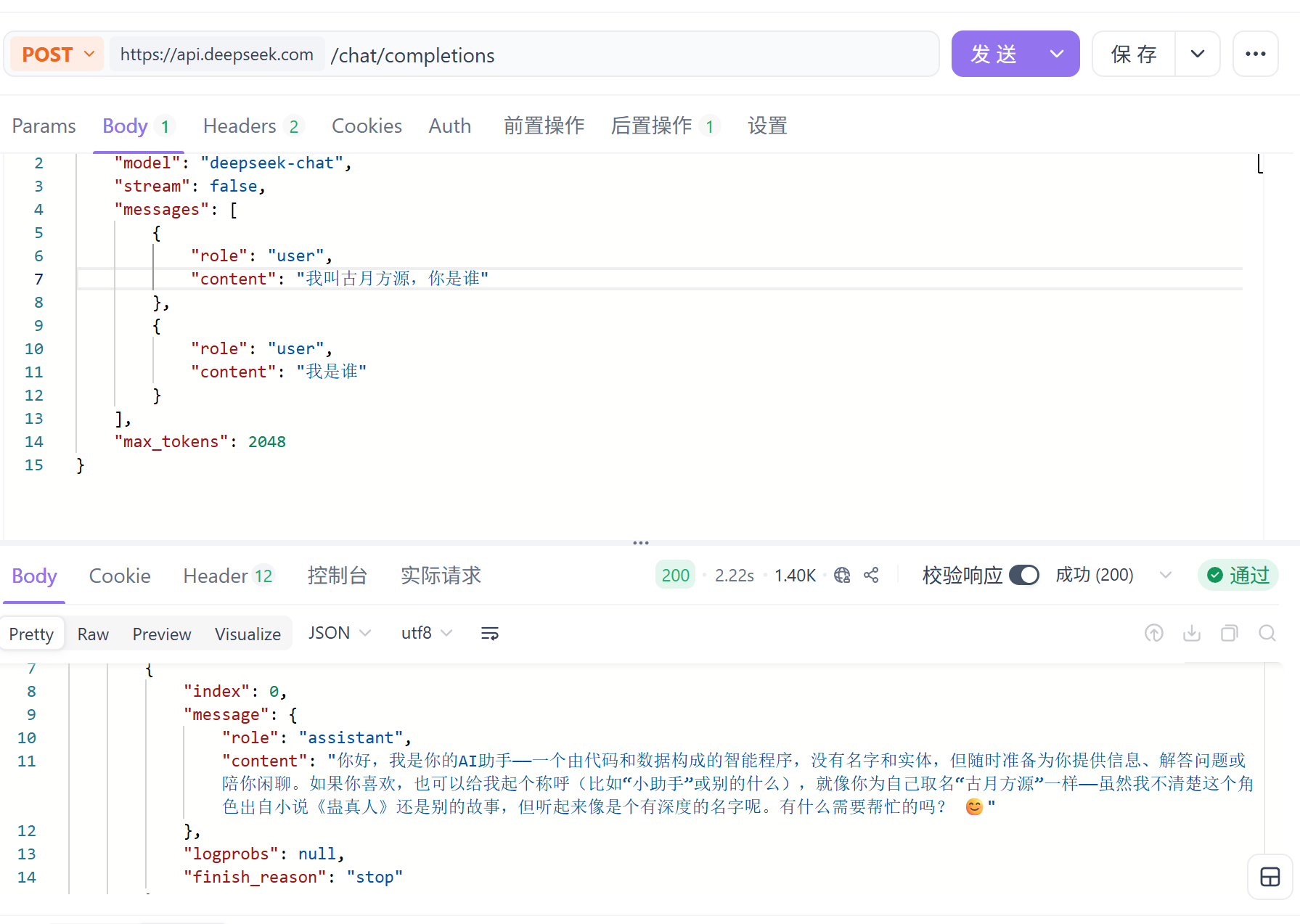
这样子一起发送的时候就会记住。
5.2 大模型初始化
#pragma once
#include <string>
#include <vector>
#include <ctime>
#include <map>
#include <functional>

namespace ai_chat_sdk {
    // 消息结构
    struct Message {
        std::string _messageId; // 消息ID
        std::string _role; // 角色
        std::string _timestamp; // 发送消息时间戳
        std::string _content; // 消息内容

        // 构造函数
        Message( const std::string& role, const std::string& content)
            :  _role(role), _content(content) {}
    };

    // 模型的公共配置信息
    struct Config {
        std::string _modelName;     // 模型名称
        double _temperature = 0.7;  // 温度参数,用于控制生成文本的随机性 低表示严谨,高表示想象力丰富
        int _maxTokens = 2048;      // 最大生成令牌数
    };

    // 通过API方式接入云端模型的配置
    struct ApiConfig : public Config {
        std::string _apiKey;     // API密钥

    };

    // 通过Ollama方式接入本地模型的配置


    // LLM信息
    struct ModelInfo {
        std::string _modelName; // 模型名称
        std::string _modelDesc; // 模型描述
        std::string _modelProvider; // 模型供应商
        std::string _modelEndpoint; // 模型端点

        ModelInfo(const std::string& modelName, const std::string& modelDesc, const std::string& modelProvider, const std::string& modelEndpoint)
            : _modelName(modelName), _modelDesc(modelDesc), _modelProvider(modelProvider), _modelEndpoint(modelEndpoint) {}
    };

    // 会话信息
    struct SessionInfo {
        std::string _sessionId; // 会话ID
        std::string _modelName; // 模型名称
        std::vector<Message> _sessionMessages; // 会话消息
        std::time_t _sessionStartTime; // 会话开始时间戳
        std::time_t _sessionEndTime; // 会话结束时间戳

        SessionInfo(const std::string& modelName = "")
            : _modelName(modelName) {}
    };


}
DeepSeekProvider.h头文件代码块:
#pragma once
#include "LLMProvider.h"

namespace ai_chat_sdk {
    // DeepSeek 模型提供器实现
    class DeepSeekProvider : public LLMProvider {
    public:
        // 初始化模型
        bool initModel(const std::map<std::string, std::string>& modelConfig) override;
        // 检查模型是否可用
        bool isAvailable() const override;
        // 获取模型名称
        std::string getModelName() const override;
        // 获取模型描述
        std::string getModelDesc() const override;
        // 发送消息 - 全量返回
        std::string sendMessage(const std::vector<Message>& messages,
                                const std::map<std::string, std::string>& requestParams) override;
        // 发送消息 - 流式返回
        std::string sendMessageStream(const std::vector<Message>& messages,
                                      const std::map<std::string, std::string>& requestParams,
                                      std::function<void(const std::string&, bool)> callback) override;
        // 发送消息 - 增量返回
        std::string sendMessageIncremental(const std::vector<Message>& messages,
                                           const std::map<std::string, std::string>& requestParams,
                                           std::function<void(const std::string&, bool)> callback);
    };
}
DeepSeekProvider.cpp代码块:
#include "DeepSeekProvider.h"
#include "util/myLog.h"
#include <jsoncpp/json/json.h>
#include <httplib.h>
using namespace httplib;


namespace ai_chat_sdk {
    //deepseekprovider 类实现
    bool DeepSeekProvider::initModel(const std::map<std::string, std::string>& modelConfig) {
        // 初始化API key
        auto it = modelConfig.find("api_key");
        if (it == modelConfig.end()) {
            ERR("DeepSeekProvider initModel api_Key not found");
            return false;
        }else{
            _apiKey = it->second;
        }

        // 初始化base_url
        it = modelConfig.find("endpoint");
        if (it == modelConfig.end()) {
            ERR("DeepSeekProvider initModel endpoint not found");
            return false;
        }else{
            _base_url = it->second;
        }

        _isAvailable = true;
        INFO("DeepSeekProvider initModel success,api_Key: {}, endpoint: {}", _apiKey, _base_url);
        return true;
    }

    // 检测模型是否可用
    bool DeepSeekProvider::isAvailable() const {
        return _isAvailable;
    }

    // 获取模型名称
    std::string DeepSeekProvider::getModelName() const{
        return "deepseek-v4-flash";
    }

    // 获取模型描述信息
    std::string DeepSeekProvider::getModelDesc() const{
        return "我是deepseek-v4-flash模型";
    }

    // 发送消息 - 全量返回
    std::string DeepSeekProvider::sendMessage(const std::vector<Message>& messages,const std::map<std::string, std::string>& requestParams)
    {
        // 检测模型是否可用
        if (!isAvailable()) {
            ERR("DeepSeekProvider sendMessage model not available");
            return "";
        }

        // 构造请求参数
        double temperature = 0.7;
        int maxTokens = 2048;
        if (requestParams.find("temperature") != requestParams.end()) {
            temperature = std::stod(requestParams.at("temperature"));
        }
        if (requestParams.find("max_tokens") != requestParams.end()) {
            maxTokens = std::stoi(requestParams.at("max_tokens"));
        }

        // 构造历史消息
        Json::Value messagesArray(Json::arrayValue);
        for (const auto& msg : messages) {
            Json::Value messageObject;
            messageObject["role"] = msg._role;
            messageObject["content"] = msg._content;
            messagesArray.append(messageObject);
        }

        // 构造请求体
        Json::Value requestBody;
        requestBody["model"] = getModelName();
        requestBody["messages"] = messagesArray;
        requestBody["temperature"] = temperature;
        requestBody["max_tokens"] = maxTokens;

        // 序列化
        Json::StreamWriterBuilder writerBuilder;
        writerBuilder["indentation"] = "  ";
        std::string requestBodyStr = Json::writeString(writerBuilder, requestBody);
        INFO("DeepSeekProvider sendMessage requestBody: {}", requestBodyStr);

        // 使用cpp httplib库构造HTTP客户端
        httplib::Client client(_base_url.c_str());
        client.set_connection_timeout(30,0);        // 连接超时时间30秒
        client.set_read_timeout(60,0);              // 读取超时时间60秒


        // 构造请求头
        httplib::Headers headers = {
            {"Authorization", "Bearer " + _apiKey},
            {"Content-Type", "application/json"}
        };

        // 发送POST请求
        auto response = client.Post("/v1/chat/completions", headers, requestBodyStr, "application/json");
        if (!response) {
            ERR("DeepSeekProvider sendMessage request failed");
            return "";
        }
        INFO("DeepSeekProvider sendMessage response success, body: {}", response->body);
        INFO("DeepSeekProvider sendMessage response success, status: {}", response->status);

        // 检测响应状态码是否成功
        if (response->status != 200) {
            return "";
        }

        // 解析响应体
        Json::Value responseBody;
        Json::CharReaderBuilder readerBuilder;
        std::string parseError;
        std::istringstream responseStream(response->body);
        if (Json::parseFromStream(readerBuilder, responseStream, &responseBody, &parseError)) {
            // 获取messages数组
            if (responseBody.isMember("choices") && responseBody["choices"].isArray() && !responseBody["choices"].empty()) {
                auto choice = responseBody["choices"][0];
                if (choice.isMember("messages") && choice["messages"].isMember("content")) {
                    std::string replyContent = choice["messages"]["content"].asString();
                    INFO("DeepSeekProvider sendMessage response success, replyContent: {}", replyContent);
                    return replyContent;
                }
            }
        }

        // json解析失败
        ERR("DeepSeekProvider sendMessage response parse error: {}", parseError);
        return "deepseek response json parse faile";

        // 构造请求URL
        std::string requestUrl = _base_url + "/v1/chat/completions";

        return "";
    }

    // 发送消息-增量返回-流式响应
    std::string DeepSeekProvider::sendMessageStream(const std::vector<Message>& messages,
                                                    const std::map<std::string, std::string>& requestParams,
                                                    std::function<void(const std::string&,bool)> callback)
    {
        // 检测模型是否可用
        if (!isAvailable()) {
            ERR("DeepSeekProvider sendMessageIncremental model not available");
            return "";
        }

        // 构造请求参数
        double temperature = 0.7;
        int maxTokens = 2048;
        if (requestParams.find("temperature") != requestParams.end()) {
            temperature = std::stod(requestParams.at("temperature"));
        }
        if (requestParams.find("max_tokens") != requestParams.end()) {
            maxTokens = std::stoi(requestParams.at("max_tokens"));
        }

        // 构造历史消息
        Json::Value messagesArray(Json::arrayValue);
        for (const auto& msg : messages) {
            Json::Value messageObject;
            messageObject["role"] = msg._role;
            messageObject["content"] = msg._content;
            messagesArray.append(messageObject);
        }

        // 构造请求体
        Json::Value requestBody;
        requestBody["model"] = getModelName();
        requestBody["messages"] = messagesArray;
        requestBody["temperature"] = temperature;
        requestBody["max_tokens"] = maxTokens;
        requestBody["stream"] = true;

        // 序列化
        Json::StreamWriterBuilder writerBuilder;
        writerBuilder["indentation"] = "  ";
        std::string requestBodyStr = Json::writeString(writerBuilder, requestBody);
        INFO("DeepSeekProvider sendMessageIncremental requestBody: {}", requestBodyStr);

        // 使用cpp httplib库构造HTTP客户端
        httplib::Client client(_base_url.c_str());
        client.set_connection_timeout(30,0);        // 连接超时时间30秒
        client.set_read_timeout(300,0);              // 流式响应需要更长时间,读取超时时间300秒

        // 构造请求头
        httplib::Headers headers = {
            {"Authorization", "Bearer " + _apiKey},
            {"Content-Type", "application/json"},
            {"Accept", "text/event-stream"}
        };

        // 流式处理变量
        std::string buffer;         // 流式响应缓冲区
        bool gotError = false;      // 是否获取到错误信息
        std::string errorMsg;       // 错误信息
        int statusCode = 0;       // 响应状态码
        bool streamFinish = false; // 流式响应是否结束
        std::string fullResponse;   // 完整响应体

        // 创建请求对象
        httplib::Request req;
        req.method = "POST";
        req.path = "/v1/chat/completions";
        req.body = requestBodyStr;
        req.headers = headers;
        // 设置响应处理器
        req.response_handler = [&](const httplib::Response& resp) {
            statusCode = resp.status;
            if (statusCode != 200) {
                // 流式响应开始
                gotError = true;
                errorMsg = "HTTP status code: " + std::to_string(statusCode);
                ERR("DeepSeekProvider sendMessageIncremental response_handler, status: {}, error: {}", statusCode, errorMsg);
                return false;
            }
            return true;    //继续接受后续数据
        };

        // 设置数据接收处理--解析流式响应的每个块的数据
        req.content_receiver = [&](const char* data, size_t len,size_t offset,size_t totalLength) {
            // 验证响应头是否出错,出错则直接返回false,不继续后续处理
            if (gotError) {
                return false;
            }

            // 追加数据到buffer
            buffer.append(data, len);
            INFO("DeepSeekProvider sendMessageIncremental content_receiver, buffer: {}", buffer);

            // 处理所有流式响应的数据块,注意数据块之间是以\n\n分隔的
            size_t pos = 0;
            while((pos = buffer.find("\n\n")) != std::string::npos){
                // 截取当前找到的数据块
                std::string chunk = buffer.substr(0, pos);
                // 谳过当前数据块的\n\n
                buffer.erase(0, pos + 2);

                // 解析该块响应数据中的模型返回的有效数据
                // 处理空行和注释,注意:以: 开头的行是注释,需要跳过
                if (chunk.empty() || chunk[0] == ':') {
                    continue;
                }
                // 获取模型返回的有效数据
                if (chunk.compare(0,6,"data: ") == 0){
                    std::string modelData = chunk.substr(6);

                    // 检测是否为标记结束
                    if (modelData == "[DONE]"){
                        streamFinish = true;
                        break;
                    }

                    // 反序列化JSON字符串
                    Json::Value modelDataJson;
                    Json::CharReaderBuilder reader;
                    std::string errors;
                    std::istringstream modelDataStream(modelData);
                    if(Json::parseFromStream(reader,modelDataStream,&modelDataJson,&errors)){
                        // 模型返回的json格式的数据现在就保存在modelDataJson
                        if(modelDataJson.isMember("choices") &&
                           modelDataJson["choices"].isArray() &&
                           !modelDataJson["choices"].empty() &&
                           modelDataJson["choices"][0]["delta"].isMember("content")){
                             std::string Content = modelDataJson["choices"][0]["delta"]["content"].asString();
                             // 处理Content,将它追加到fullResponse中
                             fullResponse += Content;

                             //将本次解析出的模型返回的内容追加到回调函数中处理
                             callback(Content,false);
                        }
                    }else{
                        WARN("DeepSeekProvider sendMessageIncremental content_receiver, errors: {}", errors);
                    }
                }
            }
            return true;
        };

        // 给模型发送请求
        auto result = client.send(req);
        if (!result) {
            // 请求发送失败,出现网络问题,比如DNS解析失败,链接超时
            ERR("Network error {}",to_string(result.error()));
            return "";
        }

        if(!streamFinish) {
            WARN("stream ended without [DONE] marker");
            callback("",true);
        }
        return fullResponse;
    }

    // 发送消息-流式响应
    // std::string DeepSeekProvider::sendMessageStream(const std::vector<Message>& messages,
    //                                                  const std::map<std::string, std::string>& requestParams,
    //                                                  std::function<void(const std::string&,bool)> callback)
    // {
    //     return sendMessageIncremental(messages, requestParams, callback);
    // }
}
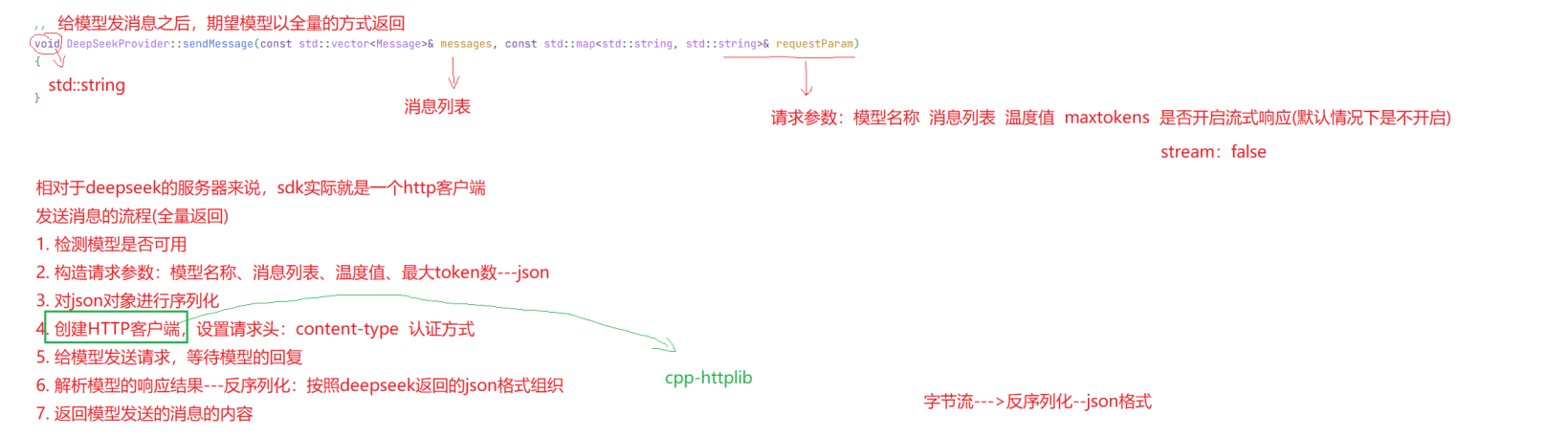
5.3 发送消息全量返回
|
字段名称
|
字段类型
|
字段说明
|
|
model
|
string
|
是否成功
|
|
messages
|
string
|
结果描述
|
|
temperature
|
double
|
响应数据
|
|
max_tokens
|
int
|
会话id
|
示例:
{
"model": "deepseek-chat",
"messages": [
{
"role": "user",
"content": "你是谁?"
},
],
"temperature": 0.7,
"max_tokens": 2048,
}
响应格式
{
"id": "d41df5f7-046d-45a3-818c-512b990fff73",
"object": "chat.completion",
"created": 1756726494,
"model": "deepseek-chat",
"choices": [
{
"index": 0,
"message": {
"role": "assistant",
"content": "你的名字是你在注册时使⽤的称呼,或者你可以告诉我你希望我怎么
称呼你?😊"
},
"logprobs": null,
"finish_reason": "stop"
}
],
"usage": {
"prompt_tokens": 9,
"completion_tokens": 20,
"total_tokens": 29,
"prompt_tokens_details": {
"cached_tokens": 0
},
"prompt_cache_hit_tokens": 0,
"prompt_cache_miss_tokens": 9
},
"system_fingerprint": "fp_feb633d1f5_prod0820_fp8_kvcache"
}
代码块:全量返回部分代码块
    // 发送消息 - 全量返回
    std::string DeepSeekProvider::sendMessage(const std::vector<Message>& messages,const std::map<std::string, std::string>& requestParams)
    {
        // 检测模型是否可用
        if (!isAvailable()) {
            ERR("DeepSeekProvider sendMessage model not available");
            return "";
        }

        // 构造请求参数
        double temperature = 0.7;
        int maxTokens = 2048;
        if (requestParams.find("temperature") != requestParams.end()) {
            temperature = std::stod(requestParams.at("temperature"));
        }
        if (requestParams.find("max_tokens") != requestParams.end()) {
            maxTokens = std::stoi(requestParams.at("max_tokens"));
        }

        // 构造历史消息
        Json::Value messagesArray(Json::arrayValue);
        for (const auto& msg : messages) {
            Json::Value messageObject;
            messageObject["role"] = msg._role;
            messageObject["content"] = msg._content;
            messagesArray.append(messageObject);
        }

        // 构造请求体
        Json::Value requestBody;
        requestBody["model"] = getModelName();
        requestBody["messages"] = messagesArray;
        requestBody["temperature"] = temperature;
        requestBody["max_tokens"] = maxTokens;

        // 序列化
        Json::StreamWriterBuilder writerBuilder;
        writerBuilder["indentation"] = "  ";
        std::string requestBodyStr = Json::writeString(writerBuilder, requestBody);
        INFO("DeepSeekProvider sendMessage requestBody: {}", requestBodyStr);

        // 使用cpp httplib库构造HTTP客户端
        httplib::Client client(_base_url.c_str());
        client.set_connection_timeout(30,0);        // 连接超时时间30秒
        client.set_read_timeout(60,0);              // 读取超时时间60秒


        // 构造请求头
        httplib::Headers headers = {
            {"Authorization", "Bearer " + _apiKey},
            {"Content-Type", "application/json"}
        };

        // 发送POST请求
        auto response = client.Post("/v1/chat/completions", headers, requestBodyStr, "application/json");
        if (!response) {
            ERR("DeepSeekProvider sendMessage request failed");
            return "";
        }
        INFO("DeepSeekProvider sendMessage response success, body: {}", response->body);
        INFO("DeepSeekProvider sendMessage response success, status: {}", response->status);

        // 检测响应状态码是否成功
        if (response->status != 200) {
            return "";
        }

        // 解析响应体
        Json::Value responseBody;
        Json::CharReaderBuilder readerBuilder;
        std::string parseError;
        std::istringstream responseStream(response->body);
        if (Json::parseFromStream(readerBuilder, responseStream, &responseBody, &parseError)) {
            // 获取messages数组
            if (responseBody.isMember("choices") && responseBody["choices"].isArray() && !responseBody["choices"].empty()) {
                auto choice = responseBody["choices"][0];
                if (choice.isMember("messages") && choice["messages"].isMember("content")) {
                    std::string replyContent = choice["messages"]["content"].asString();
                    INFO("DeepSeekProvider sendMessage response success, replyContent: {}", replyContent);
                    return replyContent;
                }
            }
        }

        // json解析失败
        ERR("DeepSeekProvider sendMessage response parse error: {}", parseError);
        return "deepseek response json parse faile";

        // 构造请求URL
        std::string requestUrl = _base_url + "/v1/chat/completions";

        return "";
    }
5.4 发送消息-全量返回测试
testLLM.cpp
#include <gtest/gtest.h>
#include "../sdk/include/DeepSeekProvider.h"
#include "../sdk/include/util/myLog.h"
#include "../sdk/include/ChatGPTProvider.h"
#include "../sdk/include/GeminiProvider.h"


//deepseek 测试
TEST(DeepSeekProviderTest, sendMessage) {

    auto provider = std::make_shared<ai_chat_sdk::DeepSeekProvider>();
    ASSERT_TRUE(provider != nullptr);

    std::map<std::string, std::string> modelParam;
    modelParam["api_key"] = std::getenv("deepseek_apikey");
    modelParam["endpoint"] = "https://api.deepseek.com";

    provider->initModel(modelParam);
    ASSERT_TRUE(provider->isAvailable());

    std::map<std::string, std::string> requestParams = {
        {"temperature", "0.7"},
        {"max_tokens", "2048"},
    };
    std::vector<ai_chat_sdk::Message> messages;
    messages.push_back({"user", "你是谁?"});

    // 实例化DeepSeekProvider的对象
    // 调用sendMessage方法
    // std::string response = provider->sendMessage(messages, requestParams);
    // ASSERT_FALSE(response.empty());
    auto writeChunk = [&](const std::string& chunk,bool last){
        INFO("chunk: {}", chunk);
        if(last){
            INFO("[DONE]");
        }
    };
    std::string fullData = provider->sendMessageStream(messages, requestParams,writeChunk);
    ASSERT_FALSE(fullData.empty());
    INFO("response : {}",fullData);
}
int main(int argc, char **argv) {
    // 初始化spdlog日志库
    my_log::Logger::initLogger("testLLM","stdout",spdlog::level::debug);
    // 初始化gtets库
    testing::InitGoogleTest(&argc, argv);
    //执行所有测试用例
    return RUN_ALL_TESTS();
}
CMakeLists.txt
# 设置Cmake最小版本
cmake_minimum_required(VERSION 3.10)

# 项目名称
project(testLLM)

# 设置cpp标准
set(CMAKE_CXX_STANDARD 17)
set(CMAKE_CXX_STANDARD_REQUIRED ON)

# 设置构建类型debug
set(CMAKE_BUILD_TYPE Debug)

# 添加可执行文件
add_executable(testLLM test_LLM.cpp
../sdk/src/util/myLog.cpp
../sdk/src/DeepSeekProvider.cpp
../sdk/src/ChatGPTProvider.cpp
../sdk/src/GeminiProvider.cpp
)

# 设置输出目录
set(EXECUTABLE_OUTPUT_PATH ${CMAKE_BINARY_DIR})

# 添加头文件搜索路径
include_directories(${CMAKE_CURRENT_SOURCE_DIR}/../sdk/include)

find_package(OpenSSL REQUIRED)
include_directories(${OPENSSL_INCLUDE_DIR})

# 添加宏定义
target_compile_definitions(testLLM PRIVATE CPPHTTPLIB_OPENSSL_SUPPORT)

# 链接库
target_link_libraries(testLLM jsoncpp fmt spdlog gtest OpenSSL::SSL OpenSSL::Crypto)
sudo apt-get install libssl-dev[2026:07:26 11:10:03] [info ] [sendMessage:88 ]DeepSeekProvider sendMessage requestBody: {
"max_tokens" : 2048,
"messages" :
[
{
"content" : "\u4f60\u662f\u8c01\uff1f",
"role" : "user"
}
],
"model" : "deepseek-v4-flash",
"temperature" : 0.69999999999999996
}
[2026:07:26 11:10:05] [info ] [sendMessage:108 ]DeepSeekProvider sendMessage response success, body: {"id":"6f3e06a3-c296-48f8-b972-b4e08da81c04","object":"chat.completion","created":1785035403,"model":"deepseek-v4-flash","choices":[{"index":0,"message":{"role":"assistant","content":"你好!我是DeepSeek,由深度求索公司创造的AI助手。我是一个纯文本模型,可以帮你解答问题、处理信息、进行创作等。我支持阅读链接、上传文件(图片、PDF、Word、Excel等),还能联网搜索(需要手动开启)。目前我是完全免费的,上下文处理能力达到1M,可以一次性处理大量文本。有什么我可以帮你的吗?","reasoning_content":"好的,用户问了一个简单的自我介绍问题。我需要清晰、友好地说明自己的身份和功能。我是DeepSeek,由深度求索公司创造。可以简要说明我的能力范围,比如文本处理、文件支持、联网搜索等,让用户知道我能做什么。同时要强调免费和长上下文的特点,这对用户可能有吸引力。最后以开放性的问题结束,邀请用户提出具体需求。"},"logprobs":null,"finish_reason":"stop"}],"usage":{"prompt_tokens":6,"completion_tokens":166,"total_tokens":172,"prompt_tokens_details":{"cached_tokens":0},"completion_tokens_details":{"reasoning_tokens":83},"prompt_cache_hit_tokens":0,"prompt_cache_miss_tokens":6},"system_fingerprint":"fp_8b330d02d0_prod0820_fp8_kvcache_20260402"}
5.5 流式响应
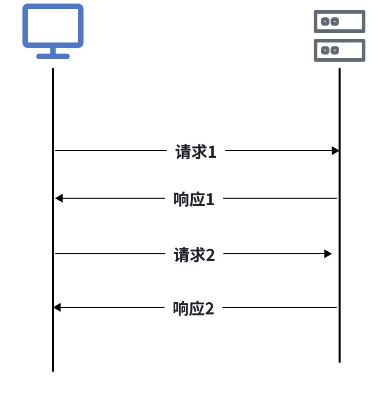
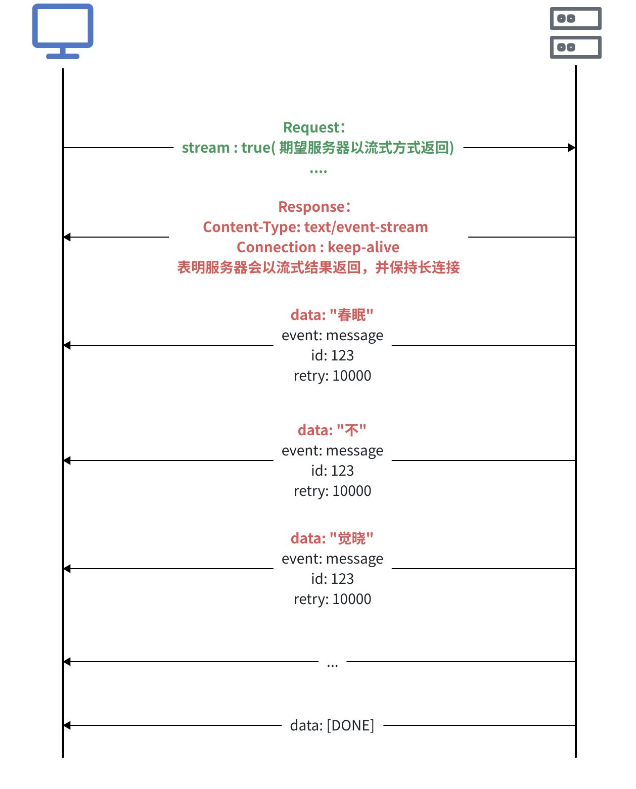
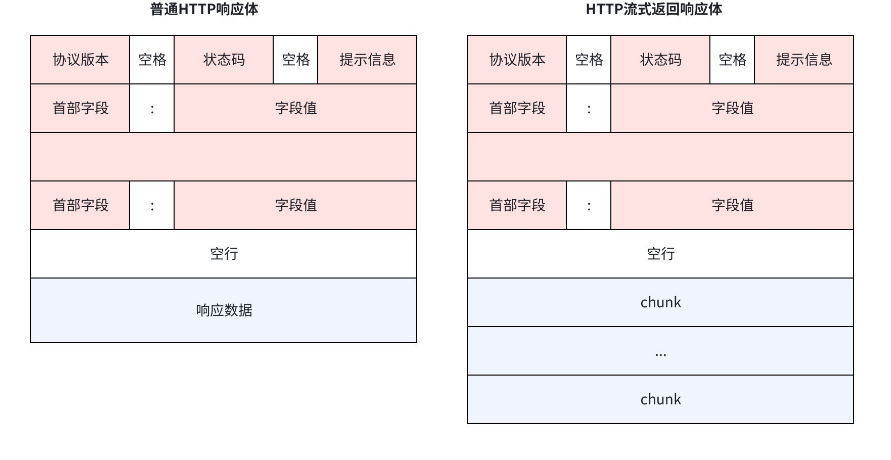
- 单向通信:服务器可以主动推送数据到客⼾端,但客⼾端⽆法直接通过SSE向服务器发送数据
- 基于HTTP协议:SSE使⽤标准的HTTP协议,⽆需额外的协议或端⼝配置,兼容性好易于实现
- 轻量级:SSE的实现更简单,代码量少,适合简单的实时数据推送场景
- ⾃动重连:如果连接断开,浏览器会⾃动尝试重新连接,⽆需开发者⼿动处理重连逻辑
- ⽀持事件类型:服务器可以发送不同类型事件,客⼾端可以根据事件类型执⾏不同的操作
- ⽀持消息ID:每条消息可以包含⼀个唯⼀的ID,⽤于断线重连后恢复消息流
- data:消息内容(必须)
- event:事件类型(可选)
- id:消息ID(可选)
- retry:重连时间(可选,单位:毫秒)
data: Hello, world!
event: message
id: 123
retry: 10000
data: Another message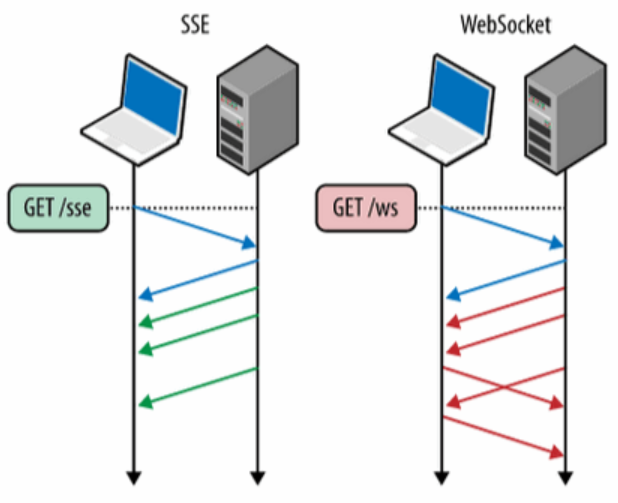
|
特性
|
SSE
|
WebSocket
|
|
通信⽅向
|
单向通道:服务器 → 客⼾端
|
双向通道:服务器 <=> 客⼾端
|
|
设计⽬的
|
服务器主动推送数据(如新闻、状态更新)
|
双向实时对话(如聊天、游戏操作同步)
|
|
协议
|
HTTP
|
独⽴的TCP协议,咱HTTP捂⼿后升级协议(ws/wss)
|
|
数据格式
|
纯⽂本
|
⼆进制或⽂本
|
|
⾃动重连
|
内置
|
较需要⼿动实现
|
|
使⽤场景
|
实时通知、⽇志流、LLM响应等单向场景
|
实时聊天、多⼈在线游戏、实时交易等双向交互场景
|
struct Request {
// 通⽤参数
std::string method; // 请求⽅法,GET、POST等
std::string path; // 资源路径,URL中域名之后的部分,⽐如:/api/users
Headers headers; // HTTP请求头,类型为 multimap<string, string>
std::string body; // HTTP请求体
// 查询参数:
Params params; // 查询参数,类型为 multimap<string, string>
// 路径参数或路由参数, 类型为 unordered_map<string, string>
std::unordered_map<std::string, std::string> path_params;
// for client
ResponseHandler response_handler;
ContentReceiverWithProgress content_receiver;
// ...
};- data:指向当前接收到的数据块的指针
- len: 当前数据块的⻓度
- offset: 当前数据块在请求体中的偏移量
- total: 请求体的总⻓度
- 返回值:true表⽰继续接收数据,false表⽰停⽌接收数据
5.6 发送消息-流式返回
|
字段名称
|
字段类型
|
字段说明
|
|
model
|
string
|
是否成功
|
|
messages
|
string
|
结果描述
|
|
temperature
|
double
|
响应数据
|
|
max_tokens
|
int
|
会话id
|
|
stream
|
boolean
|
是否开启流式响
应
|
示例:
{
"model": "deepseek-chat",
"messages": [
{
"role": "user",
"content": "你是谁?"
},
],
"temperature": 0.7,
"max_tokens": 2048,
"stream" : true
}
响应格式:
data: {
"id": "chatcmpl-1234567890",
"object": "chat.completion.chunk",
"created": 1700000000,
"model": "deepseek-chat",
"choices": [
{
"index": 0,
"delta": {
"role": "assistant",
"content": ""
},
"finish_reason": null
}
]
}
data: {
"id": "chatcmpl-1234567890",
"object": "chat.completion.chunk",
"created": 1700000000,
"model": "deepseek-chat",
"choices": [
{
"index": 0,
"delta": {
"content": "以下"
},
"finish_reason": null
}
]
}
....
data: {
"id": "chatcmpl-1234567890",
"object": "chat.completion.chunk",
"created": 1700000000,
"model": "deepseek-chat",
"choices": [
{
"index": 0,
"delta": {},
"finish_reason": "stop"
}
]
}
data: [DONE] // 最后⼀⾏,表⽰流式传输彻底结束
头文件里面加上这个就行。
// 发送消息 - 流式返回
        std::string sendMessageStream(const std::vector<Message>& messages,
                                      const std::map<std::string, std::string>& requestParams,
                                      std::function<void(const std::string&, bool)> callback) override;
deepseekprovider.cpp里面
// 发送消息-增量返回-流式响应
    std::string DeepSeekProvider::sendMessageStream(const std::vector<Message>& messages,
                                                    const std::map<std::string, std::string>& requestParams,
                                                    std::function<void(const std::string&,bool)> callback)
    {
        // 检测模型是否可用
        if (!isAvailable()) {
            ERR("DeepSeekProvider sendMessageIncremental model not available");
            return "";
        }

        // 构造请求参数
        double temperature = 0.7;
        int maxTokens = 2048;
        if (requestParams.find("temperature") != requestParams.end()) {
            temperature = std::stod(requestParams.at("temperature"));
        }
        if (requestParams.find("max_tokens") != requestParams.end()) {
            maxTokens = std::stoi(requestParams.at("max_tokens"));
        }

        // 构造历史消息
        Json::Value messagesArray(Json::arrayValue);
        for (const auto& msg : messages) {
            Json::Value messageObject;
            messageObject["role"] = msg._role;
            messageObject["content"] = msg._content;
            messagesArray.append(messageObject);
        }

        // 构造请求体
        Json::Value requestBody;
        requestBody["model"] = getModelName();
        requestBody["messages"] = messagesArray;
        requestBody["temperature"] = temperature;
        requestBody["max_tokens"] = maxTokens;
        requestBody["stream"] = true;

        // 序列化
        Json::StreamWriterBuilder writerBuilder;
        writerBuilder["indentation"] = "  ";
        std::string requestBodyStr = Json::writeString(writerBuilder, requestBody);
        INFO("DeepSeekProvider sendMessageIncremental requestBody: {}", requestBodyStr);

        // 使用cpp httplib库构造HTTP客户端
        httplib::Client client(_base_url.c_str());
        client.set_connection_timeout(30,0);        // 连接超时时间30秒
        client.set_read_timeout(300,0);              // 流式响应需要更长时间,读取超时时间300秒

        // 构造请求头
        httplib::Headers headers = {
            {"Authorization", "Bearer " + _apiKey},
            {"Content-Type", "application/json"},
            {"Accept", "text/event-stream"}
        };

        // 流式处理变量
        std::string buffer;         // 流式响应缓冲区
        bool gotError = false;      // 是否获取到错误信息
        std::string errorMsg;       // 错误信息
        int statusCode = 0;       // 响应状态码
        bool streamFinish = false; // 流式响应是否结束
        std::string fullResponse;   // 完整响应体

        // 创建请求对象
        httplib::Request req;
        req.method = "POST";
        req.path = "/v1/chat/completions";
        req.body = requestBodyStr;
        req.headers = headers;
        // 设置响应处理器
        req.response_handler = [&](const httplib::Response& resp) {
            statusCode = resp.status;
            if (statusCode != 200) {
                // 流式响应开始
                gotError = true;
                errorMsg = "HTTP status code: " + std::to_string(statusCode);
                ERR("DeepSeekProvider sendMessageIncremental response_handler, status: {}, error: {}", statusCode, errorMsg);
                return false;
            }
            return true;    //继续接受后续数据
        };

        // 设置数据接收处理--解析流式响应的每个块的数据
        req.content_receiver = [&](const char* data, size_t len,size_t offset,size_t totalLength) {
            // 验证响应头是否出错,出错则直接返回false,不继续后续处理
            if (gotError) {
                return false;
            }

            // 追加数据到buffer
            buffer.append(data, len);
            INFO("DeepSeekProvider sendMessageIncremental content_receiver, buffer: {}", buffer);

            // 处理所有流式响应的数据块,注意数据块之间是以\n\n分隔的
            size_t pos = 0;
            while((pos = buffer.find("\n\n")) != std::string::npos){
                // 截取当前找到的数据块
                std::string chunk = buffer.substr(0, pos);
                // 谳过当前数据块的\n\n
                buffer.erase(0, pos + 2);

                // 解析该块响应数据中的模型返回的有效数据
                // 处理空行和注释,注意:以: 开头的行是注释,需要跳过
                if (chunk.empty() || chunk[0] == ':') {
                    continue;
                }
                // 获取模型返回的有效数据
                if (chunk.compare(0,6,"data: ") == 0){
                    std::string modelData = chunk.substr(6);

                    // 检测是否为标记结束
                    if (modelData == "[DONE]"){
                        streamFinish = true;
                        break;
                    }

                    // 反序列化JSON字符串
                    Json::Value modelDataJson;
                    Json::CharReaderBuilder reader;
                    std::string errors;
                    std::istringstream modelDataStream(modelData);
                    if(Json::parseFromStream(reader,modelDataStream,&modelDataJson,&errors)){
                        // 模型返回的json格式的数据现在就保存在modelDataJson
                        if(modelDataJson.isMember("choices") &&
                           modelDataJson["choices"].isArray() &&
                           !modelDataJson["choices"].empty() &&
                           modelDataJson["choices"][0]["delta"].isMember("content")){
                             std::string Content = modelDataJson["choices"][0]["delta"]["content"].asString();
                             // 处理Content,将它追加到fullResponse中
                             fullResponse += Content;

                             //将本次解析出的模型返回的内容追加到回调函数中处理
                             callback(Content,false);
                        }
                    }else{
                        WARN("DeepSeekProvider sendMessageIncremental content_receiver, errors: {}", errors);
                    }
                }
            }
            return true;
        };

        // 给模型发送请求
        auto result = client.send(req);
        if (!result) {
            // 请求发送失败,出现网络问题,比如DNS解析失败,链接超时
            ERR("Network error {}",to_string(result.error()));
            return "";
        }

        if(!streamFinish) {
            WARN("stream ended without [DONE] marker");
            callback("",true);
        }
        return fullResponse;
    }
5.7 发送消息-流式返回测试
// deepseek 测试
TEST(DeepSeekProviderTest, sendMessage) {

    auto provider = std::make_shared<ai_chat_sdk::DeepSeekProvider>();
    ASSERT_TRUE(provider != nullptr);

    std::map<std::string, std::string> modelParam;
    modelParam["api_key"] = std::getenv("deepseek_apikey");
    modelParam["endpoint"] = "https://api.deepseek.com";

    provider->initModel(modelParam);
    ASSERT_TRUE(provider->isAvailable());

    std::map<std::string, std::string> requestParams = {
        {"temperature", "0.7"},
        {"max_tokens", "2048"},
    };
    std::vector<ai_chat_sdk::Message> messages;
    messages.push_back({"user", "你是谁?"});

    // 实例化DeepSeekProvider的对象
    // 调用sendMessage方法
    // 全量响应
    // std::string response = provider->sendMessage(messages, requestParams);
    // ASSERT_FALSE(response.empty());

    //流式响应
    auto writeChunk = [&](const std::string& chunk,bool last){
        INFO("chunk: {}", chunk);
        if(last){
            INFO("[DONE]");
        }
    };
    std::string fullData = provider->sendMessageStream(messages, requestParams,writeChunk);
    ASSERT_FALSE(fullData.empty());
    INFO("response : {}",fullData);
}
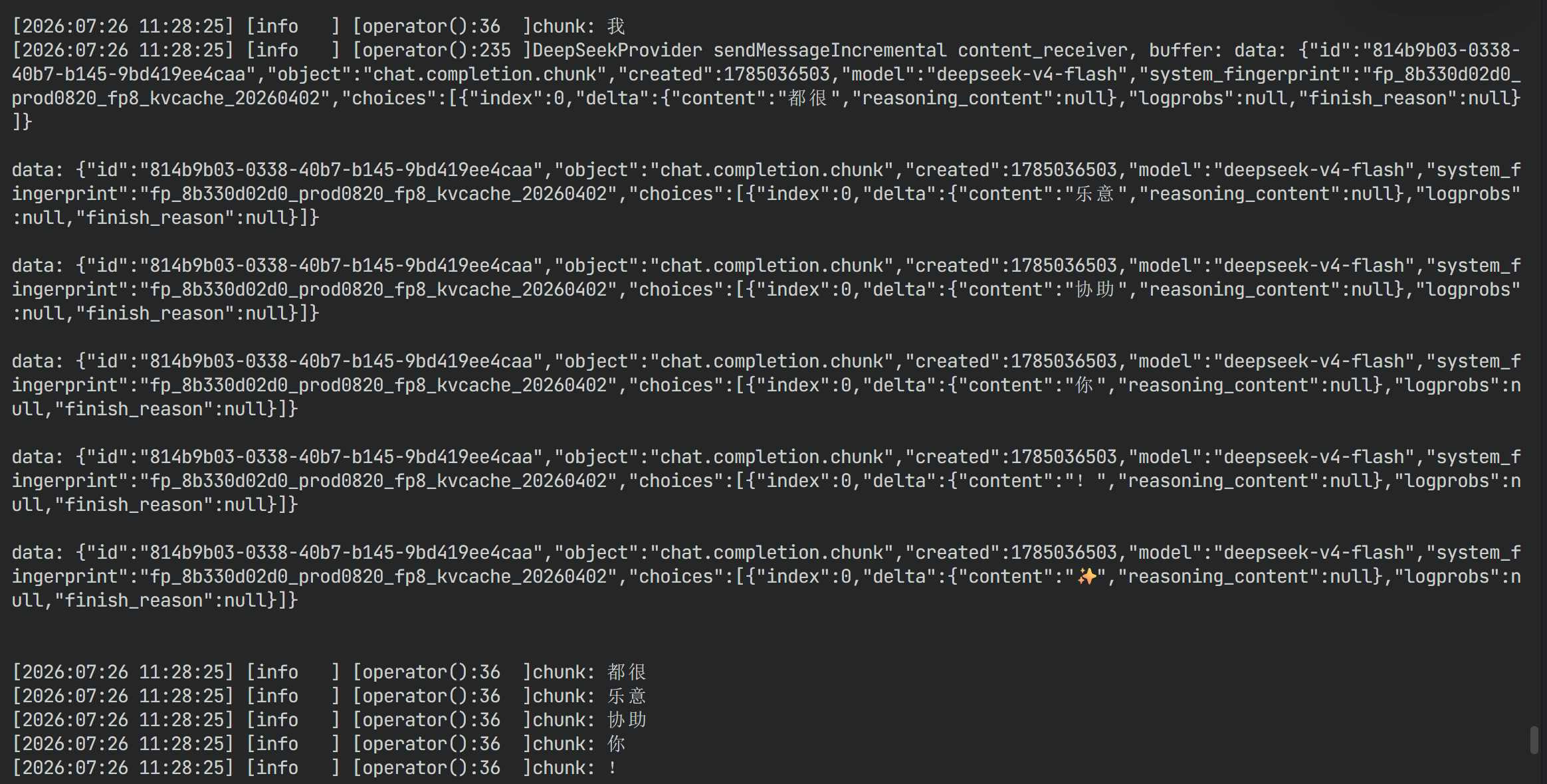
运行结果:
更多推荐
 7
7 0
0- 0


 已为社区贡献4条内容

所有评论(0)