
react 常用组件searchTable 组合式
·
话不多说,上代码,就不介绍。
加上注释了 ,大家日常要写好注释哈,目前我是开发阶段,这个项目 0-1得第三天,所以封装了一些复用性组件,我今天 发了 好多组件,可以进我主页看看,vue,react都有。回归主题,目前开发阶段,接口feactData 这里用的mock 你们要用的话 ,改一下接口就可以了,我把less 也发了把 ,再发个使用得 ,再发个图片,感兴趣,觉得有需要的可以copy微改一下,使用
import React, { useState, useEffect, useRef } from 'react';
import {
    Form,
    Input,
    Button,
    Table,
    Space,
    Row,
    Col,
    Pagination,
    Empty,
    Spin,
    message
} from 'antd';
import {
    SearchOutlined,
    ReloadOutlined,
    SyncOutlined
} from '@ant-design/icons';
import { getAllTable } from "@/services/index"
import './index.less';

const SearchTable = ({
    searchFields = [],       //   头部 search
    operations,              //   btn
    columns = [],            //   table
    style = {},
    tableHeight = 400,       //   table 高度
    onRowClick,              //   当前点击行
    watchData = null,        //   监听的数据 ,数据变化更新列表
    TableUrl = null,         //   请求的 url
    initialFetch = true,     //   是否初始化加载数据 默认为false
    rowKey = 'id',           //   点击行数据 根据 什么作为唯一值
    emptyText = '暂无数据',  //    缺省
    showSearch = true,      //    是否 需要 serarch
    showPagination = true,  //    是否需要分页
    clearSelection = true,    //    数据刷新后 清空选择,默认为true 不进行存储 跨分页储存多选时 可以设置为false (需配置onSelectionChange联调使用 )
    onSelectionChange = null  //    table check
}) => {
    const [form] = Form.useForm();
    const [data, setData] = useState([]);
    const [loading, setLoading] = useState(false);
    const [pagination, setPagination] = useState({
        current: 1,
        pageSize: 10,
        total: 0,
    });
    const [selectedRowKeys, setSelectedRowKeys] = useState([]);


    const [selectedRow, setSelectedRow] = useState(null);

    // 使用ref标记是否已初始化
    const initializedRef = useRef(false);

    // 使用ref存储上一次的watchData值
    const prevWatchDataRef = useRef(null);

    // 存储取消请求的函数
    const cancelRequestRef = useRef(null);

    const fetchData = async (params, signal) => {
        try {
            // 调用 API 服务
            const result = await getAllTable(TableUrl, params, signal);

            // 模拟数据格式转换
            const data = result.map(item => ({
                ...item,
                key: item.id,
            }));

            return {
                data,
                total: result.length,
            };
        } catch (error) {
            console.error('获取数据失败:', error);
            return {
                data: [],
                total: 0,
            };
        }
    };

    // 获取数据
    const getData = async (page = pagination.current, pageSize = pagination.pageSize) => {
        // 取消之前的请求
        if (cancelRequestRef.current) {
            cancelRequestRef.current();
        }

        setLoading(true);
        const mockData = Array.from({ length: 10 }, (_, i) => ({
            key: i,
            status: i % 3 === 0 ? '已完成' : '进行中',
            orderNo: `56565${i}`,
            model: `FT14HC-${i}`,
            description: `4.5 1° BSP ${i}`,
            orderCount: Math.floor(Math.random() * 100),
            estimatedStart: `2024/10/${10 + i}`,
            estimatedEnd: `2024/10/${20 + i}`,
            actualStart: `2024/10/${11 + i}`,
            actualEnd: `2024/10/${21 + i}`,
            processName: `FT14-${i}`,
            remark: `FLOAT ${i}`,
            purchaseOrder: `066400${i}`,
            id: `1111${i}`
        }));
        setData(mockData);
        try {
            const values = form.getFieldsValue();
            const abortController = new AbortController();
            cancelRequestRef.current = () => abortController.abort();

            const result = await fetchData({
                ...values,
                page,
                pageSize
            }, abortController.signal)
            if (result && !abortController.signal.aborted) {

                // setData(result.data || []);
                setData(mockData);
                setPagination({
                    current: page,
                    pageSize: pageSize,
                    total: result.total || 0,
                });
                // 数据刷新后清空选择
                if (clearSelection && typeof onSelectionChange === 'function') {
                    setSelectedRowKeys([]);
                    onSelectionChange([], []);
                }

            }
        } catch (error) {
            if (error.name !== 'AbortError') {
                console.error('获取数据失败:', error);
                message.error('数据加载失败,请稍后重试');
            }
        } finally {
            setLoading(false);
            cancelRequestRef.current = null;
        }
    };

    // 初始化加载数据
    useEffect(() => {
        if (initialFetch && !initializedRef.current) {
            initializedRef.current = true;
            getData();
        }
    }, [initialFetch]);

    // 监听watchData变化
    useEffect(() => {
        // 如果watchData未定义或为null,则不触发
        if (watchData === undefined || watchData === null) return;

        // 检查watchData是否变化
        const hasChanged = JSON.stringify(watchData) !== JSON.stringify(prevWatchDataRef.current);

        if (hasChanged) {
            // 重置分页到第一页
            setSelectedRow(null)
            setPagination(prev => ({
                ...prev,
                current: 1,
            }));
            getData(1);
        }

        // 更新上一次的值
        prevWatchDataRef.current = watchData;
    }, [watchData]);

    // 处理分页变化
    const handlePageChange = (page, pageSize) => {
        getData(page, pageSize);
    };

    // 处理查询
    const handleSearch = () => {
        getData(1);
    };

    // 处理重置
    const handleReset = () => {
        form.resetFields();
        getData(1);
    };

    // 处理行点击
    const handleRowClick = (record) => {
        // 设置当前选中的行
        setSelectedRow(record);

        // 调用父组件回调函数
        if (onRowClick) {
            onRowClick(record);
        }
    };

    // 组件卸载时取消请求
    useEffect(() => {
        return () => {
            if (cancelRequestRef.current) {
                cancelRequestRef.current('组件卸载');
            }
        };
    }, []);

    // 渲染查询表单
    const renderSearchForm = () => {
        if (!showSearch || searchFields.length === 0) return null;

        return (
            <div className="search-form-container">
                <Form
                    form={form}
                    layout="horizontal"
                    labelAlign="right"
                >
                    <Row gutter={16} align="middle">
                        {searchFields.map(field => (
                            <Col key={field.name} span={6}>

                                <Form.Item
                                    name={field.name}
                                    label={field.label}
                                    rules={field.rules || []}
                                    style={{ marginBottom: 12 }}
                                >
                                    {field.render ? field.render() : (
                                        <Input
                                            placeholder={field.label ? `请输入${field.label}` : field.placeholder || ''}
                                            {
                                            ...field?.config
                                            }
                                            size="middle"
                                        />
                                    )}
                                </Form.Item>
                            </Col>
                        ))}

                        {/* 操作按钮紧跟最后一个搜索条件 */}
                        <Col span={6}>
                            <Space style={{ height: '44px', alignItems: 'start' }}>
                                <Button onClick={handleReset} icon={<ReloadOutlined />}>
                                    重置
                                </Button>
                                <Button
                                    type="primary"
                                    icon={<SearchOutlined />}
                                    onClick={handleSearch}
                                >
                                    查询
                                </Button>
                            </Space>
                        </Col>
                    </Row>
                </Form>
            </div>
        );
    };

    // 渲染操作按钮区域
    const renderOperations = () => {
        if (!operations) return null;

        return (
            <div className="operations-container">
                {operations}
            </div>
        );
    };

    // 渲染表格
    const renderTable = () => {
        // 计算表格滚动区域高度
        const scrollY = tableHeight - (showPagination ? 55 : 0) - 55; // 减去表头高度和分页高度
        let rowSelectionConfig = null;
        if (typeof onSelectionChange === 'function') {
            rowSelectionConfig = {
                selectedRowKeys,
                onChange: (selectedKeys, selectedRows) => {
                    setSelectedRowKeys(selectedKeys);
                    if (onSelectionChange) {
                        onSelectionChange(selectedKeys, selectedRows);
                    }
                },
            };
        }

        return (
            <div className="table-container">
                <Spin spinning={loading} tip="加载中...">
                    <Table
                        rowKey={record => record[rowKey]}
                        rowSelection={rowSelectionConfig}
                        columns={columns}
                        dataSource={data}
                        pagination={false}
                        loading={loading}
                        scroll={{
                            x: 'max-content',
                            y: scrollY
                        }}
                        size="middle"
                        style={{ flex: 1 }}
                        bordered={false}
                        onRow={(record) => ({
                            onClick: (event) => {
                                if (event.target.closest('.ant-table-selection-column')) {
                                    return;
                                }
                                console.log(selectedRow);

                                handleRowClick(record)
                            }
                        })}
                        rowClassName={(record) =>
                            selectedRow && selectedRow[rowKey] === record[rowKey] ? 'highlight-row' : ''
                        }
                    />
                </Spin>

                {/* {showPagination && data.length > 0 && ( */}
                <div className="pagination-container">
                    <Pagination
                        current={pagination.current}
                        pageSize={pagination.pageSize}
                        total={pagination.total}
                        showSizeChanger
                        showQuickJumper
                        showTotal={(total, range) => (
                            `第 ${range[0]}-${range[1]} 条,共 ${total} 条`
                        )}
                        onChange={handlePageChange}
                        onShowSizeChange={handlePageChange}
                        size="small"
                    />
                    <div className='pagination-iocn'>
                        <ReloadOutlined onClick={() => {
                            getData(1)
                        }} />
                    </div>
                </div>
                {/* )} */}
            </div>
        );
    };

    return (
        <div className="search-table-wrapper" style={style}>
            {renderSearchForm()}
            {renderOperations()}
            {renderTable()}
        </div>
    );
};


SearchTable.defaultProps = {
    searchFields: [],
    style: {},
    tableHeight: 400,
    initialFetch: true,
    rowKey: 'id',
    emptyText: '暂无数据',
    showSearch: true,
    showPagination: true,
};

export default SearchTable;
以下是less
// SearchTable.less
.search-table-wrapper {
  background: #fff;
  border-radius: 2px;
  padding: 10px 10px 0 10px ;
  box-shadow: 0 1px 2px rgba(0, 0, 0, 0.03);

  .search-form-container {

    .search-form-header {
      display: flex;
      justify-content: space-between;
      align-items: center;
      padding: 8px 12px;
      background: #fafafa;

      .search-form-title {
        font-weight: 500;
        color: rgba(0, 0, 0, 0.85);
      }

      .toggle-button {
        color: #1890ff;
        padding: 0;
        height: auto;
      }
    }

    .form-divider {
      margin: 0;
    }

    .search-form {
      padding: 12px;

      .form-item {
        margin-bottom: 12px;

        .ant-form-item-label {
          padding-bottom: 4px;

          label {
            font-size: 13px;
            color: rgba(0, 0, 0, 0.65);
          }
        }
      }

      .form-actions {
        padding-top: 8px;
        text-align: right;
      }
    }
  }

  .operations-container {
    margin-top: 10px;
    margin-bottom: 5px;
      .ant-btn {
        margin-right: 7px;
      }

  }

  .table-container {
    .data-table {
      .ant-table-thead > tr > th {
        background: #fafafa;
        padding: 8px 12px;
        font-weight: 500;
        color: rgba(0, 0, 0, 0.85);
      }

      .ant-table-tbody > tr > td {
        padding: 8px 12px;
        font-size: 13px;
        color: rgba(0, 0, 0, 0.65);
      }

      .table-row-even {
        background-color: #fff;
      }

      .table-row-odd {
        background-color: #fafafa;
      }

      .ant-table-tbody > tr:hover > td {
        background: #e6f7ff;
      }
    }

    .pagination-container {
      padding: 12px;
      background: #fafafa;
      border-top: 1px solid #e8e8e8;
      position: relative;
      padding-right: 50px;
      .pagination-iocn{
           position: absolute;
            right: 15px;
            top: 14px;
            cursor: pointer;
      }
    }
  }
  // .ant-table-row-selected{
  //   background-color: #fff !im;
  // }
    // 高亮行样式 - 提高优先级

.ant-table-wrapper .ant-table-tbody .ant-table-row.ant-table-row-selected > td {
    background: transparent !important;
}
.ant-table-tbody {
  //  .ant-table-row.ant-table-row-selected {
  //   background-color: inherit;
  // }
  // .ant-table-row.ant-table-row-selected > td {
  //   background-color: inherit;

  // }

   .highlight-row {
    background-color: #e6f7ff !important;


    // 高亮行的悬停效果
    &:hover > td {
      background-color: #e6f7ff !important;
    }
  }
}

  // 普通行的悬停效果
  .ant-table-tbody > tr:not(.highlight-row):hover > td {
    // background-color: #f5f5f5 !important;
    cursor: pointer;
  }


}

// 响应式调整
@media (max-width: 768px) {
  .search-table-wrapper {
    .search-form-container {
      .search-form {
        .ant-col-6 {
          span: 12;
          margin-bottom: 8px;
        }
      }
    }
  }
}
 <SearchTable
                searchFields={searchFields}
                columns={columns}
                TableUrl={'/postsdadsadasdsa'}
                operations={operations}
                onRowClick={handleRowClick}
                rowKey="id"
                onSelectionChange={(ids, list) => {
                    setSelectedRowKeys(ids)
                }}
            />

  // 查询字段配置
    const searchFields = [
        { name: 'orderNo', label: '工单号' },
        { name: 'purchaseOrder', label: '订单号' },
        { name: 'model', label: '型号' },
        { name: 'description', label: '描述' },
    ];
  const columns = [
        { title: '名称', dataIndex: 'status', key: 'status', width: 100, },
        { title: '工单号', dataIndex: 'orderNo', key: 'orderNo', width: 120 },
        { title: '型号', dataIndex: 'model', key: 'model', width: 150 },
        { title: '描述', dataIndex: 'description', key: 'description', width: 200 },
        { title: '工单数', dataIndex: 'orderCount', key: 'orderCount', width: 80 },
        { title: '预计开始', dataIndex: 'estimatedStart', key: 'estimatedStart', width: 120 },
        { title: '预计结束', dataIndex: 'estimatedEnd', key: 'estimatedEnd', width: 120 },
        { title: '实际开始时间', dataIndex: 'actualStart', key: 'actualStart', width: 140 },
        { title: '实际结束时间', dataIndex: 'actualEnd', key: 'actualEnd', width: 140 },
        { title: '工艺名称', dataIndex: 'processName', key: 'processName', width: 120 },
        { title: '备注', dataIndex: 'remark', key: 'remark', width: 150 },
        { title: '订单号', dataIndex: 'purchaseOrder', key: 'purchaseOrder', width: 120 },
    ];
TableUrl={'/postsdadsadasdsa'} 这里是 url 到时候 你们要和后端统一 统一接口类型,返回值 后面数据都会在searchTable 处理
operations={operations} 按钮
const operations_t = (
        <>
            <Button
                type="primary"
                onClick={handelEditOrder}
            >
                编辑工单
            </Button>
        </>
    );
  onRowClick={handleRowClick}
                rowKey="id"
                onSelectionChange={(ids, list) => {
                    setSelectedRowKeys(ids)
                }} 这三个是 tbale操作
一个是行点击
一个是 checkout 点击 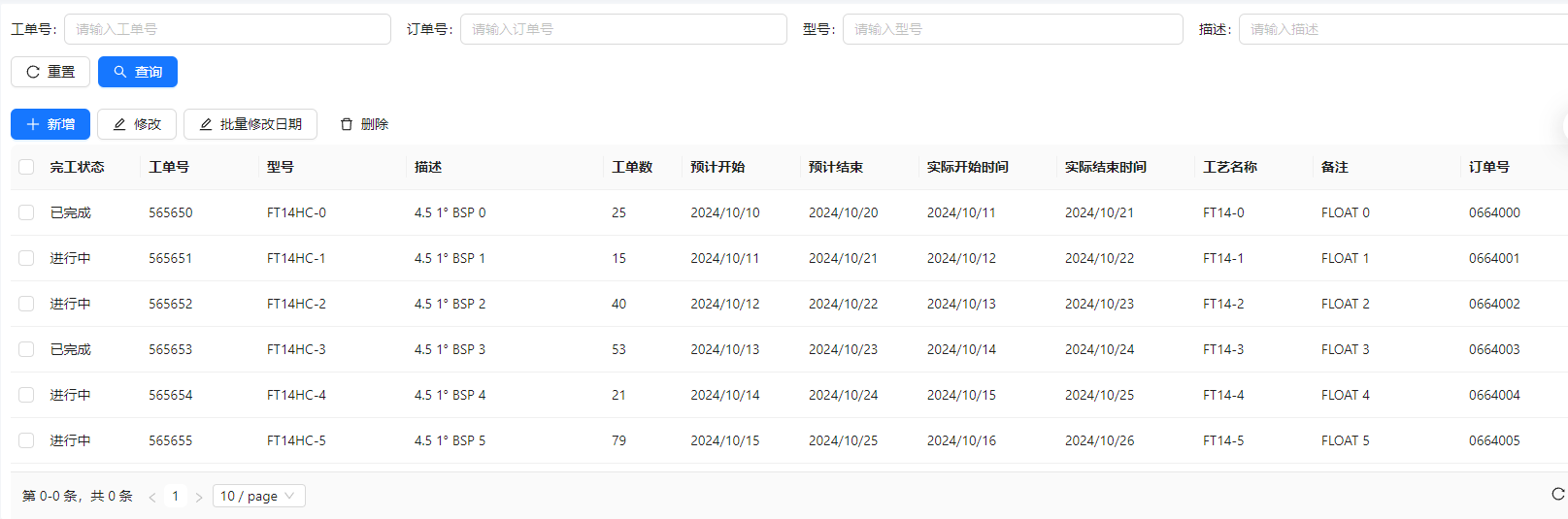
更多推荐


 5
5 0
0- 0


 已为社区贡献5条内容

所有评论(0)