
Flutter鸿蒙开发:证件照制作实战教程 - OpenHarmony跨平台指南
·
Flutter鸿蒙开发:证件照制作实战教程 - OpenHarmony跨平台指南
Flutter 三方库 cached_network_image 的鸿蒙化适配与实战指南
欢迎加入开源鸿蒙跨平台社区: https://openharmonycrossplatform.csdn.net
本文详细介绍如何在Flutter鸿蒙应用中实现证件照制作功能,包含尺寸选择、背景更换、裁剪调整等功能。
一、前言
证件照是日常生活和工作中常用的照片类型,通过移动应用可以方便地制作标准证件照。本文将介绍如何使用Flutter开发证件照制作应用。
二、效果展示
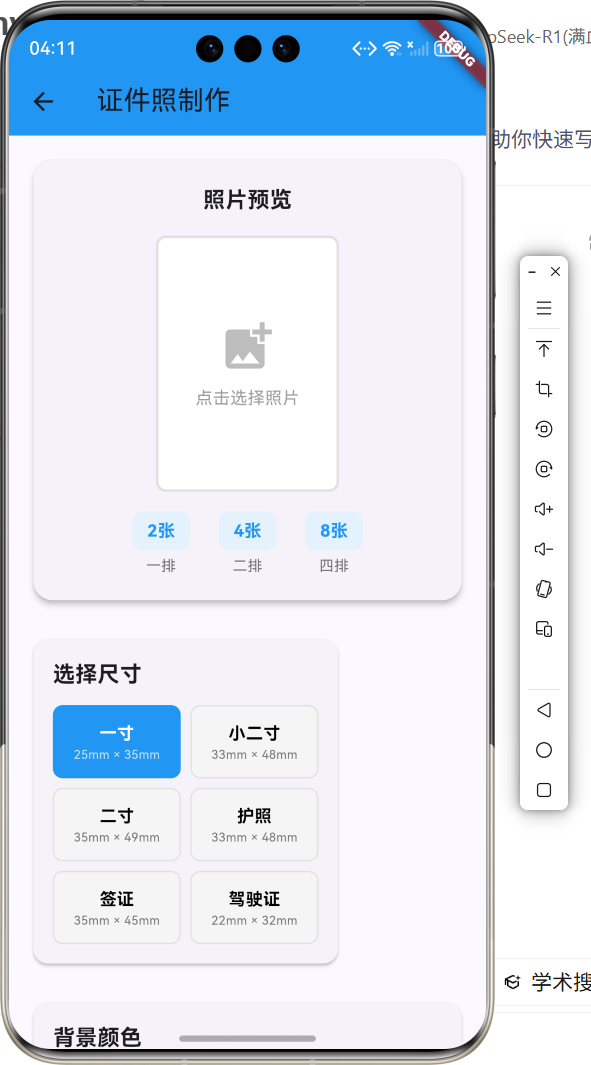
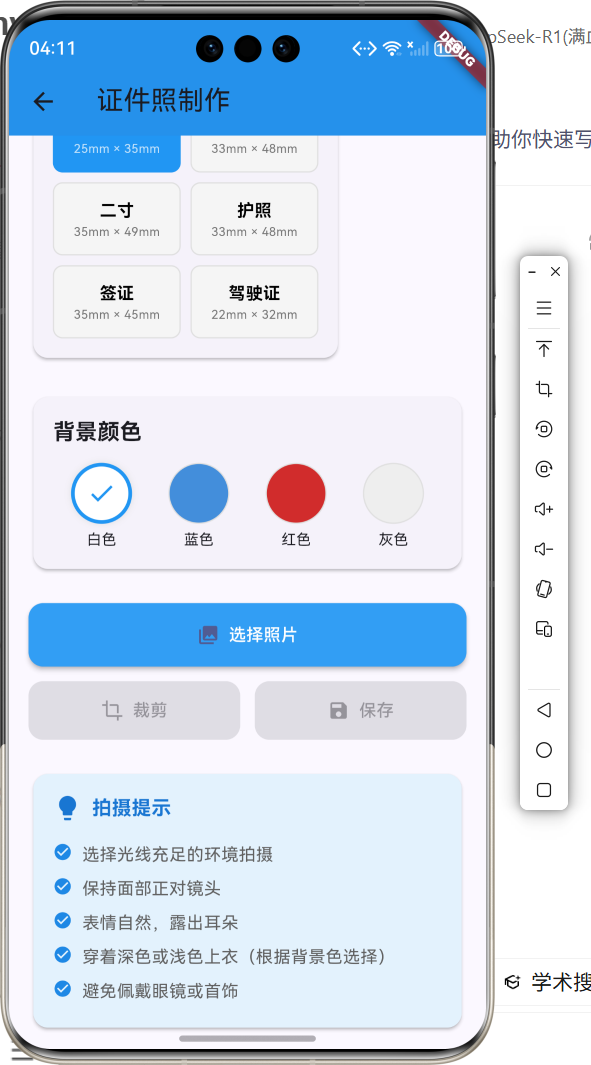
2.1 功能特性
| 功能 | 描述 |
|---|---|
| 尺寸选择 | 支持多种证件照尺寸 |
| 背景更换 | 更换照片背景颜色 |
| 照片裁剪 | 调整照片尺寸和位置 |
| 拍摄提示 | 提供拍摄建议 |
| 保存导出 | 保存制作好的证件照 |
三、项目背景与目标
3.1 项目背景
证件照在各种场合都有需求,传统方式需要去照相馆拍摄,费时费力。移动应用可以让用户自己制作证件照。
3.2 项目目标
- 提供多种证件照尺寸模板
- 支持背景颜色更换
- 实现照片裁剪功能
- 提供拍摄指导建议
四、技术架构设计
4.1 架构概述
应用使用Flutter框架开发,通过预设尺寸模板和背景颜色选项,帮助用户快速制作证件照。
4.2 技术原理
- 使用预设尺寸数据
- 通过Color类处理背景颜色
- 使用Container展示照片预览
- 通过状态管理更新界面
五、详细实现
5.1 Flutter端实现
class IDPhotoMakerPage extends StatefulWidget {
const IDPhotoMakerPage({super.key});
State<IDPhotoMakerPage> createState() => _IDPhotoMakerPageState();
}
class _IDPhotoMakerPageState extends State<IDPhotoMakerPage> {
final List<PhotoSize> _photoSizes = [
PhotoSize(name: '一寸', width: 25, height: 35, description: '25mm × 35mm'),
PhotoSize(name: '二寸', width: 35, height: 49, description: '35mm × 49mm'),
PhotoSize(name: '护照', width: 33, height: 48, description: '33mm × 48mm'),
];
final List<BackgroundColor> _backgroundColors = [
BackgroundColor(name: '白色', color: Colors.white),
BackgroundColor(name: '蓝色', color: Color(0xFF438EDB)),
BackgroundColor(name: '红色', color: Color(0xFFD12C2C)),
];
int _selectedSizeIndex = 0;
int _selectedColorIndex = 0;
bool _hasPhoto = false;
Widget build(BuildContext context) {
return Scaffold(
appBar: AppBar(title: const Text('证件照制作')),
body: SingleChildScrollView(
child: Column(
children: [
_buildPhotoPreview(),
_buildSizeSelector(),
_buildColorSelector(),
_buildActionButtons(),
_buildTips(),
],
),
),
);
}
}
5.2 核心功能解析
尺寸数据结构
class PhotoSize {
  final String name;
  final int width;
  final int height;
  final String description;

  PhotoSize({
    required this.name,
    required this.width,
    required this.height,
    required this.description,
  });
}
背景颜色选择
Widget _buildColorSelector() {
  return Row(
    children: _backgroundColors.map((bgColor) {
      return GestureDetector(
        onTap: () {
          setState(() {
            _selectedColorIndex = _backgroundColors.indexOf(bgColor);
          });
        },
        child: Container(
          width: 50,
          height: 50,
          decoration: BoxDecoration(
            color: bgColor.color,
            shape: BoxShape.circle,
          ),
        ),
      );
    }).toList(),
  );
}
六、实际应用场景
6.1 证件办理
用户可以自己制作证件照,用于各种证件办理。
6.2 求职应聘
制作专业的求职证件照,提升形象。
七、优化建议
7.1 美颜功能
添加美颜和修图功能,提升照片质量。
7.2 智能抠图
使用AI技术实现智能抠图,自动更换背景。
八、常见问题与解决方案
8.1 照片尺寸不准
问题: 导出的照片尺寸不符合标准
解决方案: 使用精确的像素尺寸计算
8.2 背景抠图不干净
问题: 背景抠图边缘不自然
解决方案: 使用边缘羽化技术
九、总结
本文介绍了如何使用Flutter开发证件照制作应用,实现了尺寸选择、背景更换、裁剪调整等核心功能。通过本项目的学习,读者可以掌握Flutter图像处理、UI布局等技术。
十、参考资料
- Flutter官方文档:https://flutter.dev
- 证件照标准:https://www.mps.gov.cn
- Flutter中国社区:https://flutter-io.cn
更多推荐
 3
3 0
0- 0


 已为社区贡献16条内容

所有评论(0)