
C++ string类完全指南01:从构造到使用
文章目录
1.为什么需要学习string类?
1.1 便于访问和管理字符串
在C语言中,C语言是以’\0’结尾的一些字符的集合,为了操作方便,C的标准库中提供了一些str系列的库函数,但是这些库函数与字符串是分离的,不太符合OOP**(Object-Oriented Programming,面向对象编程)的思想。
1.2 OJ题中快捷操作字符串
在OJ题目中,有关字符串的题目基本以string类的形式出现,而且在常规工作中,我们为了简单、方便、快捷的操作字符串,基本都使用string类。
2. 标准库中的string类
2.1 简要了解string类
文档介绍如下:👇
string - C++ Reference
string类本质上实际上是一个模板,是一个管理字符数组的顺序表,重载了流插入和流提取支持直接输入和输出。
使用时需要包含头文件和命名空间
2.2 string的不同类型

四种不同类型的介绍:
| 类型 | 字符类型 | 字符大小 | 主要用途 / 特点 |
|---|---|---|---|
string |
char |
1 字节 (8位) | 处理 ASCII、UTF-8 编码的文本。最常用,兼容 C 风格字符串 (char*)。 |
wstring |
wchar_t |
2 或 4 字节 (平台相关) | 处理宽字符,如 Windows 下的 Unicode (UTF-16)。跨平台行为不一致,不推荐用于新项目。 |
u16string (C++11) |
char16_t |
2 字节 (16位) | 明确表示 UTF-16 编码的字符串。常用于 Windows 系统或需要处理 Unicode 辅音字符的场景。 |
u32string (C++11) |
char32_t |
4 字节 (32位) | 明确表示 UTF-32 编码的字符串。每个字符定长,处理单个码点非常方便,但内存占用较大。 |
但是我们日常学习和开发的过程中最常用的还是string,采用UTF-8编码文本的方式。
- 什么是UTF-8编码?为什么需要UTF-8?
我们知道计算机只认识0、1那么如何代表字符呢?ASCII码应运而生,它站一个字节的7个位能表示128个符号。那计算机又如何表示中文呢?我们应该和英文字符一样对其进行编号,如此unicode就出现了,UTF-8就是把这个编号存储到内存/硬盘里的具体规则。 - UTF-8是如何编码的?
UTF-8编码最短为一个字节,最长目前为四个字节,从首字节可以判断一个UTF-8编码有几个字节:
- 如果以首字节以0开头,肯定是单字节编码(即单个单字节码元);
- 如果以首字节以110开头,肯定是双字节编码(即由两个单字节码元所组成的双码元结构);
- 如果以首字节以1110开头,肯定是三字节编码(即由三个单字节码元所组成的三码元结构);
2.3 auto和范围for
2.3.1 auto关键字
在早期C/C++中auto的含义是:使用auto修饰变量,是具有自动存储器的局部变量,后来C++11标准委员会赋予了auto最新的含义:auto不再作为一个存储类型的指示符,而是作为一个新的类类型指示符来指示编译器,auto声明变量必须由编译器在编译时期推导得到。
使用示例:
auto func1() {
	return 10;
}
//auto关键字
int main() {
	int a = 10;
	auto b = 10;
	auto c = 1.11;
	auto d = 'a';
	auto e = "abc";
	auto f = func1();
	//auto必须带有初始值
	//auto g;
	cout << typeid(b).name() << endl;//输出类型看看
	cout << typeid(c).name() << endl;
	cout << typeid(d).name() << endl;
	cout << typeid(e).name() << endl;
	cout << typeid(f).name() << endl;

	cout << b << endl;
	cout << c << endl;
	cout << d << endl;
	cout << e << endl;
	cout << f << endl;

	return 0;
}
- 用auto声明指针类型时,用
auto和auto*是一样的,但是用auto声明引用类型时必须加上&
int main() {

	int y = 10;
	auto p1 = &y;
	auto* p2 = &y;//写不写都一样
	auto& p3 = y;//很明显,引用不写&就变成拷贝了

	cout << typeid(p1).name() << endl;//int* __ptr64
	cout << typeid(p2).name() << endl;//int* __ptr64
	cout << typeid(p3).name() << endl;//int

	cout << p1 << endl;
	cout << p2 << endl;
	cout << p3 << endl;
	return 0;
}
- 但同一行声明多个变量时,这这些变量必须是相同的类型,否则编译器会报错。因为编译器实际上只对一个类型进行推导,然后用该类型去定义其它变量。
int main() {

	auto a = 10, b = 20;//这样写是可以的
	//auto c = 10, d = 1.1;//编译器只会识别第一个变量的类型,用整型来定义1.1编译器就会报错
	return 0;
}
- auto不能作为函数的参数,可以做返回值。(谨慎使用)
auto func2( ) {
	return 10;//谨慎使用
}
int main() {

	auto a = func2();
	cout << typeid(a).name() << endl;
	cout << a << endl;
	return 0;
}
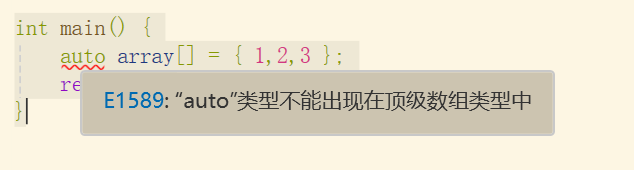
- auto不能用来直接申明数组
int main() {
	auto array[] = { 1,2,3 };
	return 0;
}
2.3.2 范围for
对于一个有范围的集合而言,由程序员来再写一遍范围实际上是很多余的,还很容易犯错。因此C++中引入了基于范围的for循环,。for循环后的括号由”:"分为两部分,第一部分是范围内用于迭代的变量,第二部分则表示被迭代的范围,自动迭代,自动读取数据,自动判读结束。
- 范围for可以作用到数组和容器对象上进行遍历
//范围for
int main() {
	int array[] = { 1,2,3,4,5 };
	for (auto i : array) {
		cout << i << " " ;
	}
	//1.自动取数据赋值给i
	//2.自动判断结束
	//3.自动迭代
	cout << endl;
	for (auto i : array) {
		i *= 2;//这里改变的是i的拷贝
	}
	for (auto i : array) {
		cout << i << " " ;
	}//所以这里不改变
	cout << endl;
	for (auto& i : array) {
		i *= 2;//引用操作原数组
	}
	for (auto i : array) {
		cout << i << " ";
	}//这里改变

	cout << endl;
	string str("hello word");
	for (auto ch : str) {
		cout << ch << " ";
	}

	return 0;
}
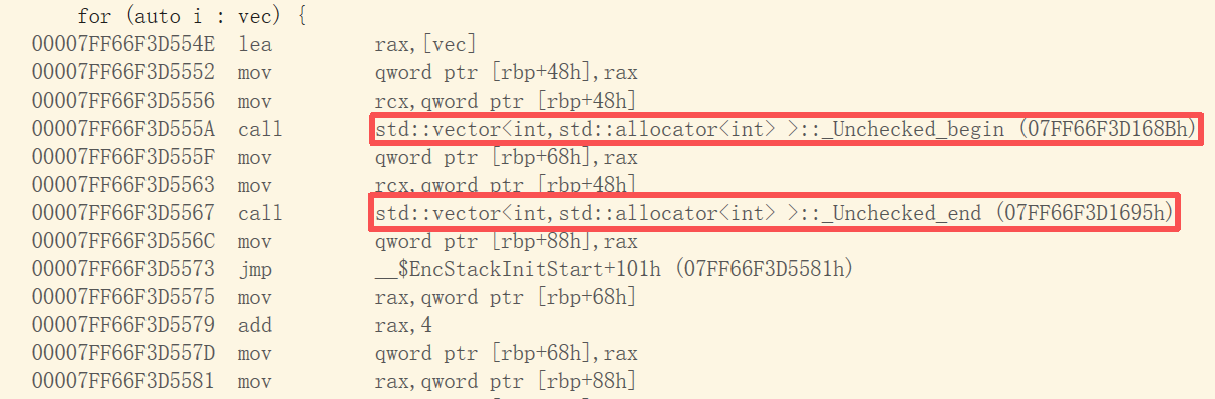
- 范围for的底层很简单,容器的遍历实际就是替换为迭代器。(可以从汇编层看到)
举个例子:
int main() {
	std::vector<int> vec = { 1, 2, 3, 4, 5 };
	for (auto i : vec) {
		cout << i << " ";
	}//但要注意的是,如果用的不是容器而是原生数组底层则是用指针模拟实现的
	//但其实都一样啦
	return 0;
}
2.4 string类常见的接口
2.4.1 Member functions成员函数
- 构造函数
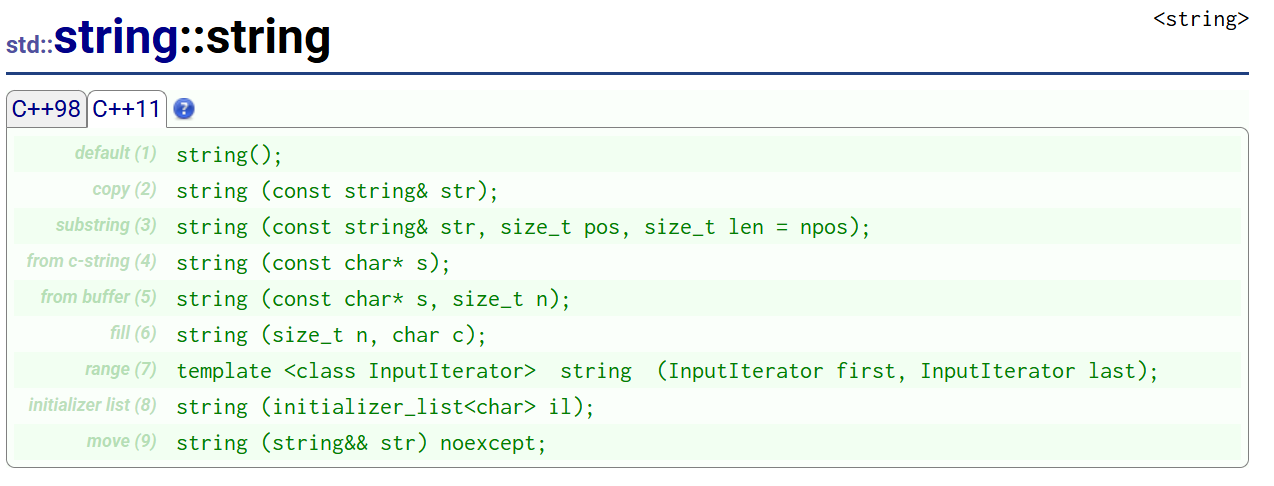
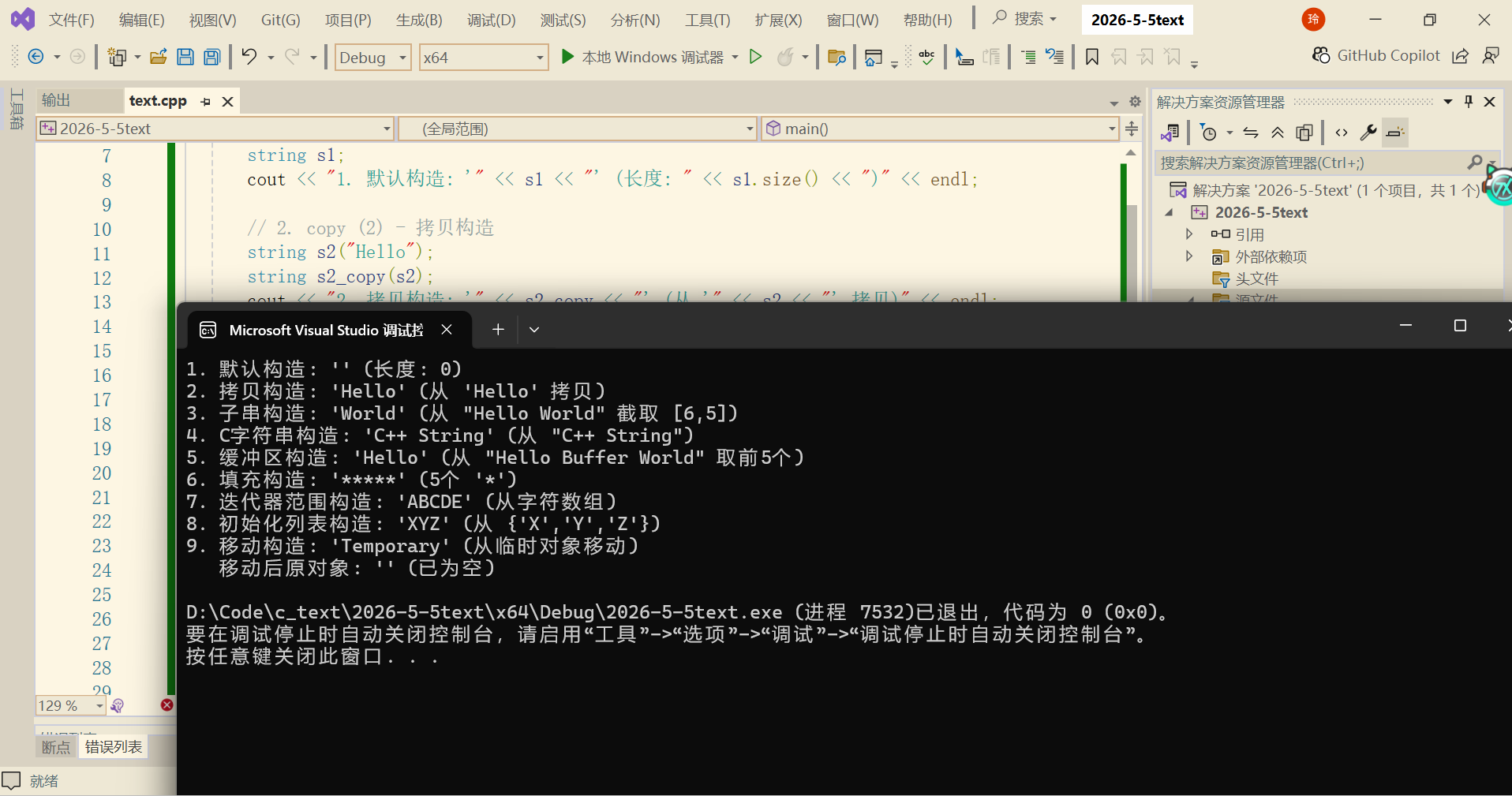
示例代码:
int main() {
    // 1. default (1) - 默认构造,空字符串
    string s1;
    cout << "1. 默认构造: '" << s1 << "' (长度: " << s1.size() << ")" << endl;

    // 2. copy (2) - 拷贝构造
    string s2("Hello");
    string s2_copy(s2);
    cout << "2. 拷贝构造: '" << s2_copy << "' (从 '" << s2 << "' 拷贝)" << endl;

    // 3. substring (3) - 从另一个 string 截取子串
    string s3_long("Hello World");
    string s3_sub(s3_long, 6, 5);  // 从下标6开始,取5个字符
    cout << "3. 子串构造: '" << s3_sub << "' (从 \"" << s3_long << "\" 截取 [6,5])" << endl;

    // 4. from c-string (4) - 从 C 风格字符串构造
    const char* cstr = "C++ String";
    string s4(cstr);
    cout << "4. C字符串构造: '" << s4 << "' (从 \"" << cstr << "\")" << endl;

    // 5. from buffer (5) - 从字符数组的前 n 个字符构造
    const char* buffer = "Hello Buffer World";
    string s5(buffer, 5);  // 只取前5个字符 "Hello"
    cout << "5. 缓冲区构造: '" << s5 << "' (从 \"" << buffer << "\" 取前5个)" << endl;

    // 6. fill (6) - 填充构造,用 n 个字符 c 填充
    string s6(5, '*');  // 5个 '*'
    cout << "6. 填充构造: '" << s6 << "' (5个 '*')" << endl;

    // 7. range (7) - 迭代器范围构造(需要包含 <iterator> 或直接用数组)
    char arr[] = { 'A', 'B', 'C', 'D', 'E' };
    string s7(begin(arr), end(arr));  // 或 arr, arr+5
    cout << "7. 迭代器范围构造: '" << s7 << "' (从字符数组)" << endl;

    // 8. initializer list (8) - 初始化列表构造(C++11)
    string s8 = { 'X', 'Y', 'Z' };  // 或 string s8{'X','Y','Z'};
    cout << "8. 初始化列表构造: '" << s8 << "' (从 {'X','Y','Z'})" << endl;

    // 9. move (9) - 移动构造(C++11)
    string s9_temp("Temporary");
    string s9(move(s9_temp));
    cout << "9. 移动构造: '" << s9 << "' (从临时对象移动)" << endl;
    cout << "   移动后原对象: '" << s9_temp << "' (已为空)" << endl;

    return 0;
}
- 析构函数
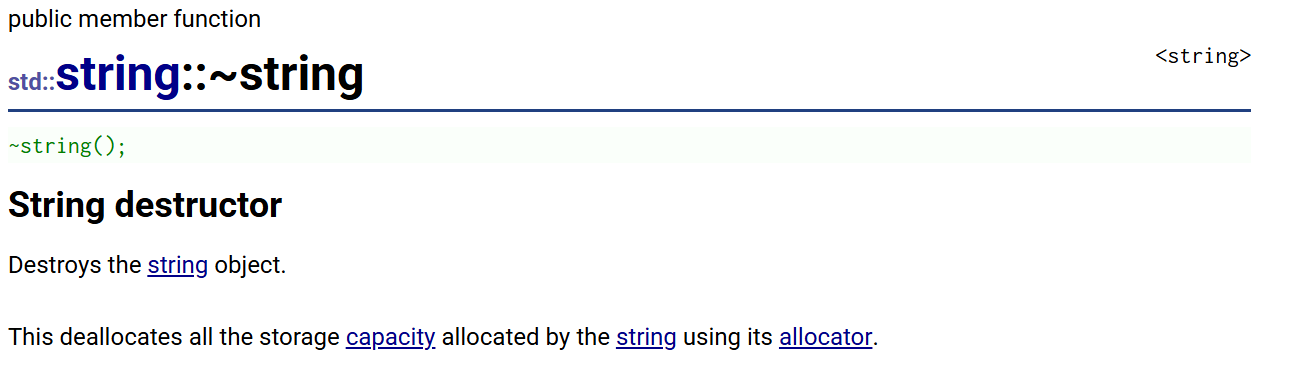
示例代码:
#include <iostream>
#include <string>
using namespace std;

int main() {
    string* s = new string("Hello");
    cout << *s << endl;

    s->~string();  // 手动调用析构(不推荐,通常用 delete)
    // 注意:实际开发中永远不要手动调用析构函数,这里仅用于演示
    // delete s;   // delete 会自动调用析构 + 释放内存

    return 0;
}
- 字符串赋值
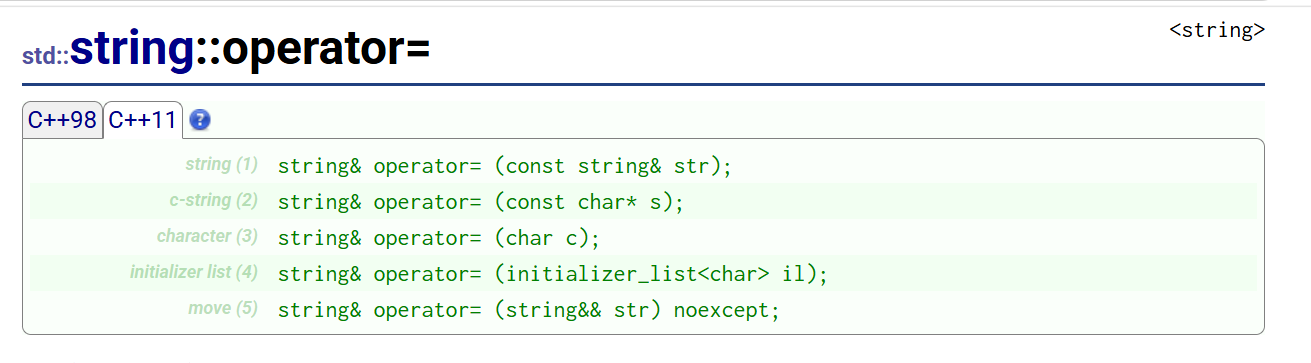
示例代码:
#include <iostream>
#include <string>
using namespace std;

int main() {
    string target;  // 目标字符串,用于接收赋值

    // (1) string& operator= (const string& str) - 拷贝赋值
    string original = "Hello C++";
    target = original;  // string 之间赋值
    cout << "1. string 拷贝赋值: " << target << endl;

    // (2) string& operator= (const char* s) - C字符串赋值
    target = "Direct C-String Assignment";
    cout << "2. C字符串赋值: " << target << endl;

    // (3) string& operator= (char c) - 单个字符赋值
    target = 'X';  // 单个字符,变成 1 个字符的字符串
    cout << "3. 单字符赋值: " << target << endl;

    // (4) string& operator= (initializer_list<char> il) - 初始化列表赋值 (C++11)
    target = {'A', 'B', 'C', 'D'};  // 用花括号列表赋值
    cout << "4. 初始化列表赋值: " << target << endl;

    // (5) string& operator= (string&& str) noexcept - 移动赋值 (C++11)
    string temp = "Temporary Data";
    cout << "5. 移动前 - temp 内容: " << temp << endl;

    target = move(temp);  // 移动赋值,temp 的资源被转移给 target
    cout << "   移动后 - target 内容: " << target << endl;
    cout << "   移动后 - temp 内容: '" << temp << "' (通常为空)" << endl;

    return 0;
}
运行结果示例: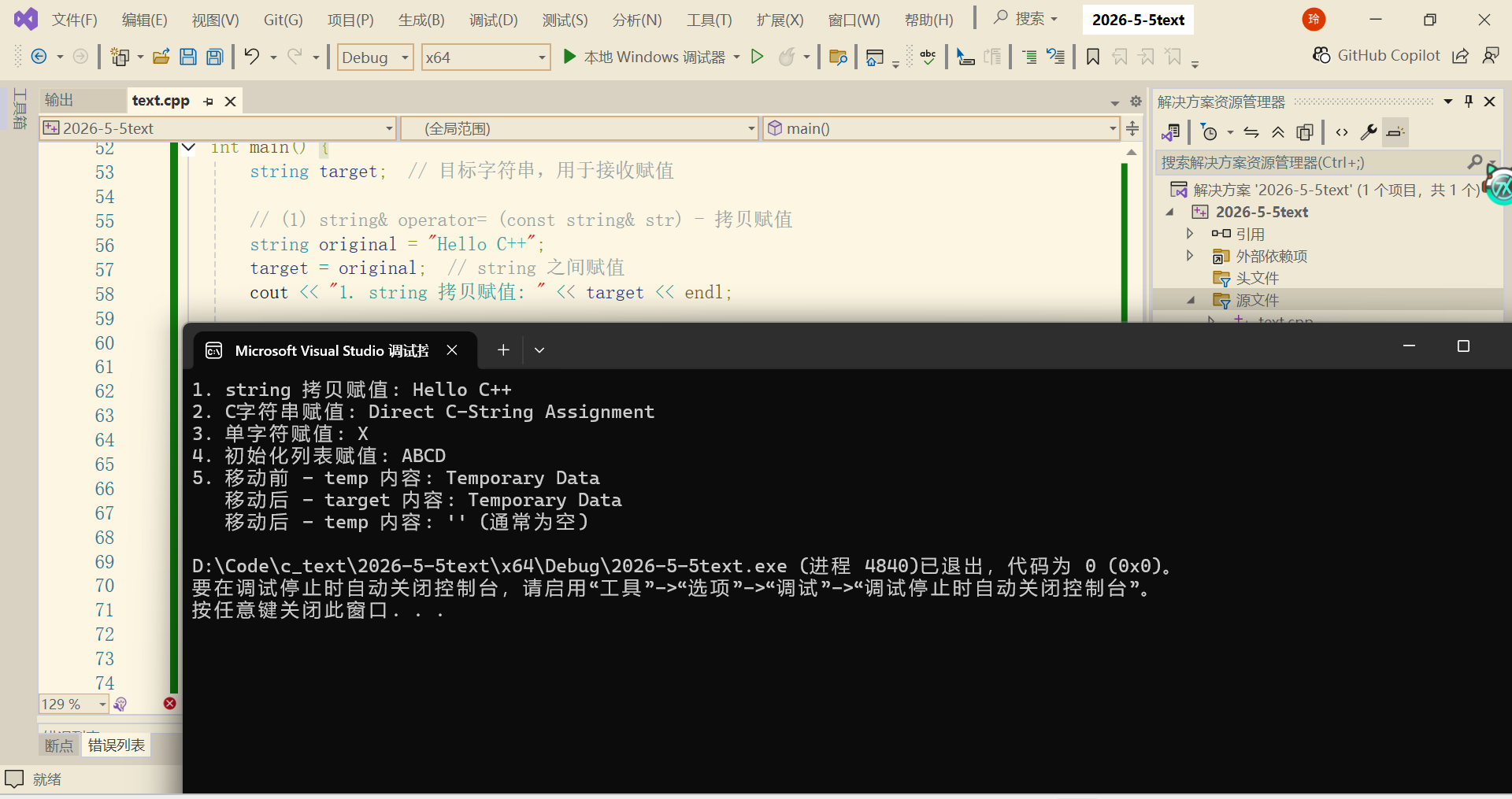
2.4.2 Iterators迭代器
可以将迭代器想象成和指针一样,iterator是迭代器的关键字,定义一个迭代器名字叫it1,初始化为第一个元素的地址。
迭代器的介绍与使用意义示例:
void text_string2() {
	string s1("hello world");
	const string s2("hello world");

	s1[0]++;//s1.operator[](0)++
	//s2[0]++//s2就是不可修改的
	cout << s1 << endl;//s的前一个是i,输出iello world

	//对于string遍历+修改的方式有三种
	//1. 下标+[]这个比较小众
	//s1的每个字符都++
	for (size_t i = 0; i < s1.size(); i++) {
		s1[i]++;
	}
	cout << s1 << endl;
	//用迭代器遍历字符串
	string::iterator it1 = s1.begin();
	while (it1 != s1.end()) {
		(*it1)++;//值++
		it1++;//迭代器++
	}
	cout << s1 << endl;

	//3.范围for
	for (auto e : s1) {
		cout << e<<" "<<endl;
	}
}
void text_iterator() {

	//字符串使用迭代器
	string s1("Hello World!");
	string::iterator it1 = s1.begin();
	while (it1 != s1.end()) {
		(*it1)++;//值++
		it1++;//迭代器++
	}
	cout << s1 << endl;

	//容器使用迭代器
	vector<int>v;//创建一个容器,名字叫做v
	v.push_back(1);
	v.push_back(2);
	v.push_back(3);
	v.push_back(4);

	vector<int>::iterator it2 = v.begin();
	while (it2 != v.end()) {
		(*it2)++;
		cout << *it2<<" ";
		it2++;
	}
		cout << endl;

	//列表使用迭代器
		list<int> it;//创建一个列表
		it.push_back(10);
		it.push_back(20);
		it.push_back(30);
		list<int>::iterator it3 = it.begin();
		while (it3 != it.end()) {
			(*it3)++;
			cout << *it3 << " ";
			it3++;
		}
		cout << endl;
		//总结上述:迭代器存在的意义在于:
		//1.使用统一类似的方式遍历修改容器
		//2.使算法脱离具体的底层结构,和底层结构解耦
		//3.使算独立模板实现针对多个容器处理
		reverse(s1.begin(), s1.end());
		cout << s1 << endl;
		reverse(v.begin(), v.end());
		reverse(it.begin(), it.end());

}
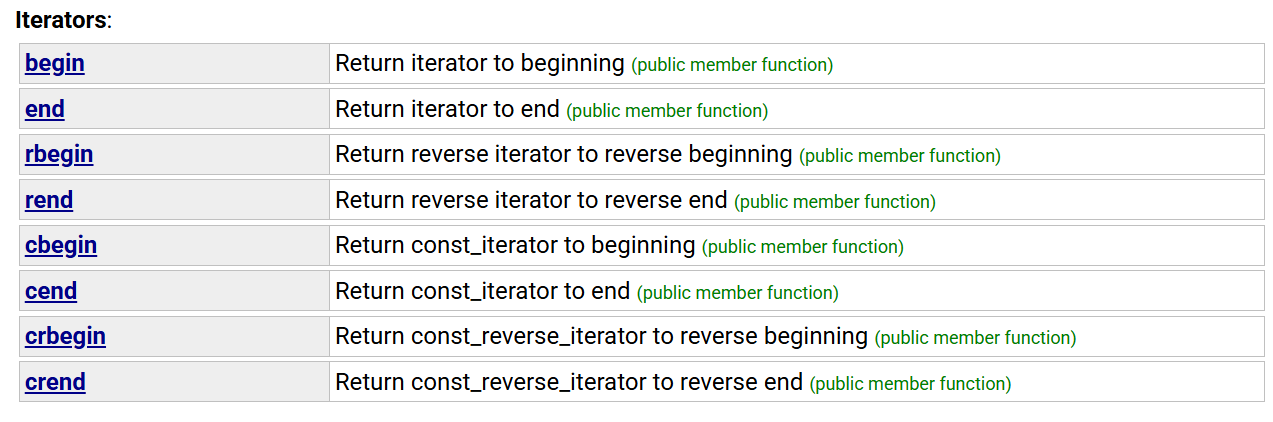
string类域下迭代器使用说明:
void text_string3() {
	string s1("123456");
	string s2("hello world");

	//1.begin()&&end()
	string::iterator it1 = s1.begin();
	while (it1 != s1.end()) {
		(*it1)--;
		it1++;
	}
	cout << s1 << endl;

	//2.cbegin()&&cend()
	string::const_iterator it2 = s2.cbegin();//这里的c写不写都行
	while (it2 != s2.cend()) {
		//(*it2)--;不可修改
		it2++;
	}
	cout << s2 << endl;

	//3.rbegin()&&rend()
	string::reverse_iterator it3 = s1.rbegin();
	while (it3 != s1.rend()) {
		//(*it3)--;不可修改
		it3++;
	}
	cout << s1 << endl;

	//4.crbegin()&&crend()
	string::const_reverse_iterator it4 = s2.crbegin();
	while (it4 != s2.crend()) {
		//(*it4)--;不可修改
		it4++;
	}
	cout << s2 << endl;

}
但是需要注意的是:
int main() {
	int array[] = {1,2,3,4,5};
	int* it2 = begin(array);//这个是C++11的内置函数来取第一个元素地址
	while (it2 != end(array)) {
		cout << *it2 << " ";
		++it2;
	}
	return 0;
}
内置类型(如 int、char)本身没有迭代器,但原生数组可以用指针来模拟迭代器的行为。内置类型原生数组一般使用范围for或者直接下标循环也可,会比模拟行为更简单一点。
2.4.3 Capacity容量
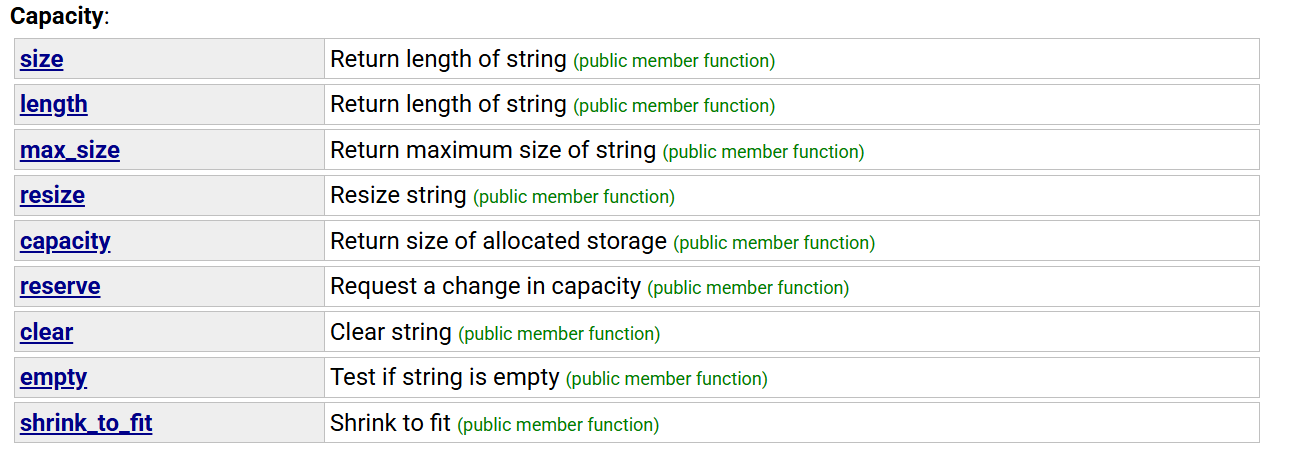
示例代码1:
void text_string4() {
	string s1("123456");
	cout << s1.max_size() << endl;//s1最大的大小
	//这个东西的存在并没有实际的意义

	//下面二者规定均不包含\0
	cout << s1.size() << endl;
	cout << s1.capacity() << endl;//底层和顺序表相同,代表的是空间的大小

	//现在我们来探讨一个问题,string的底层是怎样扩容的?
	//我们来做一个验证
	string s2;
	//如果我们知道需要多少空间,提前开好就可以避免扩容,提高效率
	//s2.reserve(100);
	size_t old = s2.capacity();
	cout << "capacitty:" << old << endl;//输出初始的空间大小
	for (size_t i = 0; i < 100; i++) {
		s2.push_back('#');
		if (s2.capacity() != old) {
			cout << "capacity:" << s2.capacity() << endl;
			old = s2.capacity();
		}
	}//在这里我们发现实际上是1.5倍扩容

	cout << s1 << endl;
	s1.clear();//清理数据,但不释放空间
	cout << s1 << endl;
	//不会缩容,代价是很大的
	cout << "size:" << s2.size() << endl;
	cout << "capacity:" << s2.capacity() << endl;

	for (size_t i = 0; i < 50; i++) {
		s2.pop_back();//弹出数据
	}
	cout << s2 << endl;
	//缩小容量,我们知道空间是不支持分期还空间的
	//那就意味着,缩小容量需要重新开空间以时间换空间
	s2.shrink_to_fit();
	cout << "size:" << s2.size() << endl;
	cout << "capacity:" << s2.capacity() << endl;//效率很低
}
示例代码2:
void text_string5() {
	string s1("123456");
	cout << "size:" << s1.size() << endl;
	cout << "capacity:" << s1.capacity() << endl;
	//扩容
	s1.reserve(100);
	cout << "size:" << s1.size() << endl;
	cout << "capacity:" << s1.capacity() << endl;

	//缩容:不靠谱
	s1.reserve(4);
	cout << "size:" << s1.size() << endl;
	cout << "capacity:" << s1.capacity() << endl;

	string s2("123456");
	cout << s2 << endl;
	cout << "size:" << s2.size() << endl;
	cout << "capacity:" << s2.capacity() << endl;
	//插入数据,让size到n个
	//n>capacity>size
	s2.resize(20, 'x');
	cout << "size:" << s2.size() << endl;
	cout << "capacity:" << s2.capacity() << endl;

	//capacity>n>size
	//s2.resize(25, 'x');
	s2.resize(25);//插入的是\0
	s2.push_back('y');
	cout << s2 << endl;
	cout << "size:" << s2.size() << endl;
	cout << "capacity:" << s2.capacity() << endl;

	//删除数据
	//n<size
	s2.resize(5);//插入的是\0
	cout << s2 << endl;
	cout << "size:" << s2.size() << endl;
	cout << "capacity:" << s2.capacity() << endl;

}
2.4.4 Element access元素访问

示例代码:
void text_string6() {
	string s1("hello world");
	s1[0]++;//元素访问的方式之一
	cout << s1<<endl;

	//越界检查的底层是断言检查
	s1[15]; //s1.operator[](15);
	//这条语句虽然越界,但通常不会直接崩溃,是未定义行为
	s1.at(0)--;
	cout << s1 << endl;
	//这条语句会抛出std::out_of_range异常,程序会因此终止,除非你捕获了异常。
	s1.at(15);

	int a[10];
	a[15] = 1;//实际上等价于*(a+15)=1

}
2.4.5 Modifiers修改器
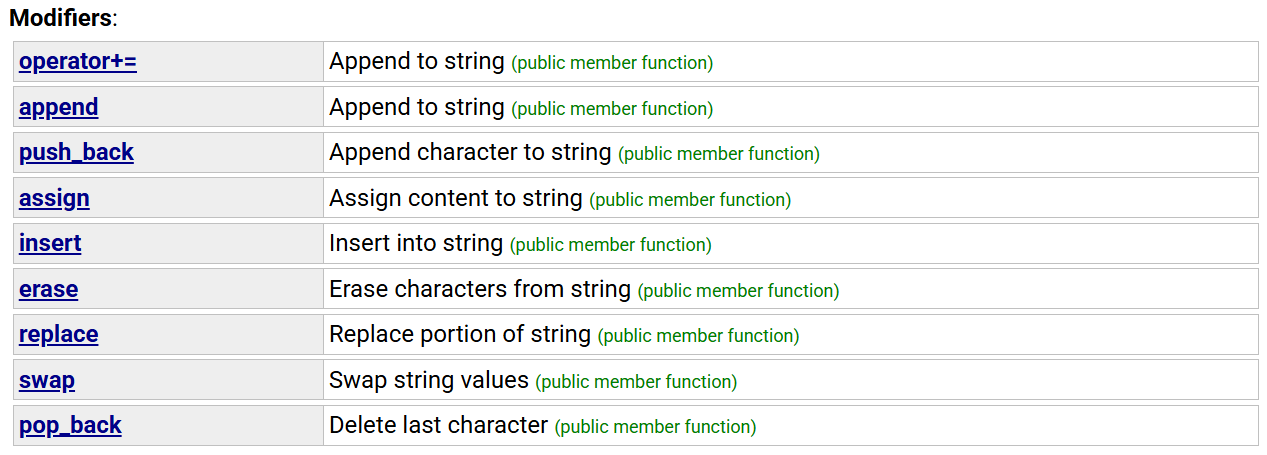
示例代码:
void text_string7() {
	string s1("hello world");
	/*s1.push_back(' ');
	s1.append("hello");
	s1.append(10, 'x');*/
	s1 += '!';
	s1 += "hello world";
	cout << s1 << endl;

	s1 = 'x';
	cout << s1 << endl;
	s1.assign(10, 'y');//将s2替换成10个y
	cout << s1 << endl;

	//insert谨慎使用,会涉及到底层数据的挪动,底层是顺序表
	string s2("hello world");
	s2.insert(0, "yyy");
	cout << s2 << endl;

	s2.insert(0, 4, '!');//在某个位置插入n个数据
	cout << s2 << endl;

	s2.insert(s2.begin(), '!');//头插
	cout << s2 << endl;

	//erase谨慎使用,涉及到底层数据的挪动,效率低下
	string s3("hello world");
	s3.erase(5, 1);//去掉下标5开始的一个数据
	cout << s3 << endl;

	s3.erase(5);//删掉5以后的数据
	cout << s3 << endl;

	//replace谨慎使用,涉及到底层数据的挪动,效率低下
	string s4("hello world");
	cout << s4 << endl;
	s4.replace(5, 3,"#");//将下标5开始的三个字符替换为#
	cout << s4 << endl;

	s4.replace(5, 1, "!!!!!!!!!!");//将下标5开始的一个字符替换
	cout << s4 << endl;

	//将所有空格都替换为%%
	string s5("           hhhhhhhhhhhhhhhhh");
	////需要查找替换,但是可以优化为
	//size_t pos = s5.find(' ');
	//	while (pos != string::npos) {
	//		s5.replace(pos, 1, "%%");
	//		pos = s5.find(' ', pos + 2);
	//}
	//cout << s5 << endl;
	string s6;
	s6.reserve(s5.size());//以空间换时间,避免数据移动提高效率
	for (auto ch : s5) {
		if (ch == ' ')
			s6 += "%%";
		else
			s6 += ch;
	}
	cout << s6 << endl;
}
欢迎大家批评指正!!!
更多推荐

 16
16 0
0- 0


 已为社区贡献13条内容

所有评论(0)