
网工必备|一键巡检图形图像小程序打开即用exe.基于Python开发
·
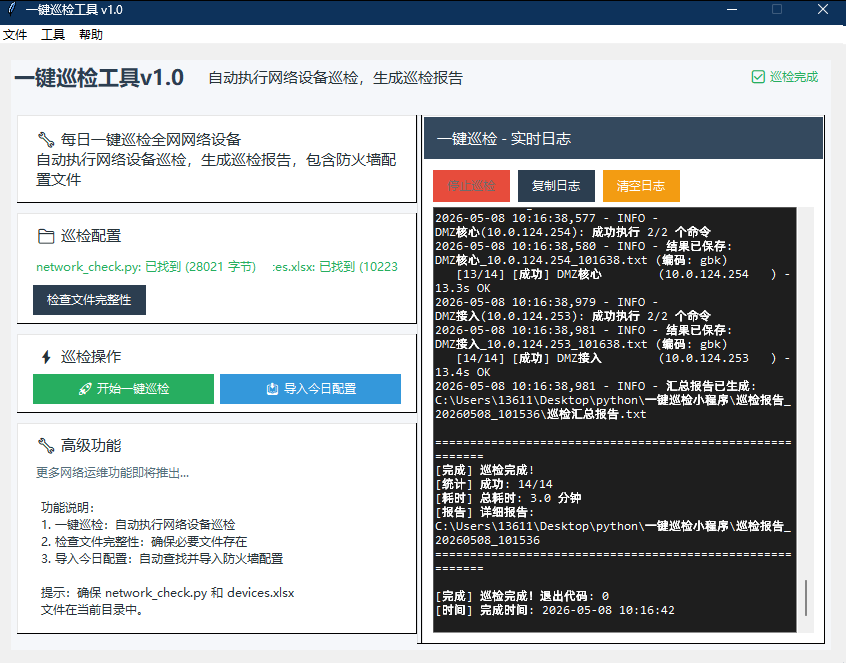
查看我的资源免费下载或者百度网盘链接进行下载:
通过网盘分享的文件:一键巡检小程序(图形图像版).zip
链接: https://pan.baidu.com/s/1Za6WPVk8YbfHg_PBbJ6dog?pwd=f9u8
提取码: f9u8
--来自百度网盘超级会员v6的分享
附上源代码:
#!/usr/bin/env python3
# -*- coding: utf-8 -*-
"""
一键巡检工具 v1.0
基于楠子网络运维小程序的一键巡检功能
功能:
1. 一键巡检功能
2. 检查文件完整性
3. 导入今日配置
"""
import tkinter as tk
from tkinter import ttk, messagebox, scrolledtext
from tkinter.font import Font
from tkinter import Toplevel
import os
import re
import subprocess
import threading
import sys
from datetime import datetime, timedelta
import ctypes
class InspectionToolApp:
def __init__(self, root):
self.root = root
self.root.title("一键巡检工具 v1.0")
# 设置固定窗口大小
self.root.geometry("850x620")
self.root.resizable(False, False) # 禁止调整窗口大小
# 设置字体
self.title_font = Font(family="Microsoft YaHei", size=16, weight="bold")
self.subtitle_font = Font(family="Microsoft YaHei", size=11)
self.normal_font = Font(family="Microsoft YaHei", size=9)
self.mono_font = Font(family="Consolas", size=9)
# 颜色配置
self.colors = {
"primary": "#2c3e50", "secondary": "#34495e", "success": "#27ae60",
"danger": "#e74c3c", "warning": "#f39c12", "info": "#3498db", "light": "#ecf0f1",
"dark": "#2c3e50", "bg": "#f5f7fa", "card": "#ffffff",
"text": "#263238", "text_secondary": "#546e7a"
}
# 初始化变量
self.inspection_process = None
# 创建界面
self.create_widgets()
def create_widgets(self):
# 主容器
main_container = tk.Frame(self.root, bg=self.colors["bg"])
main_container.pack(fill=tk.BOTH, expand=True, padx=15, pady=15)
# 创建菜单栏
self.create_menubar()
# 创建标题区域
self.create_header(main_container)
# 创建主界面
self.create_main_interface(main_container)
def create_menubar(self):
"""创建菜单栏"""
menubar = tk.Menu(self.root)
self.root.config(menu=menubar)
# 文件菜单
file_menu = tk.Menu(menubar, tearoff=0)
menubar.add_cascade(label="文件", menu=file_menu)
file_menu.add_command(label="调试信息", command=self.show_debug_info)
file_menu.add_separator()
file_menu.add_command(label="退出", command=self.root.quit)
# 工具菜单
tools_menu = tk.Menu(menubar, tearoff=0)
menubar.add_cascade(label="工具", menu=tools_menu)
tools_menu.add_command(label="检查文件", command=lambda: self.check_files(show_dialog=True))
tools_menu.add_command(label="导入今日配置", command=self.import_today_firewall_config)
# 帮助菜单
help_menu = tk.Menu(menubar, tearoff=0)
menubar.add_cascade(label="帮助", menu=help_menu)
help_menu.add_command(label="使用说明", command=self.show_help)
help_menu.add_command(label="关于", command=self.show_about)
def create_header(self, parent):
"""创建标题栏"""
header_frame = tk.Frame(parent, bg=self.colors["bg"])
header_frame.pack(fill=tk.X, pady=(0, 15))
title_frame = tk.Frame(header_frame, bg=self.colors["bg"])
title_frame.pack(side=tk.LEFT)
# 主标题
title_label = tk.Label(title_frame, text="一键巡检工具v1.0",
font=self.title_font, fg=self.colors["primary"], bg=self.colors["bg"])
title_label.pack(side=tk.LEFT)
# 副标题前的空格
space_label = tk.Label(title_frame, text=" ", font=self.title_font,
fg=self.colors["primary"], bg=self.colors["bg"])
space_label.pack(side=tk.LEFT)
# 副标题
subtitle_label = tk.Label(title_frame,
text="自动执行网络设备巡检,生成巡检报告",
font=self.subtitle_font, fg=self.colors["text"], bg=self.colors["bg"])
subtitle_label.pack(side=tk.LEFT, padx=(0, 0))
status_frame = tk.Frame(header_frame, bg=self.colors["bg"])
status_frame.pack(side=tk.RIGHT)
self.status_label = tk.Label(status_frame, text="就绪", font=self.normal_font,
fg=self.colors["success"], bg=self.colors["bg"])
self.status_label.pack(side=tk.RIGHT, padx=(0, 10))
def create_main_interface(self, parent):
"""创建主界面"""
# 使用PanedWindow实现可调整大小的布局
main_paned = tk.PanedWindow(parent, orient=tk.HORIZONTAL, bg=self.colors["bg"], sashwidth=5, sashrelief=tk.RAISED)
main_paned.pack(fill=tk.BOTH, expand=True, padx=5, pady=5)
# 左侧面板
left_frame = tk.Frame(main_paned, bg=self.colors["bg"])
# 描述区域
desc_frame = tk.Frame(left_frame, bg=self.colors["card"], relief=tk.RAISED, borderwidth=1)
desc_frame.pack(fill=tk.X, pady=(0, 10))
desc_label = tk.Label(desc_frame,
text="🔧 每日一键巡检全网网络设备\n自动执行网络设备巡检,生成巡检报告,包含防火墙配置文件",
font=self.subtitle_font, fg=self.colors["text"], bg=self.colors["card"],
justify=tk.LEFT, wraplength=360, anchor="w")
desc_label.pack(anchor=tk.W, padx=15, pady=10)
# 配置区域
config_frame = tk.Frame(left_frame, bg=self.colors["card"], relief=tk.RAISED, borderwidth=1)
config_frame.pack(fill=tk.X, pady=(0, 10))
config_label = tk.Label(config_frame, text="📁 巡检配置",
font=self.subtitle_font, fg=self.colors["text"], bg=self.colors["card"])
config_label.pack(anchor=tk.W, padx=15, pady=(8, 5))
file_container = tk.Frame(config_frame, bg=self.colors["card"])
file_container.pack(fill=tk.X, padx=15, pady=(0, 8))
# 文件状态放在一行,中间用空格隔开
file_status_frame = tk.Frame(file_container, bg=self.colors["card"])
file_status_frame.pack(fill=tk.X, pady=2)
self.script_status = tk.Label(file_status_frame, text="network_check.py: 未检查",
font=self.normal_font, fg=self.colors["text"], bg=self.colors["card"])
self.script_status.pack(side=tk.LEFT)
# 添加空格
space_label = tk.Label(file_status_frame, text=" ", font=self.normal_font,
fg=self.colors["text"], bg=self.colors["card"])
space_label.pack(side=tk.LEFT)
self.device_status = tk.Label(file_status_frame, text="devices.xlsx: 未检查",
font=self.normal_font, fg=self.colors["text"], bg=self.colors["card"])
self.device_status.pack(side=tk.LEFT)
# 检查文件按钮
check_btn = tk.Button(file_container, text="检查文件完整性",
command=lambda: self.check_files(show_dialog=True),
bg=self.colors["primary"], fg="white", font=self.normal_font,
padx=12, pady=3, bd=0, cursor="hand2")
check_btn.pack(anchor=tk.W, pady=(5, 0))
# 操作区域
button_frame = tk.Frame(left_frame, bg=self.colors["card"], relief=tk.RAISED, borderwidth=1)
button_frame.pack(fill=tk.X, pady=(0, 10))
op_label = tk.Label(button_frame, text="⚡ 巡检操作",
font=self.subtitle_font, fg=self.colors["text"], bg=self.colors["card"])
op_label.pack(anchor=tk.W, padx=15, pady=(8, 5))
btn_container = tk.Frame(button_frame, bg=self.colors["card"])
btn_container.pack(fill=tk.X, padx=15, pady=(0, 8))
# 巡检按钮框架
button_inner_frame = tk.Frame(btn_container, bg=self.colors["card"])
button_inner_frame.pack(fill=tk.X)
self.inspect_btn = tk.Button(button_inner_frame, text="🚀 开始一键巡检",
command=self.start_inspection,
bg=self.colors["success"], fg="white",
font=self.normal_font, padx=8, pady=3, bd=0, cursor="hand2")
self.inspect_btn.pack(side=tk.LEFT, expand=True, fill=tk.BOTH, padx=(0, 3))
self.import_config_btn = tk.Button(button_inner_frame, text="📥 导入今日配置",
command=self.import_today_firewall_config,
bg=self.colors["info"], fg="white",
font=self.normal_font, padx=8, pady=3, bd=0, cursor="hand2")
self.import_config_btn.pack(side=tk.LEFT, expand=True, fill=tk.BOTH, padx=(3, 0))
# 扩展操作区域
advanced_frame = tk.Frame(left_frame, bg=self.colors["card"], relief=tk.RAISED, borderwidth=1)
advanced_frame.pack(fill=tk.BOTH, expand=True, pady=(0, 10))
advanced_label = tk.Label(advanced_frame, text="🔧 高级功能",
font=self.subtitle_font, fg=self.colors["text"], bg=self.colors["card"])
advanced_label.pack(anchor=tk.W, padx=15, pady=(8, 3))
advanced_desc = tk.Label(advanced_frame, text="更多网络运维功能即将推出...",
font=self.normal_font, fg=self.colors["text_secondary"], bg=self.colors["card"])
advanced_desc.pack(anchor=tk.W, padx=15, pady=(0, 3))
# 预留功能区域
placeholder_frame = tk.Frame(advanced_frame, bg=self.colors["card"])
placeholder_frame.pack(fill=tk.BOTH, expand=True, padx=15, pady=(5, 8))
placeholder_text = """功能说明:
1. 一键巡检:自动执行网络设备巡检
2. 检查文件完整性:确保必要文件存在
3. 导入今日配置:自动查找并导入防火墙配置
提示:确保 network_check.py 和 devices.xlsx
文件在当前目录中。"""
placeholder_label = tk.Label(placeholder_frame, text=placeholder_text,
font=self.normal_font, fg=self.colors["text"], bg=self.colors["card"],
justify=tk.LEFT, anchor="w")
placeholder_label.pack(anchor=tk.W, padx=5, pady=5)
# 右侧面板 - 内嵌的实时日志窗口
right_frame = tk.Frame(main_paned, bg=self.colors["bg"])
# 实时日志区域
log_frame = tk.Frame(right_frame, bg=self.colors["card"], relief=tk.RAISED, borderwidth=1)
log_frame.pack(fill=tk.BOTH, expand=True)
# 日志标题区域
log_title_frame = tk.Frame(log_frame, bg=self.colors["secondary"])
log_title_frame.pack(fill=tk.X, padx=1, pady=1)
log_title = tk.Label(log_title_frame, text="一键巡检 - 实时日志",
font=self.subtitle_font, fg="white", bg=self.colors["secondary"])
log_title.pack(side=tk.LEFT, padx=10, pady=8)
# 控制按钮区域
control_frame = tk.Frame(log_frame, bg=self.colors["card"])
control_frame.pack(fill=tk.X, padx=10, pady=(10, 5))
# 停止巡检按钮
self.stop_inspect_btn = tk.Button(control_frame, text="停止巡检",
command=self.stop_inspection,
bg=self.colors["danger"], fg="white",
font=self.normal_font, padx=12, pady=4, bd=0, cursor="hand2")
self.stop_inspect_btn.pack(side=tk.LEFT, padx=(0, 8))
self.stop_inspect_btn.config(state=tk.DISABLED) # 初始不可用
# 复制日志按钮
self.copy_log_btn = tk.Button(control_frame, text="复制日志",
command=self.copy_inspection_log,
bg=self.colors["primary"], fg="white",
font=self.normal_font, padx=12, pady=4, bd=0, cursor="hand2")
self.copy_log_btn.pack(side=tk.LEFT)
# 清空日志按钮
self.clear_log_btn = tk.Button(control_frame, text="清空日志",
command=self.clear_inspection_log,
bg=self.colors["warning"], fg="white",
font=self.normal_font, padx=12, pady=4, bd=0, cursor="hand2")
self.clear_log_btn.pack(side=tk.LEFT, padx=(8, 0))
# 日志显示区域
log_text_frame = tk.Frame(log_frame, bg=self.colors["card"])
log_text_frame.pack(fill=tk.BOTH, expand=True, padx=10, pady=(0, 10))
# 实时日志文本框
self.inspection_log_text = scrolledtext.ScrolledText(log_text_frame, height=20, font=self.mono_font,
wrap=tk.WORD, bg="#1e1e1e", fg="#ffffff",
relief=tk.SUNKEN, borderwidth=1)
self.inspection_log_text.pack(fill=tk.BOTH, expand=True)
self.inspection_log_text.delete("1.0", tk.END)
# 将左右面板添加到PanedWindow
main_paned.add(left_frame, width=400)
main_paned.add(right_frame, width=400)
def show_debug_info(self):
debug_info = f"""程序调试信息:
========================
运行模式: {"打包EXE" if getattr(sys, 'frozen', False) else "Python脚本"}
工作目录: {os.getcwd()}
目录内容: {os.listdir()}
========================
"""
debug_window = Toplevel(self.root)
debug_window.title("调试信息")
debug_window.geometry("600x400")
text_widget = scrolledtext.ScrolledText(debug_window, width=80, height=20)
text_widget.pack(fill=tk.BOTH, expand=True, padx=10, pady=10)
text_widget.insert("1.0", debug_info)
text_widget.config(state=tk.DISABLED)
def clear_inspection_log(self):
"""清空巡检日志"""
if messagebox.askyesno("确认", "确定要清空日志吗?"):
self.inspection_log_text.delete("1.0", tk.END)
self.inspection_log_text.insert("1.0", "[日志已清空]\n")
def start_inspection(self):
"""开始一键巡检"""
print("开始一键巡检...")
if getattr(sys, 'frozen', False):
current_dir = os.path.dirname(sys.executable)
else:
current_dir = os.path.dirname(os.path.abspath(__file__))
print(f"当前目录: {current_dir}")
script_path = os.path.join(current_dir, "network_check.py")
device_path = os.path.join(current_dir, "devices.xlsx")
if not os.path.exists(script_path):
messagebox.showerror("错误", f"找不到巡检脚本:\n{script_path}")
return
if not os.path.exists(device_path):
messagebox.showerror("错误", f"找不到设备配置:\n{device_path}")
return
# 禁用开始按钮,启用停止按钮
self.inspect_btn.config(state=tk.DISABLED)
self.stop_inspect_btn.config(state=tk.NORMAL)
# 清空日志
self.inspection_log_text.delete("1.0", tk.END)
# 更新状态
self.status_label.config(text="巡检中...", fg=self.colors["warning"])
# 在新线程中运行巡检
threading.Thread(target=self.run_inspection, args=(script_path, device_path), daemon=True).start()
def run_inspection(self, script_path, device_path):
"""运行巡检脚本 - 核心修改:解决空命令提示符问题"""
try:
script_dir = os.path.dirname(script_path)
start_time = datetime.now().strftime('%Y-%m-%d %H:%M:%S')
start_info = f"[开始] 网络设备自动化巡检...\n[脚本] 巡检脚本: {os.path.basename(script_path)}\n[路径] 工作目录: {script_dir}\n[配置] 设备配置文件: {os.path.basename(device_path)}\n[时间] 开始时间: {start_time}\n" + "=" * 50 + "\n\n"
self.update_log(start_info)
if getattr(sys, 'frozen', False):
python_exe = self.find_python_interpreter()
if not python_exe:
self.update_log("[错误] 找不到Python解释器!\n")
return
cmd = [python_exe, script_path]
else:
cmd = [sys.executable, script_path]
print(f"执行命令: {' '.join(cmd)}")
print(f"工作目录: {script_dir}")
# 关键修改:使用subprocess.Popen并隐藏命令提示符窗口
if sys.platform == "win32":
# Windows系统:创建无窗口的进程
startupinfo = subprocess.STARTUPINFO()
startupinfo.dwFlags |= subprocess.STARTF_USESHOWWINDOW
startupinfo.wShowWindow = subprocess.SW_HIDE
self.inspection_process = subprocess.Popen(
cmd,
stdout=subprocess.PIPE,
stderr=subprocess.STDOUT,
text=True,
encoding='gbk',
errors='replace',
cwd=script_dir,
startupinfo=startupinfo
)
else:
# 非Windows系统
self.inspection_process = subprocess.Popen(
cmd,
stdout=subprocess.PIPE,
stderr=subprocess.STDOUT,
text=True,
encoding='utf-8',
errors='replace',
cwd=script_dir
)
# 实时读取输出
for line in iter(self.inspection_process.stdout.readline, ''):
if line:
self.update_log(line)
returncode = self.inspection_process.wait()
end_time = datetime.now().strftime('%Y-%m-%d %H:%M:%S')
if returncode == 0:
complete_info = f"\n[完成] 巡检完成!退出代码: {returncode}\n[时间] 完成时间: {end_time}\n"
self.update_log(complete_info)
self.root.after(0, lambda: self.status_label.config(text="✅ 巡检完成", fg=self.colors["success"]))
else:
error_info = f"\n[错误] 巡检失败!退出代码: {returncode}\n[时间] 完成时间: {end_time}\n"
self.update_log(error_info)
self.root.after(0, lambda: self.status_label.config(text="❌ 巡检失败", fg=self.colors["danger"]))
except Exception as e:
error_msg = f"[错误] 执行巡检时出错: {str(e)}\n"
self.update_log(error_msg)
print(f"错误: {error_msg}")
self.root.after(0, lambda: self.status_label.config(text="❌ 巡检错误", fg=self.colors["danger"]))
finally:
self.root.after(0, lambda: self.inspect_btn.config(state=tk.NORMAL))
self.root.after(0, lambda: self.stop_inspect_btn.config(state=tk.DISABLED))
self.inspection_process = None
def update_log(self, text):
"""更新日志显示"""
def update():
self.inspection_log_text.insert(tk.END, text)
self.inspection_log_text.see(tk.END)
self.root.after(0, update)
def find_python_interpreter(self):
"""查找Python解释器"""
python_paths = ["python", "python3", "py"]
for python_path in python_paths:
try:
# 使用隐藏窗口的方式检查Python版本
if sys.platform == "win32":
startupinfo = subprocess.STARTUPINFO()
startupinfo.dwFlags |= subprocess.STARTF_USESHOWWINDOW
startupinfo.wShowWindow = subprocess.SW_HIDE
result = subprocess.run(
[python_path, "--version"],
capture_output=True,
text=True,
timeout=2,
startupinfo=startupinfo
)
else:
result = subprocess.run(
[python_path, "--version"],
capture_output=True,
text=True,
timeout=2
)
if result.returncode == 0:
print(f"找到Python解释器: {python_path}")
return python_path
except:
continue
print("未找到Python解释器")
return None
def stop_inspection(self):
"""停止巡检"""
if hasattr(self, 'inspection_process') and self.inspection_process:
self.inspection_process.terminate()
self.update_log("\n[停止] 巡检已停止\n")
self.root.after(0, lambda: self.status_label.config(text="⏸️ 巡检已停止", fg=self.colors["warning"]))
self.root.after(0, lambda: self.inspect_btn.config(state=tk.NORMAL))
self.root.after(0, lambda: self.stop_inspect_btn.config(state=tk.DISABLED))
self.inspection_process = None
def copy_inspection_log(self):
"""复制巡检日志"""
log_text = self.inspection_log_text.get("1.0", tk.END).strip()
if log_text:
self.root.clipboard_clear()
self.root.clipboard_append(log_text)
messagebox.showinfo("成功", "日志已复制到剪贴板")
def check_files(self, show_dialog=True):
"""检查文件完整性"""
if getattr(sys, 'frozen', False):
current_dir = os.path.dirname(sys.executable)
else:
current_dir = os.path.dirname(os.path.abspath(__file__))
script_path = os.path.join(current_dir, "network_check.py")
device_path = os.path.join(current_dir, "devices.xlsx")
script_found = os.path.exists(script_path)
device_found = os.path.exists(device_path)
if script_found:
script_size = os.path.getsize(script_path)
self.script_status.config(text=f"network_check.py: 已找到 ({script_size} 字节)", fg=self.colors["success"])
else:
self.script_status.config(text="network_check.py: 未找到!", fg=self.colors["danger"])
if device_found:
device_size = os.path.getsize(device_path)
self.device_status.config(text=f"devices.xlsx: 已找到 ({device_size} 字节)", fg=self.colors["success"])
else:
self.device_status.config(text="devices.xlsx: 未找到!", fg=self.colors["danger"])
if script_found and device_found:
self.status_label.config(text="✅ 所有必需文件已找到!")
if show_dialog:
messagebox.showinfo("检查完成", "✅ 所有必需文件都已找到!")
else:
self.status_label.config(text="❌ 文件不完整")
if show_dialog:
dir_content = "\n".join(os.listdir(current_dir))
message_text = (
f"❌ 必需文件不完整!\n\n当前目录: {current_dir}\n\n"
f"请确保以下文件都在同一目录中:\n1. network_check.py\n2. devices.xlsx\n\n"
f"目录内容:\n{dir_content}"
)
messagebox.showwarning("文件缺失", message_text)
return script_found and device_found
def show_help(self):
"""显示帮助信息"""
help_text = """一键巡检工具 v1.0 使用说明
一、主要功能
1. 一键巡检:自动执行网络设备巡检
2. 检查文件完整性:确保必要文件存在
3. 导入今日配置:自动查找并导入防火墙配置
二、使用步骤
1. 确保文件完整
- network_check.py (巡检脚本)
- devices.xlsx (设备配置表)
2. 点击"检查文件完整性"验证文件
3. 点击"开始一键巡检"执行自动化巡检
4. 查看右侧日志区域获取实时进度
5. 巡检完成后生成报告文件
三、文件说明
1. devices.xlsx格式:
- 必须包含列:IP地址、用户名、密码
- 可选列:设备名称、设备类型、厂商、端口、超时时间、编码
四、注意事项
1. 执行巡检前请备份重要配置
2. 巡检过程可能需要较长时间
3. 确保网络连通性
4. 巡检报告保存在"巡检报告_日期时间"文件夹中
"""
messagebox.showinfo("使用说明", help_text)
def show_about(self):
"""显示关于信息"""
about_text = """一键巡检工具 v1.0
基于楠子网络运维小程序的一键巡检功能
功能简介:
1. 一键巡检:自动执行网络设备巡检
2. 检查文件完整性:确保必要文件存在
3. 导入今日配置:自动查找并导入防火墙配置
开发说明:
- 本程序基于原楠子网络运维小程序提取
- 专注于网络设备自动化巡检
- 保留了原有一键巡检的所有核心功能
- 去除了防火墙操作、路由器功能等无关模块
版本:1.0
日期:2026年"""
messagebox.showinfo("关于", about_text)
def import_today_firewall_config(self):
"""导入今日防火墙配置"""
messagebox.showinfo("提示", "导入今日配置功能已保留,但需要原程序的其他模块支持。\n在独立版本中,此功能可能需要进一步调整。")
def main():
"""主函数"""
root = tk.Tk()
app = InspectionToolApp(root)
root.mainloop()
if __name__ == "__main__":
main()更多推荐
 12
12 0
0- 0


 已为社区贡献2条内容

所有评论(0)