
Python基础篇:Python基础数据类型
·
运算符
- 常见的算术(数学)运算符有:加(+)、减(-)、乘(*)、除(/)、整除(//)、取余(%)、求平方(**)
- 复合赋值:+二、-=、=、/=、//=、%=、*=
常见内置数据类型
- 字符串:str
- 数字:int、float(Python中没有double类型,float就表示双精度浮点数。)
- 布尔:bool(True、False)
- 字节:bytes,以b开头,如b"hello"
- 字节数组:bytearray
- 字典:dict
- 列表:list
- 元祖:tuple
- 集合:set
- 不可变集合:frozenset
- 范围:range
- 类:class(function、自定义类)
Python的数据类型都在内建文件中buildins.py:build in s(内置项模块),都是类class,都是小写。
class str(object):
class int(object):
class float(object):
class bool(int):
class bytes(object):
class list(object):
class dict(object):
class tuple(object):
class set(object):
class frozenset(object):
class range(object):
常见标准库类型
- datetime - 日期时间类型
- decimal.Decimal - 高精度小数
str
- 双引号字符串:使用双引号包括字符串
- 单引号字符串:使用单引号字符串
- 嵌套字符串:解决转义问题
- 多行原始字符串:Python支持使用3个双引号来定义字符串,会保留字符串的格式,输出时会保持相同的格式原封不动的数出来(包含了回车、引号等),常用来作为文件的头注释(一般位于文件的最上方用于描述整个模块的作用)和方法内部的注释(用于描述方法的作用,参数和返回值等)
- 格式化字符串f:在开始的引号前使用
f标记,可以使用 { 变量 } 来引用变量的值。 - 原始字符串r:把特殊字符串也当做普通的字符,常用于定义正则表达式。
# 声明变量不需要关键字和数据类型
name = "melong"
// java
String name = "张三";

// javascript
var name = "张三"

# Python声明变量不需要关键字、不需要在语句最后写;
name = "张三"
english_name = 'melong'
chinese_name = "萌龙"

full_name = f" '{english_name}' - '{chinese_name}'"
full_name2 = f'"{english_name}" - "{chinese_name}"'

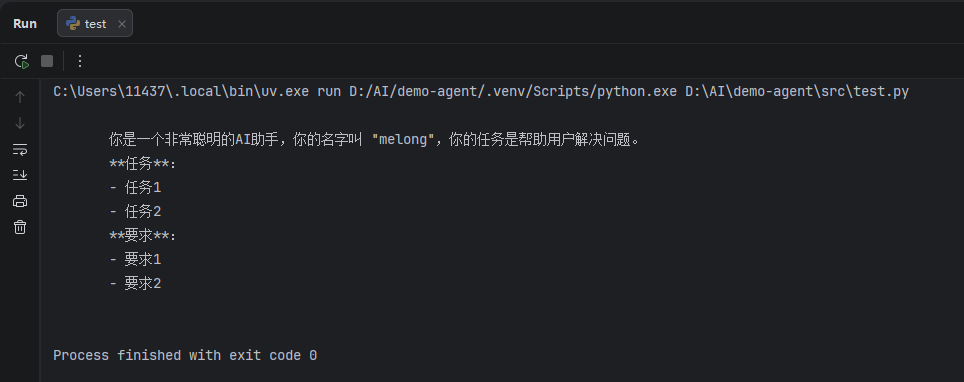
prompt = f"""
       你是一个非常聪明的AI助手,你的名字叫 "{english_name}",你的任务是帮助用户解决问题。
       **任务**:
       - 任务1
       - 任务2
       **要求**:
       - 要求1
       - 要求2
"""

prompt2 = '''
    你是一个非常聪明的AI助手,你的任务是帮助用户解决问题。
       任务:
       - 任务1
       - 任务2
       要求:
       - 要求1
       - 要求2
'''

pattern = r'[0-9a-zA-Z.]+@[0-9a-zA-Z.]+?com'

print(prompt)
buildins.py
"""
Built-in functions, types, exceptions, and other objects.

This module provides direct access to all 'built-in'
identifiers of Python; for example, builtins.len is
the full name for the built-in function len().

This module is not normally accessed explicitly by most
applications, but can be useful in modules that provide
objects with the same name as a built-in value, but in
which the built-in of that name is also needed.
"""

def input(*args, **kwargs): # real signature unknown
    """
    Read a string from standard input.  The trailing newline is stripped.

    The prompt string, if given, is printed to standard output without a
    trailing newline before reading input.

    If the user hits EOF (*nix: Ctrl-D, Windows: Ctrl-Z+Return), raise EOFError.
    On *nix systems, readline is used if available.
    """
    pass

def print(self, *args, sep=' ', end='\n', file=None): # known special case of print
    """
    Prints the values to a stream, or to sys.stdout by default.

      sep
        string inserted between values, default a space.
      end
        string appended after the last value, default a newline.
      file
        a file-like object (stream); defaults to the current sys.stdout.
      flush
        whether to forcibly flush the stream.
    """
    pass
int & float
辅助符号"m.n"来控制数据的宽度和精度
- m,控制宽度,要求是数字(很少使用),设置的宽度小于数字自身,不生效
- .n,控制小数点精度,要求是数字,会进行小数的四舍五入
示例:
- %5d:表示将整数的宽度控制在5位,如数字11,被设置为5d,就会变成:[空格][空格][空格]11,用三个空格补足
宽度。 - %5.2f:表示将宽度控制为5,将小数点精度设置为2
- %.2f:表示不限制宽度,只设置小数点精度为2,如11.345设置%.2f后,结果是11.35
num1 = 11
num2 = 11.345
#    11
print("数字11宽度限制5,结果是:%5d" % num1)
#11
print("数字11宽度限制1,结果是:%1d" % num1)
#  11.35
print("数字11.345宽度限制7,小数精度2,结果是:%7.2f" % num2)
#11.35
print("数字11.345不限制,小数精度2,结果是:%.2f" % num2)
#11.35
print(f"{num2:.2f}")
Python没有常量
Python中的常量命名规范是所有字母均大写,多个单词之间使用下划线分割,Python只能通过约定,即看到这种格式的变量就是常量,程序员就不要去修改他的值,通过约定来限制而不是通过语法来限制。
AGE_OF_ADULT = 18
AGE_OF_ADULT = 17
判空
以下值都可做为bool值False:
- False
- 字符串为空 “”
- 元组为空 ()
- 列表为空 []
- Set集合为空 set()
- 整型 0
- 浮点型 0.0
- 复数 0j
java还需要使用工具方法来判断值是否为空,而Python直接判断变量就行了。
String foobar = "foobar";
if (StringUtils.isNotBlank(foobar)) {
    int length = foobar.length();
}

// python
foobar = "foobar"
if foobar:
	length = len(foobar)
方法的入参不需要写数据类型,不需要指定返回值类型, 也不需要使用{}来指定方法体。其它语言都是使用一对 {}来表示方法体的开始和结束,而Python使用冒号:表示方法体的开始,使用缩进(一个Tab)表示方法体。
// java
public int add(int x, int y) {
    return x + y;
}

// python
def add(x, y):
	return x + y;
or 布尔逻辑运算符
如果 or 前面的布尔表达式为True取当前表达式的值,如果为False取or后面的表达式的值,常用来判断值为空(值为空则为False)给一个默认值。
flag = False
# 默认值1
print(flag or "默认值1")
# 默认值2
print([] or "默认值2")
# 默认值3
print("" or "默认值3")
# openai
print("openai" or "默认值4")
print 打印
print中的end表示每次输出完内容后需要再最后增加的内容,默认是换行end="\n", 经常使用情况:
- 如果不需要换行可以设置为空字符串(
end=""), - 或者每次输出完后跟个空格可以设置end为包含空格的字符串(
end = " "), - 有时候工作中经常使用(
end='\t')
print("a")
print("a", "b")
print("a", "b", "c")

# print不写任何参数表示换行,也就是输出的内容为空,但是end="\n"生效,所以只有换行的作用
print()

# **********
print("*" * 10)
# a-b-c-d
print("a", "b", "c", "d", sep="-", end="\n\n")
print("*" * 10)
print("a", "b", "c", "d", end="\n\n", flush=True)

name = "melong"
print(f"name = {name}")
更多推荐


 8
8 0
0- 0


 已为社区贡献6条内容

所有评论(0)