
Nginx反向代理RuoYi-Vue
·
Nginx 局域网反向代理 — 玩具
目录
环境说明
| 项目 | 说明 |
|---|---|
| 宿主机 OS | Windows (物理机) |
| 虚拟机软件 | VMware Workstation |
| VM 网络模式 | NAT (VMnet8) |
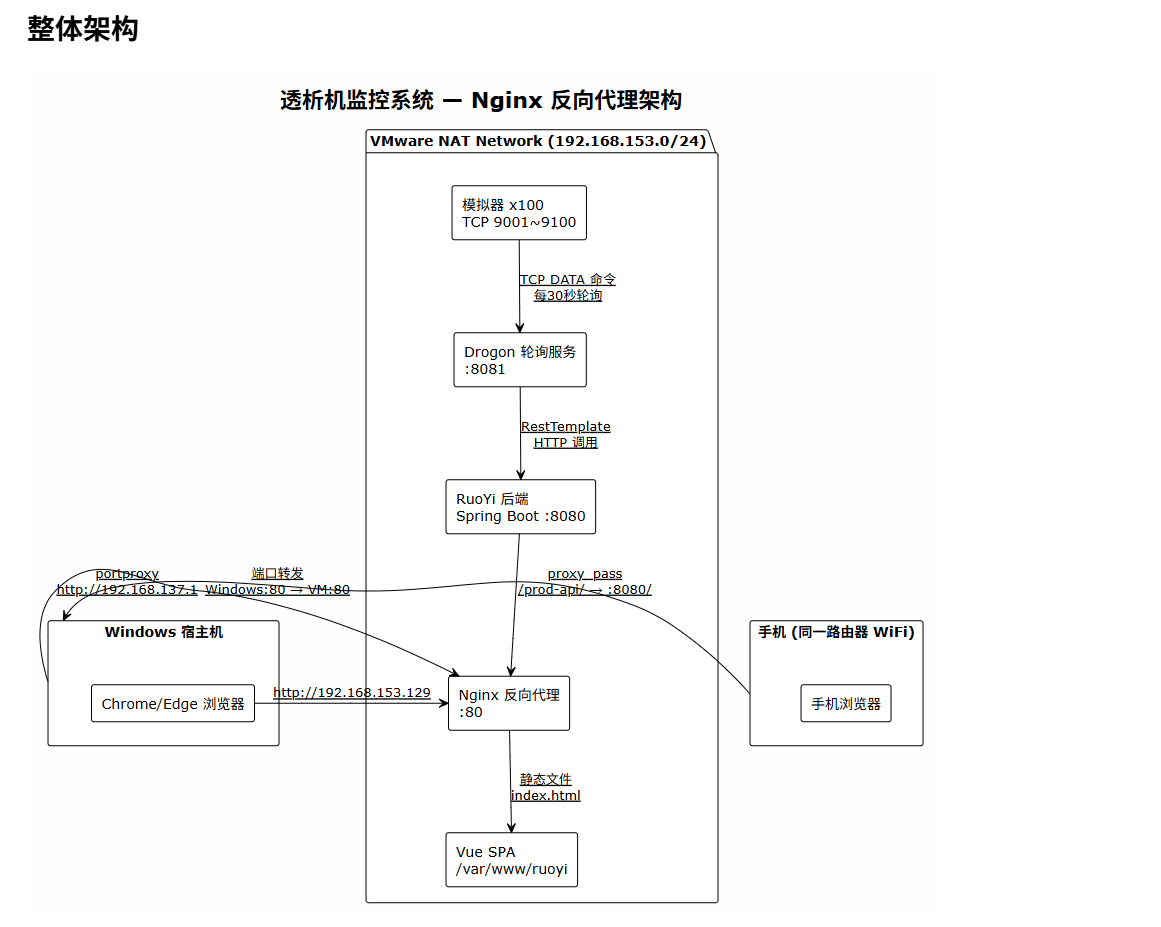
| 虚拟机 IP | 192.168.153.129/24 |
| 虚拟机 OS | Ubuntu Server 22.04 / 24.04 |
| 后端 | RuoYi-Vue (Spring Boot, 端口 8080) |
| 前端 | Vue 2 + Element UI (生产构建后由 Nginx 托管) |
| Drogon 服务 | C++ TCP 轮询服务 (端口 8081) |
| 模拟器 | TCP 服务端 x100 台 (端口 9001~9100) |
整体架构
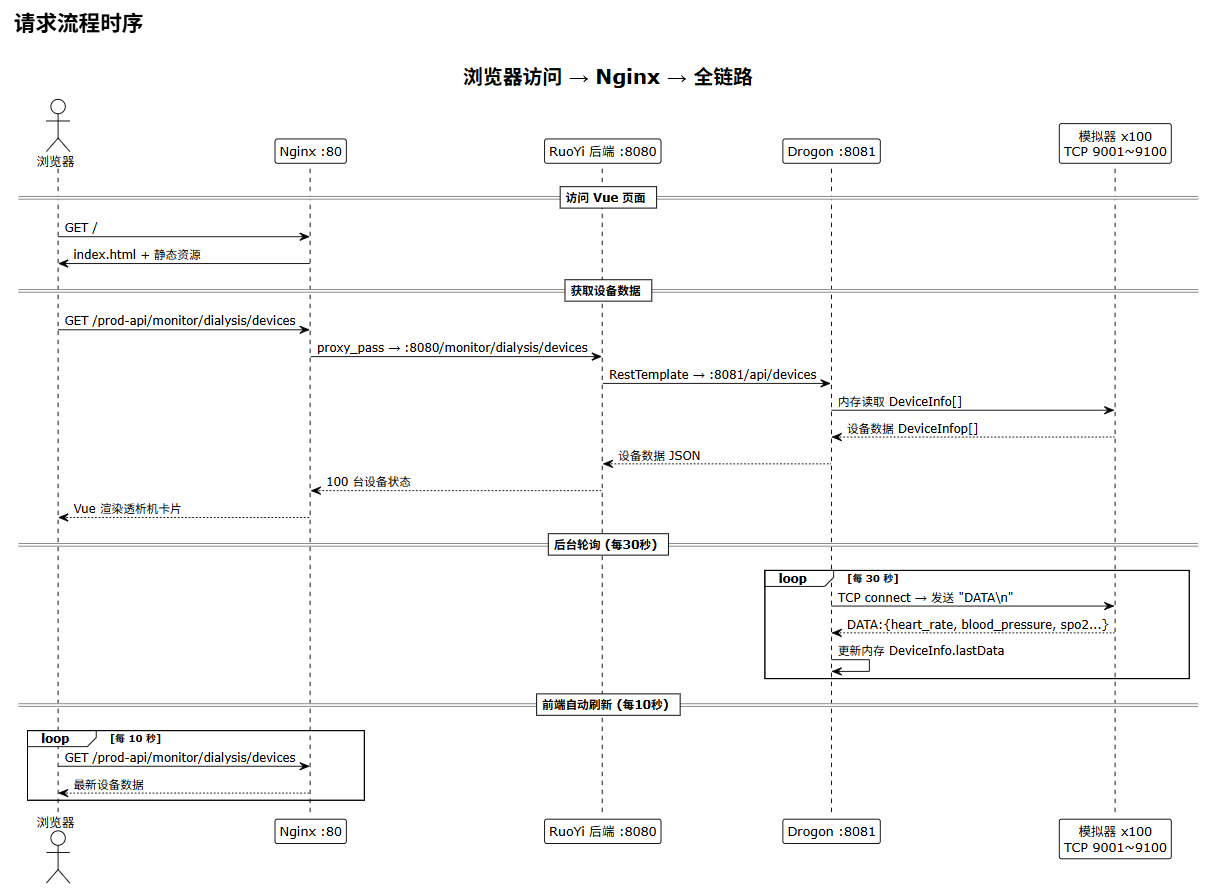
请求流程时序
Vue 前端构建
生产环境 API 配置
文件:ruoyi-ui/.env.production
VUE_APP_BASE_API = '/prod-api'
Vue 在构建时将 API 请求路径设为 /prod-api/...,对应 Nginx 中 location 匹配规则。
构建命令
cd /home/cds/ruoyi_vue/RuoYi-Vue/ruoyi-ui
npm run build
构建产物输出到 dist/ 目录。
Nginx 配置
最终配置文件
路径:/etc/nginx/sites-available/ruoyi
server {
    listen 80;
    server_name _;

    root /var/www/ruoyi;
    index index.html;

    location /prod-api/ {
        proxy_set_header Host $host;
        proxy_set_header X-Real-IP $remote_addr;
        proxy_set_header X-Forwarded-For $proxy_add_x_forwarded_for;
        proxy_pass http://127.0.0.1:8080/;
    }

    location / {
        try_files $uri $uri/ /index.html;
    }
}
配置要点说明
| 指令 | 作用 |
|---|---|
server_name _; |
匹配任意域名/IP,无需域名 |
root /var/www/ruoyi; |
Vue 构建产物的存放目录 |
location /prod-api/ |
匹配前端 /prod-api/* 的 API 请求 |
proxy_pass http://127.0.0.1:8080/; |
注意末尾的 /,会将 /prod-api/ 前缀去掉 |
try_files $uri $uri/ /index.html; |
SPA 路由回退:找不到文件时返回 index.html |
部署步骤
# 1. 复制构建产物到 Nginx 目录
sudo cp -r /home/cds/ruoyi_vue/RuoYi-Vue/ruoyi-ui/dist /var/www/ruoyi

# 2. 设置权限
sudo chown -R www-data:www-data /var/www/ruoyi

# 3. 启用站点
sudo ln -sf /etc/nginx/sites-available/ruoyi /etc/nginx/sites-enabled/
sudo rm -f /etc/nginx/sites-enabled/default

# 4. 测试配置
sudo nginx -t

# 5. 重载 Nginx
sudo systemctl reload nginx
Windows 端口转发与手机访问
由于 VM 使用 NAT 模式(192.168.153.0/24),手机连 WiFi 后与 VM 不在同一网段,需要通过 Windows 端口转发 桥接。
架构示意
@startuml
!theme plain
skinparam backgroundColor #FEFEFE

title Windows 端口转发示意

rectangle "手机" as PHONE {
  (手机浏览器) as MOBILE
}

rectangle "Windows 宿主机" as WIN {
  (WiFi 热点\n192.168.137.1:80) as HOTSPOT
  (portproxy\nnetsh) as PROXY
  (防火墙规则\nport 80) as FIREWALL
  MOBILE --> HOTSPOT : WiFi 连接
  HOTSPOT --> PROXY
  PROXY --> FIREWALL
}

rectangle "VMware NAT 网络" as VM {
  (Nginx :80\n192.168.153.129) as NGINX
  FIREWALL --> NGINX : TCP 转发\n192.168.137.1 → 192.168.153.129
}

@enduml
PowerShell/CMD 命令
# 1. 添加端口转发(管理员 CMD)
netsh interface portproxy add v4tov4 listenport=80 listenaddress=192.168.137.1 connectport=80 connectaddress=192.168.153.129

# 2. 添加防火墙规则(管理员 CMD)
netsh advfirewall firewall add rule name="Open Port 80" dir=in action=allow protocol=TCP localport=80

# 3. 查看转发规则
netsh interface portproxy show all

# 4. 删除转发规则
netsh interface portproxy delete v4tov4 listenport=80 listenaddress=192.168.137.1
访问地址
| 访问者 | 地址 |
|---|---|
| Windows 浏览器 | http://192.168.153.129 |
| 手机(连 Windows 热点) | http://192.168.137.1 |
遇到的问题与解决
问题 1:Nginx 403 Forbidden
现象:
Nginx 返回 403 Forbidden
原因: Nginx 的 www-data 用户无法读取 /home/cds/ 目录下的文件(权限不足)。
Vue 构建在: /home/cds/ruoyi_vue/RuoYi-Vue/ruoyi-ui/dist
Nginx root 指向: /home/cds/dist
问题: www-data 用户无法穿越 /home/cds/ 目录
解决: 把构建产物复制到 Nginx 默认的 Web 目录 /var/www/,并修改权限。
sudo cp -r /home/cds/ruoyi_vue/RuoYi-Vue/ruoyi-ui/dist /var/www/ruoyi
sudo chown -R www-data:www-data /var/www/ruoyi
问题 2:Chrome 无法访问 HTTP 页面
现象:
- 在 Windows 上用
curl http://192.168.153.129能返回 HTML - 但 Chrome 浏览器访问显示"无法访问"或"此网站没有正式证书"
- 没有"高级"按钮可以跳转
原因: Chrome 的 HTTPS-Only 模式(Always use secure connections)会拦截所有 HTTP 明文请求。
解决方式:
| 方法 | 操作 |
|---|---|
| 关闭 HTTPS-Only | Chrome 地址栏输入 chrome://settings/security,关闭"始终使用安全连接" |
| 使用 Edge 浏览器 | Edge 对 HTTP 的限制比 Chrome 宽松 |
| 配置 HTTPS(见下文) | 用自签名证书启用 HTTPS |
问题 3:自签名 SSL 证书尝试(未完成)
尝试生成自签名证书启用 HTTPS,但没有最终部署。
# 生成自签名证书(Nginx 格式)
sudo mkdir /etc/nginx/ssl
sudo openssl req -x509 -nodes -days 365 -newkey rsa:2048 \
  -keyout /etc/nginx/ssl/ruoyi.key \
  -out /etc/nginx/ssl/ruoyi.crt \
  -subj "/C=CN/ST=Guangdong/L=Shenzhen/O=Demo/CN=192.168.153.129"
对应的 Nginx HTTPS 配置:
server {
    listen 443 ssl;
    server_name 192.168.153.129;

    ssl_certificate /etc/nginx/ssl/ruoyi.crt;
    ssl_certificate_key /etc/nginx/ssl/ruoyi.key;

    root /var/www/ruoyi;
    index index.html;

    location /prod-api/ {
        proxy_set_header Host $host;
        proxy_set_header X-Real-IP $remote_addr;
        proxy_set_header X-Forwarded-For $proxy_add_x_forwarded_for;
        proxy_pass http://127.0.0.1:8080/;
    }

    location / {
        try_files $uri $uri/ /index.html;
    }
}
最终原因: 自签名证书浏览器仍然提示不安全,和 HTTP 方案相比用户体验没有本质提升,最终回退到 HTTP 方案 + 关闭浏览器 HTTPS-Only 模式。
问题 4:手机无法访问
现象:
- Windows 浏览器能访问
- 手机浏览器无法访问
http://192.168.153.129
原因: 手机连接 WiFi 后与 VM 不在同一网段。
| 设备 | 网络 | IP 段 |
|---|---|---|
| VM | VMware NAT (VMnet8) | 192.168.153.0/24 |
| Windows | 物理网络 | 取决于路由器 (如 192.168.1.0/24) |
| 手机 | WiFi / 手机热点 | 不同网段 |
解决: Windows 端口转发 + 手机连 Windows 热点。
问题 5:Windows 重启后转发失效
现象: 昨天能访问,今天不能访问。
原因: Windows 重启后:
netsh interface portproxy规则可能丢失- Windows 防火墙规则可能重置
解决: 重启后重新执行:
netsh interface portproxy add v4tov4 listenport=80 listenaddress=192.168.137.1 connectport=80 connectaddress=192.168.153.129
netsh advfirewall firewall add rule name="Open Port 80" dir=in action=allow protocol=TCP localport=80
附录:常用命令
服务管理
# Nginx
sudo systemctl status nginx
sudo systemctl reload nginx
sudo nginx -t          # 测试配置

# RuoYi 后端
java -jar ruoyi-admin.jar &

# Drogon
nohup ./my_server > /tmp/drogon.log 2>&1 &

# 模拟器
for i in $(seq 1 100); do
  port=$((9000 + i))
  id=$(printf "sim-%03d" $i)
  nohup ./sim $port $id > /tmp/$id.log 2>&1 &
done
调试命令
# 测试 Nginx 静态文件
curl -s -o /dev/null -w "%{http_code}" http://localhost/

# 测试 API 代理
curl -s http://localhost/prod-api/monitor/dialysis/devices

# 查看端口监听
ss -tlnp | grep -E '(80|8080|8081)'

# 查看进程
ps aux | grep -E '(nginx|java|my_server|sim)'
Windows 端口转发
# 查看
netsh interface portproxy show all

# 添加
netsh interface portproxy add v4tov4 listenport=80 listenaddress=192.168.137.1 connectport=80 connectaddress=192.168.153.129

# 删除
netsh interface portproxy delete v4tov4 listenport=80 listenaddress=192.168.137.1

# 防火墙
netsh advfirewall firewall add rule name="Open Port 80" dir=in action=allow protocol=TCP localport=80
netsh advfirewall firewall delete rule name="Open Port 80"
更多推荐
 11
11 0
0- 0


 已为社区贡献2条内容

所有评论(0)