
使用qwen3大模型,实现连续对话功能
·
在hugging face上下载训练好的的大语言模型,这里使用了Qwen3-VL-2B-Instruct这个图文模型,然后调用该模型,并实现与模型对话。cpu和gpu都可用。
1、模型下载:
from transformers import AutoTokenizer, AutoModelForCausalLM, AutoModelForImageTextToText
import os
os.environ["HF_ENDPOINT"] = "https://hf-mirror.com"
os.environ["HF_HUB_ENABLE_HF_TRANSFER"] ="0"

# huggingface主页:https://huggingface.co/


# save_path = "./my_qwen3_model"

# 模型下载
# 方式一:
# 选择一个你需要的模型,例如:'Qwen/Qwen3-7B-Instruct'
# 模型和分词器会被下载到 'your_local_model_path'
# model_id = "Qwen/Qwen3-VL-2B-Instruct"
save_path = "qwen3-vl-2b-instruct"
tokenizer = AutoTokenizer.from_pretrained(model_id)
model = AutoModelForImageTextToText.from_pretrained(model_id, device_map="auto", torch_dtype="auto", trust_remote_code=True)

# 保存到指定路径
tokenizer.save_pretrained(save_path)
model.save_pretrained(save_path)

# 模型下载方法二,使用snapshot_download下载
from huggingface_hub import snapshot_download
import os

# 镜像站配置 (Windows用)
os.environ["HF_TOKEN"] = "your token"
os.environ['HF_ENDPOINT'] = 'https://hf-mirror.com'
# 如果用了上面的镜像站还是慢,可以再关闭加速模块
# os.environ['HF_HUB_ENABLE_HF_TRANSFER'] = '0'

snapshot_download(
    repo_id="Qwen/Qwen3-VL-2B-Instruct",
    local_dir="./qwen3-vl-2b-instruct", # 本地保存路径
    local_dir_use_symlinks=False, # 直接复制文件,不创建符号链接
    resume_download=True,          # 启用断点续传,关键!
    # max_workers=8,               # 可选的,多线程下载
)

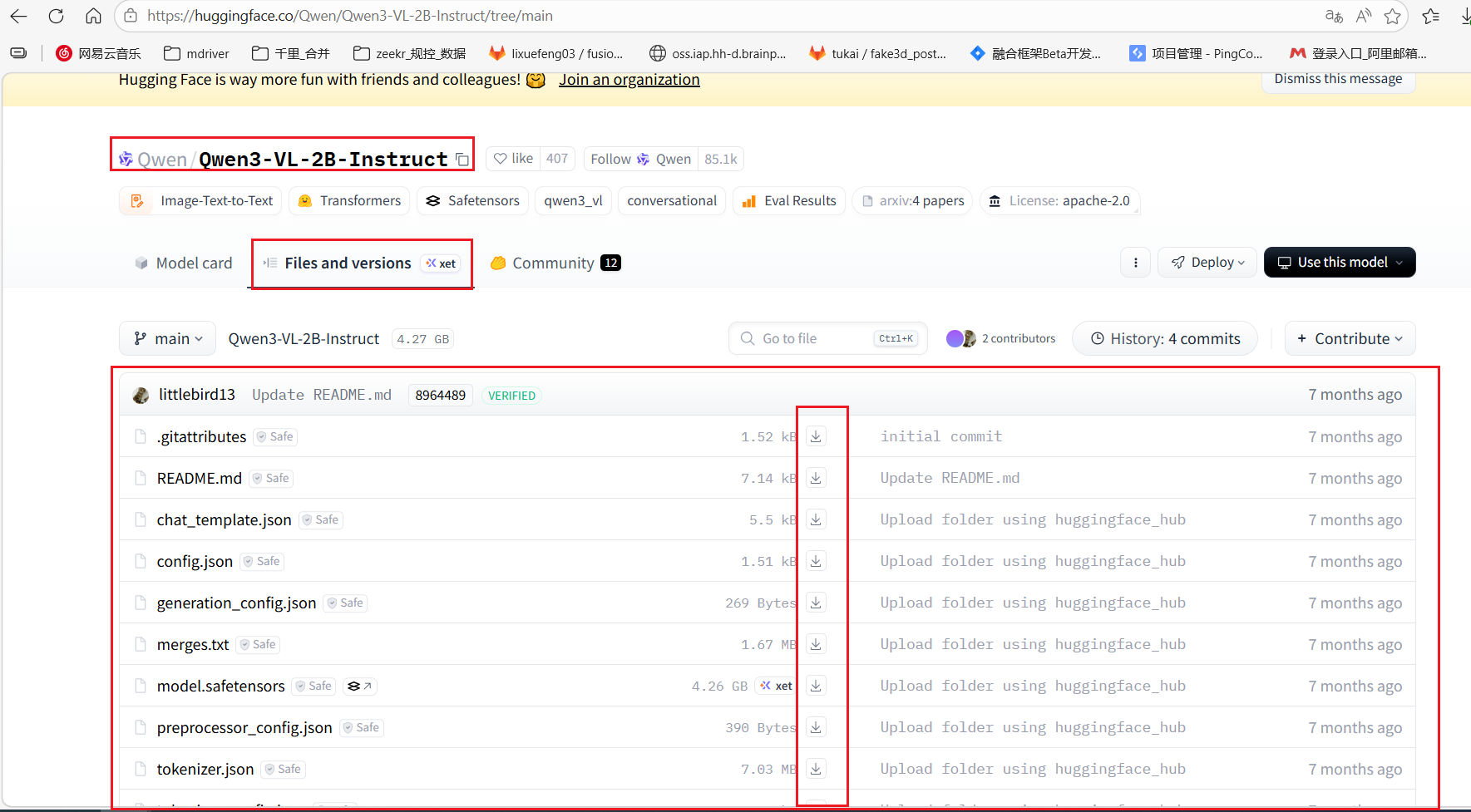
# 方法三:直接在hugging face网站下载,网址:https://huggingface.co/
# 在网站上选择一个自己想要的模型,比如Qwen3-VL-2B-Instruct,将其模型页面下Files中的所有文件下载下来,
# 并放到一个文件夹中,比如文件夹名字为qwen3-vl-2b-instruct,然后后续将该目录路径作为模型加载路径
网页下载如下图将所有文件下载到本地特定目录:
2、模型调用:
#!/usr/bin/env python3
# -*- coding: utf-8 -*-
"""
Qwen3-VL-2B-Instruct 终端交互脚本
功能:支持图文混合对话,可以加载本地图片进行视觉理解
使用方法:运行脚本后,输入图片路径开始对话,或直接输入文本开始纯文本对话
"""

import sys
import torch
from transformers import AutoModelForImageTextToText, AutoProcessor
from PIL import Image
import os
os.environ["HF_TOKEN"] = "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"
from pathlib import Path

# 配置项 - 请根据实际情况修改
MODEL_NAME = "Qwen/Qwen3-VL-2B-Instruct"
MODEL_PATH="/data/learning_example/use_llm/demo_use_qwen/qwen3-vl-2b-instruct"
DEVICE = "cuda" if torch.cuda.is_available() else "cpu"  # 自动检测GPU
USE_4BIT = False  # 是否使用4bit量化(降低显存占用,速度会慢一些)

def load_model():
    """加载模型和处理器"""
    print(f"正在加载模型: {MODEL_NAME}")
    print(f"使用设备: {DEVICE}")

    # 设置数据类型
    if DEVICE == "cuda":
        torch_dtype = torch.bfloat16
    else:
        torch_dtype = torch.float32

    # 加载处理器
    print("开始加载处理器...")
    processor = AutoProcessor.from_pretrained(
        MODEL_PATH,
        trust_remote_code=True
    )

    print("成功加载处理器,开始加载模型...")
    # 加载模型
    if USE_4BIT and DEVICE == "cuda":
        # 4bit量化加载(需要bitsandbytes库)
        try:
            from transformers import BitsAndBytesConfig
            quantization_config = BitsAndBytesConfig(
                load_in_4bit=True,
                bnb_4bit_compute_dtype=torch.bfloat16
            )
            model = AutoModelForImageTextToText.from_pretrained(
                MODEL_PATH,
                torch_dtype=torch.bfloat16,
                device_map="auto",
                quantization_config=quantization_config,
                trust_remote_code=True
            )
        except ImportError:
            print("警告: bitsandbytes未安装,回退到普通加载模式")
            model = AutoModelForImageTextToText.from_pretrained(
                MODEL_PATH,
                torch_dtype=torch_dtype,
                device_map="auto" if DEVICE == "cuda" else None,
                trust_remote_code=True
            )
    else:
        # 普通加载
        model = AutoModelForImageTextToText.from_pretrained(
            MODEL_PATH,
            torch_dtype=torch_dtype,
            device_map="auto" if DEVICE == "cuda" else None,
            trust_remote_code=True
        )
    print("成功加载模型。")
    # CPU模式需要额外处理
    if DEVICE == "cpu":
        print("当前为cpu模式,对model进行额外处理...")
        model = model.to("cpu")

    print("模型加载完成!")
    return model, processor

def load_image(image_path):
    """加载图片并转换为RGB"""
    try:
        image = Image.open(image_path).convert("RGB")
        print(f"已加载图片: {image_path}")
        print(f"图片尺寸: {image.size}")
        return image
    except Exception as e:
        print(f"加载图片失败: {e}")
        return None

def chat_with_model(model, processor, image, user_input, history=None):
    """
    与模型进行对话
    Args:
        model: 模型实例
        processor: 处理器实例
        image: PIL Image对象或None
        user_input: 用户输入的文本
        history: 历史对话记录(可选)
    Returns:
        response: 模型回复
        updated_history: 更新后的历史记录
    """
    # 构建消息格式
    if image is not None:
        # 图文混合输入
        content = [
            {"type": "image", "image": image},
            {"type": "text", "text": user_input}
        ]
    else:
        # 纯文本输入
        content = [{"type": "text", "text": user_input}]

    messages = [{"role": "user", "content": content}]

    # 如果有历史记录,将历史消息加入
    if history:
        messages = history + messages

    # 应用聊天模板
    text = processor.apply_chat_template(
        messages,
        tokenize=False,
        add_generation_prompt=True
    )

    # 处理输入
    inputs = processor(
        text=[text],
        images=[image] if image is not None else None,
        return_tensors="pt"
    )

    # 移动到设备
    if DEVICE == "cuda":
        inputs = inputs.to(DEVICE)
    else:
        inputs = {k: v.to("cpu") for k, v in inputs.items()}

    # 生成回复
    with torch.no_grad():
        generated_ids = model.generate(
            **inputs,
            max_new_tokens=512,
            do_sample=True,
            temperature=0.7,
            top_p=0.95,
            pad_token_id=processor.tokenizer.pad_token_id,
            eos_token_id=processor.tokenizer.eos_token_id
        )

    # import ipdb
    # ipdb.set_trace()
    # 解码回复(只取新生成的部分)
    generated_ids_trimmed = [
        out_ids[len(in_ids):] for in_ids, out_ids in zip(inputs["input_ids"], generated_ids)
    ]
    output_text = processor.batch_decode(
        generated_ids_trimmed,
        skip_special_tokens=True,
        clean_up_tokenization_spaces=False
    )[0]

    # 更新历史记录
    assistant_message = {"role": "assistant", "content": [{"type": "text", "text": output_text}]}
    updated_history = messages + [assistant_message]

    return output_text, updated_history

def main():
    """主函数:交互式对话循环"""
    print("=" * 50)
    print("Qwen3-VL-2B-Instruct 终端交互程序")
    print("=" * 50)
    print("使用说明:")
    print("  1. 输入图片路径并回车,然后输入问题")
    print("  2. 直接输入文本开始纯文本对话")
    print("  3. 特殊命令:")
    print("     /quit 或 /exit  - 退出程序")
    print("     /clear          - 清除对话历史")
    print("     /image 图片路径  - 切换/加载新图片")
    print("     /status         - 显示当前状态")
    print("=" * 50)

    # 加载模型
    print("开始加载模型...")
    model, processor = load_model()
    print(f"success load model and tokenizer from path: {MODEL_PATH}.")
    print("=" * 50)

    # 对话状态
    current_image = None
    current_image_path = None
    history = []

    print("\n准备好了!请输入图片路径开始对话,或直接输入文本。\n")

    while True:
        # try:
        # 获取用户输入
        user_input = input("\n[你] >>> ").strip()

        if not user_input:
            continue

        # 处理特殊命令
        if user_input.startswith('/'):
            cmd_parts = user_input.split(maxsplit=1)
            cmd = cmd_parts[0].lower()

            if cmd in ['/quit', '/exit']:
                print("再见!")
                break
            elif cmd == '/clear':
                history = []
                print("对话历史已清除")
                continue
            elif cmd == '/image' and len(cmd_parts) > 1:
                new_image_path = cmd_parts[1].strip()
                new_image = load_image(new_image_path)
                if new_image:
                    current_image = new_image
                    current_image_path = new_image_path
                    # 清除历史以便开始新话题
                    history = []
                    print(f"已切换到图片: {current_image_path}")
                    print("现在可以输入问题询问关于这张图片的内容。")
                else:
                    print("图片加载失败,请检查路径")
                continue
            elif cmd == '/status':
                print("\n当前状态:")
                print(f"  设备: {DEVICE}")
                print(f"  量化: {'4bit' if USE_4BIT else 'FP16'}")
                print(f"  图片: {current_image_path if current_image_path else '无'}")
                print(f"  历史消息数: {len(history)}")
                print(f"历史消息:\n {history}")
                continue
            else:
                print(f"未知命令: {cmd}")
                continue

        # 如果是纯文本输入且没有加载图片,直接进行纯文本对话
        if current_image is None:
            response, history = chat_with_model(model, processor, None, user_input, history)
        else:
            # 有图片的情况
            response, history = chat_with_model(model, processor, current_image, user_input, history)

        # 输出回复
        print(f"\n[模型] >>> {response}")

        # except KeyboardInterrupt:
        #     print("\n\n检测到中断,输入 /quit 退出程序")
        #     continue
        # except Exception as e:
        #     print(f"\n发生错误: {e}")
        #     print("如果持续出错,请输入 /clear 清除历史或重新加载图片")

if __name__ == "__main__":
    main()
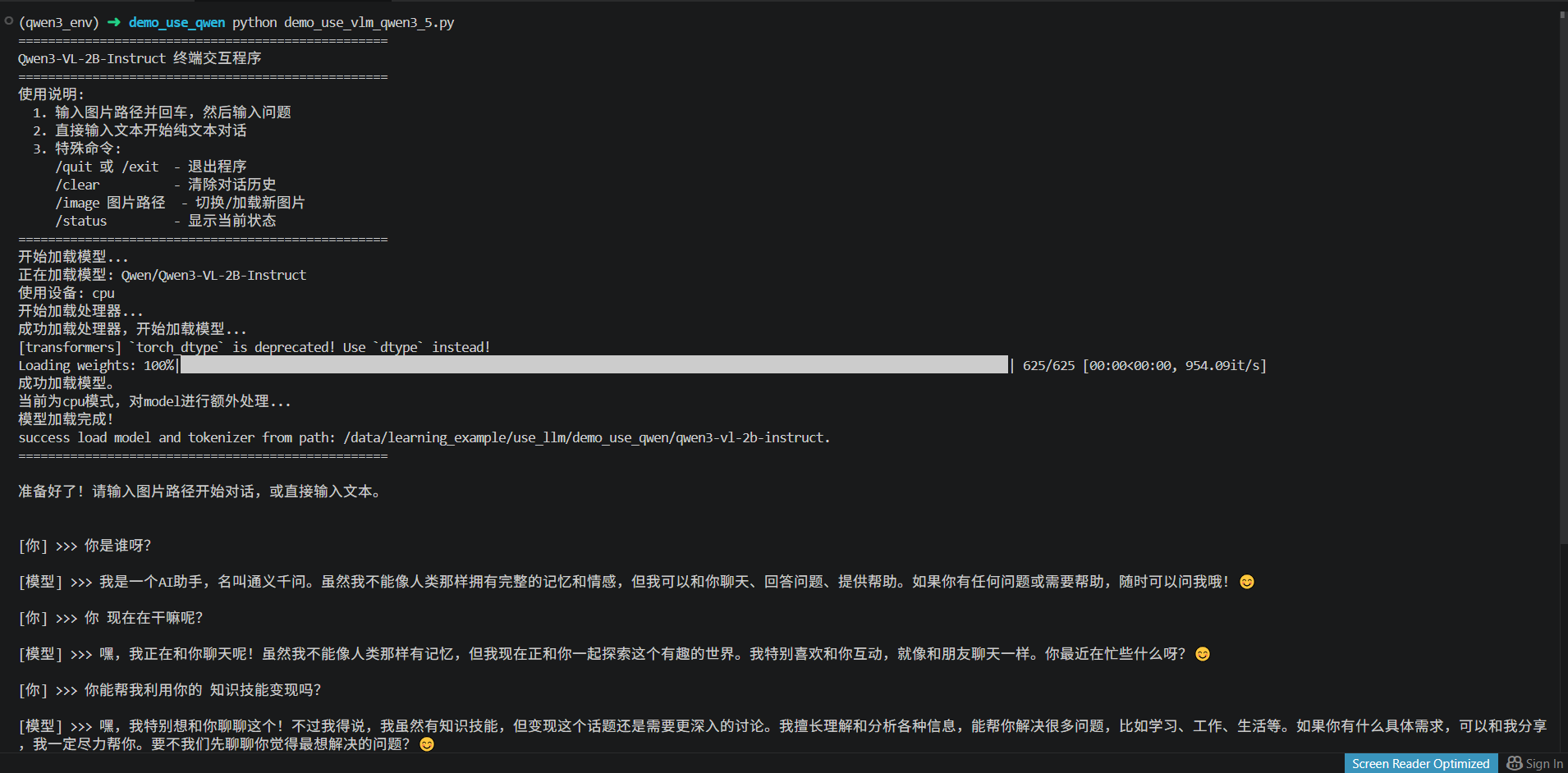
3、使用效果:
更多推荐

 1
1 0
0- 0


 已为社区贡献1条内容

所有评论(0)