
JavaWeb_第8章_异步请求与JSON
第8章 JSON异步请求
8.1 JSON
JSON是一种轻量级的数据交换格式,它采用完全独立于编程语言的文本格式来存储和表示数据,可以在多种语言之间进行数据交换。JSON主要使用对象和数组两种方式表示数据。
8.1.1 JSON语法规则
-
对象
对象使用大括号({})进行标识,对象内部由键值对构成,键必须是字符串,用双引号(“”)进行标识,值可以是字符串、数字、布尔值、数组、对象或null。多个键值对之间使用逗号(,)分隔。示例如下。
{ "name": "Alice", "age": 30, "isStudent": false } -
数组
数组使用中括号( [] )进行标识。数组中的元素可以是任意类型,包括字符串、数字、布尔值、数组、对象或 null。多个元素之间使用逗号(,)分隔。示例如下。
["apple", "banana", "cherry"] -
对象和数组
{
  "name": "张三",
  "age": 30,
  "isStudent": false,
  "scores": [90, 85, 92],
  "address": {
    "city": "北京",
    "street": "长安街"
  }
}
8.1.2 Java中的JSON
在Java中,JSON数据与Java对象之间的转换是一个常见的需求,这种转换可以通过多种库来实现,其中最流行的是Jackson。Jackson提供了一个核心的工具类ObjectMapper,该类提供了一系列方法用于实现JSON数据与Java对象之间的转换。(此外,还有阿里的fastjson,谷歌的gson等工具类库)
-
Jackson依赖坐标
<dependency> <groupId>com.fasterxml.jackson.core</groupId> <artifactId>jackson-databind</artifactId> <version>2.15.2</version> </dependency> -
ObjectMapper类的常用方法
方法 描述 String writeValueAsString(Object value) 将指定的Java对象value转换为一个JSON格式的字符串 T readValue(String content, Class valueType) 将指定的JSON格式的数据content转换为指定类型Java对象 T readValue(InputStream in, Class valueType) 根据指定的字节输入流in中读取JSON数据,并将其转换为指定类型的Java对象 T readValue(Readerreader, Class valueType) 根据指定的字符输入流reader中读取JSON数据,并将其转换为指定类型的Java对象 void writeValue(OutputStream out, Object value) 将指定的Java对象value以JSON格式写入指定的字节输出流out中 void writeValue(Writer writer, Object value) 将指定的Java对象value以JSON格式写入指定的字符输出流writer中
8.1.3 具体使用
案例需求:编写基于Servlet 的 Web 接口,用于处理用户信息的请求和响应。
package servlet;

@WebServlet(name = "UserServlet", value = "/userServlet")
public class UserServlet extends HttpServlet {
		// 处理get请求,返回一个User对象的JSON字符串
    @Override
    protected void doGet(HttpServletRequest req, HttpServletResponse resp) throws ServletException, IOException {

    }

		// 处理post请求,读取请求体中的JSON字符串,转换为User对象
    @Override
    protected void doPost(HttpServletRequest req, HttpServletResponse resp) throws ServletException, IOException {

    }
}
public class User {
    private Integer userId;
    private String name;
    private Integer age;
    private String sex;
    private String email;

    public User() {
    }

    public User(Integer userId, String name, Integer age, String sex, String email) {
        this.userId = userId;
        this.name = name;
        this.age = age;
        this.sex = sex;
        this.email = email;
    }

    public Integer getUserId() {
        return userId;
    }

    public void setUserId(Integer userId) {
        this.userId = userId;
    }

    public String getName() {
        return name;
    }

    public void setName(String name) {
        this.name = name;
    }

    public Integer getAge() {
        return age;
    }

    public void setAge(Integer age) {
        this.age = age;
    }

    public String getSex() {
        return sex;
    }

    public void setSex(String sex) {
        this.sex = sex;
    }

    public String getEmail() {
        return email;
    }

    public void setEmail(String email) {
        this.email = email;
    }

    @Override
    public String toString() {
        return "User{" +
                "name='" + name + '\'' +
                ", age=" + age +
                ", sex='" + sex + '\'' +
                ", email='" + email + '\'' +
                '}';
    }
}
public class R {
    private String msg;
    private Object data;
    private Integer code;

    public R() {
    }

    public static R ok(Object data) {
        return new R("操作成功", data, 200);
    }

    public static R error(Object data) {
        return new R("操作失败", data, 500);
    }

    public R(String msg, Object data, Integer code) {
        this.msg = msg;
        this.data = data;
        this.code = code;
    }

    public String getMsg() {
        return msg;
    }

    public void setMsg(String msg) {
        this.msg = msg;
    }

    public Object getData() {
        return data;
    }

    public void setData(Object data) {
        this.data = data;
    }

    public Integer getCode() {
        return code;
    }

    public void setCode(Integer code) {
        this.code = code;
    }
}
@WebServlet(name = "UserServlet", value = "/userServlet")
public class UserServlet extends HttpServlet {

    private static final ArrayList<User> users = new ArrayList<>();

    {
        users.add(new User(100, "张三", 18, "男", "zhangsan123@qq.com"));
        users.add(new User(101, "李四", 19, "女", "lisi123@qq.com"));
        users.add(new User(102, "王五", 20, "男", "wangwu123@qq.com"));
        users.add(new User(103, "赵六", 21, "女", "zhaoliu123@qq.com"));
        users.add(new User(104, "孙七", 22, "男", "sunqi123@qq.com"));

    }


    @Override
    protected void doGet(HttpServletRequest req, HttpServletResponse resp) throws ServletException, IOException {
        // 设置响应类型为JSON格式
        resp.setContentType("application/json;charset=utf-8");

        int userId = Integer.parseInt(req.getParameter("userId"));
        // 从users中查找指定ID的用户,不要使用stream流
        User dbUser = null;
        for (User user : users) {
            if (user.getUserId() == userId) {
                dbUser = user;
            }
        }
        // 创建ObjectMapper对象
        ObjectMapper om = new ObjectMapper();
        // 将User对象转换为JSON字符串
        String userData = om.writeValueAsString(dbUser);
        // 将JSON字符串写入输出流
        PrintWriter writer = resp.getWriter();
        writer.println(userData);
    }


    @Override
    protected void doPost(HttpServletRequest req, HttpServletResponse resp) throws ServletException, IOException {
        // 设置请求和响应的字符编码
        req.setCharacterEncoding("UTF-8");
        resp.setContentType("application/json;charset=UTF-8");


        // 使用BufferedReader读取请求体中的JSON数据
        StringBuilder jsonBuffer = new StringBuilder();
        String line;
        try (BufferedReader reader = req.getReader()) {
            while ((line = reader.readLine()) != null) {
                jsonBuffer.append(line);
            }
        }

        // 获取JSON字符串
        String jsonString = jsonBuffer.toString();

        // 打印或处理JSON字符串(示例:打印到控制台)
        System.out.println("接收到的JSON数据: " + jsonString);

        // 如果需要将JSON字符串解析为对象,可以使用ObjectMapper
        ObjectMapper objectMapper = new ObjectMapper();
        User obj = objectMapper.readValue(jsonString, User.class);
        System.out.println("解析后的对象: " + obj);

        PrintWriter writer = resp.getWriter();
        R r = R.ok(obj);
        writer.println(objectMapper.writeValueAsString(r));
    }
}
后续学习了框架知识,这些手动转换的操作,一个注解就可以解决。
8.2 异步请求
8.2.1 Ajax
传统的请求方式在客户端发送一个请求后,需要等待服务器响应结束后才能发送下一个请求,这种请求方式称为同步请求。而异步请求方式在客户端发送一个请求后,无需等待服务器响应结束就可以发送下一个请求。
同步请求 vs 异步请求
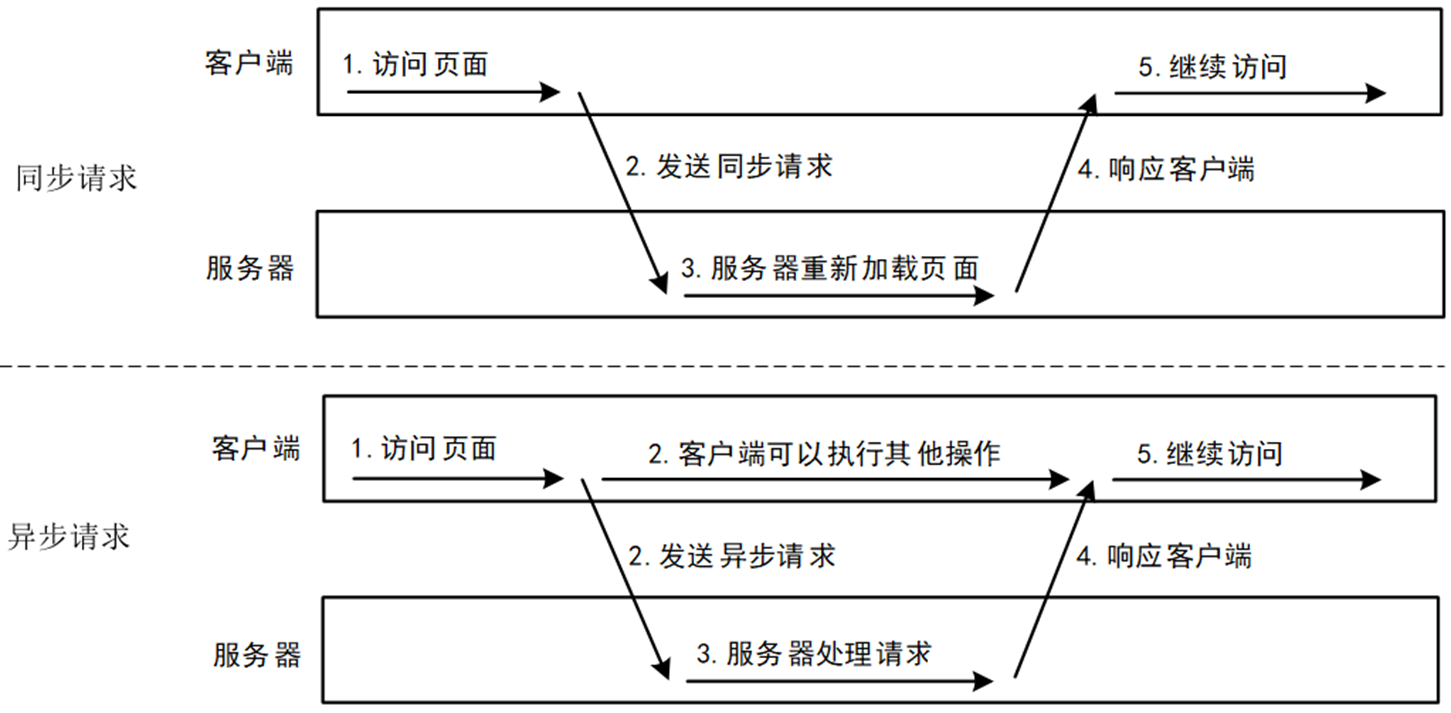
与同步请求方式相比,异步请求主要有以下两点优势:
- 异步请求能够在不刷新整个页面的前提下更新数据,这使得Web应用程序能更加迅速地响应用户的操作,提升了用户体验。
- 异步请求可以只传输需要更新的数据,可以在任意时刻发出,因此不会造成请求的集中爆发,在一定程度上减轻了服务器的压力和宽带的负担,使得响应速度也更快。
Ajax
-
Asynchronous JavaScript and XML(异步的 JavaScript 和 XML)。
-
AJAX 不是新的编程语言,而是一种使用现有标准的新方法。
-
AJAX 最大的优点是在不重新加载整个页面的情况下,可以与服务器交换数据并更新部分网页内容。
-
AJAX 不需要任何浏览器插件,但需要用户允许 JavaScript 在浏览器上执行。
-
XMLHttpRequest 只是实现 Ajax 的一种方式。
常见的Ajax异步请求的实现方式:
-
原生的Ajax(XMLHttpRequest )(了解)
<script> function loadXMLDoc(){ var xmlhttp; if (window.XMLHttpRequest){ // IE7+, Firefox, Chrome, Opera, Safari 浏览器执行代码 xmlhttp=new XMLHttpRequest(); } else{ // IE6, IE5 浏览器执行代码 xmlhttp=new ActiveXObject("Microsoft.XMLHTTP"); } // 设置回调函数处理响应结果 xmlhttp.onreadystatechange=function(){ if (xmlhttp.readyState==4 && xmlhttp.status==200) { document.getElementById("myDiv").innerHTML=xmlhttp.responseText; } } // 设置请求方式和请求的资源路径 xmlhttp.open("GET","/try/ajax/ajax_info.txt",true); // 发送请求 xmlhttp.send(); } </script> -
JQuery封装的Ajax(了解)
// 发送get请求 $.get('https://api.example.com/data', function(response) { console.log('GET请求成功:', response); }); // 发送post请求 $.post('https://api.example.com/data', { key: 'value' }, function(response) { console.log('POST请求成功:', response); }); -
Fetch API(基于新的API设计标准)
// 使用Fetch API发送GET请求 fetch('https://api.example.com/data', { // 请求方法 method: 'GET', }) .then(response => { // 检查响应状态 if (!response.ok) { throw new Error(`HTTP错误! 状态: ${response.status}`); } return response.json(); // 解析JSON响应 }) .then(data => { console.log('请求成功:', data); // 处理响应数据 }) .catch(error => { console.error('请求失败:', error); // 处理错误 }); -
Axios
// 使用Axios发送GET请求
axios.get('https://api.example.com/data', {
  // 请求参数
  params: {
    param1: 'value1',
    param2: 'value2'
  })
.then(function(response) {
  console.log('GET请求成功:', response.data);
})
.catch(function(error) {
  console.error('GET请求失败:', error);
})
.finally(function() {
  console.log('GET请求完成');
});
8.2.2 Axios
项目准备:
1、Vue项目(chapter08-Axios)
2、三方接口:https://v2.xxapi.cn/api/goldprice(一个免费的金价查询接口)
-
创建vue项目
vue create chapter08-axios -
安装axios
npm install axios
1、get请求
使用Axios发送get请求有两种常用方式,第一种使用axios()方法并传递配置对象,第二种是使用axios.get()方法
-
使用axios()方法发送GET请求
使用axios()方法并传递配置对象发送GET请求时,请求参数使用配置选项params进行指定。
axios(url[,config])<script setup> import axios from 'axios' axios('http://localhost:8080/chapter08_war_exploded/userServlet', { method: 'get', params: { userId: 104 }, // 配置请求头 headers: { 'Accept': 'application/json, text/plain, text/html,*/*' } }).then(response => { console.log(response) }).catch(error => { console.log(error) }) </script> -
使用axios.get()方法发送GET请求
发送GET请求可以使用Axios提供的axios.get()方法。为了方便起见,Axios为所有支持的请求方法提供了别名,例如axios.get()、axios.post()、axios.put()等。
axios.get(url[, config])<script setup> import axios from 'axios' axios.get('http://localhost:8080/chapter08_war_exploded/userServlet', { params: { userId: 101 } }).then(response => { console.log(response) }).catch(error => { console.log(error) }) </script>
2、post请求
POST请求一般用于提交数据,例如表单提交或文件上传等。类似的,使用Axios发送POST请求有两种常用方式,第一种使用axios()方法并传递配置对象,第二种是使用axios.post()方法。
-
使用axios()方法发送POST请求
使用axios()方法并传递配置对象,需要创建一个配置对象,该对象中可以包含多个配置选项,例如请求方法、请求的URL、请求头、请求体等等。
<script setup> import axios from 'axios' axios('http://localhost:8080/chapter08_war_exploded/userServlet', { method: 'post', data: { userId: 106, name: '汤姆', age: 20, sex: '男', email: 'tom123@qq.com' } }).then(response => { console.log(response) }).catch(error => { console.log(error) }) </script> -
使用axios.post()方法发送POST请求
axios.post(url[, data[, config]])<script setup> import axios from 'axios' const user = { userId: 109, name: '杰瑞', age: 22, sex: '男', email: 'jerry123@qq.com' } axios.post('http://localhost:8080/chapter08_war_exploded/userServlet', user, { headers: { 'Accept': 'application/json, text/plain, text/html,*/*' } }).then(response => { console.log(response) }).catch(error => { console.log(error) }) </script>
axios在发送请求时的可选配置
{
  // `url` 是用于请求的服务器 URL
  url: '/user',
  // `method` 是创建请求时使用的方法
  method: 'get', // 默认值
  // `baseURL` 将自动加在 `url` 前面,除非 `url` 是一个绝对 URL。
  // 它可以通过设置一个 `baseURL` 便于为 axios 实例的方法传递相对 URL
  baseURL: 'https://some-domain.com/api/',
  // `transformRequest` 允许在向服务器发送前,修改请求数据
  // 它只能用于 'PUT', 'POST' 和 'PATCH' 这几个请求方法
  // 数组中最后一个函数必须返回一个字符串, 一个Buffer实例,ArrayBuffer,FormData,或 Stream
  // 你可以修改请求头。
  transformRequest: [function (data, headers) {
    // 对发送的 data 进行任意转换处理
    return data;
  }],
  // `transformResponse` 在传递给 then/catch 前,允许修改响应数据
  transformResponse: [function (data) {
    // 对接收的 data 进行任意转换处理
    return data;
  }],
  // 自定义请求头
  headers: {'X-Requested-With': 'XMLHttpRequest'},
  // `params` 是与请求一起发送的 URL 参数
  // 必须是一个简单对象或 URLSearchParams 对象
  params: {
    ID: 12345
  },
  // `paramsSerializer`是可选方法,主要用于序列化`params`
  // (e.g. https://www.npmjs.com/package/qs, http://api.jquery.com/jquery.param/)
  paramsSerializer: function (params) {
    return Qs.stringify(params, {arrayFormat: 'brackets'})
  },
  // `data` 是作为请求体被发送的数据
  // 仅适用 'PUT', 'POST', 'DELETE 和 'PATCH' 请求方法
  // 在没有设置 `transformRequest` 时,则必须是以下类型之一:
  // - string, plain object, ArrayBuffer, ArrayBufferView, URLSearchParams
  // - 浏览器专属: FormData, File, Blob
  // - Node 专属: Stream, Buffer
  data: {
    firstName: 'Fred'
  },
  // 发送请求体数据的可选语法
  // 请求方式 post
  // 只有 value 会被发送,key 则不会
  data: 'Country=Brasil&City=Belo Horizonte',
  // `timeout` 指定请求超时的毫秒数。
  // 如果请求时间超过 `timeout` 的值,则请求会被中断
  timeout: 1000, // 默认值是 `0` (永不超时)
  // `withCredentials` 表示跨域请求时是否需要使用凭证
  withCredentials: false, // default
  // `adapter` 允许自定义处理请求,这使测试更加容易。
  // 返回一个 promise 并提供一个有效的响应 (参见 lib/adapters/README.md)。
  adapter: function (config) {
    /* ... */
  },
  // `auth` HTTP Basic Auth
  auth: {
    username: 'janedoe',
    password: 's00pers3cret'
  },
  // `responseType` 表示浏览器将要响应的数据类型
  // 选项包括: 'arraybuffer', 'document', 'json', 'text', 'stream'
  // 浏览器专属:'blob'
  responseType: 'json', // 默认值
  // `responseEncoding` 表示用于解码响应的编码 (Node.js 专属)
  // 注意:忽略 `responseType` 的值为 'stream',或者是客户端请求
  // Note: Ignored for `responseType` of 'stream' or client-side requests
  responseEncoding: 'utf8', // 默认值
  // `xsrfCookieName` 是 xsrf token 的值,被用作 cookie 的名称
  xsrfCookieName: 'XSRF-TOKEN', // 默认值
  // `xsrfHeaderName` 是带有 xsrf token 值的http 请求头名称
  xsrfHeaderName: 'X-XSRF-TOKEN', // 默认值
  // `onUploadProgress` 允许为上传处理进度事件
  // 浏览器专属
  onUploadProgress: function (progressEvent) {
    // 处理原生进度事件
  },
  // `onDownloadProgress` 允许为下载处理进度事件
  // 浏览器专属
  onDownloadProgress: function (progressEvent) {
    // 处理原生进度事件
  },
  // `maxContentLength` 定义了node.js中允许的HTTP响应内容的最大字节数
  maxContentLength: 2000,
  // `maxBodyLength`(仅Node)定义允许的http请求内容的最大字节数
  maxBodyLength: 2000,
  // `validateStatus` 定义了对于给定的 HTTP状态码是 resolve 还是 reject promise。
  // 如果 `validateStatus` 返回 `true` (或者设置为 `null` 或 `undefined`),
  // 则promise 将会 resolved,否则是 rejected。
  validateStatus: function (status) {
    return status >= 200 && status < 300; // 默认值
  },
  // `maxRedirects` 定义了在node.js中要遵循的最大重定向数。
  // 如果设置为0,则不会进行重定向
  maxRedirects: 5, // 默认值
  // `socketPath` 定义了在node.js中使用的UNIX套接字。
  // e.g. '/var/run/docker.sock' 发送请求到 docker 守护进程。
  // 只能指定 `socketPath` 或 `proxy` 。
  // 若都指定,这使用 `socketPath` 。
  socketPath: null, // default
  // `httpAgent` and `httpsAgent` define a custom agent to be used when performing http
  // and https requests, respectively, in node.js. This allows options to be added like
  // `keepAlive` that are not enabled by default.
  httpAgent: new http.Agent({ keepAlive: true }),
  httpsAgent: new https.Agent({ keepAlive: true }),
  // `proxy` 定义了代理服务器的主机名,端口和协议。
  // 您可以使用常规的`http_proxy` 和 `https_proxy` 环境变量。
  // 使用 `false` 可以禁用代理功能,同时环境变量也会被忽略。
  // `auth`表示应使用HTTP Basic auth连接到代理,并且提供凭据。
  // 这将设置一个 `Proxy-Authorization` 请求头,它会覆盖 `headers` 中已存在的自定义 `Proxy-Authorization` 请求头。
  // 如果代理服务器使用 HTTPS,则必须设置 protocol 为`https`
  proxy: {
    protocol: 'https',
    host: '127.0.0.1',
    port: 9000,
    auth: {
      username: 'mikeymike',
      password: 'rapunz3l'
    }
  },
  // see https://axios-http.com/zh/docs/cancellation
  cancelToken: new CancelToken(function (cancel) {
  }),
  // `decompress` indicates whether or not the response body should be decompressed
  // automatically. If set to `true` will also remove the 'content-encoding' header
  // from the responses objects of all decompressed responses
  // - Node only (XHR cannot turn off decompression)
  decompress: true // 默认值
}
8.2.3 axios拦截器
如果想在axios发送请求之前,或者是数据响应回来在执行then方法之前做一些额外的工作,可以通过拦截器完成
// 添加请求拦截器 请求发送之前
axios.interceptors.request.use(
  function (config) {
    // 在发送请求之前做些什么
    return config;
  },
  function (error) {
    // 对请求错误做些什么
    return Promise.reject(error);
  }
);

// 添加响应拦截器 数据响应回来
axios.interceptors.response.use(
  function (response) {
    // 2xx 范围内的状态码都会触发该函数。
    // 对响应数据做点什么
    return response;
  },
  function (error) {
    // 超出 2xx 范围的状态码都会触发该函数。
    // 对响应错误做点什么
    return Promise.reject(error);
  }
);
8.3 跨域问题
举例来说,就是:浏览器访问一个 页面时,比如访问 https://www.helloworld.net/special
此时的 协议,主机,端口,分别是 https , www.helloworld.net , 80
那么这个页面中,发的接口请求,这个接口的协议,主机,端口 必须和当前的页面的一样,三个都一样才行,才可以访问
否则就会出现上面的跨域现象
比如浏览器打开页面 https://www.helloworld.net/special ,
在此页面中,可以请求接口 https://www.helloworld.net/getSpecialList
因为他们的协议,主机,端口,都是相同的,是可以请求成功的。
总结一句话:在浏览器中,只有 协议,主机,端口三者都相同时,才可以互相访问,否则,不可以访问
注意:是在浏览器中
处理跨域:
前端处理
const {defineConfig} = require('@vue/cli-service')
module.exports = defineConfig({
    transpileDependencies: true,
    lintOnSave: false,
    devServer: {
        port: 9999,
        proxy: {
            // 以 /api 开头的请求会被代理
            '/api': {
                target: 'http://localhost:8080',
                changeOrigin: true,
                // 将 /api 重写为后端项目的上下文路径
                pathRewrite: {
                    '^/api': '/chapter08_JSON_war_exploded'
                }
            }
        }
    }
})
axios("/api/studentServlet", {
    method: "get",
    params: {
      studentId: "105"
    }
  }
).then(response => {
  console.log(response.data)
}).catch(error => {
  console.log(error)
})
后端处理
@WebFilter("/*")
public class CorsFilter implements Filter {
 @Override
 public void doFilter(ServletRequest request, ServletResponse response, FilterChain chain)
         throws IOException, ServletException {
     HttpServletResponse httpResponse = (HttpServletResponse) response;
     // 添加CORS头部
     httpResponse.setHeader("Access-Control-Allow-Origin", "*");
     httpResponse.setHeader("Access-Control-Allow-Methods", "GET, POST, PUT, DELETE, OPTIONS");
     httpResponse.setHeader("Access-Control-Allow-Headers", "Content-Type, Authorization");
     // 继续执行下一个过滤器或Servlet
     chain.doFilter(request, response);
 }
}
更多推荐
 3
3 0
0- 0


 已为社区贡献3条内容

所有评论(0)