
MinGW vscode 配置 Bazel c++项目
·
项目结构如下:
需要注意Bazel要求项目路径中没有中文
.
├── .vscode
│   ├── launch.json
│   └── tasks.json
├── Main
│   ├── BUILD.bazel
│   └── hello.cc
├── toolchains
│   ├── BUILD.bazel
│   └── cc_toolchain_config.bzl
├── .bazelrc
├── MODULE.bazel
└── MODULE.bazel.lock
工具链设置
由于Bazel默认c++工具链在window上是MSVC。这里需要手动配置工具链
toolchains/BUILD.bazel
load(":cc_toolchain_config.bzl", "mingw_cc_toolchain_config")

package(default_visibility = ["//visibility:public"])

# 实例化配置
mingw_cc_toolchain_config(name = "mingw_config")

filegroup(name = "empty", srcs = [])

# 定义 C++ 工具链
cc_toolchain(
    name = "mingw_toolchain",
    toolchain_config = ":mingw_config",
    toolchain_identifier = "mingw-toolchain",
    all_files = ":empty",
    compiler_files = ":empty",
    dwp_files = ":empty",
    linker_files = ":empty",
    objcopy_files = ":empty",
    strip_files = ":empty",
)

# 注册工具链,并限定只在 Windows x86_64 下生效
toolchain(
    name = "mingw_toolchain_definition",
    toolchain = ":mingw_toolchain",
    toolchain_type = "@rules_cc//cc:toolchain_type",
    exec_compatible_with = [
        "@platforms//os:windows",
        "@platforms//cpu:x86_64",
    ],
    target_compatible_with = [
        "@platforms//os:windows",
        "@platforms//cpu:x86_64",
    ],
)
toolchains/cc_toolchain_config.bzl
load("@rules_cc//cc:action_names.bzl", "ACTION_NAMES")
load(
    "@rules_cc//cc:cc_toolchain_config_lib.bzl",
    "tool_path",
)

def _impl(ctx):
    mingw_bin = "E:/qtCreator/Qt/Tools/mingw1310_64/bin"
    mingw_root = "E:/qtCreator/Qt/Tools/mingw1310_64"

    tool_paths = [
        # 将 gcc 也指向 g++.exe,确保链接时自动包含 C++ 标准库
        tool_path(name = "gcc", path = mingw_bin + "/g++.exe"),
        tool_path(name = "g++", path = mingw_bin + "/g++.exe"),
        tool_path(name = "ar", path = mingw_bin + "/ar.exe"),
        tool_path(name = "cpp", path = mingw_bin + "/cpp.exe"),
        tool_path(name = "gcov", path = mingw_bin + "/gcov.exe"),
        tool_path(name = "nm", path = mingw_bin + "/nm.exe"),
        tool_path(name = "objdump", path = mingw_bin + "/objdump.exe"),
        tool_path(name = "strip", path = mingw_bin + "/strip.exe"),
        tool_path(name = "ld", path = mingw_bin + "/ld.exe"),
    ]

    # 【关键】显式声明所有合法的内置头文件目录(白名单),彻底解决 absolute path inclusion 报错
    cxx_builtin_include_directories = [
        mingw_root + "/lib/gcc/x86_64-w64-mingw32/13.1.0/include",
        mingw_root + "/lib/gcc/x86_64-w64-mingw32/13.1.0/include-fixed",
        mingw_root + "/lib/gcc/x86_64-w64-mingw32/13.1.0/include/c++",
        mingw_root + "/lib/gcc/x86_64-w64-mingw32/13.1.0/include/c++/x86_64-w64-mingw32",
        mingw_root + "/lib/gcc/x86_64-w64-mingw32/13.1.0/include/c++/backward",
        mingw_root + "/x86_64-w64-mingw32/include",
        mingw_root + "/include",
    ]

    return cc_common.create_cc_toolchain_config_info(
        ctx = ctx,
        toolchain_identifier = "mingw-toolchain",
        host_system_name = "x86_64-windows",
        target_system_name = "x86_64-windows",
        target_cpu = "x86_64",
        target_libc = "mingw",
        compiler = "gcc",
        abi_version = "gcc",
        abi_libc_version = "gcc",
        tool_paths = tool_paths,
        builtin_sysroot = mingw_root,
        cxx_builtin_include_directories = cxx_builtin_include_directories, # 【关键新增】
        features = [],
    )

mingw_cc_toolchain_config = rule(
    implementation = _impl,
    attrs = {},
    provides = [CcToolchainConfigInfo],
)
再回到主目录配置Bazel
.bazelrc
# 关闭 C++ 严格头文件路径检查,防止 Windows 路径大小写导致的误杀
build --features=-strict_header_checking
build --incompatible_disable_nocopts=false

# 通用配置:启用新版工具链解析
build --incompatible_enable_cc_toolchain_resolution

# 禁用 Bazel 默认的 MSVC 自动检测,防止它偷偷跑出来
build --action_env=BAZEL_DO_NOT_DETECT_CPP_TOOLCHAIN=1

# MinGW 配置 (编译参数统一在这里管理)
build:mingw --copt=-std=c++17
build:mingw --copt=-Wall
build:mingw --copt=-Wextra
build:mingw --copt=-finput-charset=UTF-8
build:mingw --copt=-fexec-charset=UTF-8
# 静态链接 gcc 和 stdc++,动态链接 Windows 系统 API
build:mingw --linkopt=-static-libgcc
build:mingw --linkopt=-static-libstdc++
build:mingw --linkopt=-Wl,--allow-multiple-definition
# VSCode 的 C/C++ 调试插件(MIEngine)对 DWARF 5 的支持非常差
# 因此这里强制使用 DWARF 4
build:mingw --copt=-gdwarf-4

# MSVC 配置 (保留备用)
build:msvc --copt=/std:c++17
build:msvc --compilation_mode=opt
MODULE.bazel
module(
    name = "cc2604_02",
    version = "1.0.0",
)

# 声明对 C++ 规则集的依赖
bazel_dep(name = "rules_cc", version = "0.0.10")
bazel_dep(name = "platforms", version = "0.0.10")

# 注册自定义的 MinGW 工具链
register_toolchains("//toolchains:mingw_toolchain_definition")
再是我们的主代码
Main/BUILD.bazel
cc_binary(
    name = "c++02.exe",
    srcs = ["hello.cc"]
)
Main/hello.cc
#include <iostream>

int main(int argc, char const *argv[])
{
    int a = 0;
    std::cout << "a = " << a << std::endl;
    std::cout << "你好世界" << std::endl;
    return 0;
}
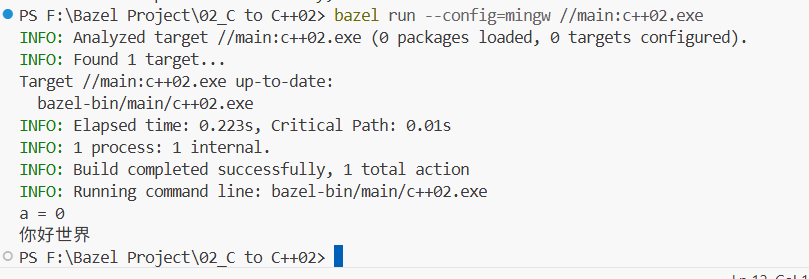
现在我们可以在命令行中运行看看了
PS F:\Bazel Project\02_C to C++02> bazel build --config=mingw //main:c++02.exe
WARNING: Build option --compilation_mode has changed, discarding analysis cache (this can be expensive, see https://bazel.build/advanced/performance/iteration-speed).
INFO: Analyzed target //main:c++02.exe (67 packages loaded, 468 targets configured).
INFO: From Compiling main/hello.cc:
main/hello.cc: In function 'int main(int, const char**)':
main/hello.cc:3:14: warning: unused parameter 'argc' [-Wunused-parameter]
    3 | int main(int argc, char const *argv[])
      |          ~~~~^~~~
main/hello.cc:3:32: warning: unused parameter 'argv' [-Wunused-parameter]
    3 | int main(int argc, char const *argv[])
      |                    ~~~~~~~~~~~~^~~~~~
INFO: Found 1 target...
Target //main:c++02.exe up-to-date:
  bazel-bin/main/c++02.exe
INFO: Elapsed time: 3.198s, Critical Path: 1.64s
INFO: 3 processes: 3 action cache hit, 1 internal, 2 local.
INFO: Build completed successfully, 3 total actions
PS F:\Bazel Project\02_C to C++02> bazel run --config=mingw //main:c++02.exe
INFO: Analyzed target //main:c++02.exe (0 packages loaded, 0 targets configured).
INFO: Found 1 target...
Target //main:c++02.exe up-to-date:
  bazel-bin/main/c++02.exe
INFO: Elapsed time: 0.223s, Critical Path: 0.01s
INFO: 1 process: 1 internal.
INFO: Build completed successfully, 1 total action
INFO: Running command line: bazel-bin/main/c++02.exe
a = 0
你好世界
第一次运行 Bazel 会下载依赖,这里需要VPN才能下载成功
再来进行vscode的任务和调试设置
以下这2个文件可以在vscode中通过手动创建文件夹.vscode再创建文件生成。也可以使用ctrl+shift+p快捷生成
.vscode/launch.json
{
    "version": "0.2.0",
    "configurations": [
        {
            "name": "Bazel Debug (MinGW)",
            "type": "cppdbg",
            "request": "launch",
            "program": "${workspaceFolder}/bazel-bin/main/c++02.exe",
            "args": [],
            "stopAtEntry": false,
            "cwd": "${workspaceFolder}",
            "environment": [],
            "externalConsole": false,
            "MIMode": "gdb",
            "miDebuggerPath": "E:/qtCreator/Qt/Tools/mingw1310_64/bin/gdb.exe",
            "setupCommands": [
                {
                    "description": "为 gdb 启用整齐打印",
                    "text": "-enable-pretty-printing",
                    "ignoreFailures": true
                }
            ],
            "preLaunchTask": "bazel-build-debug",
            "logging": {
                "moduleLoad": false,
                "trace": false
            }
        }
    ]
}
.vscode/tasks.json
{
    "version": "2.0.0",
    "tasks": [
        {
            "label": "bazel-build-debug",
            "type": "shell",
            "command": "bazel",
            "args": [
                "build",
                "--config=mingw",
                "--compilation_mode=dbg",
                "//main:c++02.exe"
            ],
            "group": {
                "kind": "build",
                "isDefault": true
            },
            "presentation": {
                "reveal": "always",
                "panel": "dedicated"
            },
            "problemMatcher": ["$gcc"]
        },
        {
            "label": "bazel-run",
            "type": "shell",
            "command": "bazel",
            "args": [
                "run",
                "--config=mingw",
                "--compilation_mode=dbg",
                "//main:c++02.exe"
            ],
            "group": {
                "kind": "test",
                "isDefault": false
            },
            "presentation": {
                "reveal": "always",
                "panel": "dedicated"
            },
            "problemMatcher": []
        },
        {
            "label": "bazel-run-release",
            "type": "shell",
            "command": "bazel",
            "args": [
                "run",
                "--config=mingw",
                "--compilation_mode=opt",
                "//main:c++02.exe"
            ],
            "group": {
                "kind": "test",
                "isDefault": false
            },
            "presentation": {
                "reveal": "always",
                "panel": "dedicated"
            },
            "problemMatcher": []
        },
        {
            "label": "bazel-build-release",
            "type": "shell",
            "command": "bazel",
            "args": [
                "build",
                "--config=mingw",
                "--compilation_mode=opt",
                "//main:c++02.exe"
            ],
            "group": {
                "kind": "build",
                "isDefault": false
            },
            "presentation": {
                "reveal": "always",
                "panel": "dedicated"
            },
            "problemMatcher": ["$gcc"]
        },
        {
            "label": "bazel-clean",
            "type": "shell",
            "command": "bazel",
            "args": [
                "clean"
            ],
            "group": {
                "kind": "build",
                "isDefault": false
            },
            "presentation": {
                "reveal": "always",
                "panel": "dedicated"
            },
            "problemMatcher": []
        },
        {
            "label": "bazel-query-all",
            "type": "shell",
            "command": "bazel",
            "args": [
                "query",
                "//..."
            ],
            "group": {
                "kind": "build",
                "isDefault": false
            },
            "presentation": {
                "reveal": "always",
                "panel": "dedicated"
            },
            "problemMatcher": []
        }
    ]
}
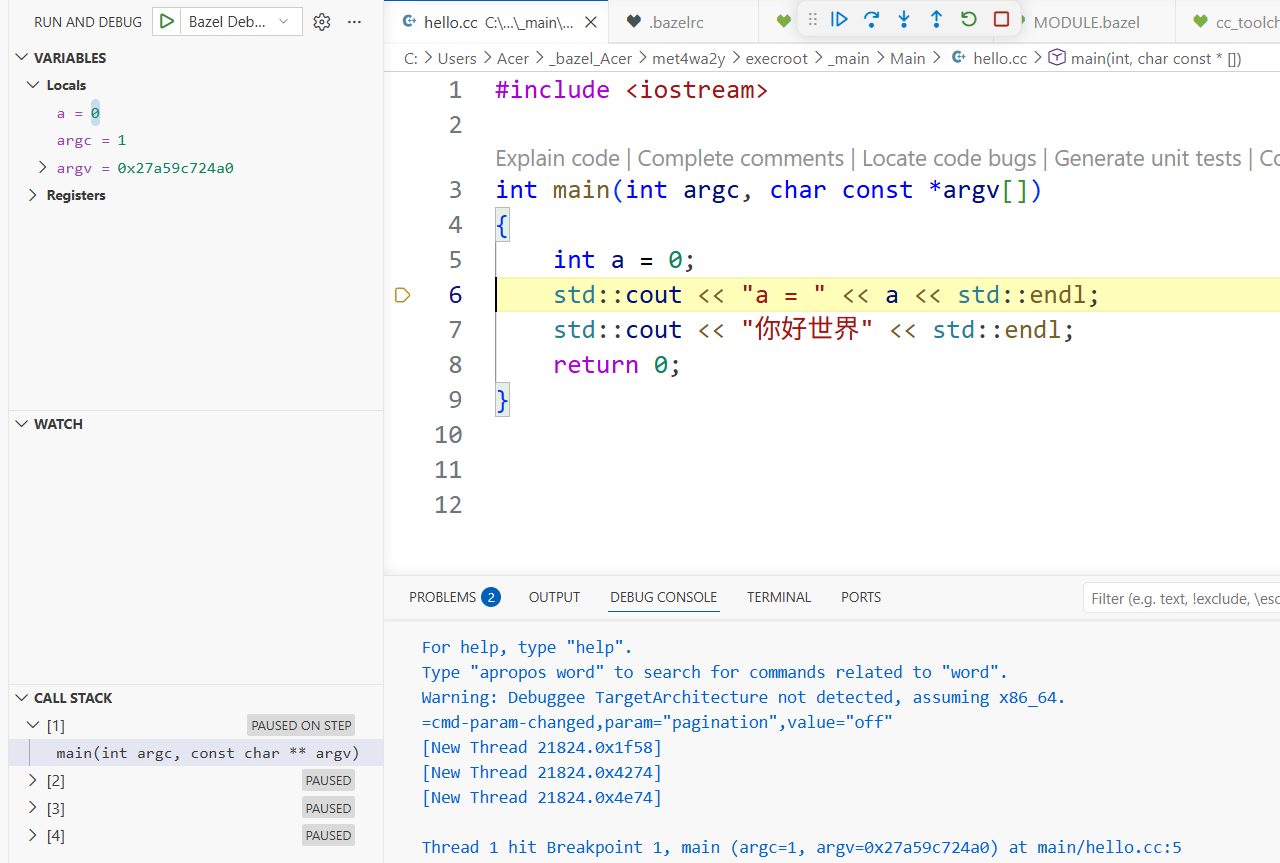
配置了这2个文件后我们可以调试代码和使用任务运行程序了
调试
打下断点例如这里是在int a = 0打的断点,然后Fn+F5进入调试
任务运行
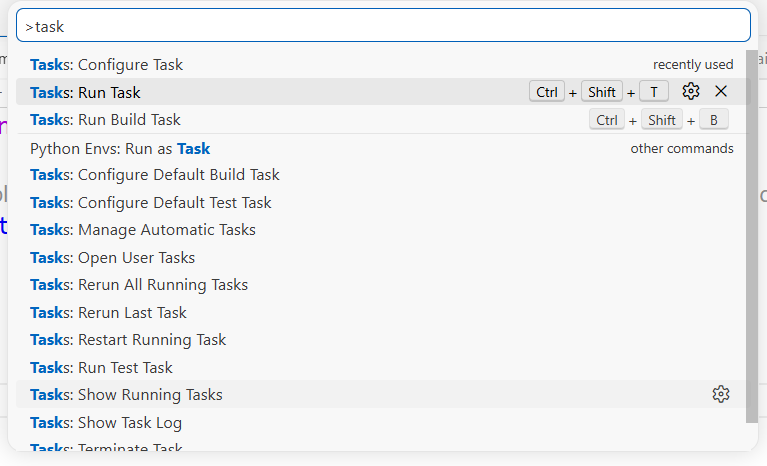
这里我给Tasks:Run Task设置了快捷键 Ctrl+Shift+T
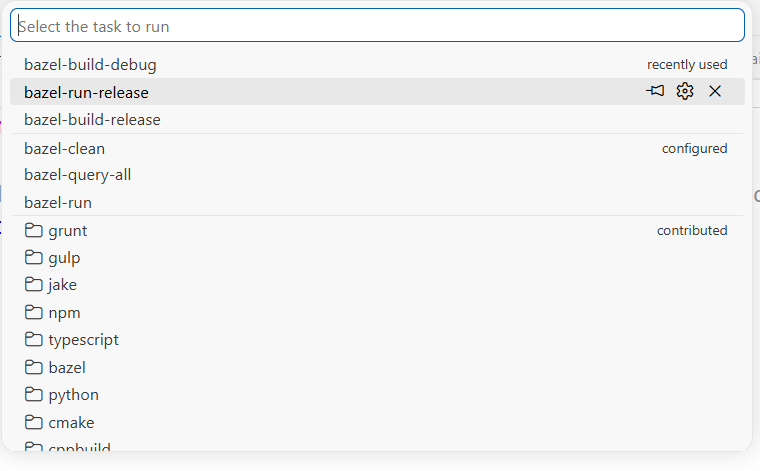
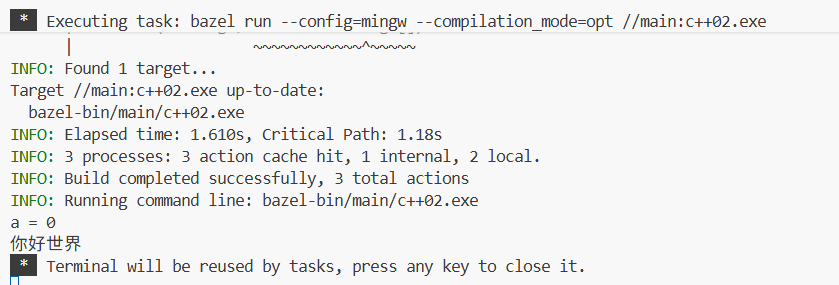
选择一个任务运行,比如我这里选择的是bazel-run-release
运行结果如下
更多推荐



 11
11 0
0- 0


 已为社区贡献4条内容

所有评论(0)