
c#模板方法模式
模板方法是一种强大的设计模式,它允许我们为算法创建一个结构,同时仍能让算法的各个部分可互换
1.定义:
-
在一个方法中定义一个算法的骨架:
-
在这个方法中,我们将某些步骤推迟到子类中实现
-
模板方法允许子类在不改变算法结构的前提下,重新定义该算法的某些特定步骤
-
举个例子:制作咖啡
-
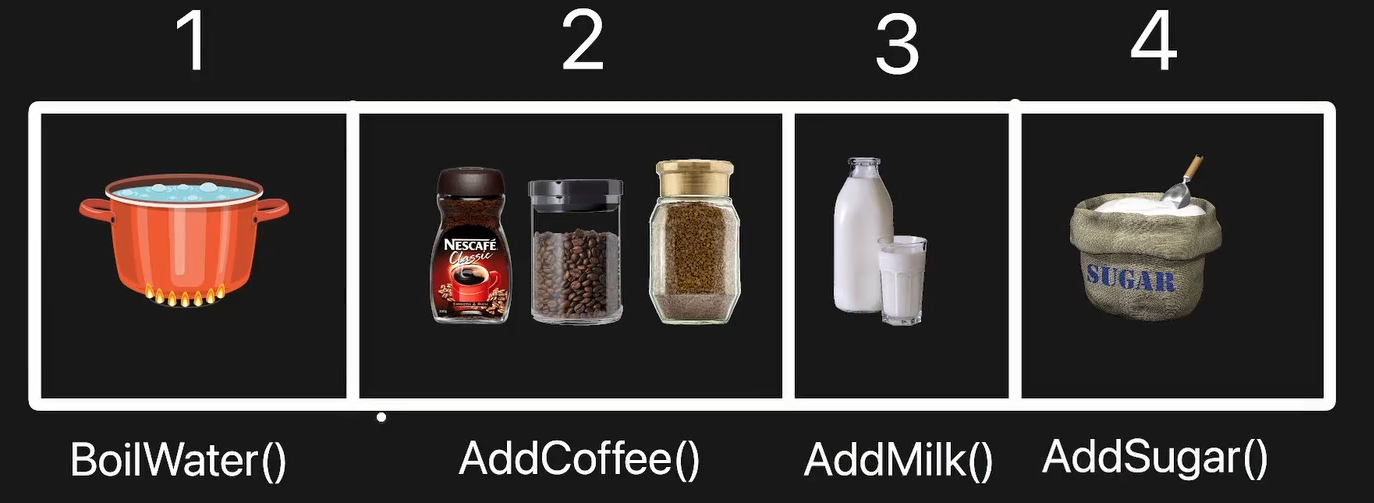
我们思考一种制作咖啡的通用算法,将它划分为几个明确的步骤
-
1.加水BoilWater(),2.加入咖啡粉AddCoffee(),3.加入牛奶AddMilk(),4.加入糖AddSugar()
-
我们现在拥有一个制作咖啡算法的骨架,关键在于,我们会将其中某些步骤推迟到子类中实现。在制作咖啡算法中,有些步骤是必须执行的,有些步骤不一定执行,或者是可定制的。
-
我们必须加水,必须加咖啡,可选加牛奶,可选加糖。
-
烧水对于所有咖啡制作都是完全一样的(必须且不可配置),但是加入咖啡会因为咖啡的种类而不同(必须且可以配置)。
-
-
模板方法模式,为我们定义了一种结构。我们可以定义一个方法,这个方法定义了算法的骨架,在制作咖啡这个算法中的骨架是:
-
BoilWater()---->AddCoffee()---->AddMilk()---->AddSugar() 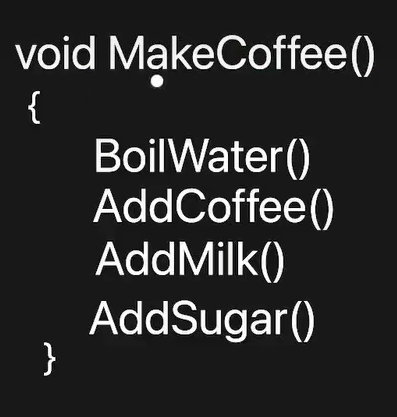
-
其中一些方法必须由子类实现,另一些方法可以由子类选择性地实现。
-
算法的骨架,将定义在某个抽象类中,其中一些方法会在抽象类中实现,但是另一些方法则会委托给子类,子类必须实现这些方法。还有一些方法,子类可选的去实现。
-
-
因为我们讨论的是不同对象之间如何分配职责;这种设计模式属于“行为型模式”
2.类图
-
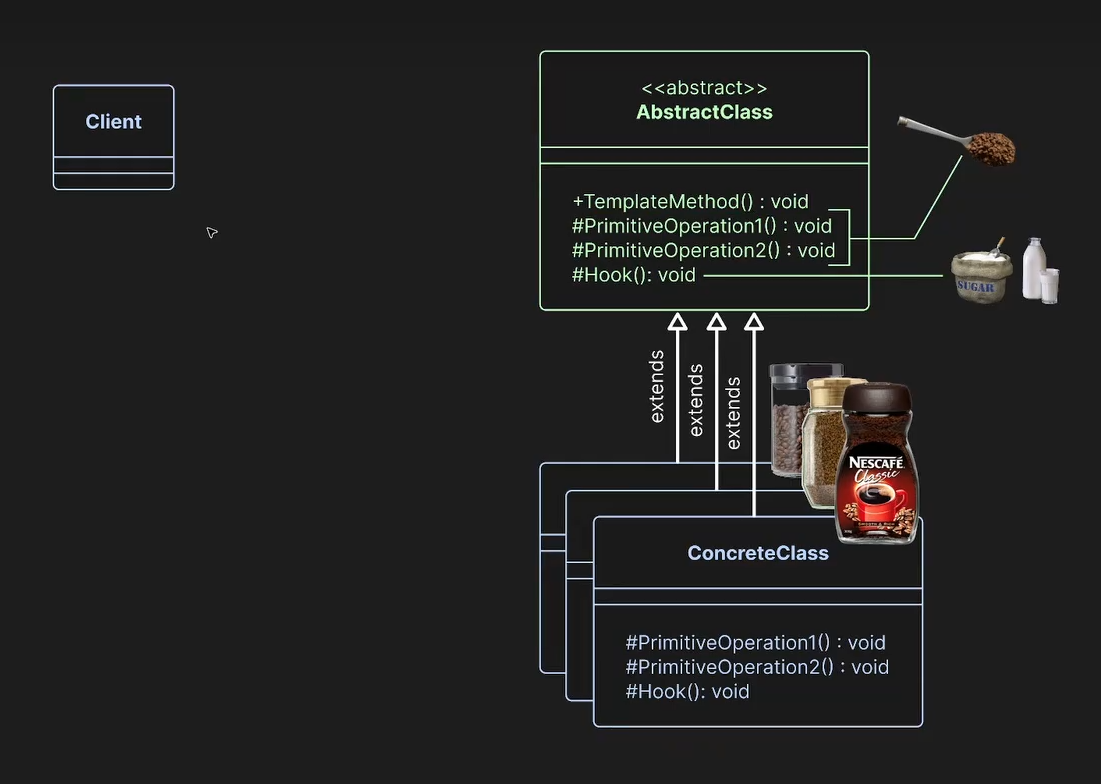
在抽象类中
-
定义算法骨架TemplateMethod()方法。--->MakeCoffee()
-
定义子类必须实现的方法 PrimitiveOperation()方法,是子类必须实现的基本操作--->AddCoffee()
-
定义可选的钩子方法 Hook()--->AddMilk()--->AddSugar()
-
-
在具体类中
-
必须实现基本操作
-
可选的实现钩子操作
-
-
客户端Client
-
客户段调用 具体类.MakeCoffee(),但是整个算法的骨架定义在抽象类中,而具体类实现了个性化的部分。
-
3.优缺点:
3.1优点:
-
代码复用:我们在所有实现中都复用了完全相同的代码。我们只需要一次性正确地构建好算法的结构,为子类提供合适的插入点,让它们配置各自需要配置的内容,就能复用完全相同的代码。如果子类的算法实现逻辑确实是通用的,这将是一个巨大的优势,这能显著减少代码重复。
-
算法结构的一致性:你只需要一次性地定义好算法结构,就能确保它在所有子类中被一致地复用。
-
可拓展性和灵活性:作为子类,你可以非常轻松地插入,并精确修改你想改变的部分。你可以在抽象类中设置多个钩子Hook(),将它们嵌入到算法流程中,然后子类就能轻松地插入并添加自己的逻辑。
-
在抽象类中:可以通过各个钩子,灵活地定制行为
-
在具体类中:可以非常轻松地添加新的具体类来继承抽象类,而它们只需要实现自己需要修改的部分即可。仅仅通过继承基类,新类就能立即获得大量开箱即用的功能。
-
-
抽象类完全掌控算法流程:算法中不变的部分被封装在模板方法内部,即使算法本身相当复杂,子类也无需了解所有内部细节,只需关注可以插入的钩子即可。如果设计得当,具体类的逻辑会非常简单,但它能执行很复杂的操作。
3.2缺点:
-
依赖继承:依赖继承的系统,其逻辑分散在类的继承层次结构中,导致整个系统的逻辑,新人上手等各方面变的更加复杂
-
算法固定:当你确保存在一个结构清晰,顺序步骤始终不变,且不太可能改变的算法时,才使用模板方法模式。如果你的算法很灵活,经常发生改变,模板方法可能就不是一个适合你的设计模式。
模板方法模式在Nodify中的使用:
InputElementState<TElement>
-
抽象类InputElementState<TElement>是模板类,定义了算法骨架。
-
算法骨架TemplateMethod()---->HandlerEvent()
-
算法骨架中,根据传入的InputEventArgs进行判断,执行不同的分支
-
-
可选的钩子方法 Hook()---->OnMouseDown(),OnMouseMove(),OnEvent()等等
-
子类可选的重写钩子方法,定制自己个性化的逻辑。
-
-
public abstract class InputElementState<TElement> : IInputHandler
where TElement : FrameworkElement
{
protected TElement Element { get; }
public bool RequiresInputCapture { get; protected set; }
public bool ProcessHandledEvents { get; protected set; }
protected InputElementState(TElement element)
{
Element = element;
}
protected virtual void OnMouseDown(MouseButtonEventArgs e) { }
protected virtual void OnMouseUp(MouseButtonEventArgs e) { }
protected virtual void OnMouseMove(MouseEventArgs e) { }
protected virtual void OnMouseWheel(MouseWheelEventArgs e) { }
protected virtual void OnKeyUp(KeyEventArgs e) { }
protected virtual void OnKeyDown(KeyEventArgs e) { }
protected virtual void OnLostMouseCapture(MouseEventArgs e) { }
protected virtual void OnEvent(InputEventArgs e) { }
public void HandleEvent(InputEventArgs e)
{
if (e.RoutedEvent == UIElement.MouseMoveEvent)
{
OnMouseMove((MouseEventArgs)e);
}
else if (e.RoutedEvent == UIElement.MouseDownEvent)
{
OnMouseDown((MouseButtonEventArgs)e);
}
else if (e.RoutedEvent == UIElement.MouseUpEvent)
{
OnMouseUp((MouseButtonEventArgs)e);
}
else if (e.RoutedEvent == UIElement.MouseWheelEvent)
{
OnMouseWheel((MouseWheelEventArgs)e);
}
else if (e.RoutedEvent == UIElement.LostMouseCaptureEvent)
{
OnLostMouseCapture((MouseEventArgs)e);
}
else if (e.RoutedEvent == UIElement.KeyDownEvent)
{
OnKeyDown((KeyEventArgs)e);
}
else if (e.RoutedEvent == UIElement.KeyUpEvent)
{
OnKeyUp((KeyEventArgs)e);
}
OnEvent(e);
}
}
DragState<TElement>
-
进一步扩展了模板方法,所以继承自DragState的类,先进行显式接口实现的模板方法流程,然后调用基类中的模板方法流程
using System.Windows;
using System.Windows.Input;
namespace Nodify.Interactivity
{
public abstract class DragState<TElement> : InputElementState<TElement>, IInputHandler
where TElement : FrameworkElement
{
private enum InteractionState
{
Ready,
InProgress,
Ending
}
protected InputGesture? CancelGesture { get; }
protected InputGesture BeginGesture { get; }
protected virtual bool HasContextMenu => Element.ContextMenu != null;
protected virtual bool CanBegin { get; } = true;
protected virtual bool CanCancel { get; } = true;
protected virtual bool IsToggle { get; }
protected IInputElement PositionElement { get; set; }
private InteractionState _interactionState;
private Point _initialPosition;
public DragState(TElement element, InputGesture beginGesture) : base(element)
{
BeginGesture = beginGesture;
PositionElement = element;
}
public DragState(TElement element, InputGesture beginGesture, InputGesture cancelGesture)
: this(element, beginGesture)
{
CancelGesture = cancelGesture;
}
void IInputHandler.HandleEvent(InputEventArgs e)
{
if (_interactionState == InteractionState.Ready && TryBeginDragging(e))
{
return;
}
if (_interactionState == InteractionState.Ending && TryEndDragging(e))
{
return;
}
if (_interactionState == InteractionState.InProgress)
{
if (TryEndDragging(e) || TryCancelDragging(e) || TrySuppressContextMenu(e))
{
return;
}
}
TryHandleEvent(e);
}
#region Interaction logic
// Begin the interaction on gesture press
private bool TryBeginDragging(InputEventArgs e)
{
if (IsInputEventPressed(e) && CanBegin && BeginGesture.Matches(e.Source, e))
{
BeginDrag(e);
return true;
}
return false;
}
private bool TryEndDragging(InputEventArgs e)
{
if (IsInputCaptureLost(e))
{
EndDrag(e);
return true;
}
if (IsToggle && _interactionState == InteractionState.InProgress)
{
return TryDeferToggleInteractionEnd(e);
}
return TryEndInteraction(e);
}
// Delay ending toggle interaction until the gesture is released
private bool TryDeferToggleInteractionEnd(InputEventArgs e)
{
if (IsInputEventPressed(e) && BeginGesture.Matches(e.Source, e))
{
_interactionState = InteractionState.Ending;
HandleEvent(e);
return true;
}
return false;
}
// End the interaction on gesture release
private bool TryEndInteraction(InputEventArgs e)
{
if (IsInputEventReleased(e) && BeginGesture.Matches(e.Source, e))
{
EndDrag(e);
return true;
}
return false;
}
// Cancel the interaction
private bool TryCancelDragging(InputEventArgs e)
{
if (CanCancel && IsInputEventReleased(e) && CancelGesture?.Matches(e.Source, e) is true)
{
CancelDrag(e);
return true;
}
return false;
}
// Suppress the context menu if a toggle interaction is in progress
private bool TrySuppressContextMenu(InputEventArgs e)
{
if (IsToggle && e is MouseButtonEventArgs mbe && mbe.ChangedButton == MouseButton.Right)
{
e.Handled = true;
HandleEvent(e);
return true;
}
return false;
}
private void TryHandleEvent(InputEventArgs e)
{
if (_interactionState == InteractionState.InProgress || _interactionState == InteractionState.Ending)
{
HandleEvent(e);
}
}
internal void BeginDrag(InputEventArgs e)
{
// Avoid stealing mouse capture from other elements
if (CanCaptureInput(e))
{
RequiresInputCapture = IsToggle;
_interactionState = InteractionState.InProgress;
_initialPosition = GetInitialPosition(e);
HandleEvent(e); // Handle the event, otherwise CaptureMouse will send a MouseMove event and the current event will be handled out of order
OnBegin(e);
e.Handled = true;
Element.Focus();
CaptureInput(e);
}
}
private void EndDrag(InputEventArgs e)
{
_interactionState = InteractionState.Ready;
HandleEvent(e);
// Suppress the context menu if the mouse moved beyond the defined drag threshold
if (HasContextMenu && e is MouseButtonEventArgs mbe && mbe.ChangedButton == MouseButton.Right)
{
double dragThreshold = NodifyEditor.MouseActionSuppressionThreshold * NodifyEditor.MouseActionSuppressionThreshold;
double dragDistance = (mbe.GetPosition(PositionElement) - _initialPosition).LengthSquared;
if (dragDistance > dragThreshold)
{
OnEnd(e);
e.Handled = true;
}
else
{
OnCancel(e);
}
}
else
{
OnEnd(e);
e.Handled = true;
}
RequiresInputCapture = false;
}
private void CancelDrag(InputEventArgs e)
{
_interactionState = InteractionState.Ready;
HandleEvent(e);
OnCancel(e);
e.Handled = true;
RequiresInputCapture = false;
}
#endregion
protected virtual Point GetInitialPosition(InputEventArgs e)
{
if (e is MouseEventArgs me)
{
return me.GetPosition(PositionElement);
}
return default;
}
protected virtual bool CanCaptureInput(InputEventArgs e)
=> Mouse.Captured == null || Element.IsMouseCaptured;
protected virtual void CaptureInput(InputEventArgs e)
=> Element.CaptureMouse();
protected virtual bool IsInputCaptureLost(InputEventArgs e)
=> e.RoutedEvent == UIElement.LostMouseCaptureEvent;
protected virtual bool IsInputEventReleased(InputEventArgs e)
{
if (e is MouseButtonEventArgs mbe && mbe.ButtonState == MouseButtonState.Released)
return true;
if (e is KeyEventArgs ke && ke.IsUp)
return true;
if (e is MouseWheelEventArgs mwe && mwe.MiddleButton == MouseButtonState.Released)
return true;
return false;
}
protected virtual bool IsInputEventPressed(InputEventArgs e)
{
if (e is MouseButtonEventArgs mbe && mbe.ButtonState == MouseButtonState.Pressed)
return true;
if (e is KeyEventArgs ke && ke.IsDown)
return true;
if (e is MouseWheelEventArgs mwe && mwe.MiddleButton == MouseButtonState.Pressed)
return true;
return false;
}
protected virtual void OnBegin(InputEventArgs e)
{
}
protected virtual void OnEnd(InputEventArgs e)
{
}
protected virtual void OnCancel(InputEventArgs e)
{
}
}
}
-
IInputHandler.HandleEvent:模板方法算法骨架
-
一些钩子函数(子类具体实现):OnBegin(),OnEnd(),OnCancel()
-
一些钩子属性(子类实现,用于控制算法分支):HasContextMenu,CanBegin,CanCancel,IsToggle,
-
状态模式和钩子属性和手势判断:共同决定算法程序流。
-
定义了三种状态:
-
Ready:空闲,等待开始拖拽
-
InProgress:拖拽进行中
-
Ending:假设有一个按钮,按下可以切换成抓取状态,此时可以抓取移动图表,再次按下按钮结束抓取状态,Ending表示结束抓取状态之前。
-
-
-
当用户触发的UI元素的行为,是继承自DragState时,进入IInputHandler.HandleEvent这个算法骨架中。
-
根据一些程序流,调用InputElementState中的模板,进入InputElementState的HandleEvent这个算法骨架中。
具体类Zooming:继承自InputElementState
using System;
using System.Windows.Input;
namespace Nodify.Interactivity
{
public static partial class EditorState
{
public class Zooming : InputElementState<NodifyEditor>
{
public Zooming(NodifyEditor editor) : base(editor)
{
}
protected override void OnMouseWheel(MouseWheelEventArgs e)
{
EditorGestures.NodifyEditorGestures gestures = EditorGestures.Mappings.Editor;
if (gestures.ZoomModifierKey == Keyboard.Modifiers && IsZoomingAllowed())
{
double zoom = Math.Pow(2.0, e.Delta / 3.0 / Mouse.MouseWheelDeltaForOneLine);
Element.ZoomAtPosition(zoom, Element.MouseLocation);
e.Handled = true;
}
}
private bool IsZoomingAllowed()
{
return !Element.DisableZooming
&& (AllowZoomingWhileSelecting || !Element.IsSelecting)
&& (AllowZoomingWhileCutting || !Element.IsCutting)
&& (AllowZoomingWhilePushingItems || !Element.IsPushingItems)
&& (AllowZoomingWhilePanning || !Element.IsPanning);
}
}
}
}
-
Zooming重写了InputElementState中的OnMouseWheel方法,计算缩放比例,改变Element的视口
具体类Selecting:继承自DragState
using System.Windows.Input;
namespace Nodify.Interactivity
{
public static partial class EditorState
{
public class Selecting : DragState<NodifyEditor>
{
protected override bool HasContextMenu => Element.HasContextMenu;
protected override bool CanBegin => Element.CanSelectMultipleItems && !Element.IsPanning && !Element.IsCutting && !Element.IsPushingItems;
protected override bool CanCancel => NodifyEditor.AllowSelectionCancellation;
protected override bool IsToggle => EnableToggledSelectingMode;
public Selecting(NodifyEditor editor)
: base(editor, EditorGestures.Mappings.Editor.Selection.Select, EditorGestures.Mappings.Editor.Selection.Cancel)
{
}
protected override void OnBegin(InputEventArgs e)
{
var selectionType = EditorGestures.Mappings.Editor.Selection.GetSelectionType(e);
Element.BeginSelecting(selectionType);
}
protected override void OnMouseMove(MouseEventArgs e)
=> Element.UpdateSelection(Element.MouseLocation);
protected override void OnEnd(InputEventArgs e)
=> Element.EndSelecting();
protected override void OnCancel(InputEventArgs e)
=> Element.CancelSelecting();
}
}
}
-
重写了DragState算法骨架中的OnBegin(),OnEnd(),OnCancel(),重写了流程控制属性HasContextMenu,CanBegin,CanCancel,IsToggle
-
重写了InputElementState算法骨架中的OnMouseMove()方法,更新选中。
其他具体类,类似,如果继承自抽象输入InputElementState类,则根据InputEventArgs,进入不同的OnMouseUP,OnMouseMove等分支。如果继承自DragState,则会有更复杂的行为,进入一个由状态机,控制流属性Bool,输入手势共同控制的算法流中,在必要时会调用InputElementState中的算法骨架,最终实现复杂的用户输入行为响应。
更多推荐
 7
7 0
0- 0


 已为社区贡献3条内容

所有评论(0)