
python 3.11以上版本pip报错
·
一、报错内容
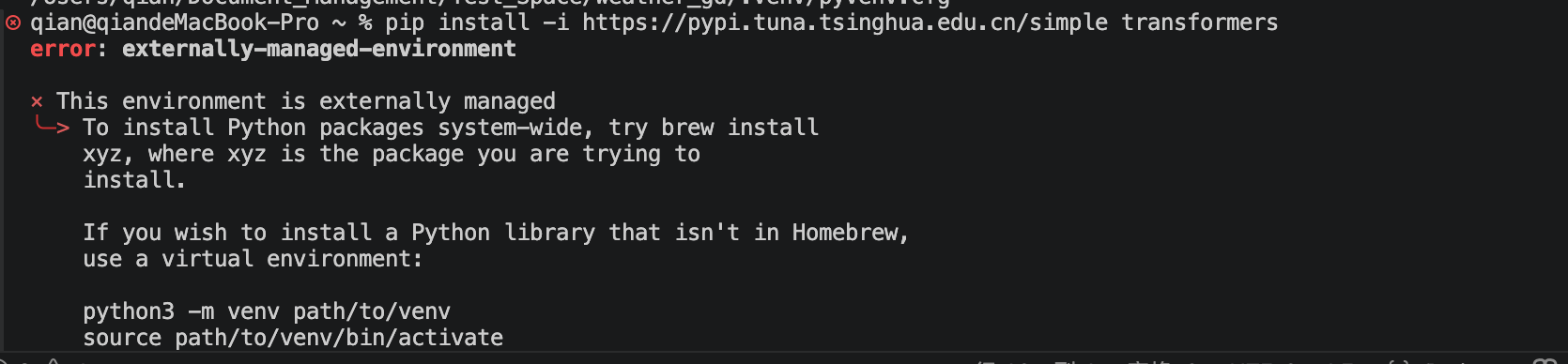
error: externally-managed-environment

× This environment is externally managed
╰─> To install Python packages system-wide, try brew install
    xyz, where xyz is the package you are trying to
    install.

    If you wish to install a Python library that isn't in Homebrew,
    use a virtual environment:

    python3 -m venv path/to/venv
    source path/to/venv/bin/activate
    python3 -m pip install xyz

    If you wish to install a Python application that isn't in Homebrew,
    it may be easiest to use 'pipx install xyz', which will manage a
    virtual environment for you. You can install pipx with

    brew install pipx

    You may restore the old behavior of pip by passing
    the '--break-system-packages' flag to pip, or by adding
    'break-system-packages = true' to your pip.conf file. The latter
    will permanently disable this error.

    If you disable this error, we STRONGLY recommend that you additionally
    pass the '--user' flag to pip, or set 'user = true' in your pip.conf
    file. Failure to do this can result in a broken Homebrew installation.

    Read more about this behavior here: <https://peps.python.org/pep-0668/>

note: If you believe this is a mistake, please contact your Python installation or OS distribution provider. You can override this, at the risk of breaking your Python installation or OS, by passing --break-system-packages.
hint: See PEP 668 for the detailed specification.
这个报错是 Python 3.11+ 版本引入的一个重要安全机制(PEP 668),旨在防止 pip 覆盖或破坏操作系统(特别是 macOS 上的 Homebrew)自带的 Python 库。
简单来说,你的 Python 环境被标记为“外部管理”,直接使用 pip install 安装包可能会导致系统不稳定。
二、解决方式:
2.1 最佳实践:使用虚拟环境 (Virtual Environment)
这是官方和社区最推荐的方式。它会在你的项目目录下创建一个独立的 Python 环境,所有包都只安装在这里,完全不会影响系统全局的 Python。
操作步骤:
# 1. 创建一个虚拟环境(例如在当前目录创建名为 venv 的文件夹)
python -m venv venv

# 2. 激活虚拟环境
source venv/bin/activate

# 3. 现在再安装包就不会报错了(无需 --break-system-packages)
pip install transformers
注意:每次进入项目目录时,都需要先运行 source venv/bin/activate 来激活环境。
2.2 🛠️ 针对应用安装:使用 pipx(不推荐)
如果你是要安装像 transformers 这样的库供开发使用,请用方案 1。但如果你是要安装像 black、flake8 这样的命令行工具(应用程序),推荐使用 pipx。它会自动为每个应用创建独立的虚拟环境。
操作步骤:
# 安装 pipx(如果尚未安装)
brew install pipx

# 使用 pipx 安装应用
pipx install transformers
2.3 用户级安装:使用 --user(不推荐)
略;
2.4 ⚠️ 强制安装(不推荐,有风险)
略;
警告:这可能会导致 Homebrew 管理的包与 pip 管理的包发生冲突,甚至导致系统工具无法使用。
三、问题
做了上面操作,发现还是有问题,默认的python环境依然不是虚拟环境。
which python

看图,我的虚拟环境是:
/Users/qian/Document_Management/Python_Space/deepseek_v3_tokenizer/venv/bin/python
发现有虚拟环境。
这时,只要把运行环境设置为虚拟路径就行了:
- VSCode:按 Ctrl+Shift+P → 输入 “Python: Select Interpreter” → 选择路径中包含 venv 的那个;
- 如何1步骤没有包含venv的路径,则新增这个虚拟环境就行了。
更多推荐


 5
5 0
0- 0


 已为社区贡献5条内容

所有评论(0)