
Java 文件操作实战:IO 流、NIO 与读写性能优化
·
一、IO 流完整分类体系
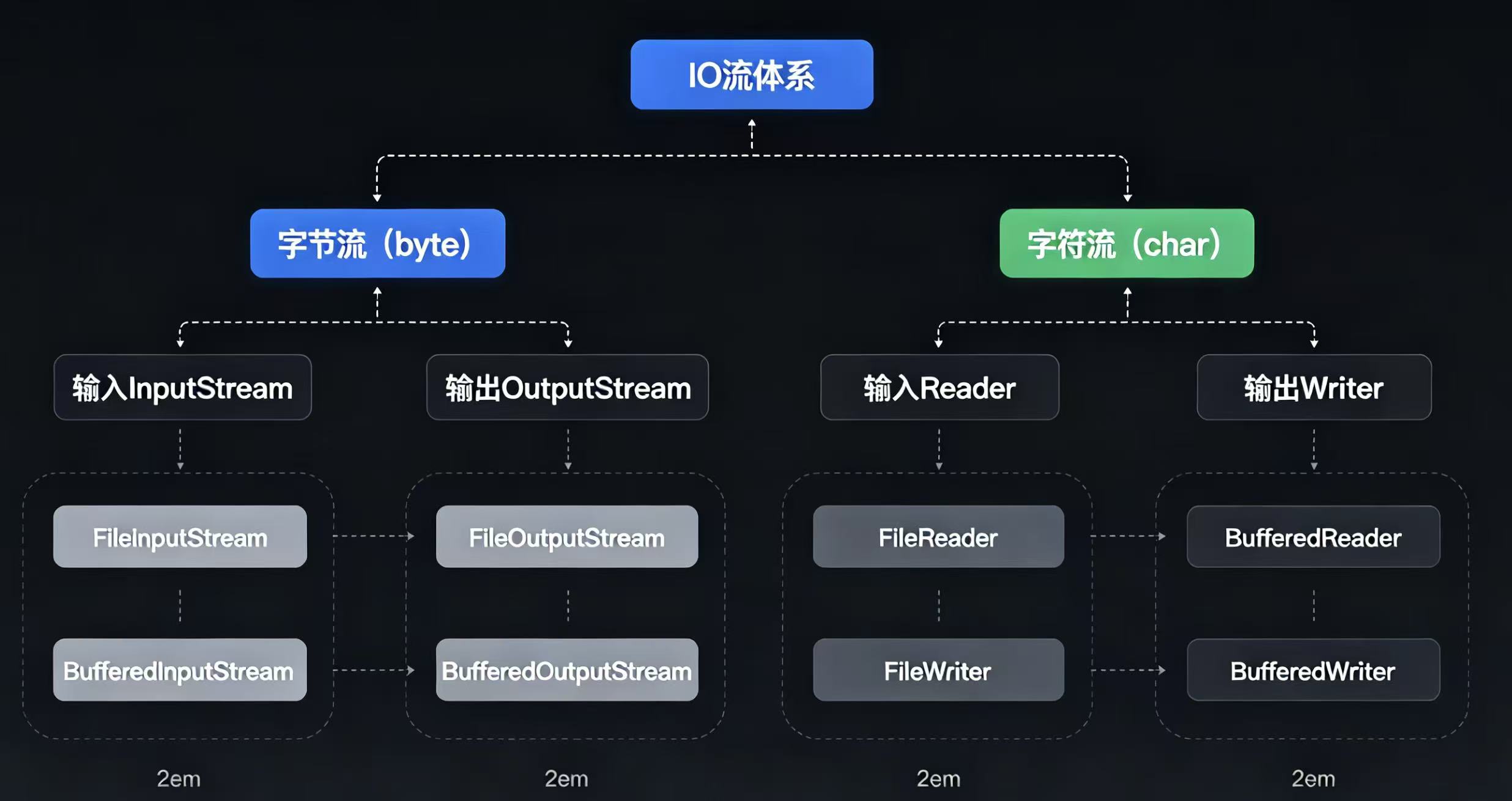
1. 两大核心分支:字节流 & 字符流
1.1 字节流(InputStream/OutputStream)
- 处理单位:单个字节
byte,适配所有文件类型(图片、视频、压缩包、二进制文件) - 顶层父类:
InputStream(输入读)、OutputStream(输出写) - 常用实现类:
- 文件读写:
FileInputStream/FileOutputStream - 缓冲加速:
BufferedInputStream/BufferedOutputStream - 字节数组:
ByteArrayInputStream
- 文件读写:
1.2 字符流(Reader/Writer)
- 处理单位:字符
char,仅适配文本文件(txt、java、md),内置编码转换 - 顶层父类:
Reader/Writer - 常用实现类:
- 文件文本:
FileReader/FileWriter - 缓冲提速:
BufferedReader/BufferedWriter - 按行读取:
BufferedReader.readLine()
- 文件文本:
1.2 核心区别对比表
表格
| 维度 | 字节流 | 字符流 |
|---|---|---|
| 操作单元 | 字节 (8bit) | 字符 (16bit) |
| 适用文件 | 二进制所有文件 | 纯文本文件 |
| 编码处理 | 无,需手动转码 | 自动处理字符编码 |
| 缓冲特性 | 无内置缓冲,推荐手动套 Buffered | 自带字符缓冲区 |
1.3 节点流 vs 处理流
- 节点流:直接对接文件 / 数组等数据源,如
FileInputStream - 处理流(装饰器模式):包裹节点流增强功能,如缓冲流、对象流、转换流
二、文件复制 4 种实现方式性能对比
方式 1:基础字节流单字节读写(性能最差)
缺点:频繁磁盘 IO,循环单字节读取,大文件直接卡顿
java
运行
// 单字节拷贝,不推荐
public static void copyByByte(String src, String dest) throws IOException {
    try (FileInputStream fis = new FileInputStream(src);
         FileOutputStream fos = new FileOutputStream(dest)) {
        int data;
        while ((data = fis.read()) != -1) {
            fos.write(data);
        }
    }
}
方式 2:字节流自定义数组缓冲区(中等性能)
自定义 byte 数组批量读取,减少 IO 交互,日常小文件够用
java
运行
public static void copyByByteArray(String src, String dest) throws IOException {
    try (FileInputStream fis = new FileInputStream(src);
         FileOutputStream fos = new FileOutputStream(dest)) {
        // 自定义8KB缓冲区
        byte[] buffer = new byte[8192];
        int len;
        while ((len = fis.read(buffer)) != -1) {
            fos.write(buffer, 0, len);
        }
    }
}
方式 3:缓冲流 Buffered 包装(传统 IO 最优)
底层内置 8192 字节缓冲,减少系统调用,中小型文件首选
java
运行
public static void copyByBuffered(String src, String dest) throws IOException {
    try (BufferedInputStream bis = new BufferedInputStream(new FileInputStream(src));
         BufferedOutputStream bos = new BufferedOutputStream(new FileOutputStream(dest))) {
        byte[] buf = new byte[1024];
        int len;
        while ((len = bis.read(buf)) != -1) {
            bos.write(buf, 0, len);
        }
        bos.flush(); // 强制刷新缓冲区残留数据
    }
}
方式 4:NIO 通道 transferTo 零拷贝(超大文件最优)
操作系统层面零拷贝,不经过应用内存,减少内核态 / 用户态切换
java
运行
public static void copyByNIOTransfer(String src, String dest) throws IOException {
    try (FileChannel inChannel = new FileInputStream(src).getChannel();
         FileChannel outChannel = new FileOutputStream(dest).getChannel()) {
        // 零拷贝传输
        inChannel.transferTo(0, inChannel.size(), outChannel);
    }
}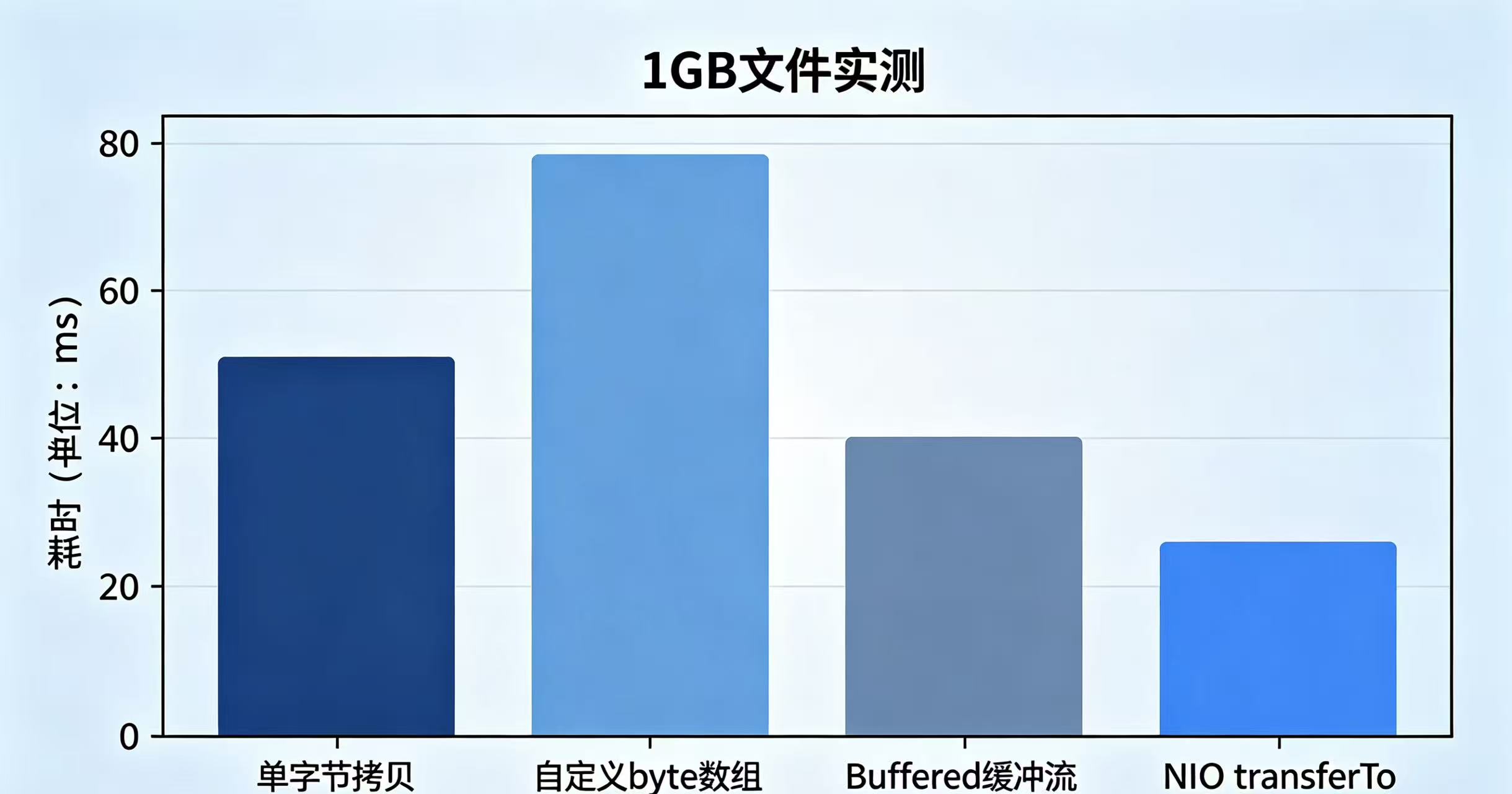
四种方式性能结论
- 单字节读写:最慢,禁止用于 100MB 以上文件
- 自定义数组缓冲:适合 100MB 内小文件
- Buffered 缓冲流:传统 IO 通用最优方案
- NIO transferTo:GB 级大文件、视频 / 镜像首选
三、NIO 核心三大组件详解
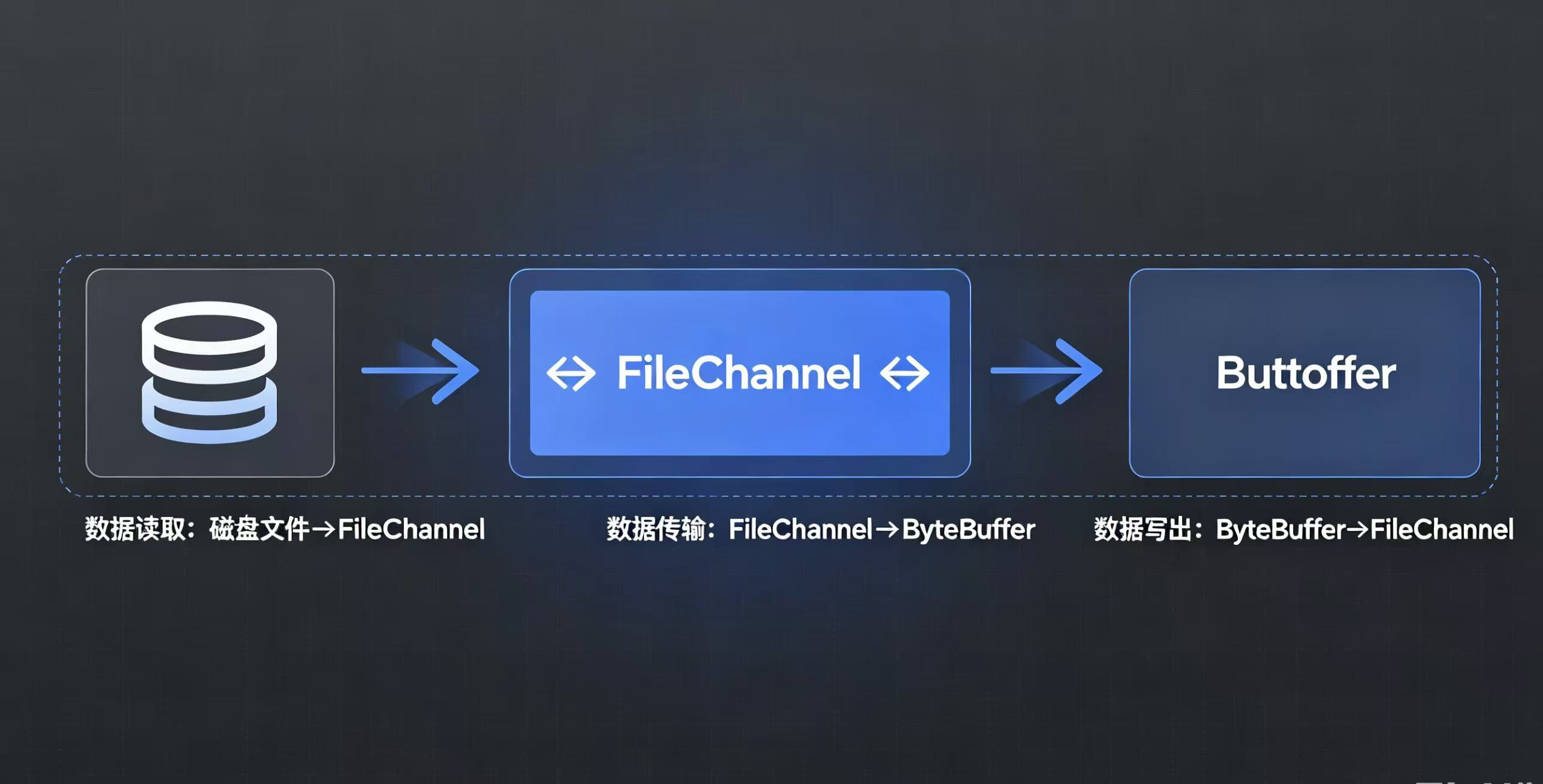
3.1 Channel 通道
- 特点:双向读写(传统 IO 流单向),支持异步、零拷贝
- 常用实现:
FileChannel(文件)、SocketChannel(网络) - 核心方法:
read(Buffer)、write(Buffer)、transferTo()
3.2 Buffer 缓冲区(数据中转容器)
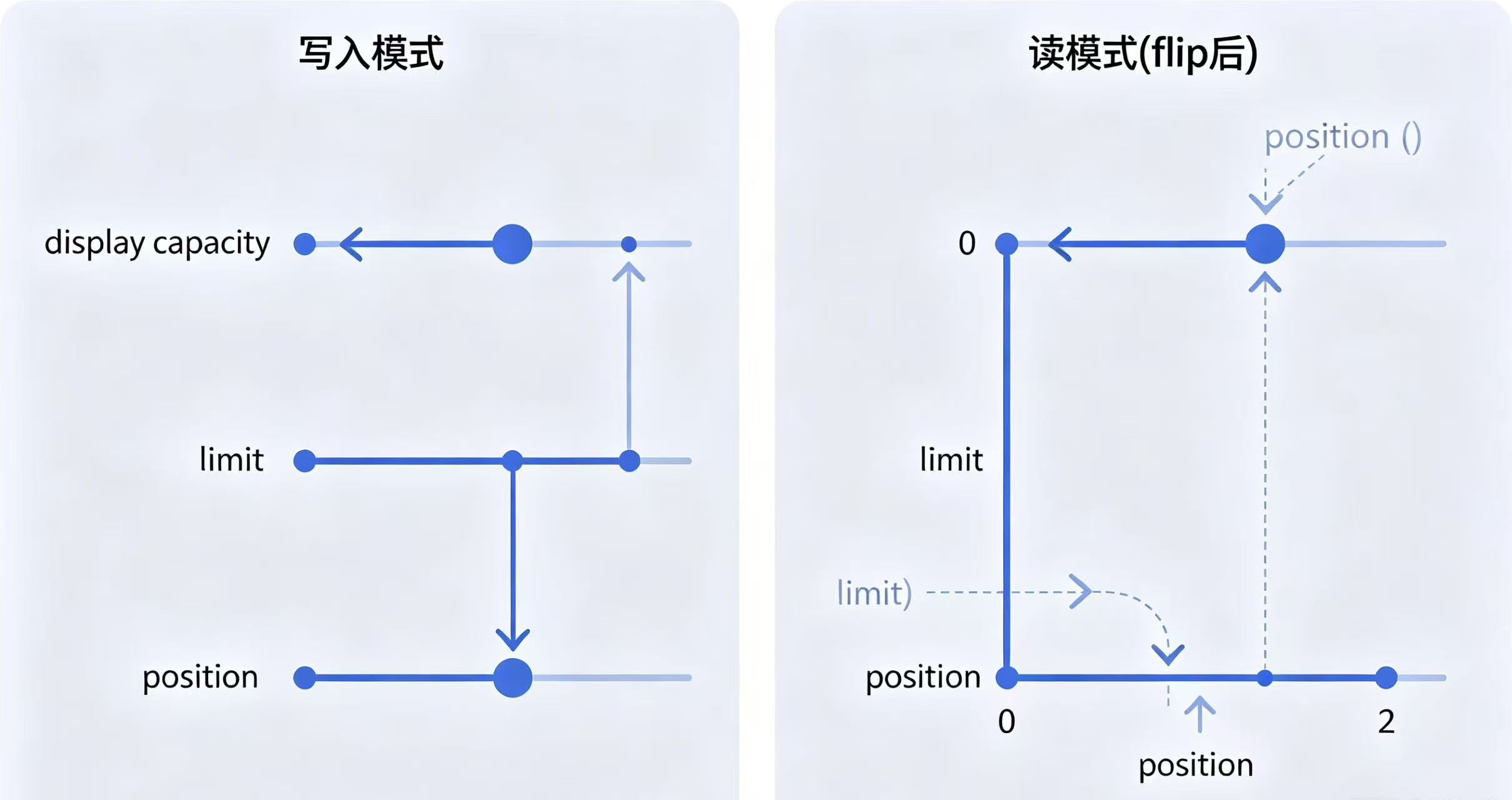
四大核心标记:
- capacity:缓冲区总容量,初始化固定不变
- limit:读写边界,写模式 = capacity,读模式 = 数据末尾
- position:当前读写下标,随读写自动移动
- mark:临时标记,配合 reset 回退 position
java
运行
public void bufferTest() {
    ByteBuffer buffer = ByteBuffer.allocate(1024);
    // 写入模式
    buffer.put("Java NIO".getBytes());
    buffer.flip(); // 切换读模式,limit=当前position,position归零

    // 循环读取
    while (buffer.hasRemaining()) {
        System.out.print((char) buffer.get());
    }
    buffer.clear(); // 清空,回到写模式
}
3.3 Path & Files 工具类(NIO.2 文件工具)
JDK7 新增,替代老旧 File 类,简化文件增删改查
java
运行
// 1. Path路径构建
Path srcPath = Paths.get("D:/test/file.txt");
Path destPath = Paths.get("D:/copy/file.txt");

// 2. Files工具类常用操作
Files.exists(srcPath); // 判断文件是否存在
Files.createDirectories(Paths.get("D:/nio")); // 创建多级目录
Files.copy(srcPath, destPath, StandardCopyOption.REPLACE_EXISTING); // 文件复制
List<String> lines = Files.readAllLines(srcPath, StandardCharsets.UTF_8); // 读取全部文本
优势:代码简洁,内置编码、覆盖、权限等参数,无需手动封装流。
四、大文件高效读取方案(避免 OOM 内存溢出)
方案 1:BufferedReader 按行读取文本文件
千万行日志文件,不一次性加载全量内容到内存
java
运行
try (BufferedReader br = Files.newBufferedReader(Paths.get("log.txt"), StandardCharsets.UTF_8)) {
    String line;
    // 逐行加载,内存只存单行数据
    while ((line = br.readLine()) != null) {
        handleLine(line); // 单行业务处理
    }
}
方案 2:NIO 分片分段读取超大二进制文件
按固定分片读取,控制单次加载内存上限,适配 GB 级视频、压缩包
java
运行
// 每次读取16MB分片
int chunkSize = 16 * 1024 * 1024;
try (FileChannel channel = FileChannel.open(Paths.get("big.rar"), StandardOpenOption.READ)) {
    long totalSize = channel.size();
    long position = 0;
    ByteBuffer buffer = ByteBuffer.allocate(chunkSize);
    while (position < totalSize) {
        buffer.clear();
        int readLen = channel.read(buffer, position);
        if (readLen == -1) break;
        buffer.flip();
        // 处理分片数据
        processChunk(buffer);
        position += readLen;
    }
}
方案 3:Files.lines 流式处理(JDK8+ Stream)
流式惰性加载,配合流式过滤、统计,内存友好
java
运行
// 筛选包含异常关键字的日志行
try (Stream<String> stream = Files.lines(Paths.get("app.log"))) {
    stream.filter(line -> line.contains("Exception"))
          .forEach(System.out::println);
}
五、资源关闭规范:try-with-resources 最佳实践
1. 传统 try-catch-finally 写法(冗余、易出错)
缺陷:双层 try-catch,忘记关闭流、关闭时报空指针
java
运行
// 老旧不推荐写法
FileInputStream fis = null;
try {
    fis = new FileInputStream("test.txt");
    // 读写逻辑
} catch (IOException e) {
    e.printStackTrace();
} finally {
    if (fis != null) {
        try {
            fis.close();
        } catch (IOException e) {
            e.printStackTrace();
        }
    }
}
2. try-with-resources 标准写法(JDK7 推荐)
实现AutoCloseable接口的流 / 通道会自动关闭,无需手动调用 close () 核心规则:资源定义在 try () 括号内,无论正常结束还是异常抛出,自动释放
java
运行
// 多个资源用分号分隔,自动关闭顺序与声明相反
try (BufferedReader br = Files.newBufferedReader(Paths.get("test.txt"));
     BufferedWriter bw = Files.newBufferedWriter(Paths.get("output.txt"))) {
    String line;
    while ((line = br.readLine()) != null) {
        bw.write(line);
        bw.newLine();
    }
} catch (IOException e) {
    // 统一异常处理
    log.error("文件读写失败", e);
}
3. 常见踩坑提醒
- 缓冲流必须在关闭前 flush (),try-with-resources 关闭时会自动执行 flush
- 不要把资源定义在 try 外部,否则无法自动释放
- 数据库连接、Socket、IO 流全部适用该语法
六、全文总结
- 区分场景选流:二进制文件用字节流,纯文本优先字符流;
- 传统 IO 提升性能必须搭配 Buffered 缓冲流,大文件直接使用 NIO transferTo 零拷贝;
- 放弃老旧 File 类,新项目统一使用 NIO.2 Path+Files 工具类;
- 超大文件禁止一次性读取全量数据,采用按行 / 分片读取防止 OOM;
- 所有 IO 资源强制使用
try-with-resources自动关闭,杜绝文件句柄泄漏。
更多推荐


 11
11 0
0- 0


 已为社区贡献8条内容

所有评论(0)