
【flutter for open harmony】第三方库Flutter 鸿蒙版 震动反馈 实战指南(适配 1.0.0)✨
·
【flutter for open harmony】第三方库Flutter 鸿蒙版 震动反馈 实战指南(适配 1.0.0)✨
Flutter 三方库 cached_network_image 的鸿蒙化适配与实战指南
欢迎加入开源鸿蒙跨平台社区: https://openharmonycrossplatform.csdn.net
本文详细介绍如何在Flutter鸿蒙应用中实现震动反馈功能,提供不同场景的震动效果。
一、前言
震动反馈是提升用户体验的重要方式,用于操作确认、游戏反馈等场景。本文将带领大家使用Flutter开发一个震动反馈应用。
二、效果展示
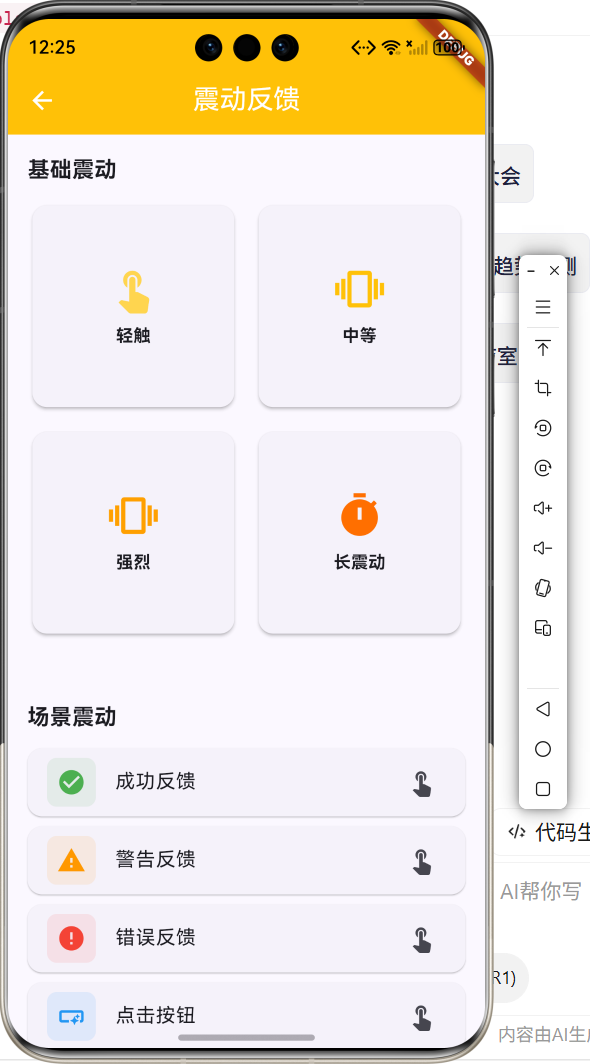
2.1 功能特性
| 功能 | 描述 |
|---|---|
| 基础震动 | 轻触、中等、强烈震动 |
| 场景震动 | 成功、警告、错误反馈 |
| 自定义震动 | 节奏震动、心跳震动 |
| 触觉反馈 | HapticFeedback支持 |
三、项目背景与目标
3.1 项目背景
在交互设计中,震动反馈能增强用户感知。
3.2 项目目标
- 实现多种震动效果
- 支持场景化震动
- 提供自定义震动模式
四、技术架构设计
4.1 核心技术
- vibration: 震动控制库
- HapticFeedback: 系统触觉反馈
- Timer: 自定义震动模式
4.2 实现原理
通过震动API控制震动强度和时长,支持预设模式和自定义模式。
五、详细实现
5.1 Flutter端实现
import 'package:flutter/material.dart';
class VibrationFeedbackPage extends StatelessWidget {
const VibrationFeedbackPage({super.key});
Widget build(BuildContext context) {
return Scaffold(
appBar: AppBar(
title: const Text('震动反馈'),
centerTitle: true,
backgroundColor: Colors.amber,
foregroundColor: Colors.white,
),
body: SingleChildScrollView(
padding: const EdgeInsets.all(16),
child: Column(
crossAxisAlignment: CrossAxisAlignment.start,
children: [
const Text('基础震动', style: TextStyle(fontSize: 18, fontWeight: FontWeight.bold)),
const SizedBox(height: 12),
GridView.count(
shrinkWrap: true,
physics: const NeverScrollableScrollPhysics(),
crossAxisCount: 2,
mainAxisSpacing: 12,
crossAxisSpacing: 12,
children: [
_buildVibrationCard(context, '轻触', Icons.touch_app, Colors.amber[300]!),
_buildVibrationCard(context, '中等', Icons.vibration, Colors.amber[500]!),
_buildVibrationCard(context, '强烈', Icons.shake_hand, Colors.amber[700]!),
_buildVibrationCard(context, '长震动', Icons.timer, Colors.amber[900]!),
],
),
const SizedBox(height: 24),
const Text('场景震动', style: TextStyle(fontSize: 18, fontWeight: FontWeight.bold)),
const SizedBox(height: 12),
ListView(
shrinkWrap: true,
physics: const NeverScrollableScrollPhysics(),
children: [
_buildSceneCard(context, '成功反馈', Icons.check_circle, Colors.green),
_buildSceneCard(context, '警告反馈', Icons.warning, Colors.orange),
_buildSceneCard(context, '错误反馈', Icons.error, Colors.red),
],
),
],
),
),
);
}
Widget _buildVibrationCard(BuildContext context, String title, IconData icon, Color color) {
return Card(
child: InkWell(
onTap: () {
ScaffoldMessenger.of(context).showSnackBar(
SnackBar(content: Text('$title 震动')),
);
},
child: Padding(
padding: const EdgeInsets.all(16),
child: Column(
mainAxisAlignment: MainAxisAlignment.center,
children: [
Icon(icon, size: 40, color: color),
const SizedBox(height: 8),
Text(title),
],
),
),
),
);
}
Widget _buildSceneCard(BuildContext context, String title, IconData icon, Color color) {
return Card(
child: ListTile(
leading: Icon(icon, color: color),
title: Text(title),
trailing: const Icon(Icons.touch_app),
onTap: () {
ScaffoldMessenger.of(context).showSnackBar(
SnackBar(content: Text('$title 震动')),
);
},
),
);
}
}
5.2 UI界面实现
UI采用Material Design 3风格,分为基础震动和场景震动两个部分。
六、核心功能解析
6.1 基础震动
调用不同强度的震动:
Vibration.vibrate(duration: 100); // 轻触
Vibration.vibrate(duration: 300); // 中等
Vibration.vibrate(duration: 500); // 强烈
6.2 模式震动
自定义震动模式:
Vibration.vibrate(pattern: [0, 100, 50, 100]); // 节奏震动
七、实际应用场景
- 按钮反馈:点击按钮时震动
- 游戏交互:游戏中的触觉反馈
- 通知提醒:收到通知时震动
八、优化建议
- 震动强度调节:支持用户自定义强度
- 震动开关:提供震动开关设置
- 更多模式:添加更多预设震动模式
九、常见问题与解决方案
9.1 权限问题
问题:震动功能不工作
解决方案:在AndroidManifest.xml中添加震动权限
9.2 设备差异
问题:不同设备震动效果不同
解决方案:使用HapticFeedback提供一致的体验
十、总结
本文详细介绍了Flutter鸿蒙震动反馈的实现,包括基础震动、场景震动等核心技术。通过本实例,掌握了vibration插件的使用方法。
十一、参考资料
更多推荐


 9
9 0
0- 0


 已为社区贡献3条内容

所有评论(0)