一点补充

之前的示例中用到多次HasForeignKey()方法来指定外键,如果实体类中不存在表示外键的属性,我们可以用下面的方式指定外键列,这样这个外键列只存在于数据库,不存在于实体中:

1

HasOptional(p => p.Invoice).WithMany().Map(m => m.MapKey("DbOnlyInvoiceId"));

对于关联的映射EF提供了很多方法,可谓让人眼花缭乱,上面只写了我了解的一部分,如有没有覆盖到的场景,欢迎大家在评论中讨论。

dudu老大也曾写了很多关于EF映射的文章,这应该是EF中最令人迷惑的一点,不知道未来某个版本能否简化一下呢?

映射高级话题

创建索引

在EF6.1中,没有原生的方式使用Fluent API创建索引,(Data Annotation配置方式下可以使用IndexAttribute标识一个属性映射包含索引)我们可以借助Annotation让Fluent API也可以用上IndexAttribute来实现映射中索引的配置,如下代码。

1

2

3

4

this.Property(ls => DepartId).HasColumnAnnotation("DepartId ", new IndexAnnotation(new IndexAttribute("IX_ DepartId ")

{

    IsUnique = true

}))

重要说明

上面这段代码是来自msdn中EF官方文档的代码,但我亲测不能生成正确的DbMigration配置,其生成的迁移代码如下(并不能正确生成索引):

1

2

3

4

5

6

7

8

AlterColumn("dbo.LineSpecific", "LineBaseId", c => c.Int(nullable: false,

    annotations: new Dictionary<string, AnnotationValues>

    {

        {

            "LineBaseId",

            new AnnotationValues(oldValue: null, newValue: "IndexAnnotation: { Name: IX_LineBaseId, IsUnique: False }")

        },

    }));

可以使用方式,请继续往下读

国外有同行把这个进行了封装,可以使用Fluent API的方式对映射中索引进行配置:

项目GithubNuget

这个扩展中的代码很简单,主要就是通过反射完成了上面代码(那段不能工作的代码)的配置:

1

2

3

4

5

6

7

8

9

10

11

12

13

14

15

16

17

18

19

20

21

22

23

24

25

26

27

28

29

30

31

32

33

34

35

36

37

38

39

40

41

42

43

44

45

46

47

48

49

50

51

52

53

54

55

56

57

58

59

60

61

62

63

64

65

66

67

68

69

70

71

72

73

74

//调用入口

public static EntityTypeConfiguration<TEntity> HasIndex<TEntity>(

    this EntityTypeConfiguration<TEntity> entityTypeConfiguration,

    string indexName,

    Func<EntityTypeConfiguration<TEntity>, PrimitivePropertyConfiguration> propertySelector,

    params Func<EntityTypeConfiguration<TEntity>, PrimitivePropertyConfiguration>[] additionalPropertySelectors)

    where TEntity : class

{

    return entityTypeConfiguration.HasIndex(indexName, IndexOptions.Nonclustered,

        propertySelector, additionalPropertySelectors);

}

//一个支持多种参数的重载

public static EntityTypeConfiguration<TEntity> HasIndex<TEntity>(

    this EntityTypeConfiguration<TEntity> entityTypeConfiguration,

    string indexName, IndexOptions indexOptions,

    Func<EntityTypeConfiguration<TEntity>, PrimitivePropertyConfiguration> propertySelector,

    params Func<EntityTypeConfiguration<TEntity>, PrimitivePropertyConfiguration>[] additionalPropertySelectors)

    where TEntity : class

{

    AddIndexColumn(indexName, indexOptions, 1, propertySelector(entityTypeConfiguration));

    for (int i = 0; i < additionalPropertySelectors.Length; i++)

    {

        AddIndexColumn(indexName, indexOptions, i + 2, additionalPropertySelectors[i](entityTypeConfiguration));

    }

    return entityTypeConfiguration;

}

//将IndexAttribute添加到IndexAnnotation

private static void AddIndexColumn(

    string indexName,

    IndexOptions indexOptions,

    int column,

    PrimitivePropertyConfiguration propertyConfiguration)

{

    var indexAttribute = new IndexAttribute(indexName, column)

    {

        IsClustered = indexOptions.HasFlag(IndexOptions.Clustered),

        IsUnique = indexOptions.HasFlag(IndexOptions.Unique)

    };

    var annotation = GetIndexAnnotation(propertyConfiguration);

    if (annotation != null)

    {

        var attributes = annotation.Indexes.ToList();

        attributes.Add(indexAttribute);

        annotation = new IndexAnnotation(attributes);

    }

    else

    {

        annotation = new IndexAnnotation(indexAttribute);

    }

    propertyConfiguration.HasColumnAnnotation(IndexAnnotation.AnnotationName, annotation);

}

//对属性进行反射得到IndexAnnotation的帮助方法

private static IndexAnnotation GetIndexAnnotation(PrimitivePropertyConfiguration propertyConfiguration)

{

    var configuration = typeof (PrimitivePropertyConfiguration)

        .GetProperty("Configuration", BindingFlags.Instance | BindingFlags.NonPublic)

        .GetValue(propertyConfiguration, null);

    var annotations = (IDictionary<string, object>) configuration.GetType()

        .GetProperty("Annotations", BindingFlags.Instance | BindingFlags.Public)

        .GetValue(configuration, null);

    object annotation;

    if (!annotations.TryGetValue(IndexAnnotation.AnnotationName, out annotation))

        return null;

    return annotation as IndexAnnotation;

}

这个库的使用方式很简单,而且可以用Fluent API编码,最终代码颜值很高(代码来自官方示例):

1

2

3

4

5

6

7

.HasIndex("IX_Customers_Name",          // Provide the index name.

    e => e.Property(x => x.LastName),   // Specify at least one column.

    e => e.Property(x => x.FirstName))  // Multiple columns as desired.

.HasIndex("IX_Customers_EmailAddress"// Supports fluent chaining for more indexes.

    IndexOptions.Unique,                // Supports flags for unique and clustered.

    e => e.Property(x => x.EmailAddress));

当然最重要的是这个库可以生成正确的Migration代码:

1

CreateIndex("dbo. Customers ", " EmailAddress ", unique: true);

映射包含继承关系的实体类

对于包含继承关系的实体类,在使用EF CodeFirst映射时可以采用TPH、TPT和TPC三种方式完成:

TPH:这是EF CodeFirst采用的默认方式,继承关系中的所有实体会被映射到同一张表。

TPT:所有类型映射到不同的表中,子类型所映射到的表只包含不存在于基类中的属性。子类映射的表的主键同时作为关联基类表的外键。

TPC:每个子类映射到不同的表,表中同时包含基类的属性。这种情况下查询非常复杂,真的完全不知道其存在的意义。后文也就不详细介绍了。

先介绍一下几演示所用的实体类,我们的产品类依然存在,这次多了几个孩子

1

2

3

4

5

6

7

8

9

10

11

12

13

14

15

16

17

18

19

20

21

public class Product

{

    public int Id{ get; set; }

    public string Name { get; set; }

    public string Description { get; set; }

}

public class PaperProduct:Product

{

    public int PageNum { get; set; }

}

public class ElectronicProduct : Product

{

    public double LifeTime { get; set; }

}

public class CD : ElectronicProduct

{

    public float Capacity { get; set; }

}

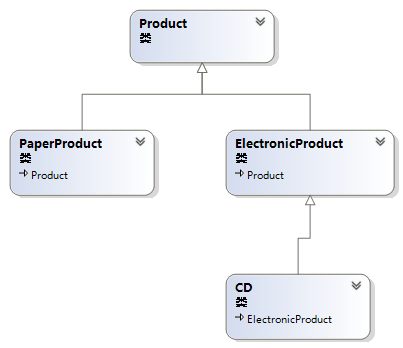
它们的关系如图所示:

图1. Product类继承关系图

TPH(Table-Per-Hierarchy)

由于所有继承层次的类在一个表中,使用一个列区分这些类就是这种方式最重要的一点。默认情况下,EF CodeFirst使用一个名为Discriminator的列并以类型名字符串作为值来区分不同的类。

我们可以使用如下配置来修改这个默认设置,另外由于TPH是EF CodeFirst的默认选择,无需附加其他配置。

1

2

3

4

5

6

7

8

9

10

11

12

public class ProductMap : EntityTypeConfiguration<Product>

{

    public ProductMap()

    {

        Map<Product>(p => { p.Requires("ProductType").HasValue(0); }).ToTable("Product");

        HasKey(p => p.Id);


        Map<PaperProduct>(pp => { pp.Requires("ProductType").HasValue(1); });

        Map<ElectronicProduct>(ep => { ep.Requires("ProductType").HasValue(2); });

        Map<CD>(cd => { cd.Requires("ProductType").HasValue(3); });

    }

}

Requires方法指定区分实体的列的名称,HasValue指定区分值。

特别注意,如果想要自定义表名的话,ToTable要和Map<Product>()在一行中调用,且ToTable()在后。。

添加点数据做测试:

1

2

3

4

5

6

7

8

var product = new Product() { Name = "投影仪", Description = "高分辨率" };

var paperproduct = new PaperProduct() { Name = "《天书》", PageNum = 5 };

var cd = new CD() { Name = "蓝光大碟", LifeTime = 50, Capacity = 50 };

context.Set<Product>().Add(product);

context.Set<Product>().Add(paperproduct);

context.Set<Product>().Add(cd);

context.SaveChanges();

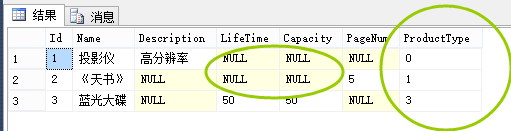
看一下数据库中表结构和数据:

图2. TPH下的数据表

EF按我们的配置添加了名为ProductType的列。当然我们也看到有很多为NULL的列。对于数据的查询不存在JOIN,就不再展示了。

TPT(Table-Per-Type)

这种方式下,所有存在于基类的属性被存储于一张表,每个子类存储到一张表,表中只存子类独有的属性。子类表的主键作为基类表的主键的外键实现关联。直接上配置代码:

1

2

3

4

5

6

7

8

9

10

11

12

public class ProductMap : EntityTypeConfiguration<Product>

{

    public ProductMap()

    {

        ToTable("Product");

        HasKey(p => p.Id);

        Map<PaperProduct>(pp => { pp.ToTable("PaperProduct"); });

        Map<ElectronicProduct>(ep => { ep.ToTable("ElectronicProduct"); });

        Map<CD>(cd => { cd.ToTable("CD"); });

    }

}

如下是迁移代码,按我们所想针对基类和子类都生成了表:

1

2

3

4

5

6

7

8

9

10

11

12

13

14

15

16

17

18

19

20

21

22

23

24

25

26

27

28

29

30

31

32

33

34

35

36

37

38

39

40

41

42

CreateTable(

    "dbo.Product",

    c => new

        {

            Id = c.Int(nullable: false, identity: true),

            Name = c.String(),

            Description = c.String(maxLength: 200),

        })

    .PrimaryKey(t => t.Id);

CreateTable(

    "dbo.PaperProduct",

    c => new

        {

            Id = c.Int(nullable: false),

            PageNum = c.Int(nullable: false),

        })

    .PrimaryKey(t => t.Id)

    .ForeignKey("dbo.Product", t => t.Id)

    .Index(t => t.Id);

CreateTable(

    "dbo.ElectronicProduct",

    c => new

        {

            Id = c.Int(nullable: false),

            LifeTime = c.Double(nullable: false),

        })

    .PrimaryKey(t => t.Id)

    .ForeignKey("dbo.Product", t => t.Id)

    .Index(t => t.Id);

CreateTable(

    "dbo.CD",

    c => new

        {

            Id = c.Int(nullable: false),

            Capacity = c.Single(nullable: false),

        })

    .PrimaryKey(t => t.Id)

    .ForeignKey("dbo.ElectronicProduct", t => t.Id)

    .Index(t => t.Id);

我们使用TPH部分那段代码来插入测试数据,然后看一下查询生成的SQL。

先来查一下子类对象试试:

1

var productGet = context.Set<PaperProduct>().Where(r=>r.Id == 2).ToList();

生成的SQL看起来不错,就是一个INNER JOIN:

1

2

3

4

5

6

7

8

9

SELECT

    '0X0X' AS [C1],

    [Extent1].[Id] AS [Id],

    [Extent2].[Name] AS [Name],

    [Extent2].[Description] AS [Description],

    [Extent1].[PageNum] AS [PageNum]

    FROM  [dbo].[PaperProduct] AS [Extent1]

    INNER JOIN [dbo].[Product] AS [Extent2] ON [Extent1].[Id] = [Extent2].[Id]

    WHERE 2 = [Extent1].[Id]

再来一个基类对象试试:

1

var productGet = context.Set<Product>().Where(r=>r.Id == 1).ToList();

这次悲剧了:

1

2

3

4

5

6

7

8

9

10

11

12

13

14

15

16

17

18

19

20

21

22

23

24

25

26

27

SELECT

    CASE WHEN (( NOT (([Project3].[C1] = 1) AND ([Project3].[C1] IS NOT NULL))) AND ( NOT (([Project1].[C1] = 1) AND ([Project1].[C1] IS NOT NULL)))) THEN '0X' WHEN (([Project3].[C1] = 1) AND ([Project3].[C1] IS NOT NULL) AND ( NOT (([Project3].[C2] = 1) AND ([Project3].[C2] IS NOT NULL)))) THEN '0X0X' WHEN (([Project3].[C2] = 1) AND ([Project3].[C2] IS NOT NULL)) THEN '0X0X0X' ELSE '0X1X' END AS [C1],

    [Extent1].[Id] AS [Id],

    [Extent1].[Name] AS [Name],

    [Extent1].[Description] AS [Description],

    CASE WHEN (( NOT (([Project3].[C1] = 1) AND ([Project3].[C1] IS NOT NULL))) AND ( NOT (([Project1].[C1] = 1) AND ([Project1].[C1] IS NOT NULL)))) THEN CAST(NULL AS float) WHEN (([Project3].[C1] = 1) AND ([Project3].[C1] IS NOT NULL) AND ( NOT (([Project3].[C2] = 1) AND ([Project3].[C2] IS NOT NULL)))) THEN [Project3].[LifeTime] WHEN (([Project3].[C2] = 1) AND ([Project3].[C2] IS NOT NULL)) THEN [Project3].[LifeTime] END AS [C2],

    CASE WHEN (( NOT (([Project3].[C1] = 1) AND ([Project3].[C1] IS NOT NULL))) AND ( NOT (([Project1].[C1] = 1) AND ([Project1].[C1] IS NOT NULL)))) THEN CAST(NULL AS real) WHEN (([Project3].[C1] = 1) AND ([Project3].[C1] IS NOT NULL) AND ( NOT (([Project3].[C2] = 1) AND ([Project3].[C2] IS NOT NULL)))) THEN CAST(NULL AS real) WHEN (([Project3].[C2] = 1) AND ([Project3].[C2] IS NOT NULL)) THEN [Project3].[Capacity] END AS [C3],

    CASE WHEN (( NOT (([Project3].[C1] = 1) AND ([Project3].[C1] IS NOT NULL))) AND ( NOT (([Project1].[C1] = 1) AND ([Project1].[C1] IS NOT NULL)))) THEN CAST(NULL AS int) WHEN (([Project3].[C1] = 1) AND ([Project3].[C1] IS NOT NULL) AND ( NOT (([Project3].[C2] = 1) AND ([Project3].[C2] IS NOT NULL)))) THEN CAST(NULL AS int) WHEN (([Project3].[C2] = 1) AND ([Project3].[C2] IS NOT NULL)) THEN CAST(NULL AS int) ELSE [Project1].[PageNum] END AS [C4]

    FROM   [dbo].[Product] AS [Extent1]

    LEFT OUTER JOIN  (SELECT

        [Extent2].[Id] AS [Id],

        [Extent2].[PageNum] AS [PageNum],

        cast(1 as bit) AS [C1]

        FROM [dbo].[PaperProduct] AS [Extent2] ) AS [Project1] ON [Extent1].[Id] = [Project1].[Id]

    LEFT OUTER JOIN  (SELECT

        [Extent3].[Id] AS [Id],

        [Extent3].[LifeTime] AS [LifeTime],

        cast(1 as bit) AS [C1],

        [Project2].[Capacity] AS [Capacity],

        CASE WHEN (([Project2].[C1] = 1) AND ([Project2].[C1] IS NOT NULL)) THEN cast(1 as bit) WHEN ( NOT (([Project2].[C1] = 1) AND ([Project2].[C1] IS NOT NULL))) THEN cast(0 as bit) END AS [C2]

        FROM  [dbo].[ElectronicProduct] AS [Extent3]

        LEFT OUTER JOIN  (SELECT

            [Extent4].[Id] AS [Id],

            [Extent4].[Capacity] AS [Capacity],

            cast(1 as bit) AS [C1]

            FROM [dbo].[CD] AS [Extent4] ) AS [Project2] ON [Extent3].[Id] = [Project2].[Id] ) AS [Project3] ON [Extent1].[Id] = [Project3].[Id]

    WHERE 1 = [Extent1].[Id]

更多推荐