
spring boot + vue3 实现RSA加密解密
·
一、前端部分
1、安装依赖
npm i jsencrypt
2、定义函数,进行数据加密
import JSEncrypt from 'jsencrypt';
import { getLoginPublicKey } from '@/api/common';//获取后端公钥接口

//RSA加密
export const rsaEncryption = async (data) => {
  let res = await getLoginPublicKey();//获取公钥
  const { publicKey } = res;
  const encryptor = new JSEncrypt();
  encryptor.setPublicKey(`-----BEGIN PUBLIC KEY-----\n${publicKey}\n-----END PUBLIC KEY-----`);
  return encryptor.encrypt(data + '|timestamp|' + Date.parse(new Date()));
};
二、后端
1、maven依赖
<dependency>
            <groupId>cn.hutool</groupId>
            <artifactId>hutool-all</artifactId>
            <version>5.8.44</version>
            <scope>compile</scope>
        </dependency>
        <dependency>
            <groupId>org.apache.commons</groupId>
            <artifactId>commons-lang3</artifactId>
            <version>3.12.0</version>
        </dependency>
2、执行命令生成公钥和私钥(可在windows电脑中的cmd命令窗口中执行)
获取私钥:openssl genrsa -out rsa_private.key 2048
获取公钥:openssl rsa -in rsa_private.key -pubout -out rsa_public.key
3、将秘钥文件放到resources中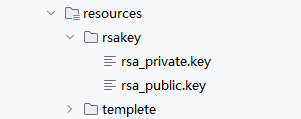
4、封装工具类RsaUtil
package com.example.system_manage.utils;

import cn.hutool.core.codec.Base64;
import cn.hutool.crypto.KeyUtil;
import cn.hutool.crypto.asymmetric.KeyType;
import cn.hutool.crypto.asymmetric.RSA;
import org.apache.commons.io.IOUtils;
import org.springframework.core.io.ClassPathResource;

import java.io.InputStream;
import java.nio.charset.StandardCharsets;
import java.security.PrivateKey;
import java.security.PublicKey;

public class RsaUtil {
    /**
     * 获取私钥
     */
    public static PrivateKey getPrivateKey() throws Exception {
        ClassPathResource classPathResource = new ClassPathResource("rsakey/rsa_private.key");
        try(InputStream inputStream = classPathResource.getInputStream()){
            String privateKeyStr=IOUtils.toString(inputStream, StandardCharsets.UTF_8)
                    .replace("-----BEGIN RSA PRIVATE KEY-----", "")
                    .replace("-----END RSA PRIVATE KEY-----", "")
                    .replaceAll("\\s", "");
            byte[] keyBytes = Base64.decode(privateKeyStr);
            return KeyUtil.generateRSAPrivateKey(keyBytes);
        }

    }

    //获取公钥
    public static String getPublicKey() {
        ClassPathResource classPathResource = new ClassPathResource("rsakey/rsa_public.key");
        try(InputStream inputStream = classPathResource.getInputStream()) {
            String result= IOUtils.toString(inputStream, StandardCharsets.UTF_8)
                    .replace("-----BEGIN PUBLIC KEY-----", "")
                    .replace("-----END PUBLIC KEY-----", "")
                    .replaceAll("\\s+", "");
            return result;
        }catch (Exception ex){
            throw new BusinessException(ex.getMessage());
        }
    }

    //解密
    public static String decrypt(String encryptedBase64) {
        try {
            //私钥
            PrivateKey privateKey = getPrivateKey();
            //公钥
            PublicKey publicKey=KeyUtil.getRSAPublicKey(privateKey);
            String content=new RSA(privateKey,publicKey).decryptStr(encryptedBase64, KeyType.PrivateKey);
            String[] contents=content.split("\\|timestamp\\|");
            if(contents.length!=2){
                throw new BusinessException("解密失败");
            }
            if(System.currentTimeMillis()-Long.valueOf(contents[1]).longValue()>3000){
                throw new BusinessException("当前无效报文");
            }
            return contents[0];
        }catch (Exception ex){
            throw new BusinessException(ex.getMessage());
        }
    }
}
5、然后就可以愉快的在代码中执行了
更多推荐



 7
7 0
0- 0


 已为社区贡献1条内容

所有评论(0)