
【Java框架】知识点汇总Day5:Spring Boot(持续更新)
Spring手动配置web.xml、spring.xml、springmvc.xml、config.xml
Spring Boot 不需要进行任何通用配置,不需要任何的XML文件,自动配置。
Spring Boot自动装配
一、项目创建+测试
Spring Boot + Spring MVC +MyBatis
1.创建项目
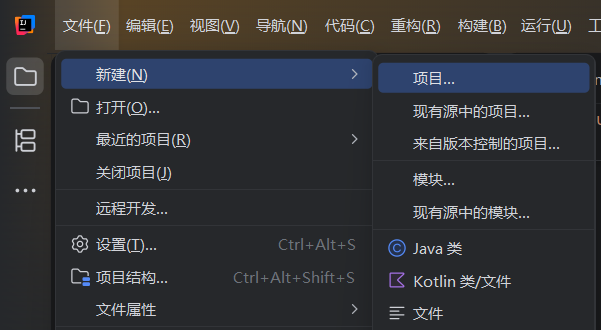
File->新建->项目
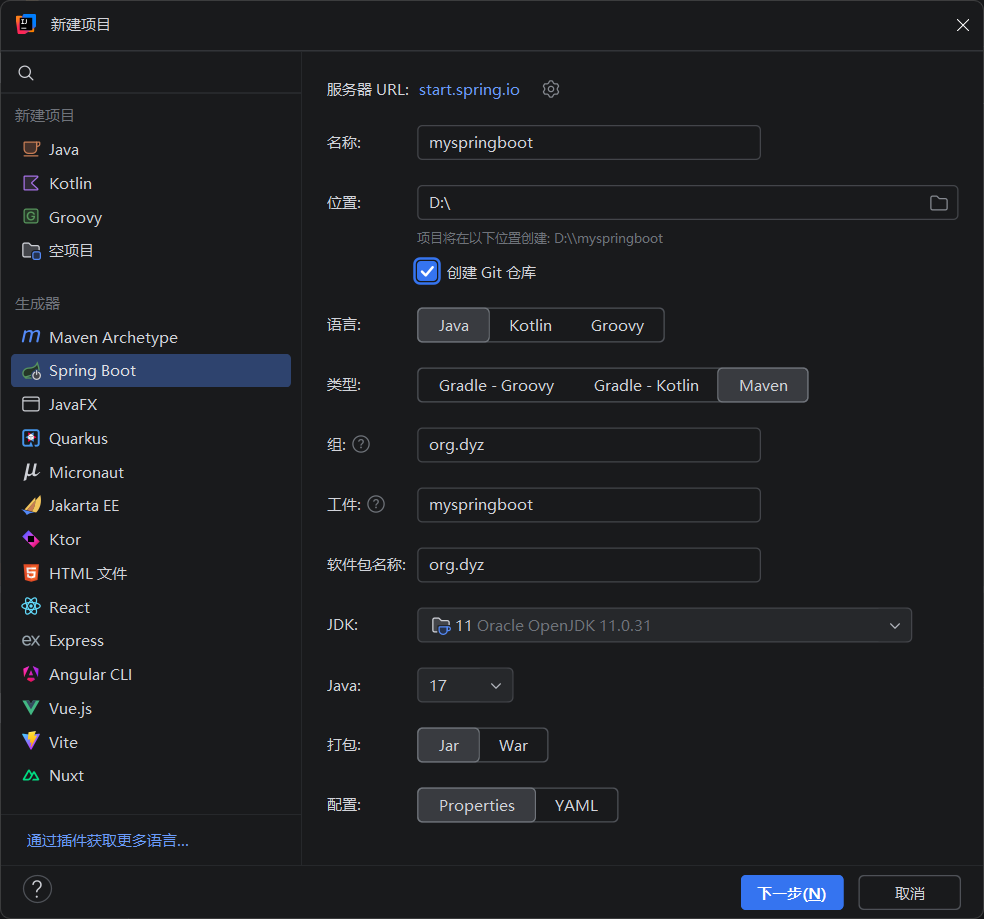
Java:17 最低版本,JDK最低需要17才能适配。我目前有JDK26,就选择了JDK26.
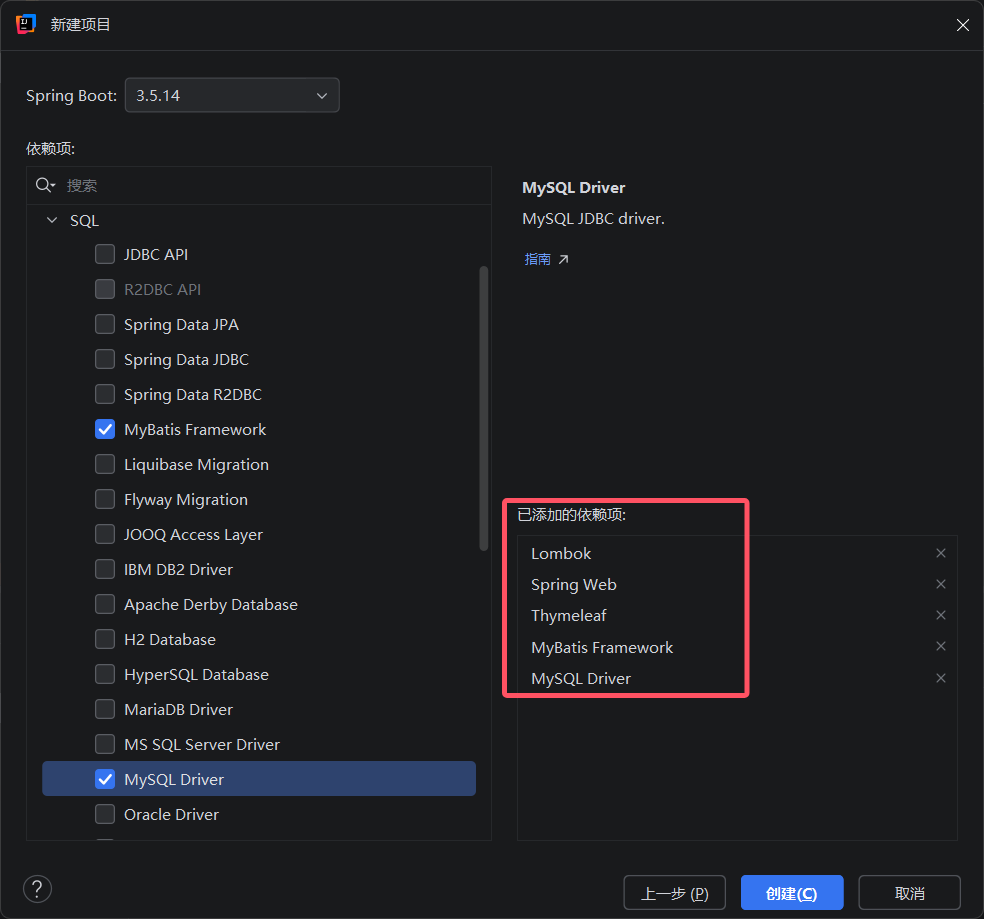
点击“创建”,就创建了新项目。
thymeleaf 前端模板,html
2.项目测试
controller、entity、mapper同ssm中的
pom.xml
<?xml version="1.0" encoding="UTF-8"?>
<project xmlns="http://maven.apache.org/POM/4.0.0" xmlns:xsi="http://www.w3.org/2001/XMLSchema-instance"
         xsi:schemaLocation="http://maven.apache.org/POM/4.0.0 https://maven.apache.org/xsd/maven-4.0.0.xsd">
    <modelVersion>4.0.0</modelVersion>
    <parent>
        <groupId>org.springframework.boot</groupId>
        <artifactId>spring-boot-starter-parent</artifactId>
        <version>3.5.14</version>
        <relativePath/> <!-- lookup parent from repository -->
    </parent>
    <groupId>org.dyz</groupId>
    <artifactId>myspringboot</artifactId>
    <version>0.0.1-SNAPSHOT</version>
    <name>myspringboot</name>
    <description>myspringboot</description>
    <url/>
    <licenses>
        <license/>
    </licenses>
    <developers>
        <developer/>
    </developers>
    <scm>
        <connection/>
        <developerConnection/>
        <tag/>
        <url/>
    </scm>
    <properties>
        <java.version>17</java.version>
    </properties>
    <dependencies>
        <dependency>
            <groupId>org.springframework.boot</groupId>
            <artifactId>spring-boot-starter-thymeleaf</artifactId>
        </dependency>
        <dependency>
            <groupId>org.springframework.boot</groupId>
            <artifactId>spring-boot-starter-web</artifactId>
        </dependency>
        <dependency>
            <groupId>org.mybatis.spring.boot</groupId>
            <artifactId>mybatis-spring-boot-starter</artifactId>
            <version>3.0.5</version>
        </dependency>

        <dependency>
            <groupId>com.mysql</groupId>
            <artifactId>mysql-connector-j</artifactId>
            <scope>runtime</scope>
        </dependency>
        <dependency>
            <groupId>org.projectlombok</groupId>
            <artifactId>lombok</artifactId>
            <optional>true</optional>
        </dependency>
        <dependency>
            <groupId>org.springframework.boot</groupId>
            <artifactId>spring-boot-starter-test</artifactId>
            <scope>test</scope>
        </dependency>
        <dependency>
            <groupId>org.mybatis.spring.boot</groupId>
            <artifactId>mybatis-spring-boot-starter-test</artifactId>
            <version>3.0.5</version>
            <scope>test</scope>
        </dependency>
    </dependencies>

    <build>
        <plugins>
            <plugin>
                <groupId>org.springframework.boot</groupId>
                <artifactId>spring-boot-maven-plugin</artifactId>
                <configuration>
                    <excludes>
                        <exclude>
                            <groupId>org.projectlombok</groupId>
                            <artifactId>lombok</artifactId>
                        </exclude>
                    </excludes>
                </configuration>
            </plugin>
            <plugin>
                <groupId>org.apache.maven.plugins</groupId>
                <artifactId>maven-compiler-plugin</artifactId>
                <executions>
                    <execution>
                        <id>default-compile</id>
                        <phase>compile</phase>
                        <goals>
                            <goal>compile</goal>
                        </goals>
                        <configuration>
                            <annotationProcessorPaths>
                                <path>
                                    <groupId>org.projectlombok</groupId>
                                    <artifactId>lombok</artifactId>
                                </path>
                            </annotationProcessorPaths>
                        </configuration>
                    </execution>
                    <execution>
                        <id>default-testCompile</id>
                        <phase>test-compile</phase>
                        <goals>
                            <goal>testCompile</goal>
                        </goals>
                        <configuration>
                            <annotationProcessorPaths>
                                <path>
                                    <groupId>org.projectlombok</groupId>
                                    <artifactId>lombok</artifactId>
                                </path>
                            </annotationProcessorPaths>
                        </configuration>
                    </execution>
                </executions>
            </plugin>
        </plugins>
        <resources>
            <resource>
                <directory>src/main/java</directory>
                <includes>
                    <include>**/*.xml</include>
                </includes>
            </resource>
        </resources>
    </build>

</project>
application.yml
spring:
  datasource:
    driver-class-name: com.mysql.cj.jdbc.Driver
    url: jdbc:mysql://localhost:3306/car_rental_separate
    username: root
    password: 123456
index.html
<!DOCTYPE html>
<html xmlns:th="http://www.thymeleaf.org">
<html lang="en">
<head>
    <meta charset="UTF-8">
    <title>Title</title>
</head>
<body>
<table border="1">
    <tr>
        <td>ID</td>
        <td>标题</td>
        <td>内容</td>
        <td>创建时间</td>
        <td>操作员</td>
        <td>操作</td>
    </tr>
    <tr th:each="news:${list}">
        <td th:text="${news.id}"></td>
        <td th:text="${news.title}"></td>
        <td th:text="${news.content}"></td>
        <td th:text="${news.createtime}"></td>
        <td th:text="${news.opername}"></td>
        <td>
            <a href="/get?id=${news.id}">编辑</a>
            <a href="/delete?id=${news.id}">删除</a>
        </td>
    </tr>
</table>

</body>
</html>
启动类,自动生成。加入@MapperScan("com.dyz.mapper")
package com.dyz;


import org.mybatis.spring.annotation.MapperScan;
import org.springframework.boot.SpringApplication;
import org.springframework.boot.autoconfigure.SpringBootApplication;

@SpringBootApplication
@MapperScan("com.dyz.mapper")
public class MyspringbootApplication {

    public static void main(String[] args) {
        SpringApplication.run(MyspringbootApplication.class, args);
    }

}
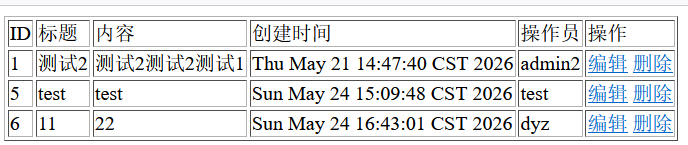
启动测试 localhost:8080/list
二、CRUD
不能直接通过url访问templates目录,thymeleaf必须通过controller解析后才能获取
index.html
<a href="/add"></a>HelloController
  @RequestMapping("/add")
    public String add(){
        return "add";
    }
表示跳转到add页面。
CRUD实现
index.html
<!DOCTYPE html>
<html xmlns:th="http://www.thymeleaf.org">
<html lang="en">
<head>
    <meta charset="UTF-8">
    <title>Title</title>
</head>
<body>
<a href="/add">添加</a>   <!--get的方式-->
<table border="1">
    <tr>
        <td>ID</td>
        <td>标题</td>
        <td>内容</td>
        <td>创建时间</td>
        <td>操作员</td>
        <td>操作</td>
    </tr>
    <tr th:each="news:${list}">
        <td th:text="${news.id}"></td>
        <td th:text="${news.title}"></td>
        <td th:text="${news.content}"></td>
        <td th:text="${news.createtime}"></td>
        <td th:text="${news.opername}"></td>
        <td>
            <!--字符串拼接-->
            <a th:href="@{'/get?id= ' + ${news.id}}">编辑</a>
            <!--th:href + @{} -->
<!--            <a th:href="@{/get(id=${news.id})}">编辑</a>-->
            <a th:href="@{'/delete?id= ' + ${news.id}}">删除</a>
        </td>
    </tr>
</table>

</body>
</html>
edit.html
<!DOCTYPE html>
<html xmlns:th="http://www.thymeleaf.org">
<html lang="en">
<head>
    <meta charset="UTF-8">
    <title>Title</title>
</head>
<body>
<form action="update" method="post">
<table>
    <tr>
        <td>ID: </td>
        <td>
            <input type="text" name="id" th:value="${news.id}" readonly>
        </td>
    </tr>
    <tr>
        <td>title: </td>
        <td>
            <input type="text" name="title" th:value="${news.title}">
        </td>
    </tr>
    <tr>
        <td>content: </td>
        <td>
            <input type="text" name="content" th:value="${news.content}">
        </td>
    </tr>
    <tr>
        <td>createtime: </td>
        <td>
            <input type="text" name="createtime" th:value="${news.createtime}" readonly>
        </td>
    </tr>
    <tr>
        <td>opername: </td>
        <td>
            <input type="text" name="opername" th:value="${news.opername}">
        </td>
    </tr>
    <tr>
        <td>
            <input type="submit" name="提交">
        </td>
        <td>
            <input type="reset" name="重置">
        </td>
    </tr>
</table>
</form>

</body>
</html>
add.html
<!DOCTYPE html>
<html lang="en">
<head>
    <meta charset="UTF-8">
    <title>Title</title>
</head>
<body>
<form action="/add" method="post">
    <table>
        <tr>
            <td>Title:</td>
            <td>
            <input type="text" name="title">
            </td>
        </tr>
        <tr>
            <td>content: </td>
            <td>
                <input type="text" name="content">
            </td>
        </tr>
        <tr>
            <td>opername: </td>
            <td>
                <input type="text" name="opername">
            </td>
        </tr>
        <tr>
            <td>
                <input type="submit" name="提交">
            </td>
            <td>
                <input type="reset" name="重置">
            </td>
        </tr>
    </table>
</form>

</body>
</html>
实体类 News
package com.dyz.entity;

import lombok.Data;

import java.util.Date;

@Data
public class News {
    private int id;
    private String title;
    private  String content;
    private Date createtime;
    private String opername;
}
NewsMapper
package com.dyz.mapper;

import com.dyz.entity.News;

import java.util.List;

public interface NewsMapper {
    public List<News> list();
    public void add(News news);
    public News getById(Integer id);
    public void update(News news);
    public void deleteById(Integer id);
}
NewsMapper.xml
<?xml version="1.0" encoding="UTF-8" ?>
<!DOCTYPE mapper PUBLIC "-//mybatis.org//DTD Mapper 3.0//EN" "http://mybatis.org/dtd/mybatis-3-mapper.dtd">
<mapper namespace="com.dyz.mapper.NewsMapper">

 <select id="list" resultType="com.dyz.entity.News">
     select * from sys_news
 </select>
   <insert id="add" parameterType="com.dyz.entity.News">
       insert into sys_news(title,content,createtime,opername) values (#{title},#{content},#{createtime},#{opername})
   </insert>

    <select id="getById" parameterType="java.lang.Integer" resultType="com.dyz.entity.News">
        select  * from sys_news where id = #{id}
    </select>
    <select id="update" parameterType="com.dyz.entity.News">
        update sys_news set title = #{title},content=#{content},opername = #{opername} where id = ${id}
    </select>
    <select id="deleteById" parameterType="com.dyz.entity.News">
        delete from sys_news where id = #{id}
    </select>
</mapper>
xml文件可以不单独写,使用注解在NewsMapper中生成SQL
HelloController
package com.dyz.controller;


import com.dyz.entity.News;
import com.dyz.mapper.NewsMapper;
import org.springframework.beans.factory.annotation.Autowired;
import org.springframework.stereotype.Controller;
import org.springframework.ui.Model;
import org.springframework.web.bind.annotation.GetMapping;
import org.springframework.web.bind.annotation.PostMapping;
import org.springframework.web.bind.annotation.RequestMapping;

import java.util.Date;
import java.util.List;

@Controller
public class HelloController {
    @Autowired
  private NewsMapper newsMapper;

    @RequestMapping("/list")
    public String List(Model model){
        List<News> list  = this.newsMapper.list();
        model.addAttribute("list",list);
        return "index";
    }

    @GetMapping("/add")  //网页跳转
    public String add(){
        return "add";
    }

    @PostMapping("/add")   //add方法
    public String add(News news){
        news.setCreatetime(new Date());
        this.newsMapper.add(news);
        return "redirect:/list";
    }
    @GetMapping("/get")
    public String get(Model model,Integer id){
        News news = this.newsMapper.getById(id);
        model.addAttribute("news",news);
        return "edit";
    }

    @PostMapping("/update")
    public String update(News news){
        this.newsMapper.update(news);
        return "redirect:/list";
    }

    @GetMapping("delete")
    public String delete(Integer id){
        this.newsMapper.deleteById(id);
        return "redirect:/list";
    }
}
三、Thymeleaf
text用于显示文本信息
if用来判断内容是否显示。条件范围内的显示,不在条件范围内的不显示。
<!DOCTYPE html>
<html lang="en">
<head>
    <meta charset="UTF-8">
    <title>Title</title>
</head>
<body>
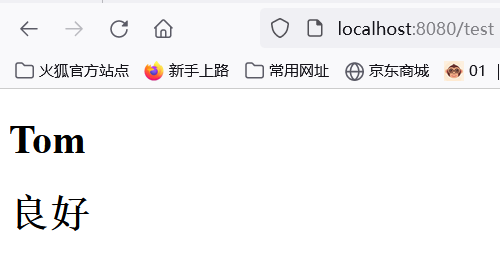
<h1 th:text="${name}"></h1>
<h1 th:if="${score >= 90}">优秀</h1>
<h1 th:if="${score < 90 && score > 80}">良好</h1>

</body>
</html>
@GetMapping("/test")
public String index(Model model){
model.addAttribute("name","Tom");
model.addAttribute("score",82);
return "/test";
}
each用来遍历集合
    <tr th:each="news:${list}">
        <td th:text="${news.id}"></td>
        <td th:text="${news.title}"></td>
        <td th:text="${news.content}"></td>
        <td th:text="${news.createtime}"></td>
        <td th:text="${news.opername}"></td>
        <td>
            <!--字符串拼接-->
            <a th:href="@{'/get?id= ' + ${news.id}}">编辑</a>
            <!--th:href + @{} -->
<!--            <a th:href="@{/get(id=${news.id})}">编辑</a>-->
            <a th:href="@{'/delete?id= ' + ${news.id}}">删除</a>
        </td>
    </tr>
@RequestMapping("/list")
public String List(Model model){
List<News> list = this.newsMapper.list();
model.addAttribute("list",list);
return "index";
}value 用来给标签赋值
@GetMapping("/get")
    public String get(Model model,Integer id){
        News news = this.newsMapper.getById(id);
        model.addAttribute("news",news);
        return "edit";
    }
<tr>
<td>opername: </td>
<td>
<input type="text" name="opername" th:value="${news.opername}">
</td>
</tr>四、application配置文件
Spring Boot工程项目的配置文件名称必须是application,有两种不同的格式,分别是properties和yaml,如果两种格式同时存在,properties的优先级更高。
application.properties
server.port=8082
spring.datasource.driver-class-name=com.mysql.cj.jdbc.Driver
spring.datasource.url=jdbc:mysql://localhost:3306/car_rental_separate
spring.datasource.username=root
spring.datasource.password=123456
application.yml
server:
  port: 8081
spring:
  datasource:
    driver-class-name: com.mysql.cj.jdbc.Driver
    url: jdbc:mysql://localhost:3306/car_rental_separate
    username: root
    password: 123456
更多推荐


 5
5 0
0- 0


 已为社区贡献15条内容

所有评论(0)