
【VisionPro项目】确定特征中心【含完整C#脚本可直接复制】
·
1. 摘要
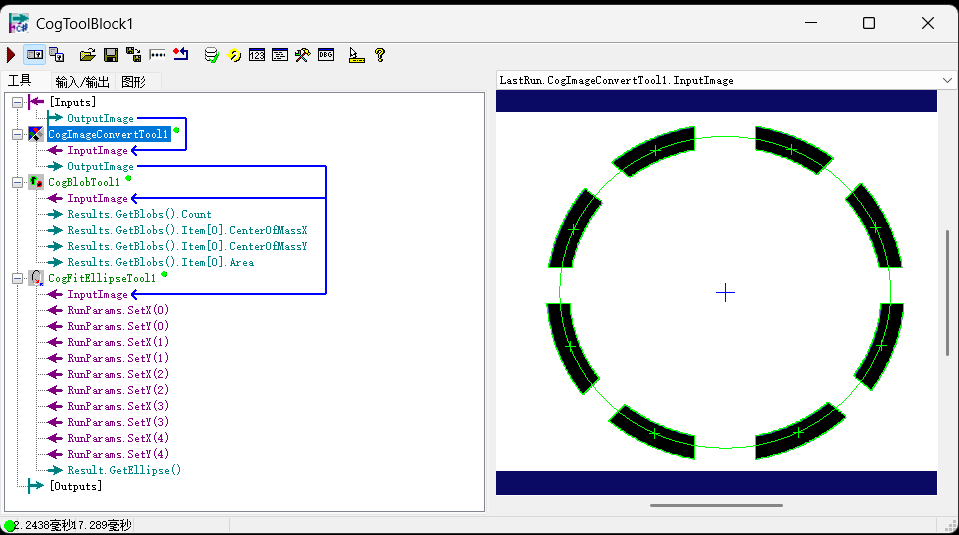
- 检测需求:当有多个特征点时,确定特征区域的的中心位置
- 检测逻辑:
- 确定需要的特征点
- 提取所有特征点的中心,并以此画圆形
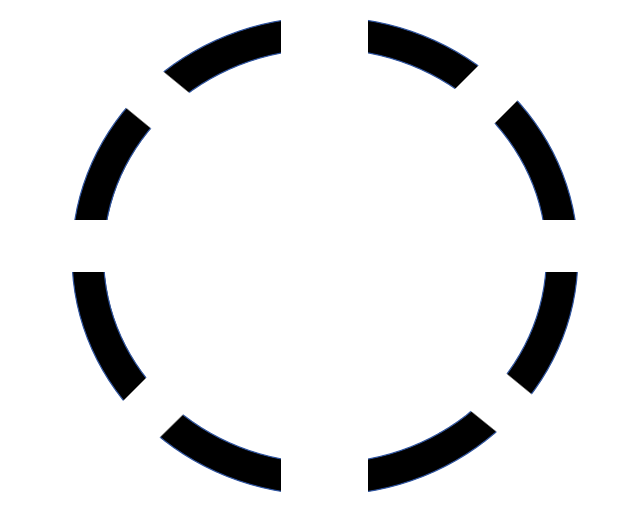
2. 产品图像
3. 工具组
4.源码
#region namespace imports
using System;
using System.Collections;
using System.Drawing;
using System.IO;
using System.Windows.Forms;
using Cognex.VisionPro;
using Cognex.VisionPro.ToolBlock;
using Cognex.VisionPro3D;
using Cognex.VisionPro.ImageProcessing;
using Cognex.VisionPro.Blob;
#endregion

public class CogToolBlockAdvancedScript : CogToolBlockAdvancedScriptBase
{
  #region Private Member Variables
  private Cognex.VisionPro.ToolBlock.CogToolBlock mToolBlock;
  #endregion

  /// <summary>
  /// Called when the parent tool is run.
  /// Add code here to customize or replace the normal run behavior.
  /// </summary>
  /// <param name="message">Sets the Message in the tool's RunStatus.</param>
  /// <param name="result">Sets the Result in the tool's RunStatus</param>
  /// <returns>True if the tool should run normally,
  ///          False if GroupRun customizes run behavior</returns>
  public override bool GroupRun(ref string message, ref CogToolResultConstants result)
  {
    // To let the execution stop in this script when a debugger is attached, uncomment the following lines.
    // #if DEBUG
    // if (System.Diagnostics.Debugger.IsAttached) System.Diagnostics.Debugger.Break();
    // #endif

    CogImageConvertTool convert = mToolBlock.Tools["CogImageConvertTool1"] as CogImageConvertTool;
    CogBlobTool blob1 = mToolBlock.Tools["CogBlobTool1"] as CogBlobTool;
    CogFitEllipseTool fit1 = mToolBlock.Tools["CogFitEllipseTool1"] as CogFitEllipseTool;


    // Run each tool using the RunTool function
    //foreach(ICogTool tool in mToolBlock.Tools)
      //mToolBlock.RunTool(tool, ref message, ref result);

    double[] xArray = new double[10];
    double[] yArray = new double[10];

    convert.Run();
    blob1.Run();
    for(int i = 0 ; i < blob1.Results.GetBlobs().Count ; i++)
    {
      xArray[i] = blob1.Results.GetBlobs()[i].CenterOfMassX;
      yArray[i] = blob1.Results.GetBlobs()[i].CenterOfMassY;
    }

    //剪裁
    Array.Resize(ref xArray, blob1.Results.GetBlobs().Count);
    Array.Resize(ref yArray, blob1.Results.GetBlobs().Count);

    while(fit1.RunParams.NumPoints > 0)
    {
      fit1.RunParams.DeletePoint(0); // 每次固定删【第0号(第一个)点】
    }

    for(int i = 0 ; i < blob1.Results.GetBlobs().Count ; i++)
    {
      double px = xArray[i];
      double py = yArray[i];
      //核心:向拟合工具添加坐标点
      fit1.RunParams.AddPoint(px, py);
    }

    fit1.Run();

    return false;
  }

  #region When the Current Run Record is Created
  /// <summary>
  /// Called when the current record may have changed and is being reconstructed
  /// </summary>
  /// <param name="currentRecord">
  /// The new currentRecord is available to be initialized or customized.</param>
  public override void ModifyCurrentRunRecord(Cognex.VisionPro.ICogRecord currentRecord)
  {
  }
  #endregion

  #region When the Last Run Record is Created
  /// <summary>
  /// Called when the last run record may have changed and is being reconstructed
  /// </summary>
  /// <param name="lastRecord">
  /// The new last run record is available to be initialized or customized.</param>
  public override void ModifyLastRunRecord(Cognex.VisionPro.ICogRecord lastRecord)
  {
  }
  #endregion

  #region When the Script is Initialized
  /// <summary>
  /// Perform any initialization required by your script here
  /// </summary>
  /// <param name="host">The host tool</param>
  public override void Initialize(Cognex.VisionPro.ToolGroup.CogToolGroup host)
  {
    // DO NOT REMOVE - Call the base class implementation first - DO NOT REMOVE
    base.Initialize(host);


    // Store a local copy of the script host
    this.mToolBlock = ((Cognex.VisionPro.ToolBlock.CogToolBlock)(host));
  }
  #endregion

}
注意:fit1.RunParams的点位不会自动清空
    while(fit1.RunParams.NumPoints > 0)
    {
      fit1.RunParams.DeletePoint(0);
    }
必须保留这段代码,删掉一定会出严重 BUG
核心原因:fit1.RunParams的点位不会自动清空,永久累加叠加。CogFitEllipse 的点位列表是全局缓存,每次脚本 Run 不会自动清空上次的点:
-
第一次运行:blob 有 4 个点。
AddPoint → fit 里一共 4 个点,正常拟合圆。
-
第二次换图运行:blob 只剩 3 个点
没有 Delete 清空旧点 → 先保留上次 4 个旧点 + 新增本次 3 个点 = 总共 7 个点
拟合 = 旧图 4 个坐标 + 新图 3 个坐标混在一起算圆,圆心、半径全部算错。
-
反复运行 N 次
点位越堆越多,几十上百个杂乱坐标混在一起,拟合彻底跑偏、画出来的圆完全错误。
更多推荐
 7
7 0
0- 0


 已为社区贡献3条内容

所有评论(0)