
Vue05
·
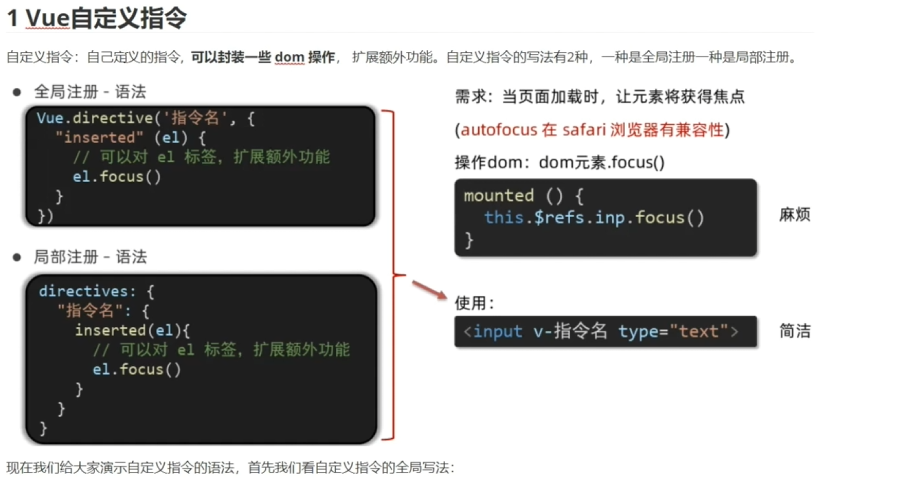
import Vue from 'vue'
import App from './App.vue'

Vue.config.productionTip = false
// 自定义组件的全局注册
Vue.directive('focus',{//参数1:自定义指令的名称
  //可以对el标签,扩张额外边距
  //inserted:当前自定义指令会在插入页面中触发效果
  inserted(el){//el 当前自定义作用的HTML元素
    el.focus();
    }
}),
new Vue({
  render: h => h(App),
}).$mount('#app')
<template>
<div>
<h3>自定义指令</h3>
<!-- 传统写法: 用户名:<input type="text" ref='put'> -->
用户名:<input type="text" v-focus>
</div>
</template>
<script>
export default {
// mounted(){
// this.$refs.put.focus();
// }
// 自定义局部指令:
directives:{
focus:{//自定义局部指令的名称
inserted(el){
el.focus();
}
}
}
}
</script>
<style>
</style>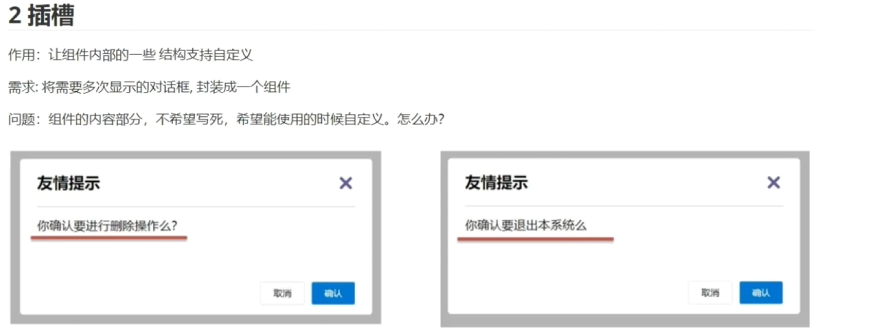

<template>
  <div class="dialog">
    <div class="dialog-header">
      <h3>友情提示</h3>
      <span class="close">x</span>
    </div>
    <div class="dialog-content">
        <!-- 将自定义内容的部分使用插槽slot占位 -->
      <slot></slot>
    </div>
    <div class="dialog-footer">
      <button>取消</button>
      <button>确认</button>
    </div>
  </div>
</template>

<script>
export default {
  data () {
    return {

    }
  }
}
</script>

<style>
* {
  margin: 0;
  padding: 0;
}
.dialog {
  width: 470px;
  height: 230px;
  padding: 0 25px;
  background-color: #ffffff;
  margin: 40px auto;
  border-radius: 5px;
}
.dialog-header {
  height: 70px;
  line-height: 70px;
  font-size: 20px;
  border-bottom: 1px solid #ccc;
  position: relative;
}
.dialog-header .close {
  position: absolute;
  right: 0px;
  top: 0px;
  cursor: pointer;
}
.dialog-content {
  height: 80px;
  font-size: 18px;
  padding: 15px 0;
}
.dialog-footer {
  display: flex;
  justify-content: flex-end;
}
.dialog-footer button {
  width: 65px;
  height: 35px;
  background-color: #ffffff;
  border: 1px solid #e1e3e9;
  cursor: pointer;
  outline: none;
  margin-left: 10px;
  border-radius: 3px;
}
.dialog-footer button:last-child {
  background-color: #007acc;
  color: #fff;
}
</style>
<template>
<div>
<MyDialog>
确定要删除吗
</MyDialog>
<!--
在子组件自定义标签的内部定义需要设置的自定义的内容
-->
<MyDialog>
确定要退出本系统吗
</MyDialog>
</div>
</template>
<script>
import MyDialog from './components/MyDialog.vue';
export default {
components:{
MyDialog,
}
}
</script>
<style>
</style>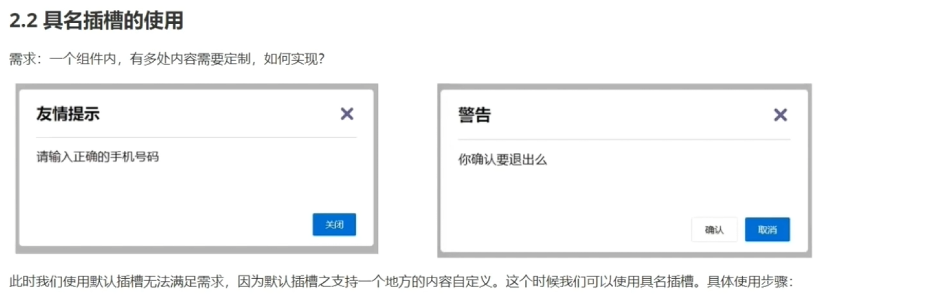
<template>
  <div class="dialog">
    <div class="dialog-header">
      <slot name="head"></slot>
      <span class="close">x</span>
    </div>
    <div class="dialog-content">
        <slot name="content"></slot>
        <!-- 将自定义内容的部分使用插槽slot占位 -->
    </div>
    <div class="dialog-footer">
        <slot name="foot"></slot>
    </div>
  </div>
</template>

<script>
export default {
  data () {
    return {

    }
  }
}
</script>

<style>
* {
  margin: 0;
  padding: 0;
}
.dialog {
  width: 470px;
  height: 230px;
  padding: 0 25px;
  background-color: #ffffff;
  margin: 40px auto;
  border-radius: 5px;
  border: 2px skyblue solid;
}
.dialog-header {
  height: 70px;
  line-height: 70px;
  font-size: 20px;
  border-bottom: 1px solid #ccc;
}
.dialog-header .close {
  position: absolute;
  right: 0px;
  top: 0px;
  cursor: pointer;
}
.dialog-content {
  height: 80px;
  font-size: 18px;
  padding: 15px 0;
}
.dialog-footer {
  display: flex;
  justify-content: flex-end;
}
.dialog-footer button {
  width: 65px;
  height: 35px;
  background-color: #ffffff;
  border: 1px solid #e1e3e9;
  cursor: pointer;
  outline: none;
  margin-left: 10px;
  border-radius: 3px;
}
.dialog-footer button:last-child {
  background-color: #007acc;
  color: #fff;
}
</style>
<template>
<div>
<!--
在子组件自定义标签的内部定义需要设置的自定义内容
如果有将多个自定义的内容分发到不同的插槽中,需要我们
使用template标签将自定义内容进行包裹
然后使用v-slot:插槽名字 实现定制化内容的定向分发
-->
<MyDialog>
<template v-slot:head>友情提示</template>
<template v-slot:content>请输入正确的手机号码</template>
<template v-slot:foot>
<button>返回</button>
</template>
</MyDialog>
<!--
在子组件自定义标签的内部定义需要设置的自定义的内容
-->
<MyDialog>
<template v-slot:head>警告</template>
<template v-slot:content>你确定要退出吗</template>
<template v-slot:foot>
<button>取消</button>
<button>确认</button>
</template>
</MyDialog>
</div>
</template>
<script>
import MyDialog from './components/MyDialog.vue';
export default {
components:{
MyDialog,
}
}
</script>
<style>
</style>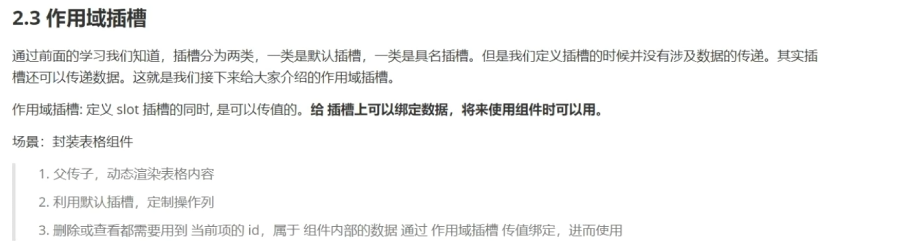
<template>
  <table class="my-table">
    <thead>
      <tr>
        <th>序号</th>
        <th>姓名</th>
        <th>年纪</th>
        <th>操作</th>
      </tr>
    </thead>
    <tbody>
      <tr v-for="(item, index) in data" :key="index">
        <td>{{ index + 1 }}</td>
        <td>{{ item.name }}</td>
        <td>{{ item.age }}</td>
        <td>
            <slot :row="item" msg="测试数据">
            <!--
                1.在slot标签上设置属性,通过设置属性的方式进行传值
                2.设置属性之后,所有的属性值都会封装到一个js对象中
                    {
                    row:{
                        id:1,
                        name:"eric",
                        age:18
                    },
                    msg:"测试对象"
                    }
             -->
            </slot>
        </td>
      </tr>
    </tbody>
  </table>
</template>

<script>
export default {
  name: 'MyTable',
  props:{
    data:{
        type:Array,
    },
    doi:{
        type:String,
    }
  },
  data() {
    return {
      // 和截图完全一样的固定数据
    }
  },
  methods: {
    handleDelete(index) {
      // 删除当前行
      this.tableData.splice(index, 1)
    }
  }
}
</script>

<style scoped>
.my-table {
  width: 100%;
  border-collapse: collapse;
  text-align: center;
  margin: 20px;
}

.my-table th,
.my-table td {
  border: 1px solid #ccc;
  padding: 12px 8px;
}

.my-table th {
  background-color: #1890ff;
  color: #fff;
  font-weight: bold;
}

.my-table button {
  padding: 6px 16px;
  border: 1px solid #ccc;
  border-radius: 4px;
  background: #fff;
  cursor: pointer;
}
</style>
<template>
<div>
<MyTable :data="list1" :doi="do1">
<template #default = "obj">
<!--
=>{
"row": {
"id": 3, "name": "刘德忠", "age": 17
},
"msg":
"测试数据"
}
-->
<!-- 指向默认插槽 -->
<button @click="del(obj.row.id)">删除</button>
</template>
</MyTable>
<MyTable :data="list2" :doi="do2">
<template #default="obj">
<button @click="lookout(obj.row)">查看</button>
</template>
</MyTable>
</div>
</template>
<script>
import MyTable from './components/MyTable.vue'
export default {
components:{
MyTable
},
data () {
return {
list1: [
{ id: 1, name: '张小花', age: 18 },
{ id: 2, name: '孙大明', age: 19 },
{ id: 3, name: '刘德忠', age: 17 },
],
list2: [
{ id: 1, name: '赵小云', age: 18 },
{ id: 2, name: '刘蓓蓓', age: 19 },
{ id: 3, name: '姜肖泰', age: 17 },
],
do1:"删除",
do2:"查看"
}
},
methods:{
del(id){
this.list1=this.list1.filter((item)=>item.id!==id);
},
lookout(row){
alert("姓名:"+row.name+"\n"+"年龄:"+row.age);
}
}
}
</script>
<style>
</style>
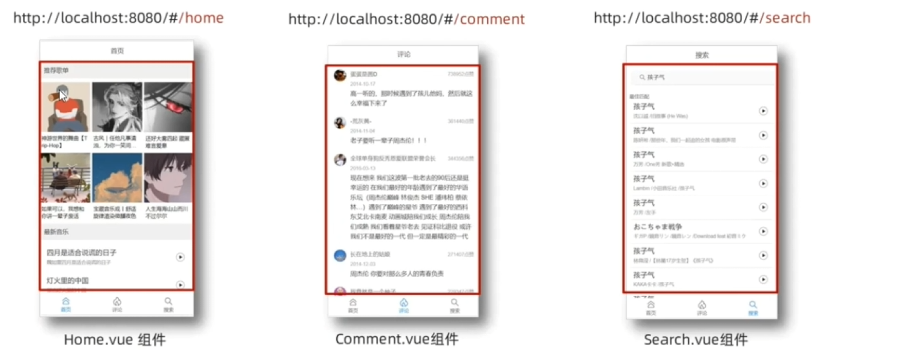
使用router后网址后面会有一个#

更多推荐
 3
3 0
0- 0


 已为社区贡献6条内容

所有评论(0)