
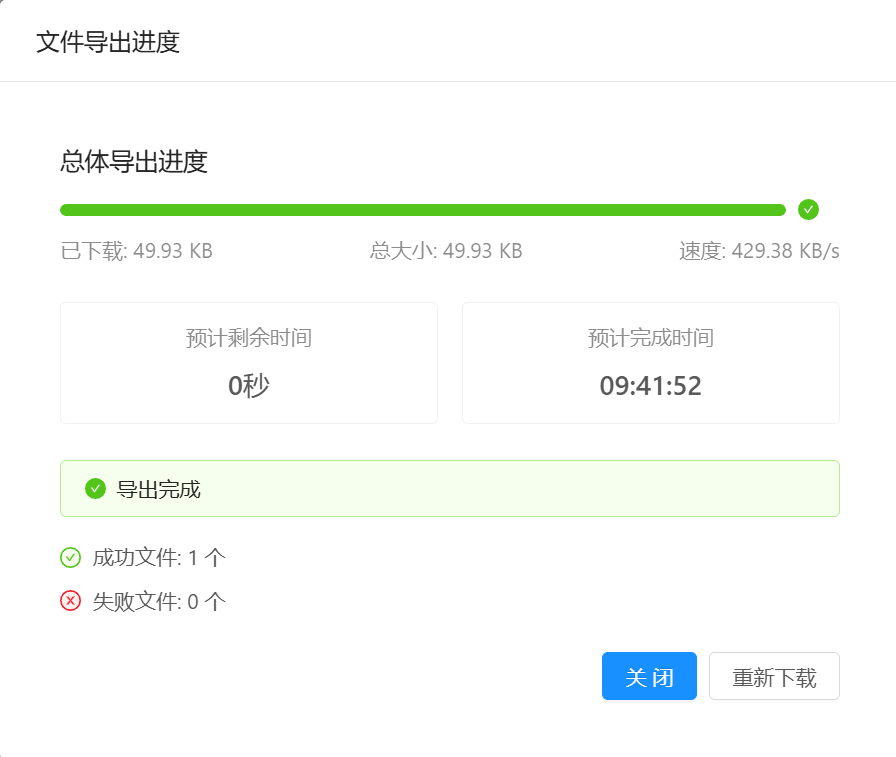
Ant Design Vue PC端文件下载进度弹窗
·
<template>
    <a-modal
      :title="title"
      :visible="visible"
      :footer="null"
      :closable="false"
      :maskClosable="false"
      width="600px"
    >
      <a-spin :spinning="loading">
        <div class="download-progress-container">
          <div class="progress-section">
            <h3>总体导出进度</h3>
            <a-progress
              :percent="progress"
              :status="progressStatus"
              :stroke-color="progressColor"
            />
            <div class="progress-info">
              <span>已下载: {{ downloadedSize }}</span>
              <span>总大小: {{ totalSize }}</span>
              <span>速度: {{ downloadSpeed }}</span>
            </div>
          </div>

          <div class="time-estimation">
            <a-row :gutter="16">
              <a-col :span="12">
                <div class="info-card">
                  <div class="info-label">预计剩余时间</div>
                  <div class="info-value">{{ remainingTime }}</div>
                </div>
              </a-col>
              <a-col :span="12">
                <div class="info-card">
                  <div class="info-label">预计完成时间</div>
                  <div class="info-value">{{ estimatedCompletionTime }}</div>
                </div>
              </a-col>
            </a-row>
          </div>
          <a-button v-if="!completed" type="primary" @click="cancelDownload">取消下载</a-button>

          <div class="result-summary" v-if="completed">
            <a-alert
              message="导出完成"
              type="success"
              show-icon
            />
            <div class="summary-details">
              <div><a-icon type="check-circle" theme="twoTone" two-tone-color="#52c41a" /> 成功文件: {{ successCount }} 个</div>
              <div><a-icon type="close-circle" theme="twoTone" two-tone-color="#f5222d" /> 失败文件: {{ failCount }} 个</div>
            </div>
          </div>

          <div class="action-buttons" v-if="completed">
            <a-button type="primary" @click="handleClose">关闭</a-button>
            <a-button v-if="downloadUrl" @click="handleDownloadAgain" style="margin-left: 8px">重新下载</a-button>
          </div>
        </div>
      </a-spin>
    </a-modal>
  </template>

  <script>
  export default {
    name: 'FileDownloadProgress',
    props: {
      title: {
        type: String,
        default: '文件导出进度'
      }
    },
    data() {
      return {
        visible: false,
        loading: false,
        progress: 0,
        progressStatus: 'active',
        progressColor: '#1890ff',
        downloadedSize: '0B',
        totalSize: '计算中...',
        totalSizeLength:0,
        downloadSpeed: '0B/s',
        remainingTime: '计算中...',
        estimatedCompletionTime: '计算中...',
        successCount: 0,
        failCount: 0,
        completed: false,
        downloadUrl: '',
        startTime: null,
        lastLoaded: 0,
        speedSamples: [],
        downloadController: null
      }
    },
    methods: {
      startDownload(url, fileName,size) {
        this.resetState()
        this.totalSizeLength = size
        this.totalSize = this.formatSize(size)
        this.visible = true
        // this.loading = true
        this.downloadUrl = url

        // 创建AbortController以便可以取消下载
        this.downloadController = new AbortController()

        this.startTime = new Date()
        this.lastLoaded = 0
        this.speedSamples = []

        this.downloadFile(url, fileName)
      },

      async downloadFile(url, fileName) {
        try {
          const response = await fetch(url, {
            signal: this.downloadController.signal
          })

          if (!response.ok) {
            throw new Error(`HTTP error! status: ${response.status}`)
          }

          // 获取文件总大小
          // const contentLength = response.headers.get('Content-Length')
          // this.totalSize = this.formatSize(contentLength || 0)

          const reader = response.body.getReader()
          let receivedLength = 0
          const chunks = []

          while (true) {
            const { done, value } = await reader.read()

            if (done) {
              break
            }

            chunks.push(value)
            receivedLength += value.length

            // 更新下载进度
            this.updateProgress(receivedLength, this.totalSizeLength)
          }

          // 下载完成
          this.handleDownloadComplete(chunks, fileName)

        } catch (error) {
          if (error.name !== 'AbortError') {
            console.error('下载失败:', error)
            this.handleDownloadError(error)
          }
        } finally {
          this.loading = false
        }
      },

      updateProgress(receivedLength, totalLength) {
        // 计算进度百分比
        if (totalLength) {
          this.progress = Math.min(99, Math.round((receivedLength / totalLength) * 100))
        }

        // 计算下载速度
        const now = new Date()
        const elapsedTime = (now - this.startTime) / 1000 // 秒
        const currentSpeed = receivedLength / elapsedTime // bytes/sec

        // 保留最近5个速度样本
        this.speedSamples.push(currentSpeed)
        if (this.speedSamples.length > 5) {
          this.speedSamples.shift()
        }

        // 计算平均速度
        const avgSpeed = this.speedSamples.reduce((sum, speed) => sum + speed, 0) / this.speedSamples.length

        // 更新显示信息
        this.downloadedSize = this.formatSize(receivedLength)
        this.downloadSpeed = this.formatSize(avgSpeed) + '/s'
        // 计算剩余时间
        if (avgSpeed > 0 && totalLength) {
          const remainingBytes = totalLength - receivedLength
          const remainingSeconds = remainingBytes / avgSpeed
          this.remainingTime = this.formatTime(remainingSeconds)

          // 计算预计完成时间
          const completionTime = new Date(now.getTime() + remainingSeconds * 1000)
          this.estimatedCompletionTime = completionTime.toLocaleTimeString()
        }

        // 更新最后加载的字节数
        this.lastLoaded = receivedLength
      },

      handleDownloadComplete(chunks, fileName) {
        // 创建Blob对象
        const blob = new Blob(chunks)
        const url = URL.createObjectURL(blob)

        // 创建下载链接并触发点击
        const link = document.createElement('a')
        link.href = url
        link.setAttribute('download', fileName)
        document.body.appendChild(link)
        link.click()
        document.body.removeChild(link)

        // 释放URL对象
        setTimeout(() => {
          URL.revokeObjectURL(url)
        }, 100)

        // 更新状态
        this.progress = 100
        this.progressStatus = 'success'
        this.progressColor = '#52c41a'
        this.successCount = 1
        this.completed = true
        this.loading = false
      },

      handleDownloadError(error) {
        this.progressStatus = 'exception'
        this.progressColor = '#f5222d'
        this.failCount = 1
        this.$message.error(`文件下载失败: ${error.message}`)
      },

      handleClose() {
        this.visible = false
        this.$emit('close')
      },

      handleDownloadAgain() {
        if (this.downloadUrl) {
          const fileName = this.downloadUrl.split('/').pop()
          this.startDownload(this.downloadUrl, fileName,this.totalSizeLength)
        }
      },

      cancelDownload() {
        if (this.downloadController) {
          this.downloadController.abort()
        }
        this.visible = false
      },

      resetState() {
        this.progress = 0
        this.progressStatus = 'active'
        this.progressColor = '#1890ff'
        this.downloadedSize = '0B'
        this.totalSize = '计算中...'
        this.downloadSpeed = '0B/s'
        this.remainingTime = '计算中...'
        this.estimatedCompletionTime = '计算中...'
        this.successCount = 0
        this.failCount = 0
        this.completed = false
        this.loading = false
      },

      formatSize(bytes) {
        if (typeof bytes !== 'number') bytes = parseInt(bytes) || 0
        if (bytes === 0) return '0 B'
        const k = 1024
        const sizes = ['B', 'KB', 'MB', 'GB']
        const i = Math.floor(Math.log(bytes) / Math.log(k))
        return parseFloat((bytes / Math.pow(k, i)).toFixed(2)) + ' ' + sizes[i]
      },

      formatTime(seconds) {
        if (seconds < 60) {
          return Math.round(seconds) + '秒'
        } else if (seconds < 3600) {
          return Math.round(seconds / 60) + '分钟'
        } else {
          const hours = Math.floor(seconds / 3600)
          const minutes = Math.round((seconds % 3600) / 60)
          return `${hours}小时${minutes > 0 ? `${minutes}分钟` : ''}`
        }
      }
    }
  }
  </script>

  <style scoped>
  .download-progress-container {
    padding: 16px;
  }

  .progress-section {
    margin-bottom: 24px;
  }

  .progress-section h3 {
    margin-bottom: 8px;
    font-weight: 500;
  }

  .progress-info {
    display: flex;
    justify-content: space-between;
    margin-top: 8px;
    color: rgba(0, 0, 0, 0.45);
  }

  .time-estimation {
    margin: 24px 0;
  }

  .info-card {
    border: 1px solid #f0f0f0;
    border-radius: 4px;
    padding: 12px;
    text-align: center;
  }

  .info-label {
    color: rgba(0, 0, 0, 0.45);
    font-size: 14px;
  }

  .info-value {
    font-size: 18px;
    margin-top: 8px;
    font-weight: 500;
  }

  .result-summary {
    margin-top: 24px;
  }

  .summary-details {
    margin-top: 16px;
  }

  .summary-details div {
    margin: 8px 0;
    display: flex;
    align-items: center;
  }

  .summary-details i {
    margin-right: 8px;
  }

  .action-buttons {
    margin-top: 24px;
    text-align: right;
  }
  </style>
组件使用:
1、引入组件
import FileDownloadProgress from '@/components/FileDownloadProgress'
2、注册
 components: {
    FileDownloadProgress
  },
3、template中使用
<file-download-progress ref="downloadProgress" />
4、调用(第一个参数为完整的下载地址,第二个参数为文件路径,第三个为文件尺寸)
this.$refs.downloadProgress.startDownload(downloadUrl, res.result.filePath, res.result.fileSize)
更多推荐
 5
5 0
0- 0


 已为社区贡献2条内容

所有评论(0)