
springboot启动项目时,端口没有占用,但还是报Port xxx was already in use错误
·
Error starting ApplicationContext. To display the condition evaluation report re-run your application with 'debug' enabled.
2026-06-25T19:15:05.659+08:00 ERROR 10808 --- [langChain-boot02] [           main] o.s.b.d.LoggingFailureAnalysisReporter   :

***************************
APPLICATION FAILED TO START
***************************

Description:

Web server failed to start. Port 10135 was already in use.

Action:

Identify and stop the process that's listening on port 10135 or configure this application to listen on another port.


Process finished with exit code 1
如上图错误;
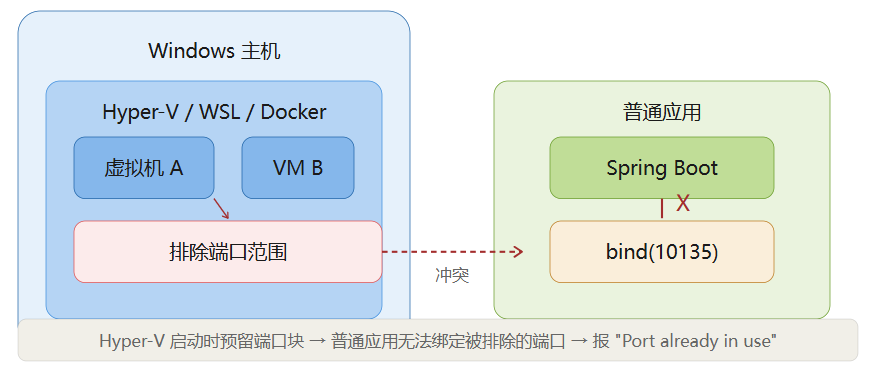
端口 10135 不是被进程占用,而是被 Windows 系统保留了。
由于我电脑启动了wsl
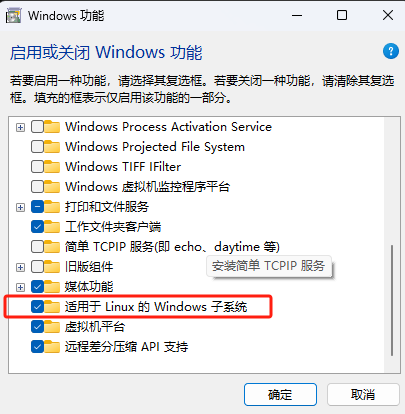
它是怎么工作的
具体流程是这样的:
-
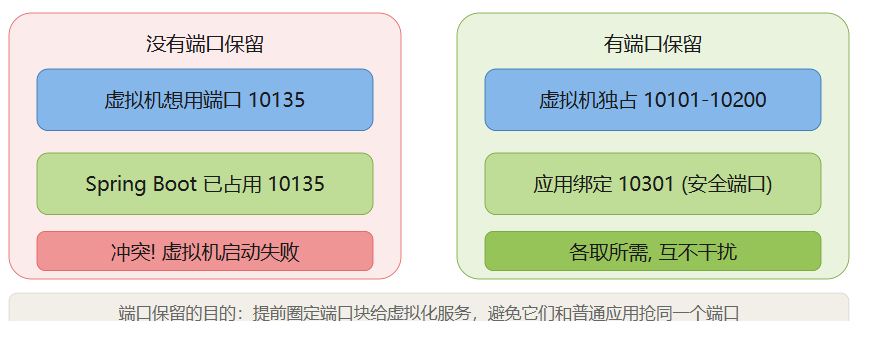
Hyper-V/WSL/Docker 启动时,通过 Windows 的 WinNAT(网络地址转换服务)注册一批端口范围。每次启动都会随机选择不同的范围,通常每个范围是 100 个连续端口。
-
操作系统收到注册后,将这些端口范围标记为"排除"。此后,任何应用调用
bind()绑定这些端口时,操作系统直接拒绝——不是告诉应用"端口被别人用了",而是直接返回权限拒绝(EACCES)。 -
WinNAT 内部使用这些端口来为虚拟机做 NAT 转发。比如 Docker 容器里跑了一个服务,WinNAT 可能用某个排除范围内的端口把主机的流量转发到容器里。
为什么它会坑到你
这个机制有几个让人头疼的特点:
- 范围是随机的:每次 Hyper-V 重启,保留的范围可能完全不同。上次 10135 还能用,重启后可能就被划进去了
- 没有进程在监听:所以你用
netstat、任务管理器查不到任何占用,但端口就是不可用 - Spring Boot 报错信息不准确:它统一报 "Port already in use",但实际原因根本不是"被占用",而是"被排除"
你系统上的当前排除范围
根据刚才的扫描,你的系统保留了这些范围:
| 排除范围 | 保留方 |
|---|---|
| 9474 - 9573 | WinNAT |
| 9574 - 9673 | WinNAT |
| 9674 - 9773 | WinNAT |
| 9774 - 9873 | WinNAT |
| 9874 - 9973 | WinNAT |
| 10001 - 10100 | WinNAT |
| 10101 - 10200 | 你的 10135 就在这 |
| 10201 - 10300 | WinNAT |
| 50000 - 50059 | WinNAT |
怎么确认自己的端口是否安全
随时可以用管理员 CMD 运行:
cmd
netsh interface ipv4 show excludedportrange protocol=tcp
查看当前的排除范围,确保你选的端口不在其中。
更多推荐
 3
3 0
0- 0


 已为社区贡献1条内容

所有评论(0)