
Vue3+ECharts使用渐变堆叠面积图实现图例横向滚动,超出出现滚动条,组件抽离复用,包含图表自适应窗口大小 - 附完整示例
·
ECharts:一个基于 JavaScript 的开源可视化图表库。
目录
/@/components/ECharts/index.vue
效果
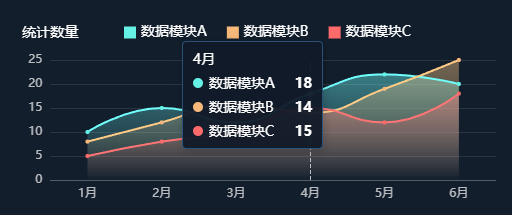
一、介绍
1、官方文档:Apache ECharts
2、官方示例
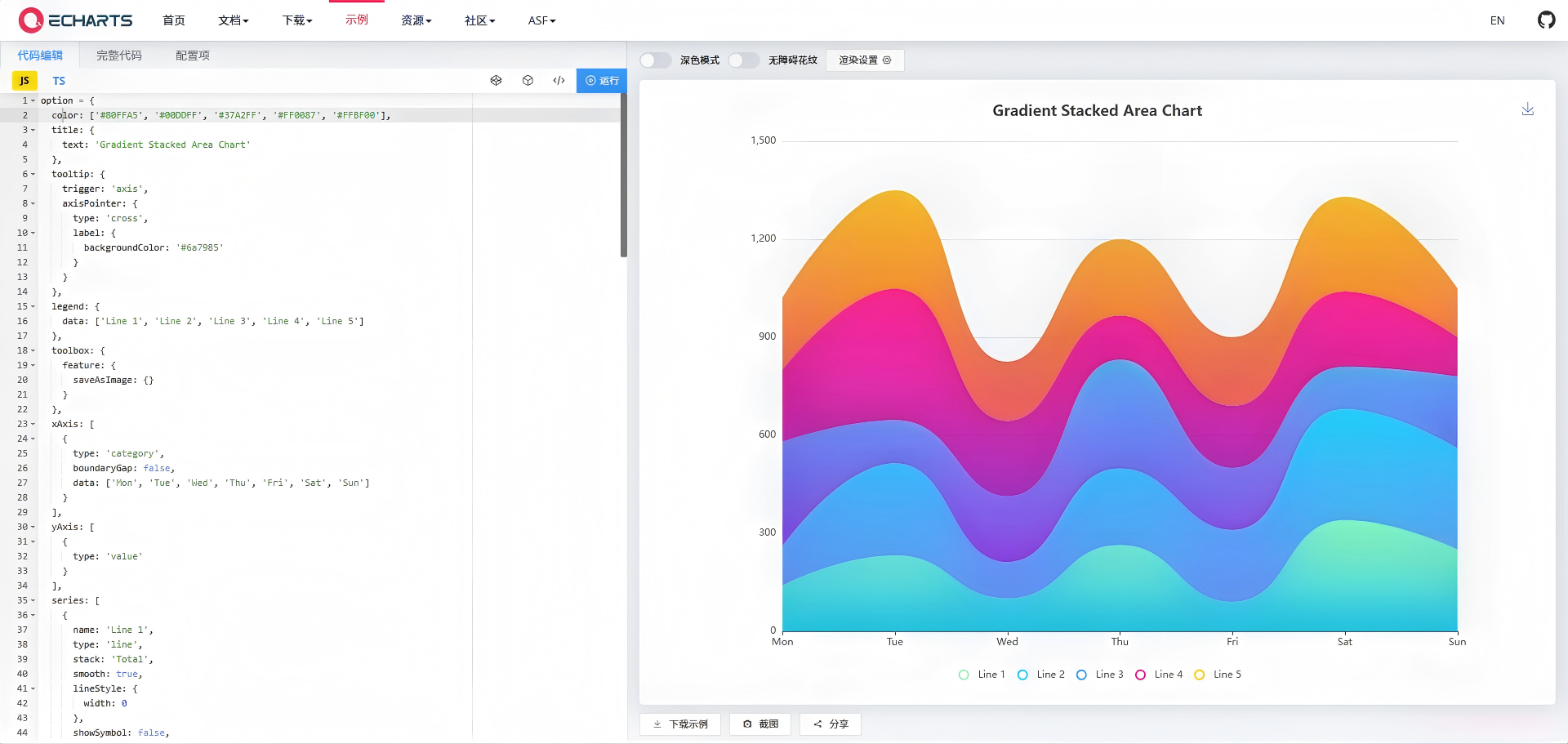
二、准备工作
1、安装依赖包
npm install echarts --save2、示例版本
"echarts": "^5.6.0",三、使用步骤
1、在单页面引入 ' echarts '
import * as echarts from 'echarts'注:上面的代码会引入 ECharts 中所有的图表和组件,如果你不想引入所有组件,也可以使用 ECharts 提供的按需引入的接口来打包必需的组件。详见官方文档:在项目中引入 ECharts - 入门篇 - Handbook - Apache ECharts
2、指定容器并设置容器宽高
<template>
  <!-- 页面根容器 -->
  <div class="w-full h-[200px] overflow-hidden flex flex-col p-5 bg-[#131E2C]">
    <!-- 趋势折线图容器 -->
    <Echarts
      ref="chartInstanceRef"
      :options="chartOptions"
      :id="`generalTrendChart_${chartId}`"
      width="100%"
      height="100%"
    />
  </div>
</template>
3、数据处理(关键点)
1)自定义tooltip样式
// 悬浮提示框配置
tooltip: {
  trigger: 'axis',
  confine: true,
  backgroundColor: 'rgba(17,25,40,0.95)',
  borderColor: 'rgba(72,168,246,0.4)',
  textStyle: {
    color: '#fff'
  }
},
2)图例横向滚动,超出出现滚动条
// 图例配置
legend: {
  show: true,
  top: 0,
  left: 100,
  right: 10,
  itemWidth: 12,
  itemHeight: 12,
  icon: 'rect',
  itemGap: 20,
  textStyle: { color: '#fff', fontSize: 14 },
  data: legendData,
  // 图例横向滚动,超出出现滚动条
  type: 'scroll',
  orient: 'horizontal'
},
3)series平滑曲线+面积渐变
{
  name: seriesName,
  type: 'line',
  smooth: true, // 平滑曲线
  symbol: 'circle', // 标记点样式
  symbolSize: 4, // 标记点大小
  // 线条样式
  lineStyle: {
    width: 2,
    color: colorConfig.color
  },
  // 标记点样式
  itemStyle: {
    color: colorConfig.color
  },
  // 面积渐变填充
  areaStyle: {
    color: new echarts.graphic.LinearGradient(0, 0, 0, 1, [
      { offset: 0, color: hexToRgba(colorConfig.color, 0.6) },
      { offset: 1, color: hexToRgba(colorConfig.color, 0) }
    ])
  },
  data: item.data || []
}
四、完整示例
/@/components/ECharts/index.vue
<template>
  <!-- ECharts 渲染容器DOM -->
  <div :id="id" :class="className" ref="chartContainerRef" class="domEle" />
</template>

<script setup lang="ts">
import * as echarts from 'echarts'
import {
  ref,
  defineProps,
  watch,
  onMounted,
  onUnmounted,
  defineEmits,
  markRaw,
  nextTick
} from 'vue'
import { useRouter } from 'vue-router'
import type { ECharts, EChartsOption, EventParams } from 'echarts'
// 项目用到3D图表可保留,无需可删除
import 'echarts-gl'

// 抛出图表点击事件
const emit = defineEmits(['click'])
const router = useRouter()

// 响应式变量
const chartInstance = ref()
const autoTooltipTimer = ref()
const resizeObserver = ref()
const resizeTimer = ref()
const chartContainerRef = ref()

// 组件入参
const props = defineProps({
  options: {
    type: Object,
    default: () => ({}),
    required: true
  },
  id: {
    type: String,
    default: 'chart',
    required: true
  },
  className: {
    type: String,
    default: 'chart'
  },
  width: {
    type: String,
    default: '100%'
  },
  height: {
    type: String,
    default: '100%'
  },
  // 点击跳转路由相关
  clickRouterName: String,
  clickRouterQuery: String,
  // 自动轮播tooltip
  trendsTooltip: {
    type: Boolean,
    default: false
  }
})

/**
 * 自适应重绘
 * 无参调用,自动读取容器真实尺寸
 */
const resize = () => {
  clearTimeout(resizeTimer.value)
  resizeTimer.value = setTimeout(() => {
    if (chartInstance.value) chartInstance.value.resize()
  }, 200)
}

/**
 * 初始化图表实例
 */
const initChart = () => {
  chartInstance.value = markRaw(echarts.init(chartContainerRef.value))
  // 初始化自适应适配
  chartInstance.value.resize()
  chartInstance.value.setOption(props.options, true)

  // 支持图表点击路由跳转
  if (props.clickRouterName) {
    chartInstance.value.on('click', params => {
      const routeParams = {
        name: props.clickRouterName,
        query: {}
      }
      if (props.clickRouterQuery) {
        routeParams.query[props.clickRouterQuery] = params.name
      }
      router.push(routeParams)
    })
  }

  // 向外抛出点击事件
  chartInstance.value.on('click', (params: EventParams) => {
    emit('click', params)
  })
}

onMounted(() => {
  nextTick(() => {
    initChart()
    // 监听容器DOM尺寸变化
    resizeObserver.value = new ResizeObserver(() => resize())
    resizeObserver.value.observe(chartContainerRef.value)
    // 监听窗口缩放
    window.addEventListener('resize', resize)
  })
})

// 销毁清理,防止内存泄漏
onUnmounted(() => {
  resizeObserver.value?.disconnect()
  window.removeEventListener('resize', resize)
  chartInstance.value?.dispose()
  chartInstance.value = null
  resizeTimer.value && clearTimeout(resizeTimer.value)
  autoTooltipTimer.value && clearTimeout(autoTooltipTimer.value)
})

// 监听配置项变化自动重绘
watch(
  () => props.options,
  () => nextTick(() => initChart()),
  { deep: true }
)
</script>

<style scoped>
.domEle {
  width: 100%;
  height: 100%;
}
</style>
注:自适应重绘resize()优化
chart.vue
<template>
  <!-- 页面根容器 -->
  <div class="w-full h-[200px] overflow-hidden flex flex-col p-5 bg-[#131E2C]">
    <!-- 趋势折线图容器 -->
    <Echarts
      ref="chartInstanceRef"
      :options="chartOptions"
      :id="`generalTrendChart_${chartId}`"
      width="100%"
      height="100%"
    />
  </div>
</template>

<script setup lang="ts">
// 导入Vue核心API
import { ref, computed, onMounted, watch, defineAsyncComponent, defineProps } from 'vue'
// 导入ECharts核心库
import * as echarts from 'echarts'

// 异步导入自定义ECharts组件
const Echarts = defineAsyncComponent(() => import('/@/components/Echarts/index.vue'))

// ==================== 全局常量配置 ====================
// 数据系列配色配置
const COMMON_COLOR_CONFIG = {
  type1: { color: '#66F1E6' },
  type2: { color: '#F6B97A' },
  type3: { color: '#FF6B6B' }
} as const

// ==================== 响应式变量 ====================
// 图表唯一ID(防止重复)
const chartId = ref('generalTrendChart_' + Date.now())
// 图表实例引用
const chartInstanceRef = ref<any>(null)
// ECharts 配置项
const chartOptions = ref<echarts.EChartsOption>({})
// X轴坐标数据
const xAxisData = ref<string[]>([])

// ==================== TS类型定义 + Props ====================
// 数据系列项类型
interface TrendSeriesItem {
  sourceType: string // 数据来源类型
  name: string // 系列名称
  data: number[] // 系列数值
}
// 趋势图数据类型
interface TrendStatisticData {
  categories?: string[] // X轴分类数据
  series?: TrendSeriesItem[] // 数据系列
}

// 组件Props定义
const props = defineProps({
  statisticData: {
    type: Object as () => TrendStatisticData,
    // 模拟数据
    default: () => ({
      categories: ['1月', '2月', '3月', '4月', '5月', '6月'],
      series: [
        { sourceType: 'type1', name: '数据模块A', data: [10, 15, 12, 18, 22, 20] },
        { sourceType: 'type2', name: '数据模块B', data: [8, 12, 16, 14, 19, 25] },
        { sourceType: 'type3', name: '数据模块C', data: [5, 8, 10, 15, 12, 18] }
      ]
    })
  }
})

// ==================== 工具函数 ====================
/**
 * @description 十六进制颜色转RGBA
 * @param hex 十六进制颜色码
 * @param opacity 透明度
 * @returns rgba颜色字符串
 */
const hexToRgba = (hex: string, opacity: number) => {
  hex = hex.replace('#', '')
  const r = parseInt(hex.substring(0, 2), 16)
  const g = parseInt(hex.substring(2, 4), 16)
  const b = parseInt(hex.substring(4, 6), 16)
  return `rgba(${r}, ${g}, ${b}, ${opacity})`
}

// ==================== 核心初始化方法 ====================
/**
 * @description 初始化通用趋势折线图
 * @param data 图表统计数据
 */
const initChart = (data: TrendStatisticData) => {
  // 无数据时清空图表配置
  if (!data?.categories || !data?.series?.length) {
    xAxisData.value = []
    chartOptions.value = {}
    return
  }

  // 赋值X轴数据
  xAxisData.value = data.categories
  // 图例数据
  const legendData = data.series.map(item => item.name || '未知类型')
  // 图表系列配置
  const chartSeries: any[] = []

  // 遍历生成系列配置
  data.series.forEach(item => {
    // 获取对应配色,无匹配则使用白色
    const colorConfig = COMMON_COLOR_CONFIG[
      item.sourceType as keyof typeof COMMON_COLOR_CONFIG
    ] || {
      color: '#ffffff'
    }
    const seriesName = item.name || '未知类型'

    // 组装折线图系列配置(平滑曲线+面积渐变)
    chartSeries.push({
      name: seriesName,
      type: 'line',
      smooth: true, // 平滑曲线
      symbol: 'circle', // 标记点样式
      symbolSize: 4, // 标记点大小
      // 线条样式
      lineStyle: {
        width: 2,
        color: colorConfig.color
      },
      // 标记点样式
      itemStyle: {
        color: colorConfig.color
      },
      // 面积渐变填充
      areaStyle: {
        color: new echarts.graphic.LinearGradient(0, 0, 0, 1, [
          { offset: 0, color: hexToRgba(colorConfig.color, 0.6) },
          { offset: 1, color: hexToRgba(colorConfig.color, 0) }
        ])
      },
      data: item.data || []
    })
  })

  // 最终ECharts配置项
  chartOptions.value = {
    backgroundColor: 'transparent', // 画布透明,继承父深色背景
    // 悬浮提示框配置
    tooltip: {
      trigger: 'axis',
      confine: true,
      backgroundColor: 'rgba(17,25,40,0.95)',
      borderColor: 'rgba(72,168,246,0.4)',
      textStyle: {
        color: '#fff'
      }
    },
    // 图例配置
    legend: {
      show: true,
      top: 0,
      left: 100,
      right: 10,
      itemWidth: 12,
      itemHeight: 12,
      icon: 'rect',
      itemGap: 20,
      textStyle: {
        color: '#fff',
        fontSize: 14
      },
      data: legendData,
      // 图例横向滚动,超出出现滚动条
      type: 'scroll',
      orient: 'horizontal'
    },
    // 网格边距
    grid: {
      left: 10,
      right: 0,
      bottom: 0,
      top: 40,
      containLabel: true
    },
    // X轴配置
    xAxis: {
      type: 'category',
      data: xAxisData.value,
      axisLine: {
        lineStyle: {
          color: 'rgba(255,255,255,0.2)'
        }
      },
      axisLabel: {
        color: 'rgba(255,255,255,0.7)',
        fontSize: 12
      },
      axisTick: {
        show: false
      },
      boundaryGap: true
    },
    // Y轴配置
    yAxis: {
      type: 'value',
      min: 0,
      name: '统计数量',
      nameGap: 20,
      nameTextStyle: {
        color: '#FFFFFF',
        fontSize: 14
      },
      splitLine: {
        lineStyle: {
          color: 'rgba(255,255,255,0.1)',
          type: 'solid'
        }
      },
      axisLabel: {
        color: 'rgba(255,255,255,0.7)'
      },
      axisLine: {
        show: false
      },
      axisTick: {
        show: false
      }
    },
    series: chartSeries
  }
}

// ==================== 生命周期 & 数据监听 ====================
// 页面挂载后初始化图表
onMounted(() => {
  initChart(props.statisticData)
})

// 深度监听数据变化,自动更新图表
watch(
  () => props.statisticData,
  val => {
    if (val) initChart(val)
  },
  { deep: true, immediate: true }
)
</script>

<style lang="scss" scoped></style>
注:文本使用了CSS框架 - Tailwind CSS,可参考这里哦CSS框架 - Tailwind CSS - 附示例-CSDN博客
欢迎关注:【前端小知识营地】
更多推荐



 2
2 0
0- 0


 已为社区贡献5条内容

所有评论(0)