
NET 安装 Aspose.Email for Python - Outlook SDK 安装
·
使用 Python 读取 Outlook MSG 文件 - 代码片段
现在,我们将实现如何以编程方式读取 MSG 文件。您可以自动处理电子邮件、归档重要消息,并使用解析后的数据进行进一步处理。此 Python SDK 提供了许多功能。我们将使用其中几个最突出的功能。
以下代码示例演示了如何使用 Python 读取 Outlook MSG 文件:
import os
import aspose.email as ae
from aspose.email.mapi import MapiMessage
# Define the path for working directory and apply Aspose.Email license.
dataDir = "files"
license = ae.License()
license.set_license("License.lic")
# Load the source MSG file by calling the load method.
msg = MapiMessage.load(dataDir + "MapiMsgWithPoll.msg")
# Get subject
print("Subject: " + msg.subject)
# Get from address
print("From: " + msg.sender_email_address)
# Get body
print("Body: " + msg.body)
# Get recipients information
print("Recipients Count: " + str(len(msg.recipients)))
# Get Attachments information
print ("Attachments Count:" + str(len(msg.attachments)))
# Print attachments information
for index, att in enumerate(msg.attachments):
    if att.object_data is not None:
        print(att.display_name)
输出:
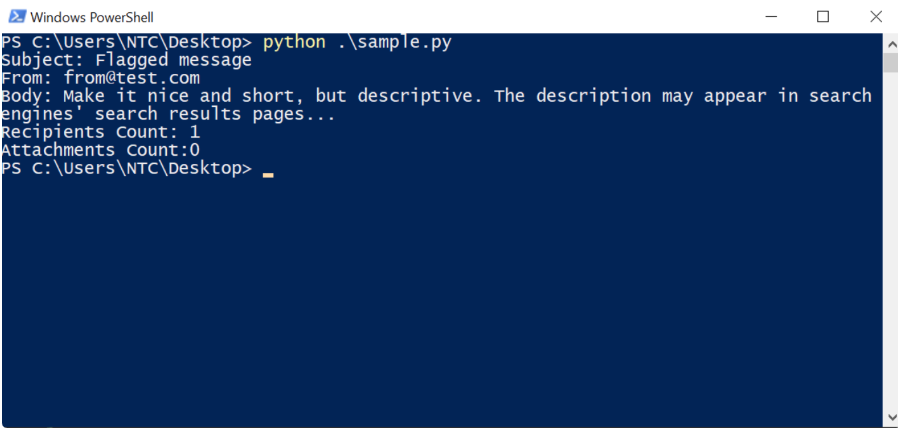
总之,我们介绍了如何以编程方式在 Python 中打开和读取 MSG 文件。这是一个简单易懂的过程,没有任何依赖项。实际上,只需几行代码,您就可以用 Python 读取 Outlook MSG 文件。
Aspose.Email 正版试用下载,请联系Aspose官方授权代理商慧都科技
更多推荐


 5
5 0
0- 0


 已为社区贡献1条内容

所有评论(0)