
API调用示例:Python接入星座运势API完整教程——云策API实战详解
从理解API的基本概念,到用Python完成一次真实的接口调用——本文以星座运势查询为例,带你走完整个流程。
零:什么是API
API(Application Programming Interface,应用程序编程接口),本质上是一组约定:它定义了软件组件之间如何通信。你可以把它理解为一扇窗——你不需要知道房子内部的构造,只需要按照窗口的规则递交请求,就能拿到返回的结果。在日常开发中,我们说的"调用API"通常指的就是通过HTTP协议向远程服务发送请求、获取数据。
这种模式并非一直存在。2000年,Salesforce率先以API方式对外提供企业级服务;同年,eBay上线了开发者接口,让第三方可以在自己的网站上展示拍卖信息。但真正让API走向大众视野的,是2006年Amazon S3的发布和随后AWS生态的扩张——“按需调用、按量付费"的云计算模式开始成型。此后,Twitter(2006)、Facebook(2010)、Stripe(2011)等公司陆续开放API,催生了整个"API经济”。到了今天,从天气查询、支付结算到大模型推理,几乎所有互联网服务都通过API对外交付能力。对于开发者而言,调用一个远程接口完成原本需要自建的服务,已经成为最自然不过的事。
理解了API的来龙去脉,接下来我们直接上手——用一个具体的星座运势接口,走一遍完整的Python接入流程。
一、接口信息
本次使用的是云策API提供的星座运势查询接口,支持今日、明日、每周、每月、每年的运势数据获取。返回字段包括综合运势、爱情运势、事业学业、财富运势、健康运势、幸运颜色、幸运数字、速配星座和短评。
支持调用的语言示例:Shell、JavaScript、Python、PHP、Java、Go、C#、Ruby 等多种语言。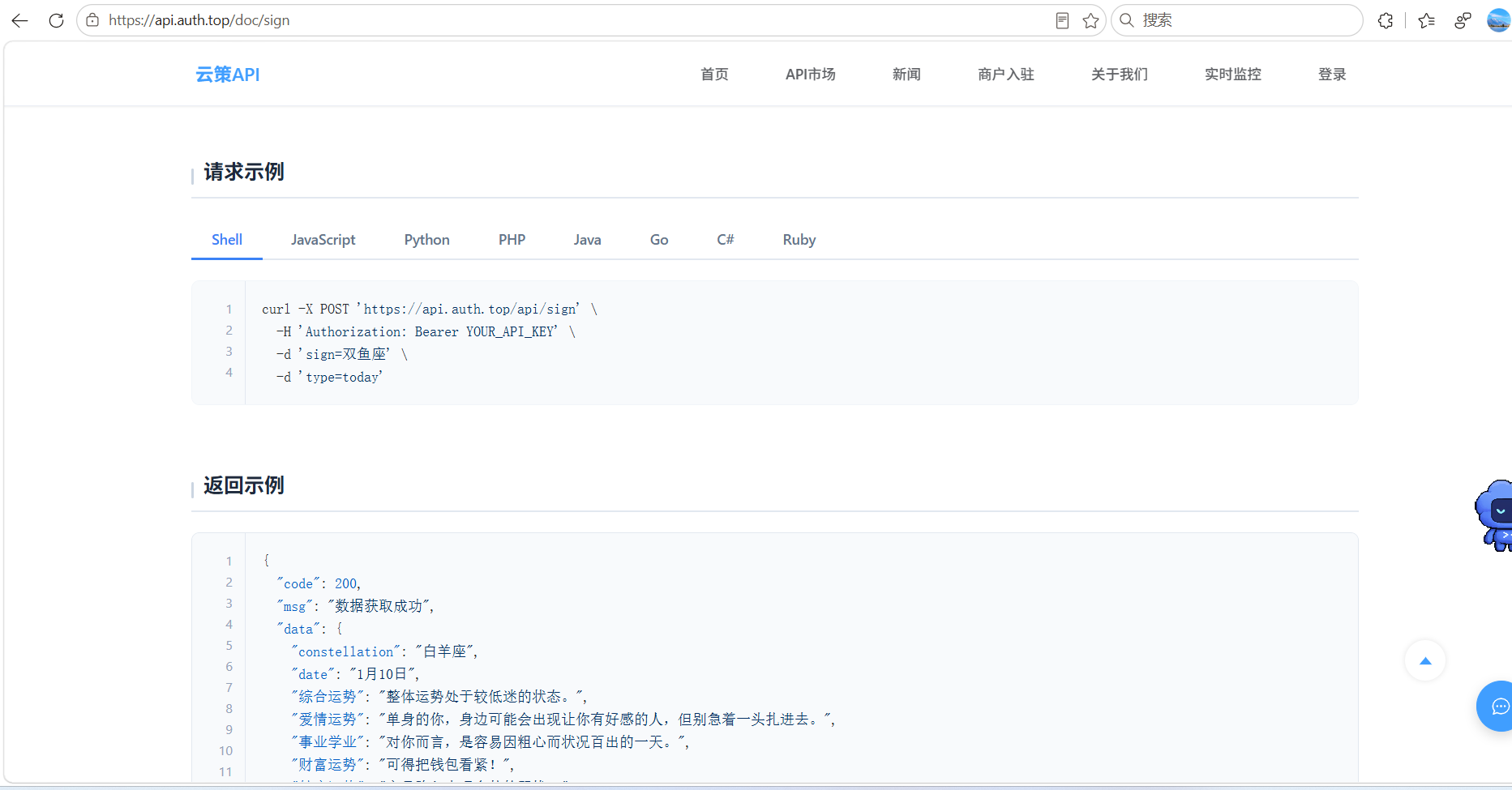
基本信息:
| 项目 | 说明 |
|---|---|
| 接口地址 | https://api.auth.top/api/sign |
| 请求方式 | GET / POST |
| QPS 上限 | 30 次/秒 |
| 平均响应时间 | 约 209ms |
文档示例:https://api.auth.top/doc/sign
二、前置准备工作
2.1 注册并获取API Key
- 访问 云策API官网,注册账号
- 进入控制台,创建应用获取 API Key
- 记录你的 API Key,后续调用时需要使用
2.2 安装依赖
本文使用 Python 内置的 urllib 和第三方库 requests 两种方式演示。如需使用 requests,先安装:
pip install requests
三、接口鉴权方式
该接口采用 Bearer Token 鉴权,将 API Key 放到 HTTP 请求头的 Authorization 字段中:
Authorization: Bearer YOUR_API_KEY
将 YOUR_API_KEY 替换为你自己的密钥。
四、请求参数
| 参数名 | 类型 | 必填 | 说明 |
|---|---|---|---|
| sign | string | 是 | 星座名称,如:白羊座、金牛座、双子座、巨蟹座、狮子座、处女座、天秤座、天蝎座、射手座、摩羯座、水瓶座、双鱼座 |
| type | string | 是 | 运势类型:today(今日)、tomorrow(明日)、week(本周)、month(本月)、year(今年) |
五、返回数据格式
接口返回 JSON 数据,结构如下:
{
  "code": 200,
  "msg": "数据获取成功",
  "data": {
    "constellation": "白羊座",
    "date": "1月10日",
    "综合运势": "整体运势处于较低迷的状态。",
    "爱情运势": "单身的你,身边可能会出现让你有好感的人,但别急着一头扎进去。",
    "事业学业": "对你而言,是容易因粗心而状况百出的一天。",
    "财富运势": "可得把钱包看紧!",
    "健康运势": "容易陷入失眠多梦的困扰。",
    "幸运颜色": "葱绿色",
    "幸运数字": "1",
    "速配星座": "双鱼座",
    "短评": "状态成最大拖累"
  }
}
返回字段说明:
| 字段 | 说明 |
|---|---|
| code | 状态码,200表示成功 |
| msg | 返回消息 |
| data.constellation | 星座名称 |
| data.date | 日期 |
| data.综合运势 | 综合运势描述 |
| data.爱情运势 | 爱情运势描述 |
| data.事业学业 | 事业学业运势描述 |
| data.财富运势 | 财富运势描述 |
| data.健康运势 | 健康运势描述 |
| data.幸运颜色 | 今日幸运颜色 |
| data.幸运数字 | 今日幸运数字 |
| data.速配星座 | 速配星座 |
| data.短评 | 运势一句话短评 |
关于返回状态码:测试过程较为简单,暂未出现多少错误,如果在接下来的测试中出现,建议直接联系后台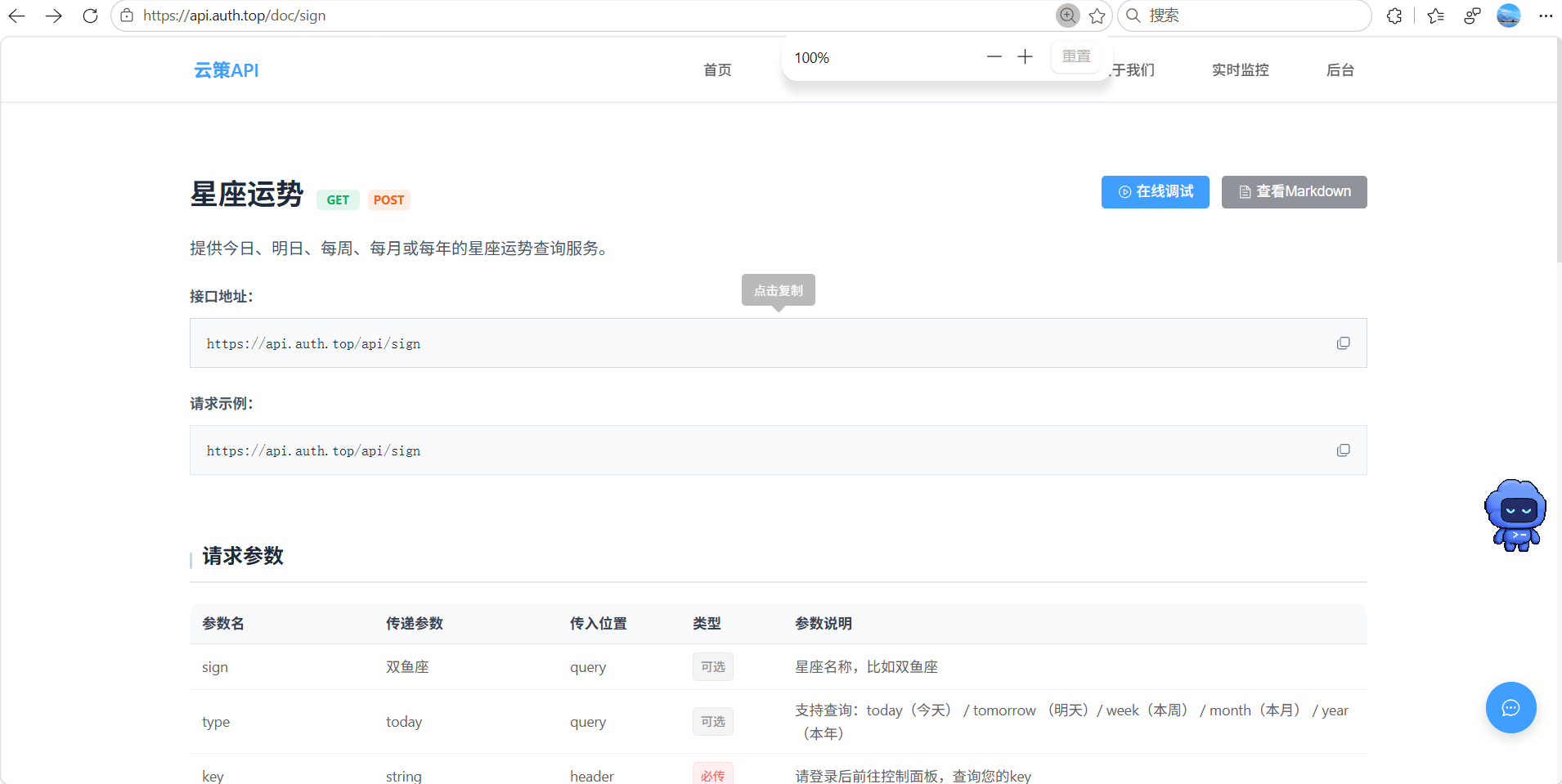
六、Python代码实现
6.1 使用 requests 库(推荐)
requests 是 Python 最流行的 HTTP 库,代码简洁易读:
import requests

API_URL = "https://api.auth.top/api/sign"
API_KEY = "YOUR_API_KEY"  # 替换为你的API Key


def get_horoscope(sign: str, horoscope_type: str = "today") -> dict:
    """
    查询星座运势

    :param sign: 星座名称,如 "白羊座"、"双鱼座"
    :param horoscope_type: 运势类型 - today/tomorrow/week/month/year
    :return: 运势数据字典
    """
    headers = {
        "Authorization": f"Bearer {API_KEY}"
    }
    params = {
        "sign": sign,
        "type": horoscope_type
    }

    response = requests.post(API_URL, headers=headers, data=params, timeout=10)
    response.raise_for_status()

    result = response.json()

    if result.get("code") != 200:
        raise Exception(f"接口调用失败: {result.get('msg', '未知错误')}")

    return result.get("data", {})


if __name__ == "__main__":
    # 查询双鱼座今日运势
    data = get_horoscope("双鱼座", "today")
    print(f"星座: {data.get('constellation')}")
    print(f"日期: {data.get('date')}")
    print(f"综合运势: {data.get('综合运势')}")
    print(f"爱情运势: {data.get('爱情运势')}")
    print(f"事业学业: {data.get('事业学业')}")
    print(f"财富运势: {data.get('财富运势')}")
    print(f"健康运势: {data.get('健康运势')}")
    print(f"幸运颜色: {data.get('幸运颜色')}")
    print(f"幸运数字: {data.get('幸运数字')}")
    print(f"速配星座: {data.get('速配星座')}")
    print(f"短评: {data.get('短评')}")
6.2 使用 urllib 标准库(无需安装第三方库)
如果你的项目环境不方便安装第三方库,可以使用 Python 内置的 urllib:
import urllib.request
import urllib.parse
import json

API_URL = "https://api.auth.top/api/sign"
API_KEY = "YOUR_API_KEY"  # 替换为你的API Key


def get_horoscope(sign: str, horoscope_type: str = "today") -> dict:
    """
    查询星座运势(urllib实现)

    :param sign: 星座名称,如 "白羊座"、"双鱼座"
    :param horoscope_type: 运势类型 - today/tomorrow/week/month/year
    :return: 运势数据字典
    """
    params = urllib.parse.urlencode({
        "sign": sign,
        "type": horoscope_type
    }).encode("utf-8")

    req = urllib.request.Request(API_URL, data=params, method="POST")
    req.add_header("Authorization", f"Bearer {API_KEY}")
    req.add_header("Content-Type", "application/x-www-form-urlencoded")

    with urllib.request.urlopen(req, timeout=10) as resp:
        result = json.loads(resp.read().decode("utf-8"))

    if result.get("code") != 200:
        raise Exception(f"接口调用失败: {result.get('msg', '未知错误')}")

    return result.get("data", {})


if __name__ == "__main__":
    data = get_horoscope("双鱼座", "today")
    print(f"星座: {data.get('constellation')}")
    print(f"综合运势: {data.get('综合运势')}")
    print(f"幸运颜色: {data.get('幸运颜色')}  幸运数字: {data.get('幸运数字')}")
七、进阶:批量查询十二星座运势
实际项目中,你可能需要一次性获取所有星座的运势数据。下面是一个并发查询的示例:
import requests
from concurrent.futures import ThreadPoolExecutor, as_completed

API_URL = "https://api.auth.top/api/sign"
API_KEY = "YOUR_API_KEY"  # 替换为你的API Key

ALL_SIGNS = [
    "白羊座", "金牛座", "双子座", "巨蟹座", "狮子座", "处女座",
    "天秤座", "天蝎座", "射手座", "摩羯座", "水瓶座", "双鱼座"
]


def get_horoscope(sign: str, horoscope_type: str = "today") -> dict:
    """查询单个星座运势"""
    headers = {"Authorization": f"Bearer {API_KEY}"}
    params = {"sign": sign, "type": horoscope_type}

    resp = requests.post(API_URL, headers=headers, data=params, timeout=10)
    resp.raise_for_status()
    result = resp.json()

    if result.get("code") != 200:
        raise Exception(f"[{sign}] 接口调用失败: {result.get('msg')}")

    return result.get("data", {})


def batch_query(horoscope_type: str = "today", max_workers: int = 5) -> list:
    """
    批量查询十二星座运势

    :param horoscope_type: 运势类型
    :param max_workers: 并发线程数(注意QPS限制为30次/秒)
    :return: 运势数据列表
    """
    results = []

    with ThreadPoolExecutor(max_workers=max_workers) as executor:
        future_map = {
            executor.submit(get_horoscope, sign, horoscope_type): sign
            for sign in ALL_SIGNS
        }

        for future in as_completed(future_map):
            sign = future_map[future]
            try:
                data = future.result()
                results.append(data)
                print(f"[OK] {sign} - {data.get('短评', '无短评')}")
            except Exception as e:
                print(f"[FAIL] {sign}: {e}")

    return results


if __name__ == "__main__":
    all_data = batch_query("today")
    print(f"\n共获取 {len(all_data)} 个星座的运势数据")
注意:接口 QPS 上限为 30 次/秒,批量查询时建议将
max_workers控制在 5-10 之间,避免触发限流。
八、进阶:封装为类方便复用
将 API 调用封装为类,更方便在项目中复用和扩展:
import requests


class HoroscopeAPI:
    """云策API - 星座运势查询客户端"""

    BASE_URL = "https://api.auth.top/api/sign"

    VALID_SIGNS = [
        "白羊座", "金牛座", "双子座", "巨蟹座", "狮子座", "处女座",
        "天秤座", "天蝎座", "射手座", "摩羯座", "水瓶座", "双鱼座"
    ]
    VALID_TYPES = ["today", "tomorrow", "week", "month", "year"]

    def __init__(self, api_key: str):
        self.api_key = api_key
        self.session = requests.Session()
        self.session.headers.update({
            "Authorization": f"Bearer {api_key}"
        })

    def query(self, sign: str, horoscope_type: str = "today") -> dict:
        """
        查询星座运势

        :raises ValueError: 参数校验失败
        :raises Exception: 接口调用失败
        """
        if sign not in self.VALID_SIGNS:
            raise ValueError(f"无效星座: {sign},可选: {', '.join(self.VALID_SIGNS)}")
        if horoscope_type not in self.VALID_TYPES:
            raise ValueError(f"无效类型: {horoscope_type},可选: {', '.join(self.VALID_TYPES)}")

        resp = self.session.post(
            self.BASE_URL,
            data={"sign": sign, "type": horoscope_type},
            timeout=10
        )
        resp.raise_for_status()
        result = resp.json()

        if result.get("code") != 200:
            raise Exception(f"接口调用失败: {result.get('msg')}")

        return result.get("data", {})

    def today(self, sign: str) -> dict:
        """查询今日运势"""
        return self.query(sign, "today")

    def tomorrow(self, sign: str) -> dict:
        """查询明日运势"""
        return self.query(sign, "tomorrow")

    def week(self, sign: str) -> dict:
        """查询本周运势"""
        return self.query(sign, "week")

    def month(self, sign: str) -> dict:
        """查询本月运势"""
        return self.query(sign, "month")

    def year(self, sign: str) -> dict:
        """查询今年运势"""
        return self.query(sign, "year")

    def format_result(self, data: dict) -> str:
        """格式化输出运势结果"""
        lines = [
            f"{'='*40}",
            f"  {data.get('constellation', '')} · {data.get('date', '')}",
            f"{'='*40}",
            f"  短评: {data.get('短评', '')}",
            f"  综合运势: {data.get('综合运势', '')}",
            f"  爱情运势: {data.get('爱情运势', '')}",
            f"  事业学业: {data.get('事业学业', '')}",
            f"  财富运势: {data.get('财富运势', '')}",
            f"  健康运势: {data.get('健康运势', '')}",
            f"  幸运颜色: {data.get('幸运颜色', '')}",
            f"  幸运数字: {data.get('幸运数字', '')}",
            f"  速配星座: {data.get('速配星座', '')}",
            f"{'='*40}",
        ]
        return "\n".join(lines)


if __name__ == "__main__":
    client = HoroscopeAPI("YOUR_API_KEY")  # 替换为你的API Key

    # 查询今日运势
    data = client.today("双鱼座")
    print(client.format_result(data))

    # 查询本周运势
    week_data = client.week("白羊座")
    print(client.format_result(week_data))
九、常见问题与注意事项
9.1 鉴权失败(401/403)
确认请求头格式正确:Authorization: Bearer YOUR_API_KEY,注意 Bearer 和 Key 之间有一个空格。
9.2 请求频率限制
接口 QPS 上限为 30 次/秒。如果触发限流,可以在代码中加入重试逻辑:
import time


def get_horoscope_with_retry(sign: str, horoscope_type: str = "today", retries: int = 3) -> dict:
    """带重试的运势查询"""
    for i in range(retries):
        try:
            return get_horoscope(sign, horoscope_type)
        except Exception as e:
            if i < retries - 1:
                time.sleep(1)
            else:
                raise
9.3 星座名称必须为中文
sign 参数需传入中文星座名称(如"白羊座"),不支持英文。
9.4 编码问题
返回数据为 UTF-8 编码的 JSON,使用 response.json() 或 json.loads() 解析即可。
十、总结
本文完整介绍了如何使用 Python 接入云策API的星座运势接口:
- 在 云策API 注册并获取 API Key
- 通过
Authorization: Bearer <KEY>方式鉴权 - 传入
sign(星座名称)和type(运势类型)请求运势数据 - 解析返回的 JSON 数据,提取所需字段
以上就是一个完整的API接入流程:注册取钥、构造鉴权请求、解析返回数据。同样的思路适用于绝大多数RESTful接口,星座运势只是一个具体例子。
回到更宏观的视角,API已经不只是一种技术手段。它让小团队也能用上曾经只属于大公司的能力——支付、地图、身份校验、大模型推理,几行代码就能接入。它也让不同行业的数据和服务得以互联,医疗、农业、物流、教育领域的数字化转型,很大程度上都是在API的连接下完成的。对开发者而言,掌握API的调用方式,就是掌握了一种快速组装产品的能力。
END:
- 愿各位开发者都能找到适合自己的API,前路顺遂!!!
更多推荐

 5
5 0
0- 0


 已为社区贡献11条内容

所有评论(0)