一、传统方案的痛点
以前实现滚动动画需要 JavaScript 监听 scroll 事件:
|
1
2
3
4
5
6
7
8
9
10 |
window.addEventListener('scroll', () => {
const scrollTop = window.scrollY;
const progress = scrollTop / (document.body.scrollHeight - window.innerHeight);
// 更新进度条
progressBar.style.width = `${progress * 100}%`;
// 视差效果
parallaxElement.style.transform = `translateY(${scrollTop * 0.5}px)`;
});
|
问题:
二、scroll-timeline 的解决方案
CSS 滚动驱动动画让元素的动画进度与滚动位置绑定,无需 JavaScript。
基础语法
|
1
2
3
4
5
6
7
8
9 |
@keyframes fade-in {
from { opacity: 0; transform: translateY(50px); }
to { opacity: 1; transform: translateY(0); }
}
.element {
animation: fade-in linear;
animation-timeline: scroll(); /* 绑定到滚动 */
}
|
三、scroll() 函数
scroll() 创建一个滚动时间线,将动画进度与滚动位置关联。
语法
|
1 |
animation-timeline: scroll(<scroller> <axis>);
|
参数:
scroller: 滚动容器(nearest | root | self)axis: 滚动方向(block | inline | y | x)
|
1
2
3
4
5
6
7
8 |
/* 最近的滚动祖先,垂直方向 */
animation-timeline: scroll(nearest block);
/* 根滚动容器,水平方向 */
animation-timeline: scroll(root inline);
/* 元素自身,垂直方向 */
animation-timeline: scroll(self y);
|
四、实战案例
案例 1:滚动进度条
|
1 |
<div class="progress-bar"></div>
|
|
1
2
3
4
5
6
7
8
9
10
11
12
13
14
15
16 |
.progress-bar {
position: fixed;
top: 0;
left: 0;
height: 4px;
background: linear-gradient(to right, #4caf50, #2196f3);
transform-origin: left;
animation: grow-progress linear;
animation-timeline: scroll(root block);
}
@keyframes grow-progress {
from { transform: scaleX(0); }
to { transform: scaleX(1); }
}
|
效果:进度条宽度随页面滚动增长。
案例 2:滚动淡入
|
1
2
3
4
5
6
7
8
9
10
11
12
13
14
15
16
17
18 |
.fade-in-section {
opacity: 0;
transform: translateY(50px);
animation: fade-in linear;
animation-timeline: view(); /* 元素进入视口时触发 */
}
@keyframes fade-in {
from {
opacity: 0;
transform: translateY(50px);
}
to {
opacity: 1;
transform: translateY(0);
}
}
|
案例 3:视差滚动
|
1
2
3
4
5
6
7
8
9
10
11
12
13
14
15
16 |
.parallax-bg {
position: fixed;
top: 0;
width: 100%;
height: 100vh;
z-index: -1;
animation: parallax linear;
animation-timeline: scroll(root block);
}
@keyframes parallax {
to {
transform: translateY(50%);
}
}
|
案例 4:图片缩放
|
1
2
3
4
5
6
7
8
9
10
11
12
13
14
15
16
17 |
.hero-image {
width: 100%;
height: 100vh;
object-fit: cover;
animation: zoom-out linear;
animation-timeline: scroll(root block);
}
@keyframes zoom-out {
from {
transform: scale(1.2);
}
to {
transform: scale(1);
}
}
|
五、view() 函数
view() 创建一个视图时间线,当元素进入/离开视口时触发动画。
语法
|
1 |
animation-timeline: view(<axis> <inset>);
|
|
1
2
3
4
5
6
7
8
9
10
11
12 |
/* 元素进入视口时触发 */
.element {
animation: fade-in linear;
animation-timeline: view();
}
/* 设置触发范围 */
.element {
animation: fade-in linear;
animation-timeline: view(block 20% 20%);
/* 在视口上下 20% 的范围内触发 */
}
|
六、animation-range
控制动画在滚动范围内的哪个阶段执行。
|
1
2
3
4
5
6 |
.element {
animation: fade-in linear;
animation-timeline: view();
animation-range: entry 0% entry 100%;
/* 只在进入阶段执行动画 */
}
|
范围关键字:
entry: 元素进入视口exit: 元素离开视口contain: 元素完全在视口内cover: 整个过程
|
1
2
3
4
5
6
7
8
9
10
11
12
13 |
/* 进入时淡入 */
.fade-in {
animation: fade linear;
animation-timeline: view();
animation-range: entry 0% entry 100%;
}
/* 离开时淡出 */
.fade-out {
animation: fade linear reverse;
animation-timeline: view();
animation-range: exit 0% exit 100%;
}
|
七、组合使用
多个动画阶段
|
1
2
3
4
5
6
7
8
9
10
11
12
13
14
15
16
17
18
19 |
.card {
animation:
slide-in linear,
rotate linear;
animation-timeline: view();
animation-range:
entry 0% entry 50%,
entry 50% entry 100%;
}
@keyframes slide-in {
from { transform: translateX(-100%); }
to { transform: translateX(0); }
}
@keyframes rotate {
from { transform: rotate(0deg); }
to { transform: rotate(360deg); }
}
|
视差分层
|
1
2
3
4
5
6
7
8
9
10
11
12
13
14
15
16
17
18
19
20
21
22
23
24
25
26 |
.layer-1 {
animation: parallax-slow linear;
animation-timeline: scroll();
}
.layer-2 {
animation: parallax-medium linear;
animation-timeline: scroll();
}
.layer-3 {
animation: parallax-fast linear;
animation-timeline: scroll();
}
@keyframes parallax-slow {
to { transform: translateY(20%); }
}
@keyframes parallax-medium {
to { transform: translateY(40%); }
}
@keyframes parallax-fast {
to { transform: translateY(60%); }
}
|
八、浏览器支持
滚动驱动动画在现代浏览器中支持:
- Chrome 115+
- Edge 115+
- Safari 尚未支持
- Firefox 尚未支持
特性检测
|
1
2
3
4
5
6
7
8
9
10
11
12
13
14 |
@supports (animation-timeline: scroll()) {
/* 支持滚动动画 */
.element {
animation: fade-in linear;
animation-timeline: scroll();
}
}
@supports not (animation-timeline: scroll()) {
/* 降级方案:使用 JavaScript */
.element {
opacity: 1;
}
}
|
Polyfill
|
1 |
<script src="https://flackr.github.io/scroll-timeline/dist/scroll-timeline.js"></script>
|
九、性能优化
1. 使用 transform 和 opacity
|
1
2
3
4
5
6
7
8
9
10
11
12
13
14
15
16
17
18
19
20
21
22
23 |
/* ✅ 性能好:只触发合成 */
@keyframes good {
from {
opacity: 0;
transform: translateY(50px);
}
to {
opacity: 1;
transform: translateY(0);
}
}
/* ❌ 性能差:触发重排 */
@keyframes bad {
from {
top: 50px;
width: 100px;
}
to {
top: 0;
width: 200px;
}
}
|
2. 使用 will-change
|
1
2
3
4
5 |
.animated-element {
will-change: transform, opacity;
animation: fade-in linear;
animation-timeline: scroll();
}
|
3. 限制动画元素数量
|
1
2
3
4
5
6 |
/* 只对可见区域的元素应用动画 */
.element {
animation: fade-in linear;
animation-timeline: view();
animation-range: entry 0% cover 100%;
}
|
十、实用技巧
1. 数字滚动计数
|
1
2
3
4
5
6
7
8
9
10
11
12
13
14
15
16
17
18
19
20 |
@property --num {
syntax: '<integer>';
initial-value: 0;
inherits: false;
}
.counter {
counter-reset: num var(--num);
animation: count linear;
animation-timeline: view();
}
.counter::after {
content: counter(num);
}
@keyframes count {
from { --num: 0; }
to { --num: 100; }
}
|
2. 文字逐字显示
|
1
2
3
4
5
6
7
8
9
10
11
12
13 |
.text {
animation: reveal linear;
animation-timeline: view();
}
@keyframes reveal {
from {
clip-path: inset(0 100% 0 0);
}
to {
clip-path: inset(0 0 0 0);
}
}
|
3. 图片模糊到清晰
|
1
2
3
4
5
6
7
8
9
10
11 |
.image {
filter: blur(10px);
animation: unblur linear;
animation-timeline: view();
}
@keyframes unblur {
to {
filter: blur(0);
}
}
|
十一、与 JavaScript 对比
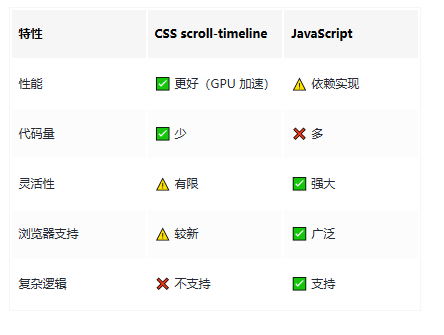



 8
8 0
0


 已为社区贡献4条内容

所有评论(0)