
MySQL升级
安装MySQL5.7.27主从
# 5.7.27 软件安装
tar xf mysql-5.7.27-linux-glibc2.12-x86_64.tar -C /usr/local/
cd /usr/local/
tar zxf mysql-5.7.27-linux-glibc2.12-x86_64.tar.gz

ln -s mysql-5.7.27-linux-glibc2.12-x86_64 mysql5727
ln -s mysql-5.7.27-linux-glibc2.12-x86_64 mysql

export PATH=$PATH:/usr/local/mysql/bin
which mysql
mysql -V
安装单实例3306
# 3306
mkdir -p /data/mysql3306/{data,logs,tmp}
chown -R mysql:mysql /data/mysql3306

# 准备配置文件
cat > /data/mysql3306/my.cnf << EOF
[mysql]
no_auto_rehash
prompt                = "\u@\h:\p \R:\m:\\\s [\d]> "
default-character-set = utf8mb4

[mysqld]
user=mysql
port=3306
#mysqlx_port=33060
#mysqlx_socket=/data/mysql3306/tmp/mysqlx33060.sock
#mysql_native_password=on
basedir=/usr/local/mysql
datadir=/data/mysql3306/data
socket=/data/mysql3306/tmp/mysql3306.sock
tmpdir=/data/mysql3306/tmp
log_error=/data/mysql3306/logs/error.log
server_id=3306
log-bin=mysql-bin
lower_case_table_names=1
log_slave_updates=on
gtid_mode=ON
enforce_gtid_consistency=ON
max_connections=2000
lock_wait_timeout=60
thread_cache_size=64
transaction_isolation="READ-COMMITTED"
log_timestamps=SYSTEM
max_binlog_cache_size=2G
report_host=192.168.126.46
report_port=3306
open_files_limit=63000
table_definition_cache=16000
table_open_cache=16000
innodb_buffer_pool_size=1G
EOF

# 不安全的初始化
cd /usr/local/mysql5727/bin/
./mysqld --defaults-file=/data/mysql3306/my.cnf --initialize-insecure

# 启动
/usr/local/mysql5727/bin/mysqld_safe --defaults-file=/data/mysql3306/my.cnf &
ps -ef|grep mysql

# 设置root用户登录密码
/usr/local/mysql5727/bin/mysqladmin -u root password '123qqq...A' -S /data/mysql3306/tmp/mysql3306.sock
# 登录
# /usr/local/mysql5727/bin/mysql -uroot -p'123qqq...A' -S /data/mysql3306/tmp/mysql3306.sock
/usr/local/mysql5727/bin/mysql -uroot -p -S /data/mysql3306/tmp/mysql3306.sock
# 改密码
alter user user() identified by '123qqq...A';
安装单实例3307
# 3307
# 创建目录并赋权
mkdir -p /data/mysql3307/{data,logs,tmp}
chown -R mysql:mysql /data/mysql3307

# 准备配置文件
cat > /data/mysql3307/my.cnf << EOF
[mysql]
no_auto_rehash
prompt                = "\u@\h:\p \R:\m:\\\s [\d]> "
default-character-set = utf8mb4

[mysqld]
user=mysql
port=3307
#mysqlx_port=33070
#mysqlx_socket=/data/mysql3306/tmp/mysqlx33070.sock
#mysql_native_password=on
basedir=/usr/local/mysql
datadir=/data/mysql3307/data
socket=/data/mysql3307/tmp/mysql3307.sock
tmpdir=/data/mysql3307/tmp
log_error=/data/mysql3307/logs/error.log
server_id=3307
log-bin=mysql-bin
lower_case_table_names=1
log_slave_updates=on
gtid_mode=ON
enforce_gtid_consistency=ON
max_connections=2000
lock_wait_timeout=60
thread_cache_size=64
transaction_isolation="READ-COMMITTED"
log_timestamps=SYSTEM
max_binlog_cache_size=2G
report_host=192.168.126.46
report_port=3307
open_files_limit=63000
table_definition_cache=16000
table_open_cache=16000
innodb_buffer_pool_size=1G
EOF

# 不安全的初始化
cd /usr/local/mysql5727/bin/
./mysqld --defaults-file=/data/mysql3307/my.cnf --initialize-insecure

# 启动
/usr/local/mysql5727/bin/mysqld_safe --defaults-file=/data/mysql3307/my.cnf &
ps -ef|grep mysql

# 设置root用户登录密码
/usr/local/mysql5727/bin/mysqladmin -u root password '123qqq...A' -S /data/mysql3307/tmp/mysql3307.sock
# 登录
# /usr/local/mysql5727/bin/mysql -uroot -p'123qqq...A' -S /data/mysql3307/tmp/mysql3307.sock
/usr/local/mysql5727/bin/mysql -uroot -p -S /data/mysql3307/tmp/mysql3307.sock
# 改密码
alter user user() identified by '123qqq...A';
主从搭建
主从用户创建
/usr/local/mysql5727/bin/mysql -uroot -p123qqq...A -S /data/mysql3306/tmp/mysql3306.sock
# 在主库创建用户
create user repl@'%' identified by '123qqq...A';
# 在主库进行用户赋权
grant replication client,replication slave on *.* to repl@'%';
主库备份
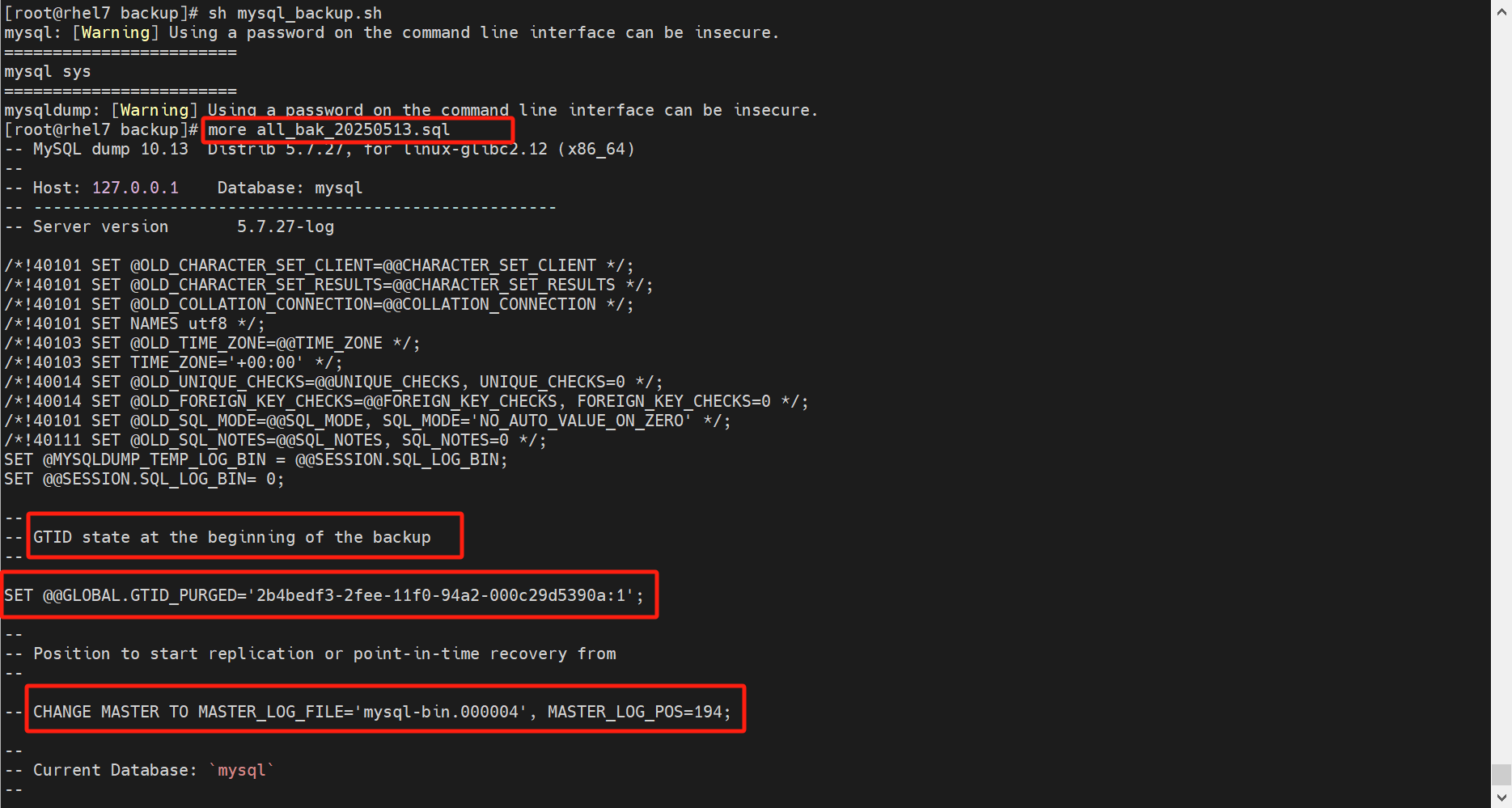
[root@itpuxdb01 ~]# cat mysql_backup.sh

select_databases="SELECT GROUP_CONCAT(schema_name SEPARATOR ' ') FROM INFORMATION_SCHEMA.SCHEMATA where SCHEMA_NAME NOT IN ('performance_schema','information_schema');"
db_list=`/usr/local/mysql5727/bin/mysql -uroot -p'123qqq...A' -h127.0.0.1 -P3306 -NBe "$select_databases"`
echo ========================
echo $db_list
echo ========================

# mysql 5.7.25 mysql.proc
/usr/local/mysql5727/bin/mysqldump -uroot -p'123qqq...A' -h127.0.0.1 -P3306 \
-R -F --master-data=2 --single-transaction --max_allowed_packet=1024M \
--log-error=mysqldump_error.log --databases $db_list \
--triggers --routines --events --hex-blob > all_bak_`date +%Y%m%d`.sql
从库初始化
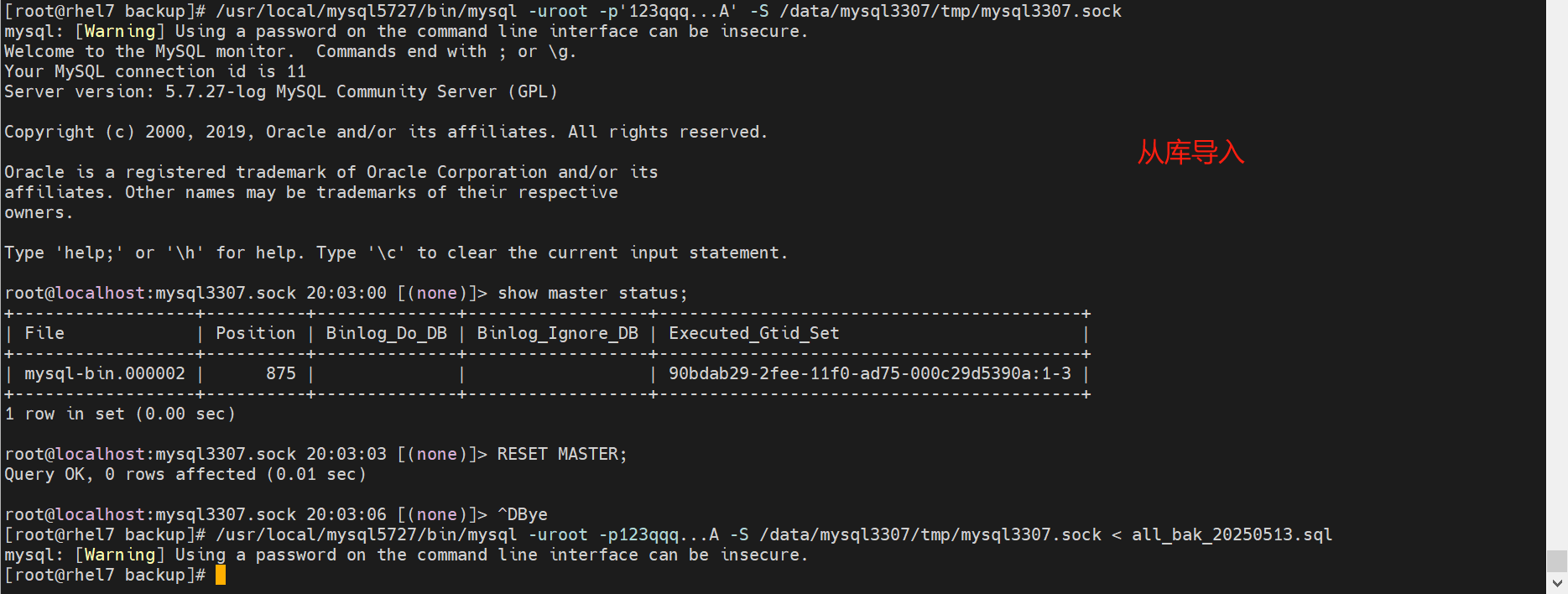
/usr/local/mysql5727/bin/mysql -uroot -p'123qqq...A' -S /data/mysql3307/tmp/mysql3307.sock < all_bak_20250513.sql
ERROR 3546 (HY000) at line 26: @@GLOBAL.GTID_PURGED cannot be changed: the added gtid set must not overlap with @@GLOBAL.GTID_EXECUTED

# 在mysql中清空GTID信息
mysql> RESET MASTER;      # 很危险的命令,会清空本机器的binlog,重置本机器的GTID

# 如果是 source xxx.sql 的方式导入,会跳过这个错误继续导入,但是数据不一致
从库启动复制
# 从库配置(基于GTID)
/usr/local/mysql5727/bin/mysql -uroot -p'123qqq...A' -S /data/mysql3307/tmp/mysql3307.sock
CHANGE MASTER TO
MASTER_HOST='192.168.126.46',
MASTER_USER='repl',
MASTER_PASSWORD='123qqq...A',
MASTER_PORT=3306,
MASTER_AUTO_POSITION=1,
GET_MASTER_PUBLIC_KEY=1;

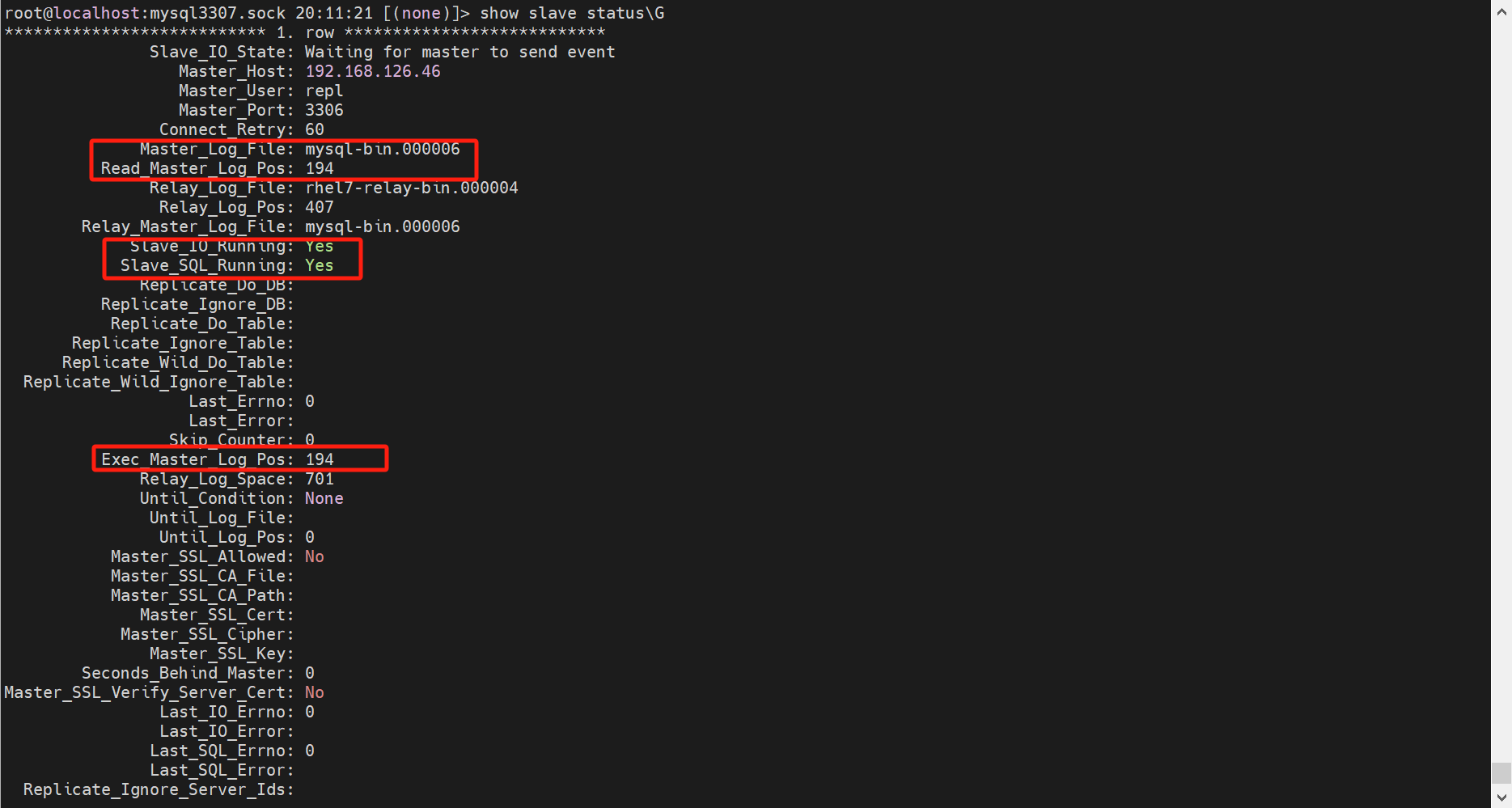
# 启动从库复制线程,并检查状态
start slave;
show slave status\G

测试同步
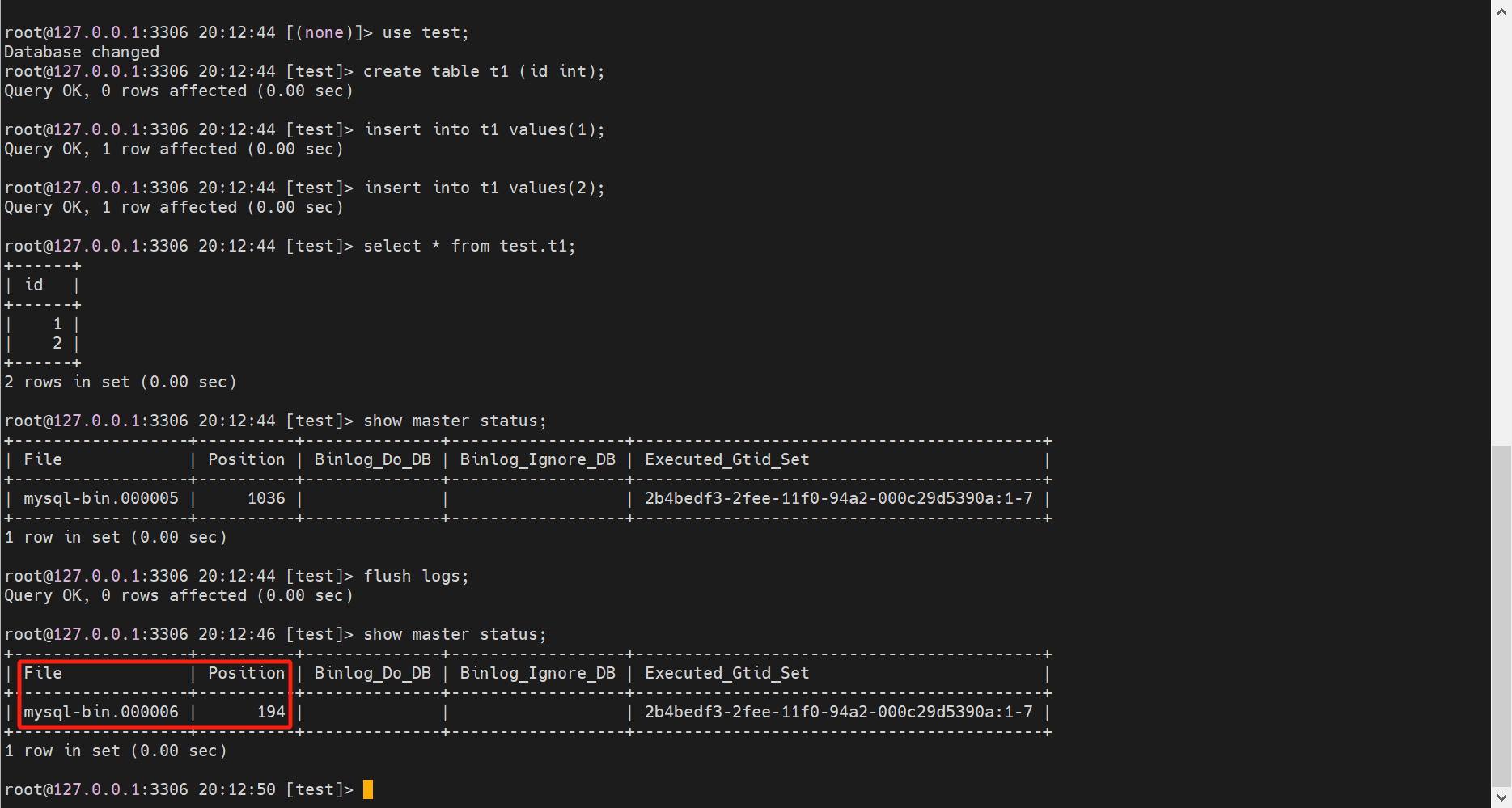
CREATE DATABASE IF NOT EXISTS test;
use test;
create table t1 (id int);
insert into t1 values(1);
insert into t1 values(2);
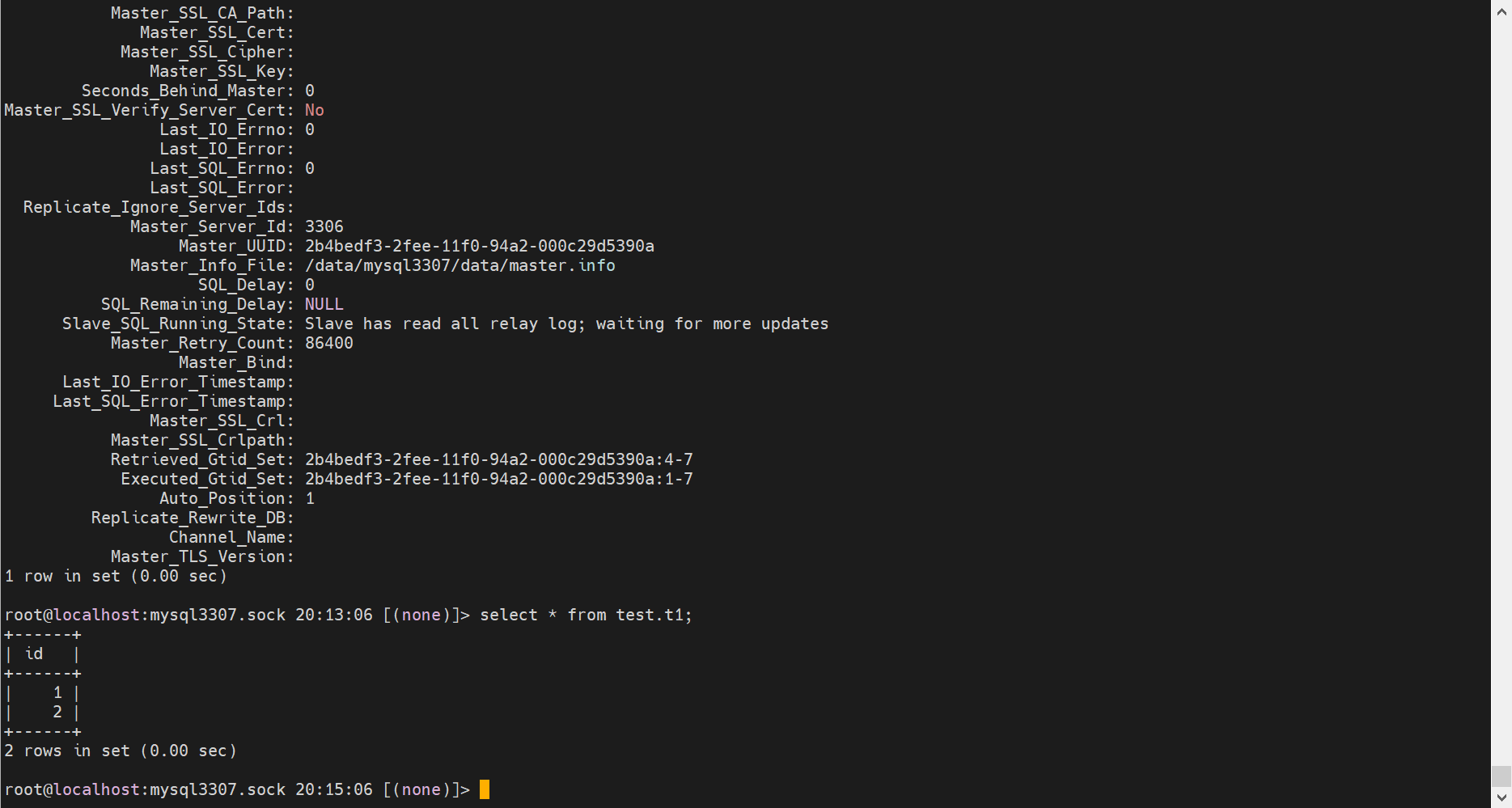
select * from test.t1;
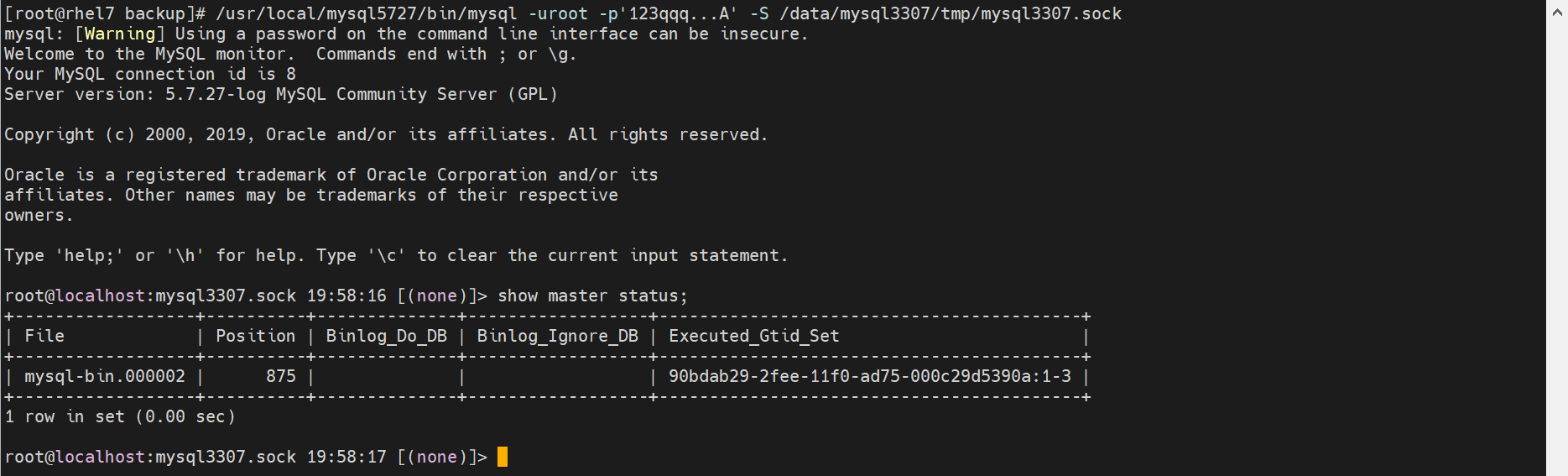
show master status;
flush logs;
升级流程
5.7.27_el7 → 5.7.44_el7 → 8.0.42_glibc → 8.4.4_el7
一、需求说明
mysql5.7.27 主从,升级到 mysql8.4.4
二、当前环境描述(模板)
Master Slave 内网地址 192.168.111.11 192.168.111.12 系统版本 RHEL76 RHEL76 数据库版本 mysql5727 mysql5727 datadir /data/mysql_m01/data/ /data/mysql_s01/data/ innodb_data_file_path ibdata1:12M:autoextend ibdata1:12M:autoextend innodb_data_home_dir /data/mysql_m01/data /data/mysql_s01/data innodb_log_group_home_dir /data/mysql_m01/rlog /data/mysql_s01/rlog innodb_temp_data_file_path ibtmp1:12M:autoextend ibtmp1:12M:autoextend innodb_undo_directory /data/mysql_m01/ulog /data/mysql_s01/ulog log_bin_basename /data/mysql_m01/blog/mysql-bin /data/mysql_s01/blog/mysql-bin relay_log_basename /data/mysql_m01/blog/relay /data/mysql_s01/blog/relay log_error /data/mysql_m01/elog/mysql.err /data/mysql_s01/elog/mysql.err tmpdir /data/mysql_m01/tmp /data/mysql_s01/tmp
三、升级前状态检查
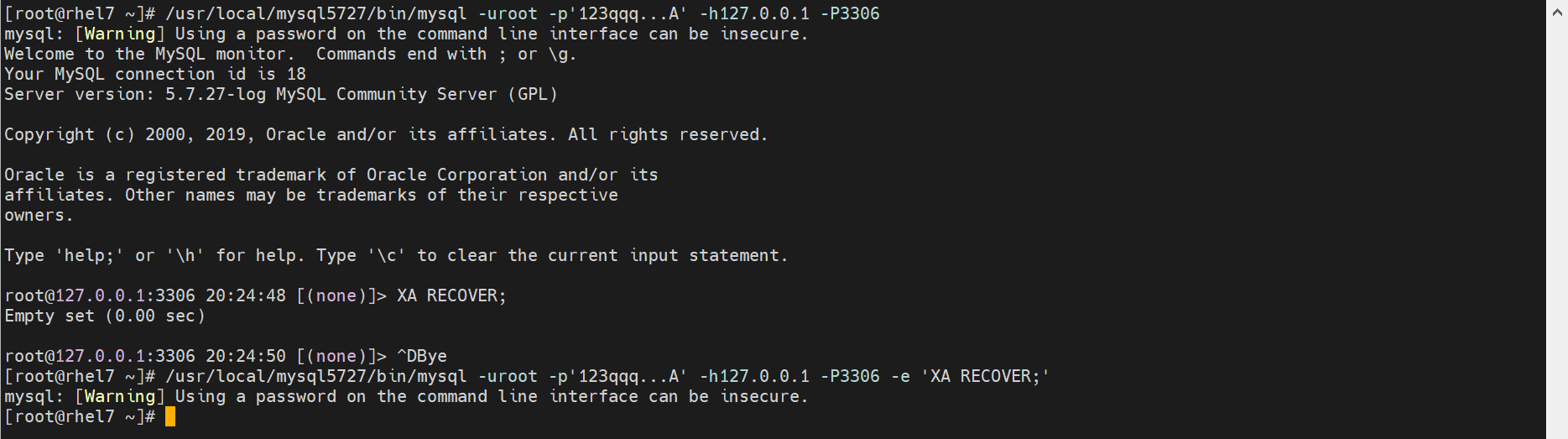
3.1、检查是否主库存在 XA 活动事务
mysql --login-path=root -e 'XA RECOVER;'
/usr/local/mysql5727/bin/mysql -uroot -p'123qqq...A' -h127.0.0.1 -P3306 -e 'XA RECOVER;'
注: 如果返回有值,需要执行 XA COMMIT ; 或则 XA ROLLBACK;
3.2、确保主库和从库无任何业务连接
mysql --login-path=root -e 'show processlist;'
/usr/local/mysql5727/bin/mysql -uroot -p'123qqq...A' -h127.0.0.1 -P3306 -e 'show processlist;'

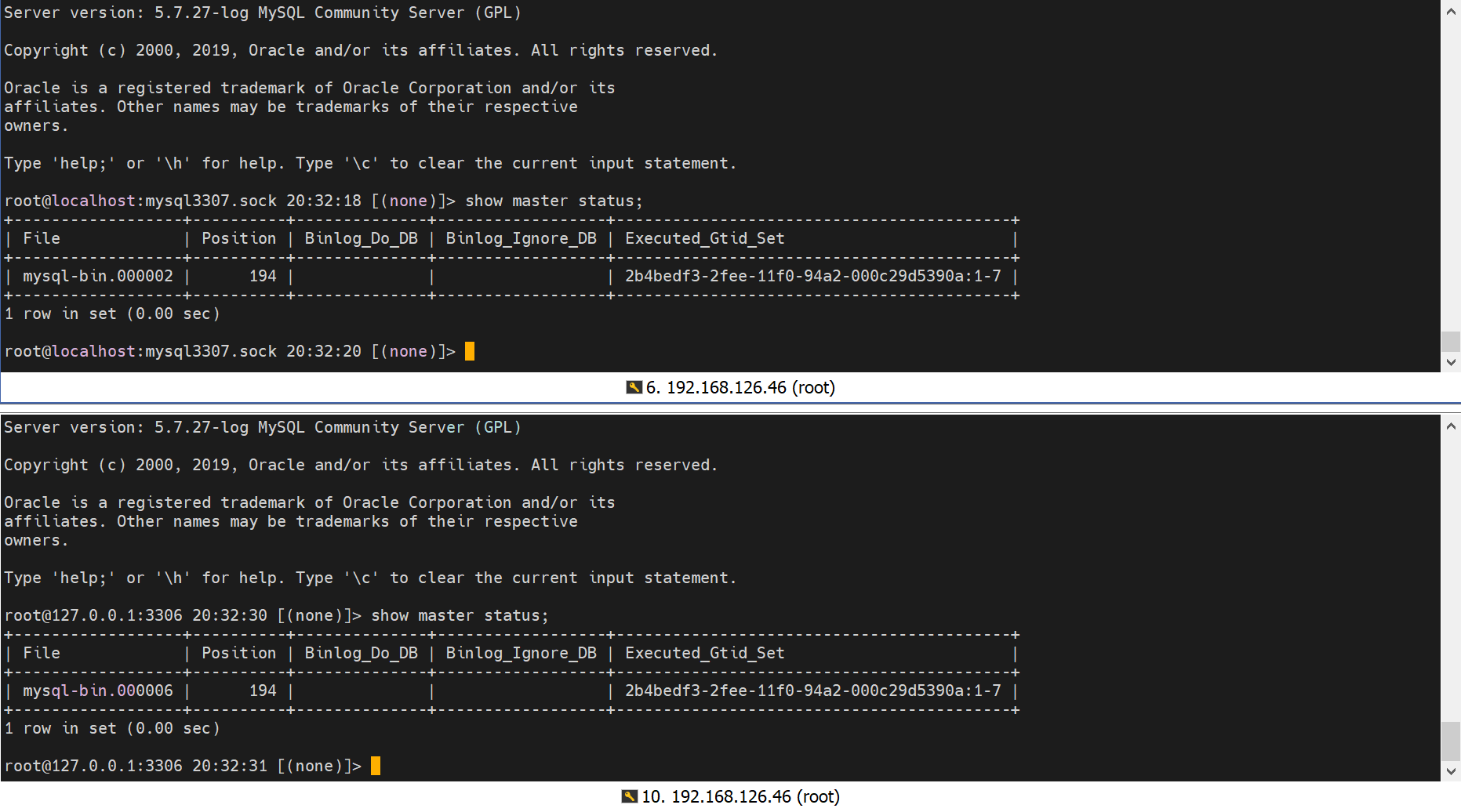
3.3、确保主库和从库数据一致
# 我这里直接通过gtid一致,进行比对了
mysql --login-path=root -e 'show master status;'
3.4、确保从库无延迟
mysql --login-path=root -e 'show slave status\G' | grep -E 'Slave_IO_Running:|Slave_SQL_Running:|Seconds_Behind_Master:'
          Slave_IO_Running: Yes
         Slave_SQL_Running: Yes
     Seconds_Behind_Master: 0

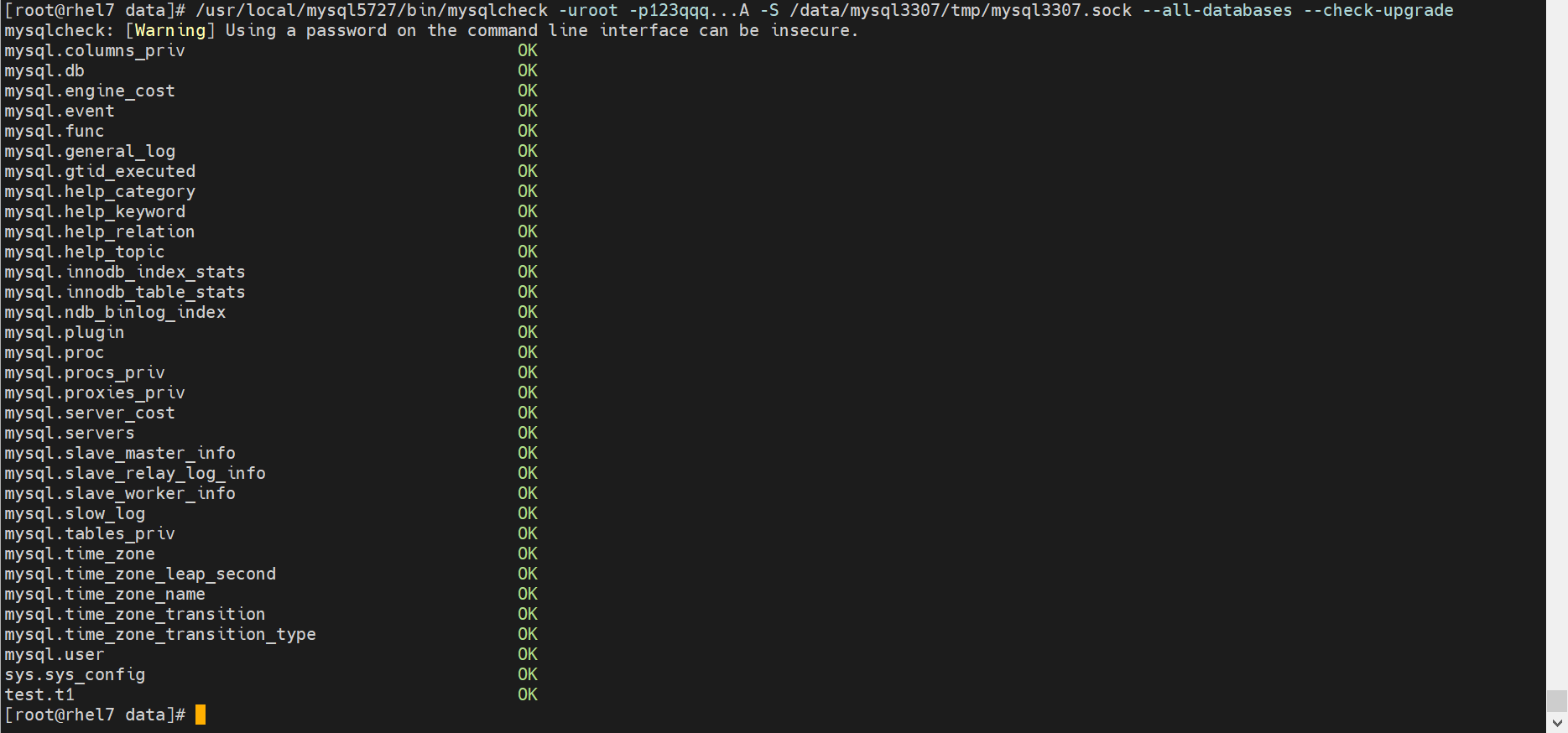
3.5、确保当前不存在损坏的表
mysqlcheck --login-path=root --all-databases --check-upgrade
/usr/local/mysql5727/bin/mysqlcheck -uroot -p123qqq...A -S /data/mysql3307/tmp/mysql3307.sock --all-databases --check-upgrade
我这里输出如下
db1.accounts                                       OK
db2.accounts                                       OK
mysql.columns_priv                                 OK
mysql.db                                           OK
mysql.engine_cost                                  OK
mysql.event                                        OK
mysql.func                                         OK
mysql.general_log                                  OK
mysql.gtid_executed                                OK
mysql.help_category                                OK
mysql.help_keyword                                 OK
mysql.help_relation                                OK
mysql.help_topic                                   OK
mysql.innodb_index_stats                           OK
mysql.innodb_table_stats                           OK
mysql.ndb_binlog_index                             OK
mysql.plugin                                       OK
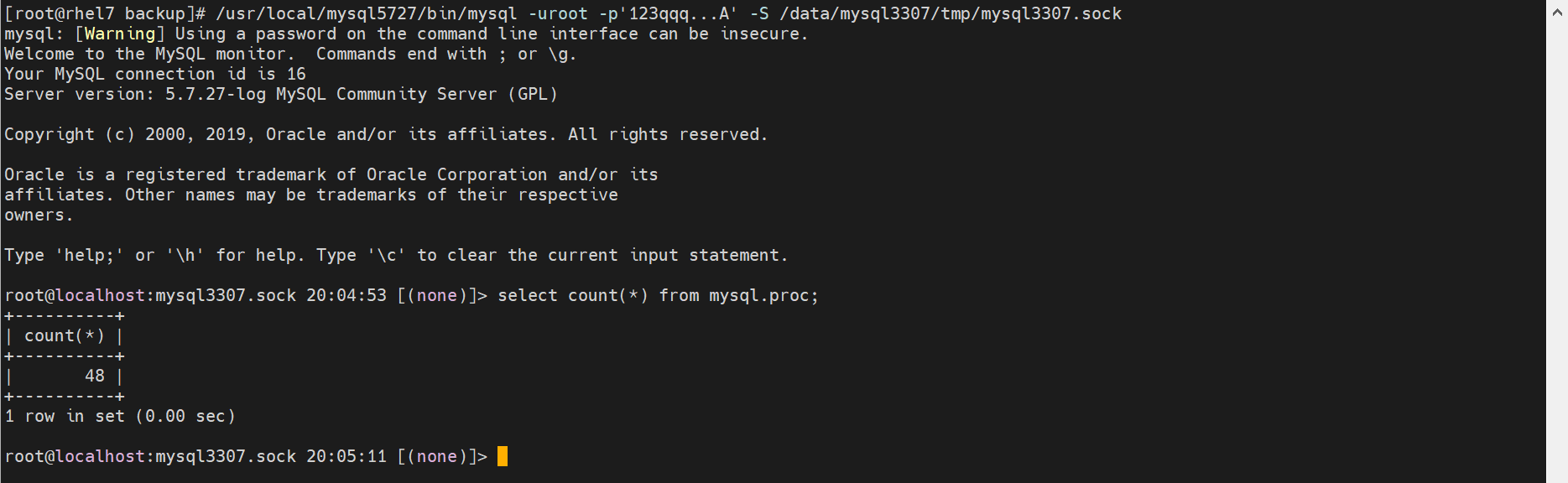
mysql.proc                                         OK
mysql.procs_priv                                   OK
mysql.proxies_priv                                 OK
mysql.server_cost                                  OK
mysql.servers                                      OK
mysql.slave_master_info                            OK
mysql.slave_relay_log_info                         OK
mysql.slave_worker_info                            OK
mysql.slow_log                                     OK
mysql.tables_priv                                  OK
mysql.time_zone                                    OK
mysql.time_zone_leap_second                        OK
mysql.time_zone_name                               OK
mysql.time_zone_transition                         OK
mysql.time_zone_transition_type                    OK
mysql.user                                         OK
orders.sales_innodb                                OK
orders.sales_myisam                                OK
warning  : The partition engine, used by table 'orders.sales_myisam', is deprecated and will be removed in a future release. Please use native partitioning instead.
orders.t1
Warning  : InnoDB: Tablespace has been discarded for table 't1'
status   : OK
sys.sys_config                                     OK
需要将这里的警告和报错,都处理掉
# 省略了处理步骤。
3.6、使用 mysqlsh 中的 util checkForServerUpgrade 确认实例是否已准备好升级
目标升级到哪里,就用哪个版本的mysqlsh
# 确定下当前的mysqlsh版本
./mysqlsh --version
	Ver 8.0.41 for Linux on x86_64 - for MySQL 8.0.41 (MySQL Community Server (GPL))
# 使用mysqlsh进行升级前的检查
./mysqlsh --user=root --password=xxx --socket=/data/mysql_s01/mysql.sock  -- util checkForServerUpgrade

mysqlsh -uroot -p123qqq...A -S /data/mysql3306/tmp/mysql3306.sock -- util checkForServerUpgrade

# 安装步骤
bunzip2 -k mysql-shell-8.0.42-linux-glibc2.17-x86-64bit.tar.gz.bz2
tar zxf mysql-shell-8.0.42-linux-glibc2.17-x86-64bit.tar.gz -C /usr/local/

export PATH=$PATH:/usr/local/mysql/bin:/usr/local/mysql-shell-8.0.42-linux-glibc2.17-x86-64bit/bin
which mysql
mysql -V
which mysqlsh
mysqlsh -V
我这里的输出如下:
The MySQL server at /data%2Fmysql_s01%2Fmysql.sock, version 5.7.27-log - MySQL
Community Server (GPL), will now be checked for compatibility issues for
upgrade to MySQL 8.0.41...

1) Usage of old temporal type
  No issues found

2) MySQL 8.0 syntax check for routine-like objects
  No issues found

3) Usage of db objects with names conflicting with new reserved keywords
  No issues found

4) Usage of utf8mb3 charset
  No issues found

5) Table names in the mysql schema conflicting with new tables in 8.0
  No issues found

6) Partitioned tables using engines with non native partitioning
  Error: In MySQL 8.0 storage engine is responsible for providing its own
    partitioning handler, and the MySQL server no longer provides generic
    partitioning support. InnoDB and NDB are the only storage engines that
    provide a native partitioning handler that is supported in MySQL 8.0. A
    partitioned table using any other storage engine must be altered—either to
    convert it to InnoDB or NDB, or to remove its partitioning—before upgrading
    the server, else it cannot be used afterwards.
  More information:
    https://dev.mysql.com/doc/refman/8.0/en/upgrading-from-previous-series.html#upgrade-configuration-changes

  orders.sales_myisam - MyISAM engine does not support native partitioning

7) Foreign key constraint names longer than 64 characters
  No issues found

8) Usage of obsolete MAXDB sql_mode flag
  No issues found

9) Usage of obsolete sql_mode flags
  Notice: The following DB objects have obsolete options persisted for
    sql_mode, which will be cleared during upgrade to 8.0.
  More information:
    https://dev.mysql.com/doc/refman/8.0/en/mysql-nutshell.html#mysql-nutshell-removals

  global system variable sql_mode - defined using obsolete NO_AUTO_CREATE_USER
    option

10) ENUM/SET column definitions containing elements longer than 255 characters
  No issues found

11) Usage of partitioned tables in shared tablespaces
  No issues found

12) Circular directory references in tablespace data file paths
  No issues found

13) Usage of removed functions
  No issues found

14) Usage of removed GROUP BY ASC/DESC syntax
  No issues found

15) Removed system variables for error logging to the system log configuration
  To run this check requires full path to MySQL server configuration file to be specified at 'configPath' key of options dictionary
  More information:
    https://dev.mysql.com/doc/relnotes/mysql/8.0/en/news-8-0-13.html#mysqld-8-0-13-logging

16) Removed system variables
  To run this check requires full path to MySQL server configuration file to be specified at 'configPath' key of options dictionary
  More information:
    https://dev.mysql.com/doc/refman/8.0/en/added-deprecated-removed.html#optvars-removed

17) System variables with new default values
  To run this check requires full path to MySQL server configuration file to be specified at 'configPath' key of options dictionary
  More information:
    https://mysqlserverteam.com/new-defaults-in-mysql-8-0/

18) Zero Date, Datetime, and Timestamp values
  No issues found

19) Schema inconsistencies resulting from file removal or corruption
  No issues found

20) Tables recognized by InnoDB that belong to a different engine
  No issues found

21) Issues reported by 'check table x for upgrade' command
  Notice  : Table (orders.t1) - InnoDB: Tablespace has been discarded for table
    't1'

22) New default authentication plugin considerations
  Warning: The new default authentication plugin 'caching_sha2_password' offers
    more secure password hashing than previously used 'mysql_native_password'
    (and consequent improved client connection authentication). However, it also
    has compatibility implications that may affect existing MySQL installations.
    If your MySQL installation must serve pre-8.0 clients and you encounter
    compatibility issues after upgrading, the simplest way to address those
    issues is to reconfigure the server to revert to the previous default
    authentication plugin (mysql_native_password). For example, use these lines
    in the server option file:

    [mysqld]
    default_authentication_plugin=mysql_native_password

    However, the setting should be viewed as temporary, not as a long term or
    permanent solution, because it causes new accounts created with the setting
    in effect to forego the improved authentication security.
    If you are using replication please take time to understand how the
    authentication plugin changes may impact you.
  More information:
    https://dev.mysql.com/doc/refman/8.0/en/upgrading-from-previous-series.html#upgrade-caching-sha2-password-compatibility-issues
    https://dev.mysql.com/doc/refman/8.0/en/upgrading-from-previous-series.html#upgrade-caching-sha2-password-replication

23) Columns which cannot have default values
  No issues found

24) Check for invalid table names and schema names used in 5.7
  No issues found

25) Check for orphaned routines in 5.7
  No issues found

26) Check for deprecated usage of single dollar signs in object names
  No issues found

27) Check for indexes that are too large to work on higher versions of MySQL
Server than 5.7
  No issues found

28) Check for deprecated '.<table>' syntax used in routines.
  No issues found

29) Check for columns that have foreign keys pointing to tables from a diffrent
database engine.
  No issues found

Errors:   1
Warnings: 1
Notices:  2

ERROR: 1 errors were found. Please correct these issues before upgrading to avoid compatibility issues.
上述输出的问题,需要处理,详细处理方式请参考:https://dev.mysql.com/doc/refman/8.0/en/upgrade-prerequisites.html
将上述输出的Errors、Warnings、Notices处理掉,再进行升级。Errors是必须处理的。

修复完成后,还需要重启mysqld,再次执行检查。
如果由于上述任何问题导致升级到 MySQL 8.0 失败,服务器将恢复对数据目录的所有更改。在这种情况下,删除所有重做日志文件并在现有数据目录上重新启动 MySQL 5.7 服务器以解决错误。重做日志文件 ( ib_logfile*) 默认位于 MySQL 数据目录中。修复错误后,请执行慢速关机(通过设置 innodb_fast_shutdown=0),然后再尝试升级。
3.6、升级前,关闭从库slave自启动
# 在mysql的配置文件 [mysqld] 下方,开启 skip_slave_start
[mysqld]
skip_slave_start=1

四、停服冷备
**直接升级有失败风险,比如bug【https://zhuanlan.zhihu.com/p/413646593】,必须做好备份及回退方案。
如果是单实例,那么必须进行停机冷备。
如果是主从,那么先升级从库,从库升级没问题后,再升级主库。
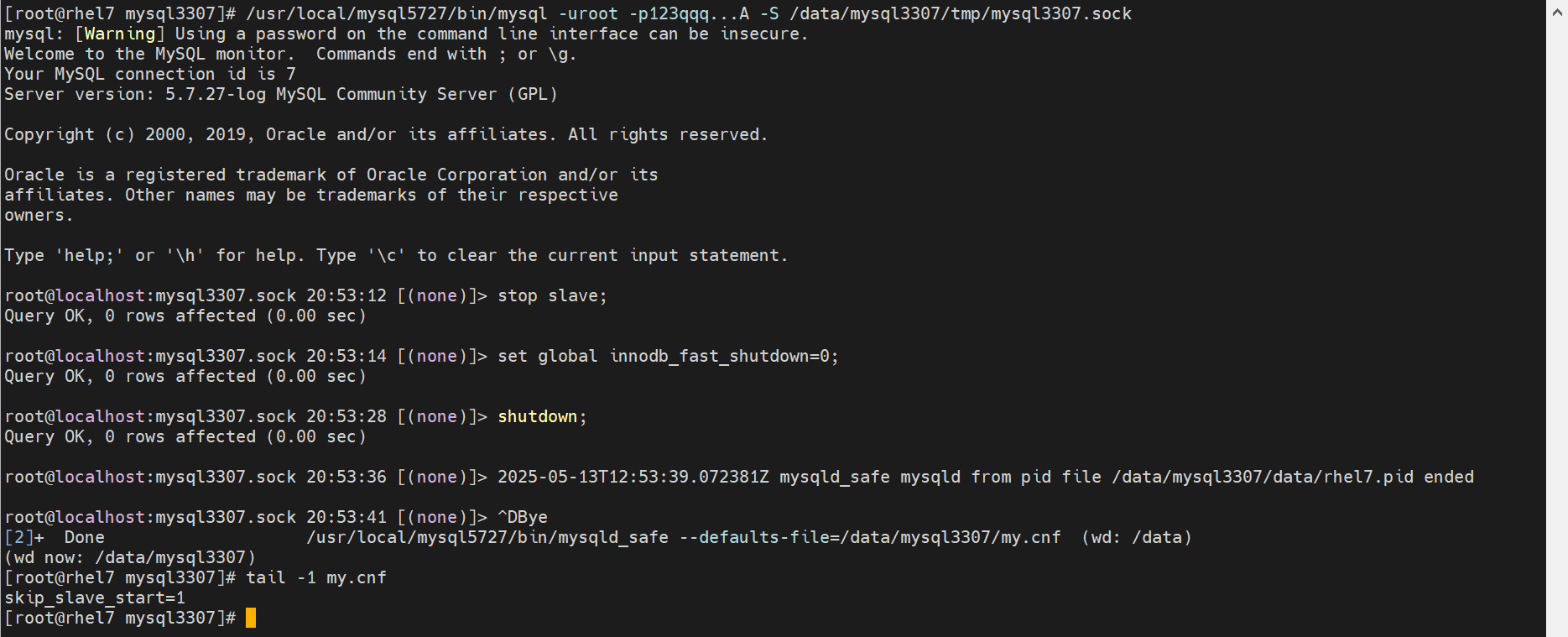
从库冷备
mysql --login-path=root -e 'stop slave;'
mysql --login-path=root -e 'set global innodb_fast_shutdown=0;'
mysql --login-path=root -e 'shutdown;'
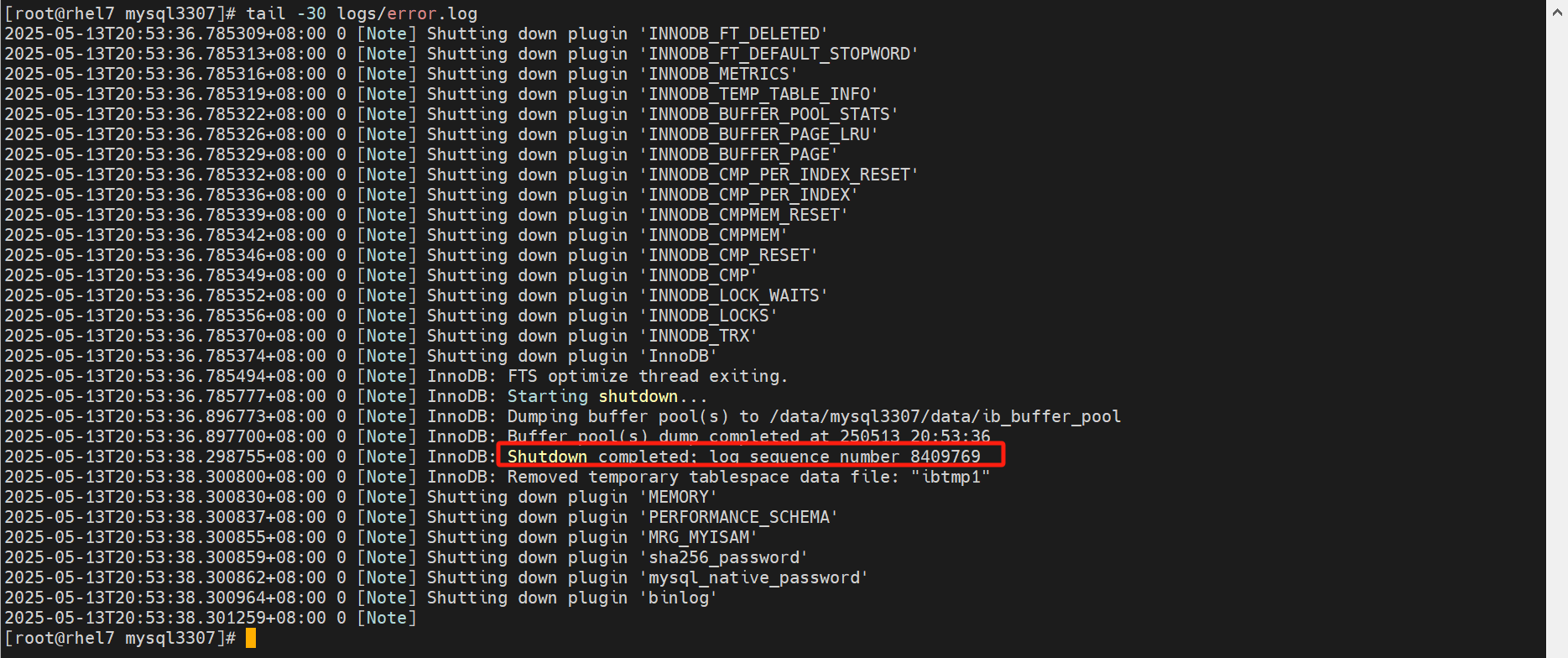
# 日志出现 Shutdown complete,则停机完成
tail -3f /data/mysql_s01/elog/mysql.err
# 数据、日志都需要进行备份 cp -rp /data/mysql_s01 /data/mysql_s01_`date +%Y-%m-%d`bak/
主库冷备[可选]
这一步,不一定需要,我这里是为了完整性的需要。
# 完全清除和change buffer合并,确保InnoDB数据文件已完全准备好。
mysql --login-path=root -e 'set global innodb_fast_shutdown=0;'

# 关机
mysql --login-path=root -e 'shutdown;'

# 日志出现 Shutdown complete,则停机完成
tail -3f /data/mysql_m01/elog/mysql.err
# 数据、日志都需要进行备份 cp -rp /data/mysql_m01 /data/mysql_m01_`date +%Y-%m-%d`bak/

五、升级从库到57最新版
5.1、更换程序文件
# 解压目标版本的mysql
tar -xf mysql-5.7.44-linux-glibc2.12-x86_64.tar.gz -C /usr/local/
# 移除之前的链接
unlink /usr/local/mysql
# 创建新的链接
ln -s /usr/local/mysql-5.7.44-linux-glibc2.12-x86_64 /usr/local/mysql

export PATH=$PATH:/usr/local/mysql/bin
which mysql
mysql -V
5.2、启动mysql
# 启动mysqld
/data/mysql_s01/bin/startup.sh
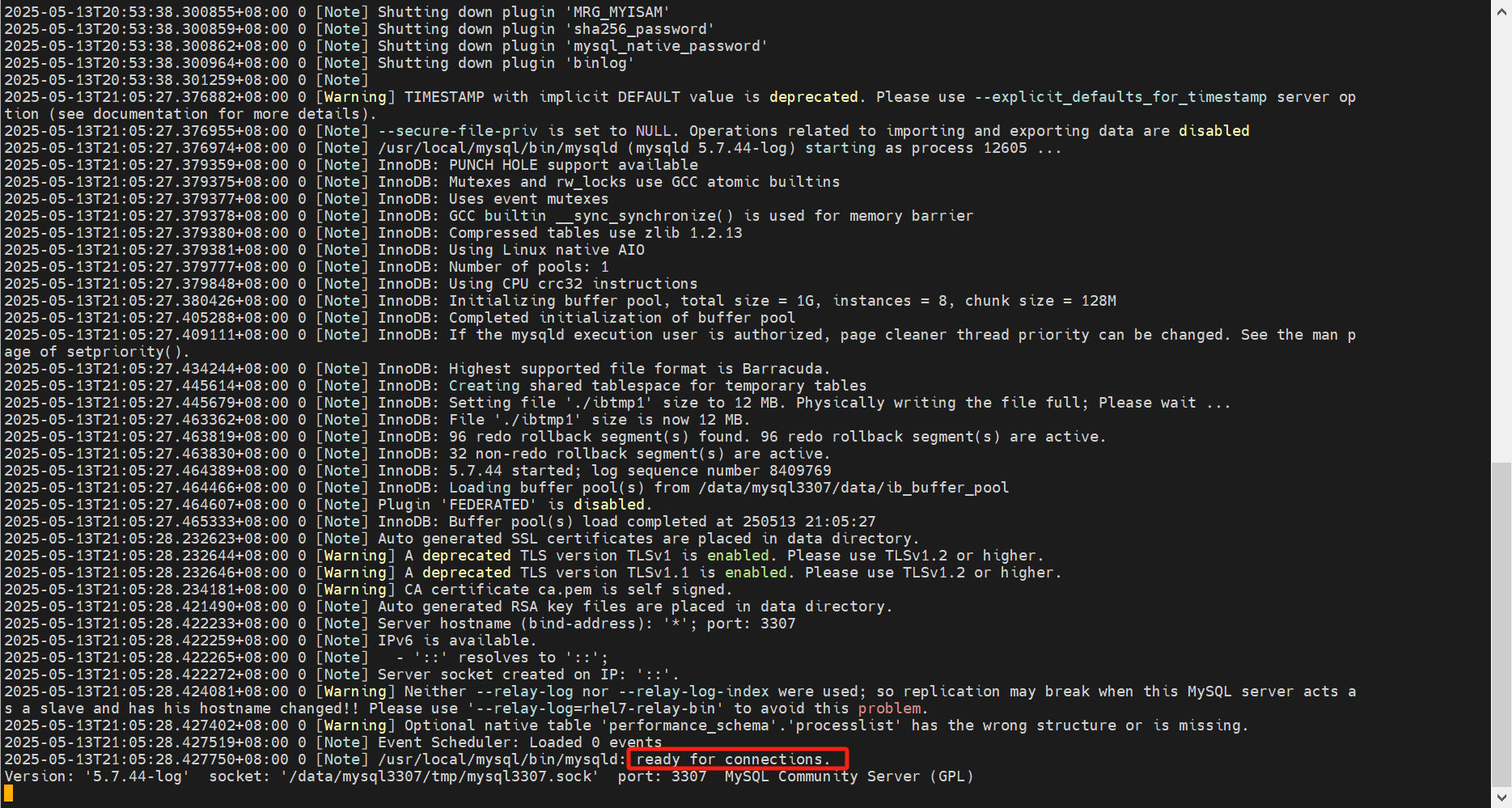
# 检查日志,确保无任何报错,并且输出 ready for connections. 则说明mysqld启动完成
tail -f /data/mysql_s01/elog/mysql.err

mysqld_safe --defaults-file=/data/mysql3307/my.cnf &
5.3、更新数据字典
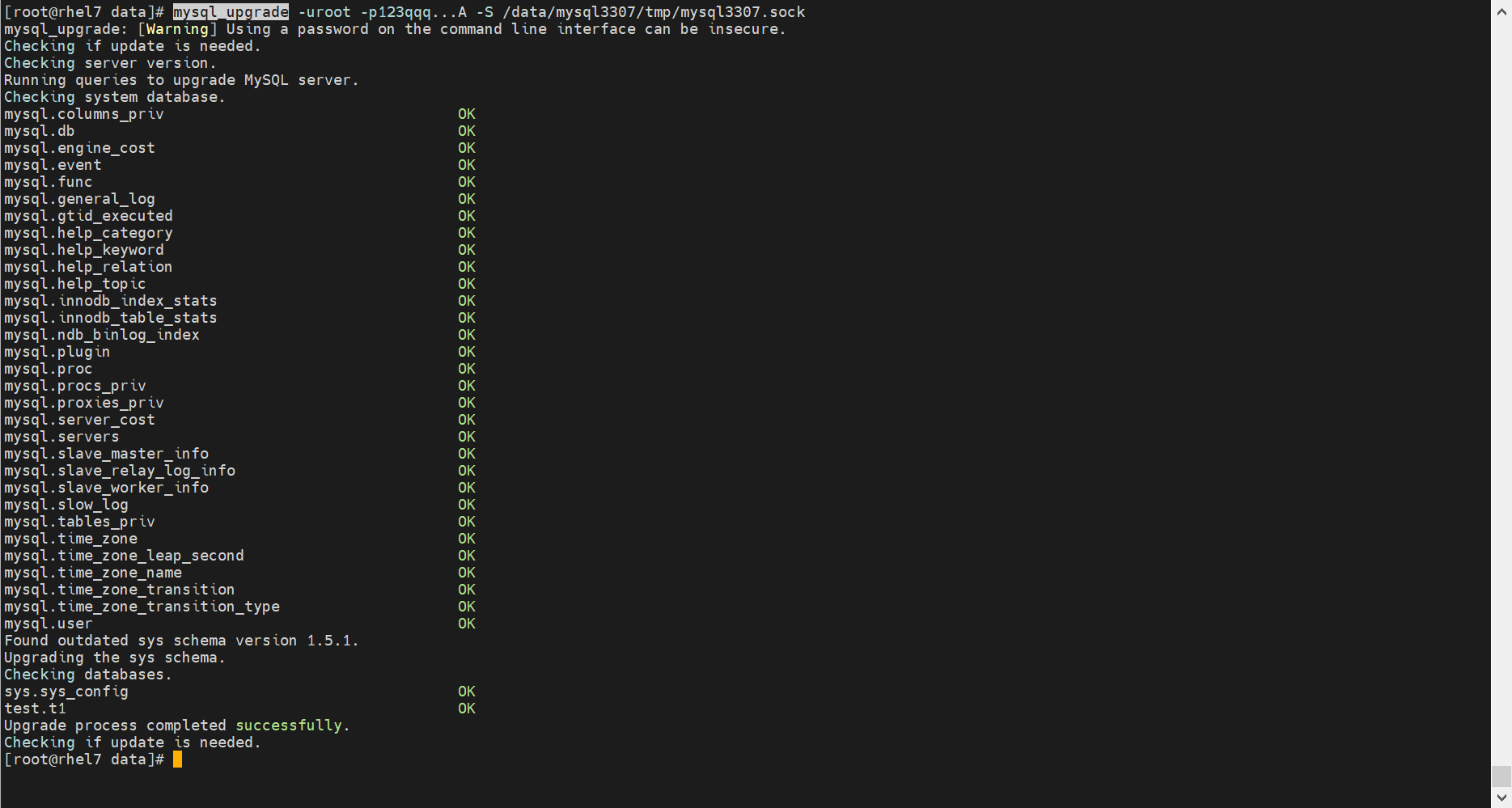
mysql_upgrade --login-path=root

mysql_upgrade -uroot -p123qqq...A -S /data/mysql3307/tmp/mysql3307.sock
我这里的输出如下
Checking if update is needed.
Checking server version.
Running queries to upgrade MySQL server.
Checking system database.
mysql.columns_priv                                 OK
mysql.db                                           OK
mysql.engine_cost                                  OK
mysql.event                                        OK
mysql.func                                         OK
mysql.general_log                                  OK
mysql.gtid_executed                                OK
mysql.help_category                                OK
mysql.help_keyword                                 OK
mysql.help_relation                                OK
mysql.help_topic                                   OK
mysql.innodb_index_stats                           OK
mysql.innodb_table_stats                           OK
mysql.ndb_binlog_index                             OK
mysql.plugin                                       OK
mysql.proc                                         OK
mysql.procs_priv                                   OK
mysql.proxies_priv                                 OK
mysql.server_cost                                  OK
mysql.servers                                      OK
mysql.slave_master_info                            OK
mysql.slave_relay_log_info                         OK
mysql.slave_worker_info                            OK
mysql.slow_log                                     OK
mysql.tables_priv                                  OK
mysql.time_zone                                    OK
mysql.time_zone_leap_second                        OK
mysql.time_zone_name                               OK
mysql.time_zone_transition                         OK
mysql.time_zone_transition_type                    OK
mysql.user                                         OK
Found outdated sys schema version 1.5.1.
Upgrading the sys schema.
Checking databases.
#mysql50##innodb_temp                              OK
db1.accounts                                       OK
db2.accounts                                       OK
orders.sales_innodb                                OK
orders.sales_myisam                                OK
sys.sys_config                                     OK
Upgrade process completed successfully.
Checking if update is needed.
六、升级从库到80最新版
6.1、升级前检查,并停止当前mysqld
升级前检查
在 3.6步骤中,已经进行了升级前的检查
停止当前mysqld
mysql --login-path=root -e 'stop slave;'
mysql --login-path=root -e 'set global innodb_fast_shutdown=0;'
mysql --login-path=root -e 'shutdown;'
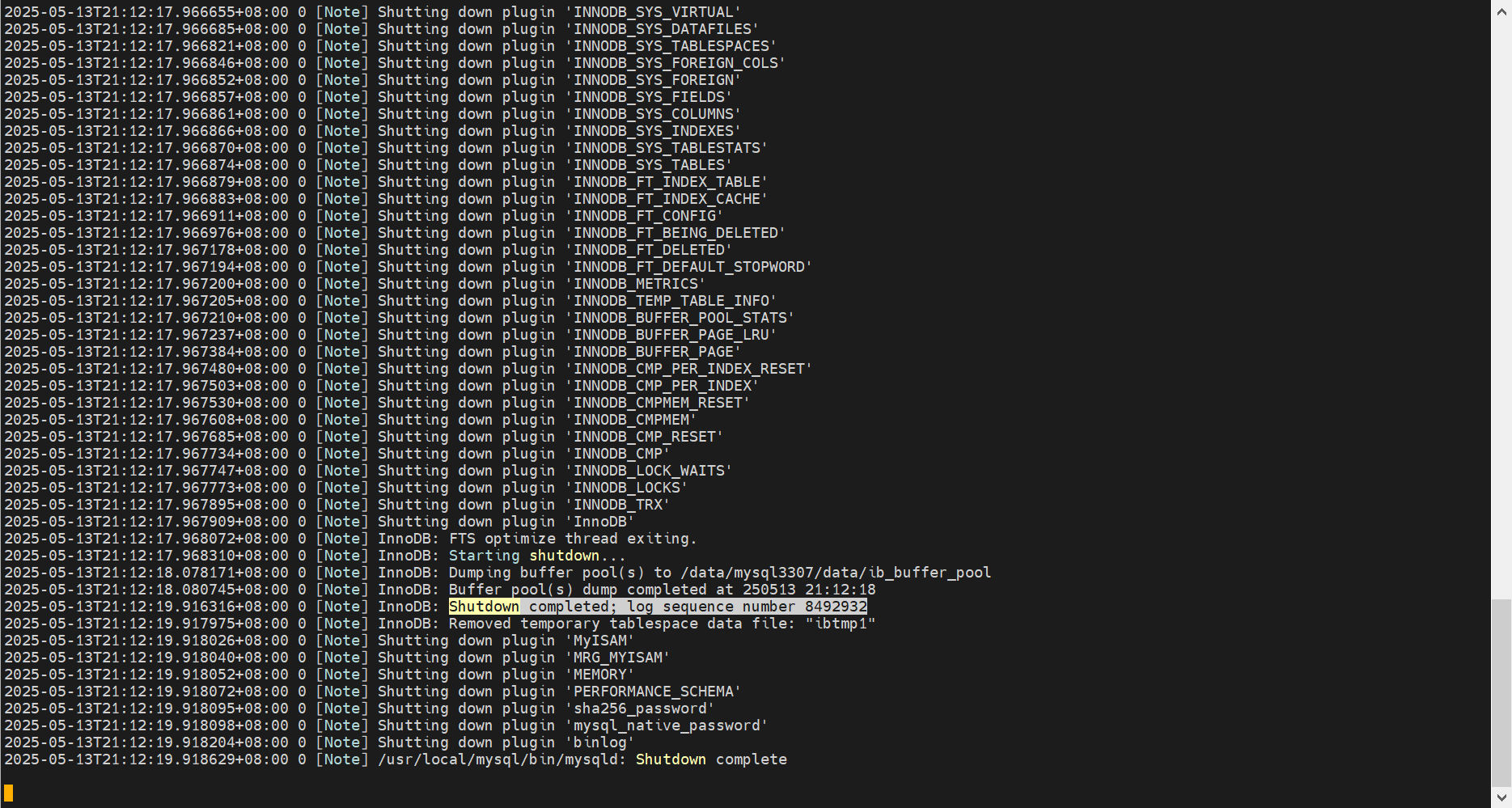
# 日志出现 Shutdown complete,则停机完成
tail -3f /data/mysql_s01/elog/mysql.err

6.2、更换数据文件
# 解压目标版本的mysql
tar -xf mysql-8.0.42-linux-glibc2.17-x86_64.tar.xz -C /usr/local/
# 移除之前的链接
unlink /usr/local/mysql
# 创建新的链接
ln -s /usr/local/mysql-8.0.42-linux-glibc2.17-x86_64 /usr/local/mysql
6.3、确认当前已不存在被移除的配置项
以下配置项,已经被移除,请确保在配置文件中不存在【https://dev.mysql.com/doc/refman/8.0/en/added-deprecated-removed.html#optvars-removed】
date_format
datetime_format
have_crypt
ignore_builtin_innodb
ignore_db_dirs
innodb_checksums
innodb_file_format
innodb_file_format_check
innodb_file_format_max
innodb_large_prefix
innodb_locks_unsafe_for_binlog
innodb_stats_sample_pages
innodb_support_xa
innodb_undo_logs
internal_tmp_disk_storage_engine
log_builtin_as_identified_by_password
log_syslog
log_syslog_facility
log_syslog_include_pid
log_syslog_tag
max_tmp_tables
metadata_locks_cache_size
metadata_locks_hash_instances
multi_range_count
myisam_repair_threads
old_passwords
query_cache_limit
query_cache_min_res_unit
query_cache_size
query_cache_type
query_cache_wlock_invalidate
secure_auth
show_compatibility_56
sync_frm
time_format
tx_isolation
tx_read_only
# 检查脚本
[root@rhel7 mysql3307]# cat remove

date_format
datetime_format
have_crypt
ignore_builtin_innodb
ignore_db_dirs
innodb_checksums
innodb_file_format
innodb_file_format_check
innodb_file_format_max
innodb_large_prefix
innodb_locks_unsafe_for_binlog
innodb_stats_sample_pages
innodb_support_xa
innodb_undo_logs
internal_tmp_disk_storage_engine
log_builtin_as_identified_by_password
log_syslog
log_syslog_facility
log_syslog_include_pid
log_syslog_tag
max_tmp_tables
metadata_locks_cache_size
metadata_locks_hash_instances
multi_range_count
myisam_repair_threads
old_passwords
query_cache_limit
query_cache_min_res_unit
query_cache_size
query_cache_type
query_cache_wlock_invalidate
secure_auth
show_compatibility_56
sync_frm
time_format
tx_isolation
tx_read_only

[root@rhel7 mysql3307]# sed 's/-/_/g' my.cnf > my.cnf.check

[root@rhel7 mysql3307]# cat remove.sh
for i in `cat remove`
do
  #echo $i
  grep $i my.cnf.check
done

6.4、启动mysql
# 启动mysqld
/data/mysql_s01/bin/startup.sh
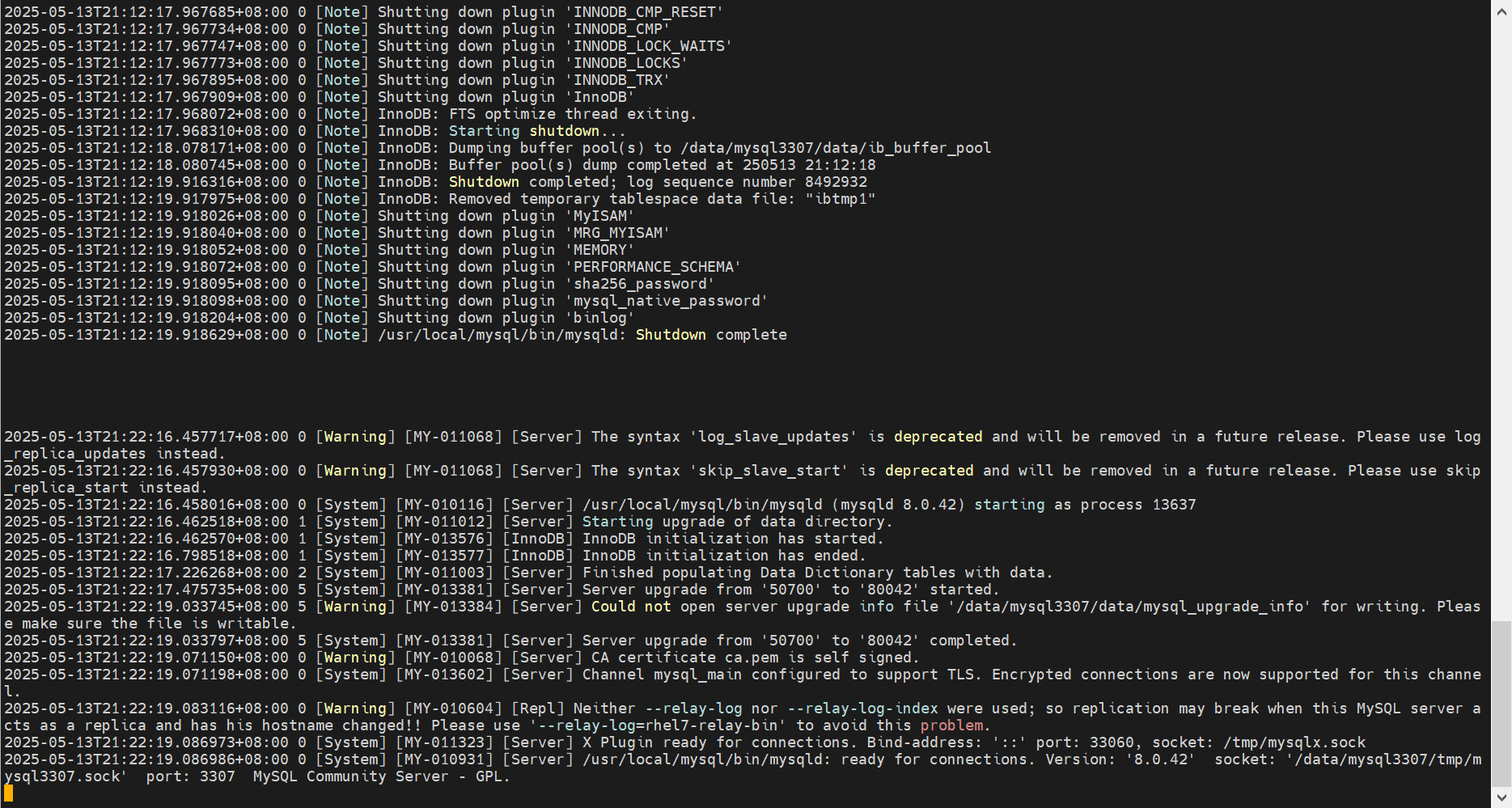
# 检查日志,确保无任何报错,并且输出 ready for connections. 则说明mysqld启动完成
tail -f /data/mysql_s01/elog/mysql.err

mysqld_safe --defaults-file=/data/mysql3307/my.cnf &

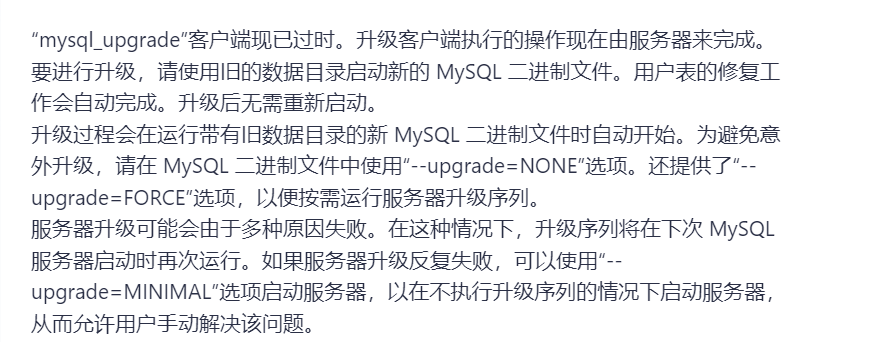
6.5、执行升级
# 确定下 mysql_upgrade 版本
mysql_upgrade --version
# mysql_upgrade也新版本的哈, 如果是8.0.16及其之后的版本可以不用执行这一步
mysql_upgrade --login-path=root

mysql_upgrade -uroot -p123qqq...A -S /data/mysql3307/tmp/mysql3307.sock

七、升级从库到84最新版
7.1、升级前检查,并停止当前mysqld
升级前检查
目标升级到哪里,就用哪个版本的mysqlsh
bunzip2 -k mysql-shell-8.4.4-linux-glibc2.17-x86-64bit.tar.gz.bz2
tar zxf mysql-shell-8.4.4-linux-glibc2.17-x86-64bit.tar.gz -C /usr/local/

export PATH=$PATH:/usr/local/mysql/bin:/usr/local/mysql-shell-8.4.4-linux-glibc2.17-x86-64bit/bin
which mysql
mysql -V
which mysqlsh
mysqlsh -V

# 确定下当前的mysqlsh版本
./mysqlsh --version
	Ver 8.4.4 for Linux on x86_64 - for MySQL 8.4.4 (MySQL Community Server (GPL))
# 使用mysqlsh进行升级前的检查
./mysqlsh --user=root --password=xxx --socket=/data/mysql_s01/mysql.sock  -- util checkForServerUpgrade

mysqlsh -uroot -p123qqq...A -S /data/mysql3307/tmp/mysql3307.sock -- util checkForServerUpgrade
我这里的输出如下:
The MySQL server at /data%2Fmysql_s01%2Fmysql.sock, version 8.0.41 - MySQL
Community Server - GPL, will now be checked for compatibility issues for
upgrade to MySQL 8.4.4. To check for a different target server version, use the
targetVersion option.

1) Removed system variables (removedSysVars)
   Error: Following system variables that were detected as being used will be
   removed. Please update your system to not rely on them before the upgrade.

   expire_logs_days - Error: The system variable 'expire_logs_days' is set to 3
      (EXPLICIT) and will be removed.
   master_info_repository - Error: The system variable 'master_info_repository'
      is set to TABLE (EXPLICIT) and will be removed.
   relay_log_info_repository - Error: The system variable
      'relay_log_info_repository' is set to TABLE (EXPLICIT) and will be removed.

   More information:
     https://dev.mysql.com/doc/refman/8.0/en/added-deprecated-removed.html#optvars-removed


2) System variables with new default values (sysVarsNewDefaults)
   Warning: Following system variables that are not defined in your
   configuration file will have new default values. Please review if you rely
   on their current values and if so define them before performing upgrade.

   binlog_transaction_dependency_tracking - default value will change from
      COMMIT_ORDER to WRITESET.
   group_replication_consistency - default value will change from EVENTUAL to
      BEFORE_ON_PRIMARY_FAILOVER.
   group_replication_exit_state_action - default value will change from
      READ_ONLY to OFFLINE_MODE.
   innodb_adaptive_hash_index - default value will change from ON to OFF.
   innodb_buffer_pool_in_core_file - default value will change from ON to OFF.
   innodb_change_buffering - default value will change from all to none.
   innodb_doublewrite_files - default value will change from
      innodb_buffer_pool_instances * 2 to 2.
   innodb_doublewrite_pages - default value will change from
      innodb_write_io_threads to 128.
   innodb_log_writer_threads - default value will change from ON to OFF ( if
      #vcpu <= 32 ).
   innodb_numa_interleave - default value will change from OFF to ON.
   innodb_parallel_read_threads - default value will change from 4 to
      MAX(#vcpu/8, 4).
   innodb_purge_threads - default value will change from 4 to 1 ( if #vcpu <=
      16 ).
   innodb_read_io_threads - default value will change from 4 to MAX(#vcpu/2, 4).
   innodb_redo_log_capacity - default value will change from 104857600 (100MB)
      to MIN ( #vcpu/2, 16 )GB.

   More information:
     https://dev.mysql.com/blog-archive/new-defaults-in-mysql-8-0/


3) Issues reported by 'check table x for upgrade' command (checkTableCommand)
   No issues found

4) Checks for foreign keys not referencing a full unique index
(foreignKeyReferences)
   No issues found

5) Check for deprecated or invalid user authentication methods.
(authMethodUsage)
   Some users are using authentication methods that may be deprecated or
   removed, please review the details below.

   Warning: The following users are using the 'mysql_native_password'
   authentication method which is deprecated as of MySQL 8.0.34 and will be
   removed in a future release.
   Consider switching the users to a different authentication method (i.e.
   caching_sha2_password).
   The 'mysql_native_password' authentication type is disabled by default in
   MySQL 8.4, but can still be enabled by setting
   loose_mysql_native_password=ON.
   - dbpmon@%
   - mysql.session@localhost
   - mysql.sys@localhost
   - repl@%
   - root@localhost
   - toor@%
   - zabbix@%

   More information:
     https://dev.mysql.com/doc/refman/en/caching-sha2-pluggable-authentication.html


6) Check for deprecated or removed plugin usage. (pluginUsage)
   No issues found

7) Check for deprecated or invalid default authentication methods in system
variables. (deprecatedDefaultAuth)
   No issues found

8) Check for deprecated or invalid authentication methods in use by MySQL
Router internal accounts. (deprecatedRouterAuthMethod)
   No issues found

9) Checks for errors in column definitions (columnDefinition)
   No issues found

10) Check for allowed values in System Variables. (sysvarAllowedValues)
   No issues found

11) Checks for user privileges that will be removed (invalidPrivileges)
   Verifies for users containing grants to be removed as part of the upgrade
   process.

   Notice: The following users have the SET_USER_ID privilege which will be
   removed as part of the upgrade process:
   - 'mysql.session'@'localhost'
   - 'root'@'localhost'

   Solution:
   - If the privileges are not being used, no action is required, otherwise,
      ensure they stop being used before the upgrade as they will be lost.


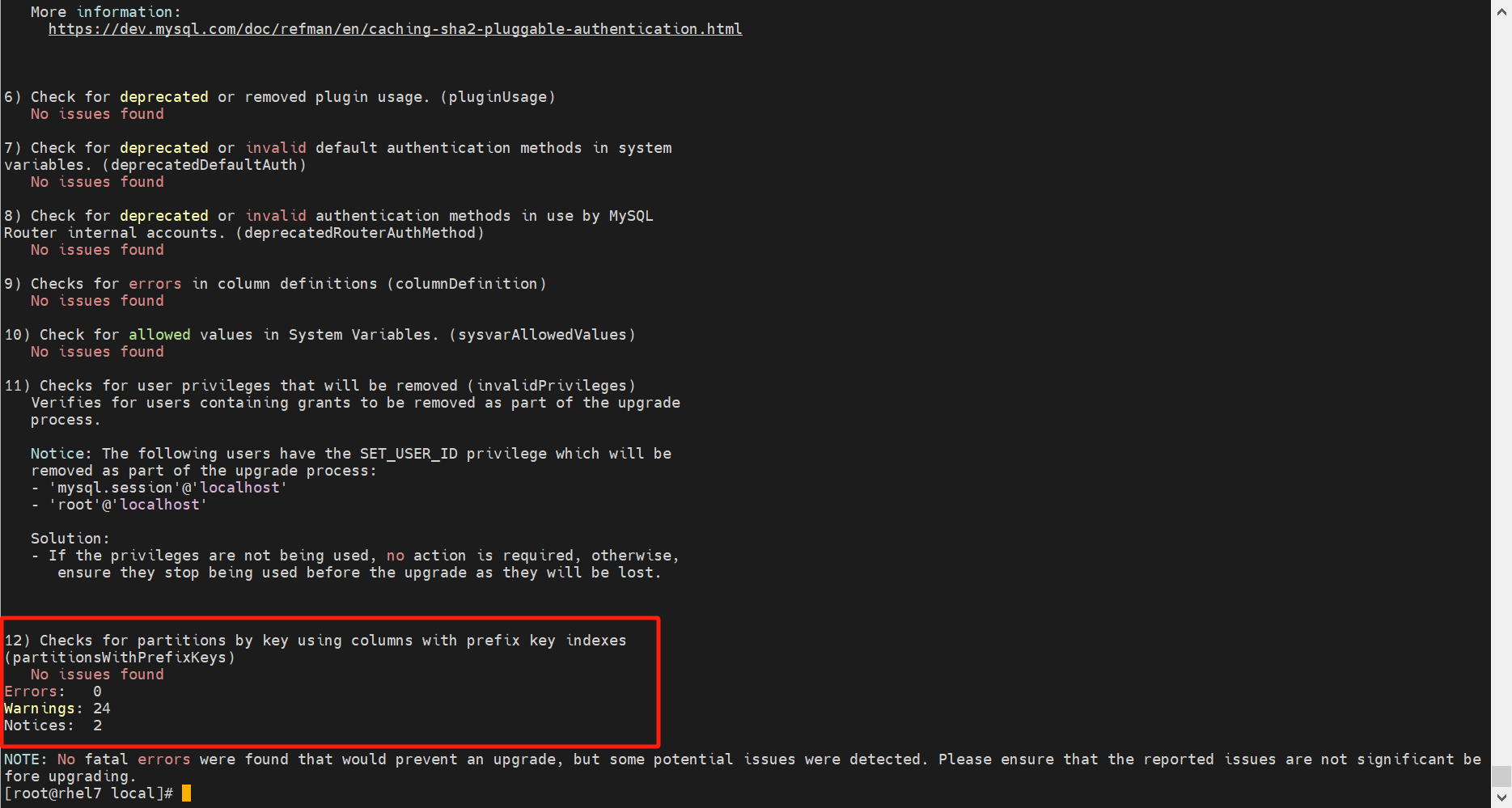
12) Checks for partitions by key using columns with prefix key indexes
(partitionsWithPrefixKeys)
   No issues found
Errors:   3
Warnings: 21
Notices:  2

ERROR: 3 errors were found. Please correct these issues before upgrading to avoid compatibility issues.
上述输出的问题,需要处理,详细处理方式请参考:https://dev.mysql.com/doc/refman/8.4/en/upgrade-prerequisites.html
将上述输出的Errors、Warnings、Notices处理掉,再进行升级。Errors是必须处理的。

修复完成后,还需要重启mysqld,再次执行检查。
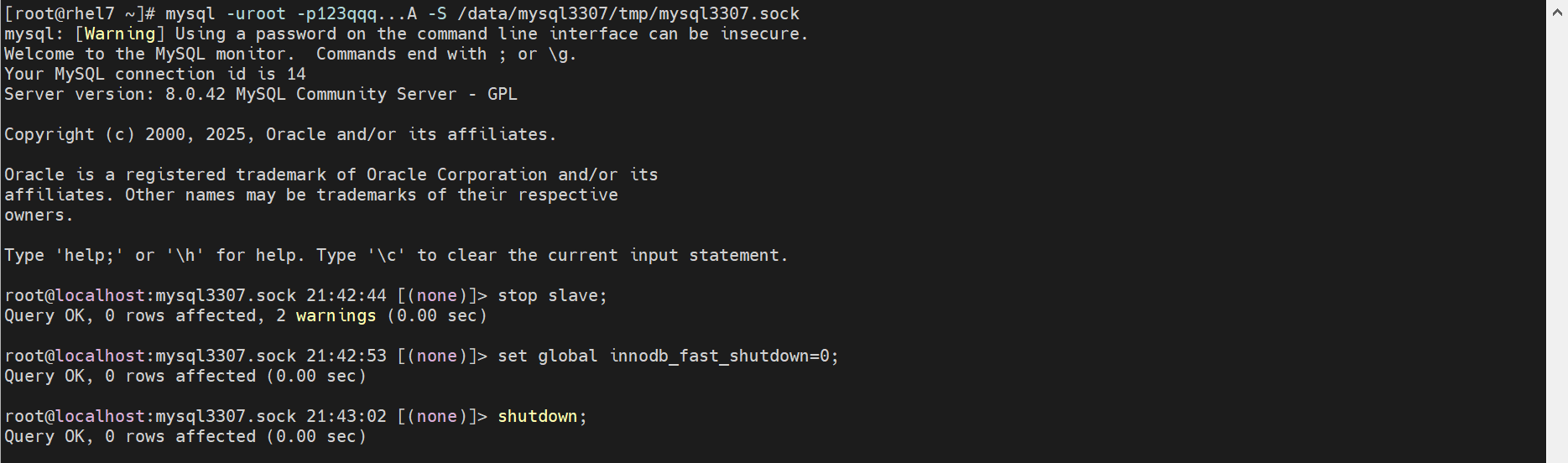
停止mysqld
mysql --login-path=root -e 'stop slave;'
mysql --login-path=root -e 'set global innodb_fast_shutdown=0;'
mysql --login-path=root -e 'shutdown;'
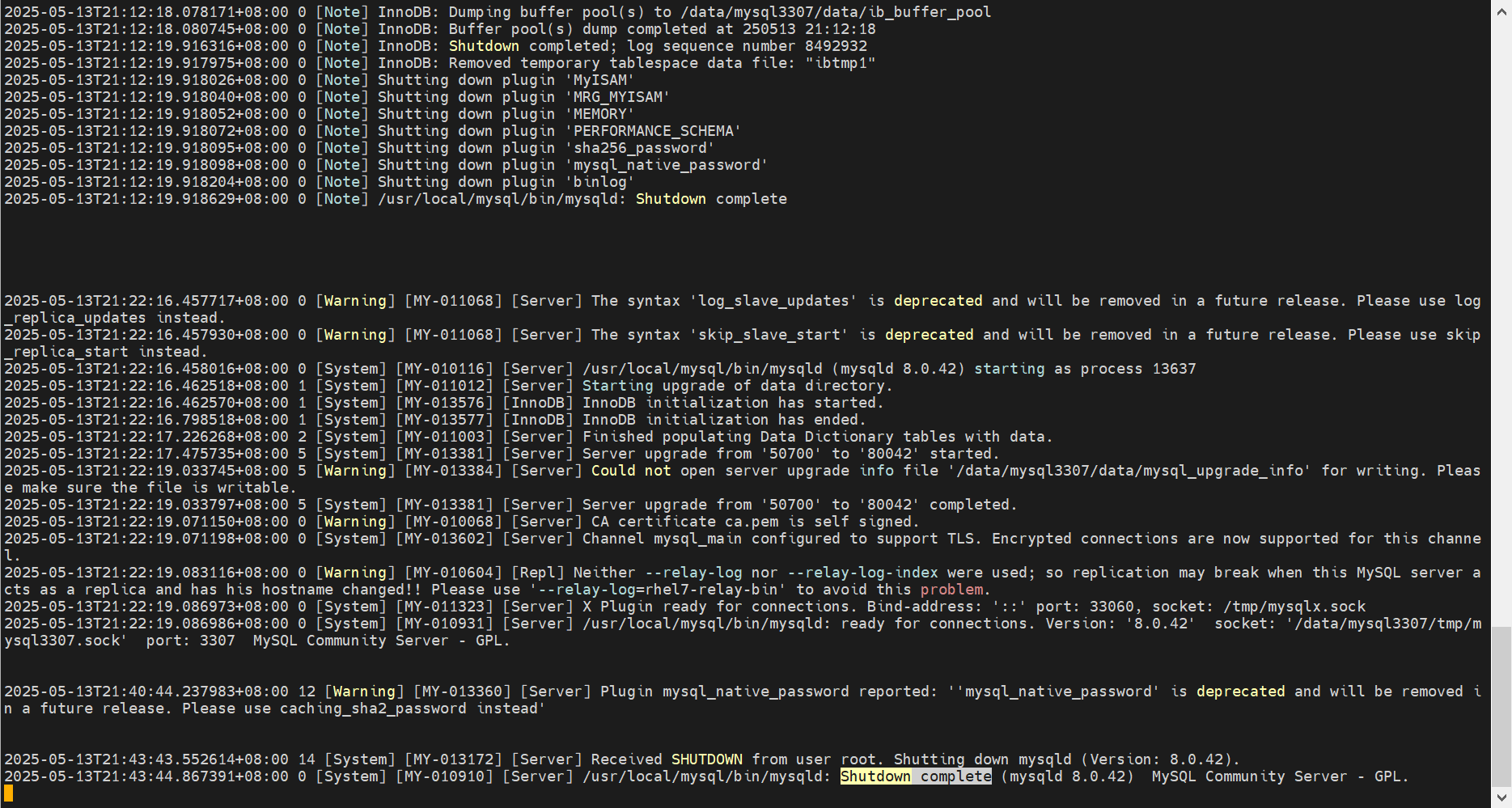
# 日志出现 Shutdown complete,则停机完成
tail -3f /data/mysql_s01/elog/mysql.err
7.2、更换数据文件
# 解压目标版本的mysql
tar -xf mysql-8.4.4-linux-glibc2.17-x86_64.tar.xz -C /usr/local/
# 移除之前的链接
unlink /usr/local/mysql
# 创建新的链接
ln -s /usr/local/mysql-8.4.4-linux-glibc2.17-x86_64 /usr/local/mysql

export PATH=$PATH:/usr/local/mysql/bin
which mysql
mysql -V
7.3、确认当前已不存在被移除的配置项
以下配置项,已经被移除,请确保在配置文件中不存在【https://dev.mysql.com/doc/refman/8.4/en/added-deprecated-removed.html#optvars-removed】
avoid_temporal_upgrade
binlog_transaction_dependency_tracking
default_authentication_plugin
expire_logs_days
have_openssl
have_ssl
innodb_api_bk_commit_interval
innodb_api_disable_rowlock
innodb_api_enable_binlog
innodb_api_enable_mdl
innodb_api_trx_level
log_bin_use_v1_row_events
master_info_repository
new
old
relay_log_info_file
relay_log_info_repository
show_old_temporals
slave_rows_search_algorithms
transaction_write_set_extraction
# 检查脚本
[root@rhel7 mysql3307]# cat remove

avoid_temporal_upgrade
binlog_transaction_dependency_tracking
default_authentication_plugin
expire_logs_days
have_openssl
have_ssl
innodb_api_bk_commit_interval
innodb_api_disable_rowlock
innodb_api_enable_binlog
innodb_api_enable_mdl
innodb_api_trx_level
log_bin_use_v1_row_events
master_info_repository
new
old
relay_log_info_file
relay_log_info_repository
show_old_temporals
slave_rows_search_algorithms
transaction_write_set_extraction

[root@rhel7 mysql3307]# sed 's/-/_/g' my.cnf > my.cnf.check

[root@rhel7 mysql3307]# cat remove.sh
for i in `cat remove`
do
  #echo $i
  grep $i my.cnf.check
done

[root@rhel7 mysql3307]# sh remove.sh
[root@rhel7 mysql3307]#
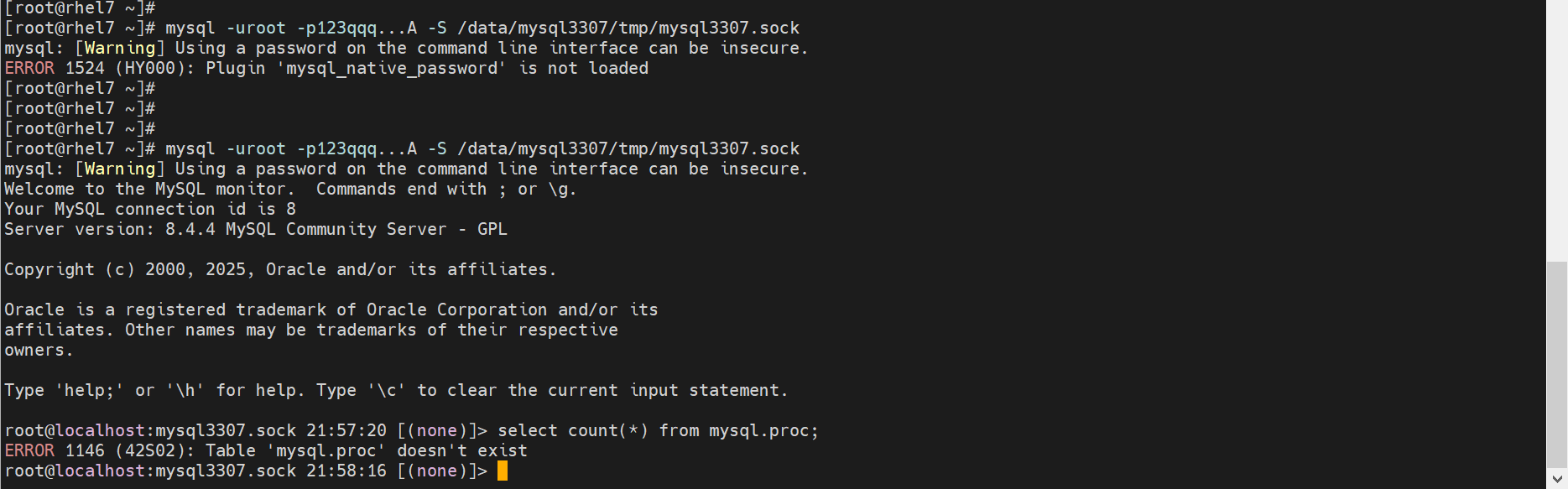
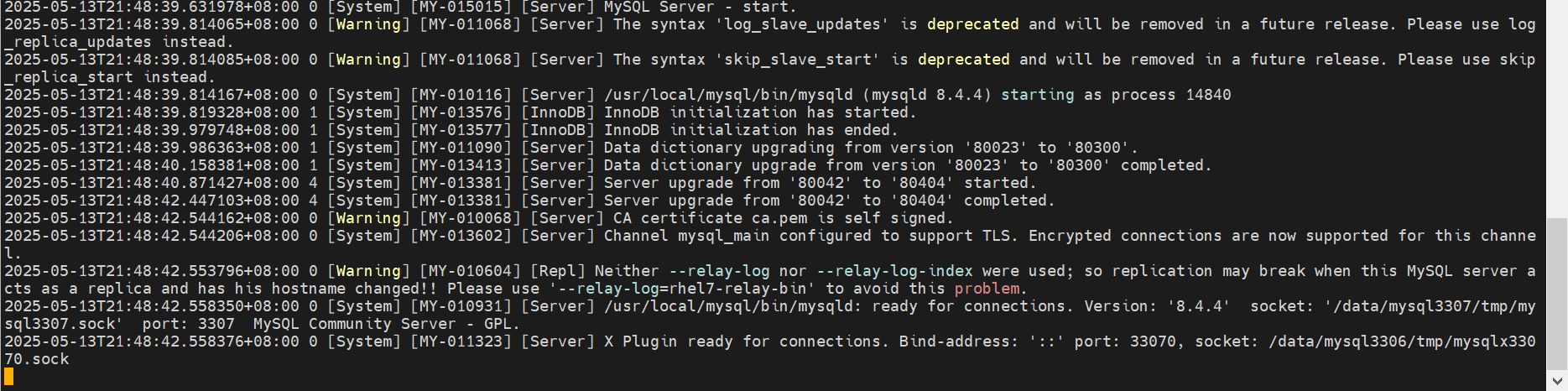
7.4、启动mysql
# 启动mysqld
/data/mysql_s01/bin/startup.sh
# 检查日志,确保无任何报错,并且输出 ready for connections. 则说明mysqld启动完成
tail -f /data/mysql_s01/elog/mysql.err

export PATH=$PATH:/usr/local/mysql/bin
which mysql
mysql -V

mysqld_safe --defaults-file=/data/mysql3307/my.cnf &
ps -ef|grep mysql



八、从库升级完成后,再升级主库
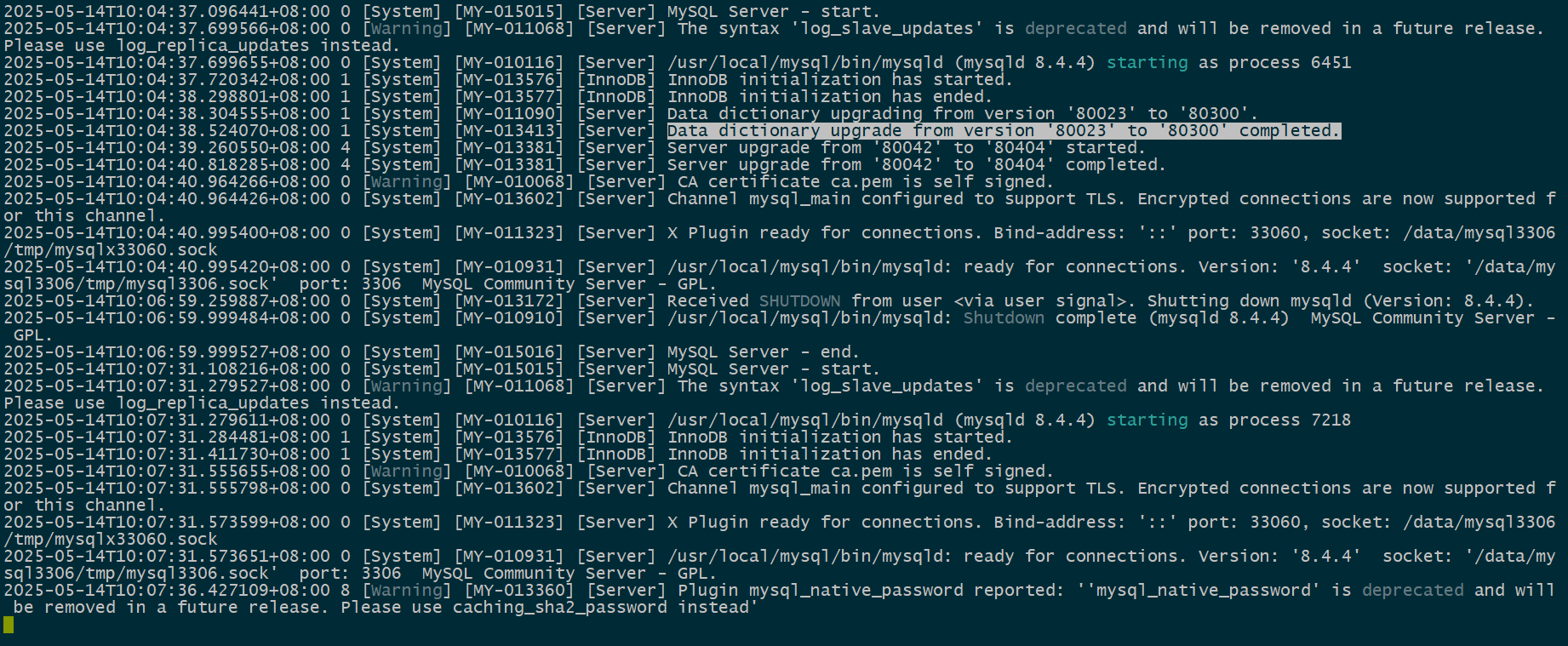
# 按照前面步骤进行即可
5.7.27_el7 → 5.7.44_el7 → 8.0.42_glibc → 8.4.4_el7
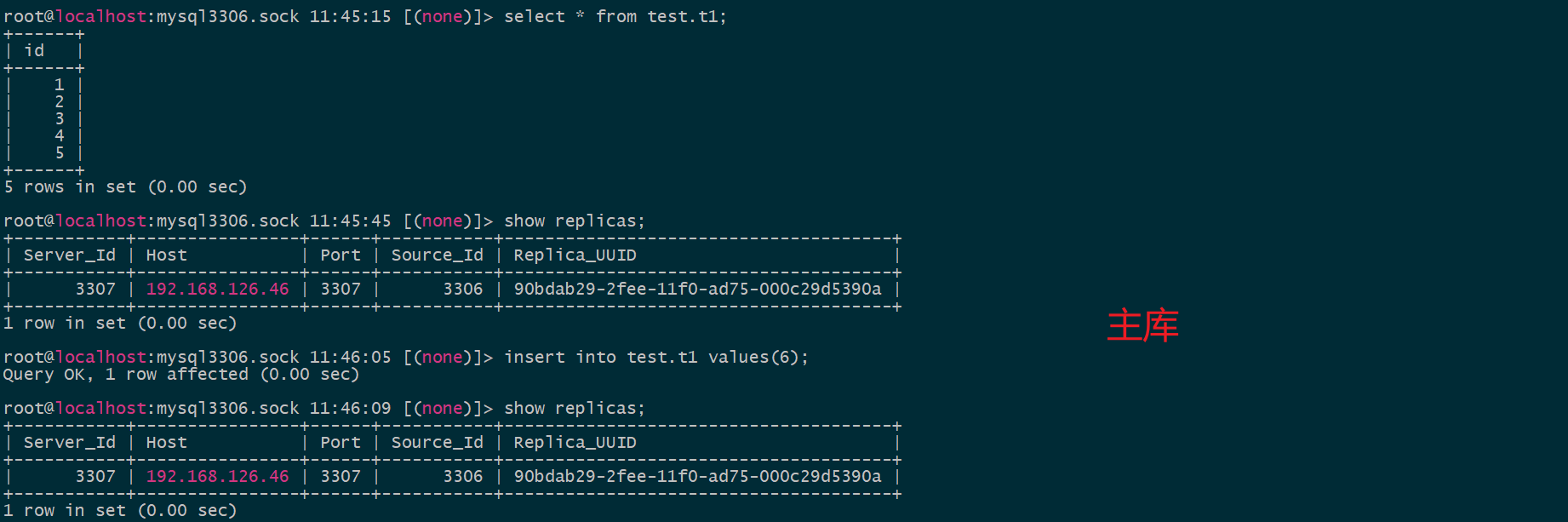
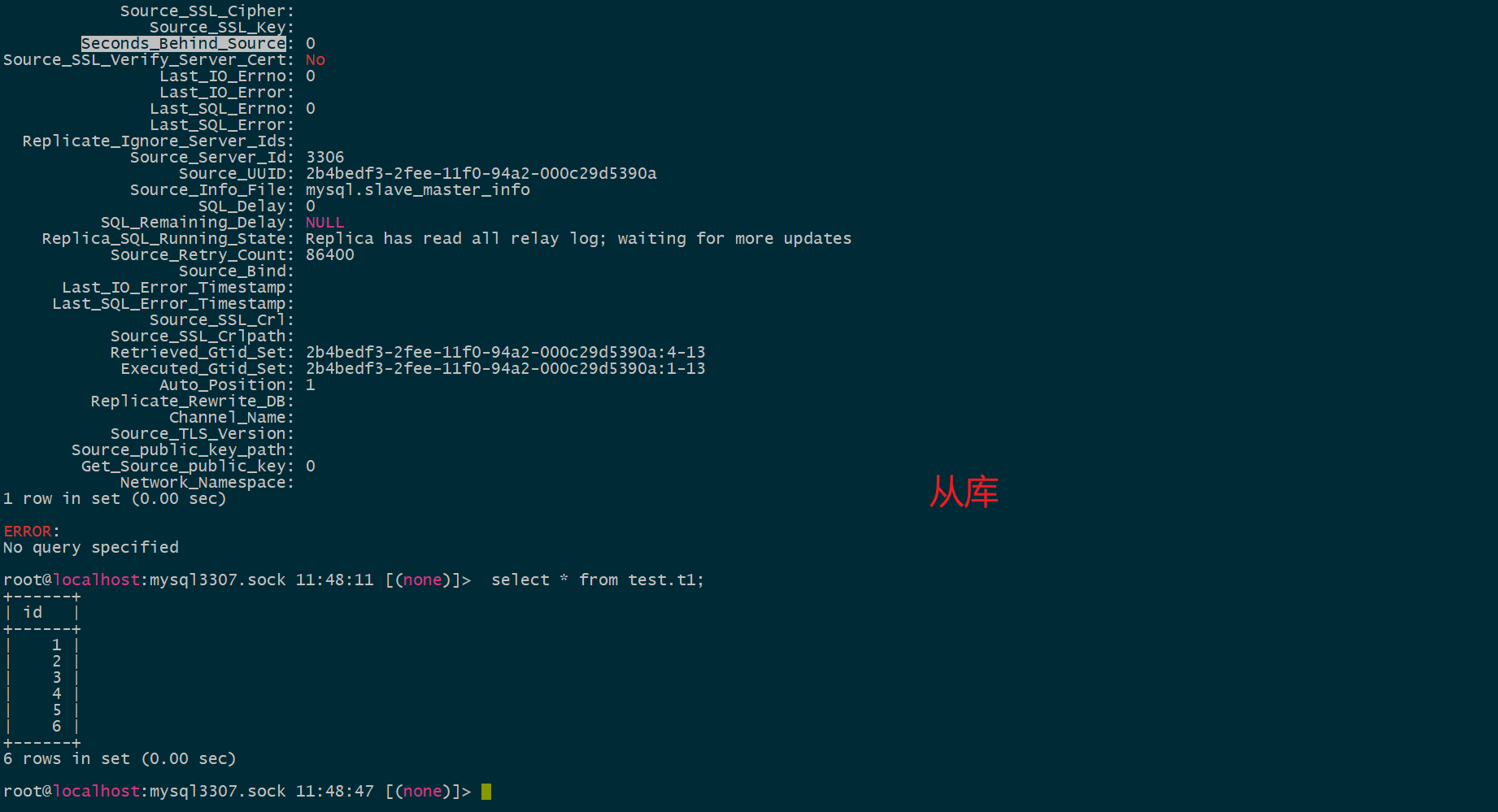
九、恢复主从复制(恢复从库进程自启动)。
# 跳过从库进程自启动
#skip_slave_start=1

# 密码插件
mysql_native_password=on

START REPLICA;
SHOW REPLICA STATUS\G
-- 检查:
-- Slave_IO_Running: Yes
-- Slave_SQL_Running: Yes
-- Last_Error: 应该为空

十、附录
XA事务的DEMO
准备工作
-- 创建数据库 db1
CREATE DATABASE IF NOT EXISTS db1;
-- 创建数据库 db2
CREATE DATABASE IF NOT EXISTS db2;

-- 使用 db1 数据库
USE db1;
-- 在 db1 中创建一个简单的表
CREATE TABLE IF NOT EXISTS accounts (
    id INT PRIMARY KEY AUTO_INCREMENT,
    name VARCHAR(50) NOT NULL,
    balance DECIMAL(10, 2) NOT NULL
);

-- 插入一些初始数据
INSERT INTO accounts (name, balance) VALUES ('Alice', 1000.00);

-- 使用 db2 数据库
USE db2;
-- 在 db2 中创建一个简单的表
CREATE TABLE IF NOT EXISTS accounts (
    id INT PRIMARY KEY AUTO_INCREMENT,
    name VARCHAR(50) NOT NULL,
    balance DECIMAL(10, 2) NOT NULL
);

-- 插入一些初始数据
INSERT INTO accounts (name, balance) VALUES ('Bob', 500.00);
实现XA事务
使用XA事务在 db1 和 db2 之间进行资金转移。
-- 启动一个 XA 事务,并为该事务分配一个唯一的事务 ID tx1。
XA START 'tx1';

-- 从 db1 的 Alice 账户转出 200 元
USE db1;
UPDATE accounts SET balance = balance - 200 WHERE name = 'Alice';

-- 向 db2 的 Bob 账户转入 200 元
USE db2;
UPDATE accounts SET balance = balance + 200 WHERE name = 'Bob';

-- 结束当前 XA 事务分支的工作。
XA END 'tx1';
-- 将事务状态标记为准备提交,这意味着所有参与事务的资源管理器都已经准备好提交事务。
XA PREPARE 'tx1';

-- 检查是否存在 XA 活动事务
XA RECOVER;
    +----------+--------------+--------------+------+
    | formatID | gtrid_length | bqual_length | data |
    +----------+--------------+--------------+------+
    |        1 |            3 |            0 | tx1  |
    +----------+--------------+--------------+------+

-- 提交 XA 事务,所有参与事务的资源管理器将同时提交事务。
XA COMMIT 'tx1';
异常处理
-- 如果在 XA PREPARE 之后出现问题,可以使用 XA ROLLBACK 来回滚事务:
XA ROLLBACK 'tx1';
检查结果
-- 检查 db1 中 Alice 的余额
USE db1;
SELECT * FROM accounts WHERE name = 'Alice';

-- 检查 db2 中 Bob 的余额
USE db2;
SELECT * FROM accounts WHERE name = 'Bob';
创建分区表
创建MyISAM分区表
-- 创建一个名为 orders 的数据库
CREATE DATABASE IF NOT EXISTS orders;
-- 使用 orders 数据库
USE orders;

-- 创建一个名为 sales_myisam 的范围分区表
CREATE TABLE sales_myisam (
    id INT NOT NULL,
    order_date DATE NOT NULL,
    amount DECIMAL(10, 2) NOT NULL
) ENGINE = MyISAM
PARTITION BY RANGE (YEAR(order_date)) (
    PARTITION p2020 VALUES LESS THAN (2021),
    PARTITION p2021 VALUES LESS THAN (2022),
    PARTITION p2022 VALUES LESS THAN (2023),
    PARTITION p2023 VALUES LESS THAN (2024),
    PARTITION p2024 VALUES LESS THAN (2025),
    PARTITION p2025 VALUES LESS THAN (2026),
    PARTITION pmax VALUES LESS THAN MAXVALUE
);
创建InnoDB分区表
-- 使用 orders 数据库
USE orders;

-- 创建一个名为 sales_innodb 的范围分区表
CREATE TABLE sales_innodb (
    id INT NOT NULL,
    order_date DATE NOT NULL,
    amount DECIMAL(10, 2) NOT NULL
) ENGINE = InnoDB
PARTITION BY RANGE (YEAR(order_date)) (
    PARTITION p2020 VALUES LESS THAN (2021),
    PARTITION p2021 VALUES LESS THAN (2022),
    PARTITION p2022 VALUES LESS THAN (2023),
    PARTITION p2023 VALUES LESS THAN (2024),
    PARTITION p2024 VALUES LESS THAN (2025),
    PARTITION p2025 VALUES LESS THAN (2026),
    PARTITION pmax VALUES LESS THAN MAXVALUE
);
创建一个孤立.frm文件
create table t1(id int primary key auto_increment not null);
alter table t1 discard tablespace;
十一、参考
https://dev.mysql.com/doc/refman/5.7/en/upgrade-binary-package.html
https://dev.mysql.com/doc/refman/8.0/en/upgrade-prerequisites.html
https://dev.mysql.com/doc/refman/8.4/en/upgrade-prerequisites.html

MySQL 8.0数据字典兼容性BUG踩雷 - 知乎 https://zhuanlan.zhihu.com/p/413646593

免费领 150 小时云算力,进群参与显卡、AI PC 幸运抽奖
更多推荐


 6
6 0
0- 0


 已为社区贡献1条内容

所有评论(0)