
YOLOV8部署RK3588
- 参考文献
【YOLOv8部署至RK3588】模型训练→转换RKNN→开发板部署_yolov8转rknn-CSDN博客
- 文件下载
模型转换需要下面三个文件:
ultralytics_yolov8、rknn_model_zoo、rknn-toolkit2
-
- ultralytics_yolov8
下载main版本
下载地址:ultralytics_yolov8 · ul/ultralytics_yolov8 - AtomGit | GitCode

-
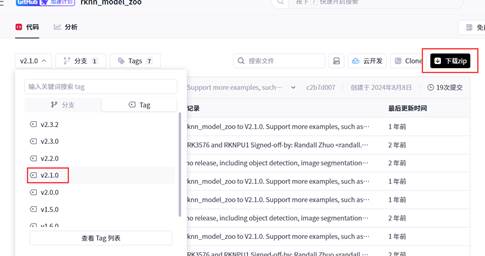
- rknn_model_zoo
下载2.1.0
下载地址:rknn_model_zoo · rk/rknn_model_zoo - AtomGit | GitCode
-
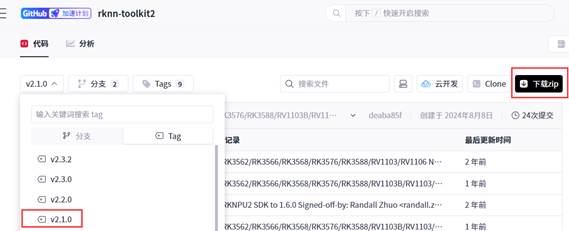
- rknn-toolkit2
下载2.1.0版本
下载地址:rknn-toolkit2 · rk/rknn-toolkit2 - AtomGit | GitCode
- 模型转换
- PT模型的训练
- PT→ONNX
-
参考文件PT转RKNN模型(RK3399PRO)-CSDN博客
打开之前下载的ultralytics—yolov8_main文件,修改D:\Linux\ultralytics_yolov8-main\ultralytics\cfg\default.yaml路径下的配置文件,将task换成目标任务,model换成模型路径,
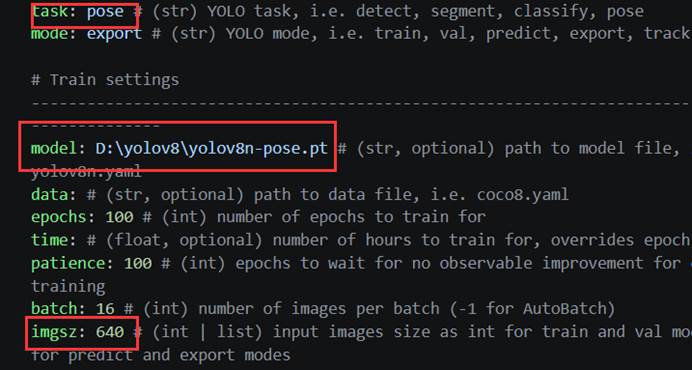
Imgsz最好和模型内部一样。再输入:
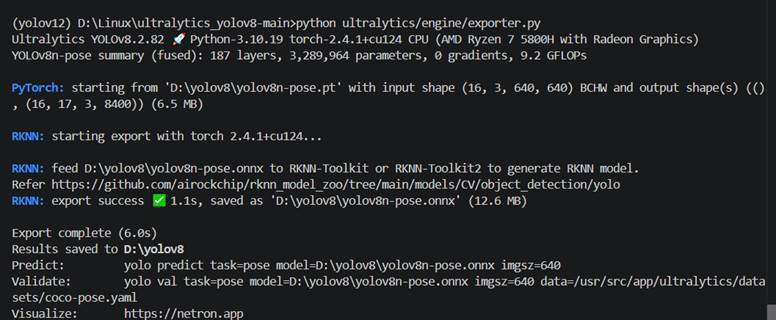
set PYTHONPATH=./
python ultralytics/engine/exporter.py
-
- ONNX→RKNN
- 环境配置
- ONNX→RKNN
来到虚拟机上,或者Linux环境中,创建虚拟环境
conda create -n rk3588 python=3.8
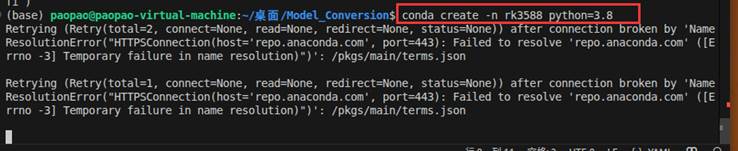
虚拟环境创建好之后,将我们之前下载的rknn-toolkit2通过共享文件夹从PC机上传到虚拟机上进行安装。
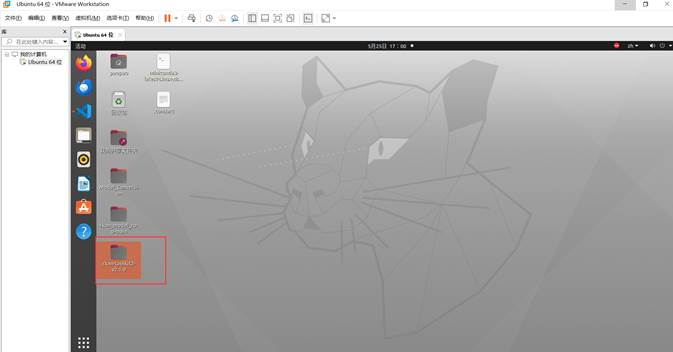
然后激活虚拟环境 conda activate rk3588
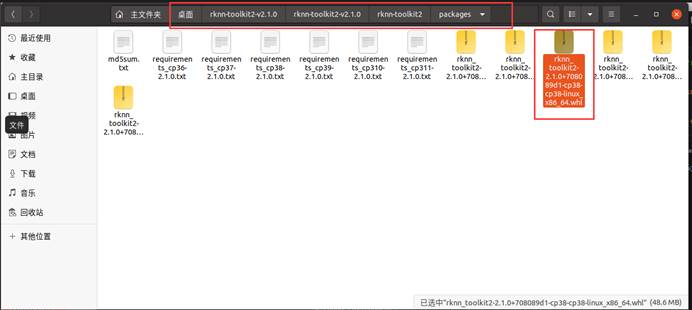
根据路径,找到安装包。
然后来到终端,确定已经激活环境:
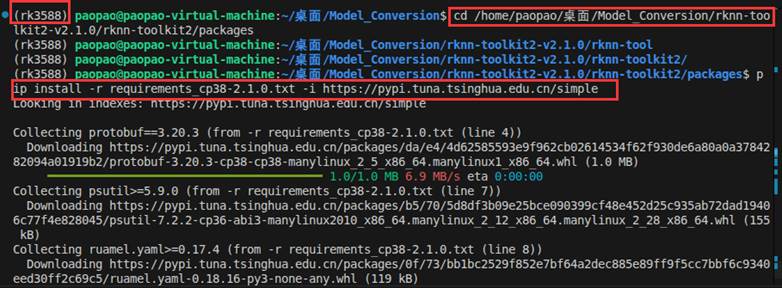
先cd 进入装有.whl安装包的文件夹
cd /home/paopao/桌面/Model_Conversion/rknn-toolkit2-v2.1.0/rknn-toolkit2/packages (这是我的路径)
然后输入:
pip install -r requirements_cp38-2.1.0.txt -i https://pypi.tuna.tsinghua.edu.cn/simple
再输入:
pip install rknn_toolkit2-2.1.0+708089d1-cp38-cp38-linux_x86_64.whl
-
-
- 开始转换
-
环境配置好之后
进入/home/paopao/桌面/Model_Conversion/rknn_model_zoo-v2.1.0/examples/yolov8/README.md 查看readme。
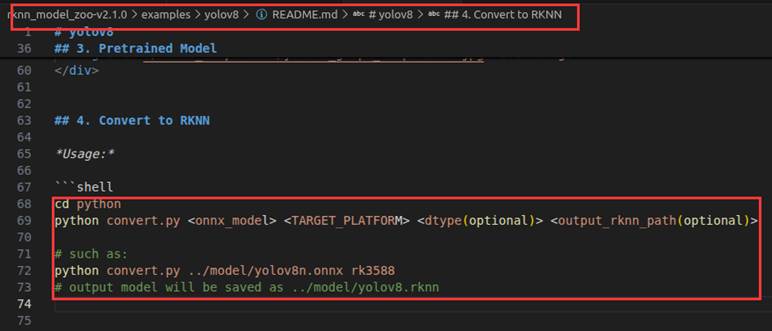
| cd python python convert.py <onnx_model> <TARGET_PLATFORM> <dtype(可选)> <output_rknn_path(可选)> # 在我的虚拟机上: python convert.py /home/paopao/桌面/Model_Conversion/Banner_Detection/model/yolov8n.onnx rk3588 fp /home/paopao/桌面/Model_Conversion/Banner_Detection/model/model_rknn/yolov8.rknn |
<onnx_model>:指定 ONNX 模型路径。
<TARGET_PLATFORM>:指定 NPU 平台名称,例如 'rk3588'。
<dtype>(可选):指定为 i8、u8 或 fp。i8/u8 表示进行量化,fp 表示不量化。默认值为 i8。
<output_rknn_path>(可选):指定 RKNN 模型的保存路径,默认保存在与 ONNX 模型相同的目录下,文件名为 yolov8.rknn。
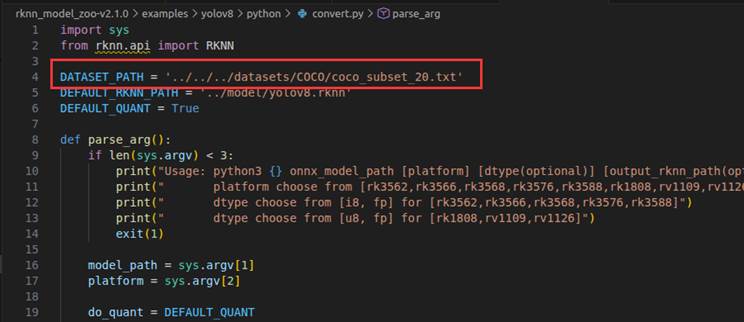
如果要开启量化,那么需要到convert.py脚本中修改校准图片的路径:
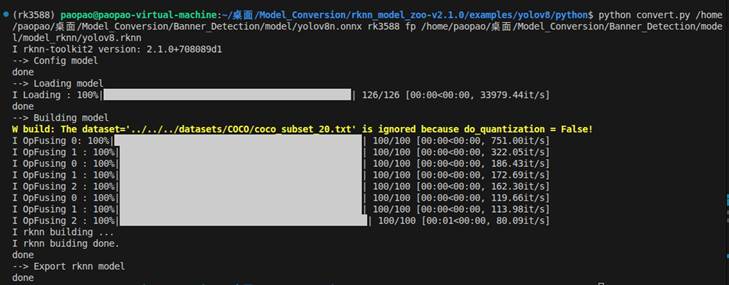
在不开启量化的情况下转化成功:
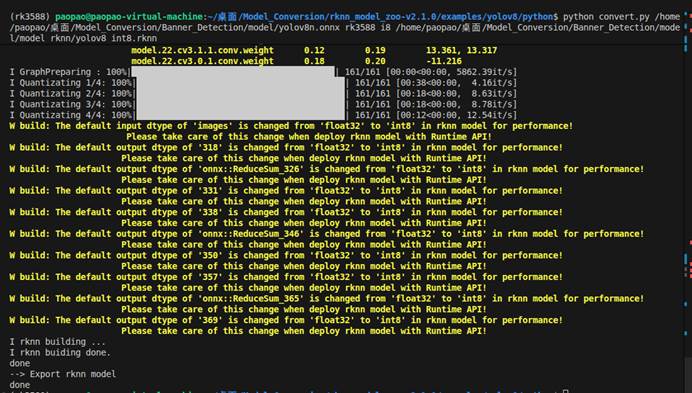
这是开启量化(记得去convert.py添加校准图片路径):
- 模型部署

将虚拟机上转换的rknn模型通过共享文件夹发送到本地。
因为rk3588这块板子没有wifi模块要么通过网线接到路由器,然后通过SSH连接到VSCODE要么就通过U盘将本地的文件拷到RK3588上。
-
- SSH连接
为了方便开发,采用SSH远程连接的方式。
首先用网线把板子和路由器连接起来,然后在终端中输入:
Ip addr show
查看inet后面的地址 例如:192.1**.*.***
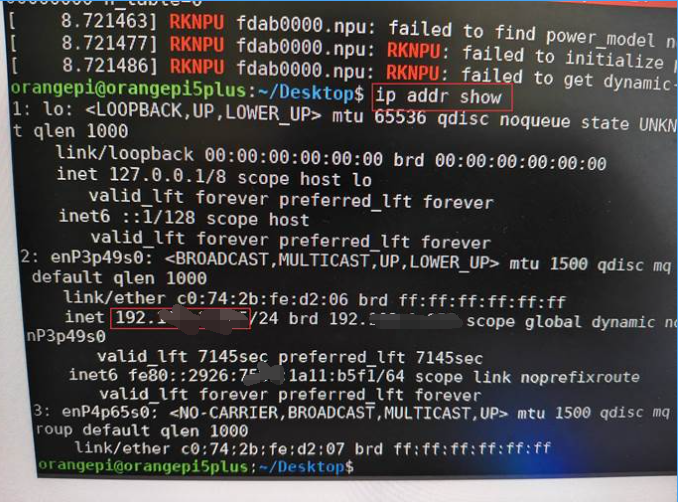
再输入:sudo systemctl status ssh
查看active状态是不是running。
如果开发板未安装或未运行SSH,我们安装并启动,依次输入:
sudo apt update
sudo apt install openssh-server -y
sudo systemctl start ssh
sudo systemctl enable ssh
然后来到VSCODE,打开远程资源管理器:
因为这个板子是香橙派的所以输入:
orangepi@192.1**.*.***

弹出:

这里我们输入密码:orangepi
然后就可以进入了:
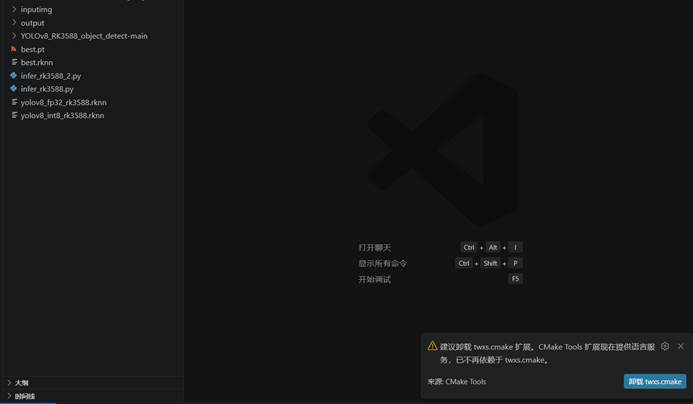
-
- 报错(更新驱动)
当我通过U盘将推理脚本和模型上传到rk3588上进行推理时,报错
| orangepi@orangepi5plus:~/Desktop/rk3588$ python3 infer_rk3588.py --model /home/orangepi/Desktop/rk3588/yolov8_fp32_rk3588.rknn --image /home/orangepi/Desktop/rk3588/drone.png --output /home/orangepi/Desktop/rk3588/result1.jpg Loading RKNN model... Initializing runtime... I RKNN: [21:44:26.357] RKNN Runtime Information: librknnrt version: 1.4.0 (a10f100eb@2022-09-09T09:07:14) I RKNN: [21:44:26.357] RKNN Driver Information: version: 0.8.8 E RKNN: [21:44:26.357] 6, 1 E RKNN: [21:44:26.357] Invalid RKNN model version 6 E RKNN: [21:44:26.357] rknn_init, load model failed! E Catch exception when init runtime! E Traceback (most recent call last): File "/home/orangepi/.local/lib/python3.10/site-packages/rknnlite/api/rknn_lite.py", line 148, in init_runtime self.rknn_runtime.build_graph(self.rknn_data, self.load_model_in_npu) File "rknnlite/api/rknn_runtime.py", line 875, in rknnlite.api.rknn_runtime.RKNNRuntime.build_graph Exception: RKNN init failed. error code: RKNN_ERR_FAIL Init runtime failed! Check NPU driver and librknnrt.so version. |
板端的 NPU 驱动和库版本太旧,不支持 PC 端用新版工具生成的 yolov8_fp32_rk3588.rknn 模型,所以我们需要升级板端的运行时库。
打开我们之前下载的rknn-toolkit2-v2.1.0,找到里面的rknpu2
点开runtime选择linux:

都选择aarch64,我们先打开librknn_api,将里面的librknnrt.so复制到开发板上,然后在终端中输入:
sudo cp /usr/lib/librknnrt.so /usr/lib/librknnrt.so.bak(备份)

然后再输入:
sudo cp /home/orangepi/Desktop/rk3588/librknnrt.so /usr/lib/librknnrt.so
将红色的地方换成自己的地址
然后输入:
strings /usr/lib/librknnrt.so | grep "librknnrt version"
查看版本,显示:librknnrt version: 2.1.0 (967d001cc8@2024-08-07T19:28:19)
多目标检测脚本:
#!/usr/bin/env python3
# -*- coding: utf-8 -*-
"""
YOLOv8 RKNN 推理脚本 (适配 RK3588)
支持图片和视频输入。模型需用 rknn-toolkit2 转换,目标平台指定为 rk3588。

使用方法:
    1. 修改下方 "用户配置区域" 的路径和参数
    2. 运行: python3 infer_rk3588_multi.py
"""

import cv2
import numpy as np
import time
import os
from rknnlite.api import RKNNLite

# ==================== 用户配置区域(请根据需要修改) ====================
# 模型路径
MODEL_PATH = "/home/orangepi/Desktop/rk3588/rknn_models/yolov8_int8_rk3588.rknn"

# 输入:图片或视频(二选一,另一个设为 None)
INPUT_IMAGE = "/home/orangepi/Desktop/rk3588/inputimg/drone.jpg"    # 图片路径,或 None
INPUT_VIDEO = None                                        # 视频路径,或 None

# 输出路径
OUTPUT_PATH = "/home/orangepi/Desktop/rk3588/output/result2.jpg" # 图片或视频输出路径

# 推理参数
IMG_SIZE = (640, 640)          # 模型输入尺寸 (width, height)
CONF_THRESH = 0.25             # 置信度阈值
NMS_THRESH = 0.45              # NMS 阈值
REG_MAX = 16                   # DFL 回归范围
STRIDES = [8, 16, 32]          # 三个特征图的下采样步长

# 类别名称(按你的模型类别顺序修改,这里以 COCO 80 类为例)
CLASSES = (
    "person", "bicycle", "car", "motorcycle", "airplane", "bus", "train", "truck", "boat",
    "traffic light", "fire hydrant", "stop sign", "parking meter", "bench", "bird", "cat",
    "dog", "horse", "sheep", "cow", "elephant", "bear", "zebra", "giraffe", "backpack",
    "umbrella", "handbag", "tie", "suitcase", "frisbee", "skis", "snowboard", "sports ball",
    "kite", "baseball bat", "baseball glove", "skateboard", "surfboard", "tennis racket",
    "bottle", "wine glass", "cup", "fork", "knife", "spoon", "bowl", "banana", "apple",
    "sandwich", "orange", "broccoli", "carrot", "hot dog", "pizza", "donut", "cake", "chair",
    "couch", "potted plant", "bed", "dining table", "toilet", "tv", "laptop", "mouse",
    "remote", "keyboard", "cell phone", "microwave", "oven", "toaster", "sink", "refrigerator",
    "book", "clock", "vase", "scissors", "teddy bear", "hair drier", "toothbrush"
)  # 默认 COCO 80 类,按你的数据集修改

# 后处理高级选项(一般不需要修改)
COORD_MODE = 0                 # 坐标解码模式 (0-3)
USE_CLS_SUM = True             # 是否使用 cls_sum 分支(优化模型建议 True)
SHOW_RESULT = True             # 是否显示结果窗口(图片会弹出,视频实时显示)
# ============================================

# ==================== 工具函数(保持不变) ====================
def letterbox(im, new_shape=(640, 640), pad_color=(0, 0, 0)):
    shape = im.shape[:2]
    r = min(new_shape[0] / shape[0], new_shape[1] / shape[1])
    new_unpad_w = int(round(shape[1] * r))
    new_unpad_h = int(round(shape[0] * r))

    if (shape[1], shape[0]) != (new_unpad_w, new_unpad_h):
        im = cv2.resize(im, (new_unpad_w, new_unpad_h), interpolation=cv2.INTER_LINEAR)

    dw = new_shape[1] - new_unpad_w
    dh = new_shape[0] - new_unpad_h

    top = dh // 2
    bottom = dh - top
    left = dw // 2
    right = dw - left

    im = cv2.copyMakeBorder(im, top, bottom, left, right, cv2.BORDER_CONSTANT, value=pad_color)

    if im.shape[0] != new_shape[0] or im.shape[1] != new_shape[1]:
        im = cv2.resize(im, new_shape, interpolation=cv2.INTER_LINEAR)

    return im, (left, top), (r, r)

def dfl_distribution(box_distribution):
    integral = np.arange(REG_MAX, dtype=np.float32)
    shape = box_distribution.shape
    if box_distribution.ndim == 3:
        box_distribution = box_distribution.reshape(4, REG_MAX, shape[1], shape[2])
        box_distribution = box_distribution.transpose(2, 3, 0, 1).reshape(-1, 4, REG_MAX)
    else:
        box_distribution = box_distribution.reshape(-1, 4, REG_MAX)
    box_distribution = np.exp(box_distribution - np.max(box_distribution, axis=-1, keepdims=True))
    box_distribution /= np.sum(box_distribution, axis=-1, keepdims=True)
    box_offset = np.sum(box_distribution * integral, axis=-1)
    return box_offset

def decode_boxes(pred_boxes, pred_cls, pred_cls_sum, stride, conf_thresh, coord_mode=0, use_cls_sum=True, debug=False):
    pred_boxes = pred_boxes[0]
    pred_cls = pred_cls[0]
    pred_cls_sum = pred_cls_sum[0]

    _, h, w = pred_cls.shape
    num_classes = pred_cls.shape[0]

    if use_cls_sum:
        score_map = pred_cls_sum.reshape(-1)
    else:
        if num_classes == 1:
            score_map = pred_cls.reshape(-1)
        else:
            score_map = np.max(pred_cls, axis=0).reshape(-1)

    keep_mask = score_map >= conf_thresh
    if not np.any(keep_mask):
        return None, None, None

    indices = np.where(keep_mask)[0]
    rows = indices // w
    cols = indices % w

    box_data = pred_boxes[:, rows, cols].transpose(1, 0)
    box_offsets = dfl_distribution(box_data)

    grid_x = cols.astype(np.float32)
    grid_y = rows.astype(np.float32)

    if coord_mode == 0:
        x1 = (grid_x - box_offsets[:, 0]) * stride
        y1 = (grid_y - box_offsets[:, 1]) * stride
        x2 = (grid_x + box_offsets[:, 2]) * stride
        y2 = (grid_y + box_offsets[:, 3]) * stride
    elif coord_mode == 1:
        x1 = (grid_x + 0.5 - box_offsets[:, 0]) * stride
        y1 = (grid_y + 0.5 - box_offsets[:, 1]) * stride
        x2 = (grid_x + 0.5 + box_offsets[:, 2]) * stride
        y2 = (grid_y + 0.5 + box_offsets[:, 3]) * stride
    elif coord_mode == 2:
        x1 = (grid_x - 0.5 - box_offsets[:, 0]) * stride
        y1 = (grid_y - 0.5 - box_offsets[:, 1]) * stride
        x2 = (grid_x - 0.5 + box_offsets[:, 2]) * stride
        y2 = (grid_y - 0.5 + box_offsets[:, 3]) * stride
    elif coord_mode == 3:
        x1 = (grid_x + 0.5 - box_offsets[:, 0]) * stride
        y1 = (grid_y + 0.5 - box_offsets[:, 1]) * stride
        x2 = (grid_x + 0.5 + box_offsets[:, 2]) * stride
        y2 = (grid_y + 0.5 + box_offsets[:, 3]) * stride
    else:
        raise ValueError("Invalid coord_mode")

    boxes = np.stack([x1, y1, x2, y2], axis=1)

    if use_cls_sum and num_classes == 1:
        cls_sum_vals = pred_cls_sum[:, rows, cols].transpose(1, 0)
        scores = cls_sum_vals.flatten()
        classes = np.zeros_like(scores, dtype=np.int32)
    else:
        cls_probs = pred_cls[:, rows, cols].transpose(1, 0)
        if num_classes == 1:
            scores = cls_probs.flatten()
            classes = np.zeros_like(scores, dtype=np.int32)
        else:
            scores = np.max(cls_probs, axis=1)
            classes = np.argmax(cls_probs, axis=1)

    keep = scores >= conf_thresh
    if not np.any(keep):
        return None, None, None
    return boxes[keep], scores[keep], classes[keep]

def nms_boxes(boxes, scores, nms_thresh):
    x1, y1, x2, y2 = boxes[:, 0], boxes[:, 1], boxes[:, 2], boxes[:, 3]
    areas = (x2 - x1 + 1) * (y2 - y1 + 1)
    order = scores.argsort()[::-1]
    keep = []
    while order.size > 0:
        i = order[0]
        keep.append(i)
        xx1 = np.maximum(x1[i], x1[order[1:]])
        yy1 = np.maximum(y1[i], y1[order[1:]])
        xx2 = np.minimum(x2[i], x2[order[1:]])
        yy2 = np.minimum(y2[i], y2[order[1:]])
        w = np.maximum(0.0, xx2 - xx1 + 1)
        h = np.maximum(0.0, yy2 - yy1 + 1)
        inter = w * h
        ovr = inter / (areas[i] + areas[order[1:]] - inter + 1e-6)
        inds = np.where(ovr <= nms_thresh)[0]
        order = order[inds + 1]
    return np.array(keep)

def post_process(outputs, conf_thresh, nms_thresh, coord_mode=0, use_cls_sum=True, debug=False):
    all_boxes, all_scores, all_classes = [], [], []
    IDX_BOX = 0
    IDX_CLS = 1
    IDX_CLS_SUM = 2

    for layer_idx in range(3):
        stride = STRIDES[layer_idx]
        pred_boxes = outputs[layer_idx * 3 + IDX_BOX]
        pred_cls = outputs[layer_idx * 3 + IDX_CLS]
        pred_cls_sum = outputs[layer_idx * 3 + IDX_CLS_SUM]

        boxes, scores, classes = decode_boxes(
            pred_boxes, pred_cls, pred_cls_sum,
            stride, conf_thresh, coord_mode, use_cls_sum, debug
        )
        if boxes is not None:
            all_boxes.append(boxes)
            all_scores.append(scores)
            all_classes.append(classes)

    if not all_boxes:
        return None, None, None
    boxes = np.concatenate(all_boxes)
    scores = np.concatenate(all_scores)
    classes = np.concatenate(all_classes)
    keep = nms_boxes(boxes, scores, nms_thresh)
    if len(keep) == 0:
        return None, None, None
    return boxes[keep], scores[keep], classes[keep]

def draw_results(image, boxes, scores, classes, pad, scale, class_names):
    img_draw = image.copy()
    dw, dh = pad
    scale_x, scale_y = scale
    h, w = image.shape[:2]
    for box, score, cl in zip(boxes, scores, classes):
        x1 = (box[0] - dw) / scale_x
        y1 = (box[1] - dh) / scale_y
        x2 = (box[2] - dw) / scale_x
        y2 = (box[3] - dh) / scale_y
        x1 = int(max(0, min(x1, w)))
        y1 = int(max(0, min(y1, h)))
        x2 = int(max(0, min(x2, w)))
        y2 = int(max(0, min(y2, h)))
        label = f"{class_names[cl]} {score:.2f}"
        cv2.rectangle(img_draw, (x1, y1), (x2, y2), (0, 255, 0), 2)
        cv2.putText(img_draw, label, (x1, y1 - 5),
                    cv2.FONT_HERSHEY_SIMPLEX, 0.5, (0, 255, 0), 1)
    return img_draw

def preprocess_frame(frame):
    img_rgb = cv2.cvtColor(frame, cv2.COLOR_BGR2RGB)
    img_proc, pad, scale = letterbox(img_rgb, IMG_SIZE, pad_color=(0, 0, 0))
    input_data = np.expand_dims(img_proc, axis=0)

    if input_data.shape != (1, IMG_SIZE[1], IMG_SIZE[0], 3):
        img_proc = cv2.resize(img_rgb, IMG_SIZE, interpolation=cv2.INTER_LINEAR)
        input_data = np.expand_dims(img_proc, axis=0)
        pad = (0, 0)
        scale = (1.0, 1.0)
    return input_data, pad, scale

def process_image(rknn, image_path, output_path):
    img = cv2.imread(image_path)
    if img is None:
        print(f"Failed to load image: {image_path}")
        return

    input_data, pad, scale = preprocess_frame(img)

    start = time.time()
    outputs = rknn.inference(inputs=[input_data])
    infer_time = time.time() - start

    boxes, scores, classes = post_process(
        outputs, CONF_THRESH, NMS_THRESH,
        coord_mode=COORD_MODE, use_cls_sum=USE_CLS_SUM, debug=False
    )

    if boxes is not None:
        result_img = draw_results(img, boxes, scores, classes, pad, scale, CLASSES)
    else:
        result_img = img.copy()
        print("No objects detected.")

    print(f"Inference time: {infer_time*1000:.1f} ms")
    cv2.imwrite(output_path, result_img)
    print(f"Result saved to: {output_path}")

    if SHOW_RESULT:
        cv2.imshow("YOLOv8 RK3588", result_img)
        # 等待按键,只有按下 Q 或 q 时才退出
        while True:
            key = cv2.waitKey(0) & 0xFF
            if key == ord('q') or key == ord('Q'):
                break
        cv2.destroyAllWindows()

def process_video(rknn, video_path, output_path):
    cap = cv2.VideoCapture(video_path)
    if not cap.isOpened():
        print(f"Failed to open video: {video_path}")
        return

    fps = cap.get(cv2.CAP_PROP_FPS)
    width = int(cap.get(cv2.CAP_PROP_FRAME_WIDTH))
    height = int(cap.get(cv2.CAP_PROP_FRAME_HEIGHT))
    total_frames = int(cap.get(cv2.CAP_PROP_FRAME_COUNT))

    fourcc = cv2.VideoWriter_fourcc(*'mp4v')
    out = cv2.VideoWriter(output_path, fourcc, fps, (width, height))

    frame_count = 0
    total_time = 0.0
    print(f"Processing video: {video_path}")
    print(f"Total frames: {total_frames}, FPS: {fps:.2f}")

    while True:
        ret, frame = cap.read()
        if not ret:
            break
        frame_count += 1

        input_data, pad, scale = preprocess_frame(frame)

        start = time.time()
        try:
            outputs = rknn.inference(inputs=[input_data])
        except Exception as e:
            print(f"Frame {frame_count}: inference error: {e}, skipping")
            continue

        infer_time = time.time() - start
        total_time += infer_time

        boxes, scores, classes = post_process(
            outputs, CONF_THRESH, NMS_THRESH,
            coord_mode=COORD_MODE, use_cls_sum=USE_CLS_SUM, debug=False
        )

        if boxes is not None:
            frame_result = draw_results(frame, boxes, scores, classes, pad, scale, CLASSES)
        else:
            frame_result = frame.copy()

        current_fps = 1.0 / infer_time if infer_time > 0 else 0
        cv2.putText(frame_result, f"FPS: {current_fps:.1f}", (10, 30),
                    cv2.FONT_HERSHEY_SIMPLEX, 0.8, (0, 255, 0), 2)

        out.write(frame_result)

        if SHOW_RESULT:
            cv2.imshow("YOLOv8 RK3588", frame_result)
            # 按 Q 或 q 退出
            if cv2.waitKey(1) & 0xFF in (ord('q'), ord('Q')):
                print("User interrupted. Exiting...")
                break

        if frame_count % 30 == 0:
            avg_fps = frame_count / total_time
            print(f"Frame {frame_count}, avg FPS: {avg_fps:.2f}")

    cap.release()
    out.release()
    if SHOW_RESULT:
        cv2.destroyAllWindows()

    avg_fps = frame_count / total_time if total_time > 0 else 0
    print(f"Done. Total frames: {frame_count}, average FPS: {avg_fps:.2f}")
    print(f"Output saved to: {output_path}")

# ==================== 主程序 ====================
def main():
    # 检查输入配置
    if INPUT_IMAGE is None and INPUT_VIDEO is None:
        print("错误:请在脚本开头设置 INPUT_IMAGE 或 INPUT_VIDEO。")
        return
    if INPUT_IMAGE is not None and INPUT_VIDEO is not None:
        print("警告:同时指定了图片和视频输入,将优先处理图片。")

    # 初始化 RKNN
    rknn = RKNNLite()
    print("Loading RKNN model...")
    ret = rknn.load_rknn(MODEL_PATH)
    if ret != 0:
        print("Load model failed! Please ensure the model is converted with rknn-toolkit2 for RK3588.")
        return

    print("Initializing runtime...")
    ret = rknn.init_runtime()
    if ret != 0:
        print("Init runtime failed! Check NPU driver and librknnrt.so version.")
        return

    # 根据配置执行
    if INPUT_IMAGE is not None:
        process_image(rknn, INPUT_IMAGE, OUTPUT_PATH)
    elif INPUT_VIDEO is not None:
        process_video(rknn, INPUT_VIDEO, OUTPUT_PATH)

    rknn.release()

if __name__ == "__main__":
    main()
单目标检测脚本:
#!/usr/bin/env python3
# -*- coding: utf-8 -*-
"""
YOLOv8 RKNN 单目标检测推理脚本 (适配 RK3588)
支持图片和视频输入。模型需用 rknn-toolkit2 转换,目标平台指定为 rk3588。

使用方法:
    1. 修改下方 "用户配置区域" 的路径和参数
    2. 运行: python3 infer_rk3588_single.py
"""

import cv2
import numpy as np
import time
from rknnlite.api import RKNNLite

# ==================== 用户配置区域 ====================
# 模型路径
MODEL_PATH = "/home/orangepi/Desktop/rk3588/rknn_models/yolov8_int8_rk3588.rknn"

# 输入:图片或视频(二选一,另一个设为 None)
INPUT_IMAGE = "/home/orangepi/Desktop/rk3588/inputimg/drone.jpg"   # 图片路径,或 None
INPUT_VIDEO = None                                              # 视频路径,或 None

# 输出路径
OUTPUT_PATH = "/home/orangepi/Desktop/rk3588/output/result3.jpg"

# 推理参数
IMG_SIZE = (640, 640)          # 模型输入尺寸 (width, height)
CONF_THRESH = 0.25             # 置信度阈值
NMS_THRESH = 0.45              # NMS 阈值
REG_MAX = 16                   # DFL 回归范围
STRIDES = [8, 16, 32]          # 三个特征图的下采样步长

# 单目标类别名称(自定义)
CLASS_NAME = "banner"          # 你的目标类别名称

# 后处理高级选项
COORD_MODE = 0                 # 坐标解码模式 (0-3)
USE_CLS_SUM = True             # 是否使用 cls_sum 分支(优化模型建议 True)
SHOW_RESULT = True             # 是否显示结果窗口
# ===================================================

def letterbox(im, new_shape=(640, 640), pad_color=(0, 0, 0)):
    shape = im.shape[:2]
    r = min(new_shape[0] / shape[0], new_shape[1] / shape[1])
    new_unpad_w = int(round(shape[1] * r))
    new_unpad_h = int(round(shape[0] * r))

    if (shape[1], shape[0]) != (new_unpad_w, new_unpad_h):
        im = cv2.resize(im, (new_unpad_w, new_unpad_h), interpolation=cv2.INTER_LINEAR)

    dw = new_shape[1] - new_unpad_w
    dh = new_shape[0] - new_unpad_h

    top = dh // 2
    bottom = dh - top
    left = dw // 2
    right = dw - left

    im = cv2.copyMakeBorder(im, top, bottom, left, right, cv2.BORDER_CONSTANT, value=pad_color)

    if im.shape[0] != new_shape[0] or im.shape[1] != new_shape[1]:
        im = cv2.resize(im, new_shape, interpolation=cv2.INTER_LINEAR)

    return im, (left, top), (r, r)

def dfl_distribution(box_distribution):
    integral = np.arange(REG_MAX, dtype=np.float32)
    shape = box_distribution.shape
    if box_distribution.ndim == 3:
        box_distribution = box_distribution.reshape(4, REG_MAX, shape[1], shape[2])
        box_distribution = box_distribution.transpose(2, 3, 0, 1).reshape(-1, 4, REG_MAX)
    else:
        box_distribution = box_distribution.reshape(-1, 4, REG_MAX)
    box_distribution = np.exp(box_distribution - np.max(box_distribution, axis=-1, keepdims=True))
    box_distribution /= np.sum(box_distribution, axis=-1, keepdims=True)
    box_offset = np.sum(box_distribution * integral, axis=-1)
    return box_offset

def decode_boxes(pred_boxes, pred_cls, pred_cls_sum, stride, conf_thresh, coord_mode=0, use_cls_sum=True):
    """
    针对单类别(num_classes=1)的解码函数
    """
    pred_boxes = pred_boxes[0]          # (64, h, w)
    pred_cls = pred_cls[0]              # (1, h, w) 或 (80, h, w) 但只取第一个通道
    pred_cls_sum = pred_cls_sum[0]      # (1, h, w)

    # 单类别时,cls 通道数为1,直接取第0个通道作为分数
    if pred_cls.shape[0] == 1:
        score_map = pred_cls[0, :, :]   # (h, w)
    else:
        # 如果模型输出是多类别但只训练了一类,取第一个类别通道
        score_map = pred_cls[0, :, :]

    # 是否使用 cls_sum 分支辅助
    if use_cls_sum:
        # 可以用 cls_sum 与 score_map 相乘或直接使用 score_map
        # 这里直接使用 score_map(已经包含置信度信息)
        pass

    # 生成候选框索引
    keep_mask = score_map >= conf_thresh
    if not np.any(keep_mask):
        return None, None, None

    rows, cols = np.where(keep_mask)
    # 获取每个位置的 box 特征
    box_data = pred_boxes[:, rows, cols].transpose(1, 0)   # (n, 64)
    box_offsets = dfl_distribution(box_data)              # (n, 4)

    grid_x = cols.astype(np.float32)
    grid_y = rows.astype(np.float32)

    if coord_mode == 0:
        x1 = (grid_x - box_offsets[:, 0]) * stride
        y1 = (grid_y - box_offsets[:, 1]) * stride
        x2 = (grid_x + box_offsets[:, 2]) * stride
        y2 = (grid_y + box_offsets[:, 3]) * stride
    elif coord_mode == 1:
        x1 = (grid_x + 0.5 - box_offsets[:, 0]) * stride
        y1 = (grid_y + 0.5 - box_offsets[:, 1]) * stride
        x2 = (grid_x + 0.5 + box_offsets[:, 2]) * stride
        y2 = (grid_y + 0.5 + box_offsets[:, 3]) * stride
    elif coord_mode == 2:
        x1 = (grid_x - 0.5 - box_offsets[:, 0]) * stride
        y1 = (grid_y - 0.5 - box_offsets[:, 1]) * stride
        x2 = (grid_x - 0.5 + box_offsets[:, 2]) * stride
        y2 = (grid_y - 0.5 + box_offsets[:, 3]) * stride
    else:
        x1 = (grid_x + 0.5 - box_offsets[:, 0]) * stride
        y1 = (grid_y + 0.5 - box_offsets[:, 1]) * stride
        x2 = (grid_x + 0.5 + box_offsets[:, 2]) * stride
        y2 = (grid_y + 0.5 + box_offsets[:, 3]) * stride

    boxes = np.stack([x1, y1, x2, y2], axis=1)
    scores = score_map[rows, cols]
    # 单目标时类别id固定为0
    classes = np.zeros_like(scores, dtype=np.int32)

    return boxes, scores, classes

def nms_boxes(boxes, scores, nms_thresh):
    x1, y1, x2, y2 = boxes[:, 0], boxes[:, 1], boxes[:, 2], boxes[:, 3]
    areas = (x2 - x1 + 1) * (y2 - y1 + 1)
    order = scores.argsort()[::-1]
    keep = []
    while order.size > 0:
        i = order[0]
        keep.append(i)
        xx1 = np.maximum(x1[i], x1[order[1:]])
        yy1 = np.maximum(y1[i], y1[order[1:]])
        xx2 = np.minimum(x2[i], x2[order[1:]])
        yy2 = np.minimum(y2[i], y2[order[1:]])
        w = np.maximum(0.0, xx2 - xx1 + 1)
        h = np.maximum(0.0, yy2 - yy1 + 1)
        inter = w * h
        ovr = inter / (areas[i] + areas[order[1:]] - inter + 1e-6)
        inds = np.where(ovr <= nms_thresh)[0]
        order = order[inds + 1]
    return np.array(keep)

def post_process(outputs, conf_thresh, nms_thresh, coord_mode=0, use_cls_sum=True):
    all_boxes, all_scores, all_classes = [], [], []
    IDX_BOX = 0
    IDX_CLS = 1
    IDX_CLS_SUM = 2

    for layer_idx in range(3):
        stride = STRIDES[layer_idx]
        pred_boxes = outputs[layer_idx * 3 + IDX_BOX]
        pred_cls = outputs[layer_idx * 3 + IDX_CLS]
        pred_cls_sum = outputs[layer_idx * 3 + IDX_CLS_SUM]

        boxes, scores, classes = decode_boxes(
            pred_boxes, pred_cls, pred_cls_sum, stride,
            conf_thresh, coord_mode, use_cls_sum
        )
        if boxes is not None:
            all_boxes.append(boxes)
            all_scores.append(scores)
            all_classes.append(classes)

    if not all_boxes:
        return None, None, None
    boxes = np.concatenate(all_boxes)
    scores = np.concatenate(all_scores)
    classes = np.concatenate(all_classes)
    keep = nms_boxes(boxes, scores, nms_thresh)
    if len(keep) == 0:
        return None, None, None
    return boxes[keep], scores[keep], classes[keep]

def draw_results(image, boxes, scores, classes, pad, scale, class_name):
    img_draw = image.copy()
    dw, dh = pad
    scale_x, scale_y = scale
    h, w = image.shape[:2]
    for box, score, _ in zip(boxes, scores, classes):
        x1 = (box[0] - dw) / scale_x
        y1 = (box[1] - dh) / scale_y
        x2 = (box[2] - dw) / scale_x
        y2 = (box[3] - dh) / scale_y
        x1 = int(max(0, min(x1, w)))
        y1 = int(max(0, min(y1, h)))
        x2 = int(max(0, min(x2, w)))
        y2 = int(max(0, min(y2, h)))
        label = f"{class_name} {score:.2f}"
        cv2.rectangle(img_draw, (x1, y1), (x2, y2), (0, 255, 0), 2)
        cv2.putText(img_draw, label, (x1, y1 - 5),
                    cv2.FONT_HERSHEY_SIMPLEX, 0.5, (0, 255, 0), 1)
    return img_draw

def preprocess_frame(frame):
    img_rgb = cv2.cvtColor(frame, cv2.COLOR_BGR2RGB)
    img_proc, pad, scale = letterbox(img_rgb, IMG_SIZE, pad_color=(0, 0, 0))
    input_data = np.expand_dims(img_proc, axis=0)
    if input_data.shape != (1, IMG_SIZE[1], IMG_SIZE[0], 3):
        img_proc = cv2.resize(img_rgb, IMG_SIZE, interpolation=cv2.INTER_LINEAR)
        input_data = np.expand_dims(img_proc, axis=0)
        pad = (0, 0)
        scale = (1.0, 1.0)
    return input_data, pad, scale

def process_image(rknn, image_path, output_path):
    img = cv2.imread(image_path)
    if img is None:
        print(f"Failed to load image: {image_path}")
        return

    input_data, pad, scale = preprocess_frame(img)
    start = time.time()
    outputs = rknn.inference(inputs=[input_data])
    infer_time = time.time() - start

    boxes, scores, classes = post_process(
        outputs, CONF_THRESH, NMS_THRESH,
        coord_mode=COORD_MODE, use_cls_sum=USE_CLS_SUM
    )

    if boxes is not None:
        result_img = draw_results(img, boxes, scores, classes, pad, scale, CLASS_NAME)
    else:
        result_img = img.copy()
        print("No objects detected.")

    print(f"Inference time: {infer_time*1000:.1f} ms")
    cv2.imwrite(output_path, result_img)
    print(f"Result saved to: {output_path}")

    if SHOW_RESULT:
        cv2.imshow("YOLOv8 RK3588 (Single Class)", result_img)
        while True:
            key = cv2.waitKey(0) & 0xFF
            if key == ord('q') or key == ord('Q'):
                break
        cv2.destroyAllWindows()

def process_video(rknn, video_path, output_path):
    cap = cv2.VideoCapture(video_path)
    if not cap.isOpened():
        print(f"Failed to open video: {video_path}")
        return

    fps = cap.get(cv2.CAP_PROP_FPS)
    width = int(cap.get(cv2.CAP_PROP_FRAME_WIDTH))
    height = int(cap.get(cv2.CAP_PROP_FRAME_HEIGHT))
    total_frames = int(cap.get(cv2.CAP_PROP_FRAME_COUNT))

    fourcc = cv2.VideoWriter_fourcc(*'mp4v')
    out = cv2.VideoWriter(output_path, fourcc, fps, (width, height))

    frame_count = 0
    total_time = 0.0
    print(f"Processing video: {video_path}")
    print(f"Total frames: {total_frames}, FPS: {fps:.2f}")

    while True:
        ret, frame = cap.read()
        if not ret:
            break
        frame_count += 1

        input_data, pad, scale = preprocess_frame(frame)
        start = time.time()
        try:
            outputs = rknn.inference(inputs=[input_data])
        except Exception as e:
            print(f"Frame {frame_count}: inference error: {e}, skipping")
            continue
        infer_time = time.time() - start
        total_time += infer_time

        boxes, scores, classes = post_process(
            outputs, CONF_THRESH, NMS_THRESH,
            coord_mode=COORD_MODE, use_cls_sum=USE_CLS_SUM
        )

        if boxes is not None:
            frame_result = draw_results(frame, boxes, scores, classes, pad, scale, CLASS_NAME)
        else:
            frame_result = frame.copy()

        current_fps = 1.0 / infer_time if infer_time > 0 else 0
        cv2.putText(frame_result, f"FPS: {current_fps:.1f}", (10, 30),
                    cv2.FONT_HERSHEY_SIMPLEX, 0.8, (0, 255, 0), 2)
        out.write(frame_result)

        if SHOW_RESULT:
            cv2.imshow("YOLOv8 RK3588 (Single Class)", frame_result)
            if cv2.waitKey(1) & 0xFF in (ord('q'), ord('Q')):
                print("User interrupted. Exiting...")
                break

        if frame_count % 30 == 0:
            avg_fps = frame_count / total_time
            print(f"Frame {frame_count}, avg FPS: {avg_fps:.2f}")

    cap.release()
    out.release()
    if SHOW_RESULT:
        cv2.destroyAllWindows()
    avg_fps = frame_count / total_time if total_time > 0 else 0
    print(f"Done. Total frames: {frame_count}, average FPS: {avg_fps:.2f}")
    print(f"Output saved to: {output_path}")

def main():
    if INPUT_IMAGE is None and INPUT_VIDEO is None:
        print("错误:请在脚本开头设置 INPUT_IMAGE 或 INPUT_VIDEO。")
        return
    if INPUT_IMAGE is not None and INPUT_VIDEO is not None:
        print("警告:同时指定了图片和视频输入,将优先处理图片。")

    rknn = RKNNLite()
    print("Loading RKNN model...")
    ret = rknn.load_rknn(MODEL_PATH)
    if ret != 0:
        print("Load model failed! Please ensure the model is converted with rknn-toolkit2 for RK3588.")
        return

    print("Initializing runtime...")
    ret = rknn.init_runtime()
    if ret != 0:
        print("Init runtime failed! Check NPU driver and librknnrt.so version.")
        return

    if INPUT_IMAGE is not None:
        process_image(rknn, INPUT_IMAGE, OUTPUT_PATH)
    elif INPUT_VIDEO is not None:
        process_video(rknn, INPUT_VIDEO, OUTPUT_PATH)

    rknn.release()

if __name__ == "__main__":
    main()
-
-
- 运行结果
-
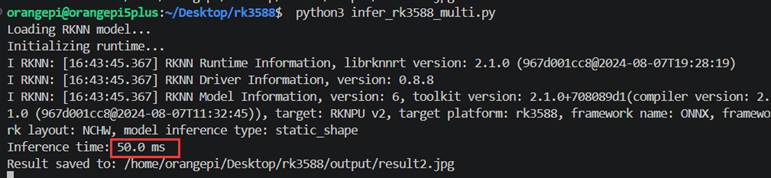
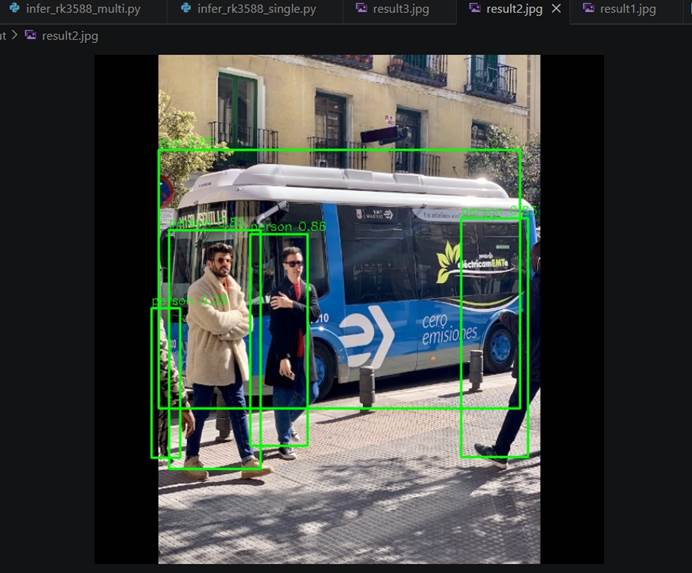
再把之前检测横幅的模型转换后拿来推理:
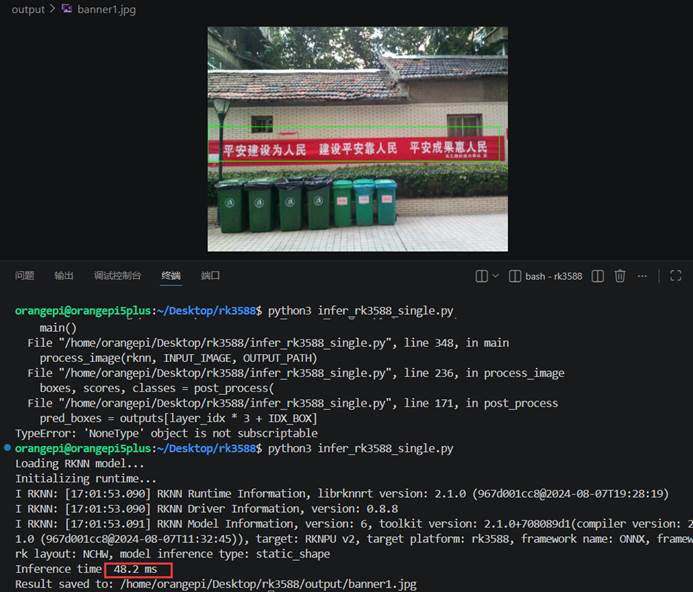
可以看到速度非常快比3399pro性能高不少。

免费领 150 小时云算力,进群参与显卡、AI PC 幸运抽奖
更多推荐

 3
3 0
0- 0


 已为社区贡献1条内容

所有评论(0)