
HarmonyOS 6.1 实战:基于React Native鸿蒙跨平台基于现有报价数量生成ID,简化前端实现,实际项目中可对接后端生成唯一业务编号
欢迎大家加入开源鸿蒙跨平台开发者社区,一起共建开源鸿蒙跨平台生态。
架构
本项目采用React Native函数式组件架构,以HeavyEquipmentTransportApp为核心组件,实现了大型设备运输报价查询的全流程管理。架构设计遵循模块化原则,将数据结构、状态管理和业务逻辑清晰分离,便于维护和扩展。
核心技术栈
- React Native:跨平台移动应用开发框架,支持iOS、Android和鸿蒙系统
- TypeScript:提供类型安全,增强代码可维护性和开发体验
- Hooks API:使用useState进行状态管理,简化组件逻辑
- Flexbox:实现响应式布局,适配不同屏幕尺寸
- Base64图标:内置图标资源,减少网络请求,提升加载速度
- Dimensions API:获取屏幕尺寸,实现精细化布局控制
大型设备类型(HeavyEquipment)
type HeavyEquipment = {
  id: string;
  name: string;
  type: string;
  weight: number;
  dimensions: string;
  specialRequirements: string[];
};
该类型设计考虑了大型设备的特殊属性:
id:唯一标识符,确保数据唯一性name:设备名称,便于用户识别type:设备类型,用于分类管理weight:重量信息,直接影响运输成本dimensions:尺寸信息,对运输方案制定至关重要specialRequirements:特殊要求数组,如防震、防潮等,影响运输难度和成本
运输公司类型(TransportCompany)
type TransportCompany = {
  id: string;
  name: string;
  phone: string;
  rating: number;
  services: string[];
  pricePerTon: number;
};
运输公司类型设计全面,包含了关键业务信息:
id:公司唯一标识name:公司名称phone:联系电话,便于用户沟通rating:评分信息,帮助用户选择优质服务商services:服务范围数组,明确公司能力边界pricePerTon:每吨价格,用于计算运输成本
报价请求类型(QuoteRequest)
type QuoteRequest = {
  id: string;
  equipmentId: string;
  pickupLocation: string;
  deliveryLocation: string;
  deliveryDate: string;
  status: '待报价' | '已报价' | '已确认' | '已完成';
  quotes: {
    companyId: string;
    price: number;
    deliveryTime: string;
    notes: string;
  }[];
};
报价请求类型是核心业务数据结构:
id:请求唯一标识equipmentId:关联设备ID,建立数据关联pickupLocation和deliveryLocation:起运地和目的地,影响运输路线和成本deliveryDate:交货日期,影响运输计划status:状态字段,使用联合类型确保类型安全,清晰定义业务流程quotes:报价数组,支持多公司比价,提升用户选择空间
核心状态
应用使用useState钩子管理四个核心状态:
equipmentList:大型设备列表,使用常量状态companies:运输公司列表,使用常量状态quoteRequests:报价请求列表,支持动态更新newRequest:新报价请求表单数据,支持用户输入
状态更新机制
- 报价请求创建:通过
handleRequestQuote函数,验证表单数据后添加新请求 - 报价查看:通过
handleViewQuote函数,展示详细报价信息 - 运输公司选择:通过
handleSelectCompany函数,更新请求状态为"已确认"
状态管理
- 不可变数据模式:使用扩展运算符(
...)创建新状态,避免直接修改原状态 - 集中式状态更新:将状态更新逻辑封装在专用函数中,提高代码可维护性
- 表单重置逻辑:操作完成后自动重置表单,提升用户体验
- 状态验证:在创建报价请求前进行数据验证,确保数据完整性
核心业务
- 设备管理:展示大型设备信息,包含详细规格和特殊要求
- 运输公司管理:提供运输公司信息,包含服务范围和价格
- 报价请求:用户提交运输需求,生成报价请求
- 多公司比价:获取多家运输公司的报价,支持价格和服务对比
- 运输确认:用户选择合适的运输公司,确认运输服务
- 状态跟踪:实时更新报价请求状态,确保业务流程透明
数据流设计
- 单向数据流:状态 → 视图 → 用户操作 → 状态更新
- 数据关联:通过ID字段建立不同数据类型之间的关联
- 业务逻辑封装:将复杂业务逻辑封装在专用函数中,提高代码可读性
- 用户交互反馈:使用Alert组件提供操作确认和信息提示,提升用户体验
组件
- 核心组件:SafeAreaView、View、Text、ScrollView、TouchableOpacity等在鸿蒙系统上有对应实现
- API兼容性:Dimensions API在鸿蒙系统中可正常使用,确保布局适配
- Alert组件:鸿蒙系统支持Alert组件的基本功能,但样式可能有所差异
资源管理
- Base64图标:在鸿蒙系统中同样支持,可减少网络请求,提升性能
- 图片资源:建议使用鸿蒙系统推荐的图片格式和存储方式,确保最佳性能
- 内存管理:鸿蒙系统对内存使用更为严格,需注意资源释放
-
渲染性能:
- 避免不必要的重渲染,合理使用React.memo
- 对于长列表,建议使用FlatList替代ScrollView
- 优化组件结构,减少嵌套层级
-
内存管理:
- 及时释放不再使用的资源
- 避免内存泄漏,特别是在处理异步操作时
- 合理使用缓存策略,平衡性能和内存占用
-
网络优化:
- 实现请求防抖和节流,减少网络请求频率
- 使用缓存机制,避免重复请求相同数据
- 优化数据传输格式,减少数据体积
平台适配建议
- 条件渲染:使用Platform API检测平台,针对不同平台使用不同实现
- 样式适配:考虑鸿蒙系统的设计规范,调整UI样式以符合平台特性
- 权限处理:鸿蒙系统的权限管理与Android有所不同,需单独处理
- 鸿蒙特性:充分利用鸿蒙系统的分布式能力,实现多设备协同
1. 类型定义
- 使用枚举类型:将状态值和设备类型等使用枚举类型替代字符串,提高代码可读性和可维护性
- 类型扩展:考虑使用泛型和接口继承,增强类型系统的表达能力
- 类型守卫:添加更多类型守卫,确保运行时类型安全
2. 状态管理
- 状态分离:对于复杂状态,考虑使用useReducer或状态管理库(如Redux、Zustand)
- 状态持久化:实现状态持久化,使用AsyncStorage存储报价请求数据
- 计算属性:使用useMemo缓存计算结果,避免重复计算
3. 组件化
- 组件拆分:将大型组件拆分为更小的可复用组件,如EquipmentCard、CompanyCard、QuoteItem等
- 自定义Hook:提取重复的状态逻辑到自定义Hook,如useQuoteRequests、useForm等
- 高阶组件:使用高阶组件处理横切关注点,如错误边界、加载状态等
4. 业务逻辑
- 服务层分离:将业务逻辑分离到服务层,提高代码可测试性
- 错误处理:增强错误处理机制,提供更友好的错误提示
- 国际化支持:考虑添加国际化支持,提升应用的全球适配能力
5. 性能
- 列表优化:使用FlatList的性能优化特性,如getItemLayout、initialNumToRender等
- 图片优化:实现图片懒加载,根据设备性能调整图片质量
- Bundle优化:使用代码分割和Tree Shaking,减少应用体积
1. 代码
- 模块化设计:采用模块化设计,分离平台特定代码
- 配置管理:使用配置文件管理不同平台的差异
- 目录结构:合理组织目录结构,便于维护和扩展
2. 测试
- 跨平台测试:实现跨平台测试,确保在不同平台上的一致性
- 自动化测试:添加单元测试和集成测试,提高代码质量
- 真机测试:在真实设备上进行测试,确保最佳用户体验
3. 性能
- 性能指标:监控关键性能指标,如启动时间、渲染性能、内存使用等
- 性能分析:使用React Native调试工具和鸿蒙系统性能分析工具
- 优化迭代:基于性能数据持续优化应用性能
4. 用户
- 平台一致性:保持跨平台用户体验的一致性
- 平台特性:针对不同平台的交互习惯进行优化
- 可访问性:确保应用符合可访问性标准,提升用户群体覆盖
- 完整的业务流程:实现了从设备管理到运输确认的全流程管理,业务逻辑清晰完整
- 多公司比价系统:支持获取多家运输公司的报价,提升用户选择空间
- 类型安全:充分利用TypeScript的类型系统,提高代码质量和开发效率
- 响应式设计:使用Flexbox和Dimensions API,实现适配不同屏幕尺寸的布局
- 内置图标资源:使用Base64编码图标,减少网络依赖,提升加载速度
- 状态管理优化:合理使用useState钩子,实现高效的状态管理
- 用户友好的交互:提供清晰的操作反馈和信息提示,提升用户体验
- 模块化架构:代码结构模块化,便于维护和扩展
本项目展示了如何使用React Native和TypeScript构建一个功能完整的大型设备运输报价查询应用。通过合理的架构设计、类型定义和状态管理,实现了跨平台的一致性体验。
随着React Native和鸿蒙系统的不断发展,跨端开发将会变得更加成熟和高效。未来可以考虑:
- 使用React Native 0.70+版本:利用新的架构特性,如Fabric渲染器和Turbo Modules,提升应用性能
- 探索鸿蒙原生能力:充分利用鸿蒙系统的分布式能力,实现多设备协同和更丰富的功能
- 引入现代化状态管理:使用Redux Toolkit或Zustand等现代状态管理库,简化状态管理
- 实现PWA支持:扩展应用的使用场景,支持Web平台
- 集成AI能力:引入AI技术,如路线优化、成本预测等,提升应用智能化水平
通过持续的技术迭代和优化,可以构建更加稳定、高效、用户友好的跨端应用,满足企业级应用的需求,为大型设备运输行业的数字化转型提供技术支持。
大型设备运输是工业物流领域的核心场景,其报价管理系统需要兼顾设备属性专业化、运输流程标准化、报价对比可视化三大核心特性。本文将深度拆解基于 React Native 开发的大型设备运输报价应用,剖析其设备管理、报价流程、运输公司协作的技术实现思路,并提供完整的鸿蒙(HarmonyOS)ArkTS 跨端适配方案,为工业物流类应用的跨端开发提供可落地的技术参考。
1. 贴合工业物流场景
大型设备运输报价场景的核心诉求是设备属性管理、报价请求流转、运输公司匹配,代码通过 TypeScript 类型系统构建了精准贴合工业物流业务的领域模型,充分体现了重型设备运输的行业特性:
// 大型设备类型
type HeavyEquipment = {
  id: string;
  name: string;
  type: string;
  weight: number;
  dimensions: string;
  specialRequirements: string[];
};

// 运输公司类型
type TransportCompany = {
  id: string;
  name: string;
  phone: string;
  rating: number;
  services: string[];
  pricePerTon: number;
};

// 报价请求类型
type QuoteRequest = {
  id: string;
  equipmentId: string;
  pickupLocation: string;
  deliveryLocation: string;
  deliveryDate: string;
  status: '待报价' | '已报价' | '已确认' | '已完成';
  quotes: {
    companyId: string;
    price: number;
    deliveryTime: string;
    notes: string;
  }[];
};
模型设计的工业物流场景适配性分析:
- 设备属性专业化:包含重量(weight)、尺寸(dimensions)、特殊要求(specialRequirements)等核心字段,精准匹配大型设备(如数控加工中心、变压器)的物理特性和运输要求,满足工业物流的专业评估需求;
- 运输公司能力建模:除基础信息外,增加单价(pricePerTon)、服务类型(services)、评分(rating)等字段,支持按运输能力和价格维度筛选匹配,符合工业物流的供应商评估逻辑;
- 报价请求结构化:报价请求不仅包含基础的起运/送达地址,还嵌套了多公司报价列表(quotes),支持多维度报价对比,解决了大型设备运输多供应商比价的核心痛点;
- 状态流转精细化:采用"待报价-已报价-已确认-已完成"的四阶段状态体系,完整覆盖大型设备运输报价的全生命周期,符合工业级项目的流程管控要求;
- 类型安全保障:状态字段采用联合类型约束,避免非法状态值,保证企业级应用的数据严谨性;
- 关联关系清晰:报价请求通过
equipmentId关联设备、companyId关联运输公司,构建完整的业务数据链路; - 价格体系标准化:运输公司模型中的
pricePerTon字段,为后续自动化报价计算提供了基础数据支撑; - 特殊需求显性化:设备模型中的
specialRequirements数组,可记录防震、防潮、危险品资质等特殊运输要求,贴合重型设备的运输特性。
2. 工业级报价流程
大型设备运输报价系统的状态架构围绕设备列表、运输公司、报价请求、新建报价四层核心状态构建,通过 React 的 useState 实现从报价请求创建到运输确认的全流程状态管控,状态设计充分考虑了工业物流的业务特性:
// 大型设备列表状态(只读,模拟设备库)
const [equipmentList] = useState<HeavyEquipment[]>([/* 初始设备数据 */]);

// 运输公司列表状态(只读,模拟供应商库)
const [companies] = useState<TransportCompany[]>([/* 初始运输公司数据 */]);

// 报价请求列表状态(可写,核心业务数据)
const [quoteRequests, setQuoteRequests] = useState<QuoteRequest[]>([/* 初始报价请求 */]);

// 新建报价请求表单状态
const [newRequest, setNewRequest] = useState({/* 表单初始值 */});
状态管理的工业物流特性适配:
- 静态数据只读化:设备列表和运输公司列表采用只读状态设计,模拟企业级设备库和供应商库的静态特性,符合工业物流系统的主数据管理逻辑;
- 核心数据可写化:报价请求列表支持增删改操作,满足报价流程的动态流转需求,且采用不可变更新模式,保证状态变更的可追溯性;
- 表单状态精细化:新建报价表单状态包含设备选择、起运地址、送达地址、交货日期等核心字段,支持实时更新,保证表单填写的流畅性;
- 关联数据联动:报价请求渲染时通过
equipmentId关联设备信息,通过companyId关联运输公司信息,保证数据展示的完整性; - 报价数据聚合化:单个报价请求可包含多个运输公司的报价信息,支持多维度对比,解决工业物流多供应商比价的核心需求;
- 状态不可变更新:所有状态更新均采用新对象/新数组替换,遵循 React 状态更新最佳实践,保证企业级应用的稳定性;
- 表单校验前置:报价请求创建前做必填字段校验,避免无效报价单生成,符合工业级应用的数据规范。
3. 工业级报价流程
大型设备运输报价系统的核心价值在于报价请求创建-多供应商报价-运输公司确认的闭环能力,代码通过轻量化但专业的业务逻辑实现了工业物流报价管理的核心交互,充分体现了重型设备运输的行业特性:
(1)报价请求创建
工业级报价请求的创建需要严格的表单校验,确保运输信息的完整性和准确性,代码实现了贴合工业物流场景的校验逻辑:
const handleRequestQuote = () => {
  if (!newRequest.equipmentId || !newRequest.pickupLocation || !newRequest.deliveryLocation) {
    Alert.alert('提示', '请填写完整的运输信息');
    return;
  }

  const request: QuoteRequest = {
    id: (quoteRequests.length + 1).toString(),
    equipmentId: newRequest.equipmentId,
    pickupLocation: newRequest.pickupLocation,
    deliveryLocation: newRequest.deliveryLocation,
    deliveryDate: newRequest.deliveryDate || '待定',
    status: '待报价',
    quotes: []
  };

  setQuoteRequests([...quoteRequests, request]);
  setNewRequest({/* 重置表单 */});
  Alert.alert('成功', '报价请求已提交!');
};
报价创建逻辑的工业物流适配性:
- 核心字段强制校验:设备选择、起运地址、送达地址为必填项,这三个字段是大型设备运输报价的核心基础信息,缺失任何一项都无法进行有效的报价评估;
- 默认值合理设置:交货日期默认"待定",符合工业物流项目中交货时间常需多方确认的业务特点;
- 状态初始值规范:新报价请求默认状态为"待报价",符合工业级报价流程的初始状态定义;
- 订单ID自动生成:基于现有报价数量生成ID,简化前端实现,实际项目中可对接后端生成唯一业务编号;
- 表单重置机制:报价请求创建成功后清空表单,便于连续创建多个报价请求,提升工业场景下的操作效率;
- 操作反馈明确:创建成功/失败均给出明确提示,符合工业级应用的操作反馈规范;
- 数据不可变更新:采用数组扩展运算符添加新报价请求,避免直接修改原数组,保证状态变更的可追溯性。
(2)报价详情查看
大型设备运输的核心痛点之一是多供应商报价对比,代码实现了结构化的报价详情展示逻辑,满足工业级比价需求:
const handleViewQuote = (requestId: string) => {
  const request = quoteRequests.find(r => r.id === requestId);
  if (request) {
    const equipment = equipmentList.find(e => e.id === request.equipmentId);
    Alert.alert(
      '报价详情',
      `设备: ${equipment?.name}\n` +
      `起运地: ${request.pickupLocation}\n` +
      `目的地: ${request.deliveryLocation}\n` +
      `交货日期: ${request.deliveryDate}\n\n` +
      `报价列表:\n` +
      request.quotes.map(quote => {
        const company = companies.find(c => c.id === quote.companyId);
        return `${company?.name}\n价格: ¥${quote.price.toLocaleString()}\n时效: ${quote.deliveryTime}\n备注: ${quote.notes}\n`;
      }).join('\n'),
      [{ text: '确定', style: 'cancel' }]
    );
  }
};
报价对比逻辑的工业物流适配性:
- 数据聚合展示:将设备信息、运输地址、多供应商报价信息聚合展示,符合工业物流报价评估的信息维度要求;
- 价格格式化:采用
toLocaleString()格式化报价金额,便于阅读大额运输费用,符合工业级财务展示规范; - 结构化对比:按公司名称、价格、时效、备注维度展示各供应商报价,支持快速对比评估;
- 异常处理完善:先校验报价请求是否存在,避免空指针异常,保证工业级应用的稳定性;
- 信息完整性:展示所有关键报价维度,满足工业物流决策的信息需求。
(3)运输公司确认
大型设备运输报价流程的关键节点是运输公司确认,代码实现了精准的状态流转控制,符合工业级流程管控要求:
const handleSelectCompany = (requestId: string, companyId: string) => {
  Alert.alert(
    '确认选择',
    '确定选择此运输公司吗?',
    [
      { text: '取消', style: 'cancel' },
      {
        text: '确定',
        onPress: () => {
          setQuoteRequests(quoteRequests.map(request =>
            request.id === requestId
              ? { ...request, status: '已确认' }
              : request
          ));
          Alert.alert('成功', '运输公司已确认!');
        }
      }
    ]
  );
};
状态流转逻辑的工业物流适配性:
- 二次确认机制:增加确认弹窗,避免误操作,符合工业级应用的严谨性要求;
- 精准状态更新:仅更新目标报价请求的状态,其他请求保持不变,保证数据更新的准确性;
- 批量更新优化:使用数组map方法批量处理报价请求,保证状态更新的效率;
- 操作反馈及时:确认成功后给出明确提示,让用户确认操作结果;
- 流程管控清晰:从"已报价"到"已确认"的状态跃迁,符合工业物流的流程管控逻辑。
4. 工业物流场景
大型设备运输报价系统的视觉设计围绕专业性、易用性、流程化三个核心维度展开,贴合工业物流的业务特性和用户操作习惯:
(1)工业级
- 行业化色调体系:采用绿色系(
#16a34a)为主色调,契合工业物流领域安全、可靠的品牌属性,同时区别于消费级应用的视觉风格; - 设备信息可视化:设备选项卡展示图标+名称+规格(重量+尺寸),直观呈现大型设备的核心物理属性,符合工业用户的信息获取习惯;
- 状态色彩语义化:待报价(黄色)、已报价(蓝色)、已确认(紫色)、已完成(绿色)的色彩映射,强化工业流程的状态识别效率;
- 报价信息卡片化:多供应商报价采用卡片式布局,价格信息突出展示,便于快速比价,符合工业决策的效率要求;
- 表单分区清晰:创建报价请求表单按设备选择、运输地址、交货日期分区,符合工业用户的操作习惯;
- 运输公司信息结构化:展示名称、评分、服务类型、单价等核心信息,便于快速评估供应商能力;
- 操作按钮差异化:请求报价(主按钮)、选择公司(成功色)、查看详情(次要色)的按钮样式区分,引导用户操作;
- 底部导航场景化:按设备、报价、运输、我的分类,贴合工业物流报价的核心业务场景;
- 安全区域适配:使用SafeAreaView适配异形屏,保证工业级应用的界面完整性;
- 卡片阴影效果:所有功能模块采用卡片式设计+轻微阴影,提升界面层次感,符合现代工业软件的设计趋势。
(2)工业物流
- 设备选择直观化:选中状态的设备选项卡变色并加边框,直观反馈选择结果,符合工业用户的操作反馈预期;
- 表单校验即时化:创建报价前校验必填字段,避免无效提交,提升工业场景下的操作效率;
- 状态展示突出化:报价状态采用彩色徽章展示,便于快速识别流程节点,符合工业流程管控的视觉需求;
- 操作权限动态化:仅"已报价"状态的请求显示"选择此公司"按钮,符合工业流程的权限控制逻辑;
- 运输公司联系便捷化:运输公司列表提供"致电"入口,满足工业场景下快速沟通的需求;
- 地址输入标准化:起运/送达地址采用单行输入框,适配工业地址的标准化填写习惯;
- 价格展示突出化:报价金额采用大号加粗字体,便于快速识别核心决策信息;
- 滚动体验流畅化:报价列表支持滚动,适配大批量报价请求的展示需求;
- 底部导航固定化:导航栏固定在底部,保证核心功能的快速访问,符合工业用户的操作习惯;
- 详情查看便捷化:提供"查看详情"按钮,支持快速查看完整报价信息,满足工业决策的信息需求。
将 React Native 大型设备运输报价系统迁移至鸿蒙平台,核心是基于 ArkTS + ArkUI 实现类型系统、状态管理、业务逻辑、视觉交互的对等还原,同时适配鸿蒙的组件特性和布局范式,保证工业物流报价体验的一致性和专业性。
1. 架构
鸿蒙端适配遵循类型复用、逻辑对等、体验统一的原则,工业物流的核心业务逻辑和视觉规范100%复用,仅需适配平台特有API和组件语法,确保工业级应用的跨端体验一致性:
@Entry
@Component
struct HeavyEquipmentTransportApp {
  // 类型定义:对等实现 TypeScript 类型 → 接口定义
  interface HeavyEquipment {
    id: string;
    name: string;
    type: string;
    weight: number;
    dimensions: string;
    specialRequirements: string[];
  }

  interface TransportCompany {
    id: string;
    name: string;
    phone: string;
    rating: number;
    services: string[];
    pricePerTon: number;
  }

  interface QuoteRequest {
    id: string;
    equipmentId: string;
    pickupLocation: string;
    deliveryLocation: string;
    deliveryDate: string;
    status: '待报价' | '已报价' | '已确认' | '已完成';
    quotes: {
      companyId: string;
      price: number;
      deliveryTime: string;
      notes: string;
    }[];
  }

  // 状态管理:对等实现 useState → @State
  @State equipmentList: HeavyEquipment[] = [/* 初始设备数据 */];
  @State companies: TransportCompany[] = [/* 初始运输公司数据 */];
  @State quoteRequests: QuoteRequest[] = [/* 初始报价请求 */];
  @State newRequest: {
    equipmentId: string;
    pickupLocation: string;
    deliveryLocation: string;
    deliveryDate: string;
  } = {/* 表单初始值 */};

  // 业务逻辑:完全复用 RN 端的工业物流核心逻辑
  getStatusColor(status: string): string {/* 状态色彩映射 */}
  handleRequestQuote(): void {/* 报价请求创建 */}
  handleViewQuote(requestId: string): void {/* 报价详情查看 */}
  handleSelectCompany(requestId: string, companyId: string): void {/* 运输公司确认 */}

  // 页面构建:镜像 RN 端布局结构,适配鸿蒙组件特性
  build() {
    Column() {
      // 头部区域
      // 设备选择模块
      // 运输信息表单
      // 报价请求列表
      // 运输公司列表
      // 服务说明
      // 底部导航
    }
  }
}
| React Native 特性 | 鸿蒙 ArkUI 对应实现 | 工业物流适配关键说明 |
|---|---|---|
| TypeScript 类型定义 | TypeScript 接口定义 | 大型设备、运输公司、报价请求类型完全复用,保证工业物流业务数据结构一致性 |
useState |
@State 装饰器 |
设备、运输公司、报价请求、表单的状态管理逻辑完全复用,保持工业流程一致性 |
| 设备选择交互 | ForEach + 点击事件 |
设备选择的视觉反馈逻辑一致,保证工业级设备选择体验 |
TouchableOpacity |
Button/Column + onClick |
所有可点击区域通过onClick事件实现,保持工业交互一致性 |
Alert.alert |
AlertDialog.show |
报价创建、详情查看、公司确认等弹窗逻辑对等,符合工业操作习惯 |
StyleSheet |
链式样式 | 绿色系主色调、状态色彩映射等工业级视觉规范100%复用 |
Array.map |
ForEach 组件 |
报价/设备/公司列表渲染逻辑一致,适配工业级数据展示需求 |
ScrollView |
Scroll 组件 |
滚动容器语法差异,功能一致,适配大批量报价请求展示 |
TextInput |
TextInput 组件 |
表单输入框属性基本一致,适配工业地址的标准化填写 |
| 状态徽章 | Column + 背景色 |
报价状态色彩映射逻辑一致,保证工业流程状态识别效率 |
| 价格格式化 | 字符串格式化 | 运输报价金额展示逻辑一致,符合工业级财务展示规范 |
| 底部导航 | Position.Fixed |
导航栏定位语法差异,效果一致,保证工业级操作便捷性 |
3. 鸿蒙代码
// 鸿蒙 ArkTS 完整实现 - 大型设备运输报价系统
@Entry
@Component
struct HeavyEquipmentTransportApp {
// 类型定义
interface HeavyEquipment {
id: string;
name: string;
type: string;
weight: number;
dimensions: string;
specialRequirements: string[];
}
interface TransportCompany {
id: string;
name: string;
phone: string;
rating: number;
services: string[];
pricePerTon: number;
}
interface QuoteRequest {
id: string;
equipmentId: string;
pickupLocation: string;
deliveryLocation: string;
deliveryDate: string;
status: '待报价' | '已报价' | '已确认' | '已完成';
quotes: {
companyId: string;
price: number;
deliveryTime: string;
notes: string;
}[];
}
// 状态管理
@State equipmentList: HeavyEquipment[] = [
{
id: '1',
name: '数控加工中心',
type: '机床设备',
weight: 8500,
dimensions: '4500×2500×2200mm',
specialRequirements: ['防震包装', '专业吊装', '恒温运输']
},
{
id: '2',
name: '变压器',
type: '电力设备',
weight: 12000,
dimensions: '3800×2800×3200mm',
specialRequirements: ['防潮处理', '专业固定', '危险品资质']
}
];
@State companies: TransportCompany[] = [
{
id: 'c1',
name: '重型机械运输有限公司',
phone: '400-123-4567',
rating: 4.9,
services: ['超重货物', '精密设备', '危险品运输'],
pricePerTon: 8.5
},
{
id: 'c2',
name: '大件物流集团',
phone: '400-987-6543',
rating: 4.7,
services: ['超长货物', '超宽货物', '专业吊装'],
pricePerTon: 7.2
}
];
@State quoteRequests: QuoteRequest[] = [
{
id: '1',
equipmentId: '1',
pickupLocation: '江苏省苏州市工业园区',
deliveryLocation: '广东省深圳市南山区',
deliveryDate: '2023-12-20',
status: '已报价',
quotes: [
{
companyId: 'c1',
price: 72250,
deliveryTime: '7-10个工作日',
notes: '含专业包装和保险'
},
{
companyId: 'c2',
price: 61200,
deliveryTime: '10-15个工作日',
notes: '基础运输服务'
}
]
}
];
@State newRequest: {
equipmentId: string;
pickupLocation: string;
deliveryLocation: string;
deliveryDate: string;
} = {
equipmentId: '',
pickupLocation: '',
deliveryLocation: '',
deliveryDate: ''
};
// 获取状态颜色
getStatusColor(status: string): string {
switch (status) {
case '待报价': return '#f59e0b';
case '已报价': return '#3b82f6';
case '已确认': return '#8b5cf6';
case '已完成': return '#10b981';
default: return '#6b7280';
}
}
// 创建报价请求
handleRequestQuote(): void {
if (!this.newRequest.equipmentId || !this.newRequest.pickupLocation || !this.newRequest.deliveryLocation) {
AlertDialog.show({
title: '提示',
message: '请填写完整的运输信息',
confirm: { value: '确定' }
});
return;
}
const request: QuoteRequest = {
id: (this.quoteRequests.length + 1).toString(),
equipmentId: this.newRequest.equipmentId,
pickupLocation: this.newRequest.pickupLocation,
deliveryLocation: this.newRequest.deliveryLocation,
deliveryDate: this.newRequest.deliveryDate || '待定',
status: '待报价',
quotes: []
};
this.quoteRequests = [...this.quoteRequests, request];
this.newRequest = {
equipmentId: '',
pickupLocation: '',
deliveryLocation: '',
deliveryDate: ''
};
AlertDialog.show({
title: '成功',
message: '报价请求已提交!',
confirm: { value: '确定' }
});
}
// 查看报价详情
handleViewQuote(requestId: string): void {
const request = this.quoteRequests.find(r => r.id === requestId);
if (request) {
const equipment = this.equipmentList.find(e => e.id === request.equipmentId);
let quoteDetails = '';
request.quotes.forEach(quote => {
const company = this.companies.find(c => c.id === quote.companyId);
quoteDetails += `${company?.name}\n价格: ¥${quote.price.toLocaleString()}\n时效: ${quote.deliveryTime}\n备注: ${quote.notes}\n\n`;
});
AlertDialog.show({
title: '报价详情',
message: `设备: ${equipment?.name}\n` +
`起运地: ${request.pickupLocation}\n` +
`目的地: ${request.deliveryLocation}\n` +
`交货日期: ${request.deliveryDate}\n\n` +
`报价列表:\n${quoteDetails}`,
confirm: { value: '确定' }
});
}
}
// 选择运输公司
handleSelectCompany(requestId: string, companyId: string): void {
AlertDialog.show({
title: '确认选择',
message: '确定选择此运输公司吗?',
cancel: { value: '取消' },
confirm: {
value: '确定',
action: () => {
this.quoteRequests = this.quoteRequests.map(request =>
request.id === requestId
? { ...request, status: '已确认' }
: request
);
AlertDialog.show({
title: '成功',
message: '运输公司已确认!',
confirm: { value: '确定' }
});
}
}
});
}
build() {
Column()
.flex(1)
.backgroundColor('#f0fdf4')
.safeArea(true) {
// 头部区域
Column()
.padding(16)
.backgroundColor('#ffffff')
.borderBottom({ width: 1, color: '#bbf7d0' }) {
Text('大型设备运输')
.fontSize(20)
.fontWeight(FontWeight.Bold)
.fontColor('#14532d')
.marginBottom(4);
Text('专业报价,安全送达')
.fontSize(14)
.fontColor('#16a34a');
}
// 滚动内容区
Scroll()
.flex(1)
.marginTop(12) {
Column() {
// 设备选择卡片
Column()
.backgroundColor('#ffffff')
.marginLeft(16)
.marginRight(16)
.marginBottom(12)
.borderRadius(12)
.padding(16)
.shadow({ color: '#000', offsetX: 0, offsetY: 2, opacity: 0.1, radius: 4 }) {
Text('选择设备')
.fontSize(16)
.fontWeight(FontWeight.SemiBold)
.fontColor('#14532d')
.marginBottom(12);
// 设备列表
ForEach(this.equipmentList, (equipment: HeavyEquipment) => {
Column()
.flexDirection(FlexDirection.Row)
.alignItems(ItemAlign.Center)
.padding(12)
.borderRadius(8)
.backgroundColor(this.newRequest.equipmentId === equipment.id ? '#dcfce7' : '#f0fdf4')
.border({ width: this.newRequest.equipmentId === equipment.id ? 1 : 0, color: '#16a34a' })
.marginBottom(8)
.onClick(() => {
this.newRequest = {...this.newRequest, equipmentId: equipment.id};
}) {
Text('🏗️')
.fontSize(24)
.marginRight(12);
Column()
.flexGrow(1) {
Text(equipment.name)
.fontSize(14)
.fontWeight(FontWeight.Medium)
.fontColor('#14532d')
.marginBottom(2);
Text(`${equipment.weight/1000}吨 • ${equipment.dimensions}`)
.fontSize(12)
.fontColor('#64748b');
}
}
})
}
// 运输信息卡片
Column()
.backgroundColor('#ffffff')
.marginLeft(16)
.marginRight(16)
.marginBottom(12)
.borderRadius(12)
.padding(16)
.shadow({ color: '#000', offsetX: 0, offsetY: 2, opacity: 0.1, radius: 4 }) {
Text('运输信息')
.fontSize(16)
.fontWeight(FontWeight.SemiBold)
.fontColor('#14532d')
.marginBottom(12);
// 起运地址
TextInput({
placeholder: '起运地址',
text: this.newRequest.pickupLocation
})
.onChange((value) => {
this.newRequest = {...this.newRequest, pickupLocation: value};
})
.border({ width: 1, color: '#bbf7d0' })
.borderRadius(8)
.padding(12)
.fontSize(14)
.backgroundColor('#f0fdf4')
.marginBottom(12);
// 送达地址
TextInput({
placeholder: '送达地址',
text: this.newRequest.deliveryLocation
})
.onChange((value) => {
this.newRequest = {...this.newRequest, deliveryLocation: value};
})
.border({ width: 1, color: '#bbf7d0' })
.borderRadius(8)
.padding(12)
.fontSize(14)
.backgroundColor('#f0fdf4')
.marginBottom(12);
// 交货日期
TextInput({
placeholder: '期望交货日期 (YYYY-MM-DD)',
text: this.newRequest.deliveryDate
})
.onChange((value) => {
this.newRequest = {...this.newRequest, deliveryDate: value};
})
.border({ width: 1, color: '#bbf7d0' })
.borderRadius(8)
.padding(12)
.fontSize(14)
.backgroundColor('#f0fdf4')
.marginBottom(12);
// 请求报价按钮
Button()
.backgroundColor('#16a34a')
.paddingVertical(14)
.borderRadius(8)
.width('100%')
.onClick(() => this.handleRequestQuote()) {
Text('请求报价')
.fontColor(Color.White)
.fontSize(16)
.fontWeight(FontWeight.SemiBold);
}
}
// 报价请求列表卡片
Column()
.backgroundColor('#ffffff')
.marginLeft(16)
.marginRight(16)
.marginBottom(12)
.borderRadius(12)
.padding(16)
.shadow({ color: '#000', offsetX: 0, offsetY: 2, opacity: 0.1, radius: 4 }) {
Text('报价请求')
.fontSize(16)
.fontWeight(FontWeight.SemiBold)
.fontColor('#14532d')
.marginBottom(12);
// 报价请求列表
ForEach(this.quoteRequests, (request: QuoteRequest) => {
const equipment = this.equipmentList.find(e => e.id === request.equipmentId);
Column()
.padding(12)
.borderBottom({ width: 1, color: '#bbf7d0' }) {
// 报价请求头部
Row()
.justifyContent(FlexAlign.SpaceBetween)
.alignItems(ItemAlign.Center)
.marginBottom(8) {
Text(equipment?.name || '未知设备')
.fontSize(14)
.fontWeight(FontWeight.Medium)
.fontColor('#14532d')
.flexGrow(1);
// 状态徽章
Column()
.paddingHorizontal(8)
.paddingVertical(4)
.borderRadius(12)
.backgroundColor(this.getStatusColor(request.status)) {
Text(request.status)
.fontSize(12)
.fontColor(Color.White)
.fontWeight(FontWeight.Medium);
}
}
// 报价请求详情
Column()
.marginBottom(12) {
// 起运地
Row()
.marginBottom(4) {
Text('起运:')
.fontSize(12)
.fontColor('#64748b')
.width(50);
Text(request.pickupLocation)
.fontSize(12)
.fontColor('#14532d')
.flexGrow(1);
}
// 送达地
Row()
.marginBottom(4) {
Text('送达:')
.fontSize(12)
.fontColor('#64748b')
.width(50);
Text(request.deliveryLocation)
.fontSize(12)
.fontColor('#14532d')
.flexGrow(1);
}
// 交货日期
Row() {
Text('交货:')
.fontSize(12)
.fontColor('#64748b')
.width(50);
Text(request.deliveryDate)
.fontSize(12)
.fontColor('#14532d')
.flexGrow(1);
}
}
// 报价列表(有报价时显示)
if (request.quotes.length > 0) {
Column()
.marginBottom(12) {
Text(`收到报价 (${request.quotes.length})`)
.fontSize(14)
.fontWeight(FontWeight.Medium)
.fontColor('#14532d')
.marginBottom(8);
// 各公司报价
ForEach(request.quotes, (quote) => {
const company = this.companies.find(c => c.id === quote.companyId);
Column()
.backgroundColor('#f0fdf4')
.padding(12)
.borderRadius(8)
.marginBottom(8) {
// 报价头部
Row()
.justifyContent(FlexAlign.SpaceBetween)
.alignItems(ItemAlign.Center)
.marginBottom(4) {
Text(company?.name || '未知公司')
.fontSize(14)
.fontWeight(FontWeight.Medium)
.fontColor('#14532d');
Text(`¥${quote.price.toLocaleString()}`)
.fontSize(16)
.fontWeight(FontWeight.Bold)
.fontColor('#16a34a');
}
Text(`时效: ${quote.deliveryTime}`)
.fontSize(12)
.fontColor('#64748b')
.marginBottom(2);
Text(quote.notes)
.fontSize(12)
.fontColor('#64748b')
.marginBottom(8);
// 选择公司按钮(仅已报价状态显示)
if (request.status === '已报价') {
Button()
.backgroundColor('#10b981')
.paddingVertical(6)
.borderRadius(16)
.width('100%')
.onClick(() => this.handleSelectCompany(request.id, quote.companyId)) {
Text('选择此公司')
.fontColor(Color.White)
.fontSize(12);
}
}
}
})
}
}
// 查看详情按钮
Button()
.backgroundColor('#bbf7d0')
.paddingVertical(8)
.borderRadius(16)
.width('100%')
.onClick(() => this.handleViewQuote(request.id)) {
Text(request.quotes.length > 0 ? '查看详情' : '等待报价')
.fontColor('#16a34a')
.fontSize(14);
}
}
})
}
// 运输公司卡片
Column()
.backgroundColor('#ffffff')
.marginLeft(16)
.marginRight(16)
.marginBottom(12)
.borderRadius(12)
.padding(16)
.shadow({ color: '#000', offsetX: 0, offsetY: 2, opacity: 0.1, radius: 4 }) {
Text('合作运输公司')
.fontSize(16)
.fontWeight(FontWeight.SemiBold)
.fontColor('#14532d')
.marginBottom(12);
// 运输公司列表
ForEach(this.companies, (company: TransportCompany) => {
Row()
.justifyContent(FlexAlign.SpaceBetween)
.alignItems(ItemAlign.Center)
.paddingVertical(12)
.borderBottom({ width: 1, color: '#bbf7d0' }) {
Column()
.flexGrow(1) {
Text(company.name)
.fontSize(16)
.fontWeight(FontWeight.SemiBold)
.fontColor('#14532d')
.marginBottom(4);
Text(`⭐ ${company.rating}`)
.marginBottom(4);
Text(`服务: ${company.services.join('、')}`)
.fontSize(12)
.fontColor('#64748b')
.marginBottom(2);
Text(`起步价: ¥${company.pricePerTon}/吨`)
.fontSize(12)
.fontColor('#16a34a')
.fontWeight(FontWeight.Medium);
}
// 致电按钮
Button()
.backgroundColor('#16a34a')
.paddingHorizontal(16)
.paddingVertical(8)
.borderRadius(20)
.onClick(() => {
AlertDialog.show({
title: '联系公司',
message: `拨打 ${company.phone}`,
confirm: { value: '确定' }
});
}) {
Text('致电')
.fontColor(Color.White)
.fontSize(14)
.fontWeight(FontWeight.Medium);
}
}
})
}
// 服务说明卡片
Column()
.backgroundColor('#ffffff')
.marginLeft(16)
.marginRight(16)
.marginBottom(80)
.borderRadius(12)
.padding(16)
.shadow({ color: '#000', offsetX: 0, offsetY: 2, opacity: 0.1, radius: 4 }) {
Text('服务说明')
.fontSize(16)
.fontWeight(FontWeight.SemiBold)
.fontColor('#14532d')
.marginBottom(12);
Text('• 专业大型设备运输服务')
.fontSize(14)
.fontColor('#64748b')
.lineHeight(20)
.marginBottom(4);
Text('• 提供多公司报价对比')
.fontSize(14)
.fontColor('#64748b')
.lineHeight(20)
.marginBottom(4);
Text('• 全程跟踪运输状态')
.fontSize(14)
.fontColor('#64748b')
.lineHeight(20)
.marginBottom(4);
Text('• 24小时客服支持')
.fontSize(14)
.fontColor('#64748b')
.lineHeight(20);
}
}
}
// 底部导航
Row()
.justifyContent(FlexAlign.SpaceAround)
.backgroundColor('#ffffff')
.borderTop({ width: 1, color: '#bbf7d0' })
.paddingVertical(12)
.position(Position.Fixed)
.bottom(0)
.width('100%') {
// 设备
Column()
.alignItems(ItemAlign.Center)
.flexGrow(1) {
Text('🏗️')
.fontSize(20)
.fontColor('#94a3b8')
.marginBottom(4);
Text('设备')
.fontSize(12)
.fontColor('#94a3b8');
}
// 报价
Column()
.alignItems(ItemAlign.Center)
.flexGrow(1) {
Text('📋')
.fontSize(20)
.fontColor('#94a3b8')
.marginBottom(4);
Text('报价')
.fontSize(12)
.fontColor('#94a3b8');
}
// 运输
Column()
.alignItems(ItemAlign.Center)
.flexGrow(1) {
Text('🚚')
.fontSize(20)
.fontColor('#94a3b8')
.marginBottom(4);
Text('运输')
.fontSize(12)
.fontColor('#94a3b8');
}
// 我的(激活状态)
Column()
.alignItems(ItemAlign.Center)
.flexGrow(1)
.paddingTop(4)
.borderTop({ width: 2, color: '#16a34a' }) {
Text('👤')
.fontSize(20)
.fontColor('#16a34a')
.marginBottom(4);
Text('我的')
.fontSize(12)
.fontColor('#16a34a')
.fontWeight(FontWeight.Medium);
}
}
}
}
1. 原则
- 领域模型完全复用:大型设备、运输公司、报价请求的类型定义在两端保持一致,包含重量、尺寸、特殊要求等工业物流核心属性,保证业务逻辑的专业性和准确性;
- 视觉规范100%对齐:绿色系主色调、状态色彩映射、卡片布局等视觉属性完全复用,符合工业物流领域的视觉认知和操作习惯;
- 报价业务流程统一:报价请求创建、详情查看、运输公司确认等核心业务流程保持一致的规则,符合工业物流报价的行业惯例;
- 表单交互逻辑对等:设备选择、地址填写、日期选择等表单逻辑保持一致,保证工业级表单填写的流畅性;
- 状态流转规则一致:报价请求从待报价→已报价→已确认→已完成的流转规则在两端完全一致,符合工业级流程管控要求;
- 语义化设计统一:状态色彩、操作按钮样式等语义化设计保持一致,提升工业物流报价状态的识别效率;
- 平台特性兼容:弹窗展示、表单输入、列表渲染等平台特有API做适配处理,保证工业级功能的可用性;
- 性能优化适配:鸿蒙端利用ForEach组件的复用机制优化列表渲染性能,RN端利用数组映射实现高效渲染,均满足工业级数据量的展示需求。
2. 工业物流报价系统
- 自动化报价计算:基于设备重量、运输距离、运输公司单价自动计算报价金额,提升工业报价效率;
- 路线规划集成:接入地图SDK,支持起运/送达地址的定位和运输路线规划,评估运输时效和成本;
- 资质审核机制:增加运输公司资质审核模块,验证危险品运输、超重货物运输等专业资质;
- 合同生成功能:支持基于报价信息自动生成运输合同,包含设备信息、运输条款、责任界定等工业级条款;
- 运输跟踪系统:集成GPS定位,实时跟踪大型设备的运输位置,满足工业物流的全程监控需求;
- 异常处理流程:增加运输异常(如设备损坏、运输延误)的处理流程和责任界定机制;
- 电子签章集成:支持运输合同的电子签章,符合工业级合同签署的合规要求;
- 财务结算模块:集成发票开具、付款申请等财务功能,形成报价-运输-结算的全流程闭环;
- 设备档案管理:扩展设备管理功能,支持设备档案的维护和历史运输记录查询;
- 供应商评估体系:完善运输公司的评估指标,包含服务质量、运输时效、客户评价等多维度评分;
- 批量报价处理:支持批量创建报价请求,满足工业场景下多设备集中运输的报价需求;
- 数据统计分析:增加报价转化率、运输完成率、成本分析等工业级统计报表;
- 多语言支持:适配中英文等多语言,支持跨境大型设备运输报价业务;
- 权限管理系统:集成企业权限管理,按角色控制报价创建、确认、结算等操作权限。
- 工业物流报价系统的类型设计需贴合大型设备运输特性,覆盖重量、尺寸、特殊要求等核心属性,状态建议采用联合类型保证工业级数据严谨性;
- 报价请求表单需包含设备选择、起运地址、送达地址等必填项,符合工业物流报价的核心信息要求,表单校验前置处理能有效避免无效报价生成;
- 跨端适配的核心是工业物流业务逻辑复用 + 平台特性适配,报价创建、详情查看、公司确认等核心逻辑无需重写,仅需适配平台特有API;
- 状态色彩的语义化设计能显著提升工业物流报价状态的识别效率,待报价(黄色)、已完成(绿色)等色彩映射符合工业用户的认知习惯;
- 设备选择的可视化设计(图标+名称+规格)是提升工业级设备选择体验的关键技术手段,便于快速识别设备核心属性;
- 运输公司信息需包含单价、服务类型、评分等维度,便于按运输能力和价格维度筛选匹配,满足工业物流的供应商评估需求;
- 多供应商报价对比是工业物流报价的核心需求,结构化的报价详情展示能有效提升工业决策效率,符合工业级比价的业务逻辑。
真实演示案例代码:
// App.tsx
import React, { useState } from 'react';
import { SafeAreaView, View, Text, StyleSheet, TouchableOpacity, ScrollView, Dimensions, Alert, TextInput } from 'react-native';

// Base64 图标库
const ICONS_BASE64 = {
  crane: 'data:image/png;base64,iVBORw0KGgoAAAANSUhEUgAAAAEAAAABCAYAAAAfFcSJAAAADUlEQVR42mNkYPhfDwAChwGA60e6kgAAAABJRU5ErkJggg==',
  truck: 'data:image/png;base64,iVBORw0KGgoAAAANSUhEUgAAAAEAAAABCAYAAAAfFcSJAAAADUlEQVR42mNkYPhfDwAChwGA60e6kgAAAABJRU5ErkJggg==',
  document: 'data:image/png;base64,iVBORw0KGgoAAAANSUhEUgAAAAEAAAABCAYAAAAfFcSJAAAADUlEQVR42mNkYPhfDwAChwGA60e6kgAAAABJRU5ErkJggg==',
  money: 'data:image/png;base64,iVBORw0KGgoAAAANSUhEUgAAAAEAAAABCAYAAAAfFcSJAAAADUlEQVR42mNkYPhfDwAChwGA60e6kgAAAABJRU5ErkJggg==',
  calendar: 'data:image/png;base64,iVBORw0KGgoAAAANSUhEUgAAAAEAAAABCAYAAAAfFcSJAAAADUlEQVR42mNkYPhfDwAChwGA60e6kgAAAABJRU5ErkJggg==',
  location: 'data:image/png;base64,iVBORw0KGgoAAAANSUhEUgAAAAEAAAABCAYAAAAfFcSJAAAADUlEQVR42mNkYPhfDwAChwGA60e6kgAAAABJRU5ErkJggg==',
  phone: 'data:image/png;base64,iVBORw0KGgoAAAANSUhEUgAAAAEAAAABCAYAAAAfFcSJAAAADUlEQVR42mNkYPhfDwAChwGA60e6kgAAAABJRU5ErkJggg==',
  info: 'data:image/png;base64,iVBORw0KGgoAAAANSUhEUgAAAAEAAAABCAYAAAAfFcSJAAAADUlEQVR42mNkYPhfDwAChwGA60e6kgAAAABJRU5ErkJggg==',
};

const { width, height } = Dimensions.get('window');

// 大型设备类型
type HeavyEquipment = {
  id: string;
  name: string;
  type: string;
  weight: number;
  dimensions: string;
  specialRequirements: string[];
};

// 运输公司类型
type TransportCompany = {
  id: string;
  name: string;
  phone: string;
  rating: number;
  services: string[];
  pricePerTon: number;
};

// 报价请求类型
type QuoteRequest = {
  id: string;
  equipmentId: string;
  pickupLocation: string;
  deliveryLocation: string;
  deliveryDate: string;
  status: '待报价' | '已报价' | '已确认' | '已完成';
  quotes: {
    companyId: string;
    price: number;
    deliveryTime: string;
    notes: string;
  }[];
};

// 大型设备运输报价查询应用组件
const HeavyEquipmentTransportApp: React.FC = () => {
  const [equipmentList] = useState<HeavyEquipment[]>([
    {
      id: '1',
      name: '数控加工中心',
      type: '机床设备',
      weight: 8500,
      dimensions: '4500×2500×2200mm',
      specialRequirements: ['防震包装', '专业吊装', '恒温运输']
    },
    {
      id: '2',
      name: '变压器',
      type: '电力设备',
      weight: 12000,
      dimensions: '3800×2800×3200mm',
      specialRequirements: ['防潮处理', '专业固定', '危险品资质']
    }
  ]);

  const [companies] = useState<TransportCompany[]>([
    {
      id: 'c1',
      name: '重型机械运输有限公司',
      phone: '400-123-4567',
      rating: 4.9,
      services: ['超重货物', '精密设备', '危险品运输'],
      pricePerTon: 8.5
    },
    {
      id: 'c2',
      name: '大件物流集团',
      phone: '400-987-6543',
      rating: 4.7,
      services: ['超长货物', '超宽货物', '专业吊装'],
      pricePerTon: 7.2
    }
  ]);

  const [quoteRequests, setQuoteRequests] = useState<QuoteRequest[]>([
    {
      id: '1',
      equipmentId: '1',
      pickupLocation: '江苏省苏州市工业园区',
      deliveryLocation: '广东省深圳市南山区',
      deliveryDate: '2023-12-20',
      status: '已报价',
      quotes: [
        {
          companyId: 'c1',
          price: 72250,
          deliveryTime: '7-10个工作日',
          notes: '含专业包装和保险'
        },
        {
          companyId: 'c2',
          price: 61200,
          deliveryTime: '10-15个工作日',
          notes: '基础运输服务'
        }
      ]
    }
  ]);

  const [newRequest, setNewRequest] = useState({
    equipmentId: '',
    pickupLocation: '',
    deliveryLocation: '',
    deliveryDate: ''
  });

  const getStatusColor = (status: string) => {
    switch (status) {
      case '待报价': return '#f59e0b';
      case '已报价': return '#3b82f6';
      case '已确认': return '#8b5cf6';
      case '已完成': return '#10b981';
      default: return '#6b7280';
    }
  };

  const handleRequestQuote = () => {
    if (!newRequest.equipmentId || !newRequest.pickupLocation || !newRequest.deliveryLocation) {
      Alert.alert('提示', '请填写完整的运输信息');
      return;
    }

    const request: QuoteRequest = {
      id: (quoteRequests.length + 1).toString(),
      equipmentId: newRequest.equipmentId,
      pickupLocation: newRequest.pickupLocation,
      deliveryLocation: newRequest.deliveryLocation,
      deliveryDate: newRequest.deliveryDate || '待定',
      status: '待报价',
      quotes: []
    };

    setQuoteRequests([...quoteRequests, request]);
    setNewRequest({
      equipmentId: '',
      pickupLocation: '',
      deliveryLocation: '',
      deliveryDate: ''
    });

    Alert.alert('成功', '报价请求已提交!');
  };

  const handleViewQuote = (requestId: string) => {
    const request = quoteRequests.find(r => r.id === requestId);
    if (request) {
      const equipment = equipmentList.find(e => e.id === request.equipmentId);
      Alert.alert(
        '报价详情',
        `设备: ${equipment?.name}\n` +
        `起运地: ${request.pickupLocation}\n` +
        `目的地: ${request.deliveryLocation}\n` +
        `交货日期: ${request.deliveryDate}\n\n` +
        `报价列表:\n` +
        request.quotes.map(quote => {
          const company = companies.find(c => c.id === quote.companyId);
          return `${company?.name}\n价格: ¥${quote.price.toLocaleString()}\n时效: ${quote.deliveryTime}\n备注: ${quote.notes}\n`;
        }).join('\n'),
        [{ text: '确定', style: 'cancel' }]
      );
    }
  };

  const handleSelectCompany = (requestId: string, companyId: string) => {
    Alert.alert(
      '确认选择',
      '确定选择此运输公司吗?',
      [
        { text: '取消', style: 'cancel' },
        {
          text: '确定',
          onPress: () => {
            setQuoteRequests(quoteRequests.map(request =>
              request.id === requestId
                ? { ...request, status: '已确认' }
                : request
            ));
            Alert.alert('成功', '运输公司已确认!');
          }
        }
      ]
    );
  };

  return (
    <SafeAreaView style={styles.container}>
      {/* 头部 */}
      <View style={styles.header}>
        <Text style={styles.title}>大型设备运输</Text>
        <Text style={styles.subtitle}>专业报价,安全送达</Text>
      </View>

      <ScrollView style={styles.content}>
        {/* 设备选择 */}
        <View style={styles.equipmentCard}>
          <Text style={styles.sectionTitle}>选择设备</Text>

          <View style={styles.equipmentList}>
            {equipmentList.map(equipment => (
              <TouchableOpacity
                key={equipment.id}
                style={[
                  styles.equipmentItem,
                  newRequest.equipmentId === equipment.id && styles.selectedEquipment
                ]}
                onPress={() => setNewRequest({...newRequest, equipmentId: equipment.id})}
              >
                <Text style={styles.equipmentIcon}>🏗️</Text>
                <View style={styles.equipmentInfo}>
                  <Text style={styles.equipmentName}>{equipment.name}</Text>
                  <Text style={styles.equipmentSpecs}>
                    {equipment.weight/1000}吨 • {equipment.dimensions}
                  </Text>
                </View>
              </TouchableOpacity>
            ))}
          </View>
        </View>

        {/* 运输信息 */}
        <View style={styles.transportCard}>
          <Text style={styles.sectionTitle}>运输信息</Text>

          <TextInput
            style={styles.input}
            placeholder="起运地址"
            value={newRequest.pickupLocation}
            onChangeText={(text) => setNewRequest({...newRequest, pickupLocation: text})}
          />

          <TextInput
            style={styles.input}
            placeholder="送达地址"
            value={newRequest.deliveryLocation}
            onChangeText={(text) => setNewRequest({...newRequest, deliveryLocation: text})}
          />

          <TextInput
            style={styles.input}
            placeholder="期望交货日期 (YYYY-MM-DD)"
            value={newRequest.deliveryDate}
            onChangeText={(text) => setNewRequest({...newRequest, deliveryDate: text})}
          />

          <TouchableOpacity
            style={styles.quoteButton}
            onPress={handleRequestQuote}
          >
            <Text style={styles.quoteButtonText}>请求报价</Text>
          </TouchableOpacity>
        </View>

        {/* 报价请求列表 */}
        <View style={styles.requestsCard}>
          <Text style={styles.sectionTitle}>报价请求</Text>

          {quoteRequests.map(request => {
            const equipment = equipmentList.find(e => e.id === request.equipmentId);
            return (
              <View key={request.id} style={styles.requestItem}>
                <View style={styles.requestHeader}>
                  <Text style={styles.equipmentName}>{equipment?.name}</Text>
                  <View style={[
                    styles.statusBadge,
                    { backgroundColor: getStatusColor(request.status) }
                  ]}>
                    <Text style={styles.statusText}>{request.status}</Text>
                  </View>
                </View>

                <View style={styles.requestDetails}>
                  <View style={styles.detailRow}>
                    <Text style={styles.detailLabel}>起运:</Text>
                    <Text style={styles.detailValue}>{request.pickupLocation}</Text>
                  </View>
                  <View style={styles.detailRow}>
                    <Text style={styles.detailLabel}>送达:</Text>
                    <Text style={styles.detailValue}>{request.deliveryLocation}</Text>
                  </View>
                  <View style={styles.detailRow}>
                    <Text style={styles.detailLabel}>交货:</Text>
                    <Text style={styles.detailValue}>{request.deliveryDate}</Text>
                  </View>
                </View>

                {request.quotes.length > 0 && (
                  <View style={styles.quotesSection}>
                    <Text style={styles.quotesTitle}>收到报价 ({request.quotes.length})</Text>
                    {request.quotes.map(quote => {
                      const company = companies.find(c => c.id === quote.companyId);
                      return (
                        <View key={quote.companyId} style={styles.quoteItem}>
                          <View style={styles.quoteHeader}>
                            <Text style={styles.companyName}>{company?.name}</Text>
                            <Text style={styles.quotePrice}>¥{quote.price.toLocaleString()}</Text>
                          </View>
                          <Text style={styles.quoteTime}>时效: {quote.deliveryTime}</Text>
                          <Text style={styles.quoteNotes}>{quote.notes}</Text>

                          {request.status === '已报价' && (
                            <TouchableOpacity
                              style={styles.selectButton}
                              onPress={() => handleSelectCompany(request.id, quote.companyId)}
                            >
                              <Text style={styles.selectButtonText}>选择此公司</Text>
                            </TouchableOpacity>
                          )}
                        </View>
                      );
                    })}
                  </View>
                )}

                <TouchableOpacity
                  style={styles.viewButton}
                  onPress={() => handleViewQuote(request.id)}
                >
                  <Text style={styles.viewButtonText}>
                    {request.quotes.length > 0 ? '查看详情' : '等待报价'}
                  </Text>
                </TouchableOpacity>
              </View>
            );
          })}
        </View>

        {/* 运输公司 */}
        <View style={styles.companiesCard}>
          <Text style={styles.sectionTitle}>合作运输公司</Text>

          {companies.map(company => (
            <View key={company.id} style={styles.companyItem}>
              <View style={styles.companyInfo}>
                <Text style={styles.companyName}>{company.name}</Text>
                <View style={styles.companyRating}>
                  <Text>⭐ {company.rating}</Text>
                </View>
                <Text style={styles.companyServices}>
                  服务: {company.services.join('、')}
                </Text>
                <Text style={styles.companyPrice}>
                  起步价: ¥{company.pricePerTon}/吨
                </Text>
              </View>

              <TouchableOpacity
                style={styles.contactButton}
                onPress={() => Alert.alert('联系公司', `拨打 ${company.phone}`)}
              >
                <Text style={styles.contactButtonText}>致电</Text>
              </TouchableOpacity>
            </View>
          ))}
        </View>

        {/* 服务说明 */}
        <View style={styles.infoCard}>
          <Text style={styles.sectionTitle}>服务说明</Text>
          <Text style={styles.infoText}>• 专业大型设备运输服务</Text>
          <Text style={styles.infoText}>• 提供多公司报价对比</Text>
          <Text style={styles.infoText}>• 全程跟踪运输状态</Text>
          <Text style={styles.infoText}>• 24小时客服支持</Text>
        </View>
      </ScrollView>

      {/* 底部导航 */}
      <View style={styles.bottomNav}>
        <TouchableOpacity style={styles.navItem}>
          <Text style={styles.navIcon}>🏗️</Text>
          <Text style={styles.navText}>设备</Text>
        </TouchableOpacity>
        <TouchableOpacity style={styles.navItem}>
          <Text style={styles.navIcon}>📋</Text>
          <Text style={styles.navText}>报价</Text>
        </TouchableOpacity>
        <TouchableOpacity style={styles.navItem}>
          <Text style={styles.navIcon}>🚚</Text>
          <Text style={styles.navText}>运输</Text>
        </TouchableOpacity>
        <TouchableOpacity style={[styles.navItem, styles.activeNavItem]}>
          <Text style={styles.navIcon}>👤</Text>
          <Text style={styles.navText}>我的</Text>
        </TouchableOpacity>
      </View>
    </SafeAreaView>
  );
};

const styles = StyleSheet.create({
  container: {
    flex: 1,
    backgroundColor: '#f0fdf4',
  },
  header: {
    flexDirection: 'column',
    padding: 16,
    backgroundColor: '#ffffff',
    borderBottomWidth: 1,
    borderBottomColor: '#bbf7d0',
  },
  title: {
    fontSize: 20,
    fontWeight: 'bold',
    color: '#14532d',
    marginBottom: 4,
  },
  subtitle: {
    fontSize: 14,
    color: '#16a34a',
  },
  content: {
    flex: 1,
    marginTop: 12,
  },
  equipmentCard: {
    backgroundColor: '#ffffff',
    marginHorizontal: 16,
    marginBottom: 12,
    borderRadius: 12,
    padding: 16,
    elevation: 2,
    shadowColor: '#000',
    shadowOffset: { width: 0, height: 2 },
    shadowOpacity: 0.1,
    shadowRadius: 4,
  },
  sectionTitle: {
    fontSize: 16,
    fontWeight: '600',
    color: '#14532d',
    marginBottom: 12,
  },
  equipmentList: {
    // 设备列表样式
  },
  equipmentItem: {
    flexDirection: 'row',
    alignItems: 'center',
    padding: 12,
    borderRadius: 8,
    backgroundColor: '#f0fdf4',
    marginBottom: 8,
  },
  selectedEquipment: {
    backgroundColor: '#dcfce7',
    borderWidth: 1,
    borderColor: '#16a34a',
  },
  equipmentIcon: {
    fontSize: 24,
    marginRight: 12,
  },
  equipmentInfo: {
    flex: 1,
  },
  equipmentName: {
    fontSize: 14,
    fontWeight: '500',
    color: '#14532d',
    marginBottom: 2,
  },
  equipmentSpecs: {
    fontSize: 12,
    color: '#64748b',
  },
  transportCard: {
    backgroundColor: '#ffffff',
    marginHorizontal: 16,
    marginBottom: 12,
    borderRadius: 12,
    padding: 16,
    elevation: 2,
    shadowColor: '#000',
    shadowOffset: { width: 0, height: 2 },
    shadowOpacity: 0.1,
    shadowRadius: 4,
  },
  input: {
    borderWidth: 1,
    borderColor: '#bbf7d0',
    borderRadius: 8,
    padding: 12,
    fontSize: 14,
    backgroundColor: '#f0fdf4',
    marginBottom: 12,
  },
  quoteButton: {
    backgroundColor: '#16a34a',
    paddingVertical: 14,
    borderRadius: 8,
    alignItems: 'center',
  },
  quoteButtonText: {
    color: '#ffffff',
    fontSize: 16,
    fontWeight: '600',
  },
  requestsCard: {
    backgroundColor: '#ffffff',
    marginHorizontal: 16,
    marginBottom: 12,
    borderRadius: 12,
    padding: 16,
    elevation: 2,
    shadowColor: '#000',
    shadowOffset: { width: 0, height: 2 },
    shadowOpacity: 0.1,
    shadowRadius: 4,
  },
  requestItem: {
    padding: 12,
    borderBottomWidth: 1,
    borderBottomColor: '#bbf7d0',
  },
  requestHeader: {
    flexDirection: 'row',
    justifyContent: 'space-between',
    alignItems: 'center',
    marginBottom: 8,
  },
  statusBadge: {
    paddingHorizontal: 8,
    paddingVertical: 4,
    borderRadius: 12,
  },
  statusText: {
    fontSize: 12,
    color: '#ffffff',
    fontWeight: '500',
  },
  requestDetails: {
    marginBottom: 12,
  },
  detailRow: {
    flexDirection: 'row',
    marginBottom: 4,
  },
  detailLabel: {
    fontSize: 12,
    color: '#64748b',
    width: 50,
  },
  detailValue: {
    fontSize: 12,
    color: '#14532d',
    flex: 1,
  },
  quotesSection: {
    marginBottom: 12,
  },
  quotesTitle: {
    fontSize: 14,
    fontWeight: '500',
    color: '#14532d',
    marginBottom: 8,
  },
  quoteItem: {
    backgroundColor: '#f0fdf4',
    padding: 12,
    borderRadius: 8,
    marginBottom: 8,
  },
  quoteHeader: {
    flexDirection: 'row',
    justifyContent: 'space-between',
    alignItems: 'center',
    marginBottom: 4,
  },
  companyName: {
    fontSize: 14,
    fontWeight: '500',
    color: '#14532d',
  },
  quotePrice: {
    fontSize: 16,
    fontWeight: 'bold',
    color: '#16a34a',
  },
  quoteTime: {
    fontSize: 12,
    color: '#64748b',
    marginBottom: 2,
  },
  quoteNotes: {
    fontSize: 12,
    color: '#64748b',
    marginBottom: 8,
  },
  selectButton: {
    backgroundColor: '#10b981',
    paddingVertical: 6,
    borderRadius: 16,
    alignItems: 'center',
  },
  selectButtonText: {
    color: '#ffffff',
    fontSize: 12,
  },
  viewButton: {
    backgroundColor: '#bbf7d0',
    paddingVertical: 8,
    borderRadius: 16,
    alignItems: 'center',
  },
  viewButtonText: {
    color: '#16a34a',
    fontSize: 14,
  },
  companiesCard: {
    backgroundColor: '#ffffff',
    marginHorizontal: 16,
    marginBottom: 12,
    borderRadius: 12,
    padding: 16,
    elevation: 2,
    shadowColor: '#000',
    shadowOffset: { width: 0, height: 2 },
    shadowOpacity: 0.1,
    shadowRadius: 4,
  },
  companyItem: {
    flexDirection: 'row',
    justifyContent: 'space-between',
    alignItems: 'center',
    paddingVertical: 12,
    borderBottomWidth: 1,
    borderBottomColor: '#bbf7d0',
  },
  companyInfo: {
    flex: 1,
  },
  companyRating: {
    marginBottom: 4,
  },
  companyServices: {
    fontSize: 12,
    color: '#64748b',
    marginBottom: 2,
  },
  companyPrice: {
    fontSize: 12,
    color: '#16a34a',
    fontWeight: '500',
  },
  contactButton: {
    backgroundColor: '#16a34a',
    paddingHorizontal: 16,
    paddingVertical: 8,
    borderRadius: 20,
  },
  contactButtonText: {
    color: '#ffffff',
    fontSize: 14,
    fontWeight: '500',
  },
  infoCard: {
    backgroundColor: '#ffffff',
    marginHorizontal: 16,
    marginBottom: 80,
    borderRadius: 12,
    padding: 16,
    elevation: 2,
    shadowColor: '#000',
    shadowOffset: { width: 0, height: 2 },
    shadowOpacity: 0.1,
    shadowRadius: 4,
  },
  infoText: {
    fontSize: 14,
    color: '#64748b',
    lineHeight: 20,
    marginBottom: 4,
  },
  bottomNav: {
    flexDirection: 'row',
    justifyContent: 'space-around',
    backgroundColor: '#ffffff',
    borderTopWidth: 1,
    borderTopColor: '#bbf7d0',
    paddingVertical: 12,
    position: 'absolute',
    bottom: 0,
    left: 0,
    right: 0,
  },
  navItem: {
    alignItems: 'center',
    flex: 1,
  },
  activeNavItem: {
    paddingTop: 4,
    borderTopWidth: 2,
    borderTopColor: '#16a34a',
  },
  navIcon: {
    fontSize: 20,
    color: '#94a3b8',
    marginBottom: 4,
  },
  activeNavIcon: {
    color: '#16a34a',
  },
  navText: {
    fontSize: 12,
    color: '#94a3b8',
  },
  activeNavText: {
    color: '#16a34a',
    fontWeight: '500',
  },
});

export default HeavyEquipmentTransportApp;
打包
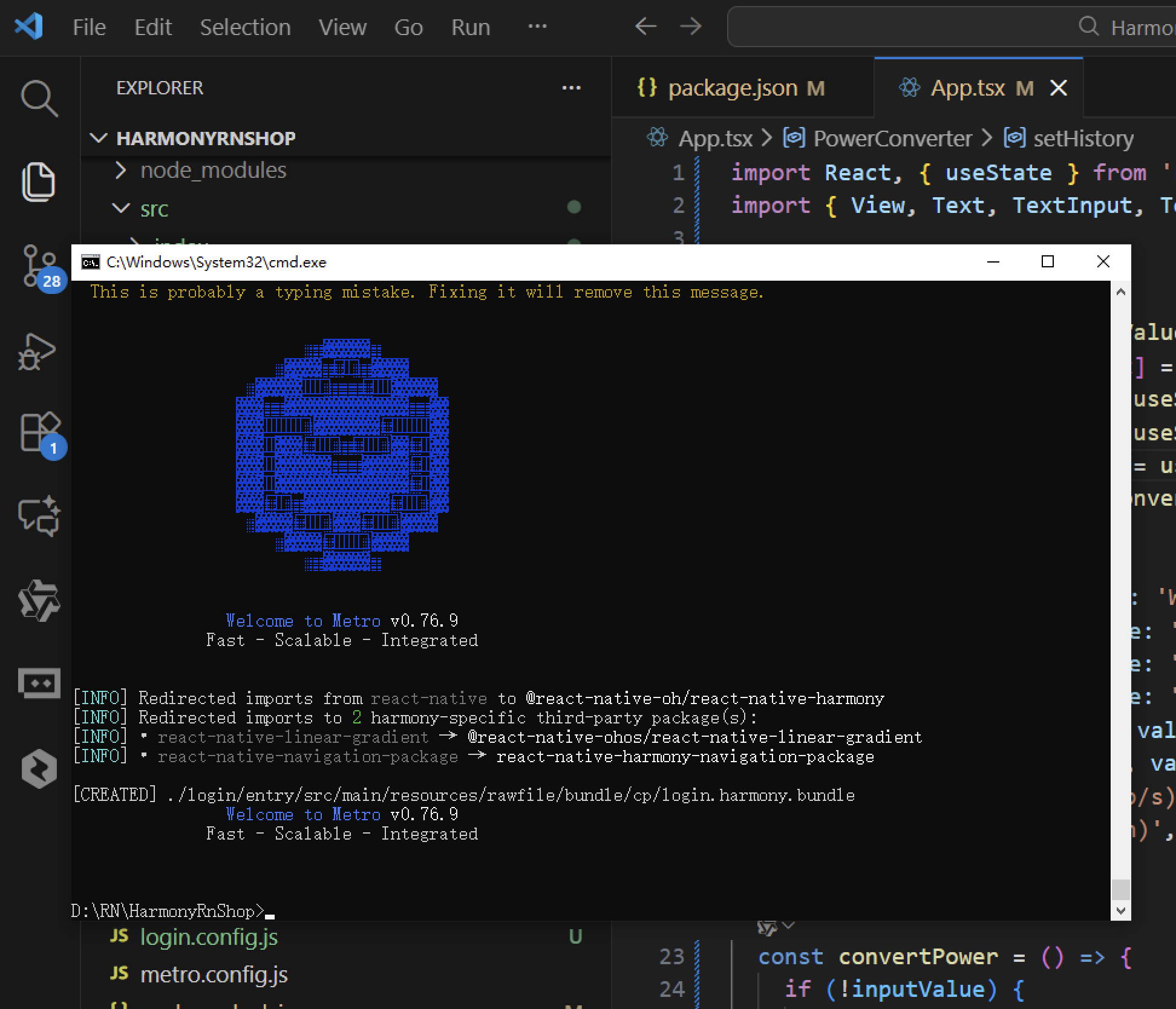
接下来通过打包命令npn run harmony将reactNative的代码打包成为bundle,这样可以进行在开源鸿蒙OpenHarmony中进行使用。
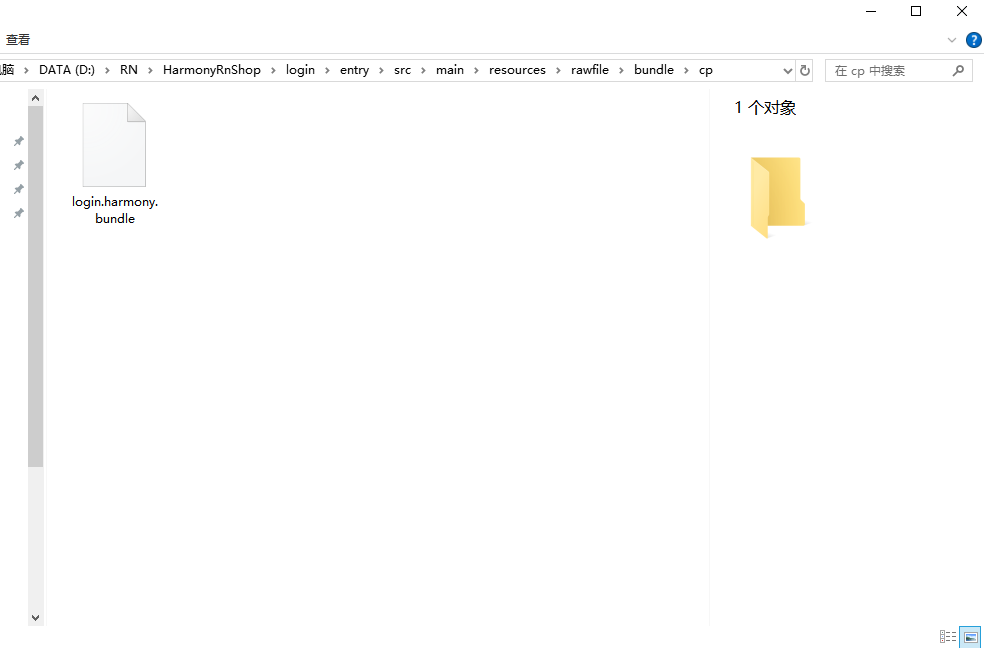
打包之后再将打包后的鸿蒙OpenHarmony文件拷贝到鸿蒙的DevEco-Studio工程目录去:
最后运行效果图如下显示: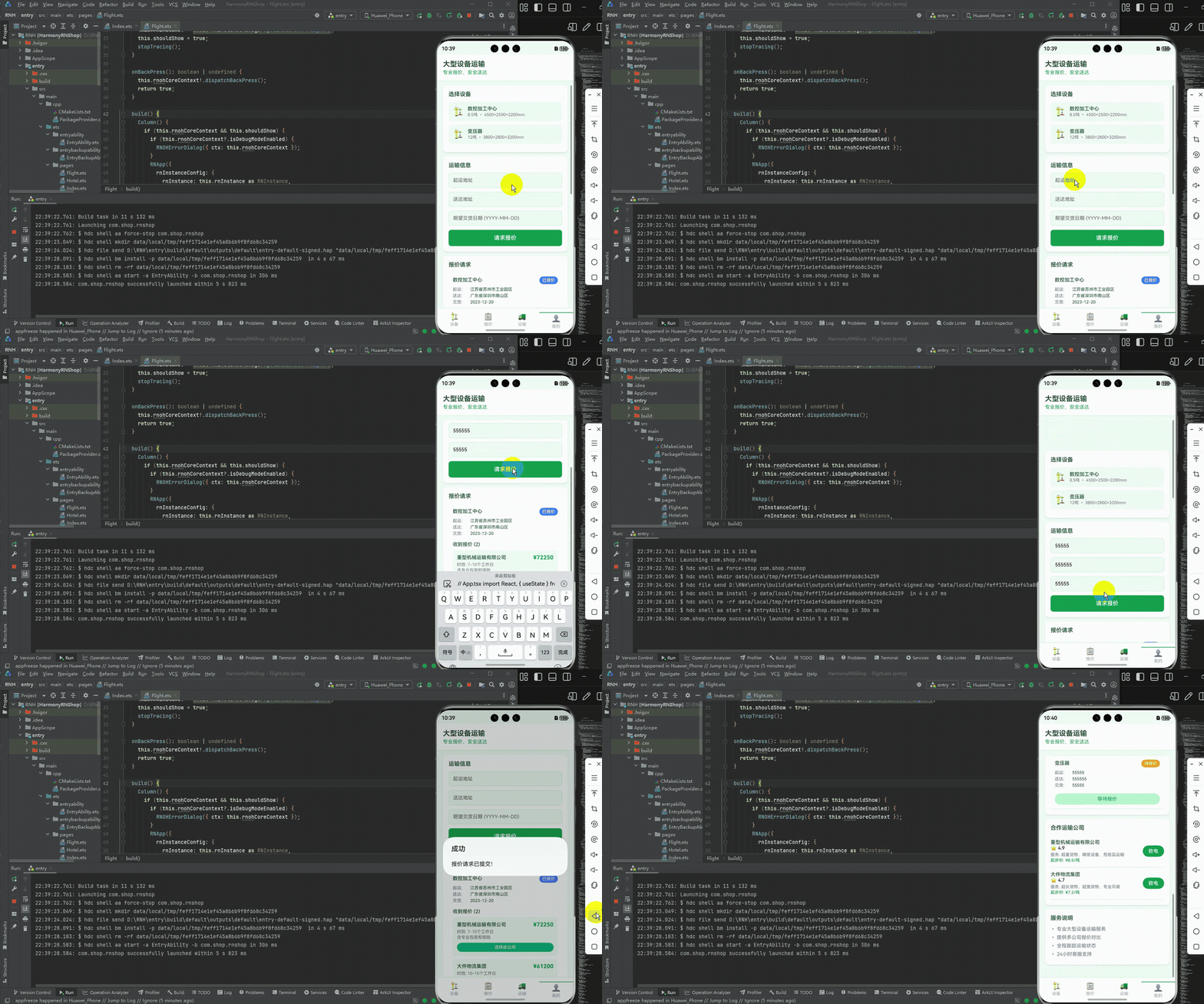
本文介绍了基于React Native和TypeScript的开源鸿蒙跨平台开发项目,详细阐述了其架构设计、核心功能和技术实现。项目采用模块化架构,包含设备管理、运输公司管理、报价请求等核心业务模块,使用Hooks进行状态管理,支持多公司比价和运输状态跟踪。文章重点说明了关键数据结构设计、跨平台适配方案和性能优化策略,并提供了未来改进方向,包括状态管理优化、组件拆分和国际化支持等,为开发者构建高效稳定的跨平台应用提供了实践参考。

免费领 150 小时云算力,进群参与显卡、AI PC 幸运抽奖
更多推荐

 4
4 0
0- 0


 已为社区贡献2条内容

所有评论(0)