
AMD Radeon Cloud SSH Connection Refused 的原因与解决方案
·
一、问题现象及分析
在AMD Radeon Cloud中自定义创建template时,即使勾选了SSH Access,大部分image也不会启动(甚至安装)sshd,导致通过AMD提供的 host:port 进行连接时,会报错Connection refused
官方文档中提到:
SSH connection does not appear
To expose SSH for a container, the application must:
- Run the SSH daemon inside the container.
- Configure a port named SSH with value 22.
The workload may need to pull the image, so the SSH port can appear after a delay.
推测大部分image还未更新SSH Access情况下的基础环境配置,故需在创建image后手动安装并启动sshd。
二、解决方案
根据上述分析,我们只需要在template创建好后,以notebook方式launch为实例,在JupyterLab中通过终端安装openssh-server并启动即可
注:因可能需要apt update,所以可以提前配置好apt的镜像以加快速度。另外,最终会有ss命令检查监听端口,可以提前安装iproute2或不执行此步。
#!/bin/bash

set -e

# Root check
if [ "$(id -u)" -ne 0 ]; then
    echo "[ERROR] Please run as root."
    exit 1
fi

CONFIG="/etc/ssh/sshd_config"

echo "[1/6] Installing OpenSSH Server..."

export DEBIAN_FRONTEND=noninteractive

apt update -y
apt install -y openssh-server

echo "[2/6] Creating required directories..."

mkdir -p /var/run/sshd
mkdir -p /root/.ssh

chmod 700 /root/.ssh

echo "[3/6] Generating host keys..."

ssh-keygen -A

echo "[4/6] Checking sshd configuration..."

# Port 22
if ! grep -Eq "^Port[[:space:]]+22$" "$CONFIG"; then
    echo "" >> "$CONFIG"
    echo "# Added by AAC SSH Fix" >> "$CONFIG"
    echo "Port 22" >> "$CONFIG"
fi

# Root login
if ! grep -Eq "^PermitRootLogin[[:space:]]+yes$" "$CONFIG"; then
    echo "PermitRootLogin yes" >> "$CONFIG"
fi

echo "[5/6] Validating configuration..."

sshd -t

echo "[6/6] Starting SSH daemon..."

if pgrep -x sshd >/dev/null; then
    echo "sshd is already running."
else
    /usr/sbin/sshd -E /var/log/sshd.log
fi

echo
echo "=========================================="
echo " SSH setup completed"
echo "=========================================="

# check sshd
if pgrep -x sshd >/dev/null; then
    echo "[OK] sshd process is running."
else
    echo "[WARNING] sshd process not detected."
fi

# if have ss command
if command -v ss >/dev/null 2>&1; then
    echo
    echo "Listening ports:"
    ss -tln | grep ":22 " || \
    echo "[NOTICE] Port 22 not found in ss output."
else
    echo
    echo "[NOTICE] 'ss' command not found (iproute2 not installed)."
    echo "Skipping port listening check."
fi

echo
echo "Host keys:"
ls -1 /etc/ssh/ssh_host_* 2>/dev/null || true

echo
echo "SSH log:"
echo "  /var/log/sshd.log"

echo
echo "Done."
使用方法
该解决方案已上传github,可下载.sh文件或本地创建start_ssh.sh文件使用
wget https://raw.githubusercontent.com/Javrou/ARC-SSH-fix/main/start_ssh.sh

chmod +x start_ssh.sh

./start_ssh.sh
运行后尝试ssh连接:
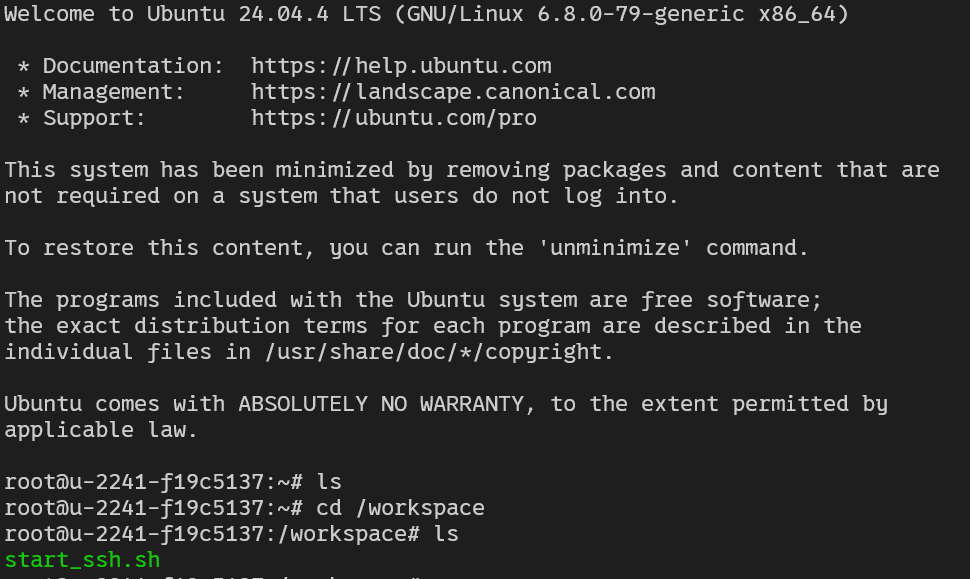
连接成功
仓库地址GitHub - Javrou/ARC-SSH-fix: Fix SSH Connection Refused on AMD Radeon Cloud(ARC) · GitHub

免费领 150 小时云算力,进群参与显卡、AI PC 幸运抽奖
更多推荐

 12
12 0
0- 0


 已为社区贡献1条内容

所有评论(0)