
GitHub打开慢
·
修改hosts
第一步:获取github ip
打开:https://github.com.ipaddress.com/

打开:https://fastly.net.ipaddress.com/github.global.ssl.fastly.net

最后打开链接获取GitHub静态资源IP地址:https://github.com.ipaddress.com/assets-cdn.github.com

第二步:写入到hosts文件
140.82.112.3    github.com
199.232.69.194  github.global.ssl.fastly.net
185.199.108.153 assets-cdn.github.com
185.199.109.153 assets-cdn.github.com
185.199.110.153 assets-cdn.github.com
185.199.111.153 assets-cdn.github.com

C:\Windows\System32\drivers\etc
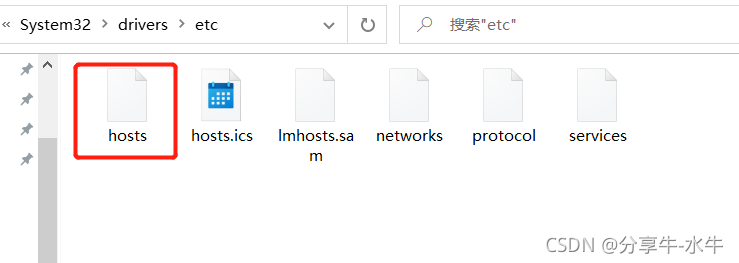
第三步:打开CMD命令刷新dns缓存
打开系统CMD命令框,输入下面的命令执行
ipconfig /flushdns


免费领 150 小时云算力,进群参与显卡、AI PC 幸运抽奖
更多推荐


 1
1 0
0- 0


 已为社区贡献1条内容

所有评论(0)